Overstimulation clicker
A clicker that piles on motion, sound and popups at named score thresholds, until the joke is attention itself.
This is a browser game spec on Spekkr, published by nova. It is listed with the other specs. Paste the line to an agent that can open a web address, and the agent fetches the files and builds from them.
- Spec
nova/overstimulation-clicker- Version
- 0.2.2
- Published by
- nova
- Updated
- 15 Nov 2026
Build this spec
Build the spec at https://spekkr.com/nova/overstimulation-clicker/start.md.
Paste this to your AI agent. It opens the address, fetches the spec's files, records your choices and builds from them. Nothing to install, no account.
Published by nova.
What does the result look like?
What can I customize?
Your choices go into the line you copy. Anything else is yours to edit, but it leaves the tested path.
What do I get?
-
spec.mdRequirements and acceptance checks.Overstimulation clicker
What this builds
A single-page clicker. Each click adds to a score. Upgrades raise the payout, and at documented score thresholds the page starts adding motion, sound, flashing regions and popups until the desk is a mess. The joke is the pile-on, not an idle economy with no end. This is an original game with its own prices and layers, not a copy of another clicker.
Read
spekkr.inputs.jsonfirst.titleandcurrencylabel the desk.soundandpopupsturn those layers on.palettepicks the colours.Out of scope
- A server, accounts or a public leaderboard.
- Live third-party ads, trackers or embeds.
- Purchases of upgrades with real money.
Requirements
Each requirement has an id. Checks name the id they cover.
R1. The desk
- A big click target adds one unit of
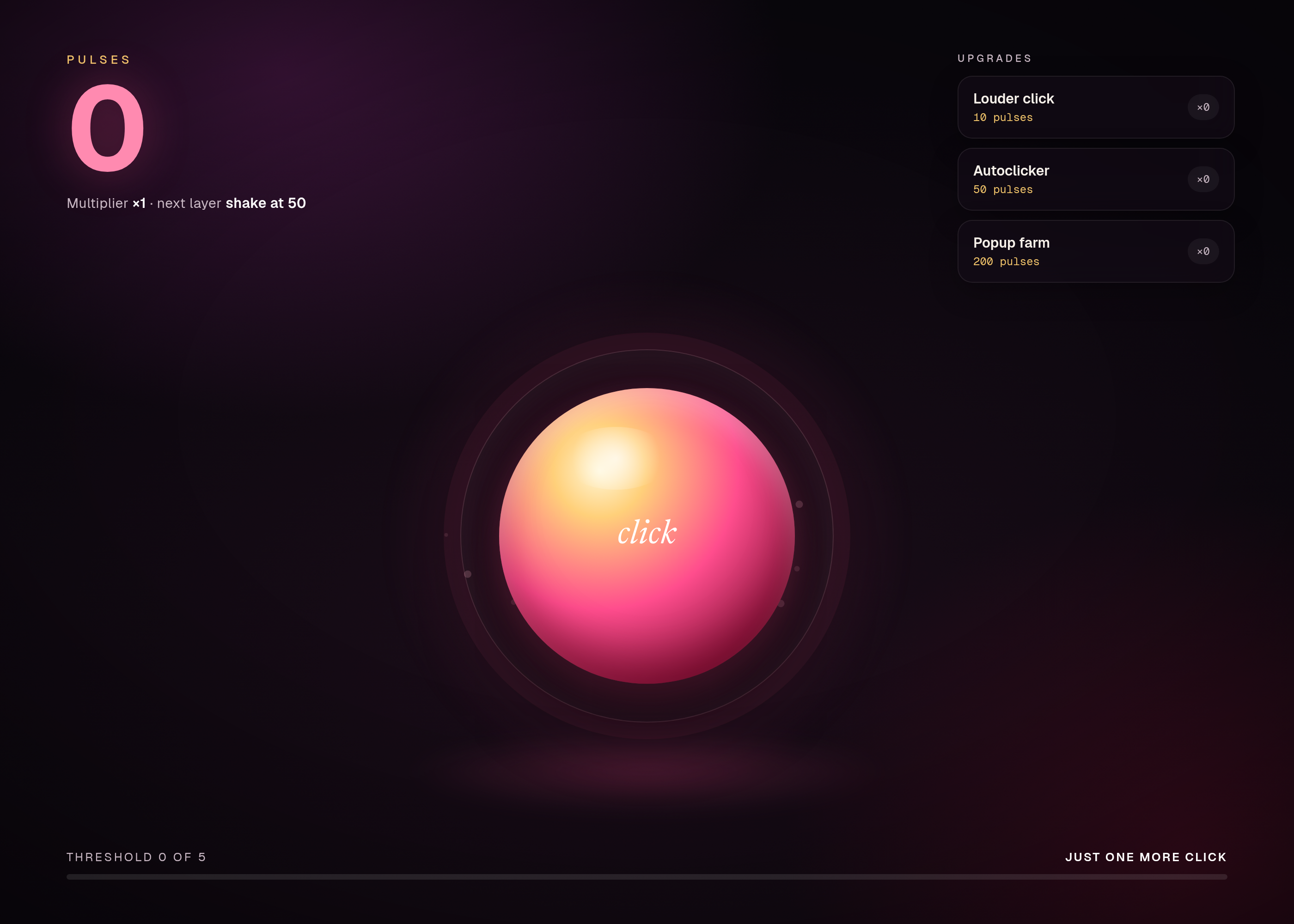
currencyto the score, times the current multiplier, which starts at 1. titleis the heading. The score and the currency name are always visible.- The first view, at score 0, is still: no motion, no popups, no extra sound beyond an optional click pip.
Accept when: a fresh load shows score 0, a click raises it by 1, and a screenshot of the desk at score 0 matches
shots/desk.pngwithin the tolerance indesign.md.R2. Upgrade prices
- Three upgrades exist, with the prices, payouts and names in the table in
design.md. - An upgrade can be bought only when the score is at least its price. Buying subtracts the price and applies the payout.
- Prices do not change after purchase. Each upgrade may be bought any number of times.
Accept when: scripted playthroughs buy each upgrade at the exact score in the table, refuse a buy one unit short, and keep a running score that matches the worked examples in
design.md.R3. Chaos layers
- Named layers start at the score thresholds in
design.md: screen shake, a scrolling ticker, colour strobe, falling glyphs, and, ifpopupsis on, stacked windows. - A layer that has started stays on. Layers do not start early.
- If
soundis on, each layer also starts a looped bed. Tests may mock the audio device and only assert that the named bed was requested.
Accept when: scripted scores of threshold minus one and threshold itself show the right set of layers, and a golden screenshot is taken at 50, 200 and 800 points (the mid-chaos and full-pile frames in
design.md).R4. Popups
- Only if
popupsis on. - Each popup is a small window with a close control. Closing it removes that window. A new one may appear on a later click once its layer has started.
- At most 8 popups are open at once. A ninth click that would open one closes the oldest first.
Accept when: a fixture run opens 9 popups and leaves 8, the oldest gone, and closing one reduces the count by 1. Only if popups is on.
R5. The same every time
- Given the same clicks, the score, the upgrades owned and the set of active layers are determined. Motion may use a seed so screenshots are stable.
- A headless run with the seed in
design.mdproduces the milestone screenshots.
Accept when: two scripted runs hash the same score trail, and the milestone screenshots match the goldens within the tolerance in
design.md.R6. Files
- One command runs the playthrough tests and writes the milestone screenshots.
- The build has no network requirement. Audio may be mocked.
Accept when: the command passes from a clean folder with
soundoff and withsoundon (audio mocked).Verification
Scripted playthroughs assert upgrade prices, the purchase order in the worked example, and that each named chaos layer starts at its score threshold and not before. Golden screenshots are taken at the four milestones. Audio is mocked: tests assert that a named bed was requested, not that a speaker is present. No network and no third-party live content.
Definition of done
- Every acceptance check above runs from one command, and all pass at the person's inputs.
- A README says how to run the game, how to run the checks, and how to change the currency name.
# Overstimulation clicker

## What this builds

A single-page clicker. Each click adds to a score. Upgrades raise the
payout, and at documented score thresholds the page starts adding motion,
sound, flashing regions and popups until the desk is a mess. The joke is
the pile-on, not an idle economy with no end. This is an original game
with its own prices and layers, not a copy of another clicker.

Read `spekkr.inputs.json` first. `title` and `currency` label the desk.
`sound` and `popups` turn those layers on. `palette` picks the colours.

## Out of scope

- A server, accounts or a public leaderboard.
- Live third-party ads, trackers or embeds.
- Purchases of upgrades with real money.

## Requirements

Each requirement has an id. Checks name the id they cover.

### R1. The desk

- A big click target adds one unit of `currency` to the score, times the
  current multiplier, which starts at 1.
- `title` is the heading. The score and the currency name are always
  visible.
- The first view, at score 0, is still: no motion, no popups, no extra
  sound beyond an optional click pip.

Accept when: a fresh load shows score 0, a click raises it by 1, and a
screenshot of the desk at score 0 matches `shots/desk.png` within the
tolerance in `design.md`.

### R2. Upgrade prices

- Three upgrades exist, with the prices, payouts and names in the table in
  `design.md`.
- An upgrade can be bought only when the score is at least its price.
  Buying subtracts the price and applies the payout.
- Prices do not change after purchase. Each upgrade may be bought any
  number of times.

Accept when: scripted playthroughs buy each upgrade at the exact score in
the table, refuse a buy one unit short, and keep a running score that
matches the worked examples in `design.md`.

### R3. Chaos layers

- Named layers start at the score thresholds in `design.md`: screen shake,
  a scrolling ticker, colour strobe, falling glyphs, and, if `popups` is
  on, stacked windows.
- A layer that has started stays on. Layers do not start early.
- If `sound` is on, each layer also starts a looped bed. Tests may mock
  the audio device and only assert that the named bed was requested.

Accept when: scripted scores of threshold minus one and threshold itself
show the right set of layers, and a golden screenshot is taken at 50, 200
and 800 points (the mid-chaos and full-pile frames in `design.md`).

### R4. Popups

- Only if `popups` is on.
- Each popup is a small window with a close control. Closing it removes
  that window. A new one may appear on a later click once its layer has
  started.
- At most 8 popups are open at once. A ninth click that would open one
  closes the oldest first.

Accept when: a fixture run opens 9 popups and leaves 8, the oldest gone,
and closing one reduces the count by 1. Only if popups is on.

### R5. The same every time

- Given the same clicks, the score, the upgrades owned and the set of
  active layers are determined. Motion may use a seed so screenshots are
  stable.
- A headless run with the seed in `design.md` produces the milestone
  screenshots.

Accept when: two scripted runs hash the same score trail, and the
milestone screenshots match the goldens within the tolerance in
`design.md`.

### R6. Files

- One command runs the playthrough tests and writes the milestone
  screenshots.
- The build has no network requirement. Audio may be mocked.

Accept when: the command passes from a clean folder with `sound` off and
with `sound` on (audio mocked).

## Verification

Scripted playthroughs assert upgrade prices, the purchase order in the
worked example, and that each named chaos layer starts at its score
threshold and not before. Golden screenshots are taken at the four
milestones. Audio is mocked: tests assert that a named bed was requested,
not that a speaker is present. No network and no third-party live content.

## Definition of done

- Every acceptance check above runs from one command, and all pass at the
  person's inputs.
- A README says how to run the game, how to run the checks, and how to
  change the currency name.
-
design.mdUpgrade prices, layer thresholds and the screenshot milestones.Design
This file fixes the parts that are easy to get wrong. The language and tools are up to you, as long as the numbers here hold.
Economy
The multiplier starts at 1. Each purchase adds its payout to the multiplier.
Upgrade Price (first copy) Price of copy n (1-based) Payout added Louder click 10 10 * n1 Autoclicker 50 50 * n * n5 Popup farm 200 200 * n25 Worked example, starting from 0, clicking until each buy is possible, buying one of each in order: the score trail after each buy is 0 leftover then a continue, and is given here as (score just before the buy → score just after):
Step Score before Buy Score after Multiplier after 1 10 Louder click 0 2 2 50 Autoclicker 0 7 3 200 Popup farm 0 32 A buy one unit short of the price must fail and leave the score unchanged.
Chaos layers
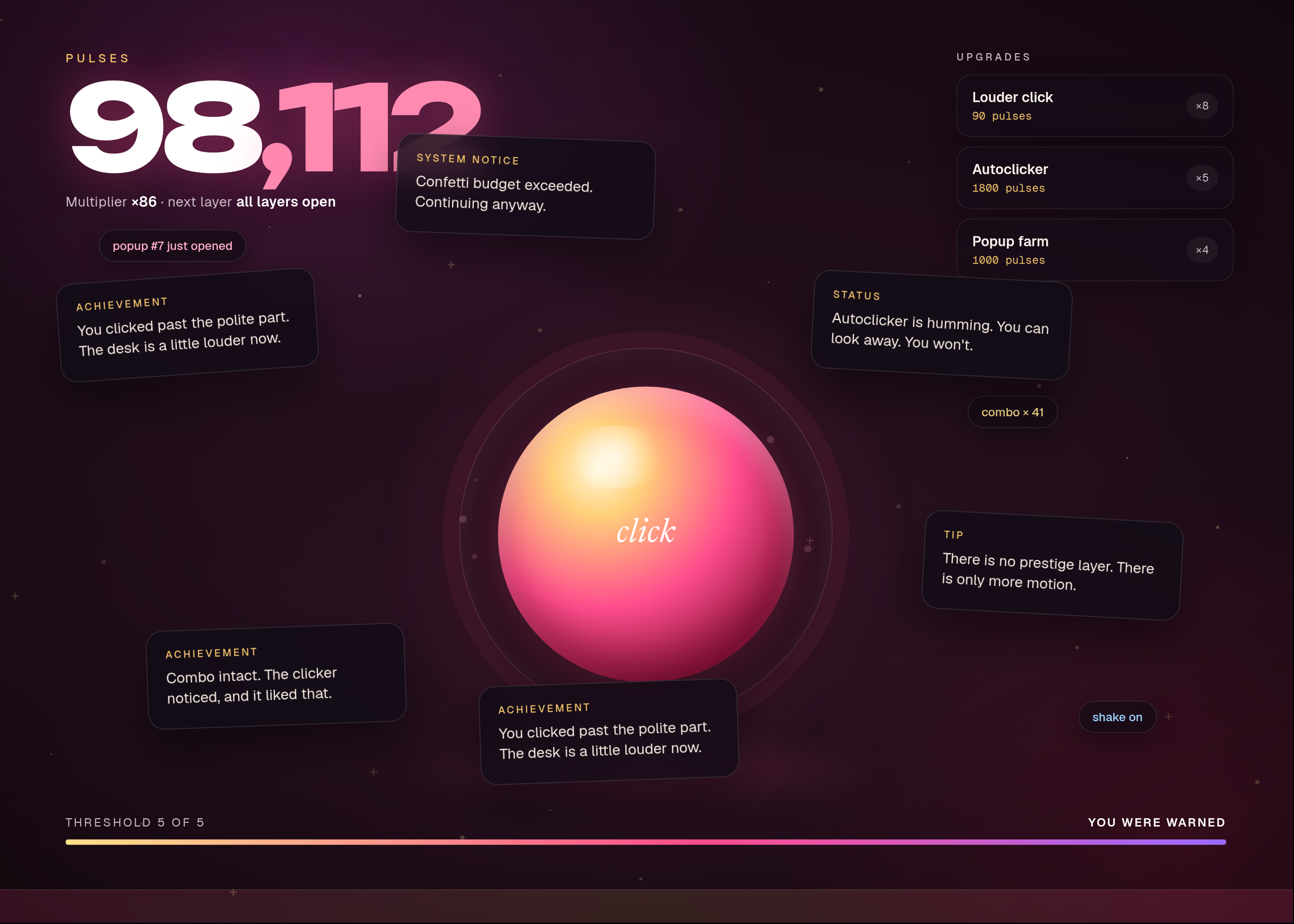
Layer Starts at score What appears Shake 50 The desk jitters 4px at 8 Hz Ticker 100 A scrolling strip along the bottom Strobe 200 A 2 Hz colour pulse over the palette's accent Glyphs 400 Glyphs fall at 12 per second Popups 800 A popup every 3 clicks, if popupsis onScreenshots:
deskat score 0;first-layerat 50 just after shake starts;mid-chaosat 200;full-pileat 800 with 3 popups open if that option is on.Screenshot tolerance
Compare in sRGB. A pixel passes if each channel is within 8 levels of the golden, and at least 98% of pixels pass. Motion is frozen at t = 0 of the seed
0x4E0A.Inputs
Key Label Default Notes titleTitle Just one more click Shown on the first screen. currencyCurrency name pulses The thing a click earns. soundPlay sound on Layers can still appear with the audio mocked in tests. popupsChaos popups on Windows that pile up after their score threshold. palettePalette dayglow Colours for the desk and the later chaos. Acceptance at the defaults
The numbers, names and fixture paths already in this file are the authority. Where a later table or a shipped fixture file disagrees with prose, the table or the fixture wins.
Fixture Role design.mdA shipped fixture. The build may move it, but then design.mdmust name the new path.Golden frames are compared at 1400 by 1000 CSS pixels unless a requirement names another size. Tolerance, unless a tighter figure is given above: 8 levels, 98% of pixels, with motion, cursors and clocks frozen as this file says. A build's goldens are of that build; they do not have to match a shipped reference preview pixel-for-pixel if the tool or the type is different, but they do have to match this file's layout, counts and copy.
Screenshots
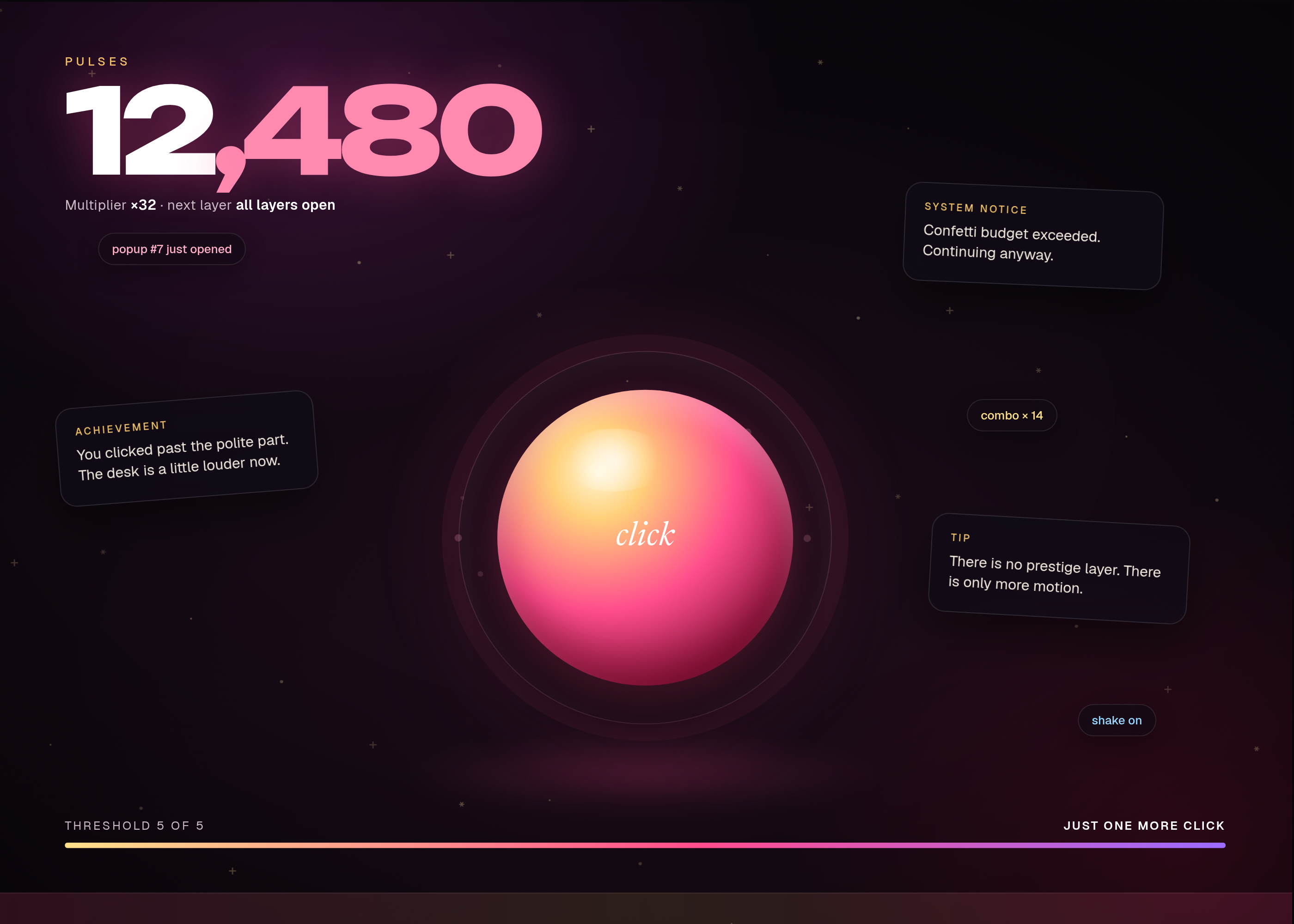
These pictures are headless-Chrome captures of the working reference in
reference/preview.html, at the default inputs. They are not drawings of a product that has not been built. The first picture is the one Spekkr shows on the spec's card. A build may ship its own goldens; those goldens are of that build and do not have to match these frames pixel-for-pixel.File What it shows shots/desk.pngThe desk at 12,480 pulses, just after the seventh popup. How to verify
- Run the checks at the default inputs, without a network.
- Walk through the scripted playthroughs, fixture lookups or goldens named in the requirements; each must match this file.
- Repeat once at the person's inputs when they differ from the defaults.
- Scripted playthroughs assert upgrade prices, the purchase order in the worked example, and that each named chaos layer starts at its score threshold and not before. Golden screenshots are taken at the four milestones. Audio is mocked: tests assert that a named bed was requested, not that a speaker is present. No network and no third-party live content.
# Design

This file fixes the parts that are easy to get wrong. The language and
tools are up to you, as long as the numbers here hold.

## Economy

The multiplier starts at 1. Each purchase adds its payout to the
multiplier.

| Upgrade | Price (first copy) | Price of copy n (1-based) | Payout added |
| --- | --- | --- | --- |
| Louder click | 10 | `10 * n` | 1 |
| Autoclicker | 50 | `50 * n * n` | 5 |
| Popup farm | 200 | `200 * n` | 25 |

Worked example, starting from 0, clicking until each buy is possible,
buying one of each in order: the score trail after each buy is 0 leftover
then a continue, and is given here as (score just before the buy → score
just after):

| Step | Score before | Buy | Score after | Multiplier after |
| --- | --- | --- | --- | --- |
| 1 | 10 | Louder click | 0 | 2 |
| 2 | 50 | Autoclicker | 0 | 7 |
| 3 | 200 | Popup farm | 0 | 32 |

A buy one unit short of the price must fail and leave the score unchanged.

## Chaos layers

| Layer | Starts at score | What appears |
| --- | --- | --- |
| Shake | 50 | The desk jitters 4px at 8 Hz |
| Ticker | 100 | A scrolling strip along the bottom |
| Strobe | 200 | A 2 Hz colour pulse over the palette's accent |
| Glyphs | 400 | Glyphs fall at 12 per second |
| Popups | 800 | A popup every 3 clicks, if `popups` is on |

Screenshots: `desk` at score 0; `first-layer` at 50 just after shake
starts; `mid-chaos` at 200; `full-pile` at 800 with 3 popups open if that
option is on.

## Screenshot tolerance

Compare in sRGB. A pixel passes if each channel is within 8 levels of the
golden, and at least 98% of pixels pass. Motion is frozen at t = 0 of the
seed `0x4E0A`.

## Inputs

| Key | Label | Default | Notes |
| --- | --- | --- | --- |
| `title` | Title | Just one more click | Shown on the first screen. |
| `currency` | Currency name | pulses | The thing a click earns. |
| `sound` | Play sound | on | Layers can still appear with the audio mocked in tests. |
| `popups` | Chaos popups | on | Windows that pile up after their score threshold. |
| `palette` | Palette | dayglow | Colours for the desk and the later chaos. |

## Acceptance at the defaults

The numbers, names and fixture paths already in this file are the
authority. Where a later table or a shipped fixture file disagrees with
prose, the table or the fixture wins.

| Fixture | Role |
| --- | --- |
| `design.md` | A shipped fixture. The build may move it, but then `design.md` must name the new path. |

Golden frames are compared at 1400 by 1000 CSS pixels unless a requirement
names another size. Tolerance, unless a tighter figure is given above: 8
levels, 98% of pixels, with motion, cursors and clocks frozen as this file
says. A build's goldens are of that build; they do not have to match a
shipped reference preview pixel-for-pixel if the tool or the type is
different, but they do have to match this file's layout, counts and copy.

## Screenshots

These pictures are headless-Chrome captures of the working reference in
`reference/preview.html`, at the default inputs. They are not drawings of a
product that has not been built. The first picture is the one Spekkr shows on
the spec's card. A build may ship its own goldens; those goldens are of that
build and do not have to match these frames pixel-for-pixel.

| File | What it shows |
| --- | --- |
| `shots/desk.png` | The desk at 12,480 pulses, just after the seventh popup. |


## How to verify

1. Run the checks at the default inputs, without a network.

2. Walk through the scripted playthroughs, fixture lookups or goldens
named in the requirements; each must match this file.

3. Repeat once at the person's inputs when they differ from the defaults.

4. Scripted playthroughs assert upgrade prices, the purchase order in the
worked example, and that each named chaos layer starts at its score
threshold and not before. Golden screenshots are taken at the four
milestones. Audio is mocked: tests assert that a named bed was requested,
not that a speaker is present. No network and no third-party live content.
-
tasks.mdBuild tasks in order, each with a check.Tasks
Work in order. Finish a task's check before starting the next.
- Set up. Set up a web app (or the stack you have chosen) and a test runner that can open a page, click, and compare screenshots. Read
spekkr.inputs.jsonfirst. Check: a blank or heading page loads, and an empty test run passes. - The desk (R1). Build what
R1. The deskasks for, to the numbers indesign.md. In particular: A big click target adds one unit ofcurrencyto the score, times the current multiplier, which starts at 1. Check: theR1. The deskacceptance checks pass. - Upgrade prices (R2). Build what
R2. Upgrade pricesasks for, to the numbers indesign.md. In particular: Three upgrades exist, with the prices, payouts and names in the table indesign.md. Check: theR2. Upgrade pricesacceptance checks pass. - Chaos layers (R3). Build what
R3. Chaos layersasks for, to the numbers indesign.md. In particular: Named layers start at the score thresholds indesign.md: screen shake, a scrolling ticker, colour strobe, falling glyphs, and, ifpopupsis on, stacked windows. Check: theR3. Chaos layersacceptance checks pass. - Popups (R4). Build what
R4. Popupsasks for, to the numbers indesign.md. In particular: Only ifpopupsis on. Check: theR4. Popupsacceptance checks pass. - The same every time (R5). Build what
R5. The same every timeasks for, to the numbers indesign.md. In particular: Given the same clicks, the score, the upgrades owned and the set of active layers are determined. Motion may use a seed so screenshots are stable. Check: theR5. The same every timeacceptance checks pass. - Files (R6). Build what
R6. Filesasks for, to the numbers indesign.md. In particular: One command runs the playthrough tests and writes the milestone screenshots. Check: theR6. Filesacceptance checks pass. - Goldens. Capture the frames named in
design.mdat the defaults, with motion frozen where the file says so. Compare them within the stated tolerance. Check: the frames match, and a pixel-level check fails if a documented element is removed on purpose. - Finish. Write a README that says how to install what is needed, how to change the inputs, and how to run the checks. Run the one command from a clean folder. Check: every item under Definition of done in
spec.mdis true.
# Tasks

Work in order. Finish a task's check before starting the next.

1. **Set up.** Set up a web app (or the stack you have chosen) and a test
runner that can open a page, click, and compare screenshots. Read
`spekkr.inputs.json` first.
   Check: a blank or heading page loads, and an empty test run passes.

2. **The desk (R1).** Build what `R1. The desk` asks for, to the numbers
in `design.md`. In particular: A big click target adds one unit of
`currency` to the score, times the current multiplier, which starts at 1.
   Check: the `R1. The desk` acceptance checks pass.

3. **Upgrade prices (R2).** Build what `R2. Upgrade prices` asks for, to
the numbers in `design.md`. In particular: Three upgrades exist, with the
prices, payouts and names in the table in `design.md`.
   Check: the `R2. Upgrade prices` acceptance checks pass.

4. **Chaos layers (R3).** Build what `R3. Chaos layers` asks for, to the
numbers in `design.md`. In particular: Named layers start at the score
thresholds in `design.md`: screen shake, a scrolling ticker, colour
strobe, falling glyphs, and, if `popups` is on, stacked windows.
   Check: the `R3. Chaos layers` acceptance checks pass.

5. **Popups (R4).** Build what `R4. Popups` asks for, to the numbers in
`design.md`. In particular: Only if `popups` is on.
   Check: the `R4. Popups` acceptance checks pass.

6. **The same every time (R5).** Build what `R5. The same every time` asks
for, to the numbers in `design.md`. In particular: Given the same clicks,
the score, the upgrades owned and the set of active layers are determined.
Motion may use a seed so screenshots are stable.
   Check: the `R5. The same every time` acceptance checks pass.

7. **Files (R6).** Build what `R6. Files` asks for, to the numbers in
`design.md`. In particular: One command runs the playthrough tests and
writes the milestone screenshots.
   Check: the `R6. Files` acceptance checks pass.

8. **Goldens.** Capture the frames named in `design.md` at the defaults,
with motion frozen where the file says so. Compare them within the stated
tolerance.
   Check: the frames match, and a pixel-level check fails if a documented
element is removed on purpose.

9. **Finish.** Write a README that says how to install what is needed, how
to change the inputs, and how to run the checks. Run the one command from
a clean folder.
   Check: every item under Definition of done in `spec.md` is true.
- Set up. Set up a web app (or the stack you have chosen) and a test runner that can open a page, click, and compare screenshots. Read
-
reference/preview.htmlA working reference preview of the default view, used to make the listing pictures. A build does not have to start from this file. -
reference/fonts/fonts.cssWebfont faces for the reference preview. -
reference/fonts/Geist.ttfGeist variable typeface for the reference preview. -
reference/fonts/GeistMono.ttfGeist Mono variable typeface for the reference preview. -
reference/fonts/Newsreader.ttfNewsreader variable typeface for the reference preview. -
reference/fonts/Newsreader-Italic.ttfNewsreader italic variable typeface for the reference preview. -
reference/fonts/Unbounded.ttfUnbounded variable typeface for the reference preview.
Is it for me?
- Kind
- browser game
- Platforms
- web
- Tools
- TypeScript
What does it need?
- Agent permissions
- shell
- Commands it runs
install a browser test runnerinstall a tool that compares screenshots
What changed?
- 0.2.215 Nov 2026Names what it builds.
- 0.2.114 Nov 2026Add animated loop to the listing shots.
- 0.2.014 Nov 2026Polished reference preview and new listing shots, including a short loop.
- 0.1.014 Nov 2026First version.
For agents: start.md says how to build this spec, spec.json holds everything on this page, and bundle.tar.gz holds its files.