Password rules
A form that keeps adding absurd password rules until the player is inventing a tiny universe to satisfy them.
This is a browser game spec on Spekkr, published by nova. It is listed with the other specs. Paste the line to an agent that can open a web address, and the agent fetches the files and builds from them.
- Spec
nova/password-rules- Version
- 0.2.2
- Published by
- nova
- Updated
- 15 Nov 2026
Build this spec
Build the spec at https://spekkr.com/nova/password-rules/start.md.
Paste this to your AI agent. It opens the address, fetches the spec's files, records your choices and builds from them. Nothing to install, no account.
Published by nova.
What does the result look like?
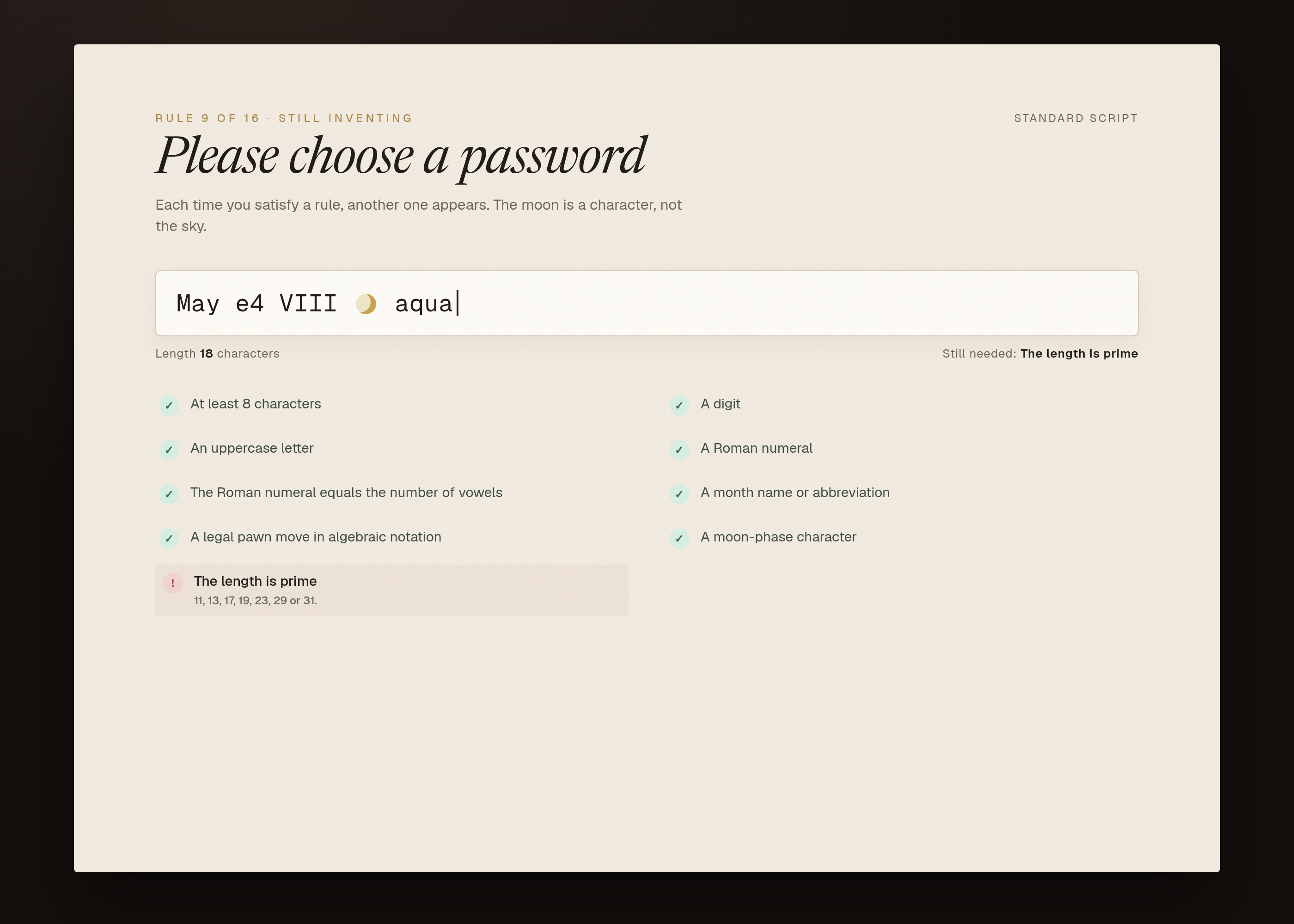
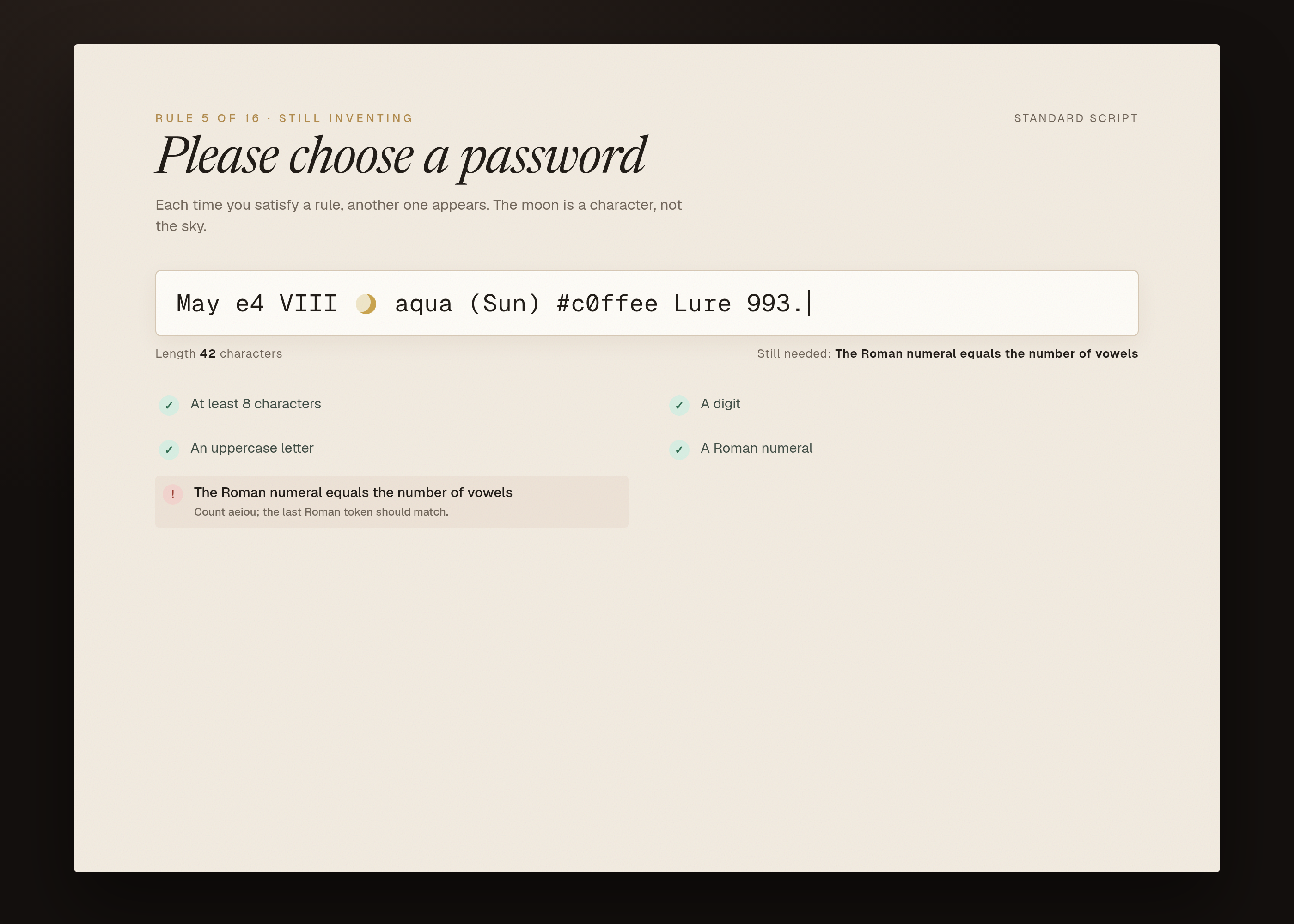
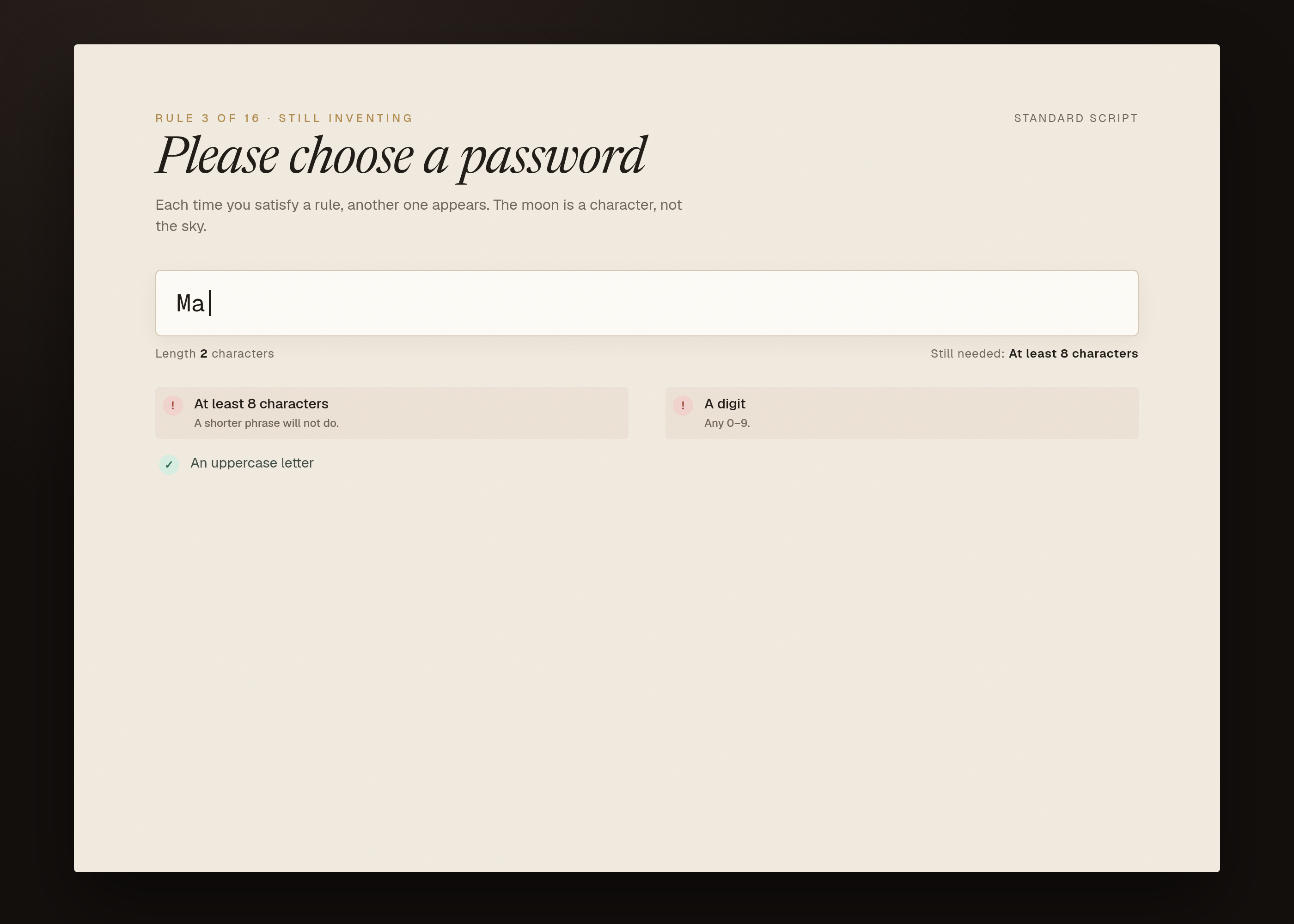
What can I customize?
Your choices go into the line you copy. Anything else is yours to edit, but it leaves the tested path.
What do I get?
-
spec.mdRequirements and acceptance checks.Password rules
What this builds
A single field and a list of rules. The first few rules are ordinary (a minimum length, a digit, a capital). Each time the current set is satisfied, a new, stranger rule is revealed. Later rules refer to earlier ones, to the text itself, and to small facts (a Roman numeral that equals the count of vowels, a chess move in algebraic notation, a moon phase emoji). This is an original rule script, not someone else's puzzle with the serial numbers filed off.
Read
spekkr.inputs.jsonfirst.titlelabels the page.start_rulesis how many rules are visible at first.scriptchooses the long or short set.show_whyandtimerchange the chrome.Out of scope
- A real account or sign-up. Nothing is stored.
- Network calls to look up facts. Every fact a rule needs is in
design.md. - A public share of solutions.
Requirements
Each requirement has an id. Checks name the id they cover.
R1. The field
- One password field, a submit control, and a list of the rules that have been revealed so far.
- Submit is allowed only as a way to re-check; checking also happens as the person types, on every change.
titleis the heading. The current value is never logged or sent anywhere.
Accept when: the page loads with an empty field and only
start_rulesrules visible.R2. Each rule
- Every rule has an id, a short statement, and a pure function of the current text (and, where
design.mdsays so, of the current date used as a fixture). - A rule is either satisfied or not. There is no third state.
- The functions and their fixtures live in code and are listed in
design.md.
Accept when: unit tests for each rule pass against the examples in
design.md, including at least one yes and one no for every rule.R3. Revealing the next rule
- A rule past the opening set is revealed only when every currently visible rule is satisfied.
- Revealing does not hide earlier rules. A later edit may break an earlier rule; the later ones stay visible and go red.
- The game is won when every rule in the chosen script is visible and satisfied.
Accept when: a fixture string that satisfies a known prefix of rules is accepted up to that prefix, and is rejected by the next rule, as in the table in
design.md.R4. Messages
- If
show_whyis on, an unsatisfied visible rule includes its short statement and, after a failed check, a one-line reason fromdesign.md. - If
timeris on, the elapsed time is shown, starting at the first keystroke, pausing when the window is hidden, and stopping at a win.
Accept when: the prefix fixture shows reasons only for the unsatisfied next rule, and the timer stays at 0 until a first keystroke.
R5. Files
- One command runs every unit test and a short UI test of the prefix fixture, and writes the screenshots in
design.md.
Accept when: the command passes for both scripts, and for
start_rulesof 1 and of 5.Verification
Unit tests cover each rule with at least one string that passes and one that fails. A checked fixture file satisfies a known prefix of rules and is rejected by the next. A second fixture satisfies the whole script. No rule reads the real date, the real moon, or the network. UI tests take the four screenshots.
Definition of done
- Every acceptance check above runs from one command, and all pass at the person's inputs.
- A README says how to play, how to run the checks, and how to add a rule.
# Password rules

## What this builds

A single field and a list of rules. The first few rules are ordinary (a
minimum length, a digit, a capital). Each time the current set is
satisfied, a new, stranger rule is revealed. Later rules refer to earlier
ones, to the text itself, and to small facts (a Roman numeral that equals
the count of vowels, a chess move in algebraic notation, a moon phase
emoji). This is an original rule script, not someone else's puzzle with
the serial numbers filed off.

Read `spekkr.inputs.json` first. `title` labels the page. `start_rules` is
how many rules are visible at first. `script` chooses the long or short
set. `show_why` and `timer` change the chrome.

## Out of scope

- A real account or sign-up. Nothing is stored.
- Network calls to look up facts. Every fact a rule needs is in
  `design.md`.
- A public share of solutions.

## Requirements

Each requirement has an id. Checks name the id they cover.

### R1. The field

- One password field, a submit control, and a list of the rules that have
  been revealed so far.
- Submit is allowed only as a way to re-check; checking also happens as
  the person types, on every change.
- `title` is the heading. The current value is never logged or sent
  anywhere.

Accept when: the page loads with an empty field and only `start_rules`
rules visible.

### R2. Each rule

- Every rule has an id, a short statement, and a pure function of the
  current text (and, where `design.md` says so, of the current date used
  as a fixture).
- A rule is either satisfied or not. There is no third state.
- The functions and their fixtures live in code and are listed in
  `design.md`.

Accept when: unit tests for each rule pass against the examples in
`design.md`, including at least one yes and one no for every rule.

### R3. Revealing the next rule

- A rule past the opening set is revealed only when every currently
  visible rule is satisfied.
- Revealing does not hide earlier rules. A later edit may break an earlier
  rule; the later ones stay visible and go red.
- The game is won when every rule in the chosen script is visible and
  satisfied.

Accept when: a fixture string that satisfies a known prefix of rules is
accepted up to that prefix, and is rejected by the next rule, as in the
table in `design.md`.

### R4. Messages

- If `show_why` is on, an unsatisfied visible rule includes its short
  statement and, after a failed check, a one-line reason from `design.md`.
- If `timer` is on, the elapsed time is shown, starting at the first
  keystroke, pausing when the window is hidden, and stopping at a win.

Accept when: the prefix fixture shows reasons only for the unsatisfied
next rule, and the timer stays at 0 until a first keystroke.

### R5. Files

- One command runs every unit test and a short UI test of the prefix
  fixture, and writes the screenshots in `design.md`.

Accept when: the command passes for both scripts, and for `start_rules` of
1 and of 5.

## Verification

Unit tests cover each rule with at least one string that passes and one
that fails. A checked fixture file satisfies a known prefix of rules and
is rejected by the next. A second fixture satisfies the whole script. No
rule reads the real date, the real moon, or the network. UI tests take the
four screenshots.

## Definition of done

- Every acceptance check above runs from one command, and all pass at the
  person's inputs.
- A README says how to play, how to run the checks, and how to add a rule.
-
design.mdThe rule script, the prefix fixtures and the screenshot points.Design
This file fixes the parts that are easy to get wrong. The language and tools are up to you, as long as the numbers here hold.
The standard script
Sixteen rules, in this order.
shortis the first eight.# Id Statement Satisfied when 1 lengthAt least 8 characters len(text) >= 82 digitA digit any 0-93 capitalAn uppercase letter any A-Z4 romanA Roman numeral a substring in the set in the Roman table, case-insensitive 5 vowel-countThe Roman numeral equals the number of vowels vowels are aeiouAEIOU; the last Roman token in the text equals that count6 monthA month name or abbreviation a token in the month table 7 chessA legal pawn move in algebraic notation a token matching ^[a-h][2-7]$or a capture^[a-h]x[a-h][2-7]$8 moonA moon-phase character one of 🌑🌒🌓🌔🌕🌖🌗🌘9 prime-lengthThe length is prime 11, 13, 17, 19, 23, 29, 31 10 no-repeat-3No character appears three times in a row no run of length 3+ 11 balancedParentheses are balanced ()only; no leftover12 colourA CSS hex colour #plus 3 or 6 hex digits13 sum-digitsThe digits sum to 25 decimal digits only 14 weekdayAn English weekday Monday…Sundayor a 3-letter abbreviation, any case15 anagramContains an anagram of RULEfour letters that sort to ELRU, any case, not necessarily consecutive16 periodEnds with a period last character is .Roman tokens recognised: I, II, III, IV, V, VI, VII, VIII, IX, X, XI, XII, XIII, XIV, XV, XVI, XVII, XVIII, XIX, XX.
Month table: January–December and Jan–Dec, any case.
Prefix fixtures
The exact strings live in
fixtures/prefix-8.txtandfixtures/prefix-8-plus.txtnext to the tests. Tests must read those files, not a re-typed copy.prefix-8.txtsatisfies rules 1–8 and fails rule 9 (prime-length).prefix-8-plus.txtsatisfies rules 1–16.
A setup test fails if either file is missing, and a check test fails if a file no longer has the claimed properties.
Screenshots
These pictures are headless-Chrome captures of the working reference in
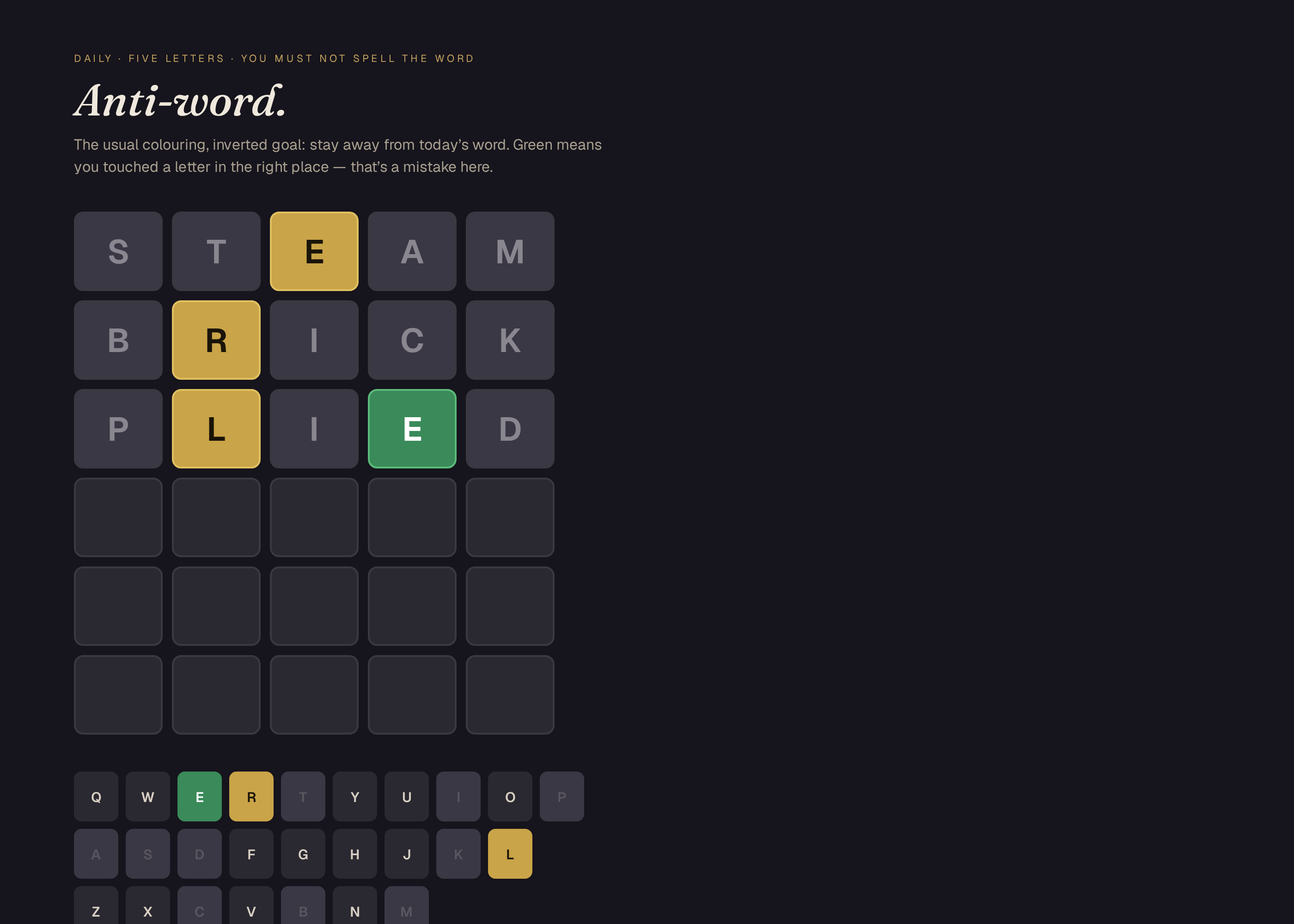
reference/preview.html, at the default inputs. They are not drawings of a product that has not been built. The first picture is the one Spekkr shows on the spec's card. A build may ship its own goldens; those goldens are of that build and do not have to match these frames pixel-for-pixel.File What it shows shots/form.pngThe default form mid-invention: a tree is still required. Dates
Rules that could depend on "today" must not. The moon rule is a character in the text, not the real moon. No rule reads the system clock, except the optional
timer.Inputs
Key Label Default Notes titleTitle Please choose a password Shown above the field. start_rulesRules at the start 3 A whole number from 1 to 5. How many rules are visible before the first success. show_whyExplain failed rules on A failed rule says what it wanted. timerCount the time off A clock starts on the first keystroke and stops when the last rule is satisfied. scriptRule script standard standard has 16 rules. short stops at 8, for a quicker path. Acceptance at the defaults
The numbers, names and fixture paths already in this file are the authority. Where a later table or a shipped fixture file disagrees with prose, the table or the fixture wins.
Fixture Role design.mdA shipped fixture. The build may move it, but then design.mdmust name the new path.fixtures/prefix-8-plus.txtA shipped fixture. The build may move it, but then design.mdmust name the new path.fixtures/prefix-8.txtA shipped fixture. The build may move it, but then design.mdmust name the new path.prefix-8-plus.txtA shipped fixture. The build may move it, but then design.mdmust name the new path.prefix-8.txtA shipped fixture. The build may move it, but then design.mdmust name the new path.Golden frames are compared at 1400 by 1000 CSS pixels unless a requirement names another size. Tolerance, unless a tighter figure is given above: 8 levels, 98% of pixels, with motion, cursors and clocks frozen as this file says. A build's goldens are of that build; they do not have to match a shipped reference preview pixel-for-pixel if the tool or the type is different, but they do have to match this file's layout, counts and copy.
How to verify
- Run the checks at the default inputs, without a network.
- Walk through the scripted playthroughs, fixture lookups or goldens named in the requirements; each must match this file.
- Repeat once at the person's inputs when they differ from the defaults.
- Unit tests cover each rule with at least one string that passes and one that fails. A checked fixture file satisfies a known prefix of rules and is rejected by the next. A second fixture satisfies the whole script. No rule reads the real date, the real moon, or the network. UI tests take the four screenshots.
# Design

This file fixes the parts that are easy to get wrong. The language and
tools are up to you, as long as the numbers here hold.

## The standard script

Sixteen rules, in this order. `short` is the first eight.

| # | Id | Statement | Satisfied when |
| --- | --- | --- | --- |
| 1 | `length` | At least 8 characters | `len(text) >= 8` |
| 2 | `digit` | A digit | any `0-9` |
| 3 | `capital` | An uppercase letter | any `A-Z` |
| 4 | `roman` | A Roman numeral | a substring in the set in the Roman table, case-insensitive |
| 5 | `vowel-count` | The Roman numeral equals the number of vowels | vowels are `aeiouAEIOU`; the last Roman token in the text equals that count |
| 6 | `month` | A month name or abbreviation | a token in the month table |
| 7 | `chess` | A legal pawn move in algebraic notation | a token matching `^[a-h][2-7]$` or a capture `^[a-h]x[a-h][2-7]$` |
| 8 | `moon` | A moon-phase character | one of `🌑🌒🌓🌔🌕🌖🌗🌘` |
| 9 | `prime-length` | The length is prime | 11, 13, 17, 19, 23, 29, 31 |
| 10 | `no-repeat-3` | No character appears three times in a row | no run of length 3+ |
| 11 | `balanced` | Parentheses are balanced | `()` only; no leftover |
| 12 | `colour` | A CSS hex colour | `#` plus 3 or 6 hex digits |
| 13 | `sum-digits` | The digits sum to 25 | decimal digits only |
| 14 | `weekday` | An English weekday | `Monday`…`Sunday` or a 3-letter abbreviation, any case |
| 15 | `anagram` | Contains an anagram of `RULE` | four letters that sort to `ELRU`, any case, not necessarily consecutive |
| 16 | `period` | Ends with a period | last character is `.` |

Roman tokens recognised: I, II, III, IV, V, VI, VII, VIII, IX, X, XI, XII,
XIII, XIV, XV, XVI, XVII, XVIII, XIX, XX.

Month table: January–December and Jan–Dec, any case.

## Prefix fixtures

The exact strings live in `fixtures/prefix-8.txt` and
`fixtures/prefix-8-plus.txt` next to the tests. Tests must read those
files, not a re-typed copy.

- `prefix-8.txt` satisfies rules 1–8 and fails rule 9 (`prime-length`).
- `prefix-8-plus.txt` satisfies rules 1–16.

A setup test fails if either file is missing, and a check test fails if a
file no longer has the claimed properties.

## Screenshots

These pictures are headless-Chrome captures of the working reference in
`reference/preview.html`, at the default inputs. They are not drawings of a
product that has not been built. The first picture is the one Spekkr shows on
the spec's card. A build may ship its own goldens; those goldens are of that
build and do not have to match these frames pixel-for-pixel.

| File | What it shows |
| --- | --- |
| `shots/form.png` | The default form mid-invention: a tree is still required. |

## Dates

Rules that could depend on "today" must not. The moon rule is a character
in the text, not the real moon. No rule reads the system clock, except the
optional `timer`.

## Inputs

| Key | Label | Default | Notes |
| --- | --- | --- | --- |
| `title` | Title | Please choose a password | Shown above the field. |
| `start_rules` | Rules at the start | 3 | A whole number from 1 to 5. How many rules are visible before the first success. |
| `show_why` | Explain failed rules | on | A failed rule says what it wanted. |
| `timer` | Count the time | off | A clock starts on the first keystroke and stops when the last rule is satisfied. |
| `script` | Rule script | standard | standard has 16 rules. short stops at 8, for a quicker path. |

## Acceptance at the defaults

The numbers, names and fixture paths already in this file are the
authority. Where a later table or a shipped fixture file disagrees with
prose, the table or the fixture wins.

| Fixture | Role |
| --- | --- |
| `design.md` | A shipped fixture. The build may move it, but then `design.md` must name the new path. |
| `fixtures/prefix-8-plus.txt` | A shipped fixture. The build may move it, but then `design.md` must name the new path. |
| `fixtures/prefix-8.txt` | A shipped fixture. The build may move it, but then `design.md` must name the new path. |
| `prefix-8-plus.txt` | A shipped fixture. The build may move it, but then `design.md` must name the new path. |
| `prefix-8.txt` | A shipped fixture. The build may move it, but then `design.md` must name the new path. |

Golden frames are compared at 1400 by 1000 CSS pixels unless a requirement
names another size. Tolerance, unless a tighter figure is given above: 8
levels, 98% of pixels, with motion, cursors and clocks frozen as this file
says. A build's goldens are of that build; they do not have to match a
shipped reference preview pixel-for-pixel if the tool or the type is
different, but they do have to match this file's layout, counts and copy.

## How to verify

1. Run the checks at the default inputs, without a network.

2. Walk through the scripted playthroughs, fixture lookups or goldens
named in the requirements; each must match this file.

3. Repeat once at the person's inputs when they differ from the defaults.

4. Unit tests cover each rule with at least one string that passes and one
that fails. A checked fixture file satisfies a known prefix of rules and
is rejected by the next. A second fixture satisfies the whole script. No
rule reads the real date, the real moon, or the network. UI tests take the
four screenshots.
-
tasks.mdBuild tasks in order, each with a check.Tasks
Work in order. Finish a task's check before starting the next.
- Set up. Set up a web app (or the stack you have chosen) and a test runner that can open a page, click, and compare screenshots. Read
spekkr.inputs.jsonfirst. Check: a blank or heading page loads, and an empty test run passes. - The field (R1). Build what
R1. The fieldasks for, to the numbers indesign.md. In particular: One password field, a submit control, and a list of the rules that have been revealed so far. Check: theR1. The fieldacceptance checks pass. - Each rule (R2). Build what
R2. Each ruleasks for, to the numbers indesign.md. In particular: Every rule has an id, a short statement, and a pure function of the current text (and, wheredesign.mdsays so, of the current date used as a fixture). Check: theR2. Each ruleacceptance checks pass. - Revealing the next rule (R3). Build what
R3. Revealing the next ruleasks for, to the numbers indesign.md. In particular: A rule past the opening set is revealed only when every currently visible rule is satisfied. Check: theR3. Revealing the next ruleacceptance checks pass. - Messages (R4). Build what
R4. Messagesasks for, to the numbers indesign.md. In particular: Ifshow_whyis on, an unsatisfied visible rule includes its short statement and, after a failed check, a one-line reason fromdesign.md. Check: theR4. Messagesacceptance checks pass. - Files (R5). Build what
R5. Filesasks for, to the numbers indesign.md. In particular: One command runs every unit test and a short UI test of the prefix fixture, and writes the screenshots indesign.md. Check: theR5. Filesacceptance checks pass. - Goldens. Capture the frames named in
design.mdat the defaults, with motion frozen where the file says so. Compare them within the stated tolerance. Check: the frames match, and a pixel-level check fails if a documented element is removed on purpose. - Finish. Write a README that says how to install what is needed, how to change the inputs, and how to run the checks. Run the one command from a clean folder. Check: every item under Definition of done in
spec.mdis true.
# Tasks

Work in order. Finish a task's check before starting the next.

1. **Set up.** Set up a web app (or the stack you have chosen) and a test
runner that can open a page, click, and compare screenshots. Read
`spekkr.inputs.json` first.
   Check: a blank or heading page loads, and an empty test run passes.

2. **The field (R1).** Build what `R1. The field` asks for, to the numbers
in `design.md`. In particular: One password field, a submit control, and a
list of the rules that have been revealed so far.
   Check: the `R1. The field` acceptance checks pass.

3. **Each rule (R2).** Build what `R2. Each rule` asks for, to the numbers
in `design.md`. In particular: Every rule has an id, a short statement,
and a pure function of the current text (and, where `design.md` says so,
of the current date used as a fixture).
   Check: the `R2. Each rule` acceptance checks pass.

4. **Revealing the next rule (R3).** Build what `R3. Revealing the next
rule` asks for, to the numbers in `design.md`. In particular: A rule past
the opening set is revealed only when every currently visible rule is
satisfied.
   Check: the `R3. Revealing the next rule` acceptance checks pass.

5. **Messages (R4).** Build what `R4. Messages` asks for, to the numbers
in `design.md`. In particular: If `show_why` is on, an unsatisfied visible
rule includes its short statement and, after a failed check, a one-line
reason from `design.md`.
   Check: the `R4. Messages` acceptance checks pass.

6. **Files (R5).** Build what `R5. Files` asks for, to the numbers in
`design.md`. In particular: One command runs every unit test and a short
UI test of the prefix fixture, and writes the screenshots in `design.md`.
   Check: the `R5. Files` acceptance checks pass.

7. **Goldens.** Capture the frames named in `design.md` at the defaults,
with motion frozen where the file says so. Compare them within the stated
tolerance.
   Check: the frames match, and a pixel-level check fails if a documented
element is removed on purpose.

8. **Finish.** Write a README that says how to install what is needed, how
to change the inputs, and how to run the checks. Run the one command from
a clean folder.
   Check: every item under Definition of done in `spec.md` is true.
- Set up. Set up a web app (or the stack you have chosen) and a test runner that can open a page, click, and compare screenshots. Read
-
reference/preview.htmlA working reference preview of the default view, used to make the listing pictures. A build does not have to start from this file. -
reference/fonts/fonts.cssWebfont faces for the reference preview. -
reference/fonts/Geist.ttfGeist variable typeface for the reference preview. -
reference/fonts/GeistMono.ttfGeist Mono variable typeface for the reference preview. -
reference/fonts/Newsreader.ttfNewsreader variable typeface for the reference preview. -
reference/fonts/Newsreader-Italic.ttfNewsreader italic variable typeface for the reference preview.
Is it for me?
- Kind
- browser game
- Platforms
- web
- Tools
- TypeScript
What does it need?
- Agent permissions
- shell
- Commands it runs
install a test runner
What changed?
- 0.2.215 Nov 2026Names what it builds.
- 0.2.114 Nov 2026Add animated loop to the listing shots.
- 0.2.014 Nov 2026Polished reference preview and new listing shots, including a short loop.
- 0.1.014 Nov 2026First version.
For agents: start.md says how to build this spec, spec.json holds everything on this page, and bundle.tar.gz holds its files.