Math motion
A math animation scene graph: fixture scenes render to a documented frame count, with golden frames and asserted positions at key times.
This is an animation spec on Spekkr, published by onyx. It is listed with the other specs. Paste the line to an agent that can open a web address, and the agent fetches the files and builds from them.
- Spec
onyx/math-motion- Version
- 0.2.1
- Published by
- onyx
- Updated
- 14 Nov 2026
Build this spec
Build the spec at https://spekkr.com/onyx/math-motion/start.md.
Paste this to your AI agent. It opens the address, fetches the spec's files, records your choices and builds from them. Nothing to install, no account.
Published by onyx.
What does the result look like?
What can I customize?
Your choices go into the line you copy. Anything else is yours to edit, but it leaves the tested path.
What do I get?
-
spec.mdRequirements and acceptance checks.Math motion
What this builds
A short, original math animation: equations and shapes that move, written as a scene graph, rendered in the browser or in Python. Fixture scenes have a documented frame count. Golden frames are taken at stated times, and the positions of a couple of text or shape elements are asserted. This is a moving argument, not a slide deck, and it is not a copy of a famous channel's typography or name.
Read
spekkr.inputs.jsonfirst.titleis on the opening card.fpsandholdsize the timeline.labelsandsubtitlechange the chrome.rendereris the engine.Out of scope
- A general computer-algebra system, or a full course platform.
- A trademarked channel's typography or name.
- A live classroom service in the checks.
Requirements
Each requirement has an id. Checks name the id they cover.
R1. Timeline and positions
- The fixture scene in
design.mdhas a frame count offpstimes the duration in the file (including holds), exact as a whole number of frames. - At the listed times, named elements (for example the left-hand side of an equation, or a plotted point) have positions in
fixtures/math-keys.json, within 1 px or 0.5% of the frame, as the file says. - Two renders of the same scene hash the same frames, or match within a 2-level pixel tolerance if the two renderers differ slightly, as documented.
Accept when: the frame count is exact, the key positions match, and a same-renderer pair of runs hashes equal.
R2. Goldens and files
- Goldens at the title card, a mid-transform, a settled equation, and the last frame, at the times in the file.
- One command renders, counts, asserts positions, and writes the frames. No network.
Accept when: the command passes for both renderers (with the documented inter-renderer tolerance), and a deliberately short hold fails the frame count.
R3. Inputs
- Inputs are read from
spekkr.inputs.json.fps,holdorframesand the frame size stay inside the ranges indesign.md. - A value outside a range is refused before a render.
Accept when: an illegal input is refused by name, and the default timeline has the frame count in
design.md.R4. Checks and report
- One command runs every acceptance check at the defaults and at the person's inputs, including golden frames where a requirement asks for them.
- Checks do not need a network, a paid API, or physical hardware.
Accept when: the command passes at the defaults, and a deliberately broken fixture or a wrong price fails it.
Verification
Fixture scenes render to a documented frame count. Golden frames are taken at stated times, and text or shape positions at a couple of keyframes are asserted. Two runs of the same renderer agree. No network is required. The product does not use a famous channel's name.
Definition of done
- Every acceptance check above runs from one command, and all pass at the person's inputs.
- A README says how to render a scene, how the timeline is listed, and how to add a key position.
# Math motion

## What this builds

A short, original math animation: equations and shapes that move, written
as a scene graph, rendered in the browser or in Python. Fixture scenes
have a documented frame count. Golden frames are taken at stated times,
and the positions of a couple of text or shape elements are asserted. This
is a moving argument, not a slide deck, and it is not a copy of a famous
channel's typography or name.

Read `spekkr.inputs.json` first. `title` is on the opening card. `fps` and
`hold` size the timeline. `labels` and `subtitle` change the chrome.
`renderer` is the engine.

## Out of scope

- A general computer-algebra system, or a full course platform.
- A trademarked channel's typography or name.
- A live classroom service in the checks.

## Requirements

Each requirement has an id. Checks name the id they cover.

### R1. Timeline and positions

- The fixture scene in `design.md` has a frame count of `fps` times the
  duration in the file (including holds), exact as a whole number of
  frames.
- At the listed times, named elements (for example the left-hand side of
  an equation, or a plotted point) have positions in
  `fixtures/math-keys.json`, within 1 px or 0.5% of the frame, as the file
  says.
- Two renders of the same scene hash the same frames, or match within a
  2-level pixel tolerance if the two renderers differ slightly, as
  documented.

Accept when: the frame count is exact, the key positions match, and a
same-renderer pair of runs hashes equal.

### R2. Goldens and files

- Goldens at the title card, a mid-transform, a settled equation, and the
  last frame, at the times in the file.
- One command renders, counts, asserts positions, and writes the frames.
  No network.

Accept when: the command passes for both renderers (with the documented
inter-renderer tolerance), and a deliberately short hold fails the frame
count.

### R3. Inputs

- Inputs are read from `spekkr.inputs.json`. `fps`, `hold` or `frames` and
  the frame size stay inside the ranges in `design.md`.
- A value outside a range is refused before a render.

Accept when: an illegal input is refused by name, and the default timeline
has the frame count in `design.md`.

### R4. Checks and report

- One command runs every acceptance check at the defaults and at the
  person's inputs, including golden frames where a requirement asks for
  them.
- Checks do not need a network, a paid API, or physical hardware.

Accept when: the command passes at the defaults, and a deliberately broken
fixture or a wrong price fails it.

## Verification

Fixture scenes render to a documented frame count. Golden frames are taken
at stated times, and text or shape positions at a couple of keyframes are
asserted. Two runs of the same renderer agree. No network is required. The
product does not use a famous channel's name.

## Definition of done

- Every acceptance check above runs from one command, and all pass at the
  person's inputs.
- A README says how to render a scene, how the timeline is listed, and how
  to add a key position.
-
design.mdFrame counts, key-time positions, and golden stills.Design
This file fixes the timeline, the camera and the frame counts. The renderer can vary, as long as the numbers here hold.
Fixture scene
A short scene: a title, an equation that rearranges, an optional small plot. Duration and the key times are
fixtures/math-scene.json. At 30 fps and hold 1.0, the expected count is in that file.Positions
Coordinates are in frame pixels, origin top-left, or in a documented scene space. The key file is the authority.
Tolerance
Same renderer: exact or 2 levels. Across browser and python: 8 levels, 98% of pixels, plus the position bound still holds.
Inputs
Key Label Default Notes titleTitle A small proof, moving Shown in the opening card, or as the first equation's label. fpsFrames a second 30 24 or 30. holdHold, seconds 1.0 How long a settled equation stays, from 0.4 to 2. labelsAxis labels on On scenes that have a plot. subtitleA subtitle on A short line under the title card. rendererRenderer browser browser is a Web or canvas renderer. python is a Manim-like or a small shipped renderer. Both must match the same frame count and positions. Acceptance at the defaults
A short, deterministic motion piece. Default 30 fps, 1.0 s hold, title 'A small proof, moving', labels and subtitle on. The timeline is the authority.
Quantity Value Tolerance Source Frame rate 30 fps exact fpsHold of a settled card 1.0 s 0.05 s holdOpening title duration 1.2 s 0.05 s Ease in, hold, ease out as in the key file Total frames at defaults 240 0 Eight seconds including holds Title text A small proof, moving exact titleA key file lists, for each named mark, its x, y (and optional opacity, scale) at each key time. In-between frames are linear or a documented ease. Goldens: the title card, a mid-transform, a settled equation, and the last frame. No physical camera is required.
Screenshots
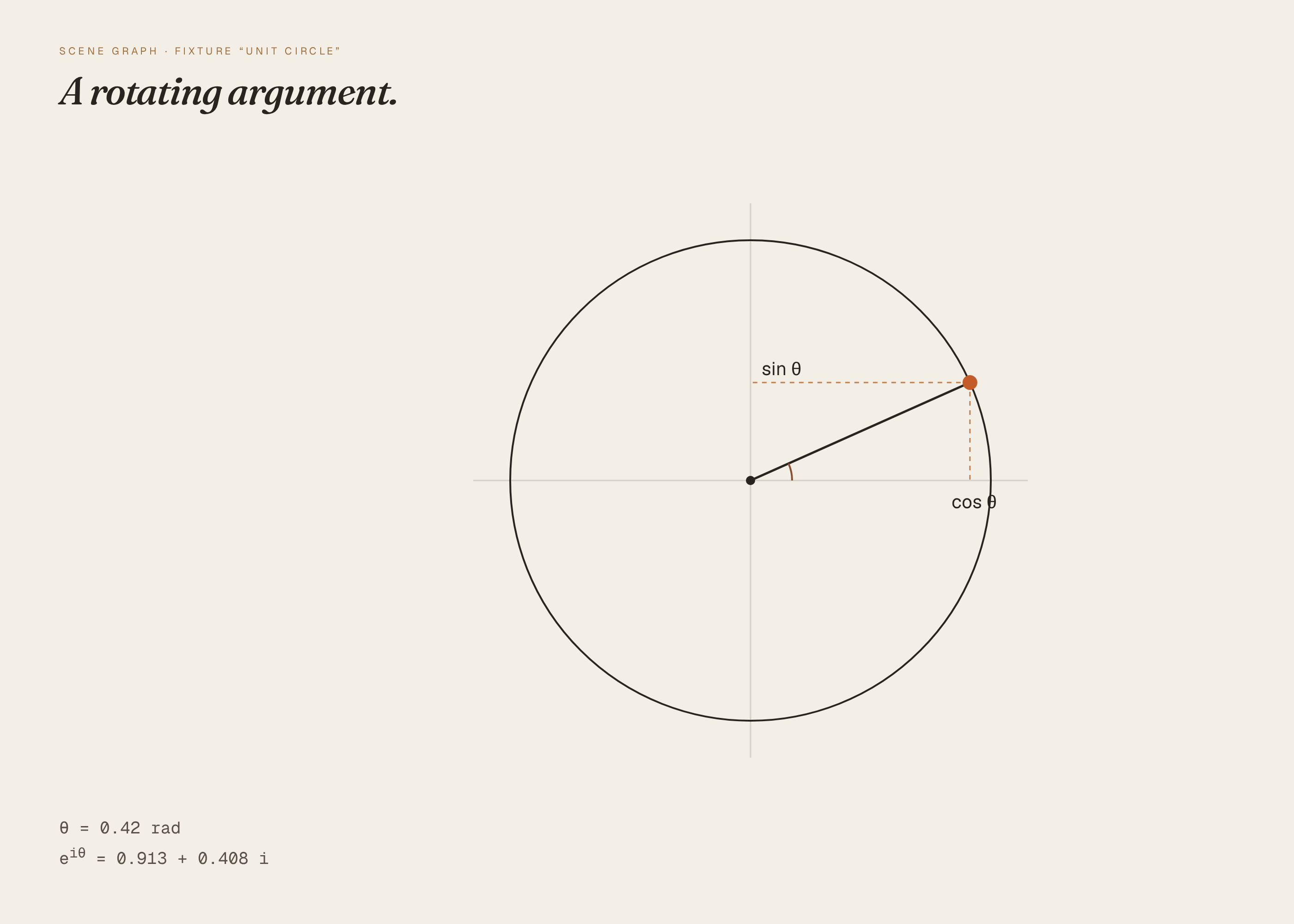
These pictures are frames from the reference renderer in
reference/preview.py, at the default inputs. They are not drawings of a product that has not been built or simulated. The first picture is the one Spekkr shows on the spec's card. A build may ship its own goldens; those goldens are of that build and do not have to match these frames pixel-for-pixel.File What it shows shots/title-card.pngTitle card “A small proof, moving”, 30 fps shots/settled.pngSettled equation after the documented hold How to verify
- Render the documented frames at the default
fps, size and hold or frame count. - Compare each named golden to the timeline or camera file in this document, within the stated tolerance.
- Confirm the total frame count matches the table.
- Fixture scenes render to a documented frame count. Golden frames are taken at stated times, and text or shape positions at a couple of keyframes are asserted. Two runs of the same renderer agree. No network is required. The product does not use a famous channel's name.
# Design

This file fixes the timeline, the camera and the frame counts. The
renderer can vary, as long as the numbers here hold.

## Fixture scene

A short scene: a title, an equation that rearranges, an optional small
plot. Duration and the key times are `fixtures/math-scene.json`. At 30 fps
and hold 1.0, the expected count is in that file.

## Positions

Coordinates are in frame pixels, origin top-left, or in a documented scene
space. The key file is the authority.

## Tolerance

Same renderer: exact or 2 levels. Across browser and python: 8 levels, 98%
of pixels, plus the position bound still holds.

## Inputs

| Key | Label | Default | Notes |
| --- | --- | --- | --- |
| `title` | Title | A small proof, moving | Shown in the opening card, or as the first equation's label. |
| `fps` | Frames a second | 30 | 24 or 30. |
| `hold` | Hold, seconds | 1.0 | How long a settled equation stays, from 0.4 to 2. |
| `labels` | Axis labels | on | On scenes that have a plot. |
| `subtitle` | A subtitle | on | A short line under the title card. |
| `renderer` | Renderer | browser | browser is a Web or canvas renderer. python is a Manim-like or a small shipped renderer. Both must match the same frame count and positions. |

## Acceptance at the defaults

A short, deterministic motion piece. Default 30 fps, 1.0 s hold, title 'A
small proof, moving', labels and subtitle on. The timeline is the
authority.

| Quantity | Value | Tolerance | Source |
| --- | --- | --- | --- |
| Frame rate | 30 fps | exact | `fps` |
| Hold of a settled card | 1.0 s | 0.05 s | `hold` |
| Opening title duration | 1.2 s | 0.05 s | Ease in, hold, ease out as in the key file |
| Total frames at defaults | 240 | 0 | Eight seconds including holds |
| Title text | A small proof, moving | exact | `title` |

A key file lists, for each named mark, its x, y (and optional opacity,
scale) at each key time. In-between frames are linear or a documented
ease. Goldens: the title card, a mid-transform, a settled equation, and
the last frame. No physical camera is required.

## Screenshots

These pictures are frames from the reference renderer in `reference/preview.py`, at the default inputs. They are not drawings of a
product that has not been built or simulated. The first picture is the one Spekkr
shows on the spec's card. A build may ship its own goldens; those goldens
are of that build and do not have to match these frames pixel-for-pixel.

| File | What it shows |
| --- | --- |
| `shots/title-card.png` | Title card  “A small proof, moving”, 30 fps |
| `shots/settled.png` | Settled equation  after the documented hold |


## How to verify

1. Render the documented frames at the default `fps`, size and hold or
frame count.

2. Compare each named golden to the timeline or camera file in this
document, within the stated tolerance.

3. Confirm the total frame count matches the table.

4. Fixture scenes render to a documented frame count. Golden frames are
taken at stated times, and text or shape positions at a couple of
keyframes are asserted. Two runs of the same renderer agree. No network is
required. The product does not use a famous channel's name.
- Render the documented frames at the default
-
tasks.mdBuild tasks in order, each with a check.Tasks
Work in order. Finish a task's check before starting the next.
- Set up. Set up the renderer in the
rendererinput. Read the inputs and the timeline or camera file into one place. Check: a single blank or title frame renders at the stated size. - Timeline and positions (R1). Build what
R1. Timeline and positionsasks for, to the numbers indesign.md. In particular: The fixture scene indesign.mdhas a frame count offpstimes the duration in the file (including holds), exact as a whole number of frames. Check: theR1. Timeline and positionsacceptance checks pass. - Goldens and files (R2). Build what
R2. Goldens and filesasks for, to the numbers indesign.md. In particular: Goldens at the title card, a mid-transform, a settled equation, and the last frame, at the times in the file. Check: theR2. Goldens and filesacceptance checks pass. - Inputs (R3). Build what
R3. Inputsasks for, to the numbers indesign.md. In particular: Inputs are read fromspekkr.inputs.json.fps,holdorframesand the frame size stay inside the ranges indesign.md. Check: theR3. Inputsacceptance checks pass. - Checks and report (R4). Build what
R4. Checks and reportasks for, to the numbers indesign.md. In particular: One command runs every acceptance check at the defaults and at the person's inputs, including golden frames where a requirement asks for them. Check: theR4. Checks and reportacceptance checks pass. - Goldens. Capture the frames named in
design.mdat the defaults, with motion frozen where the file says so. Compare them within the stated tolerance. Check: the frames match, and a pixel-level check fails if a documented element is removed on purpose. - Finish. Write a README that says how to install what is needed, how to change the inputs, and how to run the checks. Run the one command from a clean folder. Check: every item under Definition of done in
spec.mdis true.
# Tasks

Work in order. Finish a task's check before starting the next.

1. **Set up.** Set up the renderer in the `renderer` input. Read the
inputs and the timeline or camera file into one place.
   Check: a single blank or title frame renders at the stated size.

2. **Timeline and positions (R1).** Build what `R1. Timeline and
positions` asks for, to the numbers in `design.md`. In particular: The
fixture scene in `design.md` has a frame count of `fps` times the duration
in the file (including holds), exact as a whole number of frames.
   Check: the `R1. Timeline and positions` acceptance checks pass.

3. **Goldens and files (R2).** Build what `R2. Goldens and files` asks
for, to the numbers in `design.md`. In particular: Goldens at the title
card, a mid-transform, a settled equation, and the last frame, at the
times in the file.
   Check: the `R2. Goldens and files` acceptance checks pass.

4. **Inputs (R3).** Build what `R3. Inputs` asks for, to the numbers in
`design.md`. In particular: Inputs are read from `spekkr.inputs.json`.
`fps`, `hold` or `frames` and the frame size stay inside the ranges in
`design.md`.
   Check: the `R3. Inputs` acceptance checks pass.

5. **Checks and report (R4).** Build what `R4. Checks and report` asks
for, to the numbers in `design.md`. In particular: One command runs every
acceptance check at the defaults and at the person's inputs, including
golden frames where a requirement asks for them.
   Check: the `R4. Checks and report` acceptance checks pass.

6. **Goldens.** Capture the frames named in `design.md` at the defaults,
with motion frozen where the file says so. Compare them within the stated
tolerance.
   Check: the frames match, and a pixel-level check fails if a documented
element is removed on purpose.

7. **Finish.** Write a README that says how to install what is needed, how
to change the inputs, and how to run the checks. Run the one command from
a clean folder.
   Check: every item under Definition of done in `spec.md` is true.
- Set up. Set up the renderer in the
-
reference/preview.pyA reference of the title card and a settled frame at the default timeline. -
reference/preview.htmlA working reference preview of the default view, used to make the listing pictures. A build does not have to start from this file. -
reference/fonts/fonts.cssWebfont faces for the reference preview. -
reference/fonts/Geist.ttfGeist variable typeface for the reference preview. -
reference/fonts/GeistMono.ttfGeist Mono variable typeface for the reference preview. -
reference/fonts/Fraunces.ttfFraunces variable typeface for the reference preview. -
reference/fonts/Fraunces-Italic.ttfFraunces italic variable typeface for the reference preview.
Is it for me?
- Kind
- animation
- Tools
- TypeScript, Python
What does it need?
- Agent permissions
- shell
- Commands it runs
install a renderer for the scene graph, in the browser or in Pythoninstall a tool that reads video or frames
What changed?
- 0.2.114 Nov 2026Add animated loop to the listing shots.
- 0.2.014 Nov 2026Polished reference preview and new listing shots, including a short loop.
- 0.1.014 Nov 2026First version.
For agents: start.md says how to build this spec, spec.json holds everything on this page, and bundle.tar.gz holds its files.