Nibble calculator
A nibble-wide CPU and a scientific calculator in Verilog, checked with a testbench of documented operations, no FPGA required.
This is a HDL spec on Spekkr, published by onyx. It is listed with the other specs. Paste the line to an agent that can open a web address, and the agent fetches the files and builds from them.
- Spec
onyx/nibble-calculator- Version
- 0.2.1
- Published by
- onyx
- Updated
- 14 Nov 2026
Build this spec
Build the spec at https://spekkr.com/onyx/nibble-calculator/start.md.
Paste this to your AI agent. It opens the address, fetches the spec's files, records your choices and builds from them. Nothing to install, no account.
Published by onyx.
What does the result look like?
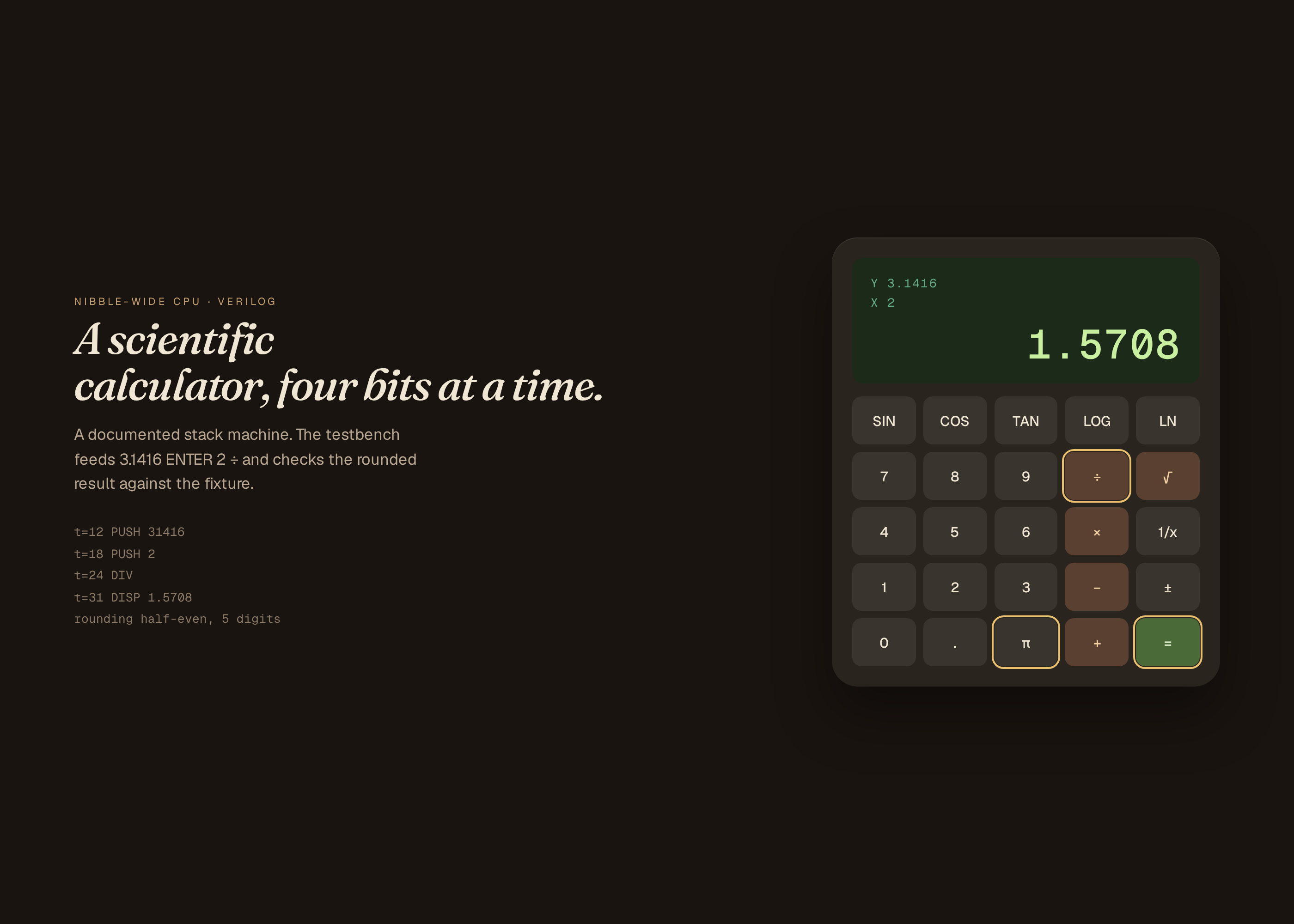
What can I customize?
Your choices go into the line you copy. Anything else is yours to edit, but it leaves the tested path.
What do I get?
-
spec.mdRequirements and acceptance checks.Nibble calculator
What this builds
A small original CPU, nibble-wide or similarly narrow, and a scientific calculator that runs on it, all in Verilog. A testbench feeds documented operations (add, a chain of stack ops, and optional trig or log) and checks the displayed or register result against a file, with a documented rounding. No FPGA and no handheld are required. This is not a copy of a commercial calculator's firmware.
Read
spekkr.inputs.jsonfirst.digitsandstacksize the machine.trigandlogadd operations.simis the simulator. Display renders are from a dumped register, not a real LCD.Out of scope
- A real FPGA, a handheld, or a seven-segment board in the checks.
- A commercial calculator's ROM or name.
- A floating-point certification beyond the file's rounding rules.
Requirements
Each requirement has an id. Checks name the id they cover.
R1. Operations
- The vectors in
fixtures/calc-vectors.json(including at least add, subtract, multiply, divide, a stack chain, and, if the options are on, a sine and a log) produce the listed results, with the rounding in the file. - A divide-by-zero or an overflow sets a documented error flag and a display state.
- Two runs of the testbench hash the same traces.
Accept when: every vector matches, the error cases match, and two runs hash equal.
R2. ISA, files, frames
- A short ISA note lists the nibble width, the registers, and the opcodes used by the calculator program. A program dump is in the repo.
- Renders: an idle display (zeros or a ready state), an add result, a trig result if on (or a second arithmetic result if off), and an error state.
- One command simulates, checks vectors, and writes the renders. No FPGA.
Accept when: the command passes for both simulators, and a deliberately wrong vector fixture fails.
R3. Inputs
- Inputs are read from
spekkr.inputs.json. Values outside the ranges or choices indesign.mdare refused before a netlist, a board or a testbench is built. - Options turn the optional circuits, ports or features in the Inputs table on or off.
Accept when: an illegal input is refused by name, and the default input set produces the measurements in
design.md.R4. Checks and report
- One command runs the simulation or the testbench, writes the plots or dumps, and compares them to the numbers in
design.md. - The command works without a physical board, a lab instrument or a network.
Accept when: the command passes at the defaults, and fails if a documented value in the netlist or the ROM is corrupted on purpose.
Verification
A testbench of documented operations (arithmetic, stack, optional trig and log, and error cases) matches a vector file, with stated rounding. Display stills are written from a dumped register. No FPGA and no handheld are required.
Definition of done
- Every acceptance check above runs from one command, and all pass at the person's inputs.
- A README says how to run the testbench, how rounding is defined, and that a board is optional.
# Nibble calculator

## What this builds

A small original CPU, nibble-wide or similarly narrow, and a scientific
calculator that runs on it, all in Verilog. A testbench feeds documented
operations (add, a chain of stack ops, and optional trig or log) and
checks the displayed or register result against a file, with a documented
rounding. No FPGA and no handheld are required. This is not a copy of a
commercial calculator's firmware.

Read `spekkr.inputs.json` first. `digits` and `stack` size the machine.
`trig` and `log` add operations. `sim` is the simulator. Display renders
are from a dumped register, not a real LCD.

## Out of scope

- A real FPGA, a handheld, or a seven-segment board in the checks.
- A commercial calculator's ROM or name.
- A floating-point certification beyond the file's rounding rules.

## Requirements

Each requirement has an id. Checks name the id they cover.

### R1. Operations

- The vectors in `fixtures/calc-vectors.json` (including at least add,
  subtract, multiply, divide, a stack chain, and, if the options are on, a
  sine and a log) produce the listed results, with the rounding in the
  file.
- A divide-by-zero or an overflow sets a documented error flag and a
  display state.
- Two runs of the testbench hash the same traces.

Accept when: every vector matches, the error cases match, and two runs
hash equal.

### R2. ISA, files, frames

- A short ISA note lists the nibble width, the registers, and the opcodes
  used by the calculator program. A program dump is in the repo.
- Renders: an idle display (zeros or a ready state), an add result, a trig
  result if on (or a second arithmetic result if off), and an error state.
- One command simulates, checks vectors, and writes the renders. No FPGA.

Accept when: the command passes for both simulators, and a deliberately
wrong vector fixture fails.

### R3. Inputs

- Inputs are read from `spekkr.inputs.json`. Values outside the ranges or
  choices in `design.md` are refused before a netlist, a board or a
  testbench is built.
- Options turn the optional circuits, ports or features in the Inputs
  table on or off.

Accept when: an illegal input is refused by name, and the default input
set produces the measurements in `design.md`.

### R4. Checks and report

- One command runs the simulation or the testbench, writes the plots or
  dumps, and compares them to the numbers in `design.md`.
- The command works without a physical board, a lab instrument or a
  network.

Accept when: the command passes at the defaults, and fails if a documented
value in the netlist or the ROM is corrupted on purpose.

## Verification

A testbench of documented operations (arithmetic, stack, optional trig and
log, and error cases) matches a vector file, with stated rounding. Display
stills are written from a dumped register. No FPGA and no handheld are
required.

## Definition of done

- Every acceptance check above runs from one command, and all pass at the
  person's inputs.
- A README says how to run the testbench, how rounding is defined, and
  that a board is optional.
-
design.mdThe operation vectors, rounding, error flags, and display dumps.Design
This file fixes the circuits, the timings and the dumps a build must match. The toolchain can vary, as long as the numbers here hold.
Rounding
Decimal,
digitssignificand digits, round half-up, as in the vector file. Angles for trig are degrees, unless the file says radians.Vectors
Each vector is: a sequence of keystrokes or opcodes, the expected stack or display, and flags. The file is the authority.
Display
A dumped 7-segment or a character buffer, rendered as a still. The mapping is in
fixtures/calc-display.json.Inputs
Key Label Default Notes digitsDecimal digits 8 From 6 to 12, the calculator's significand. stackStack depth 4 From 2 to 8, a stack calculator. trigTrigonometry on Sine, cosine, and a documented angle unit. logLog and exp on A natural log and an exp, as in the file. simSimulator verilator Either must pass the same testbench vectors. Acceptance at the defaults
A calculator in HDL that works in 4-bit digits (or a documented BCD width). The testbench feeds key codes and reads a display register.
Quantity Value Tolerance Source Digit width 4 bits exact BCD nibble Display width 8 digits 0 Plus a 1-bit overflow flag Operations +, −, ×, ÷ — Integer, documented rounding Sine at 0, 30, 90 degrees 0.000, 0.500, 1.000 0.002 When trigis on, degreesln(1), exp(0) 0.000, 1.000 0.002 When logis onA table of at least twelve calculations, including overflow and divide-by-zero, is the authority. The testbench applies them and checks the display register. No board and no seven-segment hardware are required; a dumped waveform or a register log is enough.
Screenshots
These pictures are dumps of a working reference model of the core, in
reference/preview.py, at the default inputs. They are not drawings of a product that has not been built or simulated. The first picture is the one Spekkr shows on the spec's card. A build may ship its own goldens; those goldens are of that build and do not have to match these frames pixel-for-pixel.File What it shows shots/sine-30.pngDisplay sin 30° = 0.500, eight BCD digits shots/ln-1.pngDisplay ln(1) = 0.000, eight BCD digits How to verify
- Run the simulation or the HDL testbench at the defaults, with no physical board.
- Compare periods, trip points, register dumps or frames to the acceptance table in this file.
- Corrupt one documented value on purpose and confirm the check fails.
- A testbench of documented operations (arithmetic, stack, optional trig and log, and error cases) matches a vector file, with stated rounding. Display stills are written from a dumped register. No FPGA and no handheld are required.
# Design

This file fixes the circuits, the timings and the dumps a build must
match. The toolchain can vary, as long as the numbers here hold.

## Rounding

Decimal, `digits` significand digits, round half-up, as in the vector
file. Angles for trig are degrees, unless the file says radians.

## Vectors

Each vector is: a sequence of keystrokes or opcodes, the expected stack or
display, and flags. The file is the authority.

## Display

A dumped 7-segment or a character buffer, rendered as a still. The mapping
is in `fixtures/calc-display.json`.

## Inputs

| Key | Label | Default | Notes |
| --- | --- | --- | --- |
| `digits` | Decimal digits | 8 | From 6 to 12, the calculator's significand. |
| `stack` | Stack depth | 4 | From 2 to 8, a stack calculator. |
| `trig` | Trigonometry | on | Sine, cosine, and a documented angle unit. |
| `log` | Log and exp | on | A natural log and an exp, as in the file. |
| `sim` | Simulator | verilator | Either must pass the same testbench vectors. |

## Acceptance at the defaults

A calculator in HDL that works in 4-bit digits (or a documented BCD
width). The testbench feeds key codes and reads a display register.

| Quantity | Value | Tolerance | Source |
| --- | --- | --- | --- |
| Digit width | 4 bits | exact | BCD nibble |
| Display width | 8 digits | 0 | Plus a 1-bit overflow flag |
| Operations | +, −, ×, ÷ | — | Integer, documented rounding |
| Sine at 0, 30, 90 degrees | 0.000, 0.500, 1.000 | 0.002 | When `trig` is on, degrees |
| ln(1), exp(0) | 0.000, 1.000 | 0.002 | When `log` is on |

A table of at least twelve calculations, including overflow and
divide-by-zero, is the authority. The testbench applies them and checks
the display register. No board and no seven-segment hardware are required;
a dumped waveform or a register log is enough.

## Screenshots

These pictures are dumps of a working reference model of the core, in `reference/preview.py`, at the default inputs. They are not drawings of a
product that has not been built or simulated. The first picture is the one Spekkr
shows on the spec's card. A build may ship its own goldens; those goldens
are of that build and do not have to match these frames pixel-for-pixel.

| File | What it shows |
| --- | --- |
| `shots/sine-30.png` | Display  sin 30° = 0.500, eight BCD digits |
| `shots/ln-1.png` | Display  ln(1) = 0.000, eight BCD digits |


## How to verify

1. Run the simulation or the HDL testbench at the defaults, with no
physical board.

2. Compare periods, trip points, register dumps or frames to the
acceptance table in this file.

3. Corrupt one documented value on purpose and confirm the check fails.

4. A testbench of documented operations (arithmetic, stack, optional trig
and log, and error cases) matches a vector file, with stated rounding.
Display stills are written from a dumped register. No FPGA and no handheld
are required.
-
tasks.mdBuild tasks in order, each with a check.Tasks
Work in order. Finish a task's check before starting the next.
- Set up. Install the simulator or the HDL toolchain named in
design.md(ngspice, Icarus, Verilator, or a KiCad/SVG board tool). Read the inputs into one place. Check: a trivial netlist or testbench runs and writes a file. - Operations (R1). Build what
R1. Operationsasks for, to the numbers indesign.md. In particular: The vectors infixtures/calc-vectors.json(including at least add, subtract, multiply, divide, a stack chain, and, if the options are on, a sine and a log) produce the listed results, with the rounding in the file. Check: theR1. Operationsacceptance checks pass. - ISA, files, frames (R2). Build what
R2. ISA, files, framesasks for, to the numbers indesign.md. In particular: A short ISA note lists the nibble width, the registers, and the opcodes used by the calculator program. A program dump is in the repo. Check: theR2. ISA, files, framesacceptance checks pass. - Inputs (R3). Build what
R3. Inputsasks for, to the numbers indesign.md. In particular: Inputs are read fromspekkr.inputs.json. Values outside the ranges or choices indesign.mdare refused before a netlist, a board or a testbench is built. Check: theR3. Inputsacceptance checks pass. - Checks and report (R4). Build what
R4. Checks and reportasks for, to the numbers indesign.md. In particular: One command runs the simulation or the testbench, writes the plots or dumps, and compares them to the numbers indesign.md. Check: theR4. Checks and reportacceptance checks pass. - Plots, dumps and goldens. Write the plots or framebuffer dumps named in
design.mdand compare them to the tables there. Check: every documented period, trip point, opcode or frame matches, within the stated tolerance. - Finish. Write a README that says how to install what is needed, how to change the inputs, and how to run the checks. Run the one command from a clean folder. Check: every item under Definition of done in
spec.mdis true.
# Tasks

Work in order. Finish a task's check before starting the next.

1. **Set up.** Install the simulator or the HDL toolchain named in
`design.md` (ngspice, Icarus, Verilator, or a KiCad/SVG board tool). Read
the inputs into one place.
   Check: a trivial netlist or testbench runs and writes a file.

2. **Operations (R1).** Build what `R1. Operations` asks for, to the
numbers in `design.md`. In particular: The vectors in
`fixtures/calc-vectors.json` (including at least add, subtract, multiply,
divide, a stack chain, and, if the options are on, a sine and a log)
produce the listed results, with the rounding in the file.
   Check: the `R1. Operations` acceptance checks pass.

3. **ISA, files, frames (R2).** Build what `R2. ISA, files, frames` asks
for, to the numbers in `design.md`. In particular: A short ISA note lists
the nibble width, the registers, and the opcodes used by the calculator
program. A program dump is in the repo.
   Check: the `R2. ISA, files, frames` acceptance checks pass.

4. **Inputs (R3).** Build what `R3. Inputs` asks for, to the numbers in
`design.md`. In particular: Inputs are read from `spekkr.inputs.json`.
Values outside the ranges or choices in `design.md` are refused before a
netlist, a board or a testbench is built.
   Check: the `R3. Inputs` acceptance checks pass.

5. **Checks and report (R4).** Build what `R4. Checks and report` asks
for, to the numbers in `design.md`. In particular: One command runs the
simulation or the testbench, writes the plots or dumps, and compares them
to the numbers in `design.md`.
   Check: the `R4. Checks and report` acceptance checks pass.

6. **Plots, dumps and goldens.** Write the plots or framebuffer dumps
named in `design.md` and compare them to the tables there.
   Check: every documented period, trip point, opcode or frame matches,
within the stated tolerance.

7. **Finish.** Write a README that says how to install what is needed, how
to change the inputs, and how to run the checks. Run the one command from
a clean folder.
   Check: every item under Definition of done in `spec.md` is true.
- Set up. Install the simulator or the HDL toolchain named in
-
reference/preview.pyA reference rendering of the display register for two fixture calculations. -
reference/preview.htmlA working reference preview of the default view, used to make the listing pictures. A build does not have to start from this file. -
reference/fonts/fonts.cssWebfont faces for the reference preview. -
reference/fonts/Geist.ttfGeist variable typeface for the reference preview. -
reference/fonts/GeistMono.ttfGeist Mono variable typeface for the reference preview. -
reference/fonts/Fraunces.ttfFraunces variable typeface for the reference preview. -
reference/fonts/Fraunces-Italic.ttfFraunces italic variable typeface for the reference preview.
Is it for me?
- Kind
- HDL
- Tools
- Verilog, Icarus, Verilator
What does it need?
- Agent permissions
- shell
- Commands it runs
install a Verilog simulator, such as Icarus or Verilator
What changed?
- 0.2.114 Nov 2026Add animated loop to the listing shots.
- 0.2.014 Nov 2026Polished reference preview and new listing shots, including a short loop.
- 0.1.014 Nov 2026First version.
For agents: start.md says how to build this spec, spec.json holds everything on this page, and bundle.tar.gz holds its files.