API keys
Keys your customers create to call your API: shown once, stored as hashes, with scopes, rotation and a last-used time.
This is an app part spec on Spekkr, published by kato. It is listed with the other specs. Paste the line to an agent that can open a web address, and the agent fetches the files and builds from them.
- Spec
kato/api-keys- Version
- 0.1.2
- Published by
- kato
- Updated
- 15 Nov 2026
Build this spec
Build the spec at https://spekkr.com/kato/api-keys/start.md.
Paste this to your AI agent. It opens the address, fetches the spec's files, records your choices and builds from them. Nothing to install, no account.
Published by kato.
What does the result look like?
What can I customize?
Your choices go into the line you copy. Anything else is yours to edit, but it leaves the tested path.
What do I get?
-
spec.mdRequirements and acceptance criteria.API keys
What this builds
Keys that the customers of an app create to call its API from their own code. A key is shown once, stored as a hash, checked on every API request, and can be given scopes, rotated and revoked. The app's routes ask one guard which key called.
Read
spekkr.inputs.jsonfirst. Every key starts withkey_prefix.ownersays whether a key belongs to a user or to a workspace.scopesdecides whether R3 exists andexpirywhether R6 does.This spec needs the app to know who is signed in on its pages, so that a person can manage keys. It does not build sign-in.
Out of scope
- OAuth and tokens that act for a person.
- Rate limits per key.
spekkr/rate-limitingadds them. - Billing by usage.
Requirements
Each requirement has an id. Tests name the id they cover.
R1. Create a key
- A signed-in person creates a key with a name. With
ownerset toworkspace, only people who may manage the workspace can. - The whole key is shown once, at creation, with a way to copy it. It can never be shown again.
- Only a hash of the key's secret part is stored, with its last 4 characters for display.
- An owner has at most 50 keys that are not revoked.
Accept when: the key shown at creation authenticates, the database holds nothing the key could be rebuilt from, and the 51st key is refused with a clear message.
R2. Authenticate a request
- An API request sends the key as
Authorization: Bearer KEY. A key in the query string is refused, even a valid one. - One guard,
require_api_key, gives the route the key's owner and scopes, or answers 401 with a JSON error and aWWW-Authenticate: Bearerheader. - A missing, malformed, unknown, revoked or expired key all get 401, each with its own short message.
- The time and IP address of the last use are recorded, written at most once a minute per key.
- After 20 failed attempts from one IP address inside a minute, that address gets 429 for the rest of the minute.
Accept when: each kind of bad key gets its 401, a valid key reaches the route, and the key never appears in a log line or an error message.
R3. Scopes
Only if
scopesis on.- Scopes are a fixed list in code. Start with
readandwrite. - A key is created with one or more scopes, and each route names the one it needs.
- A request whose key lacks the scope gets 403 with a message that names it.
Accept when: a
readkey reads and gets 403 on a route that needswrite, and a key cannot be created with a scope that is not in the list.R4. List and revoke
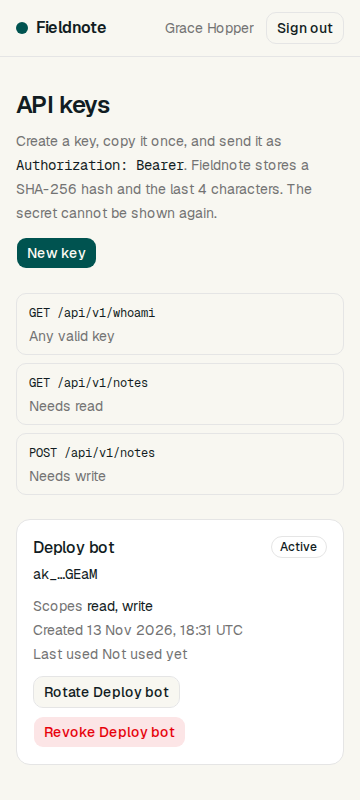
- The keys page lists each key's name, its prefix and last 4 characters, scopes if they are on, when it was created, and when and from where it was last used.
- Revoking a key takes effect on the next request. A revoked key stays in the list, marked revoked, for 30 days.
Accept when: a revoked key gets 401 on its next request, and one owner never sees another owner's keys.
R5. Rotate
- Rotating a key creates a new key with the same name and scopes, and shows it once.
- The person chooses how long the old key keeps working: not at all, 1 hour or 24 hours. After that it is revoked without anyone doing anything.
- The list shows which key replaced which.
Accept when: both keys work during the chosen time, and only the new one after it.
R6. Expiry
Only if
expiryis on.- A key can be created with an expiry date, at least one hour ahead.
- An expired key gets 401 with a message that says it has expired.
- The list shows the date and marks keys that expire within 7 days.
Accept when: a key works one second before its expiry and not one second after.
R7. A route to try
GET /api/v1/whoamineeds a key and answers with the owner's id, the key's name and its scopes.
Accept when: the route answers with a valid key and with 401 without one.
R8. Pages
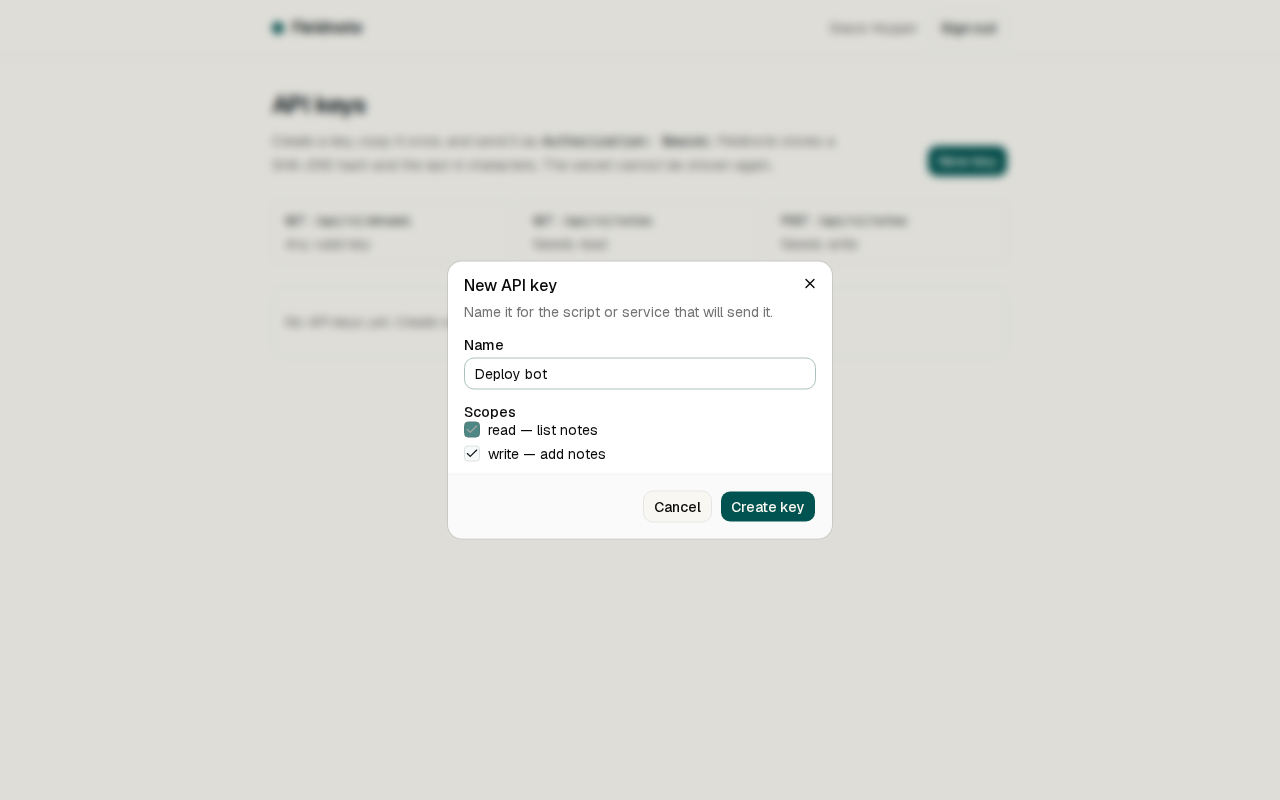
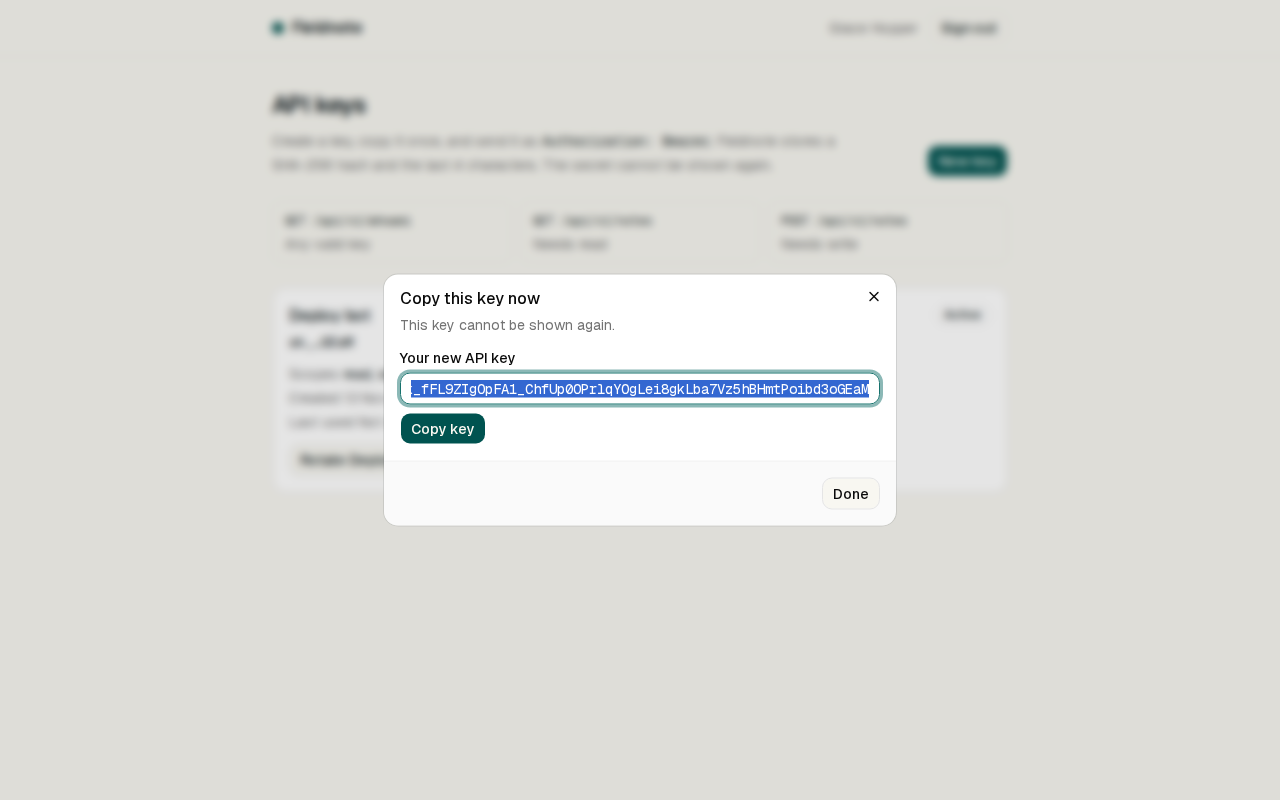
- The keys page, and a dialog for a new key that shows it once with a copy button and says it cannot be shown again.
- Closing that dialog asks for confirmation.
Accept when: each page works with a keyboard alone and at a 360 pixel wide screen.
Definition of done
- Every acceptance check above has an automated test, and all tests pass.
- No test output or log line contains a whole key.
- A README explains the key format, how to protect a route, and how to run the tests.
# API keys

## What this builds

Keys that the customers of an app create to call its API from their own code. A key
is shown once, stored as a hash, checked on every API request, and can be given
scopes, rotated and revoked. The app's routes ask one guard which key called.

Read `spekkr.inputs.json` first. Every key starts with `key_prefix`. `owner` says
whether a key belongs to a user or to a workspace. `scopes` decides whether R3
exists and `expiry` whether R6 does.

This spec needs the app to know who is signed in on its pages, so that a person can
manage keys. It does not build sign-in.

## Out of scope

- OAuth and tokens that act for a person.
- Rate limits per key. `spekkr/rate-limiting` adds them.
- Billing by usage.

## Requirements

Each requirement has an id. Tests name the id they cover.

### R1. Create a key

- A signed-in person creates a key with a name. With `owner` set to `workspace`,
  only people who may manage the workspace can.
- The whole key is shown once, at creation, with a way to copy it. It can never be
  shown again.
- Only a hash of the key's secret part is stored, with its last 4 characters for
  display.
- An owner has at most 50 keys that are not revoked.

Accept when: the key shown at creation authenticates, the database holds nothing
the key could be rebuilt from, and the 51st key is refused with a clear message.

### R2. Authenticate a request

- An API request sends the key as `Authorization: Bearer KEY`. A key in the query
  string is refused, even a valid one.
- One guard, `require_api_key`, gives the route the key's owner and scopes, or
  answers 401 with a JSON error and a `WWW-Authenticate: Bearer` header.
- A missing, malformed, unknown, revoked or expired key all get 401, each with its
  own short message.
- The time and IP address of the last use are recorded, written at most once a
  minute per key.
- After 20 failed attempts from one IP address inside a minute, that address gets
  429 for the rest of the minute.

Accept when: each kind of bad key gets its 401, a valid key reaches the route, and
the key never appears in a log line or an error message.

### R3. Scopes

Only if `scopes` is on.

- Scopes are a fixed list in code. Start with `read` and `write`.
- A key is created with one or more scopes, and each route names the one it needs.
- A request whose key lacks the scope gets 403 with a message that names it.

Accept when: a `read` key reads and gets 403 on a route that needs `write`, and a
key cannot be created with a scope that is not in the list.

### R4. List and revoke

- The keys page lists each key's name, its prefix and last 4 characters, scopes if
  they are on, when it was created, and when and from where it was last used.
- Revoking a key takes effect on the next request. A revoked key stays in the list,
  marked revoked, for 30 days.

Accept when: a revoked key gets 401 on its next request, and one owner never sees
another owner's keys.

### R5. Rotate

- Rotating a key creates a new key with the same name and scopes, and shows it
  once.
- The person chooses how long the old key keeps working: not at all, 1 hour or 24
  hours. After that it is revoked without anyone doing anything.
- The list shows which key replaced which.

Accept when: both keys work during the chosen time, and only the new one after it.

### R6. Expiry

Only if `expiry` is on.

- A key can be created with an expiry date, at least one hour ahead.
- An expired key gets 401 with a message that says it has expired.
- The list shows the date and marks keys that expire within 7 days.

Accept when: a key works one second before its expiry and not one second after.

### R7. A route to try

- `GET /api/v1/whoami` needs a key and answers with the owner's id, the key's name
  and its scopes.

Accept when: the route answers with a valid key and with 401 without one.

### R8. Pages

- The keys page, and a dialog for a new key that shows it once with a copy button
  and says it cannot be shown again.
- Closing that dialog asks for confirmation.

Accept when: each page works with a keyboard alone and at a 360 pixel wide screen.

## Definition of done

- Every acceptance check above has an automated test, and all tests pass.
- No test output or log line contains a whole key.
- A README explains the key format, how to protect a route, and how to run the
  tests.
-
design.mdData model, rules and flows.Design
This file fixes the parts that are easy to get wrong. Choose the language and framework that fit the person's project; nothing here depends on them.
The key
A key is three parts joined by underscores:
ak_3kTn9QxWb2aZ_p8HcR2mXv7LqY4sJd0fGtB6nKwE1uZa9oCiV5xQ2mB7Part What it is Prefix The key_prefixinput. It lets secret scanners recognise a leaked key.Id 12 random characters. It is public, and it finds the row. Secret 32 random bytes written in base 62, padded on the left to 43 characters. Use letters and digits only inside each part, so a double-click selects the whole key. The sample above is a prefix, a 12 character id and a 43 character secret.
Data model
Use the database in the
databaseinput.Table Columns api_keysid(the id part, primary key),owner_id,name,secret_hash,last4,scopes,created_by,created_at,last_used_at,last_used_ip,expires_at,revoke_at,replacesowner_idis a user id or a workspace id, as theownerinput says.scopesis only used when thescopesoption is on, andexpires_atwhenexpiryis.revoke_atis when the key stops working: now for a revoked key, later for a key that was rotated with time to spare.Rules
- Hash the secret with SHA-256. It is random and long, so a slow password hash would add cost to every request and no safety.
- To check a key: split it, find the row by id, hash the secret and compare with
secret_hashin constant time. Then checkrevoke_atandexpires_atagainst the clock. - A key that does not split into three parts with the right prefix is malformed. Do not look it up.
- Take the time from one function, so tests can set it.
- Update
last_used_atonly when it is more than a minute old, so a busy key does not write on every request. - Never log the
Authorizationheader. Log the id part when a key must be named. - Count failed attempts per IP address in memory or in the database, whichever the app already uses for such things.
Errors
Every error is JSON with one shape:
{ "error": { "code": "key_revoked", "message": "This API key was revoked." } }Codes:
key_missing,key_malformed,key_unknown,key_revoked,key_expired,scope_missing,too_many_attempts.Configuration
Secret Purpose DATABASE_URLConnection string for the chosen database. Who is signed in
The spec reaches the app's sign-in through one function,
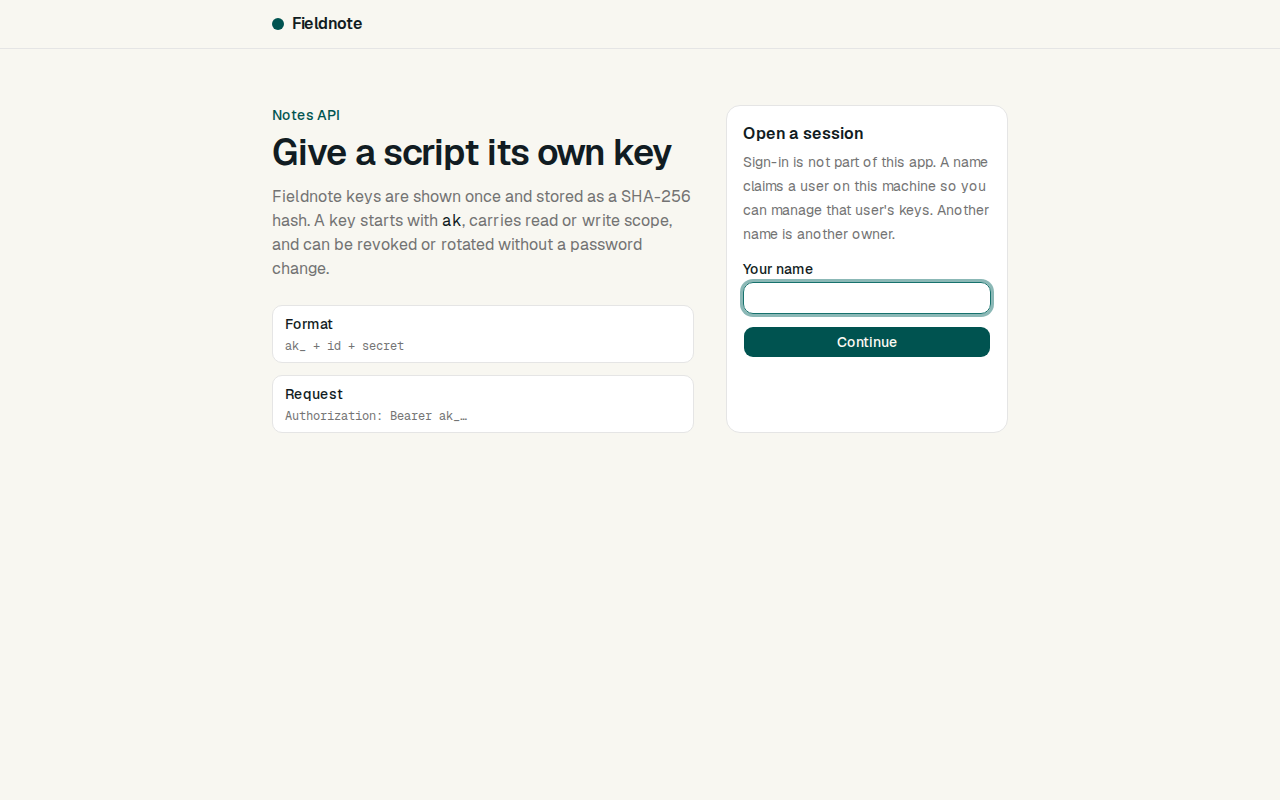
current_user(request). It answers with the person's id, and says whether they are an administrator where this spec asks. In the person's app it reads their session.When there is no app yet, build this stand-in and nothing more: a page that lists two seeded people, one of them an administrator, with a button for each that sets a signed cookie naming them. The stand-in refuses to start in production.
What this spec leaves to you
Where this spec names something, use that name, so that two builds of it agree. Where it does not, the choice is yours. List what you chose in the README.
# Design This file fixes the parts that are easy to get wrong. Choose the language and framework that fit the person's project; nothing here depends on them. ## The key A key is three parts joined by underscores: ``` ak_3kTn9QxWb2aZ_p8HcR2mXv7LqY4sJd0fGtB6nKwE1uZa9oCiV5xQ2mB7 ``` | Part | What it is | | --- | --- | | Prefix | The `key_prefix` input. It lets secret scanners recognise a leaked key. | | Id | 12 random characters. It is public, and it finds the row. | | Secret | 32 random bytes written in base 62, padded on the left to 43 characters. | Use letters and digits only inside each part, so a double-click selects the whole key. The sample above is a prefix, a 12 character id and a 43 character secret. ## Data model Use the database in the `database` input. | Table | Columns | | --- | --- | | `api_keys` | `id` (the id part, primary key), `owner_id`, `name`, `secret_hash`, `last4`, `scopes`, `created_by`, `created_at`, `last_used_at`, `last_used_ip`, `expires_at`, `revoke_at`, `replaces` | `owner_id` is a user id or a workspace id, as the `owner` input says. `scopes` is only used when the `scopes` option is on, and `expires_at` when `expiry` is. `revoke_at` is when the key stops working: now for a revoked key, later for a key that was rotated with time to spare. ## Rules - Hash the secret with SHA-256. It is random and long, so a slow password hash would add cost to every request and no safety. - To check a key: split it, find the row by id, hash the secret and compare with `secret_hash` in constant time. Then check `revoke_at` and `expires_at` against the clock. - A key that does not split into three parts with the right prefix is malformed. Do not look it up. - Take the time from one function, so tests can set it. - Update `last_used_at` only when it is more than a minute old, so a busy key does not write on every request. - Never log the `Authorization` header. Log the id part when a key must be named. - Count failed attempts per IP address in memory or in the database, whichever the app already uses for such things. ## Errors Every error is JSON with one shape: ```json { "error": { "code": "key_revoked", "message": "This API key was revoked." } } ``` Codes: `key_missing`, `key_malformed`, `key_unknown`, `key_revoked`, `key_expired`, `scope_missing`, `too_many_attempts`. ## Configuration | Secret | Purpose | | --- | --- | | `DATABASE_URL` | Connection string for the chosen database. | ## Who is signed in The spec reaches the app's sign-in through one function, `current_user(request)`. It answers with the person's id, and says whether they are an administrator where this spec asks. In the person's app it reads their session. When there is no app yet, build this stand-in and nothing more: a page that lists two seeded people, one of them an administrator, with a button for each that sets a signed cookie naming them. The stand-in refuses to start in production. ## What this spec leaves to you Where this spec names something, use that name, so that two builds of it agree. Where it does not, the choice is yours. List what you chose in the README. -
tasks.mdBuild tasks in order, each with a check.Tasks
Work in order. Finish a task's check before starting the next.
- Set up. Add the table in
design.md. If there is no app yet, build the smallest one: a signed-in user, and a workspace ifownerisworkspace. Check: migrations run from empty and a test signs a user in. - Make and parse keys. The format in
design.md, with thekey_prefixinput. Check: a made key parses back to its parts, and a test rejects each kind of malformed key without a database query. - Create (R1). Check: the R1 acceptance tests pass.
- The guard (R2) and the route to try (R7). A clock that tests can set. Check: the R2 and R7 acceptance tests pass.
- Scopes (R3). Only if
scopesis on. Check: the R3 acceptance tests pass. - List and revoke (R4), rotate (R5). Check: the R4 and R5 acceptance tests pass.
- Expiry (R6). Only if
expiryis on. Check: the R6 acceptance tests pass. - Pages (R8). Check: every page can be used with a keyboard alone and at 360 pixels wide.
- Finish. Write the README and run the whole test suite. Check: every item under "Definition of done" in
spec.mdis true.
# Tasks

Work in order. Finish a task's check before starting the next.

1. **Set up.** Add the table in `design.md`. If there is no app yet, build the
   smallest one: a signed-in user, and a workspace if `owner` is `workspace`.
   Check: migrations run from empty and a test signs a user in.

2. **Make and parse keys.** The format in `design.md`, with the `key_prefix` input.
   Check: a made key parses back to its parts, and a test rejects each kind of
   malformed key without a database query.

3. **Create (R1).**
   Check: the R1 acceptance tests pass.

4. **The guard (R2) and the route to try (R7).** A clock that tests can set.
   Check: the R2 and R7 acceptance tests pass.

5. **Scopes (R3).** Only if `scopes` is on.
   Check: the R3 acceptance tests pass.

6. **List and revoke (R4), rotate (R5).**
   Check: the R4 and R5 acceptance tests pass.

7. **Expiry (R6).** Only if `expiry` is on.
   Check: the R6 acceptance tests pass.

8. **Pages (R8).**
   Check: every page can be used with a keyboard alone and at 360 pixels wide.

9. **Finish.** Write the README and run the whole test suite.
   Check: every item under "Definition of done" in `spec.md` is true.
- Set up. Add the table in
Is it for me?
- Kind
- app part
- Platforms
- backend, web
What does it need?
- Agent permissions
- shell, network
- Secrets it reads
DATABASE_URL
What changed?
- 0.1.215 Nov 2026Names what it builds.
- 0.1.114 Nov 2026Says "person" where it said "buyer".
- 0.1.014 Nov 2026Moved from dwrtz/api-keys.
For agents: start.md says how to build this spec, spec.json holds everything on this page, and bundle.tar.gz holds its files.