Rate limiting
Limits per API key, user or IP address, with exact arithmetic, standard headers and a table of cases every build must pass.
This is an app part spec on Spekkr, published by vex. It is listed with the other specs. Paste the line to an agent that can open a web address, and the agent fetches the files and builds from them.
- Spec
vex/rate-limiting- Version
- 0.1.2
- Published by
- vex
- Updated
- 15 Nov 2026
Build this spec
Build the spec at https://spekkr.com/vex/rate-limiting/start.md.
Paste this to your AI agent. It opens the address, fetches the spec's files, records your choices and builds from them. Nothing to install, no account.
Published by vex.
What does the result look like?
What can I customize?
Your choices go into the line you copy. Anything else is yours to edit, but it leaves the tested path.
What do I get?
-
spec.mdRequirements and acceptance criteria.Rate limiting
What this builds
A limiter that sits in front of an app's routes. Each caller may make so many requests in a window. A caller over the limit gets status 429 and is told when to come back. The arithmetic is exact, so every build of this spec refuses the same requests.
Read
spekkr.inputs.jsonfirst.default_limitrequests are allowed everydefault_window_secondsseconds.storesays where counts are kept.per_route_limitsdecides whether R4 exists andresponse_headerswhether the headers in R3 are sent.Out of scope
- Protection against a flood meant to take the app down. That belongs in front of the app, at the network edge.
- Quotas per month and billing by usage.
- Queueing requests instead of refusing them.
Requirements
Each requirement has an id. Tests name the id they cover.
R1. The limit
- A limit is a number of requests and a window. A caller who has been idle can make that many requests at once, and after that one more every window divided by limit.
- The limiter keeps one number per caller and limit, and follows the algorithm in
design.mdin whole milliseconds. It does not use floating point. - A refused request does not count against the caller.
Accept when: the table of cases in
design.mdpasses exactly, row by row.R2. Who the caller is
- The caller is the first of these that the request has: an API key's id, a signed-in user's id, the IP address.
- The IP address is the address of the connection. A forwarding header is believed only when the connection comes from an address listed in
TRUSTED_PROXIES, and then the right-most address that is not itself a trusted proxy is used. - An IPv6 address is counted by its first 64 bits.
Accept when: a forged forwarding header from an untrusted address is ignored, and two addresses in the same IPv6 /64 share one count.
R3. The answer
- A refused request gets status 429, a JSON body with a code and a message, and a
Retry-Afterheader: the wait in whole seconds, rounded up. - If
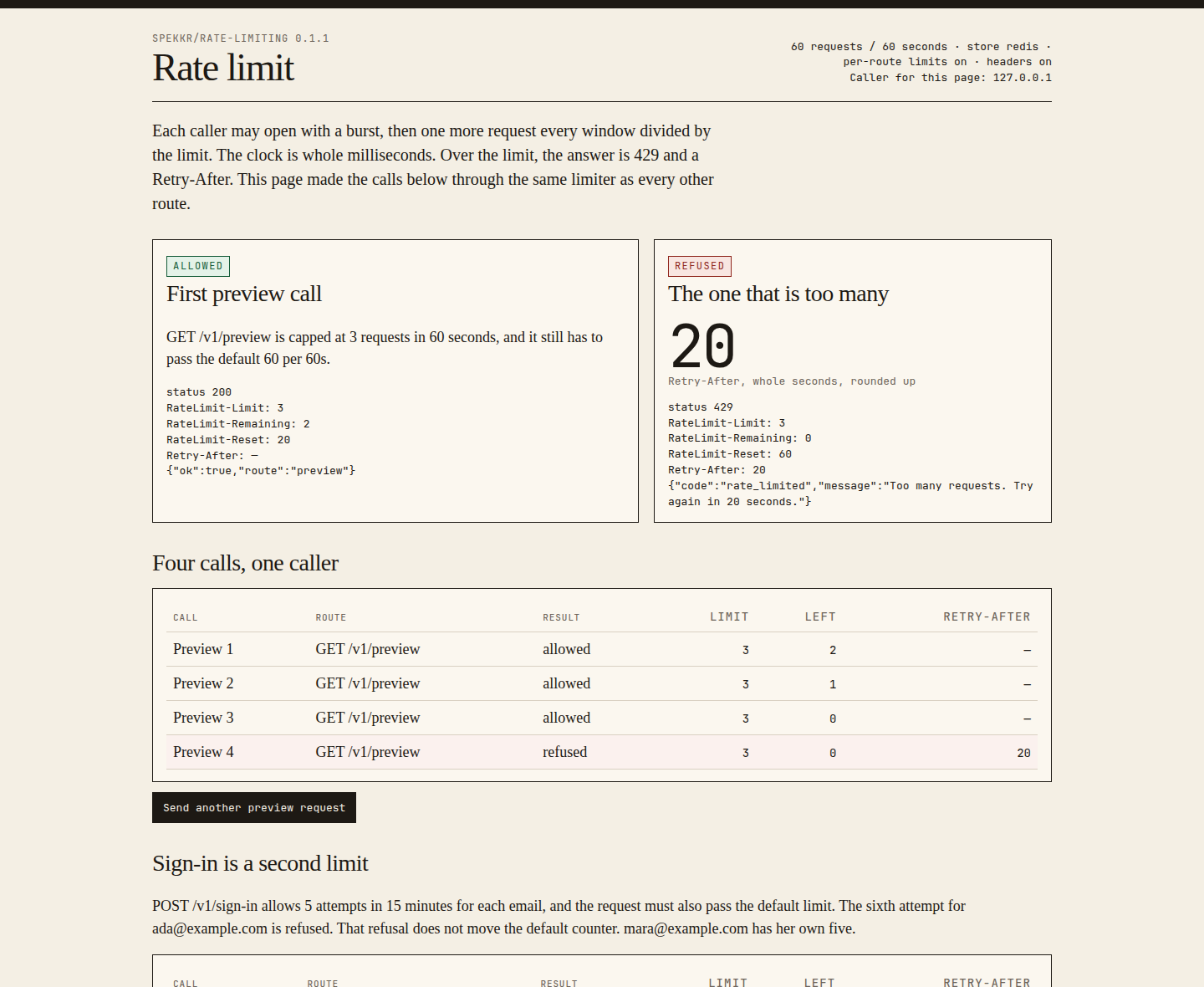
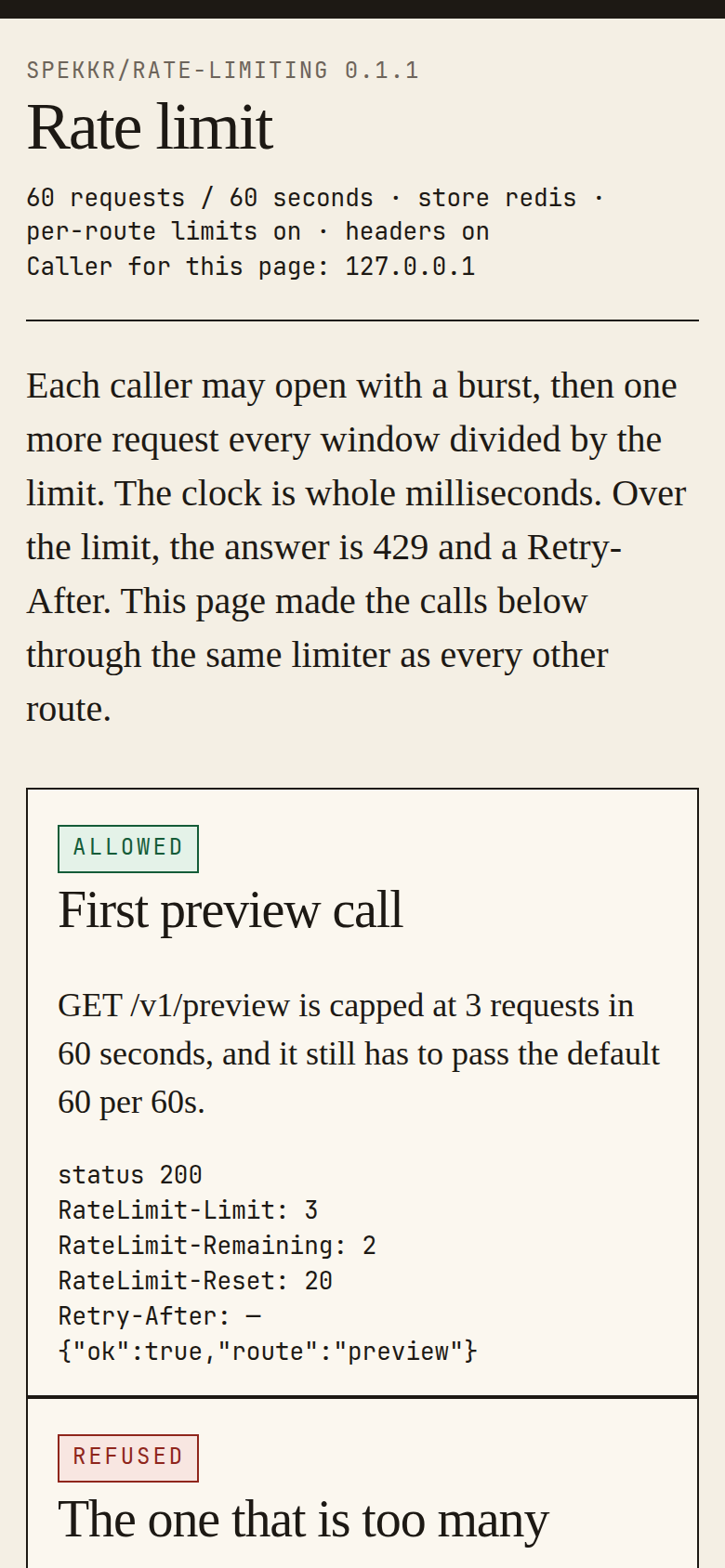
response_headersis on, every answer, allowed or refused, carriesRateLimit-Limit,RateLimit-RemainingandRateLimit-Reset. Reset is the number of seconds, rounded up, until the caller has the whole limit again. - The limiter runs before the route's own work. The default limit is checked before the request body is read.
Accept when: a caller who waits exactly
Retry-Afterseconds is allowed, and the headers match the table indesign.md.R4. Limits for single routes
Only if
per_route_limitsis on.- A route can name a limit of its own, with a name, a number and a window. For example
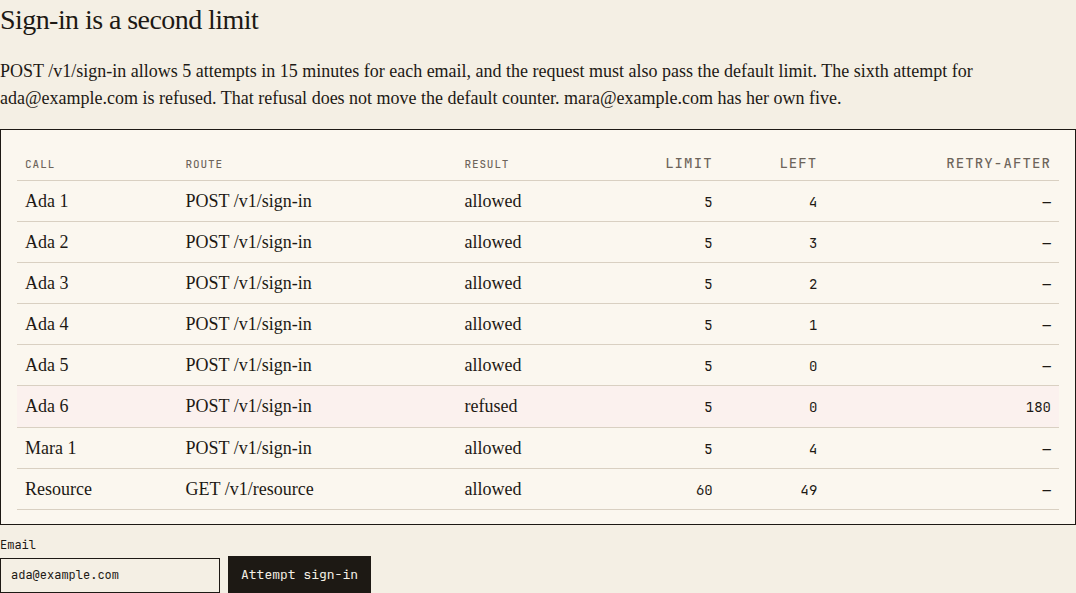
sign_in: 5 requests in 900 seconds. - A named limit is counted apart from the default. A request to such a route must pass both.
- A named limit can say what to count by, such as the email address in a sign-in form in place of the caller. Only such a limit reads the body. It does so after the default limit has passed, and hands the body on to the route unchanged. A request without that field is counted by the caller.
Accept when: using up
sign_inleaves the default untouched, and a request that passes one limit and fails the other is refused without counting against the one it passed.R5. Two requests at once
- Checking and counting are one step. Two requests that arrive together can never both take the last place.
Accept when: 50 requests sent at the same moment against a limit of 10 produce exactly 10 allowed and 40 refused, in every
store.R6. When the store is down
- If the store cannot be reached inside 100 milliseconds, the request is allowed and the failure is logged, at most once a minute.
- A named limit can be marked
strict. A strict limit refuses with status 503 when the store is down.
Accept when: with the store stopped, an ordinary route answers and a strict one gets 503.
R7. Exemptions
- A health-check route is never limited.
- Callers listed in
RATE_LIMIT_EXEMPT, by API key id or IP address, are never limited.
Accept when: an exempt caller makes 1,000 requests in a second and none is refused.
R8. Keeping the store small
- A caller's number is forgotten once the caller would have the whole limit again.
- With
storeset tomemory, at most 100,000 callers are remembered, and the ones idle longest are dropped first.
Accept when: after a window with no requests the store holds nothing for the caller.
Definition of done
- Every acceptance check above has an automated test, and all tests pass. Tests set the clock; none of them sleeps.
- A README explains how to put the limiter in front of a route, how to name a limit, and how to run the tests.
# Rate limiting

## What this builds

A limiter that sits in front of an app's routes. Each caller may make so many
requests in a window. A caller over the limit gets status 429 and is told when to
come back. The arithmetic is exact, so every build of this spec refuses the same
requests.

Read `spekkr.inputs.json` first. `default_limit` requests are allowed every
`default_window_seconds` seconds. `store` says where counts are kept.
`per_route_limits` decides whether R4 exists and `response_headers` whether the
headers in R3 are sent.

## Out of scope

- Protection against a flood meant to take the app down. That belongs in front of
  the app, at the network edge.
- Quotas per month and billing by usage.
- Queueing requests instead of refusing them.

## Requirements

Each requirement has an id. Tests name the id they cover.

### R1. The limit

- A limit is a number of requests and a window. A caller who has been idle can make
  that many requests at once, and after that one more every window divided by
  limit.
- The limiter keeps one number per caller and limit, and follows the algorithm in
  `design.md` in whole milliseconds. It does not use floating point.
- A refused request does not count against the caller.

Accept when: the table of cases in `design.md` passes exactly, row by row.

### R2. Who the caller is

- The caller is the first of these that the request has: an API key's id, a
  signed-in user's id, the IP address.
- The IP address is the address of the connection. A forwarding header is believed
  only when the connection comes from an address listed in `TRUSTED_PROXIES`, and
  then the right-most address that is not itself a trusted proxy is used.
- An IPv6 address is counted by its first 64 bits.

Accept when: a forged forwarding header from an untrusted address is ignored, and
two addresses in the same IPv6 /64 share one count.

### R3. The answer

- A refused request gets status 429, a JSON body with a code and a message, and a
  `Retry-After` header: the wait in whole seconds, rounded up.
- If `response_headers` is on, every answer, allowed or refused, carries
  `RateLimit-Limit`, `RateLimit-Remaining` and `RateLimit-Reset`. Reset is the
  number of seconds, rounded up, until the caller has the whole limit again.
- The limiter runs before the route's own work. The default limit is checked
  before the request body is read.

Accept when: a caller who waits exactly `Retry-After` seconds is allowed, and the
headers match the table in `design.md`.

### R4. Limits for single routes

Only if `per_route_limits` is on.

- A route can name a limit of its own, with a name, a number and a window. For
  example `sign_in`: 5 requests in 900 seconds.
- A named limit is counted apart from the default. A request to such a route must
  pass both.
- A named limit can say what to count by, such as the email address in a sign-in
  form in place of the caller. Only such a limit reads the body. It does so after
  the default limit has passed, and hands the body on to the route unchanged. A
  request without that field is counted by the caller.

Accept when: using up `sign_in` leaves the default untouched, and a request that
passes one limit and fails the other is refused without counting against the one it
passed.

### R5. Two requests at once

- Checking and counting are one step. Two requests that arrive together can never
  both take the last place.

Accept when: 50 requests sent at the same moment against a limit of 10 produce
exactly 10 allowed and 40 refused, in every `store`.

### R6. When the store is down

- If the store cannot be reached inside 100 milliseconds, the request is allowed
  and the failure is logged, at most once a minute.
- A named limit can be marked `strict`. A strict limit refuses with status 503
  when the store is down.

Accept when: with the store stopped, an ordinary route answers and a strict one
gets 503.

### R7. Exemptions

- A health-check route is never limited.
- Callers listed in `RATE_LIMIT_EXEMPT`, by API key id or IP address, are never
  limited.

Accept when: an exempt caller makes 1,000 requests in a second and none is refused.

### R8. Keeping the store small

- A caller's number is forgotten once the caller would have the whole limit again.
- With `store` set to `memory`, at most 100,000 callers are remembered, and the
  ones idle longest are dropped first.

Accept when: after a window with no requests the store holds nothing for the
caller.

## Definition of done

- Every acceptance check above has an automated test, and all tests pass. Tests set
  the clock; none of them sleeps.
- A README explains how to put the limiter in front of a route, how to name a
  limit, and how to run the tests.
-
design.mdData model, rules and flows.Design
This file fixes the parts that are easy to get wrong. Choose the language and framework that fit the person's project; nothing here depends on them.
The algorithm
All times are whole milliseconds. For a limit of
limitrequests perwindow:interval = window / limit (whole milliseconds, rounded down) stored = the caller's number, or now if there is none start = max(stored, now) ahead = start - now if ahead > window - interval: refuse; retry_after = ahead - (window - interval) else: store start + interval, to expire at start + interval allow; remaining = (window - (start + interval - now)) / interval, rounded downresetisstart + interval - nowwhen allowed andaheadwhen refused.Retry-AfterandRateLimit-Resetare those values in seconds, rounded up.A limit with more requests than its window has milliseconds would have an interval of zero. That is a configuration error. Refuse to start with it.
Cases
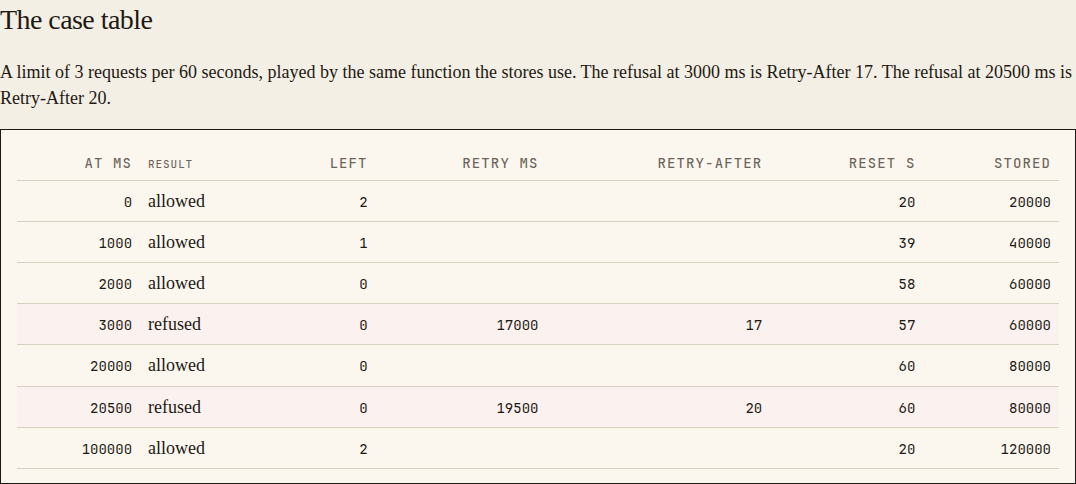
A limit of 3 requests per 60 seconds, one caller, nothing stored at the start.
Request at, ms Result Remaining Retry after, ms Stored afterwards 0 allowed 2 20000 1000 allowed 1 40000 2000 allowed 0 60000 3000 refused 0 17000 60000 20000 allowed 0 80000 20500 refused 0 19500 80000 100000 allowed 2 120000 The refused request at 3000 gets
Retry-After: 17. The one at 20500 getsRetry-After: 20.The store
The stored key is the limit's name, a colon and the caller, for example
default:key_3kTn9QxWb2aZ. The default limit is thedefault_limitinput perdefault_window_seconds.storeHow the one step is made redisOne script that reads, decides and writes, with the key's expiry set to the stored time. Pass nowin from the app, so tests can set it.databaseOne table, rate_limits(key, stored, expires_at). One transaction that locks the row, or one statement that inserts or updates and returns the result. Sweep expired rows once a minute.memoryA map behind one lock, with the least recently used entry dropped at 100,000. Hide the three behind one interface with one operation:
take(limits, now), wherelimitsis a list of key, limit and window. It decides for every entry and writes only if all of them allow. It returns, for each entry, allowed or refused withremaining,retry_afterandreset.Order of work for a request
- If the route is the health check, or the caller is exempt, pass.
- Work out the caller.
- Take from every limit that applies, in one call. If any refuses, nothing is counted. Answer 429 with the longest
retry_after. - Set the headers from the limit with the least remaining.
Configuration
Setting Purpose REDIS_URLConnection string, when storeisredis.DATABASE_URLConnection string, when storeisdatabase.TRUSTED_PROXIESAddresses or ranges whose forwarding header is believed. Empty by default. RATE_LIMIT_EXEMPTAPI key ids and IP addresses that are never limited. Empty by default. Named here
- The app says who is calling through one function,
caller(request), which answers with an API key's id, a user's id, or neither. The example app reads the key fromAuthorization: Bearer <key>. - The forwarding header is
X-Forwarded-For. If every address in it is a trusted proxy, the left-most is used. - An IPv4 address written inside IPv6 is counted as the IPv4 address.
- A refused request's body is
{"error": {"code": "rate_limited", "message": "..."}}. A strict limit with the store down answers 503 with the codestore_unavailable. - The three headers hold whole numbers, such as
RateLimit-Reset: 17. When two limits apply they describe the one with less remaining, and the default limit on a tie.
What this spec leaves to you
Where this spec names something, use that name, so that two builds of it agree. Where it does not, the choice is yours. List what you chose in the README.
# Design This file fixes the parts that are easy to get wrong. Choose the language and framework that fit the person's project; nothing here depends on them. ## The algorithm All times are whole milliseconds. For a limit of `limit` requests per `window`: ``` interval = window / limit (whole milliseconds, rounded down) stored = the caller's number, or now if there is none start = max(stored, now) ahead = start - now if ahead > window - interval: refuse; retry_after = ahead - (window - interval) else: store start + interval, to expire at start + interval allow; remaining = (window - (start + interval - now)) / interval, rounded down ``` `reset` is `start + interval - now` when allowed and `ahead` when refused. `Retry-After` and `RateLimit-Reset` are those values in seconds, rounded up. A limit with more requests than its window has milliseconds would have an interval of zero. That is a configuration error. Refuse to start with it. ## Cases A limit of 3 requests per 60 seconds, one caller, nothing stored at the start. | Request at, ms | Result | Remaining | Retry after, ms | Stored afterwards | | --- | --- | --- | --- | --- | | 0 | allowed | 2 | | 20000 | | 1000 | allowed | 1 | | 40000 | | 2000 | allowed | 0 | | 60000 | | 3000 | refused | 0 | 17000 | 60000 | | 20000 | allowed | 0 | | 80000 | | 20500 | refused | 0 | 19500 | 80000 | | 100000 | allowed | 2 | | 120000 | The refused request at 3000 gets `Retry-After: 17`. The one at 20500 gets `Retry-After: 20`. ## The store The stored key is the limit's name, a colon and the caller, for example `default:key_3kTn9QxWb2aZ`. The default limit is the `default_limit` input per `default_window_seconds`. | `store` | How the one step is made | | --- | --- | | `redis` | One script that reads, decides and writes, with the key's expiry set to the stored time. Pass `now` in from the app, so tests can set it. | | `database` | One table, `rate_limits(key, stored, expires_at)`. One transaction that locks the row, or one statement that inserts or updates and returns the result. Sweep expired rows once a minute. | | `memory` | A map behind one lock, with the least recently used entry dropped at 100,000. | Hide the three behind one interface with one operation: `take(limits, now)`, where `limits` is a list of key, limit and window. It decides for every entry and writes only if all of them allow. It returns, for each entry, allowed or refused with `remaining`, `retry_after` and `reset`. ## Order of work for a request 1. If the route is the health check, or the caller is exempt, pass. 2. Work out the caller. 3. Take from every limit that applies, in one call. If any refuses, nothing is counted. Answer 429 with the longest `retry_after`. 4. Set the headers from the limit with the least remaining. ## Configuration | Setting | Purpose | | --- | --- | | `REDIS_URL` | Connection string, when `store` is `redis`. | | `DATABASE_URL` | Connection string, when `store` is `database`. | | `TRUSTED_PROXIES` | Addresses or ranges whose forwarding header is believed. Empty by default. | | `RATE_LIMIT_EXEMPT` | API key ids and IP addresses that are never limited. Empty by default. | ## Named here - The app says who is calling through one function, `caller(request)`, which answers with an API key's id, a user's id, or neither. The example app reads the key from `Authorization: Bearer <key>`. - The forwarding header is `X-Forwarded-For`. If every address in it is a trusted proxy, the left-most is used. - An IPv4 address written inside IPv6 is counted as the IPv4 address. - A refused request's body is `{"error": {"code": "rate_limited", "message": "..."}}`. A strict limit with the store down answers 503 with the code `store_unavailable`. - The three headers hold whole numbers, such as `RateLimit-Reset: 17`. When two limits apply they describe the one with less remaining, and the default limit on a tie. ## What this spec leaves to you Where this spec names something, use that name, so that two builds of it agree. Where it does not, the choice is yours. List what you chose in the README. -
tasks.mdBuild tasks in order, each with a check.Tasks
Work in order. Finish a task's check before starting the next.
- Set up. A test runner, a clock that tests can set, and the smallest app to put the limiter in front of if there is none: one route and a health check. Check: an empty test run passes.
- The algorithm (R1). A pure function from the stored number,
now, the limit and the window to a result, with no store at all. Check: a test walks the table of cases indesign.mdand every row matches. - The store (R5, R8). The interface in
design.mdfor thestoreinput. Check: the R5 test with 50 requests at once passes, and the R8 test passes. - The caller (R2). Check: the R2 acceptance tests pass.
- The answer (R3). Status 429,
Retry-After, and the three headers ifresponse_headersis on. Usedefault_limitanddefault_window_seconds. Check: the R3 acceptance tests pass. - Named limits (R4). Only if
per_route_limitsis on. Check: the R4 acceptance tests pass. - Store failures (R6) and exemptions (R7). Check: the R6 and R7 acceptance tests pass.
- Finish. Write the README and run the whole test suite. Check: every item under "Definition of done" in
spec.mdis true.
# Tasks

Work in order. Finish a task's check before starting the next.

1. **Set up.** A test runner, a clock that tests can set, and the smallest app to
   put the limiter in front of if there is none: one route and a health check.
   Check: an empty test run passes.

2. **The algorithm (R1).** A pure function from the stored number, `now`, the limit
   and the window to a result, with no store at all.
   Check: a test walks the table of cases in `design.md` and every row matches.

3. **The store (R5, R8).** The interface in `design.md` for the `store` input.
   Check: the R5 test with 50 requests at once passes, and the R8 test passes.

4. **The caller (R2).**
   Check: the R2 acceptance tests pass.

5. **The answer (R3).** Status 429, `Retry-After`, and the three headers if
   `response_headers` is on. Use `default_limit` and `default_window_seconds`.
   Check: the R3 acceptance tests pass.

6. **Named limits (R4).** Only if `per_route_limits` is on.
   Check: the R4 acceptance tests pass.

7. **Store failures (R6) and exemptions (R7).**
   Check: the R6 and R7 acceptance tests pass.

8. **Finish.** Write the README and run the whole test suite.
   Check: every item under "Definition of done" in `spec.md` is true.
Is it for me?
- Kind
- app part
- Platforms
- backend
What does it need?
- Accounts
- A Redis server, if counts are kept in Redis
- Agent permissions
- shell, network
- Secrets it reads
REDIS_URLDATABASE_URL
What changed?
- 0.1.215 Nov 2026Names what it builds.
- 0.1.114 Nov 2026Says "person" where it said "buyer".
- 0.1.014 Nov 2026Moved from dwrtz/rate-limiting.
For agents: start.md says how to build this spec, spec.json holds everything on this page, and bundle.tar.gz holds its files.