Admin console
An internal console for your team: find a customer, see their account, act on it and sign in as them, with every action recorded.
This is an app part spec on Spekkr, published by vex. It is listed with the other specs. Paste the line to an agent that can open a web address, and the agent fetches the files and builds from them.
- Spec
vex/admin-console- Version
- 0.1.2
- Published by
- vex
- Updated
- 15 Nov 2026
Build this spec
Build the spec at https://spekkr.com/vex/admin-console/start.md.
Paste this to your AI agent. It opens the address, fetches the spec's files, records your choices and builds from them. Nothing to install, no account.
Published by vex.
What does the result look like?
What can I customize?
Your choices go into the line you copy. Anything else is yours to edit, but it leaves the tested path.
What do I get?
-
spec.mdRequirements and acceptance criteria.Admin console
What this builds
The pages a company's own staff use to help its customers: find an account, see what is in it, fix what can be fixed, and look at the app as the customer does. The console is kept apart from the app, shows no more than the job needs, and records everything staff do in it.
Read
spekkr.inputs.jsonfirst.impersonationdecides whether R6 exists, and a session as a customer lastsimpersonation_minutesminutes.require_reasonchanges R5 and R6.This spec needs an app with a
userstable and sign-in. It does not build them.Out of scope
- A general tool for editing any row of any table.
- Charts and reports.
- Help-desk tickets.
Requirements
Each requirement has an id. Tests name the id they cover.
R1. Who is staff
- Staff are listed in a table of their own, with a role:
supportoradmin. - A person becomes staff by a command run on the server, or by an
adminin the console. No public route and no field on a form can make someone staff. - An
admincannot remove their own role, and the lastadmincannot be removed.
Accept when: a request that sets a role field on the user's own profile changes nothing, and removing the last
adminis refused.R2. Kept apart
- Every console address starts with
/adminand passes through one guard. - A person who is not staff gets 404 for every console address, the same answer as for an address that does not exist.
- The console asks staff to sign in again if they last did so more than 12 hours ago.
- A test lists every route under
/adminand fails if one is not behind the guard.
Accept when: a signed-in customer gets 404 for each console address, and the route test fails when a route is added outside the guard.
R3. Find a customer
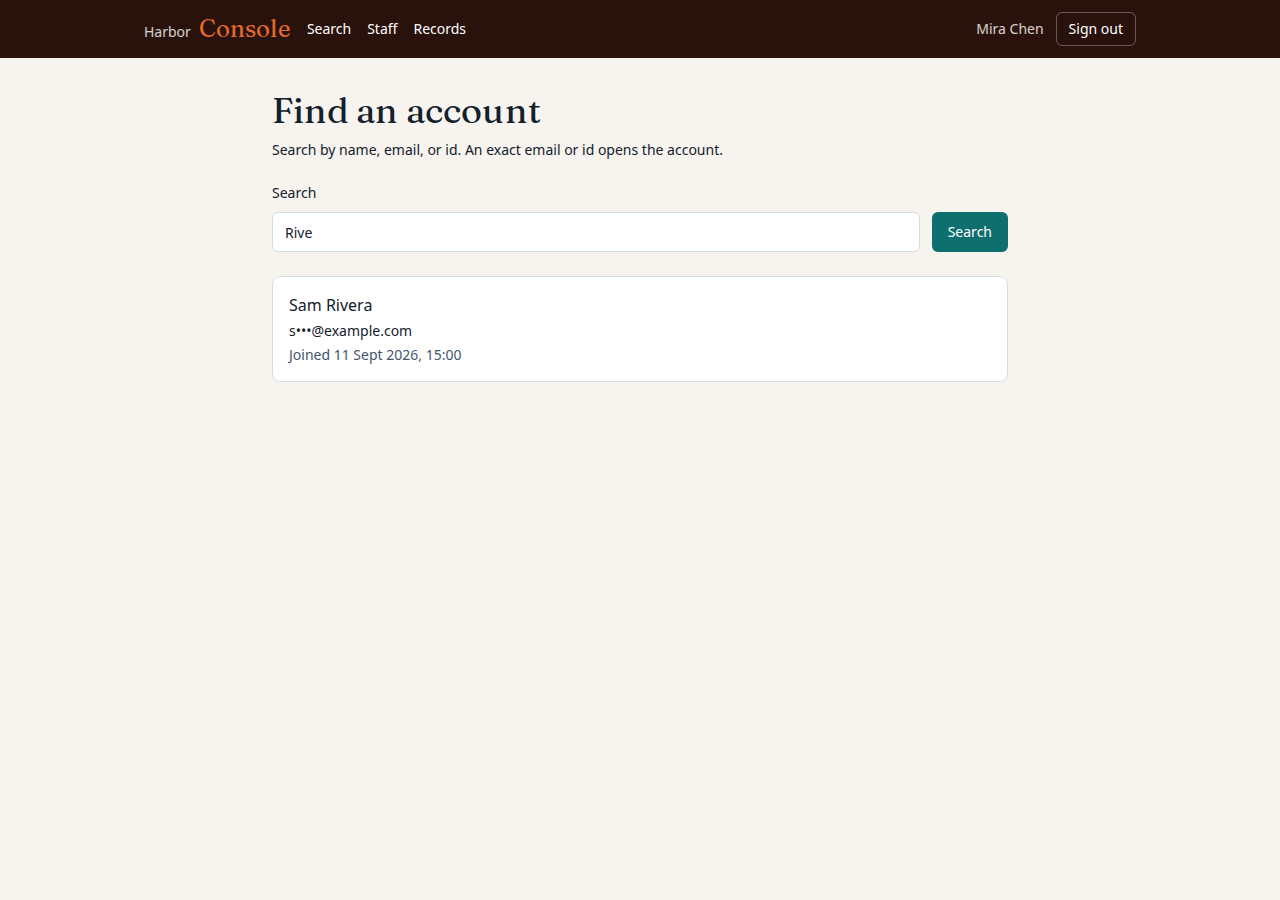
- Staff search by email address, name or id. An exact email or id leads straight to the account.
- Results show a name, a masked email address and when the account was made, 20 at a time.
Accept when: a search by part of a name lists matching accounts with their email addresses masked.
R4. A customer's page
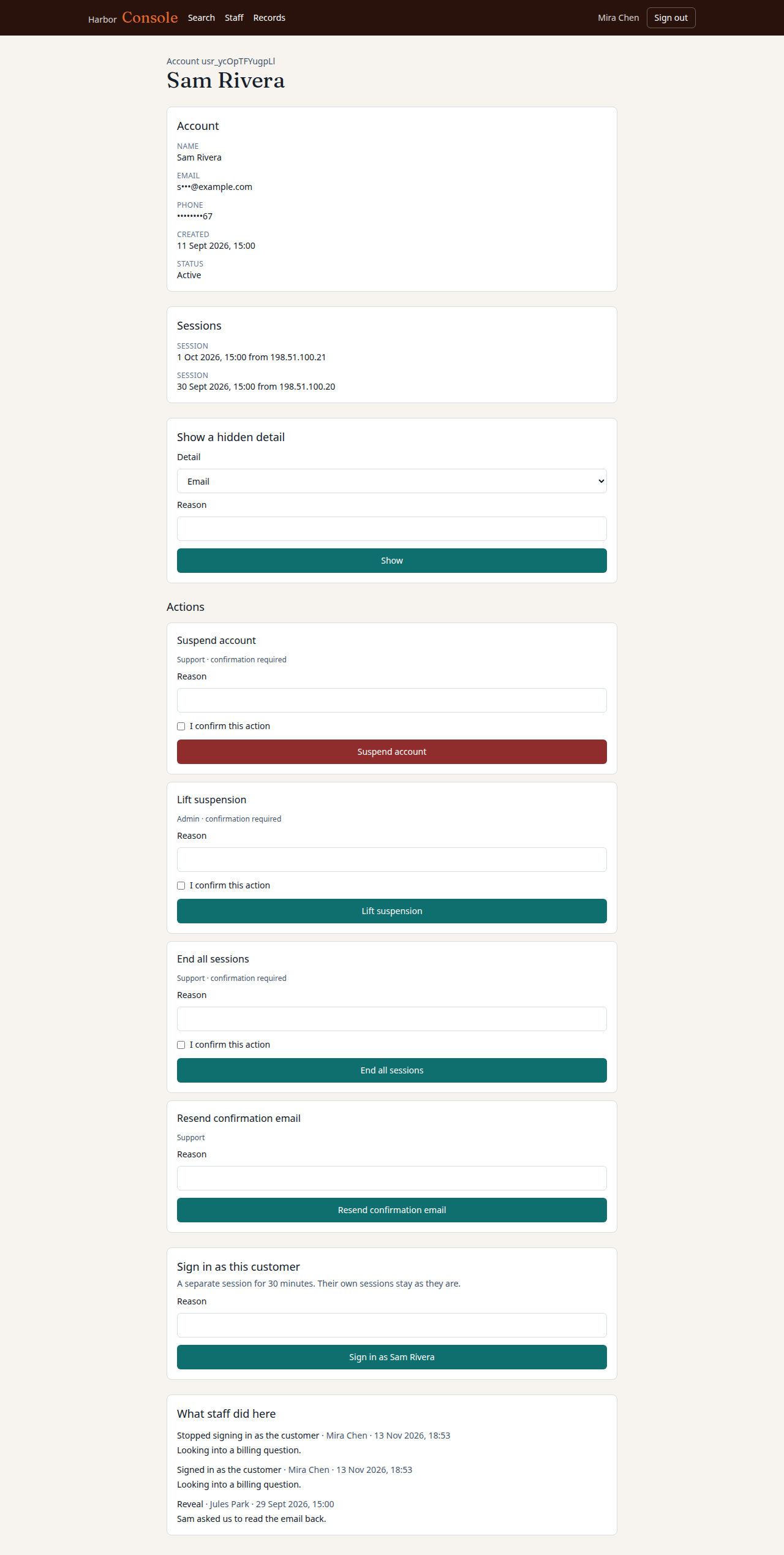
- The page is made of sections, each a function that takes the account and returns facts to show. The first sections: the account, its sessions, its workspaces if the app has them.
- Personal details are masked:
s•••@example.com. "Show" reveals one, and the reveal is recorded. - The page shows the last 20 things staff did to this account.
Accept when: the page as first loaded holds no whole email address, and pressing "Show" leaves a record.
R5. Actions
- Actions are a list in code. Each has a name, the role it needs, whether it asks to be confirmed, and a function that does it.
- The first actions: suspend an account, lift a suspension, end all of an account's sessions, and resend the confirmation email.
- If
require_reasonis on, every action needs a reason of at least 10 characters before it runs. - A suspended account cannot sign in or use a session it has. Its sign-in page says the account is suspended and how to reach support.
supportcan do only the actions marked for it.admincan do all.
Accept when: a
supportperson gets 403 for anadminaction, a suspended account's existing session is refused on its next request, and withrequire_reasonon, an action without a reason does not run.R6. Sign in as a customer
Only if
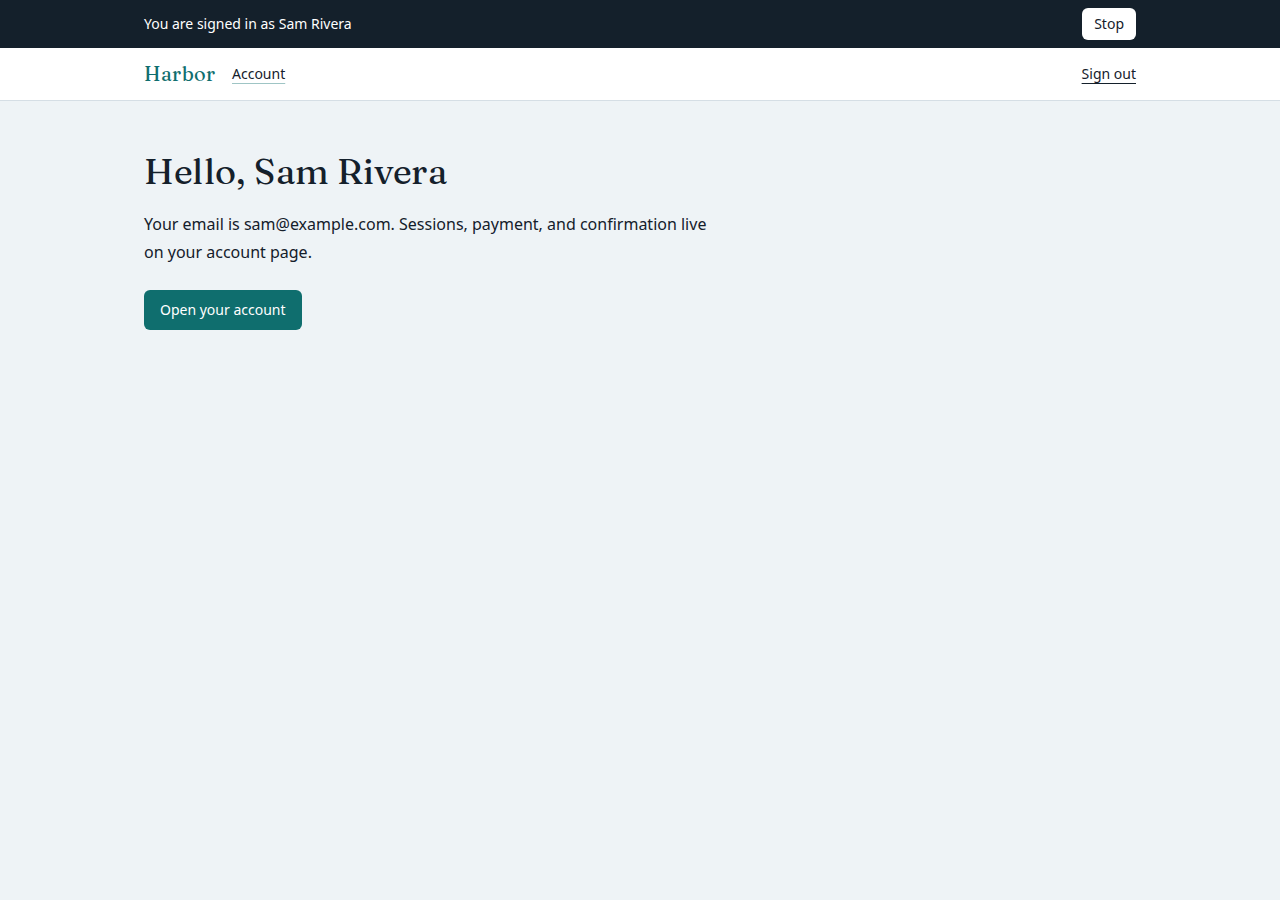
impersonationis on.- Staff start a session as a customer from the customer's page. If
require_reasonis on, it needs a reason. - The session lasts
impersonation_minutesminutes and then ends by itself. A banner on every page of the app says "You are signed in as NAME" and has a button to stop. - In such a session the routes marked sensitive answer 403: changing the email address or the password, deleting the account, anything that pays or changes how the customer pays, and creating API keys.
- Staff cannot sign in as other staff. A session as a customer cannot open the console or start another such session.
- The customer's own sessions are untouched, and nothing the customer sees says that staff looked.
- Whatever is recorded during the session, by this spec or by the app, names the staff member as well as the customer.
Accept when: a sensitive route answers 403 in such a session, the session stops working one second after its time, and staff trying to sign in as staff get 403.
R7. Everything is recorded
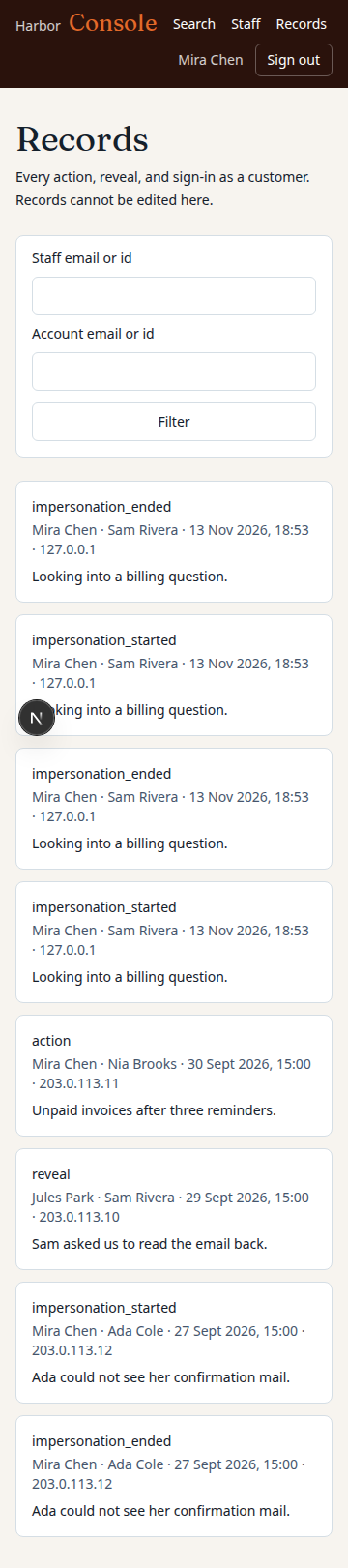
- Each action, each reveal and the start and end of each session as a customer is recorded: who, what, on which account, the reason, when, and from which IP address.
- Records cannot be changed or deleted from the console.
- An
admincan read all records, with filters for staff member and account.
Accept when: each of the four kinds of event leaves a record with every field, and no console route changes one.
R8. Pages
- Search, the customer's page, the staff list, the records.
- Every page says in its header that it is the console, in a colour the app does not use, so staff never mistake one for the other.
Accept when: each page works with a keyboard alone and at a 360 pixel wide screen.
Definition of done
- Every acceptance check above has an automated test, and all tests pass.
- A README explains how to make the first
admin, how to add a section and an action, how to mark a route sensitive, and how to run the tests.
# Admin console

## What this builds

The pages a company's own staff use to help its customers: find an account, see
what is in it, fix what can be fixed, and look at the app as the customer does.
The console is kept apart from the app, shows no more than the job needs, and
records everything staff do in it.

Read `spekkr.inputs.json` first. `impersonation` decides whether R6 exists, and a
session as a customer lasts `impersonation_minutes` minutes. `require_reason`
changes R5 and R6.

This spec needs an app with a `users` table and sign-in. It does not build them.

## Out of scope

- A general tool for editing any row of any table.
- Charts and reports.
- Help-desk tickets.

## Requirements

Each requirement has an id. Tests name the id they cover.

### R1. Who is staff

- Staff are listed in a table of their own, with a role: `support` or `admin`.
- A person becomes staff by a command run on the server, or by an `admin` in the
  console. No public route and no field on a form can make someone staff.
- An `admin` cannot remove their own role, and the last `admin` cannot be
  removed.

Accept when: a request that sets a role field on the user's own profile changes
nothing, and removing the last `admin` is refused.

### R2. Kept apart

- Every console address starts with `/admin` and passes through one guard.
- A person who is not staff gets 404 for every console address, the same answer
  as for an address that does not exist.
- The console asks staff to sign in again if they last did so more than 12 hours
  ago.
- A test lists every route under `/admin` and fails if one is not behind the
  guard.

Accept when: a signed-in customer gets 404 for each console address, and the
route test fails when a route is added outside the guard.

### R3. Find a customer

- Staff search by email address, name or id. An exact email or id leads straight
  to the account.
- Results show a name, a masked email address and when the account was made, 20
  at a time.

Accept when: a search by part of a name lists matching accounts with their email
addresses masked.

### R4. A customer's page

- The page is made of sections, each a function that takes the account and
  returns facts to show. The first sections: the account, its sessions, its
  workspaces if the app has them.
- Personal details are masked: `s•••@example.com`. "Show" reveals one, and the
  reveal is recorded.
- The page shows the last 20 things staff did to this account.

Accept when: the page as first loaded holds no whole email address, and pressing
"Show" leaves a record.

### R5. Actions

- Actions are a list in code. Each has a name, the role it needs, whether it asks
  to be confirmed, and a function that does it.
- The first actions: suspend an account, lift a suspension, end all of an
  account's sessions, and resend the confirmation email.
- If `require_reason` is on, every action needs a reason of at least 10
  characters before it runs.
- A suspended account cannot sign in or use a session it has. Its sign-in page
  says the account is suspended and how to reach support.
- `support` can do only the actions marked for it. `admin` can do all.

Accept when: a `support` person gets 403 for an `admin` action, a suspended
account's existing session is refused on its next request, and with
`require_reason` on, an action without a reason does not run.

### R6. Sign in as a customer

Only if `impersonation` is on.

- Staff start a session as a customer from the customer's page. If
  `require_reason` is on, it needs a reason.
- The session lasts `impersonation_minutes` minutes and then ends by itself.
  A banner on every page of the app says "You are signed in as NAME" and has a
  button to stop.
- In such a session the routes marked sensitive answer 403: changing the email
  address or the password, deleting the account, anything that pays or changes
  how the customer pays, and creating API keys.
- Staff cannot sign in as other staff. A session as a customer cannot open the
  console or start another such session.
- The customer's own sessions are untouched, and nothing the customer sees says
  that staff looked.
- Whatever is recorded during the session, by this spec or by the app, names the
  staff member as well as the customer.

Accept when: a sensitive route answers 403 in such a session, the session stops
working one second after its time, and staff trying to sign in as staff get 403.

### R7. Everything is recorded

- Each action, each reveal and the start and end of each session as a customer is
  recorded: who, what, on which account, the reason, when, and from which IP
  address.
- Records cannot be changed or deleted from the console.
- An `admin` can read all records, with filters for staff member and account.

Accept when: each of the four kinds of event leaves a record with every field,
and no console route changes one.

### R8. Pages

- Search, the customer's page, the staff list, the records.
- Every page says in its header that it is the console, in a colour the app does
  not use, so staff never mistake one for the other.

Accept when: each page works with a keyboard alone and at a 360 pixel wide screen.

## Definition of done

- Every acceptance check above has an automated test, and all tests pass.
- A README explains how to make the first `admin`, how to add a section and an
  action, how to mark a route sensitive, and how to run the tests.
-
design.mdData model, rules and flows.Design
This file fixes the parts that are easy to get wrong. Choose the language and framework that fit the person's project; nothing here depends on them.
Data model
Use the database in the
databaseinput.Table Columns staffuser_id(primary key),role,added_by,added_atstaff_recordsid,staff_id,kind,account_id,detail(JSON),reason,ip,atimpersonationsid,staff_id,account_id,token_hash(unique),reason,started_at,expires_at,ended_at(only ifimpersonationis on)usersgainssuspended_at.kindis one ofaction,reveal,impersonation_startedandimpersonation_ended.The guard
One function in front of every
/adminroute, in this order:- No session, or the session is one as a customer: 404.
- The user is not in
staff: 404. - The session is older than 12 hours: send to sign-in, then back.
- The route names a role the staff member lacks: 403.
Answer 404 with the same page the app gives for any unknown address.
A session as a customer
- It is a session of its own kind, with its own cookie name and a random token stored as a hash. It does not reuse or copy the customer's session.
- The app's guard, when it finds this cookie, loads the customer as the current user and also sets "acting staff member" on the request.
- Routes are marked sensitive in one list. The app's guard answers 403 for them whenever "acting staff member" is set.
- The cookie lasts as long as the
impersonation_minutesinput says, and the server checksexpires_aton every request as well. - Stopping sets
ended_at, clears the cookie and returns staff to the customer's page in the console.
Masking
Value Shown as sam@example.coms•••@example.coma@example.com•@example.comA phone number Its last 2 digits, the rest as •A name As it is The whole value is sent to the browser only in answer to "Show", never hidden in the page.
Suspension
Check
suspended_atwhere sessions are loaded, so a suspension takes effect on the next request without having to find and end each session.Configuration
Secret Purpose DATABASE_URLConnection string for the chosen database. Named here
supportmay suspend, end sessions and resend a confirmation. Lifting a suspension, revealing a hidden value and changing staff are foradmin.
What this spec leaves to you
Where this spec names something, use that name, so that two builds of it agree. Where it does not, the choice is yours. List what you chose in the README.
# Design

This file fixes the parts that are easy to get wrong. Choose the language and
framework that fit the person's project; nothing here depends on them.

## Data model

Use the database in the `database` input.

| Table | Columns |
| --- | --- |
| `staff` | `user_id` (primary key), `role`, `added_by`, `added_at` |
| `staff_records` | `id`, `staff_id`, `kind`, `account_id`, `detail` (JSON), `reason`, `ip`, `at` |
| `impersonations` | `id`, `staff_id`, `account_id`, `token_hash` (unique), `reason`, `started_at`, `expires_at`, `ended_at` (only if `impersonation` is on) |

`users` gains `suspended_at`. `kind` is one of `action`, `reveal`,
`impersonation_started` and `impersonation_ended`.

## The guard

One function in front of every `/admin` route, in this order:

1. No session, or the session is one as a customer: 404.
2. The user is not in `staff`: 404.
3. The session is older than 12 hours: send to sign-in, then back.
4. The route names a role the staff member lacks: 403.

Answer 404 with the same page the app gives for any unknown address.

## A session as a customer

- It is a session of its own kind, with its own cookie name and a random token
  stored as a hash. It does not reuse or copy the customer's session.
- The app's guard, when it finds this cookie, loads the customer as the current
  user and also sets "acting staff member" on the request.
- Routes are marked sensitive in one list. The app's guard answers 403 for them
  whenever "acting staff member" is set.
- The cookie lasts as long as the `impersonation_minutes` input says, and the
  server checks `expires_at` on every request as well.
- Stopping sets `ended_at`, clears the cookie and returns staff to the
  customer's page in the console.

## Masking

| Value | Shown as |
| --- | --- |
| `sam@example.com` | `s•••@example.com` |
| `a@example.com` | `•@example.com` |
| A phone number | Its last 2 digits, the rest as `•` |
| A name | As it is |

The whole value is sent to the browser only in answer to "Show", never hidden in
the page.

## Suspension

Check `suspended_at` where sessions are loaded, so a suspension takes effect on
the next request without having to find and end each session.

## Configuration

| Secret | Purpose |
| --- | --- |
| `DATABASE_URL` | Connection string for the chosen database. |

## Named here

- `support` may suspend, end sessions and resend a confirmation. Lifting a
  suspension, revealing a hidden value and changing staff are for `admin`.

## What this spec leaves to you

Where this spec names something, use that name, so that two builds of it agree.
Where it does not, the choice is yours. List what you chose in the README.
-
tasks.mdBuild tasks in order, each with a check.Tasks
Work in order. Finish a task's check before starting the next.
- Read the app. Find how sessions are loaded and where routes are declared. If there is no app yet, build the smallest one: users, sign-in, one page. Check: a test signs a user in the existing way.
- Staff and the guard (R1, R2). The tables in
design.md, the command that makes the firstadmin, and the route test. Check: the R1 and R2 acceptance tests pass. - Records (R7). Before anything that needs recording. Check: a record can be written and none can be changed.
- Find and show (R3, R4). With masking. Check: the R3 and R4 acceptance tests pass.
- Actions (R5). Honour
require_reason. Check: the R5 acceptance tests pass. - Sign in as a customer (R6). Only if
impersonationis on. Use theimpersonation_minutesinput and a clock that tests can set. Check: the R6 acceptance tests pass. - Pages (R8). Check: every page can be used with a keyboard alone and at 360 pixels wide.
- Finish. Write the README and run the whole test suite. Check: every item under "Definition of done" in
spec.mdis true.
# Tasks

Work in order. Finish a task's check before starting the next.

1. **Read the app.** Find how sessions are loaded and where routes are declared.
   If there is no app yet, build the smallest one: users, sign-in, one page.
   Check: a test signs a user in the existing way.

2. **Staff and the guard (R1, R2).** The tables in `design.md`, the command that
   makes the first `admin`, and the route test.
   Check: the R1 and R2 acceptance tests pass.

3. **Records (R7).** Before anything that needs recording.
   Check: a record can be written and none can be changed.

4. **Find and show (R3, R4).** With masking.
   Check: the R3 and R4 acceptance tests pass.

5. **Actions (R5).** Honour `require_reason`.
   Check: the R5 acceptance tests pass.

6. **Sign in as a customer (R6).** Only if `impersonation` is on. Use the
   `impersonation_minutes` input and a clock that tests can set.
   Check: the R6 acceptance tests pass.

7. **Pages (R8).**
   Check: every page can be used with a keyboard alone and at 360 pixels wide.

8. **Finish.** Write the README and run the whole test suite.
   Check: every item under "Definition of done" in `spec.md` is true.
Is it for me?
- Kind
- app part
- Platforms
- web, backend
What does it need?
- Agent permissions
- shell, network
- Secrets it reads
DATABASE_URL
What changed?
- 0.1.215 Nov 2026Names what it builds.
- 0.1.114 Nov 2026Says "person" where it said "buyer".
- 0.1.014 Nov 2026Moved from dwrtz/admin-console.
For agents: start.md says how to build this spec, spec.json holds everything on this page, and bundle.tar.gz holds its files.