Async video
Record your screen and camera in the browser, share a link, get comments and emoji pinned to the moment. Cloudflare Workers, R2 and D1.
This is a web app spec on Spekkr, published by dwrtz. It is listed with the other specs. Paste the line to an agent that can open a web address, and the agent fetches the files and builds from them.
- Spec
dwrtz/async-video- Version
- 0.1.2
- Published by
- dwrtz
- Updated
- 17 Nov 2026
Build this spec
Build the spec at https://spekkr.com/dwrtz/async-video/start.md.
Paste this to your AI agent. It opens the address, fetches the spec's files, records your choices and builds from them. Nothing to install, no account.
Published by dwrtz.
What does the result look like?
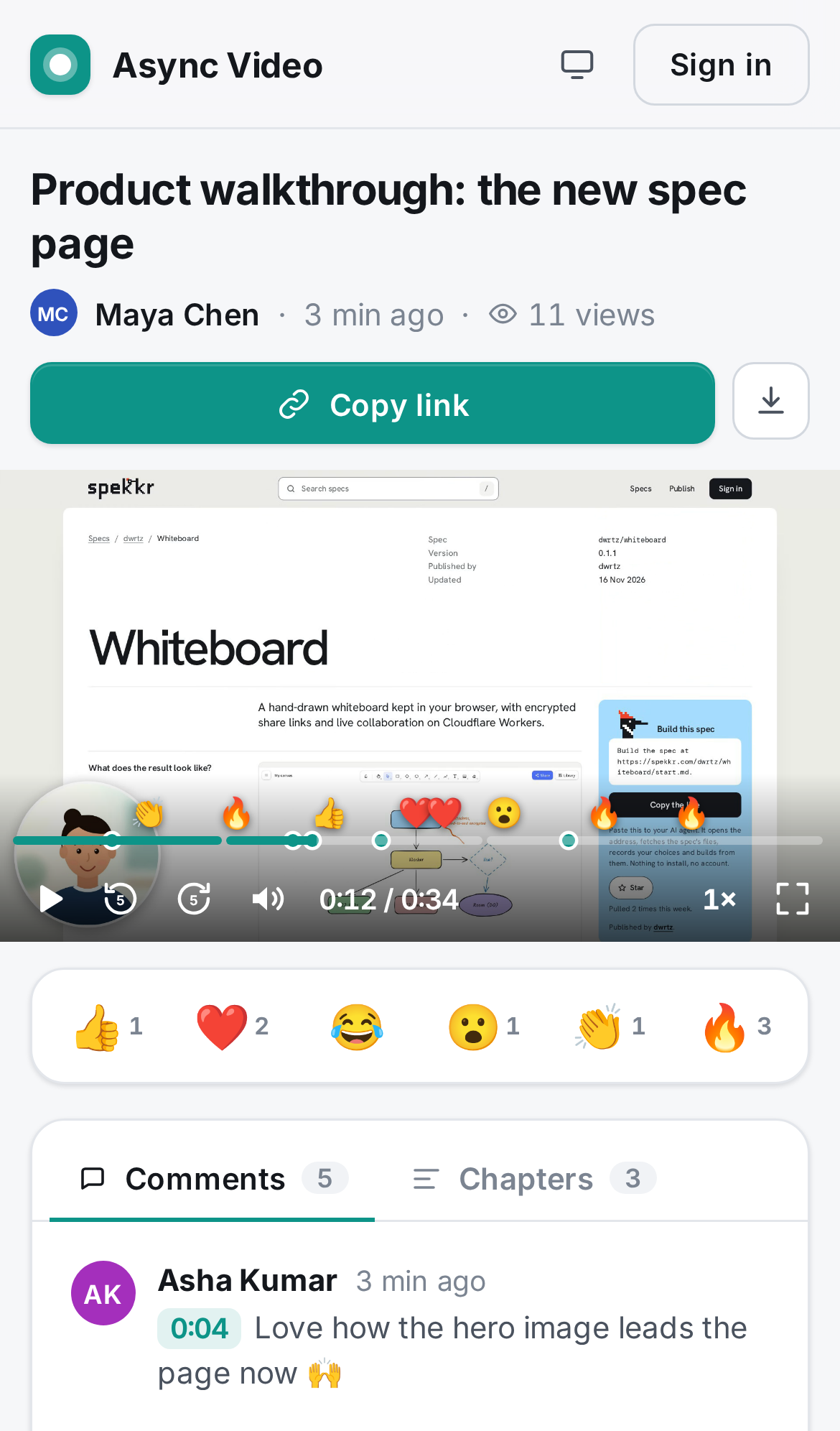
What can I customize?
Your choices go into the line you copy. Anything else is yours to edit, but it leaves the tested path.
What do I get?
-
spec.mdRequirements R1–R17 with acceptance checks: allowlisted accounts, recorder with camera bubble, review before saving with real cuts made in the browser (trim, removed section, mute; only the kept part is uploaded), MP4-first recording, multipart upload, share page and player that plays on phones, re-cutting a saved video, chapters, timestamped comments, reactions, views, library, limits, phones, deploy.Async video
What this builds
A web app for async video messages. The owner records their screen, their camera, or their screen with their face in a round camera bubble, straight from the browser. When they press Stop, the recording stays in the browser and opens in a review step: they play it back, trim the start and end, optionally remove one section from the middle, set the title and choose whether it has sound. Nothing is uploaded until they press Save. Then the browser cuts the file down to the kept part (dropping the sound if muted), uploads only that, and opens it on its own share page. The cut parts never leave the owner's device. They copy the link and send it.
Anyone with the link can watch without an account. Viewers can:
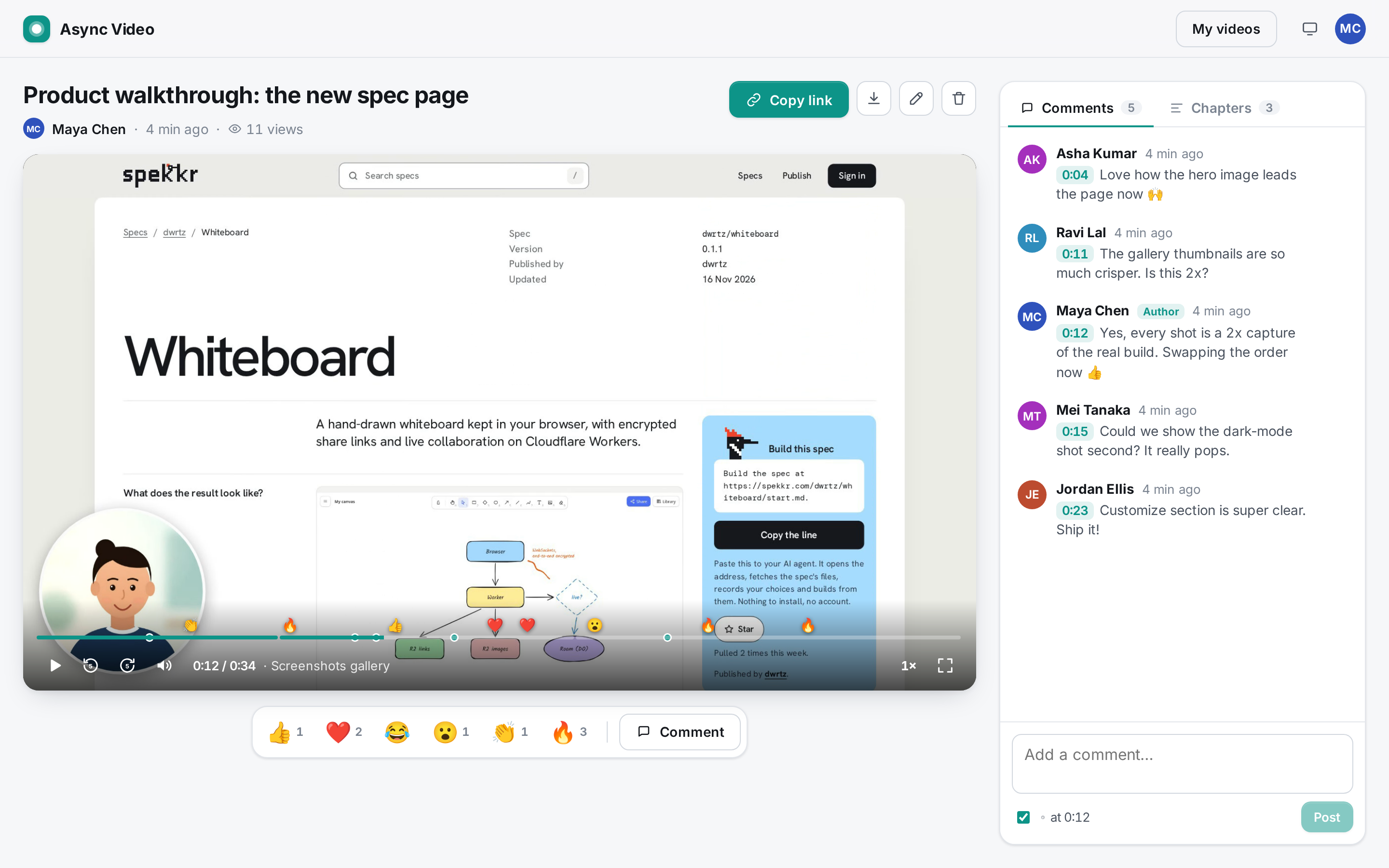
- play it with a proper player: speed control, keyboard shortcuts, chapters, a seek bar with markers
- leave comments pinned to the moment they were watching
- react with emoji at a moment in the video
- download it, if the owner allows it
The owner has a library of their videos, and for each one can rename, cut it again (trim, remove a section, mute: this replaces the stored file and can't be undone), add chapters, turn comments or downloads off, and delete.
Recording needs an account, and a deployment can limit accounts to a list of email addresses (R2). Watching never does.
It is one Cloudflare Worker:
- The React single-page app is the Worker's static assets.
- The JSON API runs in the Worker.
- Video files and thumbnails live in one R2 bucket. Uploads use R2 multipart uploads, so large files go up in parts.
- Accounts, sessions, video details, comments, reactions and views live in one D1 database.
Recording happens entirely in the browser with
getDisplayMedia,getUserMedia, a canvas for the camera bubble andMediaRecorder. There is no server-side video processing, no transcoding and no third-party service.It runs on a laptop with
npm installandnpm run dev(wrangler devwith local D1 and R2, no Cloudflare account). It deploys withnpm run deploy.Read
spekkr.inputs.jsonfirst. It sits at the repository root. If it is missing, create it from thecustomize.settingsdefaults inspekkr.json; with the defaults its full contents are:{ "app_name": "Async Video", "accent_color": "#0d9488", "allowed_emails": "" }It has exactly these three keys:
app_name: the product name (default "Async Video"). It is the page title, the name next to the brand mark, and the name in the sign-in text.accent_color: the accent colour (default#0d9488). It is used for primary buttons, the seek bar's played part, timestamps, active tabs, switches, selection and focus rings.allowed_emails: comma-separated email addresses that may have an account (default empty, which means anyone). The builder copies it intovars.ALLOWED_EMAILSinwrangler.jsonc. The Worker reads only the var, so a deployment can change it without a rebuild (R2).
design.mdhas:- the stack, Cloudflare config and deploy steps
- the data model and storage layout
- the recording pipeline and upload protocol
- the API, the limits
- every screen and the look
tasks.mdis the build order.research.mdrecords where the design came from; the builder does not need it, and nothing in it is a requirement.Names and words
- The product is called
app_nameeverywhere. The built app never shows the name, logo or wording of any other video messaging product. - The brand mark is a rounded square in the accent colour with a white dot (a record light) in the middle.
- Interface text the spec quotes is the text to use. Other text is the builder's own, short and plain.
- No image, font or icon file is copied from another product. Icons are inline SVG drawn in the app's own code. The font is Inter (SIL Open Font License) from
@fontsource-variable/inter, latin subset only.
Words used here
- Owner: the signed-in account that recorded a video. Viewer: anyone opening a share link, signed in or not.
- Mode: what a recording captures:
screen_camera("Screen + camera"),screen("Screen only") orcamera("Camera only"). - Bubble: the round camera picture drawn over the screen in
screen_cameramode. - Media time: a position in the stored file, in milliseconds. Comments, reactions and chapters store media time, and the player shows it.
- Selection: while editing (review step or "Edit video"), the trim window
[trim start, trim end]and an optional removed section strictly inside it. - Kept parts: the trim window minus the removed section (one or two segments). Removed parts: everything else (up to three spans: before the trim start, the removed section, after the trim end).
- Cut: a new file made in the browser from the kept parts laid end to end (and without sound if muted). Saving a selection that removes anything, or mutes, makes a cut; the stored file is always exactly what viewers see.
- Viewer id: 22 random base62 characters kept in the browser's
localStorage(av.viewer) and sent as thex-viewerheader. It counts views once and lets people delete their own comments. - MB: 1,048,576 bytes.
Out of scope
These are not built:
- transcripts, captions, AI summaries or AI chapters (no speech-to-text runs; see research.md)
- drawing on the screen while recording, cursor highlights, blurring
- teams, workspaces, folders, sharing a video with specific people, password-protected links, link expiry
- replying with a video, and comment threads (comments are flat)
- embedding on other sites, social share buttons, custom thumbnails, CTA buttons
- editing beyond one trim, one removed section and mute: no stitching clips, no multiple removed sections, no overlays, no undo after a cut is saved (the old file is deleted), and no server-side transcoding (cuts are made in the browser)
- a desktop app or browser extension; recording from another tab works because the browser's own screen picker offers tabs, windows and screens
- email of any kind: no sign-in links, no notifications, no password reset
- languages other than English
Requirements
Each requirement ends with an "Accept when" line naming the tests that prove it. Test names are in "Tests" at the end. Unit tests are in
tests/shared.test.ts; end-to-end tests are ine2e/.R1. Settings, run and store
spekkr.inputs.jsonis read at build time intosrc/shared/settings.ts. Anapp_namelonger than 40 characters is cut to 40; anaccent_colorthat is not#rrggbbfalls back to#0d9488.- The page title is
app_name(a share page then sets it to the video's title).--accentis set on:rootfromaccent_colorbefore the first render. - Runtime is Cloudflare Workers only, with Web APIs and no
node:*module, so nonodejs_compatflag. wrangler.jsonc(exact shape indesign.md, "Cloudflare config") servesdist/as assets with single-page-app fallback, runs the Worker first for/api/*, and bindsDB(D1),MEDIA(R2), the three rate limits, and the varsALLOWED_EMAILSandSTORAGE_LIMIT_MB.- The schema is
migrations/0001_init.sql, applied withwrangler d1 migrations apply. The Worker never creates tables. - Scripts:
build,dev(build, migrate the local D1,wrangler dev),typecheck,test,e2e,deploy,types.
Accept when: "R1 the page title and accent colour come from spekkr.inputs.json" passes,
npm run typecheckpasses, andnpx wrangler deploy --dry-run --outdir /tmp/drylists DB, MEDIA, CREATE_LIMIT, WRITE_LIMIT, AUTH_LIMIT, ALLOWED_EMAILS and STORAGE_LIMIT_MB.R2. Accounts and the email allowlist
- Accounts have a name, an email (stored lower-case, unique) and a password (at least 8 characters, PBKDF2-SHA-256 with 100,000 iterations and a 16-byte random salt). There is no email sending, so there is no email verification and no password reset.
- Signing up or in creates a session: 32 random bytes as base64url in an
HttpOnly; SameSite=Lax; Path=/cookie namedsid(plusSecureon https), valid 30 days. Only the SHA-256 of the token is stored. Allowlist.
ALLOWED_EMAILSis a comma-separated, case-insensitive list. When it is non-empty:- Sign-up with any other email is refused with 403 and
{"error": "This site only accepts accounts for approved email addresses.", "fields": {"email": <same text>}}. Nothing is written. - Sign-in with any other email is refused the same way, before the password is checked.
- A session whose account email is no longer on the list counts as signed out.
- The sign-in page shows that text under the Email field. When it is empty, anyone may sign up.
- Sign-up with any other email is refused with 403 and
- The allowlist is checked only in the Worker. The client never decides who may sign up.
- Signed-out visitors who open
/or/recordsee the sign-in page. Share pages never need an account. - Wrong email or password: 401 "Email or password is wrong". Existing email at sign-up: 409, field error "Already registered. Sign in instead."
- Sign out deletes the session row and clears the cookie.
Accept when: "R2 an email that isn't on the allowlist is refused at sign-up and sign-in", "R2 allowlisted owner signs up, signs out and signs back in; wrong password is refused", "R2 signed-out visitors can't reach the recorder or the library API" and the unit test "allowlist" pass.
R3. Recorder
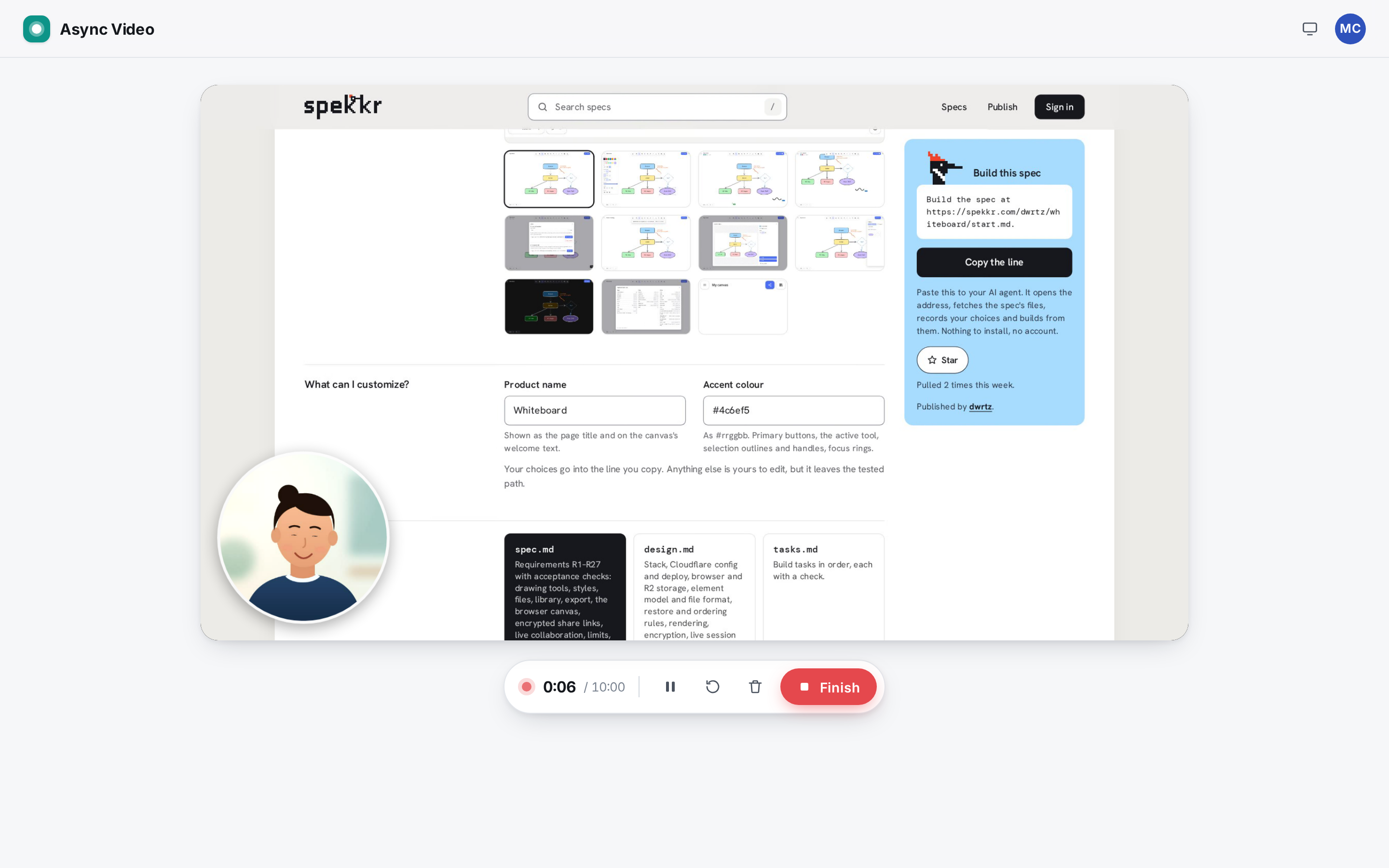
The recorder is at
/record.- Modes: a segmented control "Screen + camera", "Screen only", "Camera only". The last choice is remembered (
localStorage). - Options: a "Microphone on/off" chip, a bubble size control S / M / L (only in Screen + camera), and a "Countdown" switch (on by default). All remembered.
Setup stage: a 16:9 dark stage.
- In camera modes, it shows the live camera (front camera on phones,
facingMode: "user"), mirrored. - In Screen + camera, it shows a placeholder window with "Your screen appears here once you choose it" and the bubble over it, with the live camera inside.
- The bubble starts at the bottom-left. It can be dragged anywhere inside the stage and never leaves the frame (it keeps a margin of 3.5 % of the shorter side). Its position and size are remembered and used in the recording.
- If the camera is blocked, it says so and "Start recording" stays disabled in camera modes.
- Under the button: "Up to 10 minutes. You'll pick a screen, window or tab next. You can trim the start and end before saving." (camera mode: "Up to 10 minutes. You can trim it before saving.")
- In camera modes, it shows the live camera (front camera on phones,
Start: "Start recording" asks for the screen first (the browser's own picker, R3b) in screen modes, then shows a 3-2-1 countdown over the stage ("Click to start now" skips it), then records.
- If the picker is cancelled: "Screen sharing was cancelled. Pick a screen, window or tab to record." and back to setup.
While recording: the stage shows the live result (for Screen + camera, the composited frame), and a control bar shows:
- a pulsing red dot, the elapsed time
m:ssand "/ 10:00" - Pause / Resume, Restart (throws away what was recorded and starts again with the same screen and camera, timer back to 0:00), Cancel (throws everything away and returns to setup; nothing is uploaded), "Pop out controls" (R3b, only where supported and not already open), and "Finish"
- The bubble can still be dragged during a recording.
- a pulsing red dot, the elapsed time
- The timer excludes paused time. In the last minute it turns red. At 10:00 the recording stops by itself.
- Stop happens on Finish, on Stop in the floating controls, on Alt+Shift+S, at 10:00, or when the shared screen stops (the browser's own "Stop sharing"). It shows "Finishing your recording…" and opens the review step (R3a). Nothing is uploaded at this point.
- Phones: when
navigator.mediaDevices.getDisplayMediadoes not exist (iPhone, iPad, Android browsers), the two screen modes are disabled, Camera only is selected, and the recorder says "Phones and tablets can't share their screen from a browser, so this device records with its camera." Camera recording, review and upload work as on a computer.
Accept when: "R3 R4 R5 screen + camera: countdown, pause/resume, review, upload, then the share page plays a seekable MP4", "R3 screen only and camera only record at the source size", "R3 restart resets the timer; cancel discards without creating a video", "R3 the camera bubble can be dragged and resized, and the choice is remembered", "R15 phones without screen capture offer camera recording only" and the unit test "camera bubble" pass.
R3a. Review before saving
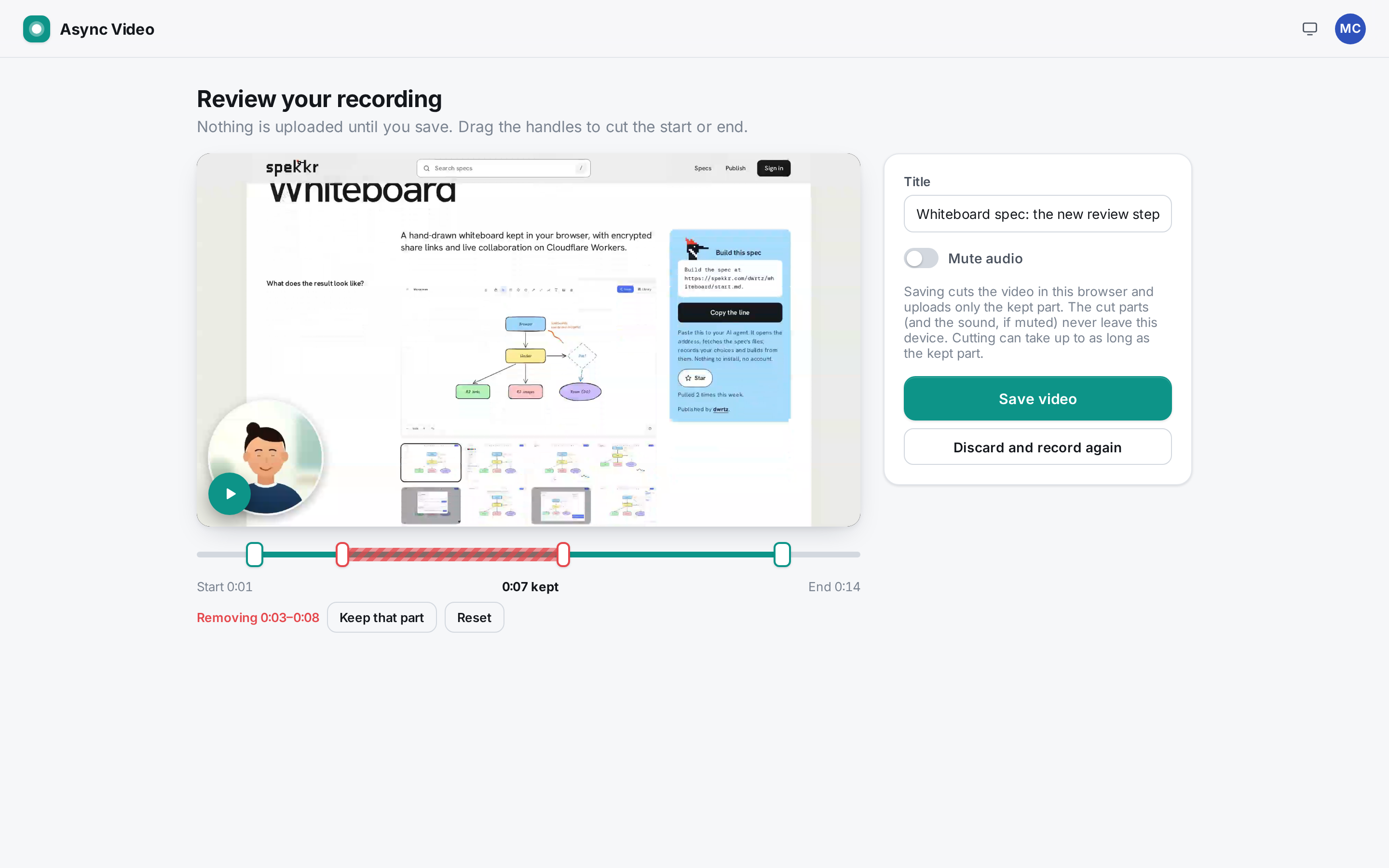
After Stop the recorder page shows "Review your recording" with the recording, which is still only in the browser (an object URL of the recorded Blob).
- The line under the heading starts "Nothing is uploaded until you save." and goes on: "You shared a whole screen, so the start and end may show this page: drag the handles to cut them." when a whole screen was shared (
displaySurface"monitor"), otherwise "Drag the handles to cut the start or end." - Preview: the video with its thumbnail as poster and a round play button "Play the kept part" / "Pause preview". Playback starts at the trim start, jumps over the removed section frame by frame (
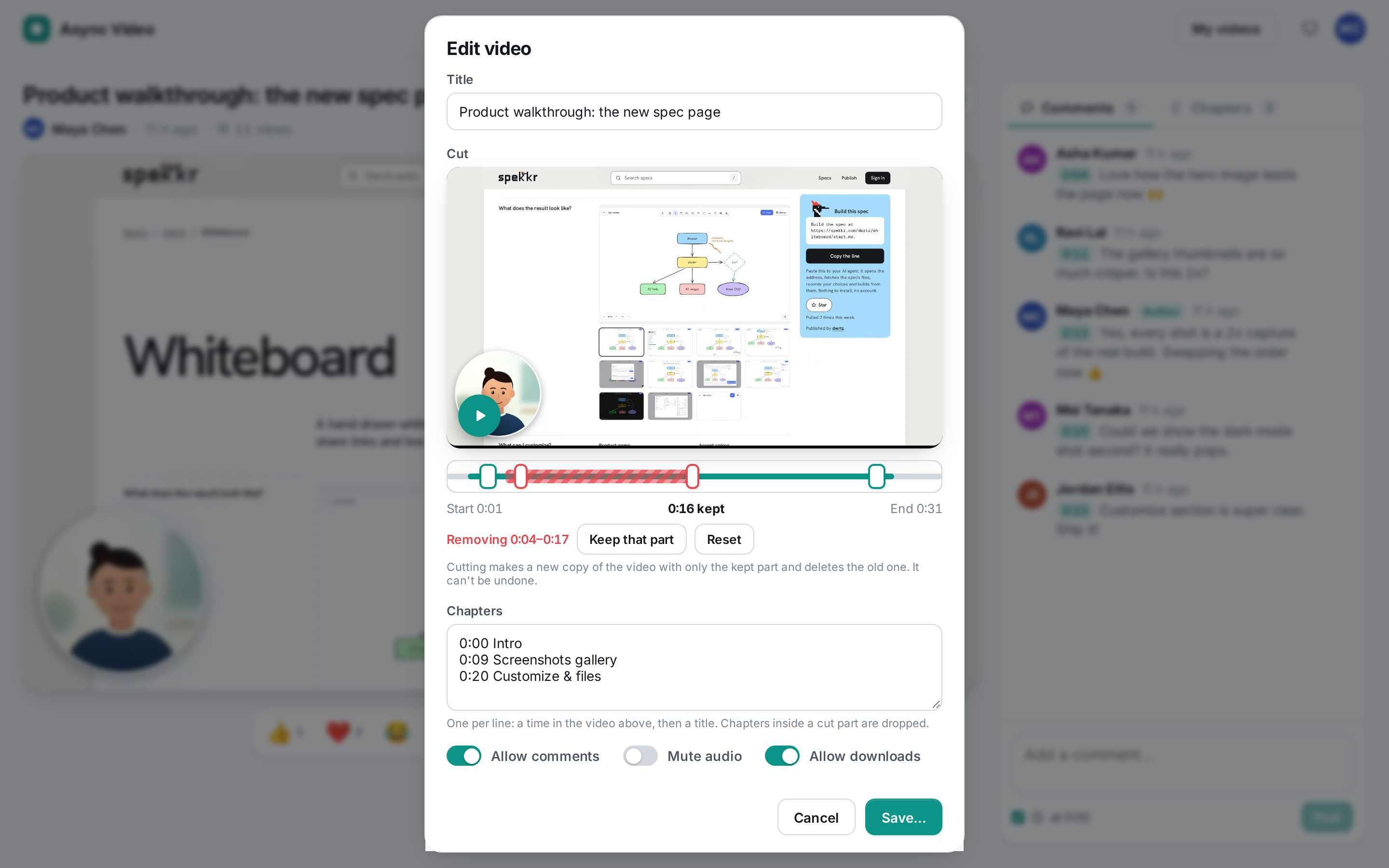
requestVideoFrameCallbackwhere available, elserequestAnimationFrame), and stops at the trim end. Dragging a handle pauses and shows that frame. Trim timeline (the same control as in "Edit video", R7):
- two handles, "Trim start" and "Trim end" (range inputs, 100 ms steps), over a bar whose kept part is in the accent colour, with a thin playhead line
- "Remove a section…" adds a removed section (red, striped) with handles "Remove from" and "Remove to": 20 % of the trim window, between 0.5 s and 3 s wide, centred on the playhead. "Keep that part" takes it away. At most one removed section. The label reads "Removing m:ss–m:ss".
- labels "Start m:ss", "<m:ss> kept" (the kept parts' total) and "End m:ss", and a "Reset" button once anything changed
- at least one second must be kept, a removed section is at least half a second and sits inside the trim window
- Title (default "Recording · <date and time>") and a "Mute audio" switch. With mute on, the preview plays silently.
- A note: "Saving cuts the video in this browser and uploads only the kept part. The cut parts (and the sound, if muted) never leave this device. Cutting can take up to as long as the kept part."
"Save video":
- With nothing removed and mute off, the recording is uploaded as it is (R5).
- Otherwise the browser first makes the cut (R7a): the buttons are replaced by "Cutting your video…" with a progress bar and a "Cancel" button. Cancel returns to the review with nothing uploaded. The cut replaces the recording's file, duration, size and thumbnail (taken from the cut), then it is uploaded.
- While uploading: "Uploading your video…" with a progress bar. Then the share page opens with the toast "Your video is ready. Copy the link to share it."
- If cutting fails: "Couldn't cut the video: <reason>. Your recording is still here; try Save again." If the upload fails: "Upload failed: <reason>. Your recording is still here; try Save again." Either way the review stays.
- "Discard and record again" asks "Discard this recording?" ("It hasn't been saved, so it will be gone for good.", "Discard") and returns to setup. Nothing is uploaded.
- Leaving the page during recording, review or upload asks the browser's "leave site?" question.
Accept when: "R3a nothing is uploaded until Save; Save cuts the file to the trim and removed section, drops muted sound, and uploads only that", "R3a Save without edits uploads the recording as it is", "R3a cutting can be cancelled, and the real-time fallback cuts too", "R3a discard and record again throws the recording away without uploading", "R3a R15 phones: a trimmed camera recording is cut before upload and saved as MP4" and "R3a R15 WebKit (iPhone 13): a video cut before upload plays, seeks and has the cut length on a share page" pass.
R3b. Not recording the recorder
When the recorder page itself is captured, the start and end of a video show that page. The recorder avoids it where the browser allows and makes the rest easy to cut.
getDisplayMediais called withselfBrowserSurface: "exclude"(this tab is not offered),preferCurrentTab: false,surfaceSwitching: "include"(Chrome's "Share this tab instead"),monitorTypeSurfaces: "include"andsystemAudio: "include", plus aCaptureControllerwhere the browser has one.- When a tab or window was shared (
displaySurface"browser" or "window"),controller.setFocusBehavior("focus-captured-surface")runs right after the picker, so the browser switches to what is being shared before the countdown and recording start. - Floating controls (Document Picture-in-Picture, Chrome 116+): in screen modes, a small always-on-top window opens right after the picker if the browser still counts the Start click as a user gesture; otherwise the "Pop out controls" button opens it. It shows the countdown ("Start now", "Cancel"), then the red dot, timer, Pause/Resume, Cancel and "■ Stop", using the page's styles. It closes on Stop or Cancel.
- Keyboard: Alt+Shift+S stops and Alt+Shift+P pauses or resumes, in the recorder page and in the floating controls.
- The browser's own "Stop sharing" bar stops the recording (the screen track's
endedevent). - Browsers without these (Firefox, Safari) ignore the extra options: recording works the same, and the review step (R3a) cuts away any recorder frames.
Accept when: "R3b screen capture excludes this tab, allows switching and jumps to a shared tab", "R3b a whole-screen share says the start and end may show this page; Stop sharing ends the recording", "R3b the keyboard shortcut Alt+Shift+S stops the recording" and "R3b floating controls (Document Picture-in-Picture) open after picking a screen and can stop the recording" pass.
R4. The recorded file
- Screen only records the screen track as it comes. Camera only records the camera track (not mirrored). Width and height are the frame as a
<video>element reports it (videoWidth/videoHeight, so a phone held upright gives a portrait size), falling back to the track settings. Screen + camera draws onto a canvas sized to the screen, scaled down so its longer side is at most 1920 (even numbers):
- the screen frame, letterboxed on black if the screen size changes mid-recording
- the bubble: a circle whose diameter is 22 % (S), 30 % (M) or 42 % (L) of the frame's shorter side, with the camera cover-cropped to a square and mirrored, a thin white ring and a soft shadow
- It draws at 30 frames per second, driven by a ticker in a Web Worker, so drawing continues while the recorder tab is in the background (the browser throttles timers there). The canvas's
captureStream(30)is recorded.
- Audio: the microphone (when on) and the screen's own audio (when the picker shares it). Two sources are mixed with an
AudioContextinto one track. - Format: MP4 with H.264 first, because every current browser plays it, including Safari on iPhone. The first type
MediaRecorder.isTypeSupportedaccepts fromvideo/mp4;codecs=avc1.42E01F,mp4a.40.2,video/mp4;codecs=avc1,mp4a.40.2,video/mp4;codecs=avc1,opus,video/webm;codecs=vp9,opus,video/webm;codecs=vp8,opus,video/webm,video/mp4; if none, the browser's default. Recent Chrome records MP4 (with AAC where the platform has an AAC encoder, otherwise Opus, as on Linux), Safari records MP4 natively, and Firefox falls back to WebM. Video at 2.5 Mbit/s, audio at 128 kbit/s, data collected every second (start(1000)). - Duration: MP4 from
MediaRecordercarries its duration. WebM files have none, so browsers can't seek in them: before upload, the measured duration (excluding pauses) is written into the WebM header withfix-webm-duration, and then the Segment's and first Cluster's sizes are set back to "unknown" withwebmHeaderPatches(src/shared/webm.ts,design.md).fix-webm-durationgives both a known size reaching the end of the file, which nests every later Cluster inside the first one; strict WebM players (Safari on iPhone) reject or cut short such files. The duration is also sent to the server. - Thumbnail: one second into the recording (or at Finish, if shorter), a 640-px-wide JPEG (quality 0.82) of the recorded picture.
Accept when: the "R3 R4 R5 screen + camera…" test passes, including its checks that the file is
video/mp4in Chromium, the duration excludes the pause, the file's duration is finite, seeking works, and a JPEG thumbnail exists; the unit tests "recording format" and "webm repair" pass.R5. Upload
POST /api/videoscreates the video with statusuploadingand starts an R2 multipart upload. It needs the content type (WebM or MP4 only), mode, width and height.- The file is cut into 5 MB parts (the last may be smaller) and each goes to
PUT /api/videos/{id}/parts/{n}. Three parts are in flight at a time; a failed part is retried twice. Progress counts uploaded bytes. - Then the thumbnail goes to
PUT /api/videos/{id}/thumbnail. ThenPOST /api/videos/{id}/completesends the part list, the duration and the title. The server completes the R2 upload, records the size and sets statusready. What is uploaded is already the cut (R3a), so there are no edits to store. - If any step fails, the client calls
DELETE /api/videos/{id}/uploadto abort the R2 upload and remove the row. - A video that is
uploadingis invisible: its share page, media and API answer 404, and it is not in the library. Unfinished uploads older than 24 hours are removed when their owner next opens the library. - The default title is "Recording · <date and time>" in the owner's locale; it can be changed in review and renamed later.
Accept when: the "R3 R4 R5 screen + camera…" test, "R16 cross-site writes are refused and inputs are checked" and the unit test "multipart plan" pass.
R6. Share page and player
The share page is
/v/{id}. The id is 12 random base62 characters.Header:
- the title (the owner can double-click it to rename)
- the owner's avatar and name, "<time> ago", and "<n> views"
- "Copy link" (copies
<origin>/v/{id}, toast "Link copied") - a Download button (if allowed, R13)
- for the owner only, "Edit video" and "Delete video" buttons
Player: custom controls over the video.
- Before the first play, a large round play button shows the length. Controls appear on hover.
- The player plays the stored file as it is: times, the seek bar, markers and speed lengths are media time. There is nothing to skip or silence, because cuts and mute are already in the file (R7).
- Full screen uses the player element, or the video element's
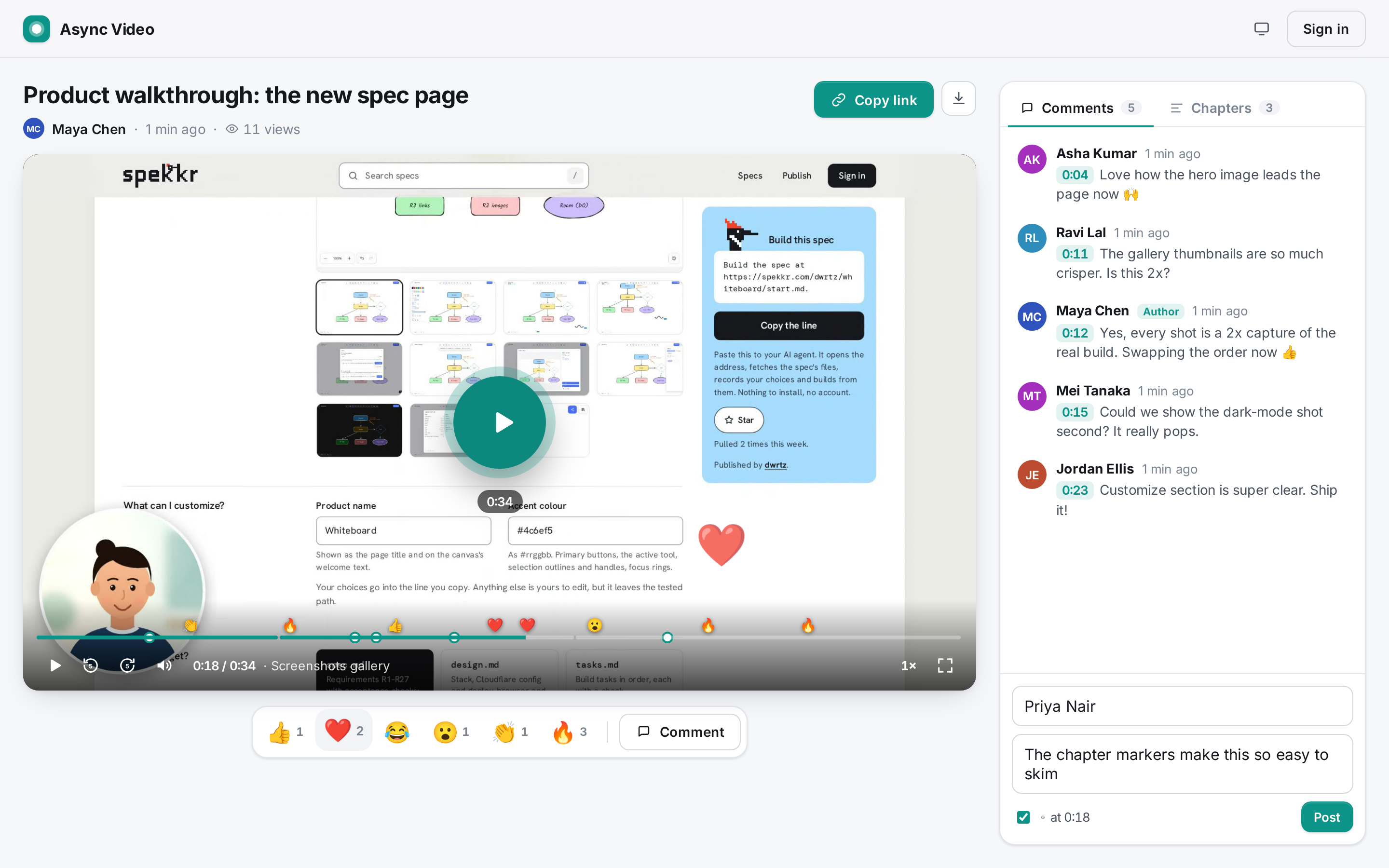
webkitEnterFullscreen()on iPhone, where only video can go full screen. - The seek bar fills with the accent colour. It is split into chapter segments (R8) and carries markers: reactions as small emoji (R10) and comments as dots (R9).
- Buttons: Play/Pause, Back 5 seconds, Forward 5 seconds, Mute with a volume slider, the time "m:ss / m:ss", the current chapter title, Playback speed, Full screen.
- Speeds: 0.75×, 1×, 1.25×, 1.5×, 1.75×, 2×, 2.5×. The speed menu lists each speed with how long the video takes at it. The chosen speed is remembered.
- Controls hide after 2.5 s without pointer movement while playing. At the end, a "Replay" button.
- Clicking the video toggles play.
- Keyboard (anywhere on the page except while typing): K or Space play/pause, J or ← back 5 s, L or → forward 5 s, M mute, S next speed, F full screen. Every control's accessible name says its shortcut, for example "Pause, keyboard shortcut K".
?t=<seconds>opens the page at that time.- Media is served from
GET /api/videos/{id}/mediawith byte-range support (206 withContent-Range,Content-LengthandAccept-Ranges: bytes, 416 for unsatisfiable ranges, HEAD answered with the size), the base content type (video/mp4orvideo/webm), so the browser can seek without downloading everything. Safari's firstRange: bytes=0-1probe gets a 2-byte 206. - WebM saved before 0.1.1 (with the nested Cluster sizes, R4) is repaired on the way out: when a response covers the first 4 KB, the Worker reads the head, finds the two size fields with
webmHeaderPatchesand rewrites just those bytes to "unknown" in the stream. The stored object never changes. - Formats a browser can't play: if
canPlayTypesays no for the file's type, or the video element fails with a "not supported"/"decode" error, the player shows "This browser can't play this recording" with "It was saved as WebM (or MP4), which this device doesn't support." followed by "Download it to watch in another app, or open the link on a computer." when downloads are allowed (otherwise "Open the link on a computer to watch it."), and a "Download" button in that case or for the owner. - Unknown or deleted ids show "Video not found" with "The link may be wrong, or the video was deleted." and a "Go home" button. Other unknown paths show "Page not found".
- Comments refresh every 15 seconds while the page is open.
Accept when: "R6 R11 anyone with the link can watch; a view counts once per viewer after 2 s, never for the owner", "R6 player controls: speed menu with lengths, keyboard shortcuts, ?t= start", "R6 unknown video ids show the not-found page", "R6a WebM saved by 0.1.0 is served with its sizes repaired; the stored file is untouched", "R6a a browser that can't play the format gets a clear notice with a download", "R3a R15 WebKit (iPhone 13): a video cut before upload plays, seeks and has the cut length on a share page", the media-range checks in "R3 R4 R5…" and the unit tests "byte ranges", "time formatting" and "webm repair" pass.
R7. Cutting (trim, removed section, mute)
- The trim control (R3a) is used in the review step and in "Edit video": a preview that plays only the kept parts, "Trim start"/"Trim end" handles, an optional removed section ("Remove a section…", "Remove from"/"Remove to", "Keep that part"), and labels "Start m:ss", "<m:ss> kept", "End m:ss". At least one second must be kept, and a removed section is at least half a second and strictly inside the trim window.
- Cuts are real: the saved file contains only the kept parts, laid end to end, and no audio track if muted. Viewers, the player, the library and downloads all get exactly that file. There is no player-side trimming, skipping or muting.
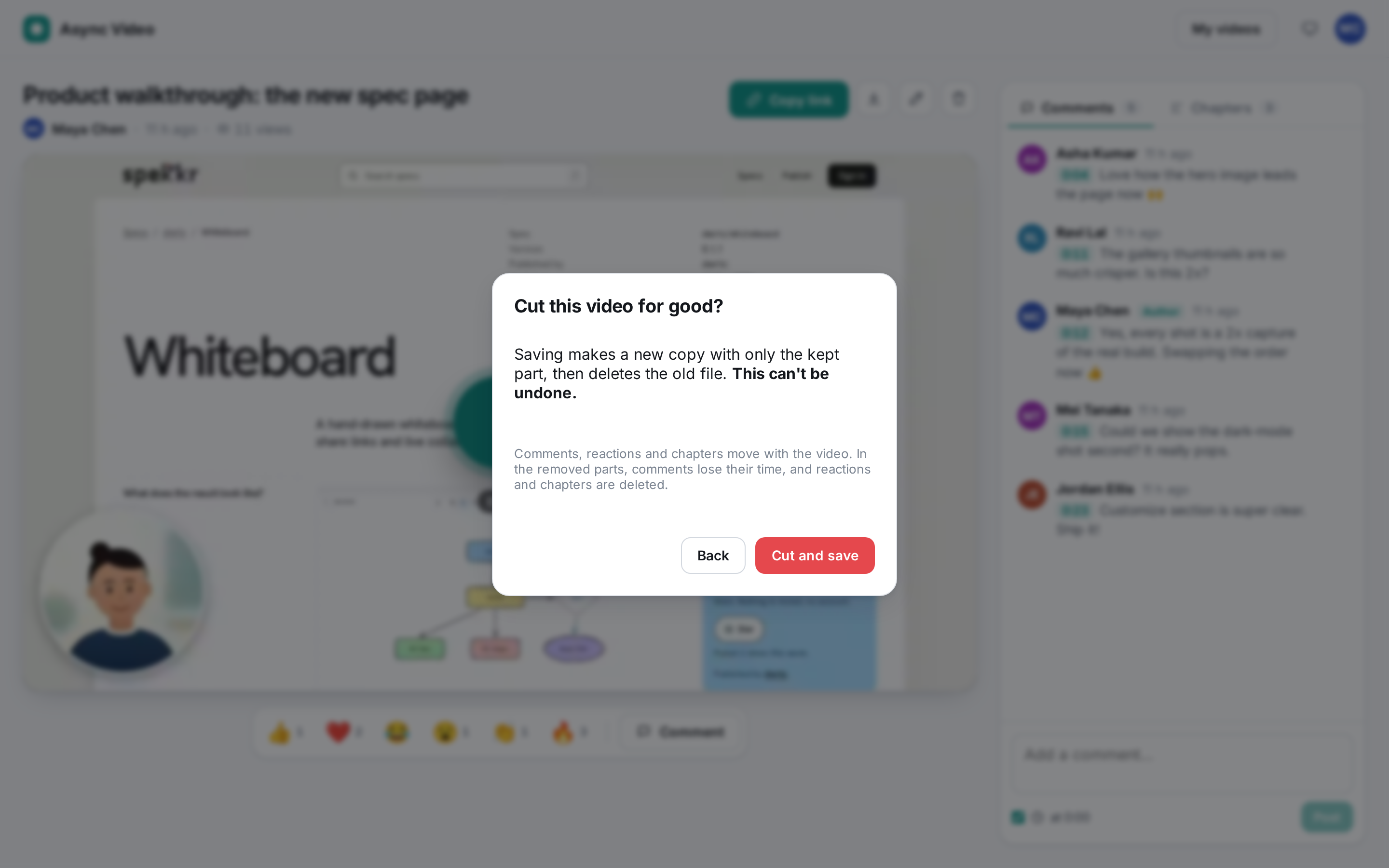
In "Edit video" the control starts at the full length with mute off. The field is labelled "Cut", with the note "Cutting makes a new copy of the video with only the kept part and deletes the old one. It can't be undone." When the selection removes something or mutes, the button reads "Save…" and opens a confirmation:
- title "Cut this video for good?", text "Saving makes a new copy with only the kept part[ and no sound], then deletes the old file. This can't be undone." and "Comments, reactions and chapters move with the video. In the removed parts, comments lose their time, and reactions and chapters are deleted.", buttons "Back" and "Cut and save"
- "Cut and save" first saves the title, chapters and switches (
PATCH), then shows "Downloading the video…", "Cutting your video…" and "Uploading the cut video…" with a progress bar and "Cancel". It downloads the stored file, makes the cut (R7a), takes a new thumbnail and uploads it with the replace API (below). - Cancel or a failure leaves the stored file unchanged: "Cancelled. The video wasn't changed (the title, chapters and switches were saved)." or "Couldn't cut the video: <reason>. The video wasn't changed."
- Replace API (owner only, video
ready,CREATE_LIMIT):POST /api/videos/{id}/replace{contentType, width, height}starts a multipart upload to a new keyvideos/{id}/v-<10 random base62>; parts go toPUT /api/videos/{id}/replace/parts/{n};POST /api/videos/{id}/replace/complete{parts, durationMs, removed}finishes it.removedlists the removed parts as{start, end}in the old file's media time (at most three, sorted, not overlapping, integers). The server checks that the new duration is no longer than the old one (+1 s) and matches old − removed within 1.5 s, refuses files over the size limit (413, the new object is deleted), then in one D1 batch points the video at the new file (media_key), updates content type, size, duration, width, height, and moves chapters, comments and reactions. Only after that commits is the old R2 object deleted.DELETE /api/videos/{id}/replaceaborts an unfinished replace. The thumbnail is then replaced withPUT /api/videos/{id}/thumbnail. - Moving times: a time in the old file moves back by the length of all removed parts before it; a time inside a removed part (start inclusive, end exclusive) has no place in the cut. Chapters there, or landing at or past the new end, or on the same time as an earlier chapter, are dropped. Comments there keep their text and lose their timestamp. Reactions there are deleted.
- Videos edited with 0.1.1's player-side trim play in full after the upgrade (migration
0003_real_cuts.sqldrops those columns) and can be cut again.
R7a. Making the cut in the browser
- WebCodecs (preferred): with Mediabunny (MPL-2.0), loaded only when cutting, the browser reads the recording (MP4 or WebM), decodes the video frames of the kept parts, gives them new timestamps (the first frame of each part starts exactly where the previous part ended) and encodes H.264 at 2.5 Mbit/s, 30 fps, a keyframe every 2 s, into an MP4 with the index at the start (fast start). Audio of the kept parts is trimmed at the boundaries and encoded as AAC (or Opus where the browser has no AAC encoder) at 128 kbit/s, unless muted. Frame-accurate and faster than real time. Used when the browser can decode the recording and encode H.264 (Chrome and Edge; Safari with WebCodecs encoders).
- Real-time fallback: elsewhere, or if the WebCodecs path fails, a hidden video element plays each kept part onto a canvas (
captureStream(30)), its sound routed through anAudioContextunless muted, recorded withMediaRecorder(the R4 format list), paused between parts. It takes as long as the kept parts. Recording resumes only once playback is moving, and the end of each part is detected on every frame and by a timer (no frames arrive after the file ends). The stored duration is the output file's own length. - Progress is reported from 0 to 99 % until the file is ready; cancelling aborts at once. WebM output gets the R4 duration fix.
- The thumbnail of a cut is taken from the cut file (at 1 s, or halfway if shorter).
Accept when: "R7 R8 R13 owner renames, cuts and adds chapters; the stored file is replaced by the cut and comments, reactions and chapters move with it", "R7 cancelling a cut leaves the video as it was", the R3a tests and the unit tests "trim", "removed section" and "real cuts: removed parts and time remapping" pass. The E2E tests prove the cut with ffprobe and by reading a timecode drawn into the recorded frames (
e2e/media.ts): the file's duration equals the kept length, exactly one jump in the timecode of the removed length, no audio track when muted, the old R2 object is gone after a later cut.R8. Chapters
- In "Edit video", a Chapters box takes one chapter per line: a time in the video as it is now (before any cut being saved), then a title, for example
0:45 The new flow. Times arem:ss,h:mm:ssor plain seconds. Errors are shown and nothing is saved:
- "Line <n>: start with a time like 1:05, then a title"
- "Line <n>: <time> is past the end of the video"
- "Two chapters start at <m:ss>"
- "At most 50 chapters"
- Chapters are sorted by time.
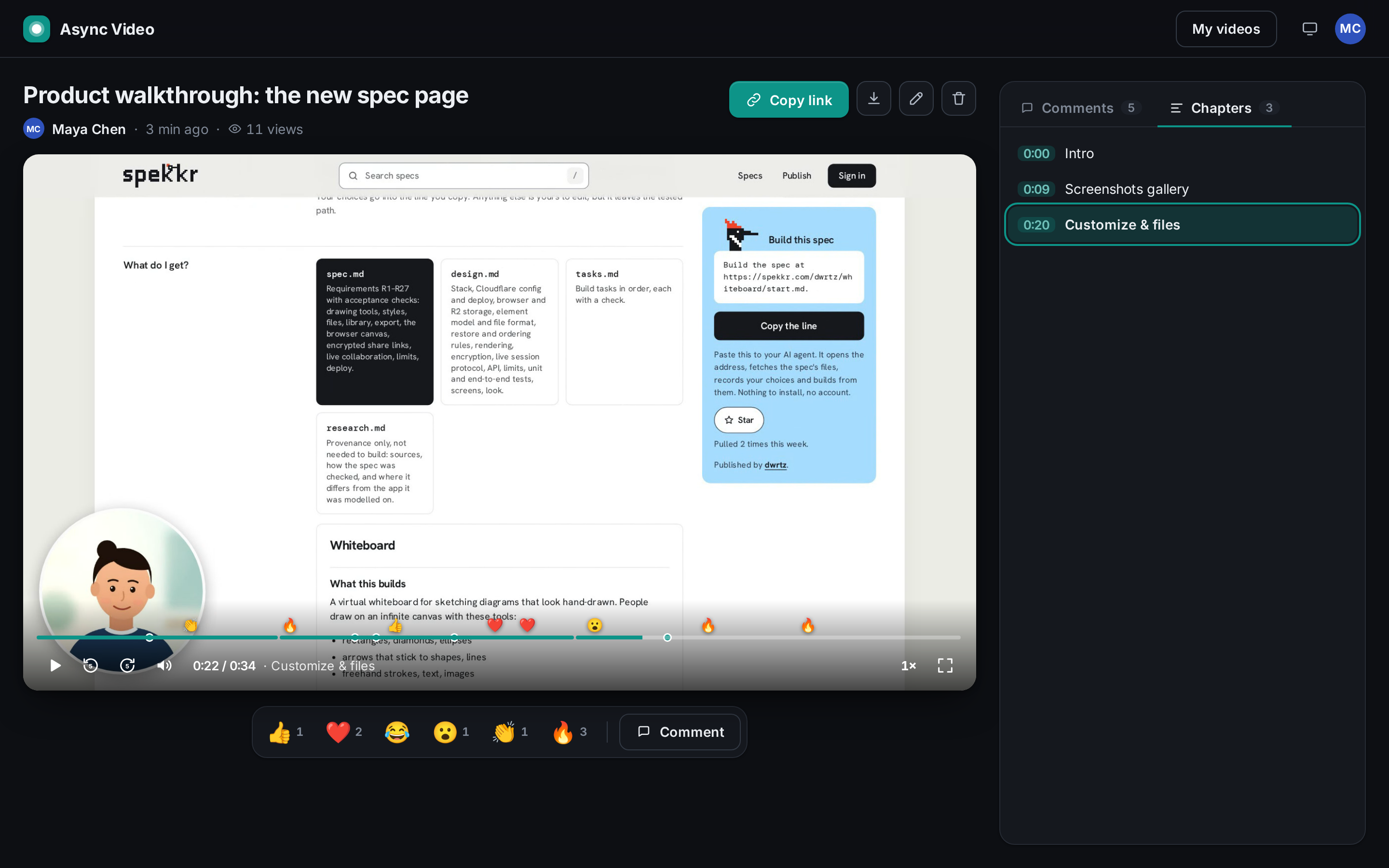
- The share page's "Chapters" tab lists them with their start times. Clicking one seeks there and plays, and the chapter playing now is highlighted. Without chapters, the tab says "No chapters yet." (with "Add chapters" for the owner).
- The seek bar is split into one segment per chapter, with a 2 px gap. The controls show "· <current chapter title>".
- The hint under the box: "One per line: a time in the video above, then a title. Chapters inside a cut part are dropped." When a cut is saved, chapters move with the video (R7).
Accept when: "R7 R8 R13 owner renames, cuts and adds chapters; the stored file is replaced by the cut and comments, reactions and chapters move with it" and the unit tests "chapters" and "real cuts: removed parts and time remapping" pass.
R9. Timestamped comments
- The "Comments" tab shows comments with timestamps first, by time, then those without, by date. Each shows an avatar with initials, the name, an "Author" badge if the owner wrote it, "<time> ago", the timestamp chip (if any) and the text.
- Clicking a timestamp chip seeks the player there.
Composer: "Your name" (only for viewers who aren't signed in; remembered in
localStorage), "Add a comment…", a checkbox "at m:ss" (on by default, following the player), and "Post". Ctrl/⌘+Enter posts.- With the checkbox on, the comment stores the current media time; off, no time.
- Signed-in people comment under their account name.
- Limits: name 60 characters, text 2,000.
- People can delete their own comments (matched by viewer id). The owner can delete any comment on their video. Anyone else gets 403.
- Comments show as dots on the seek bar, inside the kept parts.
- With comments turned off (R13), the composer is replaced by "Comments are turned off for this video." and the API refuses new comments with 403. The owner can still comment.
Accept when: "R9 viewers comment with their name at the current time; timestamps seek; only own comments can be deleted" passes.
R10. Emoji reactions
- Below the player, a bar of six reactions: 👍 ❤️ 😂 😮 👏 🔥, each with its count, plus a "Comment" button that focuses the composer.
Clicking a reaction:
- stores it at the current media time
- floats the emoji up over the player
- adds a marker on the seek bar at that time
- bumps the count
- Anyone with the link can react, as often as they like (rate limited, R16). Only these six emoji are accepted; anything else is 400.
Accept when: "R10 emoji reactions float over the player, count up, and leave a marker at their time" passes.
R11. Views
- A view counts once per viewer id per video, after two seconds of actual playback (or the whole video, if shorter). The owner's own plays never count.
- The count on the share page updates as soon as the view is counted. Library cards show it too.
Accept when: "R6 R11 anyone with the link can watch; a view counts once per viewer after 2 s, never for the owner" passes.
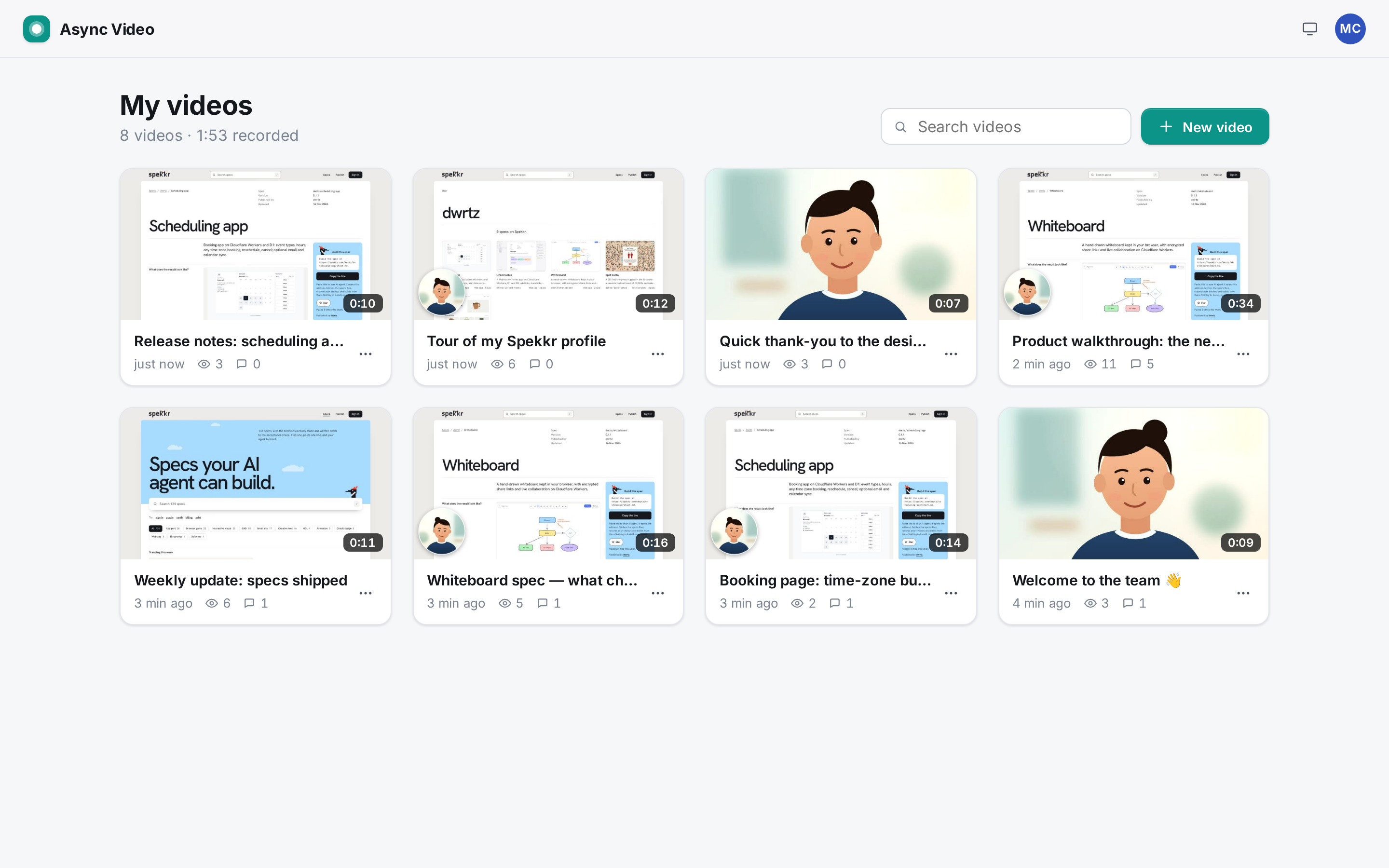
R12. Library
/for a signed-in owner shows "My videos", "<n> videos · <m:ss> recorded" (total kept length), a "Search videos" box and a "New video" button.Cards in a responsive grid, newest first. Each card has:
- the thumbnail (or a mode icon) with the kept duration
- the title (linking to the share page), "<time> ago", views and comment count
- a "More actions" menu: "Copy link", "Rename" (inline, Enter saves, Escape cancels), "Delete" (confirmed)
- Search filters by title as you type, case-insensitive. No match shows "No videos match “<query>”."
- With no videos: "Record your first video", a short explanation and "New video".
- The library and its API show only the signed-in owner's videos.
Accept when: "R12 the library lists my videos newest first, searches, renames and deletes from the card menu" and "R12 R13 another account sees none of my videos and can't change them" pass.
R13. Owner controls
- Rename from the share page (double-click the title) or the library.
Edit video: title, cut (R7), chapters (R8), and three switches, "Allow comments", "Mute audio" and "Allow downloads" (comments and downloads on by default; mute is off each time the dialog opens, and turning it on makes a cut without sound, R7). Without a cut, "Save" just saves the title, chapters and switches.
- Downloads off: the Download button is hidden from viewers and
GET /api/videos/{id}/media?downloadanswers 403 for anyone but the owner. Playback keeps working. - Download saves the stored file, which is exactly what viewers watch, as
<title>.mp4(or.webm) viaContent-Disposition: attachment. The owner can always download.
- Downloads off: the Download button is hidden from viewers and
- Delete video (confirmed: "The video, its comments and reactions will be deleted for everyone, and the link will stop working.") removes the R2 objects (the current file, any unfinished replace, the thumbnail) and all rows. The link then shows "Video not found".
- Only the owner can rename, edit or delete. Others get 403 from the API and never see those buttons.
Accept when: "R7 R8 R13 owner renames, cuts…", "R13 comments and downloads can be turned off; delete removes the video for everyone" and "R12 R13 another account sees none of my videos and can't change them" pass.
R14. Light and dark
- The theme follows the system by default. A button in the top bar cycles System → Light → Dark. Its accessible name starts with "Theme: <current>". The choice is kept in
localStorage(av.theme) and applied by an inline script inindex.htmlbefore first paint, so there is no flash. - Dark mode uses its own surface, line and ink colours (in
design.md). The accent stays the same.
Accept when: "R14 the theme follows the system and the toggle cycles system → light → dark, remembered across reloads" passes.
R15. Phones
Every page fits a 390-px-wide screen with no sideways scrolling.
- On the share page, the player spans the full width, and the title, actions, reactions and the comments panel stack below it.
- The reaction bar becomes six even columns (the Comment button is hidden; the composer is right below).
- The volume slider and chapter title hide.
- Touch works for play, reactions and posting comments. Recording works in Camera only mode (R3): front camera, MP4 where the phone records it (Safari on iPhone does; Chrome on Android records MP4 with AAC), then the review step, which stacks in one column and fits the screen. Cutting works on phones too (R7a: WebCodecs on Android Chrome and on iPhones whose Safari has the encoders, otherwise the real-time fallback).
- Share pages play on phones: MP4 recordings everywhere; older WebM recordings wherever the phone's browser plays WebM (Safari on iOS 17.4 and later; earlier iPhones get the R6 notice with a download).
Accept when: "R15 phones: sign-in, library and share page fit the screen; the player and comments work by touch" (which records with the camera, saves an MP4 and checks the review step fits), "R15 phones without screen capture offer camera recording only" and "R3a R15 phones: a trimmed camera recording is cut before upload and saved as MP4" pass on iPhone 13 and Pixel 7 emulation, and "R3a R15 WebKit (iPhone 13): a video cut before upload plays, seeks and has the cut length on a share page" passes in Playwright's WebKit.
R16. Limits and abuse
- Every
POST,PUT,PATCHandDELETEmust carry anOriginheader equal to the site's own origin, or it gets 403 "Cross-site request refused". Size and length limits:
- recordings up to 10 minutes
- files up to 500 MB
- parts up to 10 MB
- thumbnails up to 1 MB, JPEG only
- titles up to 120 characters
- comments up to 2,000 characters, names up to 60
- up to 50 chapters
- Storage cap: when the stored videos' total size reaches
STORAGE_LIMIT_MB(default 5000), new videos are refused with 507 "This site's video storage is full". Rate limits (Workers Rate Limiting). Each is checked after every other check, so refused requests don't use it up:
Binding Key Limit Covers CREATE_LIMITaccount 10 per 60 s creating videos and starting a replace (cut) WRITE_LIMITclient IP 60 per 60 s comments, reactions, views AUTH_LIMITclient IP 10 per 60 s sign-up and sign-in attempts that pass validation and the allowlist Over a limit: 429 "Too many requests. Try again in a minute."
- Errors are JSON
{"error": "...", "fields"?: {...}}with the status shown in the API table.
Accept when: "R16 cross-site writes are refused and inputs are checked" and "R16 creating videos is rate limited per account (10 a minute)" pass.
R17. Deploy and README
The README explains:
- what is stored where
- that share links are public to anyone who has them
- the allowlist, with how to set
ALLOWED_EMAILS(the first sign-in must be done by the allowlisted person, as no email is sent) - the limits table
- run, test and deploy
- The deploy steps are in
design.md("Deploy").
Accept when:
npm run typecheck,npm testandnpm run e2epass, andnpx wrangler deploy --dry-run --outdir /tmp/drysucceeds.Tests
Unit (
tests/shared.test.ts, Vitest): "time formatting", "chapters", "trim", "allowlist", "byte ranges", "multipart plan", "ids and constants", "camera bubble", "removed section", "webm repair", "recording format", "real cuts: removed parts and time remapping".The E2E tests need
ffmpegandffprobeonPATH:e2e/media.tsprobes stored files and reads a timecode that a fake screen (a canvas replacinggetDisplayMedia) draws as twelve black and white bars, so a test can see exactly which moments of the recording made it into the file.End to end (
e2e/, Playwright againstwrangler devwith a fresh local D1 and R2 andALLOWED_EMAILS=owner@example.com,second@example.com). Chromium runs with--use-fake-device-for-media-stream,--use-fake-ui-for-media-stream,--auto-select-desktop-capture-source=Entire screenand--autoplay-policy=no-user-gesture-required, so camera, microphone and screen are real browser capture of Chromium's built-in test devices and need no hardware.1-accounts.spec.ts- "R2 an email that isn't on the allowlist is refused at sign-up and sign-in"
- "R2 allowlisted owner signs up, signs out and signs back in; wrong password is refused"
- "R2 signed-out visitors can't reach the recorder or the library API"
2-record.spec.ts- "R3 R4 R5 screen + camera: countdown, pause/resume, review, upload, then the share page plays a seekable MP4"
- "R3 screen only and camera only record at the source size"
- "R3 restart resets the timer; cancel discards without creating a video"
- "R3 the camera bubble can be dragged and resized, and the choice is remembered"
3-share.spec.ts- "R6 R11 anyone with the link can watch; a view counts once per viewer after 2 s, never for the owner"
- "R6 player controls: speed menu with lengths, keyboard shortcuts, ?t= start"
- "R9 viewers comment with their name at the current time; timestamps seek; only own comments can be deleted"
- "R10 emoji reactions float over the player, count up, and leave a marker at their time"
- "R6 unknown video ids show the not-found page"
4-edit.spec.ts- "R7 R8 R13 owner renames, cuts and adds chapters; the stored file is replaced by the cut and comments, reactions and chapters move with it" (checks ffprobe duration, the timecode jump, remapped chapters, comments and reactions, that the old R2 object is gone, and that a second, muted cut drops the audio)
- "R7 cancelling a cut leaves the video as it was"
- "R13 comments and downloads can be turned off; delete removes the video for everyone"
5-library.spec.ts- "R12 the library lists my videos newest first, searches, renames and deletes from the card menu"
- "R12 R13 another account sees none of my videos and can't change them"
6-api.spec.ts- "R16 cross-site writes are refused and inputs are checked"
- "R16 creating videos is rate limited per account (10 a minute)"
7-mobile.spec.ts(runs as theiphone-13andpixel-7projects)- "R15 phones: sign-in, library and share page fit the screen; the player and comments work by touch"
- "R15 phones without screen capture offer camera recording only"
- "R3a R15 phones: a trimmed camera recording is cut before upload and saved as MP4"
8-theme.spec.ts- "R14 the theme follows the system and the toggle cycles system → light → dark, remembered across reloads"
- "R1 the page title and accent colour come from spekkr.inputs.json"
9-review.spec.ts- "R3a nothing is uploaded until Save; Save cuts the file to the trim and removed section, drops muted sound, and uploads only that"
- "R3a Save without edits uploads the recording as it is"
- "R3a cutting can be cancelled, and the real-time fallback cuts too"
- "R3a discard and record again throws the recording away without uploading"
- "R3b screen capture excludes this tab, allows switching and jumps to a shared tab" (records the
getDisplayMediaoptions and stubsCaptureControllerto checksetFocusBehavior) - "R3b a whole-screen share says the start and end may show this page; Stop sharing ends the recording" (stops the screen track and fires
ended, as the browser's bar does) - "R3b the keyboard shortcut Alt+Shift+S stops the recording"
- "R3b floating controls (Document Picture-in-Picture) open after picking a screen and can stop the recording"
10-formats.spec.ts- "R6a WebM saved by 0.1.0 is served with its sizes repaired; the stored file is untouched" (uploads a WebM with the 0.1.0 nested sizes through the API)
- "R6a a browser that can't play the format gets a clear notice with a download"
11-webkit.spec.ts(runs as thewebkit-iphoneproject: Playwright WebKit with the iPhone 13 profile)- "R3a R15 WebKit (iPhone 13): a video cut before upload plays, seeks and has the cut length on a share page" (Chromium records, cuts and uploads, WebKit plays)
Not automated, checked by hand or by reasoning: Safari's real iOS media stack (Linux WebKit uses GStreamer, which tolerates more), recording and cutting in Safari (Linux WebKit has no
MediaRecorderencoders, so neither cutting path can be exercised there end to end), the browser actually moving focus to a shared tab, the floating window staying on top of other apps, and the browser's own "Stop sharing" bar.Tests sign in through the API and reuse the session within a run, to stay under
AUTH_LIMIT.# Async video ## What this builds A web app for async video messages. The owner records their screen, their camera, or their screen with their face in a round camera bubble, straight from the browser. When they press Stop, the recording stays in the browser and opens in a review step: they play it back, trim the start and end, optionally remove one section from the middle, set the title and choose whether it has sound. Nothing is uploaded until they press Save. Then the browser cuts the file down to the kept part (dropping the sound if muted), uploads only that, and opens it on its own share page. The cut parts never leave the owner's device. They copy the link and send it. Anyone with the link can watch without an account. Viewers can: - play it with a proper player: speed control, keyboard shortcuts, chapters, a seek bar with markers - leave comments pinned to the moment they were watching - react with emoji at a moment in the video - download it, if the owner allows it The owner has a library of their videos, and for each one can rename, cut it again (trim, remove a section, mute: this replaces the stored file and can't be undone), add chapters, turn comments or downloads off, and delete. Recording needs an account, and a deployment can limit accounts to a list of email addresses (R2). Watching never does. It is one Cloudflare Worker: - The React single-page app is the Worker's static assets. - The JSON API runs in the Worker. - Video files and thumbnails live in one R2 bucket. Uploads use R2 multipart uploads, so large files go up in parts. - Accounts, sessions, video details, comments, reactions and views live in one D1 database. Recording happens entirely in the browser with `getDisplayMedia`, `getUserMedia`, a canvas for the camera bubble and `MediaRecorder`. There is no server-side video processing, no transcoding and no third-party service. It runs on a laptop with `npm install` and `npm run dev` (`wrangler dev` with local D1 and R2, no Cloudflare account). It deploys with `npm run deploy`. Read `spekkr.inputs.json` first. It sits at the repository root. If it is missing, create it from the `customize.settings` defaults in `spekkr.json`; with the defaults its full contents are: ```json { "app_name": "Async Video", "accent_color": "#0d9488", "allowed_emails": "" } ``` It has exactly these three keys: - **`app_name`:** the product name (default "Async Video"). It is the page title, the name next to the brand mark, and the name in the sign-in text. - **`accent_color`:** the accent colour (default `#0d9488`). It is used for primary buttons, the seek bar's played part, timestamps, active tabs, switches, selection and focus rings. - **`allowed_emails`:** comma-separated email addresses that may have an account (default empty, which means anyone). The builder copies it into `vars.ALLOWED_EMAILS` in `wrangler.jsonc`. The Worker reads only the var, so a deployment can change it without a rebuild (R2). `design.md` has: - the stack, Cloudflare config and deploy steps - the data model and storage layout - the recording pipeline and upload protocol - the API, the limits - every screen and the look `tasks.md` is the build order. `research.md` records where the design came from; the builder does not need it, and nothing in it is a requirement. ## Names and words - The product is called `app_name` everywhere. The built app never shows the name, logo or wording of any other video messaging product. - The brand mark is a rounded square in the accent colour with a white dot (a record light) in the middle. - Interface text the spec quotes is the text to use. Other text is the builder's own, short and plain. - No image, font or icon file is copied from another product. Icons are inline SVG drawn in the app's own code. The font is Inter (SIL Open Font License) from `@fontsource-variable/inter`, latin subset only. ## Words used here - **Owner:** the signed-in account that recorded a video. **Viewer:** anyone opening a share link, signed in or not. - **Mode:** what a recording captures: `screen_camera` ("Screen + camera"), `screen` ("Screen only") or `camera` ("Camera only"). - **Bubble:** the round camera picture drawn over the screen in `screen_camera` mode. - **Media time:** a position in the stored file, in milliseconds. Comments, reactions and chapters store media time, and the player shows it. - **Selection:** while editing (review step or "Edit video"), the trim window `[trim start, trim end]` and an optional **removed section** strictly inside it. - **Kept parts:** the trim window minus the removed section (one or two segments). **Removed parts:** everything else (up to three spans: before the trim start, the removed section, after the trim end). - **Cut:** a new file made in the browser from the kept parts laid end to end (and without sound if muted). Saving a selection that removes anything, or mutes, makes a cut; the stored file is always exactly what viewers see. - **Viewer id:** 22 random base62 characters kept in the browser's `localStorage` (`av.viewer`) and sent as the `x-viewer` header. It counts views once and lets people delete their own comments. - **MB:** 1,048,576 bytes. ## Out of scope These are not built: - transcripts, captions, AI summaries or AI chapters (no speech-to-text runs; see research.md) - drawing on the screen while recording, cursor highlights, blurring - teams, workspaces, folders, sharing a video with specific people, password-protected links, link expiry - replying with a video, and comment threads (comments are flat) - embedding on other sites, social share buttons, custom thumbnails, CTA buttons - editing beyond one trim, one removed section and mute: no stitching clips, no multiple removed sections, no overlays, no undo after a cut is saved (the old file is deleted), and no server-side transcoding (cuts are made in the browser) - a desktop app or browser extension; recording from another tab works because the browser's own screen picker offers tabs, windows and screens - email of any kind: no sign-in links, no notifications, no password reset - languages other than English ## Requirements Each requirement ends with an "Accept when" line naming the tests that prove it. Test names are in "Tests" at the end. Unit tests are in `tests/shared.test.ts`; end-to-end tests are in `e2e/`. ### R1. Settings, run and store - `spekkr.inputs.json` is read at build time into `src/shared/settings.ts`. An `app_name` longer than 40 characters is cut to 40; an `accent_color` that is not `#rrggbb` falls back to `#0d9488`. - The page title is `app_name` (a share page then sets it to the video's title). `--accent` is set on `:root` from `accent_color` before the first render. - Runtime is Cloudflare Workers only, with Web APIs and no `node:*` module, so no `nodejs_compat` flag. - `wrangler.jsonc` (exact shape in `design.md`, "Cloudflare config") serves `dist/` as assets with single-page-app fallback, runs the Worker first for `/api/*`, and binds `DB` (D1), `MEDIA` (R2), the three rate limits, and the vars `ALLOWED_EMAILS` and `STORAGE_LIMIT_MB`. - The schema is `migrations/0001_init.sql`, applied with `wrangler d1 migrations apply`. The Worker never creates tables. - Scripts: `build`, `dev` (build, migrate the local D1, `wrangler dev`), `typecheck`, `test`, `e2e`, `deploy`, `types`. Accept when: "R1 the page title and accent colour come from spekkr.inputs.json" passes, `npm run typecheck` passes, and `npx wrangler deploy --dry-run --outdir /tmp/dry` lists DB, MEDIA, CREATE_LIMIT, WRITE_LIMIT, AUTH_LIMIT, ALLOWED_EMAILS and STORAGE_LIMIT_MB. ### R2. Accounts and the email allowlist - Accounts have a name, an email (stored lower-case, unique) and a password (at least 8 characters, PBKDF2-SHA-256 with 100,000 iterations and a 16-byte random salt). There is no email sending, so there is no email verification and no password reset. - Signing up or in creates a session: 32 random bytes as base64url in an `HttpOnly; SameSite=Lax; Path=/` cookie named `sid` (plus `Secure` on https), valid 30 days. Only the SHA-256 of the token is stored. - **Allowlist.** `ALLOWED_EMAILS` is a comma-separated, case-insensitive list. When it is non-empty: - Sign-up with any other email is refused with 403 and `{"error": "This site only accepts accounts for approved email addresses.", "fields": {"email": <same text>}}`. Nothing is written. - Sign-in with any other email is refused the same way, before the password is checked. - A session whose account email is no longer on the list counts as signed out. - The sign-in page shows that text under the Email field. When it is empty, anyone may sign up. - The allowlist is checked only in the Worker. The client never decides who may sign up. - Signed-out visitors who open `/` or `/record` see the sign-in page. Share pages never need an account. - Wrong email or password: 401 "Email or password is wrong". Existing email at sign-up: 409, field error "Already registered. Sign in instead." - Sign out deletes the session row and clears the cookie. Accept when: "R2 an email that isn't on the allowlist is refused at sign-up and sign-in", "R2 allowlisted owner signs up, signs out and signs back in; wrong password is refused", "R2 signed-out visitors can't reach the recorder or the library API" and the unit test "allowlist" pass. ### R3. Recorder The recorder is at `/record`. - **Modes:** a segmented control "Screen + camera", "Screen only", "Camera only". The last choice is remembered (`localStorage`). - **Options:** a "Microphone on/off" chip, a bubble size control S / M / L (only in Screen + camera), and a "Countdown" switch (on by default). All remembered. - **Setup stage:** a 16:9 dark stage. - In camera modes, it shows the live camera (front camera on phones, `facingMode: "user"`), mirrored. - In Screen + camera, it shows a placeholder window with "Your screen appears here once you choose it" and the bubble over it, with the live camera inside. - The bubble starts at the bottom-left. It can be dragged anywhere inside the stage and never leaves the frame (it keeps a margin of 3.5 % of the shorter side). Its position and size are remembered and used in the recording. - If the camera is blocked, it says so and "Start recording" stays disabled in camera modes. - Under the button: "Up to 10 minutes. You'll pick a screen, window or tab next. You can trim the start and end before saving." (camera mode: "Up to 10 minutes. You can trim it before saving.") - **Start:** "Start recording" asks for the screen first (the browser's own picker, R3b) in screen modes, then shows a 3-2-1 countdown over the stage ("Click to start now" skips it), then records. - If the picker is cancelled: "Screen sharing was cancelled. Pick a screen, window or tab to record." and back to setup. - **While recording:** the stage shows the live result (for Screen + camera, the composited frame), and a control bar shows: - a pulsing red dot, the elapsed time `m:ss` and "/ 10:00" - Pause / Resume, Restart (throws away what was recorded and starts again with the same screen and camera, timer back to 0:00), Cancel (throws everything away and returns to setup; nothing is uploaded), "Pop out controls" (R3b, only where supported and not already open), and "Finish" - The bubble can still be dragged during a recording. - The timer excludes paused time. In the last minute it turns red. At 10:00 the recording stops by itself. - **Stop** happens on Finish, on Stop in the floating controls, on Alt+Shift+S, at 10:00, or when the shared screen stops (the browser's own "Stop sharing"). It shows "Finishing your recording…" and opens the review step (R3a). Nothing is uploaded at this point. - **Phones:** when `navigator.mediaDevices.getDisplayMedia` does not exist (iPhone, iPad, Android browsers), the two screen modes are disabled, Camera only is selected, and the recorder says "Phones and tablets can't share their screen from a browser, so this device records with its camera." Camera recording, review and upload work as on a computer. Accept when: "R3 R4 R5 screen + camera: countdown, pause/resume, review, upload, then the share page plays a seekable MP4", "R3 screen only and camera only record at the source size", "R3 restart resets the timer; cancel discards without creating a video", "R3 the camera bubble can be dragged and resized, and the choice is remembered", "R15 phones without screen capture offer camera recording only" and the unit test "camera bubble" pass. ### R3a. Review before saving After Stop the recorder page shows "Review your recording" with the recording, which is still only in the browser (an object URL of the recorded Blob). - The line under the heading starts "Nothing is uploaded until you save." and goes on: "You shared a whole screen, so the start and end may show this page: drag the handles to cut them." when a whole screen was shared (`displaySurface` "monitor"), otherwise "Drag the handles to cut the start or end." - **Preview:** the video with its thumbnail as poster and a round play button "Play the kept part" / "Pause preview". Playback starts at the trim start, jumps over the removed section frame by frame (`requestVideoFrameCallback` where available, else `requestAnimationFrame`), and stops at the trim end. Dragging a handle pauses and shows that frame. - **Trim timeline** (the same control as in "Edit video", R7): - two handles, "Trim start" and "Trim end" (range inputs, 100 ms steps), over a bar whose kept part is in the accent colour, with a thin playhead line - "Remove a section…" adds a removed section (red, striped) with handles "Remove from" and "Remove to": 20 % of the trim window, between 0.5 s and 3 s wide, centred on the playhead. "Keep that part" takes it away. At most one removed section. The label reads "Removing m:ss–m:ss". - labels "Start m:ss", "<m:ss> kept" (the kept parts' total) and "End m:ss", and a "Reset" button once anything changed - at least one second must be kept, a removed section is at least half a second and sits inside the trim window - **Title** (default "Recording · <date and time>") and a **"Mute audio"** switch. With mute on, the preview plays silently. - A note: "Saving cuts the video in this browser and uploads only the kept part. The cut parts (and the sound, if muted) never leave this device. Cutting can take up to as long as the kept part." - **"Save video":** - With nothing removed and mute off, the recording is uploaded as it is (R5). - Otherwise the browser first makes the cut (R7a): the buttons are replaced by "Cutting your video…" with a progress bar and a "Cancel" button. Cancel returns to the review with nothing uploaded. The cut replaces the recording's file, duration, size and thumbnail (taken from the cut), then it is uploaded. - While uploading: "Uploading your video…" with a progress bar. Then the share page opens with the toast "Your video is ready. Copy the link to share it." - If cutting fails: "Couldn't cut the video: <reason>. Your recording is still here; try Save again." If the upload fails: "Upload failed: <reason>. Your recording is still here; try Save again." Either way the review stays. - **"Discard and record again"** asks "Discard this recording?" ("It hasn't been saved, so it will be gone for good.", "Discard") and returns to setup. Nothing is uploaded. - Leaving the page during recording, review or upload asks the browser's "leave site?" question. Accept when: "R3a nothing is uploaded until Save; Save cuts the file to the trim and removed section, drops muted sound, and uploads only that", "R3a Save without edits uploads the recording as it is", "R3a cutting can be cancelled, and the real-time fallback cuts too", "R3a discard and record again throws the recording away without uploading", "R3a R15 phones: a trimmed camera recording is cut before upload and saved as MP4" and "R3a R15 WebKit (iPhone 13): a video cut before upload plays, seeks and has the cut length on a share page" pass. ### R3b. Not recording the recorder When the recorder page itself is captured, the start and end of a video show that page. The recorder avoids it where the browser allows and makes the rest easy to cut. - `getDisplayMedia` is called with `selfBrowserSurface: "exclude"` (this tab is not offered), `preferCurrentTab: false`, `surfaceSwitching: "include"` (Chrome's "Share this tab instead"), `monitorTypeSurfaces: "include"` and `systemAudio: "include"`, plus a `CaptureController` where the browser has one. - When a tab or window was shared (`displaySurface` "browser" or "window"), `controller.setFocusBehavior("focus-captured-surface")` runs right after the picker, so the browser switches to what is being shared before the countdown and recording start. - **Floating controls** (Document Picture-in-Picture, Chrome 116+): in screen modes, a small always-on-top window opens right after the picker if the browser still counts the Start click as a user gesture; otherwise the "Pop out controls" button opens it. It shows the countdown ("Start now", "Cancel"), then the red dot, timer, Pause/Resume, Cancel and "■ Stop", using the page's styles. It closes on Stop or Cancel. - **Keyboard:** Alt+Shift+S stops and Alt+Shift+P pauses or resumes, in the recorder page and in the floating controls. - The browser's own "Stop sharing" bar stops the recording (the screen track's `ended` event). - Browsers without these (Firefox, Safari) ignore the extra options: recording works the same, and the review step (R3a) cuts away any recorder frames. Accept when: "R3b screen capture excludes this tab, allows switching and jumps to a shared tab", "R3b a whole-screen share says the start and end may show this page; Stop sharing ends the recording", "R3b the keyboard shortcut Alt+Shift+S stops the recording" and "R3b floating controls (Document Picture-in-Picture) open after picking a screen and can stop the recording" pass. ### R4. The recorded file - **Screen only** records the screen track as it comes. **Camera only** records the camera track (not mirrored). Width and height are the frame as a `<video>` element reports it (`videoWidth`/`videoHeight`, so a phone held upright gives a portrait size), falling back to the track settings. - **Screen + camera** draws onto a canvas sized to the screen, scaled down so its longer side is at most 1920 (even numbers): - the screen frame, letterboxed on black if the screen size changes mid-recording - the bubble: a circle whose diameter is 22 % (S), 30 % (M) or 42 % (L) of the frame's shorter side, with the camera cover-cropped to a square and mirrored, a thin white ring and a soft shadow - It draws at 30 frames per second, driven by a ticker in a Web Worker, so drawing continues while the recorder tab is in the background (the browser throttles timers there). The canvas's `captureStream(30)` is recorded. - **Audio:** the microphone (when on) and the screen's own audio (when the picker shares it). Two sources are mixed with an `AudioContext` into one track. - **Format:** MP4 with H.264 first, because every current browser plays it, including Safari on iPhone. The first type `MediaRecorder.isTypeSupported` accepts from `video/mp4;codecs=avc1.42E01F,mp4a.40.2`, `video/mp4;codecs=avc1,mp4a.40.2`, `video/mp4;codecs=avc1,opus`, `video/webm;codecs=vp9,opus`, `video/webm;codecs=vp8,opus`, `video/webm`, `video/mp4`; if none, the browser's default. Recent Chrome records MP4 (with AAC where the platform has an AAC encoder, otherwise Opus, as on Linux), Safari records MP4 natively, and Firefox falls back to WebM. Video at 2.5 Mbit/s, audio at 128 kbit/s, data collected every second (`start(1000)`). - **Duration:** MP4 from `MediaRecorder` carries its duration. WebM files have none, so browsers can't seek in them: before upload, the measured duration (excluding pauses) is written into the WebM header with `fix-webm-duration`, and then the Segment's and first Cluster's sizes are set back to "unknown" with `webmHeaderPatches` (`src/shared/webm.ts`, `design.md`). `fix-webm-duration` gives both a known size reaching the end of the file, which nests every later Cluster inside the first one; strict WebM players (Safari on iPhone) reject or cut short such files. The duration is also sent to the server. - **Thumbnail:** one second into the recording (or at Finish, if shorter), a 640-px-wide JPEG (quality 0.82) of the recorded picture. Accept when: the "R3 R4 R5 screen + camera…" test passes, including its checks that the file is `video/mp4` in Chromium, the duration excludes the pause, the file's duration is finite, seeking works, and a JPEG thumbnail exists; the unit tests "recording format" and "webm repair" pass. ### R5. Upload - `POST /api/videos` creates the video with status `uploading` and starts an R2 multipart upload. It needs the content type (WebM or MP4 only), mode, width and height. - The file is cut into 5 MB parts (the last may be smaller) and each goes to `PUT /api/videos/{id}/parts/{n}`. Three parts are in flight at a time; a failed part is retried twice. Progress counts uploaded bytes. - Then the thumbnail goes to `PUT /api/videos/{id}/thumbnail`. Then `POST /api/videos/{id}/complete` sends the part list, the duration and the title. The server completes the R2 upload, records the size and sets status `ready`. What is uploaded is already the cut (R3a), so there are no edits to store. - If any step fails, the client calls `DELETE /api/videos/{id}/upload` to abort the R2 upload and remove the row. - A video that is `uploading` is invisible: its share page, media and API answer 404, and it is not in the library. Unfinished uploads older than 24 hours are removed when their owner next opens the library. - The default title is "Recording · <date and time>" in the owner's locale; it can be changed in review and renamed later. Accept when: the "R3 R4 R5 screen + camera…" test, "R16 cross-site writes are refused and inputs are checked" and the unit test "multipart plan" pass. ### R6. Share page and player The share page is `/v/{id}`. The id is 12 random base62 characters. - **Header:** - the title (the owner can double-click it to rename) - the owner's avatar and name, "<time> ago", and "<n> views" - "Copy link" (copies `<origin>/v/{id}`, toast "Link copied") - a Download button (if allowed, R13) - for the owner only, "Edit video" and "Delete video" buttons - **Player:** custom controls over the video. - Before the first play, a large round play button shows the length. Controls appear on hover. - The player plays the stored file as it is: times, the seek bar, markers and speed lengths are media time. There is nothing to skip or silence, because cuts and mute are already in the file (R7). - Full screen uses the player element, or the video element's `webkitEnterFullscreen()` on iPhone, where only video can go full screen. - The seek bar fills with the accent colour. It is split into chapter segments (R8) and carries markers: reactions as small emoji (R10) and comments as dots (R9). - Buttons: Play/Pause, Back 5 seconds, Forward 5 seconds, Mute with a volume slider, the time "m:ss / m:ss", the current chapter title, Playback speed, Full screen. - Speeds: 0.75×, 1×, 1.25×, 1.5×, 1.75×, 2×, 2.5×. The speed menu lists each speed with how long the video takes at it. The chosen speed is remembered. - Controls hide after 2.5 s without pointer movement while playing. At the end, a "Replay" button. - Clicking the video toggles play. - **Keyboard** (anywhere on the page except while typing): K or Space play/pause, J or ← back 5 s, L or → forward 5 s, M mute, S next speed, F full screen. Every control's accessible name says its shortcut, for example "Pause, keyboard shortcut K". - `?t=<seconds>` opens the page at that time. - Media is served from `GET /api/videos/{id}/media` with byte-range support (206 with `Content-Range`, `Content-Length` and `Accept-Ranges: bytes`, 416 for unsatisfiable ranges, HEAD answered with the size), the base content type (`video/mp4` or `video/webm`), so the browser can seek without downloading everything. Safari's first `Range: bytes=0-1` probe gets a 2-byte 206. - **WebM saved before 0.1.1** (with the nested Cluster sizes, R4) is repaired on the way out: when a response covers the first 4 KB, the Worker reads the head, finds the two size fields with `webmHeaderPatches` and rewrites just those bytes to "unknown" in the stream. The stored object never changes. - **Formats a browser can't play:** if `canPlayType` says no for the file's type, or the video element fails with a "not supported"/"decode" error, the player shows "This browser can't play this recording" with "It was saved as WebM (or MP4), which this device doesn't support." followed by "Download it to watch in another app, or open the link on a computer." when downloads are allowed (otherwise "Open the link on a computer to watch it."), and a "Download" button in that case or for the owner. - Unknown or deleted ids show "Video not found" with "The link may be wrong, or the video was deleted." and a "Go home" button. Other unknown paths show "Page not found". - Comments refresh every 15 seconds while the page is open. Accept when: "R6 R11 anyone with the link can watch; a view counts once per viewer after 2 s, never for the owner", "R6 player controls: speed menu with lengths, keyboard shortcuts, ?t= start", "R6 unknown video ids show the not-found page", "R6a WebM saved by 0.1.0 is served with its sizes repaired; the stored file is untouched", "R6a a browser that can't play the format gets a clear notice with a download", "R3a R15 WebKit (iPhone 13): a video cut before upload plays, seeks and has the cut length on a share page", the media-range checks in "R3 R4 R5…" and the unit tests "byte ranges", "time formatting" and "webm repair" pass. ### R7. Cutting (trim, removed section, mute) - The trim control (R3a) is used in the review step and in "Edit video": a preview that plays only the kept parts, "Trim start"/"Trim end" handles, an optional removed section ("Remove a section…", "Remove from"/"Remove to", "Keep that part"), and labels "Start m:ss", "<m:ss> kept", "End m:ss". At least one second must be kept, and a removed section is at least half a second and strictly inside the trim window. - Cuts are real: the saved file contains only the kept parts, laid end to end, and no audio track if muted. Viewers, the player, the library and downloads all get exactly that file. There is no player-side trimming, skipping or muting. - **In "Edit video"** the control starts at the full length with mute off. The field is labelled "Cut", with the note "Cutting makes a new copy of the video with only the kept part and deletes the old one. It can't be undone." When the selection removes something or mutes, the button reads "Save…" and opens a confirmation: - title "Cut this video for good?", text "Saving makes a new copy with only the kept part[ and no sound], then deletes the old file. This can't be undone." and "Comments, reactions and chapters move with the video. In the removed parts, comments lose their time, and reactions and chapters are deleted.", buttons "Back" and "Cut and save" - "Cut and save" first saves the title, chapters and switches (`PATCH`), then shows "Downloading the video…", "Cutting your video…" and "Uploading the cut video…" with a progress bar and "Cancel". It downloads the stored file, makes the cut (R7a), takes a new thumbnail and uploads it with the replace API (below). - Cancel or a failure leaves the stored file unchanged: "Cancelled. The video wasn't changed (the title, chapters and switches were saved)." or "Couldn't cut the video: <reason>. The video wasn't changed." - **Replace API** (owner only, video `ready`, `CREATE_LIMIT`): `POST /api/videos/{id}/replace` `{contentType, width, height}` starts a multipart upload to a new key `videos/{id}/v-<10 random base62>`; parts go to `PUT /api/videos/{id}/replace/parts/{n}`; `POST /api/videos/{id}/replace/complete` `{parts, durationMs, removed}` finishes it. `removed` lists the removed parts as `{start, end}` in the old file's media time (at most three, sorted, not overlapping, integers). The server checks that the new duration is no longer than the old one (+1 s) and matches old − removed within 1.5 s, refuses files over the size limit (413, the new object is deleted), then in one D1 batch points the video at the new file (`media_key`), updates content type, size, duration, width, height, and moves chapters, comments and reactions. Only after that commits is the old R2 object deleted. `DELETE /api/videos/{id}/replace` aborts an unfinished replace. The thumbnail is then replaced with `PUT /api/videos/{id}/thumbnail`. - **Moving times:** a time in the old file moves back by the length of all removed parts before it; a time inside a removed part (start inclusive, end exclusive) has no place in the cut. Chapters there, or landing at or past the new end, or on the same time as an earlier chapter, are dropped. Comments there keep their text and lose their timestamp. Reactions there are deleted. - Videos edited with 0.1.1's player-side trim play in full after the upgrade (migration `0003_real_cuts.sql` drops those columns) and can be cut again. ### R7a. Making the cut in the browser - **WebCodecs (preferred):** with [Mediabunny](https://mediabunny.dev) (MPL-2.0), loaded only when cutting, the browser reads the recording (MP4 or WebM), decodes the video frames of the kept parts, gives them new timestamps (the first frame of each part starts exactly where the previous part ended) and encodes H.264 at 2.5 Mbit/s, 30 fps, a keyframe every 2 s, into an MP4 with the index at the start (fast start). Audio of the kept parts is trimmed at the boundaries and encoded as AAC (or Opus where the browser has no AAC encoder) at 128 kbit/s, unless muted. Frame-accurate and faster than real time. Used when the browser can decode the recording and encode H.264 (Chrome and Edge; Safari with WebCodecs encoders). - **Real-time fallback:** elsewhere, or if the WebCodecs path fails, a hidden video element plays each kept part onto a canvas (`captureStream(30)`), its sound routed through an `AudioContext` unless muted, recorded with `MediaRecorder` (the R4 format list), paused between parts. It takes as long as the kept parts. Recording resumes only once playback is moving, and the end of each part is detected on every frame and by a timer (no frames arrive after the file ends). The stored duration is the output file's own length. - Progress is reported from 0 to 99 % until the file is ready; cancelling aborts at once. WebM output gets the R4 duration fix. - The thumbnail of a cut is taken from the cut file (at 1 s, or halfway if shorter). Accept when: "R7 R8 R13 owner renames, cuts and adds chapters; the stored file is replaced by the cut and comments, reactions and chapters move with it", "R7 cancelling a cut leaves the video as it was", the R3a tests and the unit tests "trim", "removed section" and "real cuts: removed parts and time remapping" pass. The E2E tests prove the cut with ffprobe and by reading a timecode drawn into the recorded frames (`e2e/media.ts`): the file's duration equals the kept length, exactly one jump in the timecode of the removed length, no audio track when muted, the old R2 object is gone after a later cut. ### R8. Chapters - In "Edit video", a Chapters box takes one chapter per line: a time in the video as it is now (before any cut being saved), then a title, for example `0:45 The new flow`. Times are `m:ss`, `h:mm:ss` or plain seconds. - Errors are shown and nothing is saved: - "Line <n>: start with a time like 1:05, then a title" - "Line <n>: <time> is past the end of the video" - "Two chapters start at <m:ss>" - "At most 50 chapters" - Chapters are sorted by time. - The share page's "Chapters" tab lists them with their start times. Clicking one seeks there and plays, and the chapter playing now is highlighted. Without chapters, the tab says "No chapters yet." (with "Add chapters" for the owner). - The seek bar is split into one segment per chapter, with a 2 px gap. The controls show "· <current chapter title>". - The hint under the box: "One per line: a time in the video above, then a title. Chapters inside a cut part are dropped." When a cut is saved, chapters move with the video (R7). Accept when: "R7 R8 R13 owner renames, cuts and adds chapters; the stored file is replaced by the cut and comments, reactions and chapters move with it" and the unit tests "chapters" and "real cuts: removed parts and time remapping" pass. ### R9. Timestamped comments - The "Comments" tab shows comments with timestamps first, by time, then those without, by date. Each shows an avatar with initials, the name, an "Author" badge if the owner wrote it, "<time> ago", the timestamp chip (if any) and the text. - Clicking a timestamp chip seeks the player there. - **Composer:** "Your name" (only for viewers who aren't signed in; remembered in `localStorage`), "Add a comment…", a checkbox "at m:ss" (on by default, following the player), and "Post". Ctrl/⌘+Enter posts. - With the checkbox on, the comment stores the current media time; off, no time. - Signed-in people comment under their account name. - Limits: name 60 characters, text 2,000. - People can delete their own comments (matched by viewer id). The owner can delete any comment on their video. Anyone else gets 403. - Comments show as dots on the seek bar, inside the kept parts. - With comments turned off (R13), the composer is replaced by "Comments are turned off for this video." and the API refuses new comments with 403. The owner can still comment. Accept when: "R9 viewers comment with their name at the current time; timestamps seek; only own comments can be deleted" passes. ### R10. Emoji reactions - Below the player, a bar of six reactions: 👍 ❤️ 😂 😮 👏 🔥, each with its count, plus a "Comment" button that focuses the composer. - Clicking a reaction: - stores it at the current media time - floats the emoji up over the player - adds a marker on the seek bar at that time - bumps the count - Anyone with the link can react, as often as they like (rate limited, R16). Only these six emoji are accepted; anything else is 400. Accept when: "R10 emoji reactions float over the player, count up, and leave a marker at their time" passes. ### R11. Views - A view counts once per viewer id per video, after two seconds of actual playback (or the whole video, if shorter). The owner's own plays never count. - The count on the share page updates as soon as the view is counted. Library cards show it too. Accept when: "R6 R11 anyone with the link can watch; a view counts once per viewer after 2 s, never for the owner" passes. ### R12. Library - `/` for a signed-in owner shows "My videos", "<n> videos · <m:ss> recorded" (total kept length), a "Search videos" box and a "New video" button. - Cards in a responsive grid, newest first. Each card has: - the thumbnail (or a mode icon) with the kept duration - the title (linking to the share page), "<time> ago", views and comment count - a "More actions" menu: "Copy link", "Rename" (inline, Enter saves, Escape cancels), "Delete" (confirmed) - Search filters by title as you type, case-insensitive. No match shows "No videos match “<query>”." - With no videos: "Record your first video", a short explanation and "New video". - The library and its API show only the signed-in owner's videos. Accept when: "R12 the library lists my videos newest first, searches, renames and deletes from the card menu" and "R12 R13 another account sees none of my videos and can't change them" pass. ### R13. Owner controls - Rename from the share page (double-click the title) or the library. - **Edit video:** title, cut (R7), chapters (R8), and three switches, "Allow comments", "Mute audio" and "Allow downloads" (comments and downloads on by default; mute is off each time the dialog opens, and turning it on makes a cut without sound, R7). Without a cut, "Save" just saves the title, chapters and switches. - Downloads off: the Download button is hidden from viewers and `GET /api/videos/{id}/media?download` answers 403 for anyone but the owner. Playback keeps working. - Download saves the stored file, which is exactly what viewers watch, as `<title>.mp4` (or `.webm`) via `Content-Disposition: attachment`. The owner can always download. - **Delete video** (confirmed: "The video, its comments and reactions will be deleted for everyone, and the link will stop working.") removes the R2 objects (the current file, any unfinished replace, the thumbnail) and all rows. The link then shows "Video not found". - Only the owner can rename, edit or delete. Others get 403 from the API and never see those buttons. Accept when: "R7 R8 R13 owner renames, cuts…", "R13 comments and downloads can be turned off; delete removes the video for everyone" and "R12 R13 another account sees none of my videos and can't change them" pass. ### R14. Light and dark - The theme follows the system by default. A button in the top bar cycles System → Light → Dark. Its accessible name starts with "Theme: <current>". The choice is kept in `localStorage` (`av.theme`) and applied by an inline script in `index.html` before first paint, so there is no flash. - Dark mode uses its own surface, line and ink colours (in `design.md`). The accent stays the same. Accept when: "R14 the theme follows the system and the toggle cycles system → light → dark, remembered across reloads" passes. ### R15. Phones - Every page fits a 390-px-wide screen with no sideways scrolling. - On the share page, the player spans the full width, and the title, actions, reactions and the comments panel stack below it. - The reaction bar becomes six even columns (the Comment button is hidden; the composer is right below). - The volume slider and chapter title hide. - Touch works for play, reactions and posting comments. Recording works in Camera only mode (R3): front camera, MP4 where the phone records it (Safari on iPhone does; Chrome on Android records MP4 with AAC), then the review step, which stacks in one column and fits the screen. Cutting works on phones too (R7a: WebCodecs on Android Chrome and on iPhones whose Safari has the encoders, otherwise the real-time fallback). - Share pages play on phones: MP4 recordings everywhere; older WebM recordings wherever the phone's browser plays WebM (Safari on iOS 17.4 and later; earlier iPhones get the R6 notice with a download). Accept when: "R15 phones: sign-in, library and share page fit the screen; the player and comments work by touch" (which records with the camera, saves an MP4 and checks the review step fits), "R15 phones without screen capture offer camera recording only" and "R3a R15 phones: a trimmed camera recording is cut before upload and saved as MP4" pass on iPhone 13 and Pixel 7 emulation, and "R3a R15 WebKit (iPhone 13): a video cut before upload plays, seeks and has the cut length on a share page" passes in Playwright's WebKit. ### R16. Limits and abuse - Every `POST`, `PUT`, `PATCH` and `DELETE` must carry an `Origin` header equal to the site's own origin, or it gets 403 "Cross-site request refused". - **Size and length limits:** - recordings up to 10 minutes - files up to 500 MB - parts up to 10 MB - thumbnails up to 1 MB, JPEG only - titles up to 120 characters - comments up to 2,000 characters, names up to 60 - up to 50 chapters - **Storage cap:** when the stored videos' total size reaches `STORAGE_LIMIT_MB` (default 5000), new videos are refused with 507 "This site's video storage is full". - **Rate limits** (Workers Rate Limiting). Each is checked after every other check, so refused requests don't use it up: | Binding | Key | Limit | Covers | |---|---|---|---| | `CREATE_LIMIT` | account | 10 per 60 s | creating videos and starting a replace (cut) | | `WRITE_LIMIT` | client IP | 60 per 60 s | comments, reactions, views | | `AUTH_LIMIT` | client IP | 10 per 60 s | sign-up and sign-in attempts that pass validation and the allowlist | Over a limit: 429 "Too many requests. Try again in a minute." - Errors are JSON `{"error": "...", "fields"?: {...}}` with the status shown in the API table. Accept when: "R16 cross-site writes are refused and inputs are checked" and "R16 creating videos is rate limited per account (10 a minute)" pass. ### R17. Deploy and README - The README explains: - what is stored where - that share links are public to anyone who has them - the allowlist, with how to set `ALLOWED_EMAILS` (the first sign-in must be done by the allowlisted person, as no email is sent) - the limits table - run, test and deploy - The deploy steps are in `design.md` ("Deploy"). Accept when: `npm run typecheck`, `npm test` and `npm run e2e` pass, and `npx wrangler deploy --dry-run --outdir /tmp/dry` succeeds. ## Tests **Unit** (`tests/shared.test.ts`, Vitest): "time formatting", "chapters", "trim", "allowlist", "byte ranges", "multipart plan", "ids and constants", "camera bubble", "removed section", "webm repair", "recording format", "real cuts: removed parts and time remapping". The E2E tests need `ffmpeg` and `ffprobe` on `PATH`: `e2e/media.ts` probes stored files and reads a timecode that a fake screen (a canvas replacing `getDisplayMedia`) draws as twelve black and white bars, so a test can see exactly which moments of the recording made it into the file. **End to end** (`e2e/`, Playwright against `wrangler dev` with a fresh local D1 and R2 and `ALLOWED_EMAILS=owner@example.com,second@example.com`). Chromium runs with `--use-fake-device-for-media-stream`, `--use-fake-ui-for-media-stream`, `--auto-select-desktop-capture-source=Entire screen` and `--autoplay-policy=no-user-gesture-required`, so camera, microphone and screen are real browser capture of Chromium's built-in test devices and need no hardware. - `1-accounts.spec.ts` - "R2 an email that isn't on the allowlist is refused at sign-up and sign-in" - "R2 allowlisted owner signs up, signs out and signs back in; wrong password is refused" - "R2 signed-out visitors can't reach the recorder or the library API" - `2-record.spec.ts` - "R3 R4 R5 screen + camera: countdown, pause/resume, review, upload, then the share page plays a seekable MP4" - "R3 screen only and camera only record at the source size" - "R3 restart resets the timer; cancel discards without creating a video" - "R3 the camera bubble can be dragged and resized, and the choice is remembered" - `3-share.spec.ts` - "R6 R11 anyone with the link can watch; a view counts once per viewer after 2 s, never for the owner" - "R6 player controls: speed menu with lengths, keyboard shortcuts, ?t= start" - "R9 viewers comment with their name at the current time; timestamps seek; only own comments can be deleted" - "R10 emoji reactions float over the player, count up, and leave a marker at their time" - "R6 unknown video ids show the not-found page" - `4-edit.spec.ts` - "R7 R8 R13 owner renames, cuts and adds chapters; the stored file is replaced by the cut and comments, reactions and chapters move with it" (checks ffprobe duration, the timecode jump, remapped chapters, comments and reactions, that the old R2 object is gone, and that a second, muted cut drops the audio) - "R7 cancelling a cut leaves the video as it was" - "R13 comments and downloads can be turned off; delete removes the video for everyone" - `5-library.spec.ts` - "R12 the library lists my videos newest first, searches, renames and deletes from the card menu" - "R12 R13 another account sees none of my videos and can't change them" - `6-api.spec.ts` - "R16 cross-site writes are refused and inputs are checked" - "R16 creating videos is rate limited per account (10 a minute)" - `7-mobile.spec.ts` (runs as the `iphone-13` and `pixel-7` projects) - "R15 phones: sign-in, library and share page fit the screen; the player and comments work by touch" - "R15 phones without screen capture offer camera recording only" - "R3a R15 phones: a trimmed camera recording is cut before upload and saved as MP4" - `8-theme.spec.ts` - "R14 the theme follows the system and the toggle cycles system → light → dark, remembered across reloads" - "R1 the page title and accent colour come from spekkr.inputs.json" - `9-review.spec.ts` - "R3a nothing is uploaded until Save; Save cuts the file to the trim and removed section, drops muted sound, and uploads only that" - "R3a Save without edits uploads the recording as it is" - "R3a cutting can be cancelled, and the real-time fallback cuts too" - "R3a discard and record again throws the recording away without uploading" - "R3b screen capture excludes this tab, allows switching and jumps to a shared tab" (records the `getDisplayMedia` options and stubs `CaptureController` to check `setFocusBehavior`) - "R3b a whole-screen share says the start and end may show this page; Stop sharing ends the recording" (stops the screen track and fires `ended`, as the browser's bar does) - "R3b the keyboard shortcut Alt+Shift+S stops the recording" - "R3b floating controls (Document Picture-in-Picture) open after picking a screen and can stop the recording" - `10-formats.spec.ts` - "R6a WebM saved by 0.1.0 is served with its sizes repaired; the stored file is untouched" (uploads a WebM with the 0.1.0 nested sizes through the API) - "R6a a browser that can't play the format gets a clear notice with a download" - `11-webkit.spec.ts` (runs as the `webkit-iphone` project: Playwright WebKit with the iPhone 13 profile) - "R3a R15 WebKit (iPhone 13): a video cut before upload plays, seeks and has the cut length on a share page" (Chromium records, cuts and uploads, WebKit plays) Not automated, checked by hand or by reasoning: Safari's real iOS media stack (Linux WebKit uses GStreamer, which tolerates more), recording and cutting in Safari (Linux WebKit has no `MediaRecorder` encoders, so neither cutting path can be exercised there end to end), the browser actually moving focus to a shared tab, the floating window staying on top of other apps, and the browser's own "Stop sharing" bar. Tests sign in through the API and reuse the session within a run, to stay under `AUTH_LIMIT`. -
design.mdStack, Cloudflare config and deploy steps, data model and migrations (including the two-step live upgrade to real cuts), R2 layout, recording pipeline, WebM header repair, review step, in-browser cutting with WebCodecs and a real-time fallback, the replace API and time remapping, upload protocol, API, player details, screens and look, test setup including ffprobe and timecode checks.Design
Stack
- Language: TypeScript everywhere,
strict. - Server: one Cloudflare Worker. It has a small hand-written router (method + path pattern with
:params) and no framework. Storage:
- Cloudflare D1 (
DB) for accounts, sessions, videos, comments, reactions and views - Cloudflare R2 (
MEDIA) for video files and thumbnails - Workers Rate Limiting for the three limits
- Cloudflare D1 (
- Client: React 18 with
react-router-dom6, built with Vite intodist/. Plain CSS in onestyle.css, with CSS variables for both themes. - Recording: browser
getDisplayMedia,getUserMedia,<canvas>andcaptureStream,AudioContext,MediaRecorder, plusfix-webm-duration(MIT) to write the duration into WebM headers. - Cutting:
mediabunny1.66 (MPL-2.0; WebCodecs demux, decode, encode and MP4 mux), imported dynamically so it is a separate chunk loaded only when a cut is made; the real-time fallback uses<video>, canvas,AudioContextandMediaRecorder. - Font:
@fontsource-variable/inter. Import onlyfiles/inter-latin-wght-normal.woff2, through an@font-faceinstyle.css. - Tests: Vitest for unit tests, and Playwright (Chromium and WebKit) for end-to-end tests against
wrangler dev, withffmpeg/ffprobeto inspect stored files. Dependencies:
- runtime:
react,react-dom,react-router-dom,fix-webm-duration,mediabunny,@fontsource-variable/inter - dev:
wrangler,vite,@vitejs/plugin-react,typescript,vitest,@playwright/test,@cloudflare/workers-types,@types/react,@types/react-dom,@types/node
- runtime:
Files
migrations/0001_init.sql 0002_edits.sql 0003_real_cuts.sql src/shared/ settings.ts limits.ts time.ts ids.ts allowlist.ts range.ts parts.ts types.ts webm.ts src/worker/ index.ts (routes) http.ts (Router, HttpError, json) security.ts (passwords, tokens, origin, limits) src/client/ main.tsx App.tsx style.css env.d.ts lib/ api.ts recorder.ts upload.ts exporter.ts theme.ts components/ Player.tsx TrimEditor.tsx EditDialog.tsx Icons.tsx ui.tsx (Modal, Confirm, Toast) pages/ Auth.tsx Library.tsx Recorder.tsx Watch.tsx tests/shared.test.ts e2e/ helpers.ts media.ts 1-accounts … 11-webkit .spec.ts index.html spekkr.inputs.json wrangler.jsonc vite.config.ts playwright.config.ts tsconfig.json tsconfig.worker.jsonsrc/sharedis used by both sides.tsconfig.jsoncovers client, shared, tests and e2e (DOM libs).tsconfig.worker.jsoncovers worker, shared andworker-configuration.d.ts(no DOM).npm run typecheckruns both.Cloudflare config
wrangler.jsonc:{ "$schema": "node_modules/wrangler/config-schema.json", "name": "video", "main": "src/worker/index.ts", "compatibility_date": "2026-11-16", "assets": { "directory": "./dist", "binding": "ASSETS", "not_found_handling": "single-page-application", "run_worker_first": ["/api/*"] }, "d1_databases": [{ "binding": "DB", "database_name": "video", "database_id": "00000000-0000-0000-0000-000000000000", "migrations_dir": "migrations" }], "r2_buckets": [{ "binding": "MEDIA", "bucket_name": "video-media" }], "ratelimits": [ { "name": "CREATE_LIMIT", "namespace_id": "2101", "simple": { "limit": 10, "period": 60 } }, { "name": "WRITE_LIMIT", "namespace_id": "2102", "simple": { "limit": 60, "period": 60 } }, { "name": "AUTH_LIMIT", "namespace_id": "2103", "simple": { "limit": 10, "period": 60 } } ], "vars": { "ALLOWED_EMAILS": "<allowed_emails from spekkr.inputs.json>", "STORAGE_LIMIT_MB": "5000" }, "observability": { "enabled": true } }The placeholder
database_idworks for local dev. Runnpm run typesafter editing, to regenerateworker-configuration.d.ts.Scripts in
package.json:Script Command buildvite builddb:migrate:localwrangler d1 migrations apply DB --localdevnpm run build && npm run db:migrate:local && wrangler devtypechecktsc -p tsconfig.json && tsc -p tsconfig.worker.jsontestvitest rune2eplaywright testdeploynpm run build && wrangler d1 migrations apply DB --remote && wrangler deploytypeswrangler types --strict-vars=falseDeploy
npx wrangler login.npx wrangler d1 create video, then paste the printed id intodatabase_id.npx wrangler r2 bucket create video-media.- Set
vars.ALLOWED_EMAILSto the email(s) that may have accounts. Leave it empty only if anyone on the internet may record. npm run deploy.- Optionally attach a custom domain (Workers → the Worker → Settings → Domains & Routes) and turn off
workers.devand preview URLs. - The allowlisted person opens the site, chooses "Create account" and signs up. No email is involved.
To change who may have an account later, edit
ALLOWED_EMAILS(dashboard: Settings → Variables, orwrangler.jsoncand redeploy). Removing an email signs that account out at its next request.Data model
migrations/0001_init.sql:CREATE TABLE users (id TEXT PRIMARY KEY, email TEXT NOT NULL UNIQUE, name TEXT NOT NULL, password_hash TEXT NOT NULL, created_at INTEGER NOT NULL); CREATE TABLE sessions (token_hash TEXT PRIMARY KEY, user_id TEXT NOT NULL REFERENCES users(id) ON DELETE CASCADE, expires_at INTEGER NOT NULL); CREATE INDEX sessions_user ON sessions(user_id); CREATE TABLE videos ( id TEXT PRIMARY KEY, owner_id TEXT NOT NULL REFERENCES users(id) ON DELETE CASCADE, title TEXT NOT NULL, status TEXT NOT NULL CHECK (status IN ('uploading','ready')), mode TEXT NOT NULL CHECK (mode IN ('screen_camera','screen','camera')), content_type TEXT NOT NULL, upload_id TEXT, size INTEGER NOT NULL DEFAULT 0, duration_ms INTEGER NOT NULL DEFAULT 0, width INTEGER NOT NULL DEFAULT 0, height INTEGER NOT NULL DEFAULT 0, trim_start_ms INTEGER NOT NULL DEFAULT 0, trim_end_ms INTEGER, chapters TEXT NOT NULL DEFAULT '[]', allow_comments INTEGER NOT NULL DEFAULT 1, allow_download INTEGER NOT NULL DEFAULT 1, has_thumbnail INTEGER NOT NULL DEFAULT 0, view_count INTEGER NOT NULL DEFAULT 0, created_at INTEGER NOT NULL); CREATE INDEX videos_owner ON videos(owner_id, created_at DESC); CREATE TABLE comments (id TEXT PRIMARY KEY, video_id TEXT NOT NULL REFERENCES videos(id) ON DELETE CASCADE, author_name TEXT NOT NULL, author_user_id TEXT, viewer_id TEXT NOT NULL, body TEXT NOT NULL, time_ms INTEGER, created_at INTEGER NOT NULL); CREATE INDEX comments_video ON comments(video_id, created_at); CREATE TABLE reactions (id TEXT PRIMARY KEY, video_id TEXT NOT NULL REFERENCES videos(id) ON DELETE CASCADE, emoji TEXT NOT NULL, time_ms INTEGER NOT NULL, viewer_id TEXT NOT NULL, created_at INTEGER NOT NULL); CREATE INDEX reactions_video ON reactions(video_id, time_ms); CREATE TABLE views (video_id TEXT NOT NULL REFERENCES videos(id) ON DELETE CASCADE, viewer_id TEXT NOT NULL, created_at INTEGER NOT NULL, PRIMARY KEY (video_id, viewer_id));migrations/0002_edits.sql(0.1.1) adds the removed section and mute without touching existing rows:ALTER TABLE videos ADD COLUMN cut_start_ms INTEGER; ALTER TABLE videos ADD COLUMN cut_end_ms INTEGER; ALTER TABLE videos ADD COLUMN muted INTEGER NOT NULL DEFAULT 0;migrations/0003_real_cuts.sql(0.1.2) makes cuts real. Player-side edits go, and a video can point at a newer file:ALTER TABLE videos ADD COLUMN media_key TEXT; -- current file; NULL means videos/{id}/video ALTER TABLE videos ADD COLUMN pending_key TEXT; -- a cut being uploaded ALTER TABLE videos ADD COLUMN pending_upload_id TEXT; ALTER TABLE videos ADD COLUMN pending_meta TEXT; -- JSON { contentType, w, h } ALTER TABLE videos DROP COLUMN trim_start_ms; ALTER TABLE videos DROP COLUMN trim_end_ms; ALTER TABLE videos DROP COLUMN cut_start_ms; ALTER TABLE videos DROP COLUMN cut_end_ms; ALTER TABLE videos DROP COLUMN muted;- Videos trimmed, cut or muted under 0.1.1 play in full afterwards (their file was never changed) and can be cut again.
- Upgrading a live site without a broken moment: add the four columns first (the 0.1.1 Worker ignores them), deploy the 0.1.2 Worker (it never reads the old columns), then drop the five columns and record
0003_real_cuts.sqlind1_migrations.npm run deployapplies the whole migration before deploying, so 0.1.1's edit requests fail for the few seconds in between; that is acceptable for a single-owner site. - Times: stored as epoch milliseconds. Ids: base62 from
crypto.getRandomValueswith rejection sampling. Videos use 12 characters, users, comments and reactions 16. chaptersis JSON[{ "timeMs": number, "title": string }], sorted.- Deleting a video deletes its comments, reactions and views explicitly, then the video row, in one
DB.batch, so the clean-up doesn't depend on foreign-key enforcement. The R2 objects go first (videos/{id}/video,media_key,pending_key, the thumbnail), and any unfinished multipart upload (first upload or replace) is aborted.
R2 layout
videos/{id}/video: the recording as first uploaded, withhttpMetadata.contentTypeset to the base type (video/webmorvideo/mp4).videos/{id}/v-<10 base62>: a cut made later in Edit video.media_keypoints at it, and the previous file is deleted once the database points at the new one. A fresh key per cut means a half-finished replace never overwrites the file viewers are watching.videos/{id}/thumb.jpg: the thumbnail.
Recording pipeline
src/client/lib/recorder.tshas aRecordingSession(mode, mic, bubble, previewCamera)with these methods:prepare():- Screen modes call
getDisplayMedia({ video: { frameRate: 30, width: { ideal: 1920 }, height: { ideal: 1080 } }, audio: true, selfBrowserSurface: "exclude", preferCurrentTab: false, surfaceSwitching: "include", monitorTypeSurfaces: "include", systemAudio: "include", controller }), wherecontrollerisnew CaptureController()ifglobalThis.CaptureControllerexists. They listen for the video track'sended(which calls the page's stop handler, so it goes to review). surfaceis the track'sgetSettings().displaySurface("browser", "window", "monitor" or "unknown"). For "browser" and "window",controller.setFocusBehavior("focus-captured-surface")is called at once (it must be called before the microtask after the promise resolves); errors are ignored.- Camera modes reuse the page's preview camera stream.
getUserMediais called only for what's missing: video{ width: { ideal: 1280 }, height: { ideal: 720 }, facingMode: "user" }and/oraudiowhen the mic is on.- Camera only: width and height come from a muted
<video>playing the track (videoWidth/videoHeightafterloadedmetadata), so rotated phone cameras are measured correctly. Builds the output stream (R4). For
screen_camera:- Two muted
<video>elements play the screen and camera streams. - The canvas size is the screen's size times
min(1, 1920 / longer side), rounded to even numbers. - A Web Worker created from a Blob posts a tick every 33 ms. Each tick fills black, draws the screen letterboxed, then the bubble.
- Two muted
- Screen modes call
start(): creates theMediaRecorderwithpickMimeType()(the first ofMIME_PREFERENCEthatisTypeSupportedaccepts; if none, nomimeTypeoption at all), the bitrates,start(1000), and schedules the thumbnail at 1 s. The Blob's type is the recorder's actualmimeType.pause()/resume(): track elapsed time withperformance.now(), excluding pauses.restart(): stops the recorder without keeping data and callsstart()again.stop(): stops the recorder, waits foronstop, builds the Blob and, for WebM only, runsfixWebmDuration(blob, durationMs, { logger: false })and then applieswebmHeaderPatchesto its first 4 KB (below). Releases the screen, the worker ticker, theAudioContextand the tracks the session opened itself (not the page's preview camera). Returns{ blob, durationMs, width, height, mimeType, mode, thumbnail }.discard(): cancel. Stops everything and keeps nothing.
Bubble geometry (
clampBubble):- The centre
(x, y)is a fraction of the frame. Diameterd = D[size] × min(w, h)withD = { sm: 0.22, md: 0.3, lg: 0.42 }. - The margin is
m = 0.035 × min(w, h). - The centre is clamped to
[r + m, w − r − m] × [r + m, h − r − m]. - The default
{ x: 0, y: 1, size: "md" }clamps to the bottom-left corner. - The same function places the DOM bubble on the stage and the drawn bubble on the canvas, so what you drag is what you get.
Drawing the bubble:
- A white ring
max(2, 0.035 r)wide with a shadow (rgba(0,0,0,.35), blur0.18 r, y-offset0.05 r). - Then the camera is clipped to the circle, mirrored, cover-cropped to the centre square.
Thumbnail:
- Clone the output video track and play it in a muted
<video>. - Draw it into a 640-px-wide canvas, with the height keeping the aspect ratio.
toBlob("image/jpeg", 0.82), then stop the clone.
WebM header repair (
src/shared/webm.ts, used by the recorder and the Worker):webmHeaderPatches(head, total)reads the EBML header element, then expects a Segment (18 53 80 67). If the Segment's size is known and it ends exactly attotal, it walks the Segment's children (SeekHead, Info, Tracks, Void …) to the first Cluster (1F 43 B6 75). If that Cluster's size is also known and it, too, ends attotal, the file has the nested layoutfix-webm-durationproduces: every later Cluster sits "inside" the first.- It returns one patch per size field: same offset, same length, the vint for "unknown size" of that length (
0x01FFFFFFFFFFFFFFfor 8 bytes,0x1FFFFFFFfor 4, and so on). Same length means no other byte moves, so ranges and Cues stay valid. Any other layout (MP4, healthy WebM, an unknown element order) gives no patches. applyPatches(chunk, chunkStart, patches)returns a copy with the patches that fall inside the chunk applied.
Pre-save review (
Recorder.tsxReviewStep,TrimEditor.tsx)- Phases:
setup → starting → countdown → recording → finishing → review → uploading.stop()returns the recording; the page keeps it in state withURL.createObjectURL(blob)(revoked on discard, save and unmount). TrimEditoris a controlled component with value{ start, end, cut: { start, end } | null }in media ms and is shared with Edit video.toEdits(value, duration)maps it to the selection{ durationMs, trimStartMs, trimEndMs (null at the end), cutStartMs, cutEndMs }(an editing value only; nothing of it is stored).- Range inputs (step 100 ms): "Trim start" (0 … end − 1 s, or cut start − 100 ms), "Trim end" (start + 1 s, or cut end + 100 ms … duration), and with a cut "Remove from"/"Remove to" (at least 100 ms inside the trim window, at least 500 ms apart). "Remove a section…" is enabled when the window is at least 1.9 s; the new cut is 20 % of the window rounded to 100 ms, clamped to 0.5–3 s, centred on the playhead and kept inside the window.
- The preview
<video playsInline preload="auto">seeks to the value being dragged. "Play the kept part" plays from the playhead (or the start); arequestVideoFrameCallbackloop (falling back torequestAnimationFrame) jumps from the cut start to the cut end and pauses at the end. - The track shows the kept part in the accent, the cut as a red striped block, and the playhead.
- Save: if
keepsAll(selection)and not muted,uploadRecording({ ...rec, title })as it is. Otherwise stepcutting:exportCut(rec.blob, { edits, muted, onProgress, signal })with anAbortController(Cancel aborts it), then the recording's blob, type, duration, size and thumbnail (thumbnailOf(cut)) are replaced by the cut's, then stepuploading. An abort returns toreviewsilently; other failures return toreviewwith the R3a message.window.__videoExport = { method, ms, keptMs, bytes }is set for tests.
Cutting (
src/client/lib/exporter.ts)exportCut(source, { edits, muted, onProgress, signal, method? })→{ blob, durationMs, width, height, mimeType, method: "webcodecs" | "realtime" }. It tries WebCodecs, which returnsnullwhen the browser can't do it (noVideoEncoder, can't decode the track, orcanEncodeVideo("avc")false) and falls back on any other error except an abort.window.__exportMethodforces one path (tests).WebCodecs (Mediabunny):
new Input({ source: new BlobSource(blob), formats: ALL_FORMATS }), primary video and audio tracks,canDecode().new Output({ format: new Mp4OutputFormat({ fastStart: "in-memory" }), target: new BufferTarget() }), aVideoSampleSource({ codec: "avc", bitrate: 2.5e6, keyFrameInterval: 2, sizeChangeBehavior: "contain" })at 30 fps and, unless muted, anAudioSampleSourcewithgetFirstEncodableAudioCodec(["aac", "opus"])at 128 kbit/s.- For each kept segment
[s, e)with output offseto:VideoSampleSink.samples(s, e); the first sample gets timestampo, later onesmax(o, t − s + o); each is added and closed. Audio does the same withAudioSampleSink, andAudioSample.trimcuts samples that crosssore. Video and audio run concurrently (Promise.all), progress is the video position over the kept length, and the signal is checked per sample (output.cancel()on abort). finalize()gives the MP4 bytes; duration is the kept length.
- Real time: a hidden
<video>of the source (muted when the cut is muted); a canvas at the video size withcaptureStream(30), drawn every animation frame; unless muted,AudioContext.createMediaElementSource(video)→MediaStreamDestination, whose track joins the canvas track (the element itself is then silent to the speakers).MediaRecorderwithpickMimeType(). For each segment: pause drawing, seek tos, draw, wait two animation frames (so the canvas stream carries the new frame),play(), thenstart(1000)orresume(); a check on every video frame (requestVideoFrameCallback) and every 30 ms (setInterval, since no frames arrive once the file ends), plusended, pauses video and recorder ate − 15 ms. After the last segmentstop(), WebM getsfix-webm-duration, and the duration is read back from the output with Mediabunny'scomputeDuration()(real-time recording adds a little slack at each segment start). thumbnailOf(blob): a 640-px-wide JPEG (quality 0.82) atmin(1 s, duration / 2).- Speed (measured on the test machine: headless Chromium on an 8-core Linux VM, software H.264): WebCodecs cut a 61 s screen + camera recording (fake test devices) to 43 s in 2.6 s, so about 4 s per minute kept; real time takes the kept length plus about a second.
Replacing a video's file (Edit video)
Client (
EditDialog.tsx,upload.ts):PATCHtitle, chapters (in the current file's time) and switches.downloadMedia(id)(XHR with progress) → Blob.exportCut(as above),thumbnailOf.replaceVideo(id, cut, removedSpans(selection)):POST /replace→ parts (uploadParts, same 5 MB × 3 plan) →POST /replace/complete { parts, durationMs, removed }→PUT /thumbnail. A failure afterPOST /replacesendsDELETE /replace.
Server:
POST /videos/:id/replace: owner, ready,CREATE_LIMIT; aborts any earlier pending replace;createMultipartUpload("videos/{id}/v-" + randomId(10)); storespending_key,pending_upload_id,pending_meta.POST /videos/:id/replace/complete:validSpans(removed, duration_ms);durationMs≤ old + 1000 and|old − Σremoved − durationMs| ≤ 1500, else 400; completes the upload; over 500 MB → delete it, 413. Then oneDB.batch:UPDATE videos SET media_key, content_type, size, duration_ms, width, height, chapters = remapChapters(...)and clearpending_*; for every comment with a time,time_ms = remapTime(...)(NULL inside a removed part); every reaction is moved or deleted. A time at or past the new duration counts as removed too. After the batch, the old object (media_key ?? videos/{id}/video) is deleted.- The media route, downloads and the WebM repair read
media_key ?? videos/{id}/video. - Floating controls:
documentPictureInPicture.requestWindow({ width: 340, height: 96 }), only ifnavigator.userActivation.isActiveright after the picker (otherwise the "Pop out controls" button). The page's stylesheets are copied into it (<link>clones and<style>text) and a React portal renders the toolbar there.pagehideon the window clears it. ApipRefmirrors the state so handlers don't read stale closures. - Keyboard: a
keydownlistener onwindowand on the PiP window:Alt+Shift+S(bye.code === "KeyS", since Alt changes the character on macOS) stops,Alt+Shift+Ppauses or resumes.
Upload protocol
src/client/lib/upload.ts,uploadRecording(rec, onProgress):POST /api/videoswith{ title, contentType, mode, width, height }returns{ id }.planParts(size, 5 MB)gives the parts as{ partNumber, start, end }. Three workers take the next part. Each part is aPUT /api/videos/{id}/parts/{n}with the Blob slice, sent byXMLHttpRequestsoupload.onprogresscan report bytes. A failed part is retried up to 2 more times.PUT /api/videos/{id}/thumbnailwith the JPEG, if any.POST /api/videos/{id}/completewith{ parts: [{ partNumber, etag }], durationMs }, sorted by part number. The blob is already the cut (if any).- On any error:
DELETE /api/videos/{id}/upload, then rethrow.
On the server:
- Create calls
MEDIA.createMultipartUpload(key, { httpMetadata })and storesupload_id. - Parts call
resumeMultipartUpload(key, upload_id).uploadPart(n, request.body). - Complete calls
.complete(parts). If the resulting size exceeds 500 MB, everything is deleted and the answer is 413.
API
All under
/api, JSON in and out unless noted. Writes needOrigin= the site's origin (R16). "Owner" means the signed-in account that owns the video. Viewer endpoints read thex-viewerheader.Method and path Who Does GET /healthanyone { ok: true }POST /auth/signupanyone on the allowlist { email, name, password }→{ user }+ cookie. 400 fields / 403 allowlist / 409 existsPOST /auth/signinanyone on the allowlist { email, password }→{ user }+ cookie. 403 allowlist / 401 wrongPOST /auth/signoutanyone clears the session GET /meanyone { user: { id, email, name } | null }GET /videos?q=signed in { videos: VideoSummary[] }: own ready videos, newest first, title containsq(case-insensitive). Cleans up own unfinished uploads older than 24 hPOST /videossigned in { title?, contentType, mode, width, height }→ 201{ id }. 400 bad type/mode/size, 507 storage full, 429PUT /videos/:id/parts/:nowner, uploading raw bytes (≤ 10 MB) → { partNumber, etag }. 409 already finished, 413POST /videos/:id/completeowner, uploading { parts, durationMs }(500 ms … 10 min + 5 s) →{ video }DELETE /videos/:id/uploadowner, uploading abort and remove PUT /videos/:id/thumbnailowner image/jpeg≤ 1 MBGET /videos/:idanyone { video: VideoDetail }, 404 unless readyPATCH /videos/:idowner any of { title, chapters, allowComments, allowDownload }(other fields are ignored)POST /videos/:id/replaceowner, ready { contentType, width, height }→ 201{ ok }. Starts a cut's upload to a new key. 429PUT /videos/:id/replace/parts/:nowner, replace pending raw bytes (≤ 10 MB) → { partNumber, etag }POST /videos/:id/replace/completeowner, replace pending { parts, durationMs, removed: { start, end }[] }→{ video }. Swaps the file, moves chapters, comments and reactions, deletes the old file. 400 bad spans or duration, 413DELETE /videos/:id/replaceowner abort a pending replace DELETE /videos/:idowner delete the video, files and rows GET /videos/:id/media[?download]anyone (download: owner, or if allowed) the file, with Rangesupport and the WebM repair.?downloadaddsContent-Disposition: attachment; filename="<title>.<ext>"GET /videos/:id/thumbnailanyone the JPEG or 404 GET /videos/:id/commentsanyone { comments: Comment[] }by date, withmine(viewer id matches) andbyOwnerPOST /videos/:id/commentsanyone (owner only, if comments are off) { name?, body, timeMs | null }→ 201{ comment }. Signed-in people use their account nameDELETE /videos/:id/comments/:cidthe comment's viewer id, or the owner delete POST /videos/:id/reactionsanyone { emoji, timeMs }→ 201{ reaction }POST /videos/:id/viewsanyone {}→{ counted, viewCount }. Owner: never counted. Same viewer id: counted onceTypes (
src/shared/types.ts):VideoSummary:{ id, title, status, mode, durationMs, createdAt, viewCount, commentCount, hasThumbnail, size }VideoDetail:VideoSummary & { ownerName, isOwner, contentType, width, height, chapters, allowComments, allowDownload, reactions: { id, emoji, timeMs }[] }Comment:{ id, authorName, body, timeMs, createdAt, mine, byOwner }
Media responses use these headers:
Accept-Ranges: bytes,Cache-Control: private, max-age=3600andX-Content-Type-Options: nosniff- Content type: the base type
- A single
bytes=a-b,bytes=a-orbytes=-nrange gives 206 withContent-Range: bytes a-b/sizeandContent-Length - An unsatisfiable range gives 416 with
Content-Range: bytes */size - Multi-range headers are ignored (200)
- WebM repair: for
video/webmwhen the served range starts below 4096, the Worker first readsbytes=0-4095from R2, computeswebmHeaderPatches(head, size), and if there are any, pipes the response body through aTransformStreamthat applies them by absolute offset, then throughnew FixedLengthStream(length). Lengths don't change, soContent-Rangestays as computed, and theFixedLengthStreammakes Workers sendContent-Length(a plain transformed stream would go out chunked, without it). The R2 object is never rewritten.
Error statuses: 400 bad input, 401 "Sign in first", 403 (allowlist, cross-site, not owner, comments/downloads off), 404 not found or not ready, 405, 409, 413, 416, 429, 507, 500 "Something went wrong" (logged).
Limits (
src/shared/limits.ts)maxRecordingMs: 600_000, maxVideoBytes: 500 MB, partBytes: 5 MB, maxPartBytes: 10 MB, maxThumbnailBytes: 1 MB, titleChars: 120, commentChars: 2000, nameChars: 60, chapters: 50, chapterTitleChars: 80, stuckUploadMs: 24 h, sessionDays: 30, minPasswordChars: 8 REACTIONS = ["👍", "❤️", "😂", "😮", "👏", "🔥"]; SPEEDS = [0.75, 1, 1.25, 1.5, 1.75, 2, 2.5]Time helpers (
src/shared/time.ts)formatTime(ms)floors to seconds:m:ss, orh:mm:ssfrom an hour.parseTimeacceptsss,m:ss,h:mm:ss, with minutes and seconds up to 59.parseChapters(text, durationMs)returns{ chapters } | { error }with the R8 messages.chaptersToTextis its inverse.chapterAt(chapters, t)returns the last chapter starting at or beforet, or −1.- On a selection
v(editing only):trimWindow(v)gives{ start, end, length }.validTrim(duration, start, end)returns the R7 message or null. segments(v)gives the kept parts[start, end]in media time (one, or two around a removed section).keptLength(v)is their total.toKept/toMedia/nextPlayablemap between media time and the kept parts laid end to end; the review preview uses them.removedSpans(v)lists the removed parts{ start, end }(up to three);keepsAll(v)is true when none is at least 1 ms.remapTime(ms, removed):msminus the length of every removed span ending at or before it, ornullwhenstart ≤ ms < endfor some span.remapChapters(chapters, removed, newDuration): remapped, droppingnulls, times ≥ the new duration and repeats of an earlier time; sorted.validSpans(removed, duration): at most three, integers, sorted, not overlapping, each ≥ 1 ms, ends ≤ duration + 50 ms (clamped) → spans ornull.validCut(v, start, end)returns "Give the removed section a start and an end", "The removed section must sit inside the kept part", "Remove at least half a second", "Keep at least one second", or null.atSpeed(len, s) = round(len / s).
Player details (
Player.tsx)<video preload="metadata" playsInline>, with the thumbnail asposter. It plays the stored file as it is; every time is media time. Onloadedmetadata, it seeks to the?t=start, if any. The?t=start must be applied here, not after a timer: on a slow network the metadata arrives late and would reset the position. A seek requested before the metadata has loaded (a comment timestamp clicked early) is kept and applied there instead.- Format check: before setting
src,canPlayFormat(contentType)(video.canPlayTypeof the base type,""means no). If no, or onerrorwithMEDIA_ERR_DECODE(3) orMEDIA_ERR_SRC_NOT_SUPPORTED(4), the format notice replaces the big play button. - On
timeupdate: at the end, show Replay. Otherwise, add the playback delta (if between 0 and 1 s, while playing) to a watched counter. Atmin(2000, duration − 100)ms, it sends one view. - Seeking: an invisible
<input type="range" aria-label="Seek">(0 … duration, step 100) covers the track, so it is keyboard and screen-reader accessible. The visible track is chapter segments with a played fill. Markers sit above the track. - The speed and volume are applied to the element. The speed is stored in
localStorage(av.speed). - An imperative handle
{ seek, time, play, burst }lets the page seek from comments and chapters, read the time for comments and reactions, and float emoji.
Screens
Look
- Font: Inter, with tabular numbers for every time and count. Text is 14 px. Titles are tight (−0.02 em). Radius is 10 px for controls, 14–18 px for cards and panels, and 999 px for pills.
- Light theme:
--bg #f6f7f9,--panel #ffffff,--panel-2 #f1f3f6,--line #e3e6eb,--line-2 #d3d8df,--ink #14171c,--ink-2 #4a525e,--ink-3 #7b8491,--stage #0e1116,--rec #e5484d,--accent-soft= accent at 12 %. - Dark theme (
[data-theme="dark"]):--bg #0d0f13,--panel #15181e,--panel-2 #1c2028,--line #262b34,--line-2 #333a45,--ink #eceff3,--ink-2 #b2bac6,--ink-3 #7f8896,--stage #07080a,--accent-softat 22 %,color-scheme: dark. - Shadows: a soft small shadow on cards, and a larger, softer one on floating things (menus, the player, the recorder bar, modals).
- Avatars: circles with up to two initials on a hue picked from the name (one of 9 hues at 60 % saturation, 46 % lightness).
- Top bar: sticky, 60 px, translucent
--bgwith backdrop blur, a bottom line. Brand mark and name on the left; on the right, the theme button and the account avatar (menu: name, email, "Sign out"), or "Sign in" when signed out. The share page adds "My videos" for signed-in people.
Sign-in (
/signed out,/signin,/recordsigned out)Two columns.
- Left: a hero panel in an accent-to-navy gradient with the brand, "Say it with a video.", the line "Record your screen and camera, share a link, and get replies pinned to the exact moment." and a mock player drawn in CSS: a browser window with a bar chart, a camera bubble, a play button and two floating comment cards with timestamps.
- Right: a centred form card: "Welcome back" / "Create your account", a segmented "Sign in | Create account", the fields Name (sign-up only), Email and Password, the field errors, and a full-width primary button.
- Below 900 px, only the form.
Library (
/)The header row has "My videos" with a muted summary line, and on the right the search box and "New video". Below it is a card grid (
minmax(268px, 1fr), 22 px gap):- 16:9 thumbnails that zoom slightly on hover, with a duration pill in the bottom-right
- the title on one line with ellipsis
- a meta row: date, eye icon + views, speech-bubble icon + comments
- a "⋯" menu at the bottom-right
Cards lift on hover. While loading, it shows shimmering skeleton cards.
Recorder (
/record)- Stage: centred, at most 1080 px wide and 64 vh high. Its aspect is 16:9 before recording and the recording's aspect during it. Dark, radius 18, large shadow. The setup placeholder is a faint grid with an accent glow and a ghost browser window.
- Bubble: a white 4 px border and a deep shadow. During recording, a transparent drag handle sits exactly over the drawn bubble.
- Below the stage: the mode control, then the options row, then the red "Start recording" pill (with a white dot) and the muted line from R3. On phones the disabled screen modes are followed by the R3 note in a soft info box.
- While recording: a floating white pill holds the pulsing red dot, the time, "/ 10:00", a divider, the icon buttons (pause, restart, cancel, pop out) and a red "Finish" pill.
- Review: at most 1180 px wide; above 900 px two columns (the TrimEditor, then a 320 px side panel with title, mute switch, note and buttons), one column below. The preview uses the recording's aspect ratio, capped at 62 vh. "Save video" is the accent pill; "Discard and record again" is a quiet text button.
- Floating controls: a 340 × 96 window, dark, with the red dot, the time and pill buttons.
- Countdown: a big number (128 px, pop-in animation) over a dimmed, blurred stage.
- Upload: a card with a spinner, the text, a progress bar and the percentage.
Share page (
/v/:id)- Layout: two columns, the main column (fluid) and a 380 px sidebar, with a 24 px gap, max 1440 px wide.
Main column:
- the title row (24 px bold title, meta line), with the actions on the right: primary "Copy link", then the square outlined icon buttons Download, Edit, Delete
- the player: radius 16, large shadow, black, 16:9
- the reaction pill bar centred under the player
Player chrome:
- The big play button is a 96 px accent circle with a 10 px translucent accent halo, and the length in a dark pill below.
- The controls sit on a bottom gradient (transparent → 72 % black), with white icons.
- The seek track is 4 px (6 px on hover) at 30 % white, with an accent fill and 2 px gaps between chapters.
- Comment markers are 6 px accent dots with a white ring. Reaction markers are 14 px emoji with a drop shadow.
- The speed menu opens upward, as a panel-coloured card.
- Reaction burst: a 40 px emoji rising 260 px and fading over 1.8 s, at a random horizontal position.
Sidebar: sticky, the full viewport height minus the top bar. It holds the tabs "Comments <count>" and "Chapters <count>" (the active one has an accent underline) and a scrolling list.
- Comment rows: a 30 px avatar, then the name, an "Author" badge and the time; then the text with an accent-tinted timestamp chip in front. A delete icon shows on hover.
- Composer: pinned at the bottom.
- Chapters: rows of a timestamp chip and a title, with the current one tinted in the accent.
- Below 1080 px the sidebar stacks under the main column. Below 640 px the phone layout applies (R15).
Edit video (dialog)
- A 560 px modal with Title, Cut (the
TrimEditor, starting at the full length) with its R7 note, Chapters and the three switches (Allow comments, Mute audio, Allow downloads), then Cancel / Save ("Save…" when a cut is selected). - Cut confirmation: the same modal size, titled "Cut this video for good?", with the R7 text, "Back" and a red "Cut and save". While working, the buttons are replaced by an inline progress card (spinner, stage text, bar, percentage, "Cancel").
- Cut control: the
TrimEditor(above) on the stored media, with the thumbnail as poster. Overlaid range inputs have white handles with accent borders, 18 × 26 px,ew-resize; the cut handles are red. - Other dialogs: delete confirmations ("Delete this video?") use the same modal, with a red "Delete" button.
- Toasts: bottom-centre, dark (light in dark mode), for 2.6 s.
Unit and end-to-end tests
tests/shared.test.tscoverstime.ts(including the selection helpers andremovedSpans,keepsAll,remapTime,remapChapters,validSpans),webm.ts(a synthetic WebM with the nested layout, a healthy one and MP4 bytes),allowlist.ts,range.ts,parts.ts,ids.ts, the constants,pickMimeTypeandclampBubble(imported fromsrc/client/lib/recorder.ts; it uses no DOM at import).playwright.config.ts:webServerrunsrm -rf .e2e && npm run build && npx wrangler d1 migrations apply DB --local --persist-to .e2e && npx wrangler dev --port 3220 --ip 127.0.0.1 --persist-to .e2e --var ALLOWED_EMAILS:owner@example.com,second@example.com --show-interactive-dev-session=false- 1 worker, 90 s timeout
- permissions camera and microphone, and the four Chromium flags from spec "Tests"
- Projects:
desktop(1360 × 900, all but mobile and webkit),iphone-13andpixel-7(Playwright device descriptors forced to Chromium, mobile spec only), andwebkit-iphone(Playwright WebKit with the iPhone 13 descriptor, no Chromium flags or permissions, webkit spec only) BASE_URLoverrides the base URL and skips the web server, for checking a deployed site.
e2e/helpers.ts:signIn(page, email, name)signs up or, on 409, signs in throughpage.request(with theOriginheader), then caches thesidcookie per email and origin.record(page, { mode, ms, countdown, review })drives the real recorder, waits for "Review your recording", runs the optionalreview(page)callback, clicks "Save video" and returns the new id.recordToReviewstops at the review step;videoCountreads the library API.viewer(browser)opens a fresh signed-out context.play(page)andmediaTime(page).
- Phone without screen capture:
delete MediaDevices.prototype.getDisplayMediain an init script. - R3b: an init script wraps
getDisplayMediato record its options and defines aCaptureControllerstub that recordssetFocusBehavior;displaySurfaceis forced by overridinggetSettingson the returned track. The PiP test uses Chromium's realdocumentPictureInPicture(it opens as a new Playwright page). "Stop sharing" is simulated withtrack.stop()and anendedevent. - R6a: the old-WebM test builds a WebM with the 0.1.0 nested sizes in the test, uploads it through the API, and compares the served head with the stored bytes (the full body, a 4-byte range on the Segment size, and a range past 4 KB that must equal the stored bytes; patching the two fields back gives the original byte for byte). The notice test overrides
HTMLMediaElement.prototype.canPlayTypeto return"". - WebKit: Playwright's Linux WebKit has no
MediaRecorderencoders, so the Chromium page records, cuts and uploads, then a WebKit context opens the share link and checks the played duration equals the cut length. e2e/media.ts(proving cuts):timecodeScreen(page): an init script replacesgetDisplayMediawith a 640×360 canvas stream (30 fps) that draws the elapsed tenths of a second as 12 black/white bars (bit 11 on the left), withgetSettings().displaySurface = "browser".timecodes(buf):ffmpeg -i - -vf scale=120:68,format=gray -f rawvideoand reads the bars on row 17 atx = 10b + 5, giving one timecode per frame;jumps(codes)lists steps over 0.4 s. A file cut at 2–3 s shows exactly one jump of about 10 tenths.probe(buf):ffprobe -show_format -show_streams→ duration, format, audio/video present, codecs.fileOf(page, id)downloads the stored file;localSqlandlocalObjectExistsread the local D1 and R2 under.e2ewithwrangler(to checkmedia_keyand that an old object is gone).
# Design ## Stack - **Language:** TypeScript everywhere, `strict`. - **Server:** one Cloudflare Worker. It has a small hand-written router (method + path pattern with `:params`) and no framework. - **Storage:** - Cloudflare D1 (`DB`) for accounts, sessions, videos, comments, reactions and views - Cloudflare R2 (`MEDIA`) for video files and thumbnails - Workers Rate Limiting for the three limits - **Client:** React 18 with `react-router-dom` 6, built with Vite into `dist/`. Plain CSS in one `style.css`, with CSS variables for both themes. - **Recording:** browser `getDisplayMedia`, `getUserMedia`, `<canvas>` and `captureStream`, `AudioContext`, `MediaRecorder`, plus `fix-webm-duration` (MIT) to write the duration into WebM headers. - **Cutting:** `mediabunny` 1.66 (MPL-2.0; WebCodecs demux, decode, encode and MP4 mux), imported dynamically so it is a separate chunk loaded only when a cut is made; the real-time fallback uses `<video>`, canvas, `AudioContext` and `MediaRecorder`. - **Font:** `@fontsource-variable/inter`. Import only `files/inter-latin-wght-normal.woff2`, through an `@font-face` in `style.css`. - **Tests:** Vitest for unit tests, and Playwright (Chromium and WebKit) for end-to-end tests against `wrangler dev`, with `ffmpeg`/`ffprobe` to inspect stored files. - **Dependencies:** - runtime: `react`, `react-dom`, `react-router-dom`, `fix-webm-duration`, `mediabunny`, `@fontsource-variable/inter` - dev: `wrangler`, `vite`, `@vitejs/plugin-react`, `typescript`, `vitest`, `@playwright/test`, `@cloudflare/workers-types`, `@types/react`, `@types/react-dom`, `@types/node` ### Files ``` migrations/0001_init.sql 0002_edits.sql 0003_real_cuts.sql src/shared/ settings.ts limits.ts time.ts ids.ts allowlist.ts range.ts parts.ts types.ts webm.ts src/worker/ index.ts (routes) http.ts (Router, HttpError, json) security.ts (passwords, tokens, origin, limits) src/client/ main.tsx App.tsx style.css env.d.ts lib/ api.ts recorder.ts upload.ts exporter.ts theme.ts components/ Player.tsx TrimEditor.tsx EditDialog.tsx Icons.tsx ui.tsx (Modal, Confirm, Toast) pages/ Auth.tsx Library.tsx Recorder.tsx Watch.tsx tests/shared.test.ts e2e/ helpers.ts media.ts 1-accounts … 11-webkit .spec.ts index.html spekkr.inputs.json wrangler.jsonc vite.config.ts playwright.config.ts tsconfig.json tsconfig.worker.json ``` `src/shared` is used by both sides. `tsconfig.json` covers client, shared, tests and e2e (DOM libs). `tsconfig.worker.json` covers worker, shared and `worker-configuration.d.ts` (no DOM). `npm run typecheck` runs both. ## Cloudflare config `wrangler.jsonc`: ```jsonc { "$schema": "node_modules/wrangler/config-schema.json", "name": "video", "main": "src/worker/index.ts", "compatibility_date": "2026-11-16", "assets": { "directory": "./dist", "binding": "ASSETS", "not_found_handling": "single-page-application", "run_worker_first": ["/api/*"] }, "d1_databases": [{ "binding": "DB", "database_name": "video", "database_id": "00000000-0000-0000-0000-000000000000", "migrations_dir": "migrations" }], "r2_buckets": [{ "binding": "MEDIA", "bucket_name": "video-media" }], "ratelimits": [ { "name": "CREATE_LIMIT", "namespace_id": "2101", "simple": { "limit": 10, "period": 60 } }, { "name": "WRITE_LIMIT", "namespace_id": "2102", "simple": { "limit": 60, "period": 60 } }, { "name": "AUTH_LIMIT", "namespace_id": "2103", "simple": { "limit": 10, "period": 60 } } ], "vars": { "ALLOWED_EMAILS": "<allowed_emails from spekkr.inputs.json>", "STORAGE_LIMIT_MB": "5000" }, "observability": { "enabled": true } } ``` The placeholder `database_id` works for local dev. Run `npm run types` after editing, to regenerate `worker-configuration.d.ts`. Scripts in `package.json`: | Script | Command | |---|---| | `build` | `vite build` | | `db:migrate:local` | `wrangler d1 migrations apply DB --local` | | `dev` | `npm run build && npm run db:migrate:local && wrangler dev` | | `typecheck` | `tsc -p tsconfig.json && tsc -p tsconfig.worker.json` | | `test` | `vitest run` | | `e2e` | `playwright test` | | `deploy` | `npm run build && wrangler d1 migrations apply DB --remote && wrangler deploy` | | `types` | `wrangler types --strict-vars=false` | ## Deploy 1. `npx wrangler login`. 2. `npx wrangler d1 create video`, then paste the printed id into `database_id`. 3. `npx wrangler r2 bucket create video-media`. 4. Set `vars.ALLOWED_EMAILS` to the email(s) that may have accounts. Leave it empty only if anyone on the internet may record. 5. `npm run deploy`. 6. Optionally attach a custom domain (Workers → the Worker → Settings → Domains & Routes) and turn off `workers.dev` and preview URLs. 7. The allowlisted person opens the site, chooses "Create account" and signs up. No email is involved. To change who may have an account later, edit `ALLOWED_EMAILS` (dashboard: Settings → Variables, or `wrangler.jsonc` and redeploy). Removing an email signs that account out at its next request. ## Data model `migrations/0001_init.sql`: ```sql CREATE TABLE users (id TEXT PRIMARY KEY, email TEXT NOT NULL UNIQUE, name TEXT NOT NULL, password_hash TEXT NOT NULL, created_at INTEGER NOT NULL); CREATE TABLE sessions (token_hash TEXT PRIMARY KEY, user_id TEXT NOT NULL REFERENCES users(id) ON DELETE CASCADE, expires_at INTEGER NOT NULL); CREATE INDEX sessions_user ON sessions(user_id); CREATE TABLE videos ( id TEXT PRIMARY KEY, owner_id TEXT NOT NULL REFERENCES users(id) ON DELETE CASCADE, title TEXT NOT NULL, status TEXT NOT NULL CHECK (status IN ('uploading','ready')), mode TEXT NOT NULL CHECK (mode IN ('screen_camera','screen','camera')), content_type TEXT NOT NULL, upload_id TEXT, size INTEGER NOT NULL DEFAULT 0, duration_ms INTEGER NOT NULL DEFAULT 0, width INTEGER NOT NULL DEFAULT 0, height INTEGER NOT NULL DEFAULT 0, trim_start_ms INTEGER NOT NULL DEFAULT 0, trim_end_ms INTEGER, chapters TEXT NOT NULL DEFAULT '[]', allow_comments INTEGER NOT NULL DEFAULT 1, allow_download INTEGER NOT NULL DEFAULT 1, has_thumbnail INTEGER NOT NULL DEFAULT 0, view_count INTEGER NOT NULL DEFAULT 0, created_at INTEGER NOT NULL); CREATE INDEX videos_owner ON videos(owner_id, created_at DESC); CREATE TABLE comments (id TEXT PRIMARY KEY, video_id TEXT NOT NULL REFERENCES videos(id) ON DELETE CASCADE, author_name TEXT NOT NULL, author_user_id TEXT, viewer_id TEXT NOT NULL, body TEXT NOT NULL, time_ms INTEGER, created_at INTEGER NOT NULL); CREATE INDEX comments_video ON comments(video_id, created_at); CREATE TABLE reactions (id TEXT PRIMARY KEY, video_id TEXT NOT NULL REFERENCES videos(id) ON DELETE CASCADE, emoji TEXT NOT NULL, time_ms INTEGER NOT NULL, viewer_id TEXT NOT NULL, created_at INTEGER NOT NULL); CREATE INDEX reactions_video ON reactions(video_id, time_ms); CREATE TABLE views (video_id TEXT NOT NULL REFERENCES videos(id) ON DELETE CASCADE, viewer_id TEXT NOT NULL, created_at INTEGER NOT NULL, PRIMARY KEY (video_id, viewer_id)); ``` `migrations/0002_edits.sql` (0.1.1) adds the removed section and mute without touching existing rows: ```sql ALTER TABLE videos ADD COLUMN cut_start_ms INTEGER; ALTER TABLE videos ADD COLUMN cut_end_ms INTEGER; ALTER TABLE videos ADD COLUMN muted INTEGER NOT NULL DEFAULT 0; ``` `migrations/0003_real_cuts.sql` (0.1.2) makes cuts real. Player-side edits go, and a video can point at a newer file: ```sql ALTER TABLE videos ADD COLUMN media_key TEXT; -- current file; NULL means videos/{id}/video ALTER TABLE videos ADD COLUMN pending_key TEXT; -- a cut being uploaded ALTER TABLE videos ADD COLUMN pending_upload_id TEXT; ALTER TABLE videos ADD COLUMN pending_meta TEXT; -- JSON { contentType, w, h } ALTER TABLE videos DROP COLUMN trim_start_ms; ALTER TABLE videos DROP COLUMN trim_end_ms; ALTER TABLE videos DROP COLUMN cut_start_ms; ALTER TABLE videos DROP COLUMN cut_end_ms; ALTER TABLE videos DROP COLUMN muted; ``` - Videos trimmed, cut or muted under 0.1.1 play in full afterwards (their file was never changed) and can be cut again. - **Upgrading a live site without a broken moment:** add the four columns first (the 0.1.1 Worker ignores them), deploy the 0.1.2 Worker (it never reads the old columns), then drop the five columns and record `0003_real_cuts.sql` in `d1_migrations`. `npm run deploy` applies the whole migration before deploying, so 0.1.1's edit requests fail for the few seconds in between; that is acceptable for a single-owner site. - **Times:** stored as epoch milliseconds. **Ids:** base62 from `crypto.getRandomValues` with rejection sampling. Videos use 12 characters, users, comments and reactions 16. - `chapters` is JSON `[{ "timeMs": number, "title": string }]`, sorted. - Deleting a video deletes its comments, reactions and views explicitly, then the video row, in one `DB.batch`, so the clean-up doesn't depend on foreign-key enforcement. The R2 objects go first (`videos/{id}/video`, `media_key`, `pending_key`, the thumbnail), and any unfinished multipart upload (first upload or replace) is aborted. ### R2 layout - `videos/{id}/video`: the recording as first uploaded, with `httpMetadata.contentType` set to the base type (`video/webm` or `video/mp4`). - `videos/{id}/v-<10 base62>`: a cut made later in Edit video. `media_key` points at it, and the previous file is deleted once the database points at the new one. A fresh key per cut means a half-finished replace never overwrites the file viewers are watching. - `videos/{id}/thumb.jpg`: the thumbnail. ## Recording pipeline `src/client/lib/recorder.ts` has a `RecordingSession(mode, mic, bubble, previewCamera)` with these methods: - **`prepare()`:** - Screen modes call `getDisplayMedia({ video: { frameRate: 30, width: { ideal: 1920 }, height: { ideal: 1080 } }, audio: true, selfBrowserSurface: "exclude", preferCurrentTab: false, surfaceSwitching: "include", monitorTypeSurfaces: "include", systemAudio: "include", controller })`, where `controller` is `new CaptureController()` if `globalThis.CaptureController` exists. They listen for the video track's `ended` (which calls the page's stop handler, so it goes to review). - `surface` is the track's `getSettings().displaySurface` ("browser", "window", "monitor" or "unknown"). For "browser" and "window", `controller.setFocusBehavior("focus-captured-surface")` is called at once (it must be called before the microtask after the promise resolves); errors are ignored. - Camera modes reuse the page's preview camera stream. - `getUserMedia` is called only for what's missing: video `{ width: { ideal: 1280 }, height: { ideal: 720 }, facingMode: "user" }` and/or `audio` when the mic is on. - Camera only: width and height come from a muted `<video>` playing the track (`videoWidth`/`videoHeight` after `loadedmetadata`), so rotated phone cameras are measured correctly. - Builds the output stream (R4). For `screen_camera`: - Two muted `<video>` elements play the screen and camera streams. - The canvas size is the screen's size times `min(1, 1920 / longer side)`, rounded to even numbers. - A Web Worker created from a Blob posts a tick every 33 ms. Each tick fills black, draws the screen letterboxed, then the bubble. - **`start()`:** creates the `MediaRecorder` with `pickMimeType()` (the first of `MIME_PREFERENCE` that `isTypeSupported` accepts; if none, no `mimeType` option at all), the bitrates, `start(1000)`, and schedules the thumbnail at 1 s. The Blob's type is the recorder's actual `mimeType`. - **`pause()` / `resume()`:** track elapsed time with `performance.now()`, excluding pauses. - **`restart()`:** stops the recorder without keeping data and calls `start()` again. - **`stop()`:** stops the recorder, waits for `onstop`, builds the Blob and, for WebM only, runs `fixWebmDuration(blob, durationMs, { logger: false })` and then applies `webmHeaderPatches` to its first 4 KB (below). Releases the screen, the worker ticker, the `AudioContext` and the tracks the session opened itself (not the page's preview camera). Returns `{ blob, durationMs, width, height, mimeType, mode, thumbnail }`. - **`discard()`:** cancel. Stops everything and keeps nothing. **Bubble geometry** (`clampBubble`): - The centre `(x, y)` is a fraction of the frame. Diameter `d = D[size] × min(w, h)` with `D = { sm: 0.22, md: 0.3, lg: 0.42 }`. - The margin is `m = 0.035 × min(w, h)`. - The centre is clamped to `[r + m, w − r − m] × [r + m, h − r − m]`. - The default `{ x: 0, y: 1, size: "md" }` clamps to the bottom-left corner. - The same function places the DOM bubble on the stage and the drawn bubble on the canvas, so what you drag is what you get. **Drawing the bubble:** - A white ring `max(2, 0.035 r)` wide with a shadow (`rgba(0,0,0,.35)`, blur `0.18 r`, y-offset `0.05 r`). - Then the camera is clipped to the circle, mirrored, cover-cropped to the centre square. **Thumbnail:** - Clone the output video track and play it in a muted `<video>`. - Draw it into a 640-px-wide canvas, with the height keeping the aspect ratio. - `toBlob("image/jpeg", 0.82)`, then stop the clone. **WebM header repair** (`src/shared/webm.ts`, used by the recorder and the Worker): - `webmHeaderPatches(head, total)` reads the EBML header element, then expects a Segment (`18 53 80 67`). If the Segment's size is known and it ends exactly at `total`, it walks the Segment's children (SeekHead, Info, Tracks, Void …) to the first Cluster (`1F 43 B6 75`). If that Cluster's size is also known and it, too, ends at `total`, the file has the nested layout `fix-webm-duration` produces: every later Cluster sits "inside" the first. - It returns one patch per size field: same offset, same length, the vint for "unknown size" of that length (`0x01FFFFFFFFFFFFFF` for 8 bytes, `0x1FFFFFFF` for 4, and so on). Same length means no other byte moves, so ranges and Cues stay valid. Any other layout (MP4, healthy WebM, an unknown element order) gives no patches. - `applyPatches(chunk, chunkStart, patches)` returns a copy with the patches that fall inside the chunk applied. ## Pre-save review (`Recorder.tsx` `ReviewStep`, `TrimEditor.tsx`) - Phases: `setup → starting → countdown → recording → finishing → review → uploading`. `stop()` returns the recording; the page keeps it in state with `URL.createObjectURL(blob)` (revoked on discard, save and unmount). - `TrimEditor` is a controlled component with value `{ start, end, cut: { start, end } | null }` in media ms and is shared with Edit video. `toEdits(value, duration)` maps it to the selection `{ durationMs, trimStartMs, trimEndMs (null at the end), cutStartMs, cutEndMs }` (an editing value only; nothing of it is stored). - Range inputs (step 100 ms): "Trim start" (0 … end − 1 s, or cut start − 100 ms), "Trim end" (start + 1 s, or cut end + 100 ms … duration), and with a cut "Remove from"/"Remove to" (at least 100 ms inside the trim window, at least 500 ms apart). "Remove a section…" is enabled when the window is at least 1.9 s; the new cut is 20 % of the window rounded to 100 ms, clamped to 0.5–3 s, centred on the playhead and kept inside the window. - The preview `<video playsInline preload="auto">` seeks to the value being dragged. "Play the kept part" plays from the playhead (or the start); a `requestVideoFrameCallback` loop (falling back to `requestAnimationFrame`) jumps from the cut start to the cut end and pauses at the end. - The track shows the kept part in the accent, the cut as a red striped block, and the playhead. - Save: if `keepsAll(selection)` and not muted, `uploadRecording({ ...rec, title })` as it is. Otherwise step `cutting`: `exportCut(rec.blob, { edits, muted, onProgress, signal })` with an `AbortController` (Cancel aborts it), then the recording's blob, type, duration, size and thumbnail (`thumbnailOf(cut)`) are replaced by the cut's, then step `uploading`. An abort returns to `review` silently; other failures return to `review` with the R3a message. `window.__videoExport = { method, ms, keptMs, bytes }` is set for tests. ## Cutting (`src/client/lib/exporter.ts`) `exportCut(source, { edits, muted, onProgress, signal, method? })` → `{ blob, durationMs, width, height, mimeType, method: "webcodecs" | "realtime" }`. It tries WebCodecs, which returns `null` when the browser can't do it (no `VideoEncoder`, can't decode the track, or `canEncodeVideo("avc")` false) and falls back on any other error except an abort. `window.__exportMethod` forces one path (tests). - **WebCodecs** (Mediabunny): - `new Input({ source: new BlobSource(blob), formats: ALL_FORMATS })`, primary video and audio tracks, `canDecode()`. - `new Output({ format: new Mp4OutputFormat({ fastStart: "in-memory" }), target: new BufferTarget() })`, a `VideoSampleSource({ codec: "avc", bitrate: 2.5e6, keyFrameInterval: 2, sizeChangeBehavior: "contain" })` at 30 fps and, unless muted, an `AudioSampleSource` with `getFirstEncodableAudioCodec(["aac", "opus"])` at 128 kbit/s. - For each kept segment `[s, e)` with output offset `o`: `VideoSampleSink.samples(s, e)`; the first sample gets timestamp `o`, later ones `max(o, t − s + o)`; each is added and closed. Audio does the same with `AudioSampleSink`, and `AudioSample.trim` cuts samples that cross `s` or `e`. Video and audio run concurrently (`Promise.all`), progress is the video position over the kept length, and the signal is checked per sample (`output.cancel()` on abort). - `finalize()` gives the MP4 bytes; duration is the kept length. - **Real time:** a hidden `<video>` of the source (muted when the cut is muted); a canvas at the video size with `captureStream(30)`, drawn every animation frame; unless muted, `AudioContext.createMediaElementSource(video)` → `MediaStreamDestination`, whose track joins the canvas track (the element itself is then silent to the speakers). `MediaRecorder` with `pickMimeType()`. For each segment: pause drawing, seek to `s`, draw, wait two animation frames (so the canvas stream carries the new frame), `play()`, then `start(1000)` or `resume()`; a check on every video frame (`requestVideoFrameCallback`) and every 30 ms (`setInterval`, since no frames arrive once the file ends), plus `ended`, pauses video and recorder at `e − 15 ms`. After the last segment `stop()`, WebM gets `fix-webm-duration`, and the duration is read back from the output with Mediabunny's `computeDuration()` (real-time recording adds a little slack at each segment start). - `thumbnailOf(blob)`: a 640-px-wide JPEG (quality 0.82) at `min(1 s, duration / 2)`. - **Speed** (measured on the test machine: headless Chromium on an 8-core Linux VM, software H.264): WebCodecs cut a 61 s screen + camera recording (fake test devices) to 43 s in 2.6 s, so about 4 s per minute kept; real time takes the kept length plus about a second. ## Replacing a video's file (Edit video) Client (`EditDialog.tsx`, `upload.ts`): 1. `PATCH` title, chapters (in the current file's time) and switches. 2. `downloadMedia(id)` (XHR with progress) → Blob. 3. `exportCut` (as above), `thumbnailOf`. 4. `replaceVideo(id, cut, removedSpans(selection))`: `POST /replace` → parts (`uploadParts`, same 5 MB × 3 plan) → `POST /replace/complete { parts, durationMs, removed }` → `PUT /thumbnail`. A failure after `POST /replace` sends `DELETE /replace`. Server: - `POST /videos/:id/replace`: owner, ready, `CREATE_LIMIT`; aborts any earlier pending replace; `createMultipartUpload("videos/{id}/v-" + randomId(10))`; stores `pending_key`, `pending_upload_id`, `pending_meta`. - `POST /videos/:id/replace/complete`: `validSpans(removed, duration_ms)`; `durationMs` ≤ old + 1000 and `|old − Σremoved − durationMs| ≤ 1500`, else 400; completes the upload; over 500 MB → delete it, 413. Then one `DB.batch`: `UPDATE videos SET media_key, content_type, size, duration_ms, width, height, chapters = remapChapters(...)` and clear `pending_*`; for every comment with a time, `time_ms = remapTime(...)` (NULL inside a removed part); every reaction is moved or deleted. A time at or past the new duration counts as removed too. After the batch, the old object (`media_key ?? videos/{id}/video`) is deleted. - The media route, downloads and the WebM repair read `media_key ?? videos/{id}/video`. - **Floating controls:** `documentPictureInPicture.requestWindow({ width: 340, height: 96 })`, only if `navigator.userActivation.isActive` right after the picker (otherwise the "Pop out controls" button). The page's stylesheets are copied into it (`<link>` clones and `<style>` text) and a React portal renders the toolbar there. `pagehide` on the window clears it. A `pipRef` mirrors the state so handlers don't read stale closures. - **Keyboard:** a `keydown` listener on `window` and on the PiP window: `Alt+Shift+S` (by `e.code === "KeyS"`, since Alt changes the character on macOS) stops, `Alt+Shift+P` pauses or resumes. ## Upload protocol `src/client/lib/upload.ts`, `uploadRecording(rec, onProgress)`: 1. `POST /api/videos` with `{ title, contentType, mode, width, height }` returns `{ id }`. 2. `planParts(size, 5 MB)` gives the parts as `{ partNumber, start, end }`. Three workers take the next part. Each part is a `PUT /api/videos/{id}/parts/{n}` with the Blob slice, sent by `XMLHttpRequest` so `upload.onprogress` can report bytes. A failed part is retried up to 2 more times. 3. `PUT /api/videos/{id}/thumbnail` with the JPEG, if any. 4. `POST /api/videos/{id}/complete` with `{ parts: [{ partNumber, etag }], durationMs }`, sorted by part number. The blob is already the cut (if any). 5. On any error: `DELETE /api/videos/{id}/upload`, then rethrow. On the server: - Create calls `MEDIA.createMultipartUpload(key, { httpMetadata })` and stores `upload_id`. - Parts call `resumeMultipartUpload(key, upload_id).uploadPart(n, request.body)`. - Complete calls `.complete(parts)`. If the resulting size exceeds 500 MB, everything is deleted and the answer is 413. ## API All under `/api`, JSON in and out unless noted. Writes need `Origin` = the site's origin (R16). "Owner" means the signed-in account that owns the video. Viewer endpoints read the `x-viewer` header. | Method and path | Who | Does | |---|---|---| | `GET /health` | anyone | `{ ok: true }` | | `POST /auth/signup` | anyone on the allowlist | `{ email, name, password }` → `{ user }` + cookie. 400 fields / 403 allowlist / 409 exists | | `POST /auth/signin` | anyone on the allowlist | `{ email, password }` → `{ user }` + cookie. 403 allowlist / 401 wrong | | `POST /auth/signout` | anyone | clears the session | | `GET /me` | anyone | `{ user: { id, email, name } \| null }` | | `GET /videos?q=` | signed in | `{ videos: VideoSummary[] }`: own ready videos, newest first, title contains `q` (case-insensitive). Cleans up own unfinished uploads older than 24 h | | `POST /videos` | signed in | `{ title?, contentType, mode, width, height }` → 201 `{ id }`. 400 bad type/mode/size, 507 storage full, 429 | | `PUT /videos/:id/parts/:n` | owner, uploading | raw bytes (≤ 10 MB) → `{ partNumber, etag }`. 409 already finished, 413 | | `POST /videos/:id/complete` | owner, uploading | `{ parts, durationMs }` (500 ms … 10 min + 5 s) → `{ video }` | | `DELETE /videos/:id/upload` | owner, uploading | abort and remove | | `PUT /videos/:id/thumbnail` | owner | `image/jpeg` ≤ 1 MB | | `GET /videos/:id` | anyone | `{ video: VideoDetail }`, 404 unless ready | | `PATCH /videos/:id` | owner | any of `{ title, chapters, allowComments, allowDownload }` (other fields are ignored) | | `POST /videos/:id/replace` | owner, ready | `{ contentType, width, height }` → 201 `{ ok }`. Starts a cut's upload to a new key. 429 | | `PUT /videos/:id/replace/parts/:n` | owner, replace pending | raw bytes (≤ 10 MB) → `{ partNumber, etag }` | | `POST /videos/:id/replace/complete` | owner, replace pending | `{ parts, durationMs, removed: { start, end }[] }` → `{ video }`. Swaps the file, moves chapters, comments and reactions, deletes the old file. 400 bad spans or duration, 413 | | `DELETE /videos/:id/replace` | owner | abort a pending replace | | `DELETE /videos/:id` | owner | delete the video, files and rows | | `GET /videos/:id/media[?download]` | anyone (download: owner, or if allowed) | the file, with `Range` support and the WebM repair. `?download` adds `Content-Disposition: attachment; filename="<title>.<ext>"` | | `GET /videos/:id/thumbnail` | anyone | the JPEG or 404 | | `GET /videos/:id/comments` | anyone | `{ comments: Comment[] }` by date, with `mine` (viewer id matches) and `byOwner` | | `POST /videos/:id/comments` | anyone (owner only, if comments are off) | `{ name?, body, timeMs \| null }` → 201 `{ comment }`. Signed-in people use their account name | | `DELETE /videos/:id/comments/:cid` | the comment's viewer id, or the owner | delete | | `POST /videos/:id/reactions` | anyone | `{ emoji, timeMs }` → 201 `{ reaction }` | | `POST /videos/:id/views` | anyone | `{}` → `{ counted, viewCount }`. Owner: never counted. Same viewer id: counted once | Types (`src/shared/types.ts`): - `VideoSummary`: `{ id, title, status, mode, durationMs, createdAt, viewCount, commentCount, hasThumbnail, size }` - `VideoDetail`: `VideoSummary & { ownerName, isOwner, contentType, width, height, chapters, allowComments, allowDownload, reactions: { id, emoji, timeMs }[] }` - `Comment`: `{ id, authorName, body, timeMs, createdAt, mine, byOwner }` **Media responses** use these headers: - `Accept-Ranges: bytes`, `Cache-Control: private, max-age=3600` and `X-Content-Type-Options: nosniff` - Content type: the base type - A single `bytes=a-b`, `bytes=a-` or `bytes=-n` range gives 206 with `Content-Range: bytes a-b/size` and `Content-Length` - An unsatisfiable range gives 416 with `Content-Range: bytes */size` - Multi-range headers are ignored (200) - **WebM repair:** for `video/webm` when the served range starts below 4096, the Worker first reads `bytes=0-4095` from R2, computes `webmHeaderPatches(head, size)`, and if there are any, pipes the response body through a `TransformStream` that applies them by absolute offset, then through `new FixedLengthStream(length)`. Lengths don't change, so `Content-Range` stays as computed, and the `FixedLengthStream` makes Workers send `Content-Length` (a plain transformed stream would go out chunked, without it). The R2 object is never rewritten. **Error statuses:** 400 bad input, 401 "Sign in first", 403 (allowlist, cross-site, not owner, comments/downloads off), 404 not found or not ready, 405, 409, 413, 416, 429, 507, 500 "Something went wrong" (logged). ## Limits (`src/shared/limits.ts`) ```ts maxRecordingMs: 600_000, maxVideoBytes: 500 MB, partBytes: 5 MB, maxPartBytes: 10 MB, maxThumbnailBytes: 1 MB, titleChars: 120, commentChars: 2000, nameChars: 60, chapters: 50, chapterTitleChars: 80, stuckUploadMs: 24 h, sessionDays: 30, minPasswordChars: 8 REACTIONS = ["👍", "❤️", "😂", "😮", "👏", "🔥"]; SPEEDS = [0.75, 1, 1.25, 1.5, 1.75, 2, 2.5] ``` ## Time helpers (`src/shared/time.ts`) - `formatTime(ms)` floors to seconds: `m:ss`, or `h:mm:ss` from an hour. - `parseTime` accepts `ss`, `m:ss`, `h:mm:ss`, with minutes and seconds up to 59. - `parseChapters(text, durationMs)` returns `{ chapters } | { error }` with the R8 messages. `chaptersToText` is its inverse. - `chapterAt(chapters, t)` returns the last chapter starting at or before `t`, or −1. - On a selection `v` (editing only): `trimWindow(v)` gives `{ start, end, length }`. `validTrim(duration, start, end)` returns the R7 message or null. - `segments(v)` gives the kept parts `[start, end]` in media time (one, or two around a removed section). `keptLength(v)` is their total. `toKept`/`toMedia`/`nextPlayable` map between media time and the kept parts laid end to end; the review preview uses them. - `removedSpans(v)` lists the removed parts `{ start, end }` (up to three); `keepsAll(v)` is true when none is at least 1 ms. - `remapTime(ms, removed)`: `ms` minus the length of every removed span ending at or before it, or `null` when `start ≤ ms < end` for some span. - `remapChapters(chapters, removed, newDuration)`: remapped, dropping `null`s, times ≥ the new duration and repeats of an earlier time; sorted. - `validSpans(removed, duration)`: at most three, integers, sorted, not overlapping, each ≥ 1 ms, ends ≤ duration + 50 ms (clamped) → spans or `null`. - `validCut(v, start, end)` returns "Give the removed section a start and an end", "The removed section must sit inside the kept part", "Remove at least half a second", "Keep at least one second", or null. - `atSpeed(len, s) = round(len / s)`. ## Player details (`Player.tsx`) - `<video preload="metadata" playsInline>`, with the thumbnail as `poster`. It plays the stored file as it is; every time is media time. On `loadedmetadata`, it seeks to the `?t=` start, if any. The `?t=` start must be applied here, not after a timer: on a slow network the metadata arrives late and would reset the position. A seek requested before the metadata has loaded (a comment timestamp clicked early) is kept and applied there instead. - **Format check:** before setting `src`, `canPlayFormat(contentType)` (`video.canPlayType` of the base type, `""` means no). If no, or on `error` with `MEDIA_ERR_DECODE` (3) or `MEDIA_ERR_SRC_NOT_SUPPORTED` (4), the format notice replaces the big play button. - On `timeupdate`: at the end, show Replay. Otherwise, add the playback delta (if between 0 and 1 s, while playing) to a watched counter. At `min(2000, duration − 100)` ms, it sends one view. - **Seeking:** an invisible `<input type="range" aria-label="Seek">` (0 … duration, step 100) covers the track, so it is keyboard and screen-reader accessible. The visible track is chapter segments with a played fill. Markers sit above the track. - The speed and volume are applied to the element. The speed is stored in `localStorage` (`av.speed`). - An imperative handle `{ seek, time, play, burst }` lets the page seek from comments and chapters, read the time for comments and reactions, and float emoji. ## Screens ### Look - **Font:** Inter, with tabular numbers for every time and count. Text is 14 px. Titles are tight (−0.02 em). Radius is 10 px for controls, 14–18 px for cards and panels, and 999 px for pills. - **Light theme:** `--bg #f6f7f9`, `--panel #ffffff`, `--panel-2 #f1f3f6`, `--line #e3e6eb`, `--line-2 #d3d8df`, `--ink #14171c`, `--ink-2 #4a525e`, `--ink-3 #7b8491`, `--stage #0e1116`, `--rec #e5484d`, `--accent-soft` = accent at 12 %. - **Dark theme** (`[data-theme="dark"]`): `--bg #0d0f13`, `--panel #15181e`, `--panel-2 #1c2028`, `--line #262b34`, `--line-2 #333a45`, `--ink #eceff3`, `--ink-2 #b2bac6`, `--ink-3 #7f8896`, `--stage #07080a`, `--accent-soft` at 22 %, `color-scheme: dark`. - **Shadows:** a soft small shadow on cards, and a larger, softer one on floating things (menus, the player, the recorder bar, modals). - **Avatars:** circles with up to two initials on a hue picked from the name (one of 9 hues at 60 % saturation, 46 % lightness). - **Top bar:** sticky, 60 px, translucent `--bg` with backdrop blur, a bottom line. Brand mark and name on the left; on the right, the theme button and the account avatar (menu: name, email, "Sign out"), or "Sign in" when signed out. The share page adds "My videos" for signed-in people. ### Sign-in (`/` signed out, `/signin`, `/record` signed out) - **Two columns.** - Left: a hero panel in an accent-to-navy gradient with the brand, "Say it with a video.", the line "Record your screen and camera, share a link, and get replies pinned to the exact moment." and a mock player drawn in CSS: a browser window with a bar chart, a camera bubble, a play button and two floating comment cards with timestamps. - Right: a centred form card: "Welcome back" / "Create your account", a segmented "Sign in | Create account", the fields Name (sign-up only), Email and Password, the field errors, and a full-width primary button. - Below 900 px, only the form. ### Library (`/`) The header row has "My videos" with a muted summary line, and on the right the search box and "New video". Below it is a card grid (`minmax(268px, 1fr)`, 22 px gap): - 16:9 thumbnails that zoom slightly on hover, with a duration pill in the bottom-right - the title on one line with ellipsis - a meta row: date, eye icon + views, speech-bubble icon + comments - a "⋯" menu at the bottom-right Cards lift on hover. While loading, it shows shimmering skeleton cards. ### Recorder (`/record`) - **Stage:** centred, at most 1080 px wide and 64 vh high. Its aspect is 16:9 before recording and the recording's aspect during it. Dark, radius 18, large shadow. The setup placeholder is a faint grid with an accent glow and a ghost browser window. - **Bubble:** a white 4 px border and a deep shadow. During recording, a transparent drag handle sits exactly over the drawn bubble. - **Below the stage:** the mode control, then the options row, then the red "Start recording" pill (with a white dot) and the muted line from R3. On phones the disabled screen modes are followed by the R3 note in a soft info box. - **While recording:** a floating white pill holds the pulsing red dot, the time, "/ 10:00", a divider, the icon buttons (pause, restart, cancel, pop out) and a red "Finish" pill. - **Review:** at most 1180 px wide; above 900 px two columns (the TrimEditor, then a 320 px side panel with title, mute switch, note and buttons), one column below. The preview uses the recording's aspect ratio, capped at 62 vh. "Save video" is the accent pill; "Discard and record again" is a quiet text button. - **Floating controls:** a 340 × 96 window, dark, with the red dot, the time and pill buttons. - **Countdown:** a big number (128 px, pop-in animation) over a dimmed, blurred stage. - **Upload:** a card with a spinner, the text, a progress bar and the percentage. ### Share page (`/v/:id`) - **Layout:** two columns, the main column (fluid) and a 380 px sidebar, with a 24 px gap, max 1440 px wide. - **Main column:** - the title row (24 px bold title, meta line), with the actions on the right: primary "Copy link", then the square outlined icon buttons Download, Edit, Delete - the player: radius 16, large shadow, black, 16:9 - the reaction pill bar centred under the player - **Player chrome:** - The big play button is a 96 px accent circle with a 10 px translucent accent halo, and the length in a dark pill below. - The controls sit on a bottom gradient (transparent → 72 % black), with white icons. - The seek track is 4 px (6 px on hover) at 30 % white, with an accent fill and 2 px gaps between chapters. - Comment markers are 6 px accent dots with a white ring. Reaction markers are 14 px emoji with a drop shadow. - The speed menu opens upward, as a panel-coloured card. - **Reaction burst:** a 40 px emoji rising 260 px and fading over 1.8 s, at a random horizontal position. - **Sidebar:** sticky, the full viewport height minus the top bar. It holds the tabs "Comments <count>" and "Chapters <count>" (the active one has an accent underline) and a scrolling list. - **Comment rows:** a 30 px avatar, then the name, an "Author" badge and the time; then the text with an accent-tinted timestamp chip in front. A delete icon shows on hover. - **Composer:** pinned at the bottom. - **Chapters:** rows of a timestamp chip and a title, with the current one tinted in the accent. - Below 1080 px the sidebar stacks under the main column. Below 640 px the phone layout applies (R15). ### Edit video (dialog) - A 560 px modal with Title, Cut (the `TrimEditor`, starting at the full length) with its R7 note, Chapters and the three switches (Allow comments, Mute audio, Allow downloads), then Cancel / Save ("Save…" when a cut is selected). - **Cut confirmation:** the same modal size, titled "Cut this video for good?", with the R7 text, "Back" and a red "Cut and save". While working, the buttons are replaced by an inline progress card (spinner, stage text, bar, percentage, "Cancel"). - **Cut control:** the `TrimEditor` (above) on the stored media, with the thumbnail as poster. Overlaid range inputs have white handles with accent borders, 18 × 26 px, `ew-resize`; the cut handles are red. - **Other dialogs:** delete confirmations ("Delete this video?") use the same modal, with a red "Delete" button. - **Toasts:** bottom-centre, dark (light in dark mode), for 2.6 s. ## Unit and end-to-end tests - `tests/shared.test.ts` covers `time.ts` (including the selection helpers and `removedSpans`, `keepsAll`, `remapTime`, `remapChapters`, `validSpans`), `webm.ts` (a synthetic WebM with the nested layout, a healthy one and MP4 bytes), `allowlist.ts`, `range.ts`, `parts.ts`, `ids.ts`, the constants, `pickMimeType` and `clampBubble` (imported from `src/client/lib/recorder.ts`; it uses no DOM at import). - **`playwright.config.ts`:** - `webServer` runs `rm -rf .e2e && npm run build && npx wrangler d1 migrations apply DB --local --persist-to .e2e && npx wrangler dev --port 3220 --ip 127.0.0.1 --persist-to .e2e --var ALLOWED_EMAILS:owner@example.com,second@example.com --show-interactive-dev-session=false` - 1 worker, 90 s timeout - permissions camera and microphone, and the four Chromium flags from spec "Tests" - Projects: `desktop` (1360 × 900, all but mobile and webkit), `iphone-13` and `pixel-7` (Playwright device descriptors forced to Chromium, mobile spec only), and `webkit-iphone` (Playwright WebKit with the iPhone 13 descriptor, no Chromium flags or permissions, webkit spec only) - `BASE_URL` overrides the base URL and skips the web server, for checking a deployed site. - **`e2e/helpers.ts`:** - `signIn(page, email, name)` signs up or, on 409, signs in through `page.request` (with the `Origin` header), then caches the `sid` cookie per email and origin. - `record(page, { mode, ms, countdown, review })` drives the real recorder, waits for "Review your recording", runs the optional `review(page)` callback, clicks "Save video" and returns the new id. `recordToReview` stops at the review step; `videoCount` reads the library API. - `viewer(browser)` opens a fresh signed-out context. - `play(page)` and `mediaTime(page)`. - **Phone without screen capture:** `delete MediaDevices.prototype.getDisplayMedia` in an init script. - **R3b:** an init script wraps `getDisplayMedia` to record its options and defines a `CaptureController` stub that records `setFocusBehavior`; `displaySurface` is forced by overriding `getSettings` on the returned track. The PiP test uses Chromium's real `documentPictureInPicture` (it opens as a new Playwright page). "Stop sharing" is simulated with `track.stop()` and an `ended` event. - **R6a:** the old-WebM test builds a WebM with the 0.1.0 nested sizes in the test, uploads it through the API, and compares the served head with the stored bytes (the full body, a 4-byte range on the Segment size, and a range past 4 KB that must equal the stored bytes; patching the two fields back gives the original byte for byte). The notice test overrides `HTMLMediaElement.prototype.canPlayType` to return `""`. - **WebKit:** Playwright's Linux WebKit has no `MediaRecorder` encoders, so the Chromium page records, cuts and uploads, then a WebKit context opens the share link and checks the played duration equals the cut length. - **`e2e/media.ts` (proving cuts):** - `timecodeScreen(page)`: an init script replaces `getDisplayMedia` with a 640×360 canvas stream (30 fps) that draws the elapsed tenths of a second as 12 black/white bars (bit 11 on the left), with `getSettings().displaySurface = "browser"`. - `timecodes(buf)`: `ffmpeg -i - -vf scale=120:68,format=gray -f rawvideo` and reads the bars on row 17 at `x = 10b + 5`, giving one timecode per frame; `jumps(codes)` lists steps over 0.4 s. A file cut at 2–3 s shows exactly one jump of about 10 tenths. - `probe(buf)`: `ffprobe -show_format -show_streams` → duration, format, audio/video present, codecs. - `fileOf(page, id)` downloads the stored file; `localSql` and `localObjectExists` read the local D1 and R2 under `.e2e` with `wrangler` (to check `media_key` and that an old object is gone). - Language: TypeScript everywhere,
-
tasks.mdBuild tasks in order, each with a check, plus testing notes for fake media devices and for proving cuts.Tasks
Work in this order. Finish each task's check before starting the next one.
Set up (R1).
- One npm package: the Vite + React client in
src/client, the Worker insrc/worker, shared code insrc/shared. - Add
wrangler.jsoncand the scripts fromdesign.md("Cloudflare config"), then runnpm run types. src/shared/settings.tsreadsspekkr.inputs.jsonat build time (the Worker imports it too).vite.config.tsputsapp_nameinto the<title>.- Add
GET /api/health.
Check:
npm run devserves a page titledapp_name, and/api/healthanswers{ ok: true }.npx wrangler deploy --dry-run --outdir /tmp/drybundles. Do not log in to Cloudflare or deploy.- One npm package: the Vite + React client in
Shared helpers. Write
time.ts,allowlist.ts,range.ts,parts.ts,ids.tsandlimits.tsfromdesign.md, plustests/shared.test.ts.Check:
npm testpasses every unit test named inspec.md"Tests" except "camera bubble" (step 5).Database and accounts (R2).
- Add
migrations/0001_init.sql. - Passwords: PBKDF2-SHA-256 at 100000 iterations with a 16-byte salt, stored as
pbkdf2$100000$<salt b64>$<hash b64>. - Sessions: a 32-byte token in the
sidcookie (HttpOnly; Secure; SameSite=Lax; Path=/; Max-Age30 days), stored as its SHA-256 hex. - Add the allowlist check on sign-up, on sign-in, and on every request that loads a session. Then the auth endpoints,
/api/me, the sign-in page and the top bar.
Check: the three
1-accountstests. Also check by hand that removing an email fromALLOWED_EMAILS(restartwrangler devwith a different--var) signs that account out at its next request.- Add
Upload API (R5, R16).
- Video create, parts, complete, abort, thumbnail, media (with
Range) and thumbnail read. - Add the
Origincheck and the three rate limits. Return 507 when the storage limit is reached. - Add the stuck-upload cleanup in the library list.
Check:
6-api"cross-site writes are refused and inputs are checked". Also upload a small WebM throughpage.requestin three parts and read it back withRange: bytes=0-99(206, 100 bytes).- Video create, parts, complete, abort, thumbnail, media (with
Recorder (R3, R4).
lib/recorder.tsperdesign.md"Recording pipeline",lib/upload.ts, and the/recordpage: setup, the bubble, the countdown, the recording bar, upload progress, and the camera-only fallback.- Add the "camera bubble" unit test.
Check: the four
2-recordtests. Then download a screen + camera recording and confirm thatffprobe(or a<video>element) reports the right duration and that the bubble appears in the frame.Share page and player (R6, R9, R10, R11).
Watch.tsxandPlayer.tsx, including the speed menu, shortcuts,?t=, markers, the sidebar tabs, comments, reactions and views.- Add the not-found page.
Check: the five
3-sharetests.Owner controls (R7, R8, R13).
- The Edit dialog with the trim preview and the chapters text box.
- Copy link, download, the two switches, and delete.
Check: the two
4-edittests.Library (R12). The grid, skeletons, search, the card menu, and the empty state.
Check: the two
5-librarytests and6-api"creating videos is rate limited".Themes and phones (R14, R15). Dark colours, the toggle, and the layouts under 1080 px and 640 px.
Check:
8-themeand both7-mobiletests under theiphone-13andpixel-7projects. Also look at the share page at 390 × 844: nothing may overflow sideways, and every button must be at least 40 px.Review before saving (R3a, R3b, R7). The
TrimEditor(trim handles, one removed section, kept-only preview), the review step with title, mute, Save and Discard, edits sent withcomplete, migration0002_edits.sql, the player's kept timeline and cut skipping, thegetDisplayMediaoptions,CaptureControllerfocus, the floating controls and the shortcuts.Check: the six
9-reviewtests and the unit test "removed section".Formats that play everywhere (R4, R6, R15). MP4-first
pickMimeType,webm.ts(record-time and serve-time repair), the format notice,webkitEnterFullscreen, and camera-only recording on phones.Check: both
10-formatstests,11-webkitunder thewebkit-iphoneproject (npx playwright install webkitand its system packages first), the unit tests "webm repair" and "recording format", andcurl -r 0-1/curl -r 0-against a media URL (206,Content-Range,Accept-Ranges).Real cuts (R3a, R7, R7a, R13).
exporter.ts(Mediabunny WebCodecs path and the real-time fallback, progress, cancel,thumbnailOf), Save cutting before upload in the review step, the replace API and migration0003_real_cuts.sql,remapTime/remapChapters/validSpans, the Edit video cut with its confirmation and stages, and a player that plays the file as it is (no trim, skip or mute logic; downloads equal what viewers see).Check: the R3a and R7 tests in
9-review,4-edit,7-mobileand11-webkit(they needffmpegandffprobeonPATH), the unit test "real cuts: removed parts and time remapping", and on a deployed site that a later cut leaves exactly one video object and the thumbnail undervideos/{id}/.Finish (R17). README, keyboard paths and focus rings, toasts, and the empty and error states.
Check:
npm run typecheck,npm testandnpm run e2eall pass, and the dry-run deploy bundles.
Testing notes
- Fake devices: Chromium's fake camera is a moving pattern with a timer, and its fake screen (picked automatically by
--auto-select-desktop-capture-source=Entire screen) comes back at the size you ask for, 1920 × 1080 here. Assert sizes against the<video>element'svideoWidth/videoHeight, or an aspect ratio, not against fixed numbers. - Secure context: capture APIs exist only on secure origins. Run the tests against
http://127.0.0.1orhttp://localhost, never a LAN IP. - First frame: the first frame of a recording can be black at 0 s. Seek the trim preview a little and give the player a poster (the thumbnail), so a paused video never shows a black box.
- Background tabs: canvas drawing must not depend on
requestAnimationFrame, which pauses in background tabs. Use the Web Worker ticker. AUTH_LIMIT: cache the session per email (seedesign.mdhelpers), or the account tests hit 429.- Exact matches: match labels and buttons exactly where names overlap, for example the size radios "S", "M", "L", and "Comment" versus "Comments".
- Playback: a chapter or comment click can start playback, so check
pausedbefore pressing play in a test. - Video length: keep recordings in tests short (2–4 s) so the whole suite runs in about 2 minutes.
- Range fill order: each removed-section handle is clamped against the other, so fill them in an order that never crosses (for example "Remove to", then "Remove from", then "Remove to" again), with values on the 100 ms step.
- Proving a cut: don't trust the app's own duration. Read the stored file back:
ffprobefor duration and audio streams, and a fake screen that draws a timecode into every frame, soffmpegcan show which moments survived (e2e/media.ts). - Real-time cutting: after the last frame of a file,
requestVideoFrameCallbacknever fires again, so the end-of-part check also needs a timer; start or resume the recorder only afterplay()resolves, or each part begins with frozen frames. - Document PiP needs a click:
requestWindowthrows without user activation, which the picker usually uses up. Open it right after the picker only ifnavigator.userActivation.isActive, and keep the "Pop out controls" button. In tests where PiP isn't the subject, deletewindow.documentPictureInPicturein an init script so a stray window doesn't steal focus. - What the fake devices can't show: Linux WebKit plays media through GStreamer, which accepts WebM files Safari on iPhone rejects; it also has no
MediaRecorderencoders. Bundled Chromium records MP4 with Opus (no AAC encoder on Linux), while Chrome on macOS, Windows and Android records AAC. Check the real thing on a phone when you can.
# Tasks Work in this order. Finish each task's check before starting the next one. 1. **Set up (R1).** - One npm package: the Vite + React client in `src/client`, the Worker in `src/worker`, shared code in `src/shared`. - Add `wrangler.jsonc` and the scripts from `design.md` ("Cloudflare config"), then run `npm run types`. - `src/shared/settings.ts` reads `spekkr.inputs.json` at build time (the Worker imports it too). `vite.config.ts` puts `app_name` into the `<title>`. - Add `GET /api/health`. Check: `npm run dev` serves a page titled `app_name`, and `/api/health` answers `{ ok: true }`. `npx wrangler deploy --dry-run --outdir /tmp/dry` bundles. Do not log in to Cloudflare or deploy. 2. **Shared helpers.** Write `time.ts`, `allowlist.ts`, `range.ts`, `parts.ts`, `ids.ts` and `limits.ts` from `design.md`, plus `tests/shared.test.ts`. Check: `npm test` passes every unit test named in `spec.md` "Tests" except "camera bubble" (step 5). 3. **Database and accounts (R2).** - Add `migrations/0001_init.sql`. - Passwords: PBKDF2-SHA-256 at 100000 iterations with a 16-byte salt, stored as `pbkdf2$100000$<salt b64>$<hash b64>`. - Sessions: a 32-byte token in the `sid` cookie (`HttpOnly; Secure; SameSite=Lax; Path=/; Max-Age` 30 days), stored as its SHA-256 hex. - Add the allowlist check on sign-up, on sign-in, and on every request that loads a session. Then the auth endpoints, `/api/me`, the sign-in page and the top bar. Check: the three `1-accounts` tests. Also check by hand that removing an email from `ALLOWED_EMAILS` (restart `wrangler dev` with a different `--var`) signs that account out at its next request. 4. **Upload API (R5, R16).** - Video create, parts, complete, abort, thumbnail, media (with `Range`) and thumbnail read. - Add the `Origin` check and the three rate limits. Return 507 when the storage limit is reached. - Add the stuck-upload cleanup in the library list. Check: `6-api` "cross-site writes are refused and inputs are checked". Also upload a small WebM through `page.request` in three parts and read it back with `Range: bytes=0-99` (206, 100 bytes). 5. **Recorder (R3, R4).** - `lib/recorder.ts` per `design.md` "Recording pipeline", `lib/upload.ts`, and the `/record` page: setup, the bubble, the countdown, the recording bar, upload progress, and the camera-only fallback. - Add the "camera bubble" unit test. Check: the four `2-record` tests. Then download a screen + camera recording and confirm that `ffprobe` (or a `<video>` element) reports the right duration and that the bubble appears in the frame. 6. **Share page and player (R6, R9, R10, R11).** - `Watch.tsx` and `Player.tsx`, including the speed menu, shortcuts, `?t=`, markers, the sidebar tabs, comments, reactions and views. - Add the not-found page. Check: the five `3-share` tests. 7. **Owner controls (R7, R8, R13).** - The Edit dialog with the trim preview and the chapters text box. - Copy link, download, the two switches, and delete. Check: the two `4-edit` tests. 8. **Library (R12).** The grid, skeletons, search, the card menu, and the empty state. Check: the two `5-library` tests and `6-api` "creating videos is rate limited". 9. **Themes and phones (R14, R15).** Dark colours, the toggle, and the layouts under 1080 px and 640 px. Check: `8-theme` and both `7-mobile` tests under the `iphone-13` and `pixel-7` projects. Also look at the share page at 390 × 844: nothing may overflow sideways, and every button must be at least 40 px. 10. **Review before saving (R3a, R3b, R7).** The `TrimEditor` (trim handles, one removed section, kept-only preview), the review step with title, mute, Save and Discard, edits sent with `complete`, migration `0002_edits.sql`, the player's kept timeline and cut skipping, the `getDisplayMedia` options, `CaptureController` focus, the floating controls and the shortcuts. Check: the six `9-review` tests and the unit test "removed section". 11. **Formats that play everywhere (R4, R6, R15).** MP4-first `pickMimeType`, `webm.ts` (record-time and serve-time repair), the format notice, `webkitEnterFullscreen`, and camera-only recording on phones. Check: both `10-formats` tests, `11-webkit` under the `webkit-iphone` project (`npx playwright install webkit` and its system packages first), the unit tests "webm repair" and "recording format", and `curl -r 0-1` / `curl -r 0-` against a media URL (206, `Content-Range`, `Accept-Ranges`). 12. **Real cuts (R3a, R7, R7a, R13).** `exporter.ts` (Mediabunny WebCodecs path and the real-time fallback, progress, cancel, `thumbnailOf`), Save cutting before upload in the review step, the replace API and migration `0003_real_cuts.sql`, `remapTime`/`remapChapters`/`validSpans`, the Edit video cut with its confirmation and stages, and a player that plays the file as it is (no trim, skip or mute logic; downloads equal what viewers see). Check: the R3a and R7 tests in `9-review`, `4-edit`, `7-mobile` and `11-webkit` (they need `ffmpeg` and `ffprobe` on `PATH`), the unit test "real cuts: removed parts and time remapping", and on a deployed site that a later cut leaves exactly one video object and the thumbnail under `videos/{id}/`. 13. **Finish (R17).** README, keyboard paths and focus rings, toasts, and the empty and error states. Check: `npm run typecheck`, `npm test` and `npm run e2e` all pass, and the dry-run deploy bundles. ## Testing notes - **Fake devices:** Chromium's fake camera is a moving pattern with a timer, and its fake screen (picked automatically by `--auto-select-desktop-capture-source=Entire screen`) comes back at the size you ask for, 1920 × 1080 here. Assert sizes against the `<video>` element's `videoWidth`/`videoHeight`, or an aspect ratio, not against fixed numbers. - **Secure context:** capture APIs exist only on secure origins. Run the tests against `http://127.0.0.1` or `http://localhost`, never a LAN IP. - **First frame:** the first frame of a recording can be black at 0 s. Seek the trim preview a little and give the player a poster (the thumbnail), so a paused video never shows a black box. - **Background tabs:** canvas drawing must not depend on `requestAnimationFrame`, which pauses in background tabs. Use the Web Worker ticker. - **`AUTH_LIMIT`:** cache the session per email (see `design.md` helpers), or the account tests hit 429. - **Exact matches:** match labels and buttons exactly where names overlap, for example the size radios "S", "M", "L", and "Comment" versus "Comments". - **Playback:** a chapter or comment click can start playback, so check `paused` before pressing play in a test. - **Video length:** keep recordings in tests short (2–4 s) so the whole suite runs in about 2 minutes. - **Range fill order:** each removed-section handle is clamped against the other, so fill them in an order that never crosses (for example "Remove to", then "Remove from", then "Remove to" again), with values on the 100 ms step. - **Proving a cut:** don't trust the app's own duration. Read the stored file back: `ffprobe` for duration and audio streams, and a fake screen that draws a timecode into every frame, so `ffmpeg` can show which moments survived (`e2e/media.ts`). - **Real-time cutting:** after the last frame of a file, `requestVideoFrameCallback` never fires again, so the end-of-part check also needs a timer; start or resume the recorder only after `play()` resolves, or each part begins with frozen frames. - **Document PiP needs a click:** `requestWindow` throws without user activation, which the picker usually uses up. Open it right after the picker only if `navigator.userActivation.isActive`, and keep the "Pop out controls" button. In tests where PiP isn't the subject, delete `window.documentPictureInPicture` in an init script so a stray window doesn't steal focus. - **What the fake devices can't show:** Linux WebKit plays media through GStreamer, which accepts WebM files Safari on iPhone rejects; it also has no `MediaRecorder` encoders. Bundled Chromium records MP4 with Opus (no AAC encoder on Linux), while Chrome on macOS, Windows and Android records AAC. Check the real thing on a phone when you can. -
research.mdWhat the design was modelled on, how it was studied, where it differs (including why cuts are made in the browser), the mobile playback investigation, and how each version was checked.Research notes
This spec describes an async video messaging app modelled on the design of Loom, the screen-and-camera recording product. Everything here is described in our own words from public pages and from watching how public share links behave. No source code, text, images, icons or branding were copied, and the built app must not use any of them (see "Names and words" in
spec.md). No Loom account was created or signed in to.How it was studied
With REA (Reverse Engineer Anything:
rea-agents6.9.0 from npm, the official package of github.com/morluto/rea) on 2026-11-16.rea capture-browser-scenariowas run against two public share pages in headless Chrome (1440 × 900, UTC, light, reduced motion). It captured accessibility text and a screenshot after each step, and recorded the network without bodies.- Steps: wait for the player, let it settle, start playback with the keyboard, let it play, scroll, and reach the bottom.
Evidence ids:
ev_142d4f7926dd8af85de2db75b2272fd3c7dd9b73974a02a8601614fc3b31ffa7(full run, playing)ev_15c08f2deafc0dfc80d8eb0579232b6cd41b7bba862ccc2816d9ad7b66df7327(a first run whose mouse click on the player timed out)
What the runs showed:
- Page layout: the video's title, the owner's name, how long ago it was recorded, a view count, and Copy link and Download actions above the player. A sidebar of activity and comments sits beside it, with an empty state inviting the first comment.
- Before the first play: a big central play button with the length.
- Speeds: a speed menu from 0.8× to 2.5× that shows the remaining time at each speed, with a default above 1×.
- Keyboard: shortcuts for play/pause, seeking back and forward, mute, speed, full screen and more.
- Chapters: a list of chapters that link to
?t=start times, also drawn as segments on the seek bar. - Reactions: a row of six emoji reactions and a Comment button under the player. Comments and reactions are pinned to the time they were made.
The public product pages (the screen recorder page, read 2026-11-16) describe the recorder:
- screen only, camera only, or both, with the camera shown as a movable, resizable bubble
- microphone choice
- a three-second countdown before recording starts
- stop, then an instant link to share
- trimming in the browser
- comments and emoji from viewers
- captions, embeds, drawing tools and desktop and mobile apps
Evidence files (kept by the spec author, not shipped): the Evidence JSON, plus per-step accessibility text and screenshots.
Where this spec chooses differently
- Browser only. The original records through desktop apps and a browser extension, which can capture any window and show the bubble on the real desktop. This spec records in a web page with
getDisplayMediaand draws the bubble into the video on a canvas, so the bubble is placed on a preview in the page, not on the desktop. - Upload after review. The original streams the video while recording, so the link is ready the moment you stop. This spec records into memory, shows a review step (trim, one removed section, title, mute) and uploads only on Save, in 5 MB R2 multipart parts (three at a time, retried, with a progress bar), which keeps the Worker stateless. With the 10-minute cap and the bitrates in R4, a recording is at most about 190 MB.
- Cuts made in the browser. 0.1.1 kept the whole file and had the player skip and silence parts, so downloads were the full recording and a muted video still carried its sound. 0.1.2 makes real cuts: on Save the browser decodes the kept frames and encodes a new H.264 MP4 with WebCodecs (through Mediabunny, MPL-2.0), and uploads only that, so cut parts and muted sound never reach the server. A Worker can't encode video, and server-side transcoding would need another service. Where WebCodecs encoders are missing, the kept part is replayed into
MediaRecorderin real time. Re-cutting a saved video downloads it, cuts it in the browser and swaps the file; it can't be undone. Only one removed section is offered because every extra cut is another visible jump. - Not recording the recorder. A web page has to be open to start and stop a recording, so a whole-screen recording begins and ends on it. 0.1.0 had no answer. 0.1.1 hides the recorder tab from the picker, switches to a shared tab or window right away (
CaptureController), offers floating controls (Document Picture-in-Picture) and Alt+Shift+S, and above all lets the owner trim the start and end before saving. Cutting automatically when the page is visible was considered and rejected: it guesses, and a guess that cuts the wrong second is worse than a handle the owner drags. - Chapters typed by hand. No automatic chapters, titles or summaries, because they need speech-to-text and a language model.
- No transcript or captions. In-browser speech recognition isn't available in headless test browsers, and a hosted speech-to-text service would add cost and an account. Neither can be checked cheaply, so both are out of scope (see
spec.md). - Accounts. Email and password with a server-side allowlist (
ALLOWED_EMAILS), instead of sign-in with Google or by email. No email is sent, so the app needs no email service. Share links are public to anyone who has them, with no workspace or privacy levels. - Six fixed reactions and no "more" picker. The speed list is 0.75× to 2.5× with 1× as the default.
- Runs on Cloudflare: one Worker with static assets, D1 and R2. Passwords use Web Crypto PBKDF2 (100000 iterations, the Workers maximum).
Mobile playback (0.1.1)
David's first recordings on the live site wouldn't play on his phone. What was found:
- The files: 0.1.0 preferred WebM, so Chrome on his computer recorded VP9 video and Opus audio in WebM. Safari on iPhone can't play WebM with Opus at all before iOS 17.4, and its WebM support since then is strict.
- The structure:
fix-webm-durationwrites the duration by rewriting the Segment and the first Cluster with known sizes, and both sizes run to the end of the file. That makes every later Cluster a child of the first, which the Matroska rules don't allow. Chrome, Firefox, ffmpeg and GStreamer (Playwright's Linux WebKit) shrug it off; this is the most likely reason Safari stops or refuses. A copy of his recording (read-only, never modified on the server) had exactly this layout: sizes at bytes 40 and 219. - Not the cause: byte ranges.
curlagainst the live media URL gave206withContent-Range,Content-LengthandAccept-Ranges: bytesforbytes=0-1andbytes=0-, and200for a plain request, as Safari needs. - The fix: record MP4 with H.264 first (every current phone and computer plays it, and
MediaRecorderMP4 carries its duration); for WebM, keepfix-webm-durationbut set both sizes back to "unknown" with same-length patches, at record time and, for files already stored, in the Worker's response (the R2 object stays as it was); if a browser still can't play the format, say so and offer the download. - What could not be proved here: the real iOS media stack. Emulated phones (Chromium with iPhone and Pixel profiles, and Playwright WebKit with the iPhone 13 profile) played the old file even before the repair, so the repair can't be shown to fix Safari from this box; it is the change the format rules call for, and new recordings sidestep the question by being MP4.
Third-party pieces
fix-webm-duration1.0.6 (MIT): writes the length into Chromium's WebM recordings, which otherwise have no duration and can't be seeked.- Inter (SIL Open Font License 1.1) through
@fontsource-variable/inter. - Everything else (icons, illustrations, the sign-in hero's mock player) is drawn in code for this spec.
Checked by building it
A build made from these files ran under
wrangler devwith a local D1 and R2 and no Cloudflare account. Camera, microphone and screen were Chromium's fake devices.- 11 unit tests passed.
- 24 Playwright tests passed: 20 on desktop, plus the 2 phone tests under both the
iphone-13andpixel-7projects. - The tests recorded real WebM files from screen + camera, screen only and camera only, uploaded them in multipart parts, and played them back on the share page with seeking.
The same build was deployed to Cloudflare as a Worker with a custom domain, D1 and R2. Live end-to-end tests passed there, as did the phone layouts at iPhone 13 and Pixel 7 sizes:
- an address outside the allowlist was refused at sign-up and sign-in
- record, upload, share, comment, react, trim and delete all worked
- a signed-out visitor could watch the link
The temporary test account was then removed and the allowlist set back to its owner. The source of that build is at https://github.com/dwrtz/video (MIT).
0.1.1 was checked the same way:
- 18 unit tests passed.
- 33 Playwright tests passed: 27 on desktop (including the six review and recorder-capture tests and the two format tests), the 2 phone tests under both
iphone-13andpixel-7, and the WebKit test underwebkit-iphone. Chromium now records MP4 (video/mp4, H.264), and WebKit plays and seeks it. - On the live deploy, with a temporary test account: sign-up refusal, record → review (trim, removed section, title, mute) → save → share → playback, discard, the phone flow under iPhone 13 and Pixel 7 emulation, and WebKit (iPhone 13) playback of a new MP4 and of the owner's existing 0.1.0 WebM from the repaired stream (views blocked so it wasn't counted).
curlagainst the owner's video:HEAD200 withAccept-Ranges,bytes=0-1206 withContent-Length: 2,bytes=0-206, a range past the end 416, and the served head differing from the stored file in exactly the eight size bytes. The live D1 got0002_edits.sql(columns added, existing values unchanged), the test account and its data were removed, and the allowlist was set back to the owner.
0.1.2 (real cuts) was checked the same way:
- 22 unit tests passed, including the remapping of times, chapters and removed spans.
- 38 Playwright tests passed across
desktop,iphone-13,pixel-7andwebkit-iphone. Every cut was checked on the stored file withffprobeand a timecode drawn into the fake screen: a 6 s recording trimmed to 1–5.5 s with 2–3 s removed and muted came back 3.5 s long, MP4, with no audio track and exactly one 1 s jump in the timecode; a later cut in Edit video moved chapters, comments and reactions as specified and left the old R2 object deleted; the real-time fallback cut correctly after a cancel. - On the live deploy, with a temporary test account: the same review cut (WebCodecs in headless Chromium, 150–170 ms for 4 s kept), a viewer download identical to the cut, a later cut whose old object was gone from R2 (only the new
v-…file and the thumbnail remained), phones under iPhone 13 and Pixel 7 emulation saving a trimmed MP4, and WebKit (iPhone 13) playback. The live D1 got0003_real_cuts.sqlin two steps around the deploy (columns added, Worker deployed, old columns dropped); the owner's video had no edits, so its file and values were unchanged. The test account and its data were removed, and the allowlist was set back to the owner. - Speed: WebCodecs cut a 61 s recording to 43 s in 2.6 s in headless Chromium, so a one-minute clip takes a few seconds plus the upload.
The screenshots are from that build at 2× scale (the review and Edit video screenshots from 0.1.2). The "screen" in them is short clips of public spekkr.com pages, and the camera is an illustrated presenter drawn in SVG. Both were fed in through the browser's fake capture devices, so every frame came out of the app's own recorder.
# Research notes

This spec describes an async video messaging app modelled on the design of Loom, the screen-and-camera recording product. Everything here is described in our own words from public pages and from watching how public share links behave. No source code, text, images, icons or branding were copied, and the built app must not use any of them (see "Names and words" in `spec.md`). No Loom account was created or signed in to.

## How it was studied

With REA (Reverse Engineer Anything: `rea-agents` 6.9.0 from npm, the official package of github.com/morluto/rea) on 2026-11-16.

`rea capture-browser-scenario` was run against two public share pages in headless Chrome (1440 × 900, UTC, light, reduced motion). It captured accessibility text and a screenshot after each step, and recorded the network without bodies.

- **Steps:** wait for the player, let it settle, start playback with the keyboard, let it play, scroll, and reach the bottom.
- **Evidence ids:**
  - `ev_142d4f7926dd8af85de2db75b2272fd3c7dd9b73974a02a8601614fc3b31ffa7` (full run, playing)
  - `ev_15c08f2deafc0dfc80d8eb0579232b6cd41b7bba862ccc2816d9ad7b66df7327` (a first run whose mouse click on the player timed out)

What the runs showed:

- **Page layout:** the video's title, the owner's name, how long ago it was recorded, a view count, and Copy link and Download actions above the player. A sidebar of activity and comments sits beside it, with an empty state inviting the first comment.
- **Before the first play:** a big central play button with the length.
- **Speeds:** a speed menu from 0.8× to 2.5× that shows the remaining time at each speed, with a default above 1×.
- **Keyboard:** shortcuts for play/pause, seeking back and forward, mute, speed, full screen and more.
- **Chapters:** a list of chapters that link to `?t=` start times, also drawn as segments on the seek bar.
- **Reactions:** a row of six emoji reactions and a Comment button under the player. Comments and reactions are pinned to the time they were made.

The public product pages (the screen recorder page, read 2026-11-16) describe the recorder:

- screen only, camera only, or both, with the camera shown as a movable, resizable bubble
- microphone choice
- a three-second countdown before recording starts
- stop, then an instant link to share
- trimming in the browser
- comments and emoji from viewers
- captions, embeds, drawing tools and desktop and mobile apps

Evidence files (kept by the spec author, not shipped): the Evidence JSON, plus per-step accessibility text and screenshots.

## Where this spec chooses differently

- **Browser only.** The original records through desktop apps and a browser extension, which can capture any window and show the bubble on the real desktop. This spec records in a web page with `getDisplayMedia` and draws the bubble into the video on a canvas, so the bubble is placed on a preview in the page, not on the desktop.
- **Upload after review.** The original streams the video while recording, so the link is ready the moment you stop. This spec records into memory, shows a review step (trim, one removed section, title, mute) and uploads only on Save, in 5 MB R2 multipart parts (three at a time, retried, with a progress bar), which keeps the Worker stateless. With the 10-minute cap and the bitrates in R4, a recording is at most about 190 MB.
- **Cuts made in the browser.** 0.1.1 kept the whole file and had the player skip and silence parts, so downloads were the full recording and a muted video still carried its sound. 0.1.2 makes real cuts: on Save the browser decodes the kept frames and encodes a new H.264 MP4 with WebCodecs (through Mediabunny, MPL-2.0), and uploads only that, so cut parts and muted sound never reach the server. A Worker can't encode video, and server-side transcoding would need another service. Where WebCodecs encoders are missing, the kept part is replayed into `MediaRecorder` in real time. Re-cutting a saved video downloads it, cuts it in the browser and swaps the file; it can't be undone. Only one removed section is offered because every extra cut is another visible jump.
- **Not recording the recorder.** A web page has to be open to start and stop a recording, so a whole-screen recording begins and ends on it. 0.1.0 had no answer. 0.1.1 hides the recorder tab from the picker, switches to a shared tab or window right away (`CaptureController`), offers floating controls (Document Picture-in-Picture) and Alt+Shift+S, and above all lets the owner trim the start and end before saving. Cutting automatically when the page is visible was considered and rejected: it guesses, and a guess that cuts the wrong second is worse than a handle the owner drags.
- **Chapters typed by hand.** No automatic chapters, titles or summaries, because they need speech-to-text and a language model.
- **No transcript or captions.** In-browser speech recognition isn't available in headless test browsers, and a hosted speech-to-text service would add cost and an account. Neither can be checked cheaply, so both are out of scope (see `spec.md`).
- **Accounts.** Email and password with a server-side allowlist (`ALLOWED_EMAILS`), instead of sign-in with Google or by email. No email is sent, so the app needs no email service. Share links are public to anyone who has them, with no workspace or privacy levels.
- **Six fixed reactions** and no "more" picker. The speed list is 0.75× to 2.5× with 1× as the default.
- **Runs on Cloudflare:** one Worker with static assets, D1 and R2. Passwords use Web Crypto PBKDF2 (100000 iterations, the Workers maximum).

## Mobile playback (0.1.1)

David's first recordings on the live site wouldn't play on his phone. What was found:

- **The files:** 0.1.0 preferred WebM, so Chrome on his computer recorded VP9 video and Opus audio in WebM. Safari on iPhone can't play WebM with Opus at all before iOS 17.4, and its WebM support since then is strict.
- **The structure:** `fix-webm-duration` writes the duration by rewriting the Segment and the first Cluster with known sizes, and both sizes run to the end of the file. That makes every later Cluster a child of the first, which the Matroska rules don't allow. Chrome, Firefox, ffmpeg and GStreamer (Playwright's Linux WebKit) shrug it off; this is the most likely reason Safari stops or refuses. A copy of his recording (read-only, never modified on the server) had exactly this layout: sizes at bytes 40 and 219.
- **Not the cause:** byte ranges. `curl` against the live media URL gave `206` with `Content-Range`, `Content-Length` and `Accept-Ranges: bytes` for `bytes=0-1` and `bytes=0-`, and `200` for a plain request, as Safari needs.
- **The fix:** record MP4 with H.264 first (every current phone and computer plays it, and `MediaRecorder` MP4 carries its duration); for WebM, keep `fix-webm-duration` but set both sizes back to "unknown" with same-length patches, at record time and, for files already stored, in the Worker's response (the R2 object stays as it was); if a browser still can't play the format, say so and offer the download.
- **What could not be proved here:** the real iOS media stack. Emulated phones (Chromium with iPhone and Pixel profiles, and Playwright WebKit with the iPhone 13 profile) played the old file even before the repair, so the repair can't be shown to fix Safari from this box; it is the change the format rules call for, and new recordings sidestep the question by being MP4.

## Third-party pieces

- `fix-webm-duration` 1.0.6 (MIT): writes the length into Chromium's WebM recordings, which otherwise have no duration and can't be seeked.
- Inter (SIL Open Font License 1.1) through `@fontsource-variable/inter`.
- Everything else (icons, illustrations, the sign-in hero's mock player) is drawn in code for this spec.

## Checked by building it

A build made from these files ran under `wrangler dev` with a local D1 and R2 and no Cloudflare account. Camera, microphone and screen were Chromium's fake devices.

- 11 unit tests passed.
- 24 Playwright tests passed: 20 on desktop, plus the 2 phone tests under both the `iphone-13` and `pixel-7` projects.
- The tests recorded real WebM files from screen + camera, screen only and camera only, uploaded them in multipart parts, and played them back on the share page with seeking.

The same build was deployed to Cloudflare as a Worker with a custom domain, D1 and R2. Live end-to-end tests passed there, as did the phone layouts at iPhone 13 and Pixel 7 sizes:

- an address outside the allowlist was refused at sign-up and sign-in
- record, upload, share, comment, react, trim and delete all worked
- a signed-out visitor could watch the link

The temporary test account was then removed and the allowlist set back to its owner. The source of that build is at https://github.com/dwrtz/video (MIT).

**0.1.1** was checked the same way:

- 18 unit tests passed.
- 33 Playwright tests passed: 27 on desktop (including the six review and recorder-capture tests and the two format tests), the 2 phone tests under both `iphone-13` and `pixel-7`, and the WebKit test under `webkit-iphone`. Chromium now records MP4 (`video/mp4`, H.264), and WebKit plays and seeks it.
- On the live deploy, with a temporary test account: sign-up refusal, record → review (trim, removed section, title, mute) → save → share → playback, discard, the phone flow under iPhone 13 and Pixel 7 emulation, and WebKit (iPhone 13) playback of a new MP4 and of the owner's existing 0.1.0 WebM from the repaired stream (views blocked so it wasn't counted). `curl` against the owner's video: `HEAD` 200 with `Accept-Ranges`, `bytes=0-1` 206 with `Content-Length: 2`, `bytes=0-` 206, a range past the end 416, and the served head differing from the stored file in exactly the eight size bytes. The live D1 got `0002_edits.sql` (columns added, existing values unchanged), the test account and its data were removed, and the allowlist was set back to the owner.

**0.1.2** (real cuts) was checked the same way:

- 22 unit tests passed, including the remapping of times, chapters and removed spans.
- 38 Playwright tests passed across `desktop`, `iphone-13`, `pixel-7` and `webkit-iphone`. Every cut was checked on the stored file with `ffprobe` and a timecode drawn into the fake screen: a 6 s recording trimmed to 1–5.5 s with 2–3 s removed and muted came back 3.5 s long, MP4, with no audio track and exactly one 1 s jump in the timecode; a later cut in Edit video moved chapters, comments and reactions as specified and left the old R2 object deleted; the real-time fallback cut correctly after a cancel.
- On the live deploy, with a temporary test account: the same review cut (WebCodecs in headless Chromium, 150–170 ms for 4 s kept), a viewer download identical to the cut, a later cut whose old object was gone from R2 (only the new `v-…` file and the thumbnail remained), phones under iPhone 13 and Pixel 7 emulation saving a trimmed MP4, and WebKit (iPhone 13) playback. The live D1 got `0003_real_cuts.sql` in two steps around the deploy (columns added, Worker deployed, old columns dropped); the owner's video had no edits, so its file and values were unchanged. The test account and its data were removed, and the allowlist was set back to the owner.
- Speed: WebCodecs cut a 61 s recording to 43 s in 2.6 s in headless Chromium, so a one-minute clip takes a few seconds plus the upload.

The screenshots are from that build at 2× scale (the review and Edit video screenshots from 0.1.2). The "screen" in them is short clips of public spekkr.com pages, and the camera is an illustrated presenter drawn in SVG. Both were fed in through the browser's fake capture devices, so every frame came out of the app's own recorder.
Is it for me?
- Kind
- web app
- Platforms
- web, backend
- Tools
- TypeScript, Cloudflare Workers, Cloudflare R2, Cloudflare D1, Wrangler, React, Vite, MediaRecorder, Mediabunny, WebCodecs, Vitest, Playwright
What does it need?
- Agent permissions
- shell, network
- Commands it runs
npm installnpx wrangler d1 migrations apply DB --localnpx wrangler devnpx playwright install chromiumnpx playwright install webkit
What changed?
- 0.1.217 Nov 2026Real cuts. Saving a trimmed, cut or muted recording now makes a new MP4 in the browser (WebCodecs through Mediabunny, faster than real time, with a real-time MediaRecorder fallback) and uploads only the kept part, so cut parts and muted sound never leave the device; cutting shows progress and can be cancelled, and a recording without edits uploads as it is. Edit video re-cuts a saved video: it downloads the file, cuts it, uploads a new copy and deletes the old one after a confirmation that it can't be undone; chapters, comments and reactions move with the video. The player plays the file as it is, downloads equal what viewers see, and muted videos can be downloaded again. Migration 0003 adds the new file columns and drops 0.1.1's trim, cut and mute columns. Requirements R3a, R5–R8, R13, R15 and the tests updated; new R7a; E2E tests check stored files with ffprobe and a timecode drawn into the recording.
- 0.1.116 Nov 2026Videos play on phones: recordings are MP4 (H.264) first, WebM is written with valid sizes, WebM saved by 0.1.0 is repaired as it's served (the stored file is untouched), and browsers that can't play a format get a notice with a download. New review step after Stop: nothing uploads until Save; trim the start and end, remove one middle section, set the title and mute, or discard and record again. The recorder tab is left out of the screen picker, a shared tab or window gets focus, floating controls (Document Picture-in-Picture) and Alt+Shift+S stop the recording. Phones record with the camera and say why screen modes are off. Requirements R3–R7, R13 and R15 and the tests updated; new R3a, R3b and R6a checks and a WebKit (iPhone 13) project.
- 0.1.016 Nov 2026First version.
For agents: start.md says how to build this spec, spec.json holds everything on this page, and bundle.tar.gz holds its files.