Whiteboard
A hand-drawn whiteboard kept in your browser, with encrypted share links and live collaboration on Cloudflare Workers.
This is a web app spec on Spekkr, published by dwrtz. It is listed with the other specs. Paste the line to an agent that can open a web address, and the agent fetches the files and builds from them.
- Spec
dwrtz/whiteboard- Version
- 0.1.1
- Published by
- dwrtz
- Updated
- 16 Nov 2026
Build this spec
Build the spec at https://spekkr.com/dwrtz/whiteboard/start.md.
Paste this to your AI agent. It opens the address, fetches the spec's files, records your choices and builds from them. Nothing to install, no account.
Published by dwrtz.
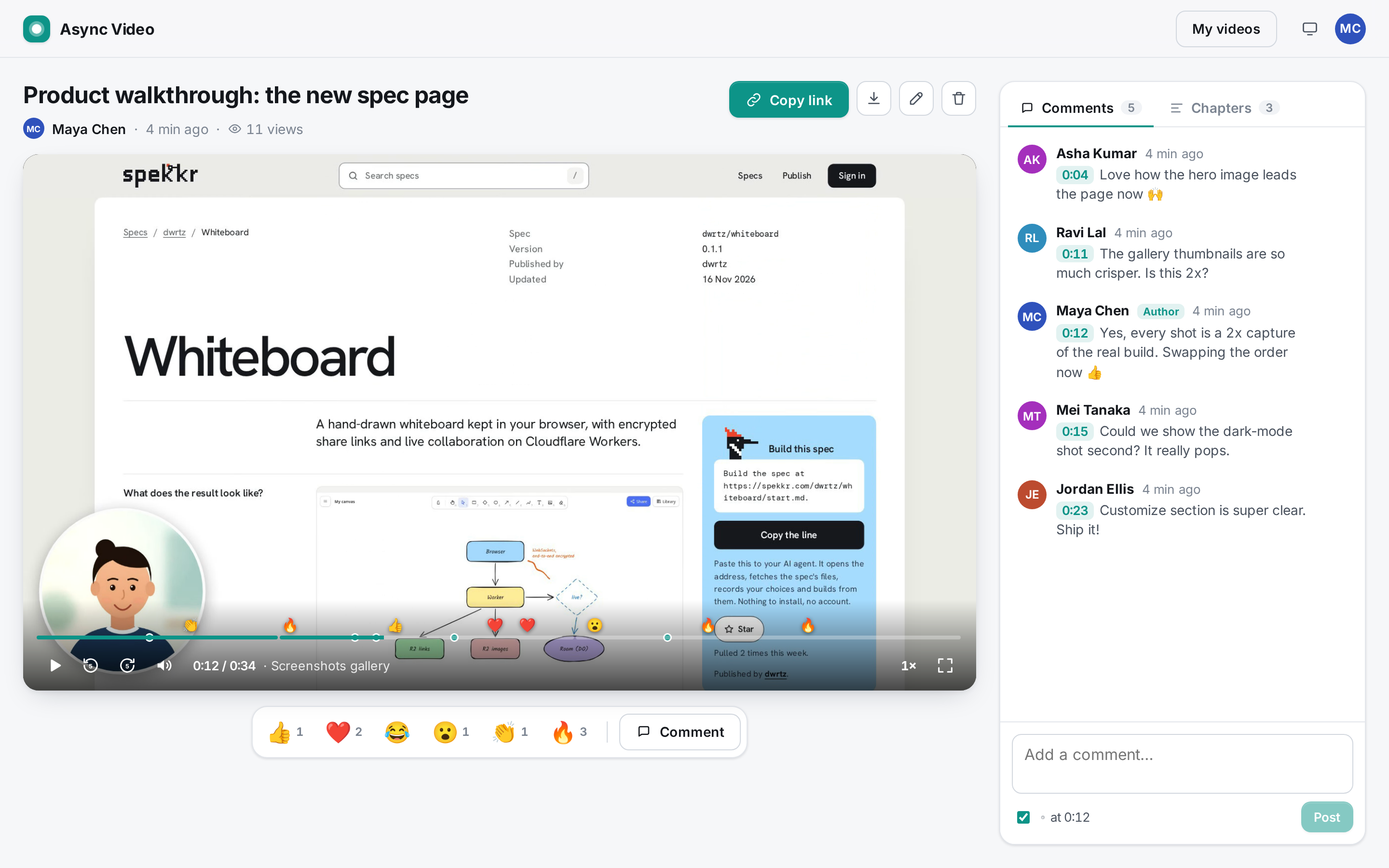
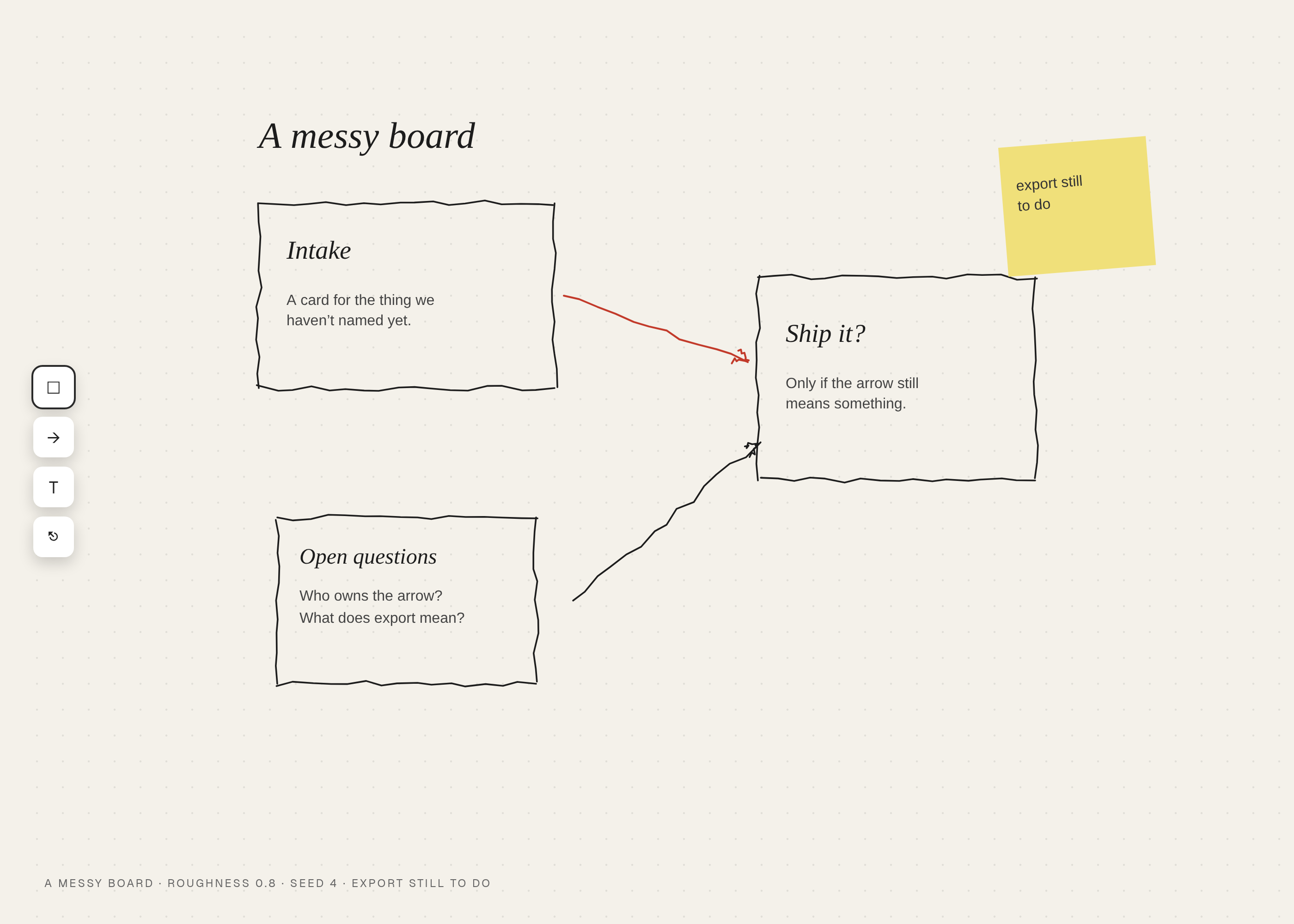
What does the result look like?
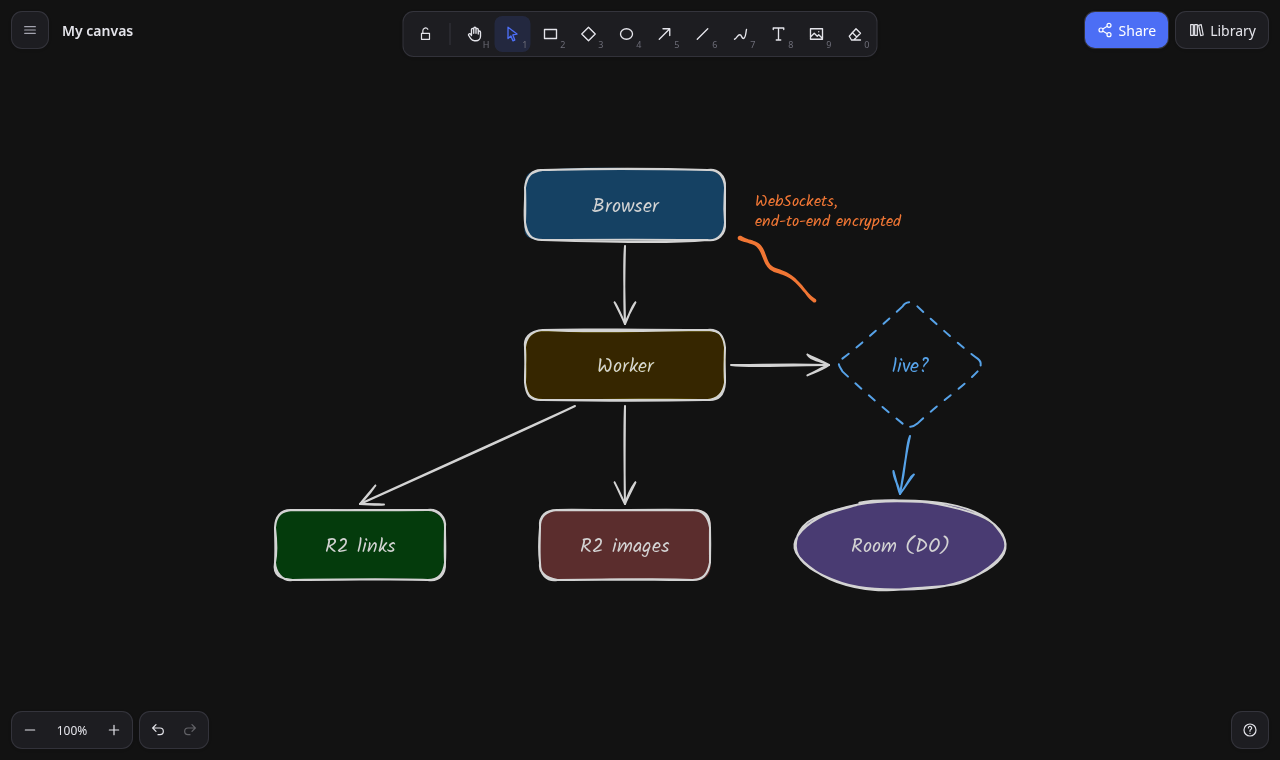
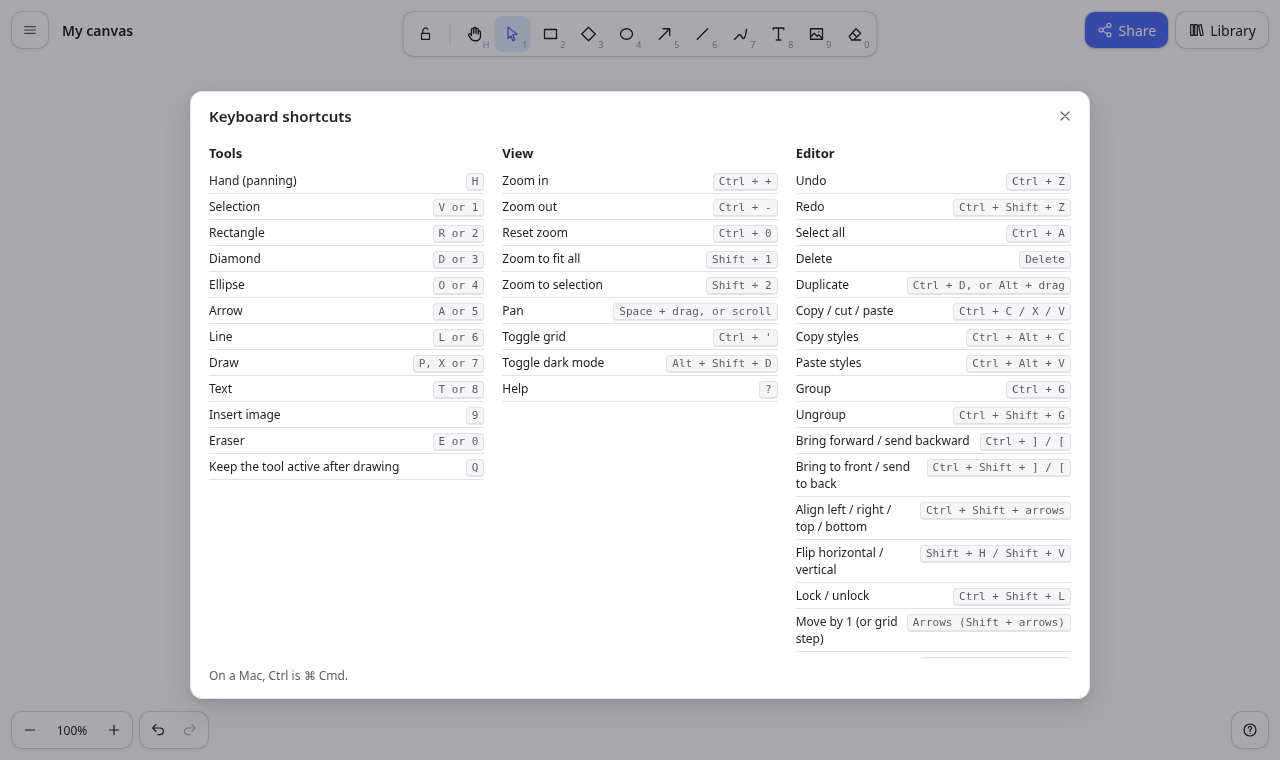
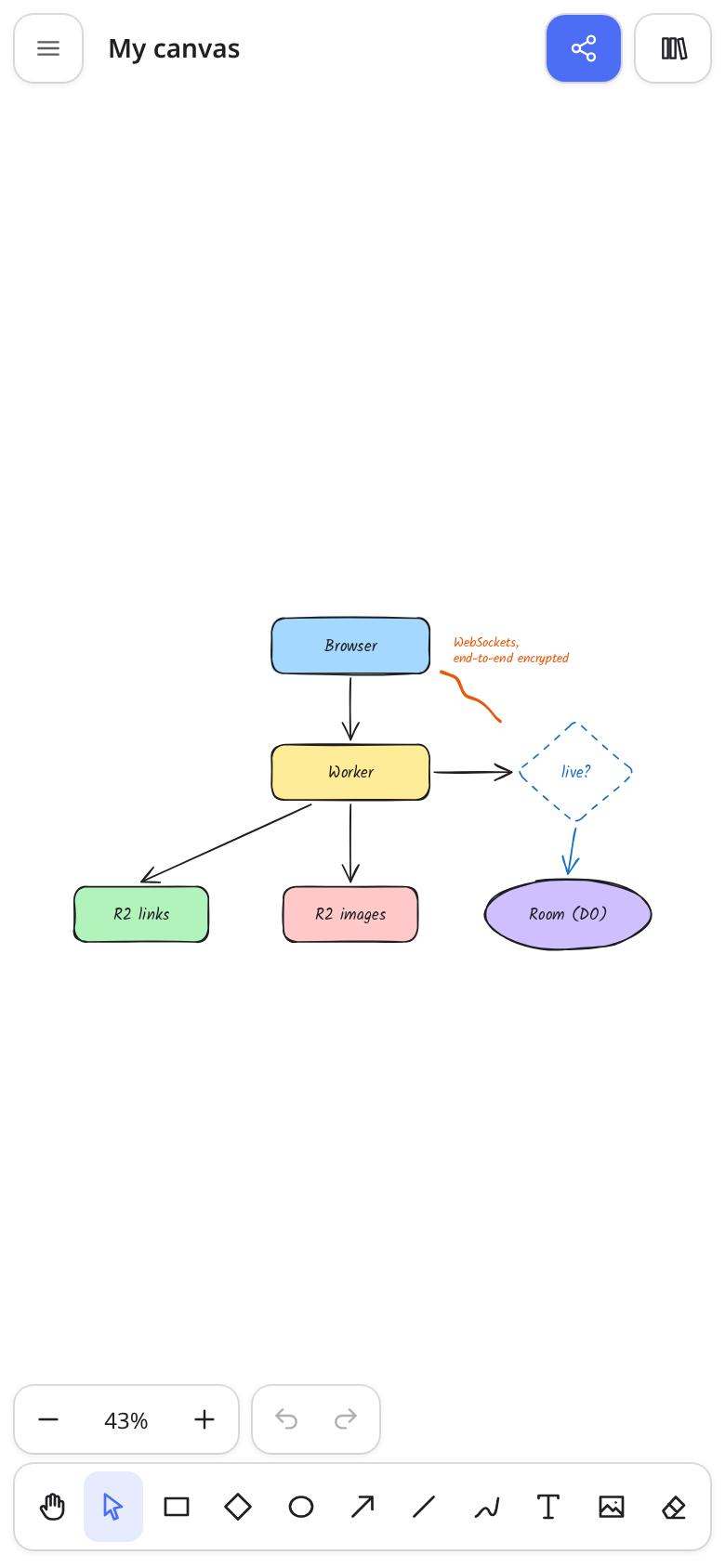
What can I customize?
Your choices go into the line you copy. Anything else is yours to edit, but it leaves the tested path.
What do I get?
-
spec.mdRequirements R1–R27 with acceptance checks: drawing tools, styles, files, library, export, the browser canvas, encrypted share links, live collaboration, limits, deploy.Whiteboard
What this builds
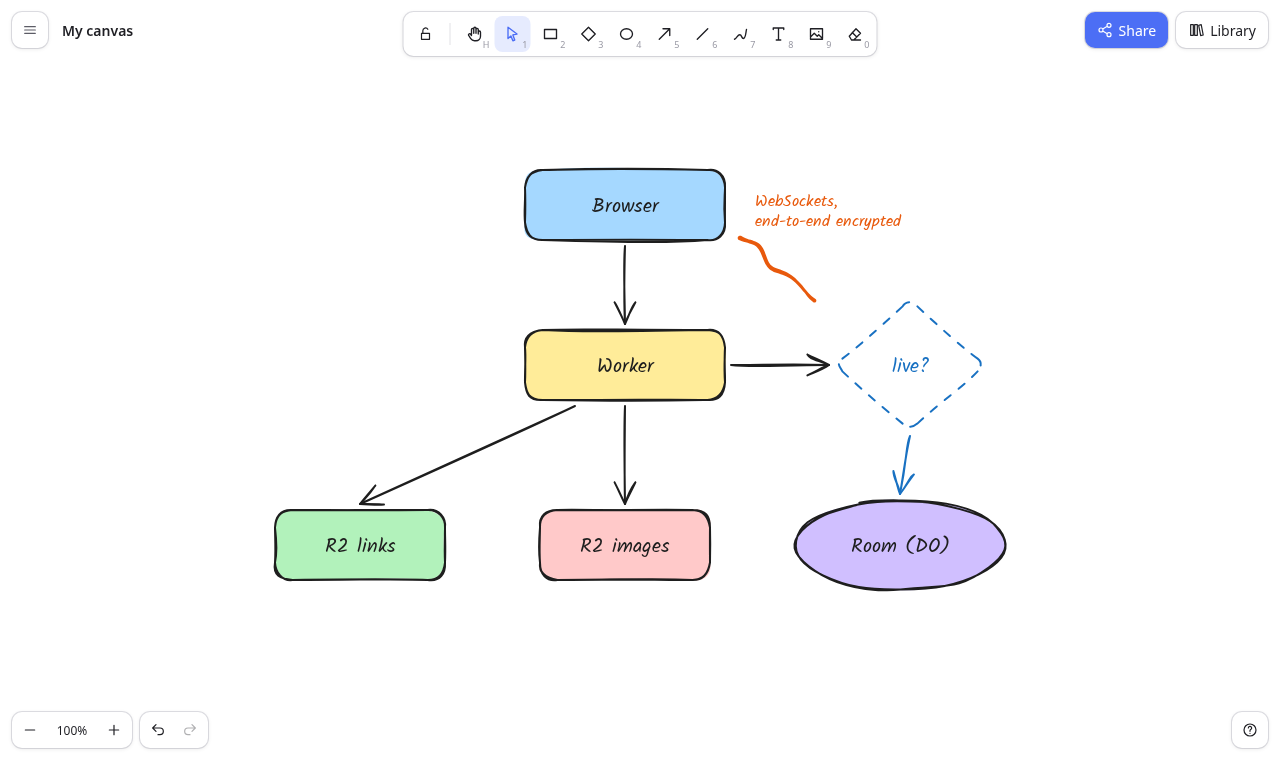
A virtual whiteboard for sketching diagrams that look hand-drawn. People draw on an infinite canvas with these tools:
- rectangles, diamonds, ellipses
- arrows that stick to shapes, lines
- freehand strokes, text, images
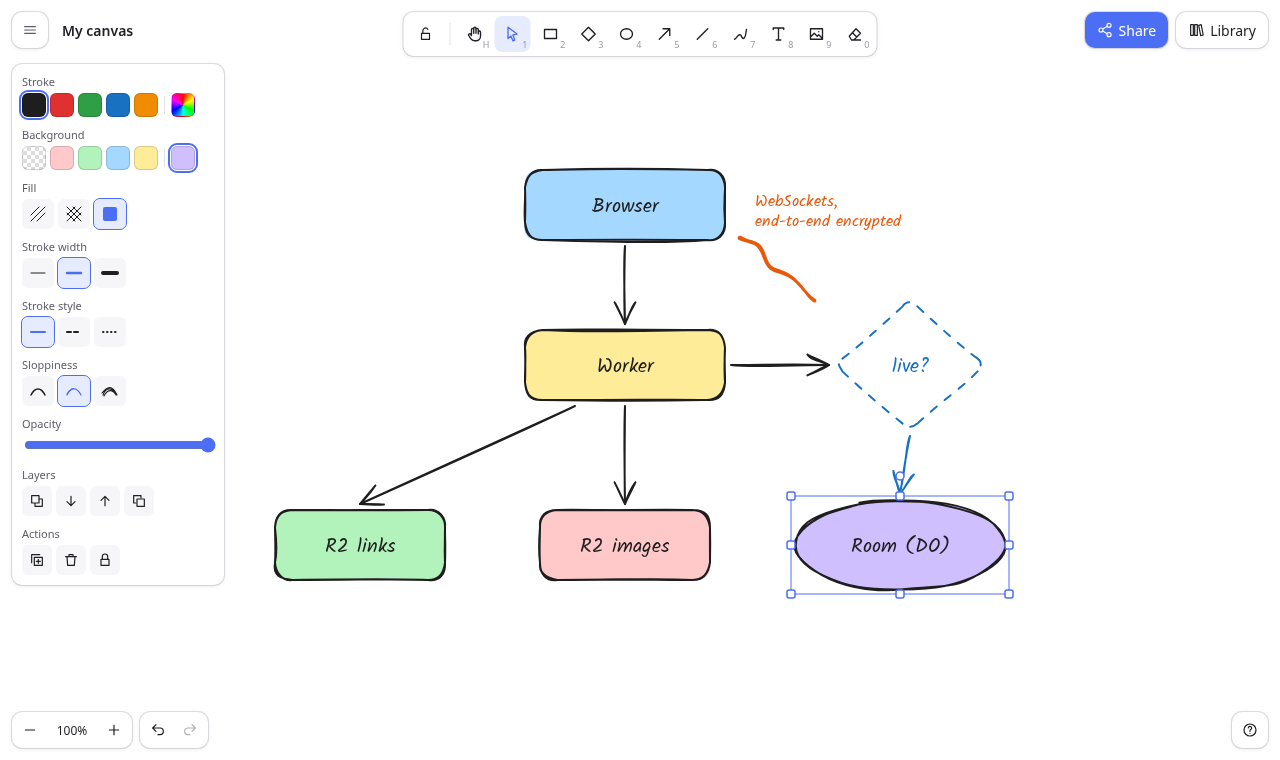
They style shapes from a side panel and arrange them with selection, groups, alignment and layers. They can:
- undo anything
- export PNG or SVG images
- save and open
.excalidrawJSON files (the format of the widely used open-source whiteboard, so files move both ways) - keep a personal library of reusable shapes
- switch to dark mode and use it on a phone
There are no accounts. Drawings live in the browser: the canvas at
/is kept in that browser's storage (R23), and files carry drawings anywhere else (R19).The server only handles what people share, and it can't read any of it:
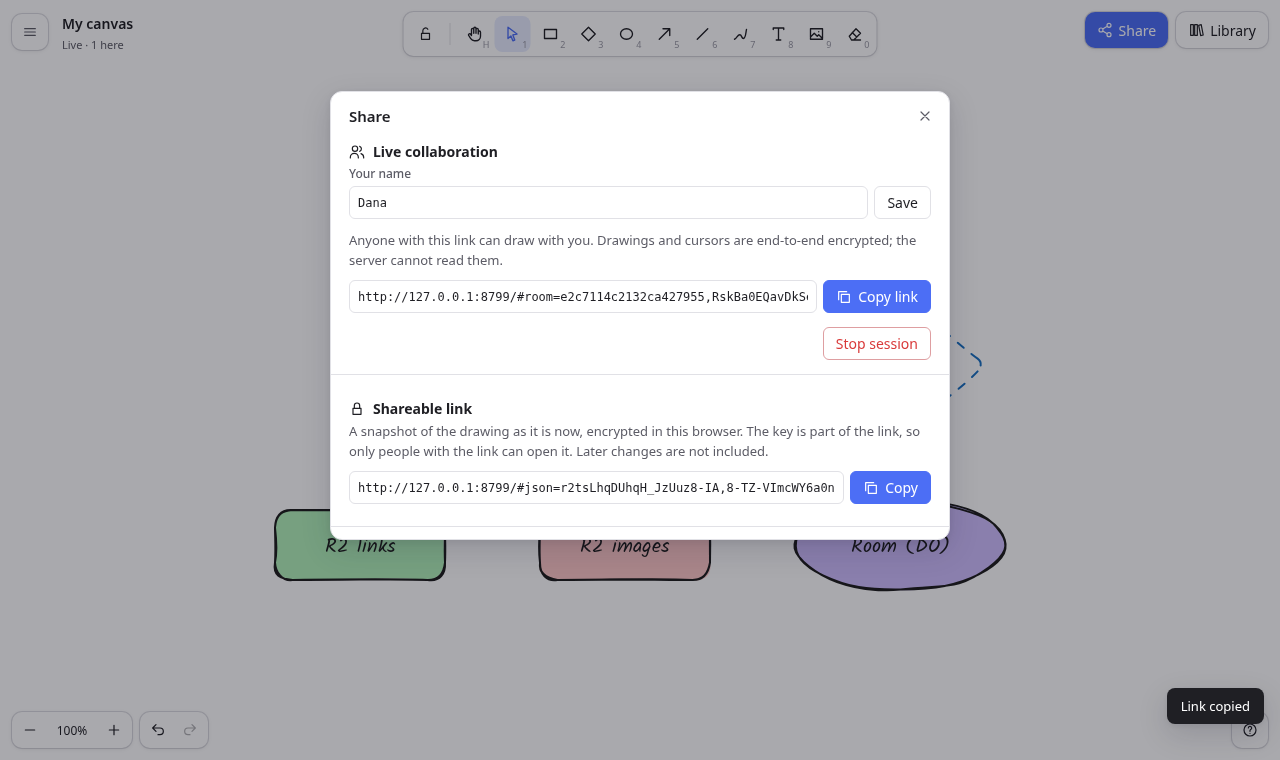
- Shareable links: an end-to-end encrypted snapshot whose key stays in the link (R24).
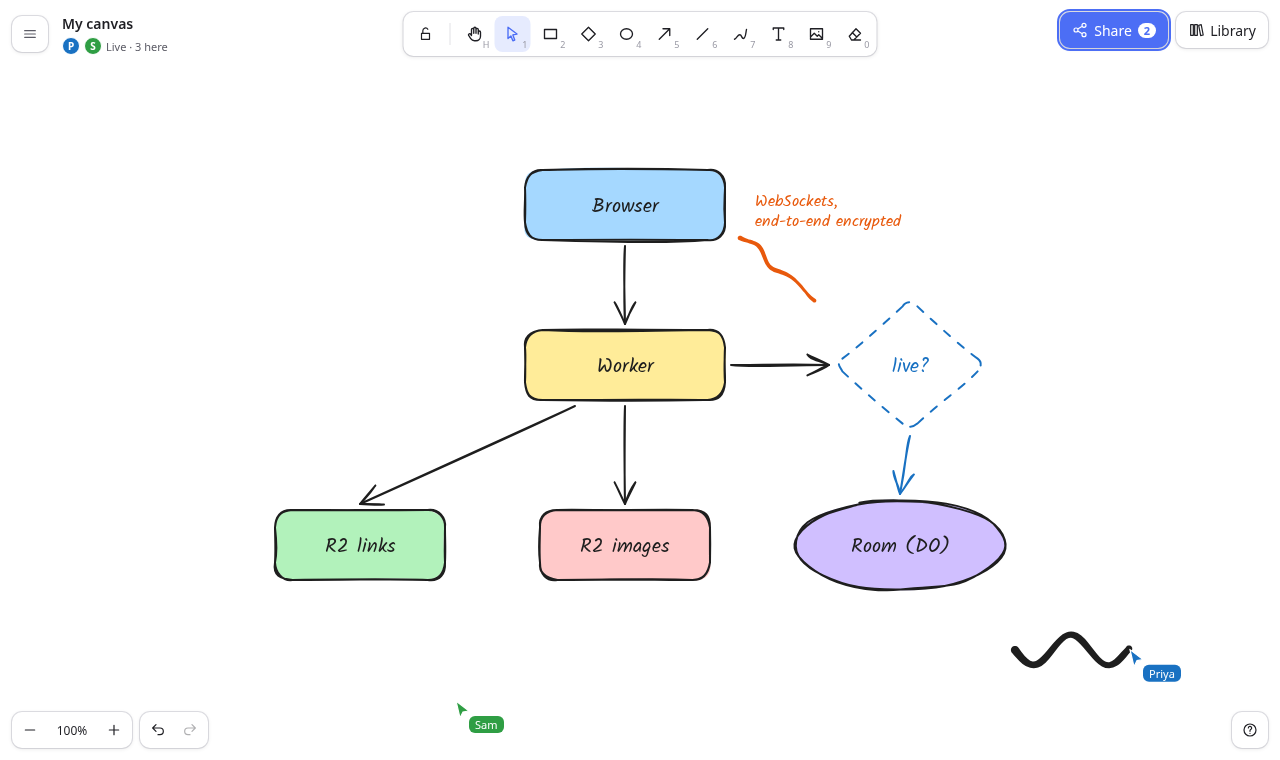
- Live collaboration: everyone in a session sees each other's edits and cursors in real time. Sessions are also end-to-end encrypted (R25).
Anyone who can reach the site can use both, so they have size and rate limits (R26).
It is one Cloudflare Worker:
- The React single-page app is the Worker's static assets.
- A small API runs in the Worker. It stores encrypted share links and encrypted session images in one R2 bucket.
- Each live session is one Durable Object. It relays encrypted WebSocket messages and keeps the latest encrypted scene for people who join later.
- There is no database.
It runs on a laptop with
npm installandnpm run dev(wrangler devwith local R2 and Durable Objects, and no Cloudflare account). It deploys withnpm run deployand needs no other service.Read
spekkr.inputs.jsonfirst. It sits at the repository root. If it is missing, create it from thecustomize.settingsdefaults inspekkr.json; with the defaults its full contents are:{ "app_name": "Whiteboard", "accent_color": "#4c6ef5" }It has exactly these two keys:
app_name: the product name (default "Whiteboard"). It is the page title and the welcome text on the canvas.accent_color: the accent colour (default#4c6ef5). It is used for primary buttons, selection outlines and handles, active tools and focus rings.
design.mdhas:- the stack, Cloudflare config and storage layout
- the element model and file formats
- the rendering rules, sync and collaboration protocols, and API
- every screen and the look
tasks.mdis the build order.research.mdrecords where the design came from; the builder does not need it, and nothing in it is a requirement.Names and words
The product is called
app_nameeverywhere. The built app never shows the name, logo or wordmark of any other whiteboard product. The brand mark is a plain rounded square in the accent colour.- "Excalidraw" may appear only where the file format needs it: the
.excalidraw/.excalidrawlibextensions and the"type": "excalidraw"/"excalidrawlib"values inside files.
- "Excalidraw" may appear only where the file format needs it: the
- Interface text the spec quotes is the text to use. Other text is the builder's own, short and plain.
No image, font or icon file is copied from another product. Icons are inline SVG drawn in the app's own code.
- The hand-drawn font is Kalam (SIL Open Font License) from
@fontsource/kalam. - The other two font choices use system font stacks.
- The hand-drawn font is Kalam (SIL Open Font License) from
Words used here
- Scene coordinates: positions on the infinite canvas. Screen coordinates: CSS pixels in the window.
screen = (scene + scroll) × zoom. - Click vs drag: a press counts as a drag once the pointer has moved 10 screen pixels or more from where it went down; less than that, it is a click (Excalidraw's dragging threshold).
- Element: one thing on the canvas: rectangle, diamond, ellipse, arrow, line, freedraw, text or image. Its fields are in
design.md("Element model"). - Live elements: elements with
isDeletedfalse. Deleted elements are kept as tombstones only where sync needs them. - Linear element: an arrow or a line. Its first point is always
[0, 0], andx,yis that first point's scene position. The other points are offsets from it and may be negative.width/heightare the size of the points' bounding box. - Binding: an arrow end attached to a shape, so the arrow follows the shape when it moves.
- Group: elements that share a group id in
groupIdsand are selected together. Groups nest; the last id is the outermost group. - Browser canvas: the scene kept in this browser's storage.
- Session: a live collaboration room. Session link:
<origin>/#room=<20 hex>,<22-char key>. - Shareable link:
<origin>/#json=<22-char id>,<22-char key>. - Host: the person who started a session. Guest: anyone who joined it by link.
- MB: 1,048,576 bytes.
Out of scope
These are not built:
- frames, embeds and iframes
- the laser pointer, sticky notes
- elbow arrows (imported elbowed arrows draw as plain polylines)
- image cropping, element hyperlinks
- the command palette, find on canvas
- text-to-diagram and AI features
- languages other than English
- a public library catalogue
- PNG files that carry the scene inside them
- presenting or slides
- comments, version history beyond undo
- accounts, sign-in, drawings stored on the server, read-only links that follow later edits, teams or shared folders (sharing is by encrypted link and live session only)
Import counts elements of unknown kinds, leaves them out, and says so (R19).
Requirements
Each requirement ends with an "Accept when" line naming the tests that prove it. Test names are in "Tests" at the end.
R1. Infinite canvas, zoom and pan
- The editor fills the window with one
<canvas data-testid="canvas">. It is drawn at the device pixel ratio and redrawn on resize. The scene has no edges. View state:
{ scrollX, scrollY, zoom }, withscreen = (scene + scroll) × zoom.- Zoom is clamped to 10 %–3000 % and rounded to 0.001.
- The bottom-left zoom control has "Zoom out" (−10 points), "Reset zoom" (shows the percentage and sets 100 % around the window centre) and "Zoom in" (+10 points).
- Keys: Ctrl/⌘
+/=zoom in, Ctrl/⌘-zoom out, Ctrl/⌘0resets to 100 %. Shift+1 zooms to fit all elements (padding 40 px, never above 100 %). Shift+2 fits the selection. Wheel:
- With Ctrl/⌘ held (and trackpad pinch, which browsers send as Ctrl+wheel), the wheel zooms around the pointer: the scene point under the pointer stays under it.
- Zoom step per wheel event, as in Excalidraw:
d = clamp(deltaY, −10, 10),zoom' = zoom − d / 100 + log10(max(1, zoom)) × −sign(deltaY) × min(1, |deltaY| / 20), then clamped and rounded as above. So one notch zooms by 10 points at 100 % and by more above it. - Otherwise the wheel pans by its deltas, and Shift+wheel pans horizontally.
- Panning: drag with the Hand tool (H), drag with the middle mouse button, or hold Space and drag. On touch screens, a two-finger drag pans and a pinch zooms around the fingers' midpoint.
- First view: opening a scene that has elements fits it to the window (never above 100 %). An empty scene opens at 100 % with the origin at the top left.
- The view is not stored with a drawing or the browser canvas; each opening fits the scene again.
Accept when: "R1 R16 zoom, pan, fit, the eraser, and the shortcuts help" passes.
R2. Shapes
Toolbar: a toolbar (
role="toolbar", name "Tools") at the top centre. Each tool is a button with the tool's name as its accessible name, an icon, and its key shown small. The tools, with their keys:- Hand (panning tool) H; Selection V or 1
- Rectangle R or 2; Diamond D or 3; Ellipse O or 4
- Arrow A or 5; Line L or 6; Draw P, X or 7
- Text T or 8; Insert image 9; Eraser E or 0
- A lock button before them, "Keep selected tool active after drawing" (Q), with
aria-pressed. - The active tool has
aria-pressed="true".
Drawing a shape:
- Dragging with Rectangle, Diamond or Ellipse draws from the press point to the pointer. Shift keeps the shape square or circular.
- A click (under the 10-pixel drag threshold) makes a 100×100 shape centred on the click.
- Dragging back past the start point flips the box, and the stored x/y/width/height stay positive.
- After drawing: the new element is selected and the tool returns to Selection, unless the lock is on.
New elements:
- They take the current style (R13).
- They get a random
seed,version1, a randomversionNonce, and a fractionalindexabove every other element. - Rectangles default to round corners (
roundness: {type: 3}); diamonds to{type: 2}; ellipses have none.
- With the grid on, corners snap to the grid (R17).
Accept when: "R2 shapes: drag to draw, Shift for squares, a click makes a default shape, Q keeps the tool" passes.
R3. Arrows and lines
Drawing:
- Dragging with Arrow or Line makes a two-point element.
- A click (under the 10-pixel drag threshold) starts a multi-point element: each click adds a point and the last segment follows the pointer.
- Enter, Escape, a double-click, or a click within 8 screen pixels of the last fixed point finishes it.
- Shift locks each segment to 15° steps.
Arrowheads: arrows default to no start arrowhead and an "arrow" end arrowhead. Lines have none.
- The style panel lists None, Arrow, Triangle, Triangle outline, Bar, Circle, Circle outline and Diamond for each end.
- An imported
dotis read ascircle. An importeddiamond_outlineis kept and drawn as an outlined diamond.
- Edges: "Round" draws a smooth curve through the points; "Sharp" draws straight segments.
- Closed lines: a line whose
polygonflag is true is closed and can have a background fill. - Editing points: a selected two-or-more-point linear element shows a handle on every point. Dragging a point moves just that point; the element's x/y/width/height are recomputed from the points.
Accept when: "R3 R4 arrows and lines: two-point drags, multi-point clicks, binding that follows shapes" passes.
R4. Arrow binding
- Binding targets: rectangles, diamonds, ellipses, text and images can be bound to. Locked elements can't.
Binding on draw: when an arrow's start or end is placed within 10 screen pixels of the topmost bindable element's outline, or inside it, that end binds:
- The arrow stores
startBinding/endBindingas{ elementId, fixedPoint: [fx, fy], mode: "orbit" }, wherefixedPointis where the end sits as a fraction (0–1) of the target's unrotated box. - The target's
boundElementsgets{ id, type: "arrow" }. - While drawing, the target under the pointer is outlined in the accent colour.
- The arrow stores
- End placement: a bound end does not sit inside the shape. Take the ray from the target's centre toward the neighbouring point, in the target's unrotated frame. Find where it leaves the target's real outline: the box for rectangles, text and images, the ellipse for ellipses, and the rhombus through the box's edge midpoints for diamonds. Move 4 units further out along the same ray, then rotate with the target. For a two-point arrow bound at both ends, the line goes toward the other target's centre.
Keeping bindings up to date:
- Moving, resizing or rotating a target re-places the bound ends of every arrow bound to it, in the same undo step.
- Deleting a target removes the bindings that point at it.
- Deleting an arrow removes it from its targets'
boundElements. - Duplicating a target together with its arrow re-points the copies at each other. Duplicating the target alone leaves the copy unbound.
- Moving the arrow itself by its body unbinds both ends.
Accept when: "R3 R4 arrows and lines: two-point drags, multi-point clicks, binding that follows shapes" and the unit tests "arrow binding" pass.
R5. Freehand drawing
- The Draw tool records every pointer position while the button is down, as points relative to the first one, along with pen pressure when the device reports it (
pressures; otherwisesimulatePressure: true). The stroke is drawn as a filled outline from
perfect-freehandwith these settings:- size
strokeWidth × 4.25, thinning 0.6, smoothing 0.5, streamline 0.5 - easing
sin(t·π/2), last true
- size
- With a background colour, the area enclosed by the points is filled as a rough polygon under the stroke.
- After a stroke the tool stays on Draw and nothing is selected.
Accept when: "R5 R6 freehand drawing and text" passes.
R6. Text
Starting text: a click with the Text tool, or a double-click on empty canvas with Selection, starts a text element there.
- A
<textarea>with the accessible name "Text" opens over the canvas at the element's place, scaled by the zoom, in the element's font, size, colour and alignment. - It grows as the person types. Enter adds a new line.
- It sits in its own layer the size of the canvas (
overflow: hidden, above the canvas, below the toolbar). It is focused without scrolling (focus({ preventScroll: true })). - The caret stays in view by panning the canvas, never by scrolling the page or the app. When the browser scrolls that layer to reveal the caret (typing past the screen's edge, many lines, the on-screen keyboard), the app puts the layer's scroll back to 0 at once and pans the canvas by the same amount plus 5 px, so the text and the caret stay visible and the editor stays on its text.
- A
- Finishing: Escape, Ctrl/⌘+Enter, or a click outside finishes editing. If the text is empty or only spaces, the element is removed.
- Editing again: a double-click on a text element, or Enter with one text element selected, opens it for editing.
- Size: width and height come from measuring each line with the canvas font. Line height is
fontSize × lineHeight; new text useslineHeight1.25 for Hand-drawn, 1.35 for Normal and 1.2 for Code, and imported text keeps its own. Fonts:
- "Hand-drawn" (
fontFamily5, Kalam), "Normal" (6, the system sans-serif stack) and "Code" (3, the system monospace stack). - Imported text in other font numbers is drawn with the nearest of these: 1 → Hand-drawn; 2, 7, 9 and 10 → Normal; 8 → Code. Any other number → Hand-drawn. The font number in the file is kept.
- "Hand-drawn" (
- Font sizes: S 16, M 20, L 28, XL 36. Text align: Left, Center, Right.
- Text is selected, moved, rotated and styled like a shape. Resizing text by a corner scales the font size.
Accept when: "R5 R6 freehand drawing and text" passes.
R7. Images
Adding an image:
- "Insert image" (key 9) opens a file picker. Dropping image files on the canvas, or pasting an image, also adds them.
- Accepted types: PNG, JPEG, GIF, WebP, SVG, BMP and AVIF. Other files are refused with "Only PNG, JPEG, GIF, WebP, SVG, BMP and AVIF images can be added".
Processing:
- Raster images larger than 1440 px on the long side are re-encoded so the stored bitmap is 1440 px on the long side (JPEG stays JPEG at 0.9 quality; others become PNG). SVG and GIF are kept as they are. This is about the file bytes, not the element's size on the canvas.
- The result must be at most 4 MB, or it is refused with "Images can be up to 4 MB".
- The file entry: the file's id is the SHA-1 hex of its bytes. The scene's
filesmap gets{ id, mimeType, dataURL, created }, and identical images share one entry. - The image element:
fileId,status: "saved",scale: [1, 1], no rounded edges. It is placed centred on the drop point or the window centre. Its width and height start at the stored bitmap's pixel size, scaled down (aspect kept) so the long side is at most half the visible area's shorter side in scene units (min(viewW, viewH) / zoom / 2). - Display: images draw with their aspect ratio kept when resized from corners. Round edges clip them with the rectangle radius. While the bytes are loading, a grey placeholder shows "Loading image…"; if loading fails, it shows "Image could not load".
Storage:
- In the browser canvas, image bytes live in IndexedDB (R23).
- In a shareable link they are inside the encrypted snapshot (R24).
- In a session they are encrypted and stored in R2 for the session (R25).
Accept when: "R7 images: insert from a file, large ones are scaled down, they survive a reload" and "R25 images travel encrypted to everyone in the session" pass.
R8. Hand-drawn rendering
Shape generation: every shape and line is generated by roughjs's
RoughGeneratorfrom the element's fields, so the same element always draws the same way.- Options:
seed,roughness(0 Architect, 1 Artist, 2 Cartoonist),strokeWidth(Thin 1, Bold 2, Extra bold 4),fillWeight = strokeWidth / 2,hachureGap = strokeWidth × 4,preserveVerticeswhen roughness < 2, anddisableMultiStrokefor dashed and dotted strokes. - Dashed is
[8, 8 + strokeWidth]; dotted is[1.5, 6 + strokeWidth]. - Fill styles: Hachure, Cross-hatch and Solid. As in Excalidraw, Alt-clicking Hachure while the fill is already hachure switches it to
zigzag. While the fill is zigzag, that button is shown pressed as "Zigzag (Alt-Click)", otherwise it is "Hachure (Alt-Click)". Zigzag is drawn as rough's zigzag.
- Options:
- Corner radius:
roundness.type3 uses 25 % of the short side up to 32 units; type 2 uses 25 % of the short side. Fill rule: fill paths use the non-zero rule, except roughjs curve, polygon and path shapes, which use even-odd (the same rule as rough's own canvas renderer). An ellipse filled even-odd would show no fill.
- Sharp rectangles (
gen.rectangle) and ellipses fill non-zero. - Rounded rectangles and rounded diamonds are built as roughjs paths (
gen.path), so they fill even-odd. Sharp diamonds, closed lines and freehand fills are polygons, so they fill even-odd too.
- Sharp rectangles (
- Shared paths: the canvas and SVG export draw the same paths. Generated paths are cached per element. The cache key covers everything the paths depend on:
version,versionNonce, type, width, height,seed, stroke and background colours,fillStyle,strokeWidth,strokeStyle,roughness,roundness,points,pressures,simulatePressure,polygonand the arrowheads. A drag preview changes points or size without a version bump, so it still redraws. - Element properties:
opacity(0–100) is the element's alpha.anglerotates around the element's centre.
Accept when: "R13 R8 the style panel changes the selection and the next shape" and the unit tests "R8 hand-drawn shapes" pass.
R9. Selection, moving, resizing, rotating
Selecting with the Selection tool:
A click selects the topmost element under the pointer.
- Filled shapes, text and images hit anywhere inside.
- Unfilled shapes and lines hit within 10 screen pixels of their stroke.
- Shift+click adds or removes an element.
- A click on empty canvas clears the selection.
- Dragging from empty canvas draws a selection box: elements fully inside it are selected (Shift adds).
- Ctrl/⌘+A selects every element that isn't locked.
- Selection outline: the selection is drawn as an accent-coloured dashed box around each element (rotated with it) and one box around a multi-selection.
Handles:
- Eight square 8-px resize handles. Corners only, when the box is under 30 px on screen.
- One round rotate handle 20 px above the top middle.
Moving:
- Dragging a selected element, or any element (which selects it first), moves the selection.
- Arrow keys move it as Excalidraw does. With the grid off: 1 unit, or 5 with Shift. With the grid on: the grid size (20), or 1 with Shift.
- With the grid on, the moved box's top-left snaps to the grid.
Resizing:
- Dragging a handle resizes by the pointer's movement from the press point.
- Shift keeps the aspect ratio. Images and text always keep it, and multi-selections scale as one box with their contents.
- Rotating: dragging the rotate handle rotates around the selection's centre. Shift snaps to 15°.
- Deleting: Delete or Backspace deletes the selection.
- Escape clears the selection. If a group is being edited, it leaves the group first. If a non-selection tool is active, it returns to Selection.
Accept when: "R9 selection: click, Shift-click, box select, move with arrow keys, resize, rotate, delete" and the unit tests "geometry" pass.
R10. Groups
- Grouping: Ctrl/⌘+G (or "Group" in the style panel or context menu) groups two or more selected elements. A new group id is added to the end of each element's
groupIds, and the members are moved next to each other in z-order, at the topmost member's place. - Ungrouping: Ctrl/⌘+Shift+G (or "Ungroup") removes the outermost group id from the selected elements.
Clicking a group:
- A click on any member selects the whole outermost group. The group is outlined with one dashed box.
- A double-click on a member enters the group: that member alone is selected. Further clicks select within the group until Escape or a click outside it.
- A double-click on an element that is in no group and is not text acts as a single click.
- Groups move together: moving, deleting, duplicating, copying, locking, z-order and the eraser act on whole groups.
Accept when: "R10 R11 R12 group, align, distribute, z-order and flip" passes.
R11. Align, distribute, flip
Align (2+ selected units): a group counts as one unit. The style panel shows "Align left", "Center horizontally", "Align right", "Align top", "Center vertically" and "Align bottom". They line up the units' bounding boxes with the selection's box.
- Keys: Ctrl/⌘+Shift+←/→/↑/↓ for left, right, top and bottom.
- Distribute (3+ units): "Distribute horizontally" and "Distribute vertically" keep the first and last units and space the others so the gaps between boxes are equal.
Flip: Shift+H flips the selection horizontally and Shift+V vertically, around the selection's centre.
- Positions mirror. Linear and freedraw points mirror. Angles negate. An image's
scalesign flips. - Bound arrows are re-placed.
- Positions mirror. Linear and freedraw points mirror. Angles negate. An image's
Accept when: "R10 R11 R12 group, align, distribute, z-order and flip" and the unit tests "align, distribute, group, flip" pass.
R12. Layers (z-order)
- Order: z-order is the order of the elements array, and each element's
indexis a fractional-indexing key that increases along it. Commands:
- "Send to back" (Ctrl/⌘+Shift+[), "Send backward" (Ctrl/⌘+[), "Bring forward" (Ctrl/⌘+]) and "Bring to front" (Ctrl/⌘+Shift+]).
- Alt with the bracket keys works like Shift on keyboards where Shift changes the bracket.
- Front and back move the selection, with whole groups, to the end or the start.
- Forward and backward use Excalidraw's rule. The selection moves just past the next unselected live element above it (forward) or below it (backward). That element need not overlap the selection. If it is in a group, the selection moves past that element's whole outermost group. Nothing happens at the top or bottom.
- The relative order of the moved elements is kept.
- Keys after a move: only the moved elements get new
indexkeys, chosen between their new neighbours, so other people's elements keep theirs (R25). - Repair: an
indexthat is missing, not a valid key, or not greater than the previous one is replaced. Only those runs are regenerated, between their valid neighbours.
Accept when: "R10 R11 R12 group, align, distribute, z-order and flip" and the unit tests "fractional indices" and "z-order" pass.
R13. Style panel
When it shows: with something selected, or with a drawing tool active, a panel at the left (
aria-label="Style") shows the controls that apply. Each choice group isrole="radiogroup"with the group's label, and each option is arole="radio"button witharia-checked.- "Stroke": #1e1e1e, #e03131, #2f9e44, #1971c2, #f08c00, plus a custom colour input labelled "Stroke: custom colour".
- "Background" (shapes, closed lines, freedraw): Transparent, #ffc9c9, #b2f2bb, #a5d8ff, #ffec99, plus "Background: custom colour".
- "Fill" (only with a background): "Hachure (Alt-Click)", "Cross-hatch", "Solid". Alt-click gives zigzag (R8).
- "Stroke width": Thin, Bold, Extra bold.
- "Stroke style" (not freedraw): Solid, Dashed, Dotted.
- "Sloppiness" (not freedraw): Architect, Artist, Cartoonist.
- "Edges" (rectangles, diamonds, lines, arrows, images): Sharp, Round.
- Arrowheads (arrows): "Start arrowhead" and "End arrowhead" selects.
- Text: "Font size" S/M/L/XL, "Font family" Hand-drawn/Normal/Code, "Text align" Left/Center/Right.
- "Opacity": a range input from 0 to 100 in steps of 10.
- "Layers": the four z-order buttons. "Align" appears with 2+ units, plus the distribute buttons with 3+.
- "Actions": Duplicate, Delete, Group / Ungroup (when they apply) and Lock.
- Mixed values: when the selected elements differ, no option is checked.
- Applying a change: it is applied to every selected element it fits (each element's
versionis bumped) and recorded as one undo step. It also becomes the style for the next new element. That style is kept in memory for the page's life. - Colours: only
#rgb,#rrggbb,#rrggbbaaortransparentare accepted. Anything else is ignored. - Phones: the panel is a bottom sheet (R22).
Accept when: "R13 R8 the style panel changes the selection and the next shape" passes.
R14. Duplicate, clipboard, copy styles, lock, context menu
Duplicate (Ctrl/⌘+D): copies the selection, 10 units right and down, above the originals. The copies are selected.
- Alt+drag of a selection leaves the originals in place and moves copies.
- Copies get new ids, seeds and group ids (consistently within the copy), and copied bindings are re-pointed (R4).
Clipboard:
- Ctrl/⌘+C and X write the selection to the clipboard as text: JSON
{ "type": "excalidraw/clipboard", "elements": [...], "files": {...} }. Cut also deletes the selection. - Ctrl/⌘+V pastes that JSON, from this app or the original format, centred on the pointer's last position. Pasted elements get new ids and are selected.
- Pasting other text makes a text element at the pointer. Pasting an image file adds an image (R7).
- Ctrl/⌘+C and X write the selection to the clipboard as text: JSON
- Copy styles: Ctrl/⌘+Alt+C copies the first selected element's style. Ctrl/⌘+Alt+V applies it to the selection: stroke, background, fill, width, style, sloppiness, edges and opacity, plus font, size and alignment for text.
Lock: Ctrl/⌘+Shift+L locks or unlocks the selection.
- Locked elements can't be selected by click or box, and nothing can bind to them.
- The canvas context menu's "Unlock all" unlocks every element.
Context menus:
- Right-click on the selection: Cut, Copy, Copy styles, Paste styles (disabled until styles were copied), Duplicate, Group (2+ selected), Ungroup (when grouped), Bring to front, Send to back, Flip horizontal, Flip vertical, Add to library (adds the selection as one library item and opens the library), Lock, Delete.
- Right-click on empty canvas: Select all, Unlock all (when anything is locked), Show grid / Hide grid, Zoom to fit all.
Accept when: "R14 duplicate, Alt-drag, copy and paste, copy styles, lock" passes.
R15. Undo and redo
- Keys and buttons: Ctrl/⌘+Z undoes. Ctrl/⌘+Shift+Z and Ctrl/⌘+Y redo. "Undo" and "Redo" buttons sit next to the zoom control and are disabled when there is nothing to do.
What counts as one step:
- every finished pointer gesture (draw, move, resize, rotate, point edit, erase stroke)
- every style change, command (align, group, z-order, flip, duplicate, delete, paste, import, insert from library) and finished text edit
- What a step holds: a step stores the elements before the change and the selection. The history keeps the last 100 steps, and a new change clears redo.
- Remote changes: changes that arrive from a session or a merge are not added to the history. Undo only reverts the person's own changes. Each step restores the elements it changed, at higher
versions, so the restore syncs to others. - Reloads: opening a different scene, or reloading, starts a new history.
Accept when: "R15 undo and redo, from the keyboard and the buttons" and the unit tests "undo history" pass.
R16. Keyboard shortcuts and help
- Keys: all the keys in R1–R15 and R17–R21 work when focus is not in a text field. Keys never act while a textarea, input or select has focus.
Help: "?" (or Shift+/) or the "Help" button opens a dialog named "Keyboard shortcuts" that lists them in three groups:
- "Tools"
- "View": zoom in/out, reset zoom, fit all, fit selection, grid, dark mode
- "Editor": undo, redo, select all, delete, duplicate, copy/paste, copy/paste styles, group/ungroup, lock, z-order, align, flip, export image, open, save, finish text
- Format: keys are written as, for example, "Ctrl + Shift + ] / [". A note says "On a Mac, Ctrl is ⌘ Cmd." Escape closes the dialog.
- Eraser (E or 0): dragging over elements marks them, with their whole groups (drawn at 25 % opacity). Releasing deletes them as one step. Escape cancels.
Accept when: "R1 R16 zoom, pan, fit, the eraser, and the shortcuts help" passes.
R17. Grid and canvas background
Grid: Ctrl/⌘+' turns grid mode on or off. The main menu has "Grid and snapping: on (Ctrl+')" / "… off …", and the canvas context menu has "Show grid" / "Hide grid".
- While on, grid lines are drawn every
gridSize(default 20) scene units, with every 5th line darker. - New shapes' corners, linear points, moved selections (by the box's top-left) and resized edges snap to the grid. Rotated elements don't snap.
gridModeEnabledandgridSizeare saved with the scene.
- While on, grid lines are drawn every
- Canvas background: the main menu lists "Canvas background #ffffff", "#f8f9fa", "#f5faff", "#fffce8" and "#fdf8f6". The current one is marked "✓". It sets
viewBackgroundColor, which is saved with the scene and used by exports with a background.
Accept when: "R17 R21 grid snapping, canvas background, and dark mode" passes.
R18. Export images
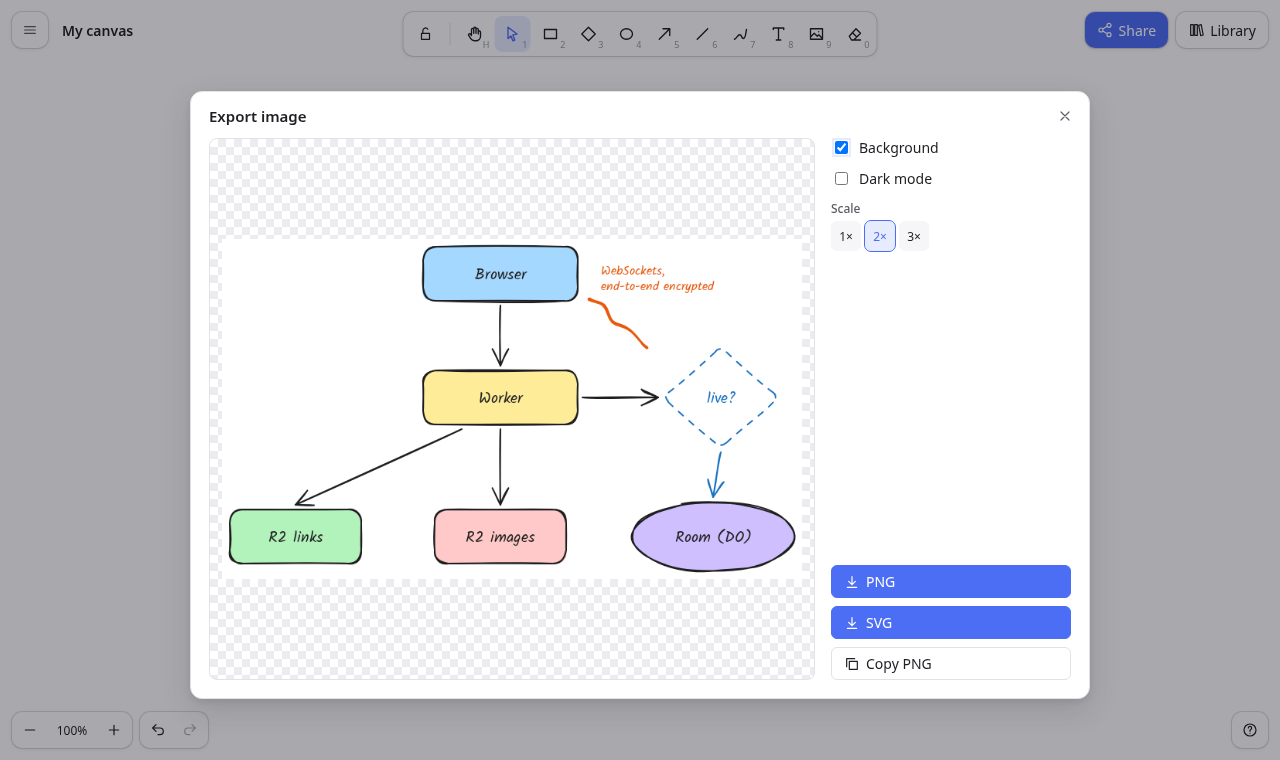
- Opening: "Export image…" in the main menu, or Ctrl/⌘+Shift+E, opens a dialog named "Export image".
- What it exports: with a selection it exports only the selected elements and says "Only the selected elements are exported." Otherwise it exports every element. With nothing to export it says "There is nothing to export yet. Draw something first."
- Preview: an image named "Preview of the exported image", on a checkerboard.
Options:
- "Background" checkbox (default on): fills with
viewBackgroundColor. - "Dark mode" checkbox (default: the current theme): applies the dark filter of R21 to the output.
- "Scale" radio group: 1×, 2× (default), 3×.
- "Background" checkbox (default on): fills with
Buttons:
- "PNG" downloads
<name>.png. Its size is(content box + 10 padding on each side) × scale. "SVG" downloads
<name>.svg.- It starts
<svg xmlns="http://www.w3.org/2000/svg", uses the same rough paths as the canvas, and draws text as<text>. - It embeds the Kalam font as an
@font-facewith base64 WOFF2 when any text uses it. - Images are embedded as data URLs.
- Without a background there is no full-size background rect.
- It starts
- "Copy PNG" copies the PNG to the clipboard ("Image copied"). If the browser refuses: "This browser would not copy an image; download it instead".
- "PNG" downloads
<name>is the scene's name with\ / : * ? " < > |replaced by spaces. The browser canvas's name is "My canvas".
Accept when: "R18 export PNG and SVG, with scale, background and selection-only options" passes.
R19. Save and open .excalidraw files
Save: "Save to file…" (main menu, or Ctrl/⌘+S) downloads
<name>.excalidraw.- It contains
{ "type": "excalidraw", "version": 2, "source": <origin>, "elements": [...], "appState": { gridSize, gridModeEnabled, viewBackgroundColor }, "files": {...} }. - Only live elements are written, and only files that live image elements use.
- The JSON is indented with 2 spaces.
- It contains
Open: "Open…" (Ctrl/⌘+O), or dropping a file on the canvas, reads
.excalidraw,.jsonand.excalidrawlibfiles.- A library file adds its items to the library ("Added N items to your library").
- A scene file replaces the canvas. If the canvas has elements, the app first asks "Replace this drawing?" ("Opening a file replaces what is on the canvas. You can undo this.", button "Replace").
- The opened scene is fitted to the window. The replacement is one undo step.
Restoring elements: imported elements are restored element by element (design.md "Restore"):
- Missing fields get defaults and bad values are replaced.
- Deleted elements are dropped. Unknown types (frames, embeds, iframes, magic frames) are counted and left out, along with linear elements with fewer than two points.
- Indices are repaired and bindings to missing elements are removed.
- When anything was left out, a notice says "N element(s) of a kind this app doesn't draw (such as frames or embeds) was/were left out" (singular or plural as fits).
Refused files:
- Not JSON: "That file is not valid JSON."
- A library opened as a scene from the drawings list: "That is a library file. Open it from the library panel."
- Any other shape: "That file is not a drawing this app can open."
- The canvas is unchanged.
- Round trip: a file written by this app opens again with identical elements, and writing it again gives the same element JSON. An element's
link(a string up to 2048 characters, kept but not shown) andcustomData(any JSON object) are kept as they are.
Accept when: "R19 save to and open .excalidraw files, keeping them compatible" and the unit tests "file format" pass.
R20. Library
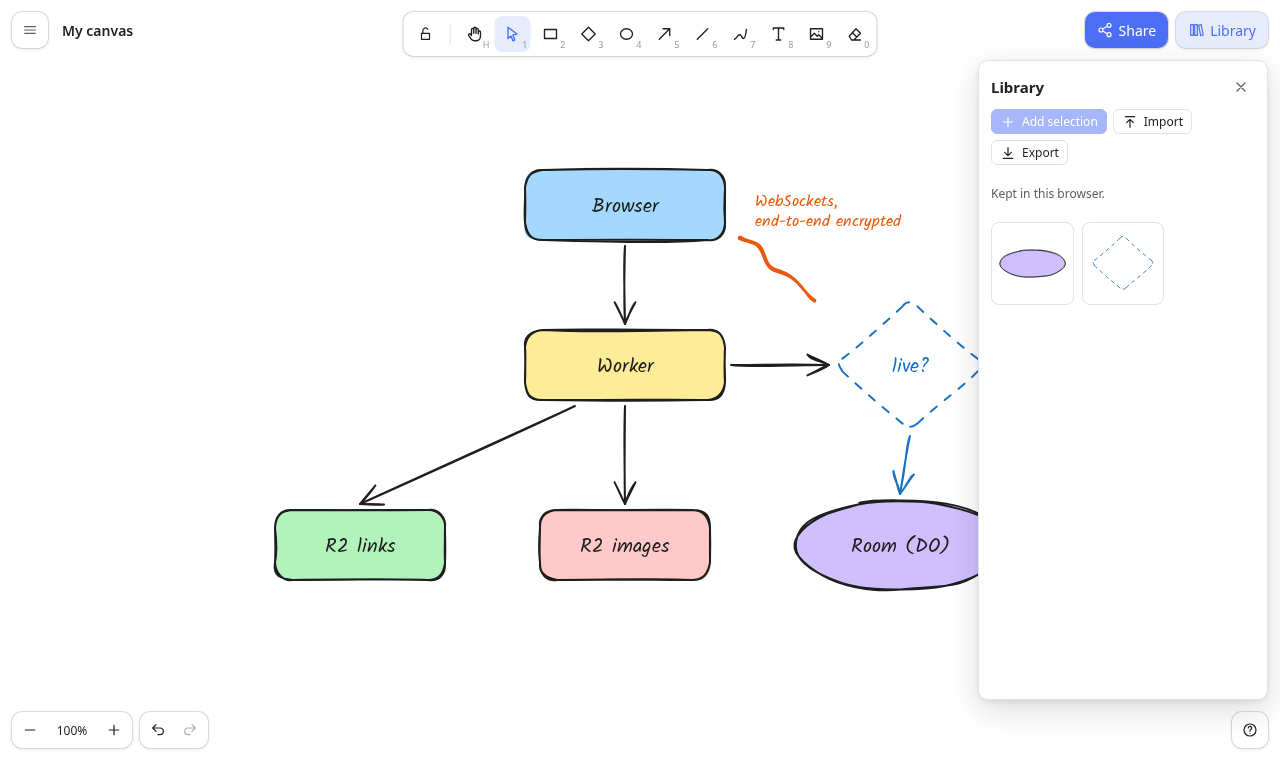
- Opening: the "Library" button (top right) opens a side panel (
role="complementary", name "Library"). Buttons:
- "Add selection" adds the selected elements as one item. With nothing selected it says "Select something on the canvas first".
- "Import" reads
.excalidrawlibfiles (version 2libraryItems, and version 1libraryarrays) and adds their items at the top. - "Export" downloads
library.excalidrawlibas{ "type": "excalidrawlib", "version": 2, "source", "libraryItems": [...] }.
Items:
- Each item is shown as an SVG preview button named "Insert <item name>", or "Insert library item" when unnamed.
- A remove button "Remove from library" appears on hover or focus.
- Inserting places a copy with new ids at the window centre, selected, as one undo step.
- Empty state: "No items yet. Select shapes on the canvas and press “Add selection” to keep them here."
- Where it is kept: in this browser (
localStoragekeywhiteboard:library); the panel says "Kept in this browser." Export and import move it elsewhere.
Accept when: "R20 the library: add the selection, insert it, import and export library files" passes.
R21. Dark mode
Theme preference: Light (default), Dark or System (follows
prefers-color-scheme).- It is stored in
localStoragekeythemeand applied asdata-themeon<html>before first paint. - Alt+Shift+D switches between light and dark. The main menu item "Theme: <Light|Dark|System> (change)" cycles through the three.
- It is stored in
Look in dark mode: the app's chrome uses dark colours. The canvas is drawn with the CSS filter
invert(93%) hue-rotate(180deg)(classis-darkon the editor), so drawings keep their hues but invert their lightness, the way the file format expects.- Images are counter-filtered. On the canvas each image is drawn with the 2D context's
ctx.filter = "invert(93%) hue-rotate(180deg)", the same filter again, and thenctx.filter = "none". Hue-rotate 180° twice cancels, and the two 93 % inverts bring each channel back to about0.07 + 0.86 × c, so photos look as they are, slightly flattened. Library and export previews in dark mode get the same CSS filter on their<img>. - Saved colours never change.
- Images are counter-filtered. On the canvas each image is drawn with the 2D context's
Accept when: "R17 R21 grid snapping, canvas background, and dark mode" passes.
R22. Phones and touch
Phone layout: below 768 px wide the layout changes:
- The tool bar moves to the bottom edge with larger buttons and no key hints.
- The style panel becomes a bottom sheet, opened by a "Style" button when something is selected and closed with "Close style".
- Zoom and undo sit above the tool bar. The Help button is hidden.
Touch input: pointer events serve mouse, pen and touch alike.
- One finger draws or selects with the current tool.
- Two fingers pan and pinch-zoom (R1). A second finger landing cancels a drawing gesture that just started.
- Pen pressure feeds freedraw (R5).
- No page gestures: the page doesn't scroll or zoom on the canvas (
touch-action: none, a viewport meta withwidth=device-width, initial-scale=1, maximum-scale=1, user-scalable=no, viewport-fit=cover, interactive-widget=resizes-content).maximum-scale=1also stops iOS Safari zooming the page into the text field when it gets focus. The UI never leaves the screen. The toolbar, the menu button, zoom and undo, Share and Library stay fully on screen at all times, including while text is edited (R6):
- while typing a line longer than the screen, or more lines than fit;
- while the on-screen keyboard is up (the viewport gets shorter);
- after rotating the phone, and after a two-finger pinch;
- after the text is finished by tapping away, and when it is opened again by a double-tap.
- The app root is fixed to the screen and never scrolls: if anything scrolls it, the app sets its scroll back to 0. After text editing ends, a page left scrolled by the keyboard (iOS) is scrolled back to the top.
- The page itself is never zoomed (
visualViewport.scalestays 1); a pinch zooms the canvas.
Accept when: "R22 phone layout: tools at the bottom, style in a sheet, pinch-free zoom buttons", "R22 R6 mobile text editing (iPhone 13) › the UI stays on screen while typing, with the keyboard up, and after", "R22 R6 mobile text editing (iPhone 13) › double-tap to edit, rotate and pinch keep the UI on screen" and the same two for Pixel 7 pass.
R23. The canvas lives in this browser
What it is:
/opens the editor for anyone. There is nothing to sign in to. The scene is kept in this browser:- Elements and appState go in
localStoragekeywhiteboard:local, written 300 ms after each change and when the page is hidden. - Images go in IndexedDB database
whiteboard-files, storefiles. Unused images are removed. - If storage is full: "This browser's storage is full; the latest changes were not saved here".
- Elements and appState go in
- Welcome text: an empty canvas shows
app_namewith the brand mark, "Your drawing is saved in this browser. Clearing site data removes it — save to a file to keep it." and "Pick a tool and start drawing · ? for shortcuts". It disappears once anything is drawn. - Keeping work elsewhere: files (R19) and image exports (R18). The main menu has no sign-in, account or "my drawings" items.
- Other addresses: any path other than
/shows "Page not found" with a "Go to your canvas" link.
Accept when: "R23 the canvas lives in this browser and survives a reload" and the unit tests "settings" pass.
R24. Shareable links
Creating: the Share dialog has a "Shareable link" section. It says the snapshot is encrypted in this browser, only people with the link can open it, and later changes are not included.
"Create encrypted link" (disabled on an empty canvas):
- Makes a fresh AES-GCM 128-bit key.
- Compresses the scene file JSON (R19, with images) with zlib deflate, as Excalidraw does with pako before encrypting. Use the browser's built-in
CompressionStream("deflate"); no library is needed. - Encrypts the compressed bytes as
IV (12 bytes) ‖ ciphertext. - Uploads the bytes with
POST /api/links(R26 limits). - Shows
<origin>/#json=<id>,<key>in a textbox named "Encrypted link" and copies it ("Link copied").
- The key is the JWK
kvalue (22 base64url characters). It is only in the URL fragment, so it never reaches the server. - The server stores the bytes in R2 at
links/<id>, where the id is 16 random bytes as base64url (22 characters), and returns{ id }with 201.
Opening the link at
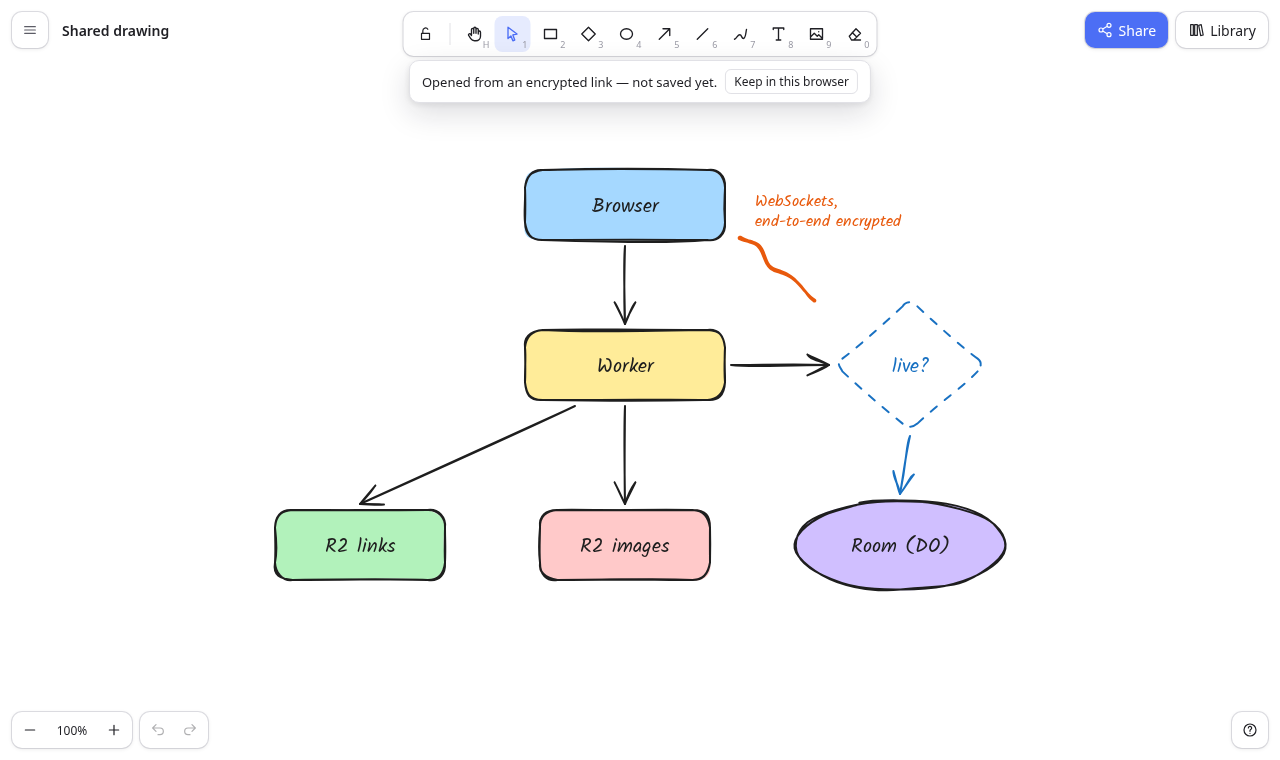
/: the app fetchesGET /api/links/<id>(the bytes,application/octet-stream, with the R26 headers), decrypts and inflates them (a plaintext that starts with{is read as uncompressed JSON), restores them (R19), and shows the drawing as "Shared drawing" with the banner "Opened from an encrypted link — not saved yet."- The drawing is not written to this browser's canvas until the person presses "Keep in this browser". If that canvas has elements, it first asks "Replace the drawing in this browser?". Then it opens
/. - A wrong key shows "Couldn't decrypt this drawing: the key in the link is wrong."
- An unknown id shows "This link doesn't exist or was mistyped."
- Changing the address bar to a
#json=or#room=link in an open tab reloads onto that link.
- The drawing is not written to this browser's canvas until the person presses "Keep in this browser". If that canvas has elements, it first asks "Replace the drawing in this browser?". Then it opens
- Lifetime: share links never expire. This is a deliberate choice that mirrors Excalidraw: the app never deletes a link, there is no expiry date and no "turn off" button, and the spec sets no R2 lifecycle rule. Nobody can list links. Only someone with the link (id and key) can open one.
- Size cap: the 10 MB cap (R26) applies to the encrypted, compressed bytes. The server checks the upload size and nothing else.
Accept when: "R24 shareable links: the server stores only ciphertext; the key in the fragment opens it" and the unit tests "encryption" pass.
R25. Live collaboration
Starting: anyone starts a session from the Share dialog's "Live collaboration" section with "Start session". The section says nobody needs an account and anyone with the link can join.
- The browser makes the room id (10 random bytes as hex) and an AES-GCM key itself. It puts
#room=<id>,<key>in the address and connects. The server needs no request to create a room. - The dialog shows "Session link" with "Copy link", and "Stop session".
- "Your name" with "Save" is always in the section. It is kept in
localStoragekeywhiteboard:name(default "Guest", at most 40 characters) and is sent to the room at once when connected. - The host stays on their browser canvas, which keeps saving to this browser (R23) during the session.
- The browser makes the room id (10 random bytes as hex) and an AES-GCM key itself. It puts
Joining: anyone with the link joins at
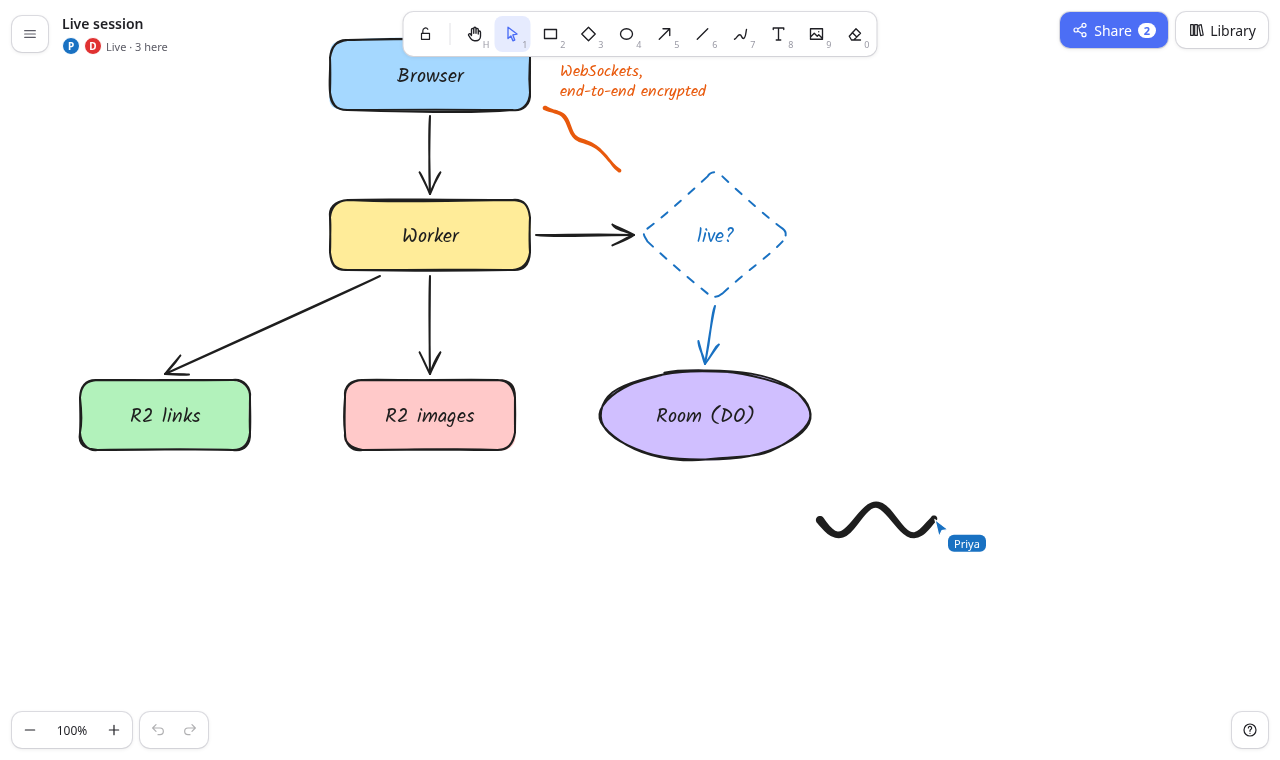
/#room=…. There is no sign-up.- Guests can edit like the host.
- The canvas name shown to guests is "Live session".
- A guest's own browser canvas is not changed by the session.
Transport: each room is one Durable Object, keyed by
idFromName(roomId). The browser connects a WebSocket to/api/rooms/:id/ws; the Worker checks the id's format and the rate limit (R26) and forwards it. The Durable Object:- accepts sockets with the hibernation API, refusing a 33rd with 429 "This session is full"
- gives each person an id and a colour (#e03131, #2f9e44, #1971c2, #f08c00, #9c36b5, #0c8599, #e8590c, #5c940d; unused colours first)
- after
hello, sendswelcomewith the others and the latest stored scene, and tells everyone the newpeerslist - relays
broadcastandvolatilemessages to everyone else - stores the encrypted scene from
savemessages and from abroadcastmarkedsnapshot(in chunks under 1 MB, at most 4 MB) - on leave, sends the new
peerslist
- End-to-end encryption: the server never sees drawing content. Every scene and pointer payload is AES-GCM encrypted with the link's key and sent as base64. Session images are encrypted the same way and stored in R2 at
rooms/<id>/<fileId>(R26 limits). Sync:
- Changed elements (by
version) are sent at most every 50 ms. - The full scene is sent every 20 s and whenever someone new joins, so a late joiner is complete at once.
- One second after local changes settle, and when leaving, the full encrypted scene is sent as
save. The room stores it without relaying it, so whoever opens the link later, even after everyone has left, gets the latest drawing. - An element still being drawn has no
indexyet and is not sent until the stroke is finished. When an element'sindexchanges, its version goes up (design.md "Ordering"), so everyone ends with the same order. - Incoming scenes are merged with the reconcile rule. Elements being dragged or text being typed locally are kept. Tombstones carry deletes.
- Remote changes don't enter the undo history.
- Changed elements (by
Cursors:
- Pointer positions (scene coordinates, button state, selection, name) are sent at most every 33 ms as volatile messages.
- Each other person's cursor is drawn as an arrow in their colour with a name label. Their selection is outlined in their colour.
- The top-left status (
data-testid="room-status") shows their initials in coloured dots and "Live · N here". The Share button shows a count of the others.
- Reconnecting: a dropped connection shows "Reconnecting…" and retries with backoff (0.5 s doubling, at most 10 s).
Leaving: ending a session only disconnects the person who ends it. This is a deliberate choice that mirrors Excalidraw: there is no "end for everyone", and the server has no idea who the host is.
- The host's "Stop session" asks "Stop the session?" ("You leave the session and your drawing stays here. Others who are still in it can keep drawing together.", button "Stop session"). It disconnects the host and sets the address back to
/; the drawing stays in the host's browser canvas. - A guest's "Leave session" disconnects them and shows the banner "You left the live session." with "Keep a copy in this browser" (which asks before replacing a non-empty browser canvas).
- Room expiry: a room with nobody connected deletes its stored scene and its R2 images 24 hours later (a Durable Object alarm, cancelled when someone connects).
- The host's "Stop session" asks "Stop the session?" ("You leave the session and your drawing stays here. Others who are still in it can keep drawing together.", button "Stop session"). It disconnects the host and sets the address back to
Accept when: "R25 live collaboration: anyone with the link joins, edits and cursors flow both ways, people leave", "R25 images travel encrypted to everyone in the session" and "R25 R26 sessions need no account; malformed session links are refused" pass, together with the unit tests "reconcile" and "fractional indices".
R26. Security and limits
- No accounts: there are no cookies, sessions or user data on the server. Anyone who can reach the site can create share links and start or join sessions. The README says so plainly and points to Cloudflare Access for anyone who wants to restrict the whole site.
- Cross-site checks: every non-GET request and every WebSocket upgrade whose
Originheader is present and differs from the site's origin is refused with 403 "Cross-site request refused". - Validation: ids are checked against their formats before storage is touched: link 22 base64url characters, room 20 hex, file 40 hex. A bad link id is 404 "This link doesn't exist"; a bad room id is 404 "Not a session link". A request to the WebSocket route without
Upgrade: websocketis 426 with the JSON body{"error":"Expected a WebSocket upgrade"}. - Stored blobs: links and session images are served as
application/octet-streamwithcontent-security-policy: default-src 'none'; sandboxandx-content-type-options: nosniff, so they can never run as a page. Size limits (
src/shared/limits.ts), each answered with 413 and a sentence naming the limit:- share link 10 MB ("This drawing is too big to share as a link (limit 10 MB)")
- session image 4 MB + 64 bytes ("Images can be up to 4 MB"); 100 images per session
- stored session scene and each relayed message 4 MB ("This drawing is too big for a live session", as an
errormessage) - 32 people per session
Rate limits (Workers Rate Limiting bindings, keyed by the
CF-Connecting-IPaddress, per 60 s):LINK_LIMIT: 10 share linksROOM_LIMIT: 120 session connectionsFILE_LIMIT: 120 session image uploads- Over a limit: 429 with
Retry-After: 60and "Too many <share links | session connections | image uploads> from your address. Wait a minute and try again." Rejected requests don't spend a slot. The rate limit is checked last, after all of the request's other checks, so requests refused with 400, 403, 404, 413 or 426 never count:
POST /api/links: origin (403), then size (413) and too short (400), thenLINK_LIMIT.- WebSocket: origin (403), room id (404), upgrade (426), then
ROOM_LIMIT. - Image upload: origin (403), room id (404), file id (400), size (413), "already stored" (200, no slot), session full (413), then
FILE_LIMIT.
- Errors: JSON
{ error }with a fitting status. Unexpected errors log on the server and answer 500 "Something went wrong on our side. Try again." - Untrusted input: imported, decrypted and received elements always pass through restore (R19), so a hostile file or peer can't put scripts, bad colours or non-image data URLs into the scene.
Accept when: "R26 limits: oversized links, cross-site requests and bad ids are refused", "R26 rate limits: share links are limited per address per minute; refused requests do not count" and "R25 R26 sessions need no account; malformed session links are refused" pass, and
npm run typecheckpasses.R27. Build, run and deploy
Commands:
npm install && npm run devbuilds the app with Vite and runswrangler dev(local R2 and Durable Objects).npm testruns the unit tests.npm run e2eruns Playwright againstwrangler devon port 3210 with a fresh--persist-to .e2efolder.npx wrangler deploy --dry-run --outdir <dir>bundles without a Cloudflare account.
wrangler.jsonc: the assets indist(SPA fallback,run_worker_firstfor/api/*), R2 bindingFILES, Durable Object bindingROOMS→ classRoomwith migration tagv1new_sqlite_classes, and theratelimitsbindingsLINK_LIMIT,ROOM_LIMITandFILE_LIMIT. There is no D1 database and no vars.README:
- what is stored where
- the "Anyone with the URL can use sharing" note with the limits table and room expiry
- Cloudflare Access as the way to restrict the site
- local run and test commands
- the deploy steps (
wrangler login,r2 bucket create whiteboard-files,npm run deploy)
Accept when:
npm run typecheck,npm testandnpm run e2epass, andnpx wrangler deploy --dry-run --outdir /tmp/drylists the FILES, ROOMS, ASSETS and three rate-limit bindings.Tests
Unit tests (Vitest,
tests/), bydescribename:- "fractional indices"
- "reconcile"
- "z-order"
- "align, distribute, group, flip"
- "geometry"
- "arrow binding"
- "undo history"
- "file format"
- "encryption"
- "settings"
- "R8 hand-drawn shapes"
design.md("Unit tests") lists their cases.End-to-end tests (Playwright,
e2e/, run in file order againstwrangler devwith fresh local storage, Chromium at 1360×860;1-mobile.spec.tsuses phone settings).6-rate-limits.spec.tsruns last because it uses up the share-link allowance for a minute.1-canvas.spec.ts:- "R23 the canvas lives in this browser and survives a reload"
- "R2 shapes: drag to draw, Shift for squares, a click makes a default shape, Q keeps the tool"
- "R3 R4 arrows and lines: two-point drags, multi-point clicks, binding that follows shapes"
- "R5 R6 freehand drawing and text"
- "R9 selection: click, Shift-click, box select, move with arrow keys, resize, rotate, delete"
- "R15 undo and redo, from the keyboard and the buttons"
- "R1 R16 zoom, pan, fit, the eraser, and the shortcuts help"
- "R17 R21 grid snapping, canvas background, and dark mode"
- "R22 phone layout: tools at the bottom, style in a sheet, pinch-free zoom buttons"
1-mobile.spec.ts(each test runs twice, as "R22 R6 mobile text editing (iPhone 13)" and "(Pixel 7)", with Playwright's device settings on Chromium: touch, mobile viewport):- "the UI stays on screen while typing, with the keyboard up, and after"
- "double-tap to edit, rotate and pinch keep the UI on screen"
2-style-actions.spec.ts:- "R13 R8 the style panel changes the selection and the next shape"
- "R10 R11 R12 group, align, distribute, z-order and flip"
- "R14 duplicate, Alt-drag, copy and paste, copy styles, lock"
3-files.spec.ts:- "R18 export PNG and SVG, with scale, background and selection-only options"
- "R19 save to and open .excalidraw files, keeping them compatible"
- "R7 images: insert from a file, large ones are scaled down, they survive a reload"
- "R20 the library: add the selection, insert it, import and export library files"
4-share.spec.ts:- "R24 shareable links: the server stores only ciphertext; the key in the fragment opens it"
- "R26 limits: oversized links, cross-site requests and bad ids are refused"
5-collab.spec.ts:- "R25 live collaboration: anyone with the link joins, edits and cursors flow both ways, people leave"
- "R25 images travel encrypted to everyone in the session"
- "R25 R26 sessions need no account; malformed session links are refused"
6-rate-limits.spec.ts:- "R26 rate limits: share links are limited per address per minute; refused requests do not count"
design.md("End-to-end tests") describes what each one does, step by step.# Whiteboard ## What this builds A virtual whiteboard for sketching diagrams that look hand-drawn. People draw on an infinite canvas with these tools: - rectangles, diamonds, ellipses - arrows that stick to shapes, lines - freehand strokes, text, images They style shapes from a side panel and arrange them with selection, groups, alignment and layers. They can: - undo anything - export PNG or SVG images - save and open `.excalidraw` JSON files (the format of the widely used open-source whiteboard, so files move both ways) - keep a personal library of reusable shapes - switch to dark mode and use it on a phone There are no accounts. **Drawings live in the browser**: the canvas at `/` is kept in that browser's storage (R23), and files carry drawings anywhere else (R19). The server only handles what people share, and it can't read any of it: - **Shareable links:** an end-to-end encrypted snapshot whose key stays in the link (R24). - **Live collaboration:** everyone in a session sees each other's edits and cursors in real time. Sessions are also end-to-end encrypted (R25). Anyone who can reach the site can use both, so they have size and rate limits (R26). It is one Cloudflare Worker: - The React single-page app is the Worker's static assets. - A small API runs in the Worker. It stores encrypted share links and encrypted session images in one R2 bucket. - Each live session is one Durable Object. It relays encrypted WebSocket messages and keeps the latest encrypted scene for people who join later. - There is no database. It runs on a laptop with `npm install` and `npm run dev` (`wrangler dev` with local R2 and Durable Objects, and no Cloudflare account). It deploys with `npm run deploy` and needs no other service. Read `spekkr.inputs.json` first. It sits at the repository root. If it is missing, create it from the `customize.settings` defaults in `spekkr.json`; with the defaults its full contents are: ```json { "app_name": "Whiteboard", "accent_color": "#4c6ef5" } ``` It has exactly these two keys: - **`app_name`:** the product name (default "Whiteboard"). It is the page title and the welcome text on the canvas. - **`accent_color`:** the accent colour (default `#4c6ef5`). It is used for primary buttons, selection outlines and handles, active tools and focus rings. `design.md` has: - the stack, Cloudflare config and storage layout - the element model and file formats - the rendering rules, sync and collaboration protocols, and API - every screen and the look `tasks.md` is the build order. `research.md` records where the design came from; the builder does not need it, and nothing in it is a requirement. ## Names and words - The product is called `app_name` everywhere. The built app never shows the name, logo or wordmark of any other whiteboard product. The brand mark is a plain rounded square in the accent colour. - "Excalidraw" may appear only where the file format needs it: the `.excalidraw` / `.excalidrawlib` extensions and the `"type": "excalidraw"` / `"excalidrawlib"` values inside files. - Interface text the spec quotes is the text to use. Other text is the builder's own, short and plain. - No image, font or icon file is copied from another product. Icons are inline SVG drawn in the app's own code. - The hand-drawn font is Kalam (SIL Open Font License) from `@fontsource/kalam`. - The other two font choices use system font stacks. ## Words used here - **Scene coordinates:** positions on the infinite canvas. **Screen coordinates:** CSS pixels in the window. `screen = (scene + scroll) × zoom`. - **Click vs drag:** a press counts as a drag once the pointer has moved 10 screen pixels or more from where it went down; less than that, it is a click (Excalidraw's dragging threshold). - **Element:** one thing on the canvas: rectangle, diamond, ellipse, arrow, line, freedraw, text or image. Its fields are in `design.md` ("Element model"). - **Live elements:** elements with `isDeleted` false. Deleted elements are kept as tombstones only where sync needs them. - **Linear element:** an arrow or a line. Its first point is always `[0, 0]`, and `x`, `y` is that first point's scene position. The other points are offsets from it and may be negative. `width`/`height` are the size of the points' bounding box. - **Binding:** an arrow end attached to a shape, so the arrow follows the shape when it moves. - **Group:** elements that share a group id in `groupIds` and are selected together. Groups nest; the last id is the outermost group. - **Browser canvas:** the scene kept in this browser's storage. - **Session:** a live collaboration room. **Session link:** `<origin>/#room=<20 hex>,<22-char key>`. - **Shareable link:** `<origin>/#json=<22-char id>,<22-char key>`. - **Host:** the person who started a session. **Guest:** anyone who joined it by link. - **MB:** 1,048,576 bytes. ## Out of scope These are not built: - frames, embeds and iframes - the laser pointer, sticky notes - elbow arrows (imported elbowed arrows draw as plain polylines) - image cropping, element hyperlinks - the command palette, find on canvas - text-to-diagram and AI features - languages other than English - a public library catalogue - PNG files that carry the scene inside them - presenting or slides - comments, version history beyond undo - accounts, sign-in, drawings stored on the server, read-only links that follow later edits, teams or shared folders (sharing is by encrypted link and live session only) Import counts elements of unknown kinds, leaves them out, and says so (R19). ## Requirements Each requirement ends with an "Accept when" line naming the tests that prove it. Test names are in "Tests" at the end. ### R1. Infinite canvas, zoom and pan - The editor fills the window with one `<canvas data-testid="canvas">`. It is drawn at the device pixel ratio and redrawn on resize. The scene has no edges. - **View state:** `{ scrollX, scrollY, zoom }`, with `screen = (scene + scroll) × zoom`. - Zoom is clamped to 10 %–3000 % and rounded to 0.001. - The bottom-left zoom control has "Zoom out" (−10 points), "Reset zoom" (shows the percentage and sets 100 % around the window centre) and "Zoom in" (+10 points). - **Keys:** Ctrl/⌘ `+`/`=` zoom in, Ctrl/⌘ `-` zoom out, Ctrl/⌘ `0` resets to 100 %. Shift+1 zooms to fit all elements (padding 40 px, never above 100 %). Shift+2 fits the selection. - **Wheel:** - With Ctrl/⌘ held (and trackpad pinch, which browsers send as Ctrl+wheel), the wheel zooms around the pointer: the scene point under the pointer stays under it. - Zoom step per wheel event, as in Excalidraw: `d = clamp(deltaY, −10, 10)`, `zoom' = zoom − d / 100 + log10(max(1, zoom)) × −sign(deltaY) × min(1, |deltaY| / 20)`, then clamped and rounded as above. So one notch zooms by 10 points at 100 % and by more above it. - Otherwise the wheel pans by its deltas, and Shift+wheel pans horizontally. - **Panning:** drag with the Hand tool (H), drag with the middle mouse button, or hold Space and drag. On touch screens, a two-finger drag pans and a pinch zooms around the fingers' midpoint. - **First view:** opening a scene that has elements fits it to the window (never above 100 %). An empty scene opens at 100 % with the origin at the top left. - The view is not stored with a drawing or the browser canvas; each opening fits the scene again. Accept when: "R1 R16 zoom, pan, fit, the eraser, and the shortcuts help" passes. ### R2. Shapes - **Toolbar:** a toolbar (`role="toolbar"`, name "Tools") at the top centre. Each tool is a button with the tool's name as its accessible name, an icon, and its key shown small. The tools, with their keys: - Hand (panning tool) H; Selection V or 1 - Rectangle R or 2; Diamond D or 3; Ellipse O or 4 - Arrow A or 5; Line L or 6; Draw P, X or 7 - Text T or 8; Insert image 9; Eraser E or 0 - A lock button before them, "Keep selected tool active after drawing" (Q), with `aria-pressed`. - The active tool has `aria-pressed="true"`. - **Drawing a shape:** - Dragging with Rectangle, Diamond or Ellipse draws from the press point to the pointer. Shift keeps the shape square or circular. - A click (under the 10-pixel drag threshold) makes a 100×100 shape centred on the click. - Dragging back past the start point flips the box, and the stored x/y/width/height stay positive. - **After drawing:** the new element is selected and the tool returns to Selection, unless the lock is on. - **New elements:** - They take the current style (R13). - They get a random `seed`, `version` 1, a random `versionNonce`, and a fractional `index` above every other element. - Rectangles default to round corners (`roundness: {type: 3}`); diamonds to `{type: 2}`; ellipses have none. - With the grid on, corners snap to the grid (R17). Accept when: "R2 shapes: drag to draw, Shift for squares, a click makes a default shape, Q keeps the tool" passes. ### R3. Arrows and lines - **Drawing:** - Dragging with Arrow or Line makes a two-point element. - A click (under the 10-pixel drag threshold) starts a multi-point element: each click adds a point and the last segment follows the pointer. - Enter, Escape, a double-click, or a click within 8 screen pixels of the last fixed point finishes it. - Shift locks each segment to 15° steps. - **Arrowheads:** arrows default to no start arrowhead and an "arrow" end arrowhead. Lines have none. - The style panel lists None, Arrow, Triangle, Triangle outline, Bar, Circle, Circle outline and Diamond for each end. - An imported `dot` is read as `circle`. An imported `diamond_outline` is kept and drawn as an outlined diamond. - **Edges:** "Round" draws a smooth curve through the points; "Sharp" draws straight segments. - **Closed lines:** a line whose `polygon` flag is true is closed and can have a background fill. - **Editing points:** a selected two-or-more-point linear element shows a handle on every point. Dragging a point moves just that point; the element's x/y/width/height are recomputed from the points. Accept when: "R3 R4 arrows and lines: two-point drags, multi-point clicks, binding that follows shapes" passes. ### R4. Arrow binding - **Binding targets:** rectangles, diamonds, ellipses, text and images can be bound to. Locked elements can't. - **Binding on draw:** when an arrow's start or end is placed within 10 screen pixels of the topmost bindable element's outline, or inside it, that end binds: - The arrow stores `startBinding`/`endBinding` as `{ elementId, fixedPoint: [fx, fy], mode: "orbit" }`, where `fixedPoint` is where the end sits as a fraction (0–1) of the target's unrotated box. - The target's `boundElements` gets `{ id, type: "arrow" }`. - While drawing, the target under the pointer is outlined in the accent colour. - **End placement:** a bound end does not sit inside the shape. Take the ray from the target's centre toward the neighbouring point, in the target's unrotated frame. Find where it leaves the target's real outline: the box for rectangles, text and images, the ellipse for ellipses, and the rhombus through the box's edge midpoints for diamonds. Move 4 units further out along the same ray, then rotate with the target. For a two-point arrow bound at both ends, the line goes toward the other target's centre. - **Keeping bindings up to date:** - Moving, resizing or rotating a target re-places the bound ends of every arrow bound to it, in the same undo step. - Deleting a target removes the bindings that point at it. - Deleting an arrow removes it from its targets' `boundElements`. - Duplicating a target together with its arrow re-points the copies at each other. Duplicating the target alone leaves the copy unbound. - Moving the arrow itself by its body unbinds both ends. Accept when: "R3 R4 arrows and lines: two-point drags, multi-point clicks, binding that follows shapes" and the unit tests "arrow binding" pass. ### R5. Freehand drawing - The Draw tool records every pointer position while the button is down, as points relative to the first one, along with pen pressure when the device reports it (`pressures`; otherwise `simulatePressure: true`). - The stroke is drawn as a filled outline from `perfect-freehand` with these settings: - size `strokeWidth × 4.25`, thinning 0.6, smoothing 0.5, streamline 0.5 - easing `sin(t·π/2)`, last true - With a background colour, the area enclosed by the points is filled as a rough polygon under the stroke. - After a stroke the tool stays on Draw and nothing is selected. Accept when: "R5 R6 freehand drawing and text" passes. ### R6. Text - **Starting text:** a click with the Text tool, or a double-click on empty canvas with Selection, starts a text element there. - A `<textarea>` with the accessible name "Text" opens over the canvas at the element's place, scaled by the zoom, in the element's font, size, colour and alignment. - It grows as the person types. Enter adds a new line. - It sits in its own layer the size of the canvas (`overflow: hidden`, above the canvas, below the toolbar). It is focused without scrolling (`focus({ preventScroll: true })`). - **The caret stays in view by panning the canvas, never by scrolling the page or the app.** When the browser scrolls that layer to reveal the caret (typing past the screen's edge, many lines, the on-screen keyboard), the app puts the layer's scroll back to 0 at once and pans the canvas by the same amount plus 5 px, so the text and the caret stay visible and the editor stays on its text. - **Finishing:** Escape, Ctrl/⌘+Enter, or a click outside finishes editing. If the text is empty or only spaces, the element is removed. - **Editing again:** a double-click on a text element, or Enter with one text element selected, opens it for editing. - **Size:** width and height come from measuring each line with the canvas font. Line height is `fontSize × lineHeight`; new text uses `lineHeight` 1.25 for Hand-drawn, 1.35 for Normal and 1.2 for Code, and imported text keeps its own. - **Fonts:** - "Hand-drawn" (`fontFamily` 5, Kalam), "Normal" (6, the system sans-serif stack) and "Code" (3, the system monospace stack). - Imported text in other font numbers is drawn with the nearest of these: 1 → Hand-drawn; 2, 7, 9 and 10 → Normal; 8 → Code. Any other number → Hand-drawn. The font number in the file is kept. - **Font sizes:** S 16, M 20, L 28, XL 36. Text align: Left, Center, Right. - Text is selected, moved, rotated and styled like a shape. Resizing text by a corner scales the font size. Accept when: "R5 R6 freehand drawing and text" passes. ### R7. Images - **Adding an image:** - "Insert image" (key 9) opens a file picker. Dropping image files on the canvas, or pasting an image, also adds them. - Accepted types: PNG, JPEG, GIF, WebP, SVG, BMP and AVIF. Other files are refused with "Only PNG, JPEG, GIF, WebP, SVG, BMP and AVIF images can be added". - **Processing:** - Raster images larger than 1440 px on the long side are re-encoded so the **stored bitmap** is 1440 px on the long side (JPEG stays JPEG at 0.9 quality; others become PNG). SVG and GIF are kept as they are. This is about the file bytes, not the element's size on the canvas. - The result must be at most 4 MB, or it is refused with "Images can be up to 4 MB". - **The file entry:** the file's id is the SHA-1 hex of its bytes. The scene's `files` map gets `{ id, mimeType, dataURL, created }`, and identical images share one entry. - **The image element:** `fileId`, `status: "saved"`, `scale: [1, 1]`, no rounded edges. It is placed centred on the drop point or the window centre. Its width and height start at the stored bitmap's pixel size, scaled down (aspect kept) so the long side is at most half the visible area's shorter side in scene units (`min(viewW, viewH) / zoom / 2`). - **Display:** images draw with their aspect ratio kept when resized from corners. Round edges clip them with the rectangle radius. While the bytes are loading, a grey placeholder shows "Loading image…"; if loading fails, it shows "Image could not load". - **Storage:** - In the browser canvas, image bytes live in IndexedDB (R23). - In a shareable link they are inside the encrypted snapshot (R24). - In a session they are encrypted and stored in R2 for the session (R25). Accept when: "R7 images: insert from a file, large ones are scaled down, they survive a reload" and "R25 images travel encrypted to everyone in the session" pass. ### R8. Hand-drawn rendering - **Shape generation:** every shape and line is generated by roughjs's `RoughGenerator` from the element's fields, so the same element always draws the same way. - Options: `seed`, `roughness` (0 Architect, 1 Artist, 2 Cartoonist), `strokeWidth` (Thin 1, Bold 2, Extra bold 4), `fillWeight = strokeWidth / 2`, `hachureGap = strokeWidth × 4`, `preserveVertices` when roughness < 2, and `disableMultiStroke` for dashed and dotted strokes. - Dashed is `[8, 8 + strokeWidth]`; dotted is `[1.5, 6 + strokeWidth]`. - Fill styles: Hachure, Cross-hatch and Solid. As in Excalidraw, Alt-clicking Hachure while the fill is already hachure switches it to `zigzag`. While the fill is zigzag, that button is shown pressed as "Zigzag (Alt-Click)", otherwise it is "Hachure (Alt-Click)". Zigzag is drawn as rough's zigzag. - **Corner radius:** `roundness.type` 3 uses 25 % of the short side up to 32 units; type 2 uses 25 % of the short side. - **Fill rule:** fill paths use the non-zero rule, except roughjs curve, polygon and path shapes, which use even-odd (the same rule as rough's own canvas renderer). An ellipse filled even-odd would show no fill. - Sharp rectangles (`gen.rectangle`) and ellipses fill non-zero. - Rounded rectangles and rounded diamonds are built as roughjs paths (`gen.path`), so they fill even-odd. Sharp diamonds, closed lines and freehand fills are polygons, so they fill even-odd too. - **Shared paths:** the canvas and SVG export draw the same paths. Generated paths are cached per element. The cache key covers everything the paths depend on: `version`, `versionNonce`, type, width, height, `seed`, stroke and background colours, `fillStyle`, `strokeWidth`, `strokeStyle`, `roughness`, `roundness`, `points`, `pressures`, `simulatePressure`, `polygon` and the arrowheads. A drag preview changes points or size without a version bump, so it still redraws. - **Element properties:** `opacity` (0–100) is the element's alpha. `angle` rotates around the element's centre. Accept when: "R13 R8 the style panel changes the selection and the next shape" and the unit tests "R8 hand-drawn shapes" pass. ### R9. Selection, moving, resizing, rotating - **Selecting with the Selection tool:** - A click selects the topmost element under the pointer. - Filled shapes, text and images hit anywhere inside. - Unfilled shapes and lines hit within 10 screen pixels of their stroke. - Shift+click adds or removes an element. - A click on empty canvas clears the selection. - Dragging from empty canvas draws a selection box: elements fully inside it are selected (Shift adds). - Ctrl/⌘+A selects every element that isn't locked. - **Selection outline:** the selection is drawn as an accent-coloured dashed box around each element (rotated with it) and one box around a multi-selection. - **Handles:** - Eight square 8-px resize handles. Corners only, when the box is under 30 px on screen. - One round rotate handle 20 px above the top middle. - **Moving:** - Dragging a selected element, or any element (which selects it first), moves the selection. - Arrow keys move it as Excalidraw does. With the grid off: 1 unit, or 5 with Shift. With the grid on: the grid size (20), or 1 with Shift. - With the grid on, the moved box's top-left snaps to the grid. - **Resizing:** - Dragging a handle resizes by the pointer's movement from the press point. - Shift keeps the aspect ratio. Images and text always keep it, and multi-selections scale as one box with their contents. - **Rotating:** dragging the rotate handle rotates around the selection's centre. Shift snaps to 15°. - **Deleting:** Delete or Backspace deletes the selection. - **Escape** clears the selection. If a group is being edited, it leaves the group first. If a non-selection tool is active, it returns to Selection. Accept when: "R9 selection: click, Shift-click, box select, move with arrow keys, resize, rotate, delete" and the unit tests "geometry" pass. ### R10. Groups - **Grouping:** Ctrl/⌘+G (or "Group" in the style panel or context menu) groups two or more selected elements. A new group id is added to the end of each element's `groupIds`, and the members are moved next to each other in z-order, at the topmost member's place. - **Ungrouping:** Ctrl/⌘+Shift+G (or "Ungroup") removes the outermost group id from the selected elements. - **Clicking a group:** - A click on any member selects the whole outermost group. The group is outlined with one dashed box. - A double-click on a member enters the group: that member alone is selected. Further clicks select within the group until Escape or a click outside it. - A double-click on an element that is in no group and is not text acts as a single click. - **Groups move together:** moving, deleting, duplicating, copying, locking, z-order and the eraser act on whole groups. Accept when: "R10 R11 R12 group, align, distribute, z-order and flip" passes. ### R11. Align, distribute, flip - **Align (2+ selected units):** a group counts as one unit. The style panel shows "Align left", "Center horizontally", "Align right", "Align top", "Center vertically" and "Align bottom". They line up the units' bounding boxes with the selection's box. - Keys: Ctrl/⌘+Shift+←/→/↑/↓ for left, right, top and bottom. - **Distribute (3+ units):** "Distribute horizontally" and "Distribute vertically" keep the first and last units and space the others so the gaps between boxes are equal. - **Flip:** Shift+H flips the selection horizontally and Shift+V vertically, around the selection's centre. - Positions mirror. Linear and freedraw points mirror. Angles negate. An image's `scale` sign flips. - Bound arrows are re-placed. Accept when: "R10 R11 R12 group, align, distribute, z-order and flip" and the unit tests "align, distribute, group, flip" pass. ### R12. Layers (z-order) - **Order:** z-order is the order of the elements array, and each element's `index` is a fractional-indexing key that increases along it. - **Commands:** - "Send to back" (Ctrl/⌘+Shift+[), "Send backward" (Ctrl/⌘+[), "Bring forward" (Ctrl/⌘+]) and "Bring to front" (Ctrl/⌘+Shift+]). - Alt with the bracket keys works like Shift on keyboards where Shift changes the bracket. - Front and back move the selection, with whole groups, to the end or the start. - Forward and backward use Excalidraw's rule. The selection moves just past the next unselected live element above it (forward) or below it (backward). That element need not overlap the selection. If it is in a group, the selection moves past that element's whole outermost group. Nothing happens at the top or bottom. - The relative order of the moved elements is kept. - **Keys after a move:** only the moved elements get new `index` keys, chosen between their new neighbours, so other people's elements keep theirs (R25). - **Repair:** an `index` that is missing, not a valid key, or not greater than the previous one is replaced. Only those runs are regenerated, between their valid neighbours. Accept when: "R10 R11 R12 group, align, distribute, z-order and flip" and the unit tests "fractional indices" and "z-order" pass. ### R13. Style panel - **When it shows:** with something selected, or with a drawing tool active, a panel at the left (`aria-label="Style"`) shows the controls that apply. Each choice group is `role="radiogroup"` with the group's label, and each option is a `role="radio"` button with `aria-checked`. - "Stroke": #1e1e1e, #e03131, #2f9e44, #1971c2, #f08c00, plus a custom colour input labelled "Stroke: custom colour". - "Background" (shapes, closed lines, freedraw): Transparent, #ffc9c9, #b2f2bb, #a5d8ff, #ffec99, plus "Background: custom colour". - "Fill" (only with a background): "Hachure (Alt-Click)", "Cross-hatch", "Solid". Alt-click gives zigzag (R8). - "Stroke width": Thin, Bold, Extra bold. - "Stroke style" (not freedraw): Solid, Dashed, Dotted. - "Sloppiness" (not freedraw): Architect, Artist, Cartoonist. - "Edges" (rectangles, diamonds, lines, arrows, images): Sharp, Round. - Arrowheads (arrows): "Start arrowhead" and "End arrowhead" selects. - Text: "Font size" S/M/L/XL, "Font family" Hand-drawn/Normal/Code, "Text align" Left/Center/Right. - "Opacity": a range input from 0 to 100 in steps of 10. - "Layers": the four z-order buttons. "Align" appears with 2+ units, plus the distribute buttons with 3+. - "Actions": Duplicate, Delete, Group / Ungroup (when they apply) and Lock. - **Mixed values:** when the selected elements differ, no option is checked. - **Applying a change:** it is applied to every selected element it fits (each element's `version` is bumped) and recorded as one undo step. It also becomes the style for the next new element. That style is kept in memory for the page's life. - **Colours:** only `#rgb`, `#rrggbb`, `#rrggbbaa` or `transparent` are accepted. Anything else is ignored. - **Phones:** the panel is a bottom sheet (R22). Accept when: "R13 R8 the style panel changes the selection and the next shape" passes. ### R14. Duplicate, clipboard, copy styles, lock, context menu - **Duplicate (Ctrl/⌘+D):** copies the selection, 10 units right and down, above the originals. The copies are selected. - Alt+drag of a selection leaves the originals in place and moves copies. - Copies get new ids, seeds and group ids (consistently within the copy), and copied bindings are re-pointed (R4). - **Clipboard:** - Ctrl/⌘+C and X write the selection to the clipboard as text: JSON `{ "type": "excalidraw/clipboard", "elements": [...], "files": {...} }`. Cut also deletes the selection. - Ctrl/⌘+V pastes that JSON, from this app or the original format, centred on the pointer's last position. Pasted elements get new ids and are selected. - Pasting other text makes a text element at the pointer. Pasting an image file adds an image (R7). - **Copy styles:** Ctrl/⌘+Alt+C copies the first selected element's style. Ctrl/⌘+Alt+V applies it to the selection: stroke, background, fill, width, style, sloppiness, edges and opacity, plus font, size and alignment for text. - **Lock:** Ctrl/⌘+Shift+L locks or unlocks the selection. - Locked elements can't be selected by click or box, and nothing can bind to them. - The canvas context menu's "Unlock all" unlocks every element. - **Context menus:** - Right-click on the selection: Cut, Copy, Copy styles, Paste styles (disabled until styles were copied), Duplicate, Group (2+ selected), Ungroup (when grouped), Bring to front, Send to back, Flip horizontal, Flip vertical, Add to library (adds the selection as one library item and opens the library), Lock, Delete. - Right-click on empty canvas: Select all, Unlock all (when anything is locked), Show grid / Hide grid, Zoom to fit all. Accept when: "R14 duplicate, Alt-drag, copy and paste, copy styles, lock" passes. ### R15. Undo and redo - **Keys and buttons:** Ctrl/⌘+Z undoes. Ctrl/⌘+Shift+Z and Ctrl/⌘+Y redo. "Undo" and "Redo" buttons sit next to the zoom control and are disabled when there is nothing to do. - **What counts as one step:** - every finished pointer gesture (draw, move, resize, rotate, point edit, erase stroke) - every style change, command (align, group, z-order, flip, duplicate, delete, paste, import, insert from library) and finished text edit - **What a step holds:** a step stores the elements before the change and the selection. The history keeps the last 100 steps, and a new change clears redo. - **Remote changes:** changes that arrive from a session or a merge are not added to the history. Undo only reverts the person's own changes. Each step restores the elements it changed, at higher `version`s, so the restore syncs to others. - **Reloads:** opening a different scene, or reloading, starts a new history. Accept when: "R15 undo and redo, from the keyboard and the buttons" and the unit tests "undo history" pass. ### R16. Keyboard shortcuts and help - **Keys:** all the keys in R1–R15 and R17–R21 work when focus is not in a text field. Keys never act while a textarea, input or select has focus. - **Help:** "?" (or Shift+/) or the "Help" button opens a dialog named "Keyboard shortcuts" that lists them in three groups: - "Tools" - "View": zoom in/out, reset zoom, fit all, fit selection, grid, dark mode - "Editor": undo, redo, select all, delete, duplicate, copy/paste, copy/paste styles, group/ungroup, lock, z-order, align, flip, export image, open, save, finish text - **Format:** keys are written as, for example, "Ctrl + Shift + ] / [". A note says "On a Mac, Ctrl is ⌘ Cmd." Escape closes the dialog. - **Eraser (E or 0):** dragging over elements marks them, with their whole groups (drawn at 25 % opacity). Releasing deletes them as one step. Escape cancels. Accept when: "R1 R16 zoom, pan, fit, the eraser, and the shortcuts help" passes. ### R17. Grid and canvas background - **Grid:** Ctrl/⌘+' turns grid mode on or off. The main menu has "Grid and snapping: on (Ctrl+')" / "… off …", and the canvas context menu has "Show grid" / "Hide grid". - While on, grid lines are drawn every `gridSize` (default 20) scene units, with every 5th line darker. - New shapes' corners, linear points, moved selections (by the box's top-left) and resized edges snap to the grid. Rotated elements don't snap. - `gridModeEnabled` and `gridSize` are saved with the scene. - **Canvas background:** the main menu lists "Canvas background #ffffff", "#f8f9fa", "#f5faff", "#fffce8" and "#fdf8f6". The current one is marked "✓". It sets `viewBackgroundColor`, which is saved with the scene and used by exports with a background. Accept when: "R17 R21 grid snapping, canvas background, and dark mode" passes. ### R18. Export images - **Opening:** "Export image…" in the main menu, or Ctrl/⌘+Shift+E, opens a dialog named "Export image". - **What it exports:** with a selection it exports only the selected elements and says "Only the selected elements are exported." Otherwise it exports every element. With nothing to export it says "There is nothing to export yet. Draw something first." - **Preview:** an image named "Preview of the exported image", on a checkerboard. - **Options:** - "Background" checkbox (default on): fills with `viewBackgroundColor`. - "Dark mode" checkbox (default: the current theme): applies the dark filter of R21 to the output. - "Scale" radio group: 1×, 2× (default), 3×. - **Buttons:** - "PNG" downloads `<name>.png`. Its size is `(content box + 10 padding on each side) × scale`. - "SVG" downloads `<name>.svg`. - It starts `<svg xmlns="http://www.w3.org/2000/svg"`, uses the same rough paths as the canvas, and draws text as `<text>`. - It embeds the Kalam font as an `@font-face` with base64 WOFF2 when any text uses it. - Images are embedded as data URLs. - Without a background there is no full-size background rect. - "Copy PNG" copies the PNG to the clipboard ("Image copied"). If the browser refuses: "This browser would not copy an image; download it instead". - `<name>` is the scene's name with `\ / : * ? " < > |` replaced by spaces. The browser canvas's name is "My canvas". Accept when: "R18 export PNG and SVG, with scale, background and selection-only options" passes. ### R19. Save and open .excalidraw files - **Save:** "Save to file…" (main menu, or Ctrl/⌘+S) downloads `<name>.excalidraw`. - It contains `{ "type": "excalidraw", "version": 2, "source": <origin>, "elements": [...], "appState": { gridSize, gridModeEnabled, viewBackgroundColor }, "files": {...} }`. - Only live elements are written, and only files that live image elements use. - The JSON is indented with 2 spaces. - **Open:** "Open…" (Ctrl/⌘+O), or dropping a file on the canvas, reads `.excalidraw`, `.json` and `.excalidrawlib` files. - A library file adds its items to the library ("Added N items to your library"). - A scene file replaces the canvas. If the canvas has elements, the app first asks "Replace this drawing?" ("Opening a file replaces what is on the canvas. You can undo this.", button "Replace"). - The opened scene is fitted to the window. The replacement is one undo step. - **Restoring elements:** imported elements are restored element by element (design.md "Restore"): - Missing fields get defaults and bad values are replaced. - Deleted elements are dropped. Unknown types (frames, embeds, iframes, magic frames) are counted and left out, along with linear elements with fewer than two points. - Indices are repaired and bindings to missing elements are removed. - When anything was left out, a notice says "N element(s) of a kind this app doesn't draw (such as frames or embeds) was/were left out" (singular or plural as fits). - **Refused files:** - Not JSON: "That file is not valid JSON." - A library opened as a scene from the drawings list: "That is a library file. Open it from the library panel." - Any other shape: "That file is not a drawing this app can open." - The canvas is unchanged. - **Round trip:** a file written by this app opens again with identical elements, and writing it again gives the same element JSON. An element's `link` (a string up to 2048 characters, kept but not shown) and `customData` (any JSON object) are kept as they are. Accept when: "R19 save to and open .excalidraw files, keeping them compatible" and the unit tests "file format" pass. ### R20. Library - **Opening:** the "Library" button (top right) opens a side panel (`role="complementary"`, name "Library"). - **Buttons:** - "Add selection" adds the selected elements as one item. With nothing selected it says "Select something on the canvas first". - "Import" reads `.excalidrawlib` files (version 2 `libraryItems`, and version 1 `library` arrays) and adds their items at the top. - "Export" downloads `library.excalidrawlib` as `{ "type": "excalidrawlib", "version": 2, "source", "libraryItems": [...] }`. - **Items:** - Each item is shown as an SVG preview button named "Insert <item name>", or "Insert library item" when unnamed. - A remove button "Remove from library" appears on hover or focus. - Inserting places a copy with new ids at the window centre, selected, as one undo step. - **Empty state:** "No items yet. Select shapes on the canvas and press “Add selection” to keep them here." - **Where it is kept:** in this browser (`localStorage` key `whiteboard:library`); the panel says "Kept in this browser." Export and import move it elsewhere. Accept when: "R20 the library: add the selection, insert it, import and export library files" passes. ### R21. Dark mode - **Theme preference:** Light (default), Dark or System (follows `prefers-color-scheme`). - It is stored in `localStorage` key `theme` and applied as `data-theme` on `<html>` before first paint. - Alt+Shift+D switches between light and dark. The main menu item "Theme: <Light|Dark|System> (change)" cycles through the three. - **Look in dark mode:** the app's chrome uses dark colours. The canvas is drawn with the CSS filter `invert(93%) hue-rotate(180deg)` (class `is-dark` on the editor), so drawings keep their hues but invert their lightness, the way the file format expects. - Images are counter-filtered. On the canvas each image is drawn with the 2D context's `ctx.filter = "invert(93%) hue-rotate(180deg)"`, the same filter again, and then `ctx.filter = "none"`. Hue-rotate 180° twice cancels, and the two 93 % inverts bring each channel back to about `0.07 + 0.86 × c`, so photos look as they are, slightly flattened. Library and export previews in dark mode get the same CSS filter on their `<img>`. - Saved colours never change. Accept when: "R17 R21 grid snapping, canvas background, and dark mode" passes. ### R22. Phones and touch - **Phone layout:** below 768 px wide the layout changes: - The tool bar moves to the bottom edge with larger buttons and no key hints. - The style panel becomes a bottom sheet, opened by a "Style" button when something is selected and closed with "Close style". - Zoom and undo sit above the tool bar. The Help button is hidden. - **Touch input:** pointer events serve mouse, pen and touch alike. - One finger draws or selects with the current tool. - Two fingers pan and pinch-zoom (R1). A second finger landing cancels a drawing gesture that just started. - Pen pressure feeds freedraw (R5). - **No page gestures:** the page doesn't scroll or zoom on the canvas (`touch-action: none`, a viewport meta with `width=device-width, initial-scale=1, maximum-scale=1, user-scalable=no, viewport-fit=cover, interactive-widget=resizes-content`). `maximum-scale=1` also stops iOS Safari zooming the page into the text field when it gets focus. - **The UI never leaves the screen.** The toolbar, the menu button, zoom and undo, Share and Library stay fully on screen at all times, including while text is edited (R6): - while typing a line longer than the screen, or more lines than fit; - while the on-screen keyboard is up (the viewport gets shorter); - after rotating the phone, and after a two-finger pinch; - after the text is finished by tapping away, and when it is opened again by a double-tap. - The app root is fixed to the screen and never scrolls: if anything scrolls it, the app sets its scroll back to 0. After text editing ends, a page left scrolled by the keyboard (iOS) is scrolled back to the top. - The page itself is never zoomed (`visualViewport.scale` stays 1); a pinch zooms the canvas. Accept when: "R22 phone layout: tools at the bottom, style in a sheet, pinch-free zoom buttons", "R22 R6 mobile text editing (iPhone 13) › the UI stays on screen while typing, with the keyboard up, and after", "R22 R6 mobile text editing (iPhone 13) › double-tap to edit, rotate and pinch keep the UI on screen" and the same two for Pixel 7 pass. ### R23. The canvas lives in this browser - **What it is:** `/` opens the editor for anyone. There is nothing to sign in to. The scene is kept in this browser: - Elements and appState go in `localStorage` key `whiteboard:local`, written 300 ms after each change and when the page is hidden. - Images go in IndexedDB database `whiteboard-files`, store `files`. Unused images are removed. - If storage is full: "This browser's storage is full; the latest changes were not saved here". - **Welcome text:** an empty canvas shows `app_name` with the brand mark, "Your drawing is saved in this browser. Clearing site data removes it — save to a file to keep it." and "Pick a tool and start drawing · ? for shortcuts". It disappears once anything is drawn. - **Keeping work elsewhere:** files (R19) and image exports (R18). The main menu has no sign-in, account or "my drawings" items. - **Other addresses:** any path other than `/` shows "Page not found" with a "Go to your canvas" link. Accept when: "R23 the canvas lives in this browser and survives a reload" and the unit tests "settings" pass. ### R24. Shareable links - **Creating:** the Share dialog has a "Shareable link" section. It says the snapshot is encrypted in this browser, only people with the link can open it, and later changes are not included. - "Create encrypted link" (disabled on an empty canvas): - Makes a fresh AES-GCM 128-bit key. - Compresses the scene file JSON (R19, with images) with zlib deflate, as Excalidraw does with pako before encrypting. Use the browser's built-in `CompressionStream("deflate")`; no library is needed. - Encrypts the compressed bytes as `IV (12 bytes) ‖ ciphertext`. - Uploads the bytes with `POST /api/links` (R26 limits). - Shows `<origin>/#json=<id>,<key>` in a textbox named "Encrypted link" and copies it ("Link copied"). - The key is the JWK `k` value (22 base64url characters). It is only in the URL fragment, so it never reaches the server. - The server stores the bytes in R2 at `links/<id>`, where the id is 16 random bytes as base64url (22 characters), and returns `{ id }` with 201. - **Opening the link at `/`:** the app fetches `GET /api/links/<id>` (the bytes, `application/octet-stream`, with the R26 headers), decrypts and inflates them (a plaintext that starts with `{` is read as uncompressed JSON), restores them (R19), and shows the drawing as "Shared drawing" with the banner "Opened from an encrypted link — not saved yet." - The drawing is not written to this browser's canvas until the person presses "Keep in this browser". If that canvas has elements, it first asks "Replace the drawing in this browser?". Then it opens `/`. - A wrong key shows "Couldn't decrypt this drawing: the key in the link is wrong." - An unknown id shows "This link doesn't exist or was mistyped." - Changing the address bar to a `#json=` or `#room=` link in an open tab reloads onto that link. - **Lifetime: share links never expire.** This is a deliberate choice that mirrors Excalidraw: the app never deletes a link, there is no expiry date and no "turn off" button, and the spec sets no R2 lifecycle rule. Nobody can list links. Only someone with the link (id and key) can open one. - **Size cap:** the 10 MB cap (R26) applies to the encrypted, compressed bytes. The server checks the upload size and nothing else. Accept when: "R24 shareable links: the server stores only ciphertext; the key in the fragment opens it" and the unit tests "encryption" pass. ### R25. Live collaboration - **Starting:** anyone starts a session from the Share dialog's "Live collaboration" section with "Start session". The section says nobody needs an account and anyone with the link can join. - The browser makes the room id (10 random bytes as hex) and an AES-GCM key itself. It puts `#room=<id>,<key>` in the address and connects. The server needs no request to create a room. - The dialog shows "Session link" with "Copy link", and "Stop session". - "Your name" with "Save" is always in the section. It is kept in `localStorage` key `whiteboard:name` (default "Guest", at most 40 characters) and is sent to the room at once when connected. - The host stays on their browser canvas, which keeps saving to this browser (R23) during the session. - **Joining:** anyone with the link joins at `/#room=…`. There is no sign-up. - Guests can edit like the host. - The canvas name shown to guests is "Live session". - A guest's own browser canvas is not changed by the session. - **Transport:** each room is one Durable Object, keyed by `idFromName(roomId)`. The browser connects a WebSocket to `/api/rooms/:id/ws`; the Worker checks the id's format and the rate limit (R26) and forwards it. The Durable Object: - accepts sockets with the hibernation API, refusing a 33rd with 429 "This session is full" - gives each person an id and a colour (#e03131, #2f9e44, #1971c2, #f08c00, #9c36b5, #0c8599, #e8590c, #5c940d; unused colours first) - after `hello`, sends `welcome` with the others and the latest stored scene, and tells everyone the new `peers` list - relays `broadcast` and `volatile` messages to everyone else - stores the encrypted scene from `save` messages and from a `broadcast` marked `snapshot` (in chunks under 1 MB, at most 4 MB) - on leave, sends the new `peers` list - **End-to-end encryption:** the server never sees drawing content. Every scene and pointer payload is AES-GCM encrypted with the link's key and sent as base64. Session images are encrypted the same way and stored in R2 at `rooms/<id>/<fileId>` (R26 limits). - **Sync:** - Changed elements (by `version`) are sent at most every 50 ms. - The full scene is sent every 20 s and whenever someone new joins, so a late joiner is complete at once. - One second after local changes settle, and when leaving, the full encrypted scene is sent as `save`. The room stores it without relaying it, so whoever opens the link later, even after everyone has left, gets the latest drawing. - An element still being drawn has no `index` yet and is not sent until the stroke is finished. When an element's `index` changes, its version goes up (design.md "Ordering"), so everyone ends with the same order. - Incoming scenes are merged with the reconcile rule. Elements being dragged or text being typed locally are kept. Tombstones carry deletes. - Remote changes don't enter the undo history. - **Cursors:** - Pointer positions (scene coordinates, button state, selection, name) are sent at most every 33 ms as volatile messages. - Each other person's cursor is drawn as an arrow in their colour with a name label. Their selection is outlined in their colour. - The top-left status (`data-testid="room-status"`) shows their initials in coloured dots and "Live · N here". The Share button shows a count of the others. - **Reconnecting:** a dropped connection shows "Reconnecting…" and retries with backoff (0.5 s doubling, at most 10 s). - **Leaving: ending a session only disconnects the person who ends it.** This is a deliberate choice that mirrors Excalidraw: there is no "end for everyone", and the server has no idea who the host is. - The host's "Stop session" asks "Stop the session?" ("You leave the session and your drawing stays here. Others who are still in it can keep drawing together.", button "Stop session"). It disconnects the host and sets the address back to `/`; the drawing stays in the host's browser canvas. - A guest's "Leave session" disconnects them and shows the banner "You left the live session." with "Keep a copy in this browser" (which asks before replacing a non-empty browser canvas). - **Room expiry:** a room with nobody connected deletes its stored scene and its R2 images 24 hours later (a Durable Object alarm, cancelled when someone connects). Accept when: "R25 live collaboration: anyone with the link joins, edits and cursors flow both ways, people leave", "R25 images travel encrypted to everyone in the session" and "R25 R26 sessions need no account; malformed session links are refused" pass, together with the unit tests "reconcile" and "fractional indices". ### R26. Security and limits - **No accounts:** there are no cookies, sessions or user data on the server. Anyone who can reach the site can create share links and start or join sessions. The README says so plainly and points to Cloudflare Access for anyone who wants to restrict the whole site. - **Cross-site checks:** every non-GET request and every WebSocket upgrade whose `Origin` header is present and differs from the site's origin is refused with 403 "Cross-site request refused". - **Validation:** ids are checked against their formats before storage is touched: link 22 base64url characters, room 20 hex, file 40 hex. A bad link id is 404 "This link doesn't exist"; a bad room id is 404 "Not a session link". A request to the WebSocket route without `Upgrade: websocket` is 426 with the JSON body `{"error":"Expected a WebSocket upgrade"}`. - **Stored blobs:** links and session images are served as `application/octet-stream` with `content-security-policy: default-src 'none'; sandbox` and `x-content-type-options: nosniff`, so they can never run as a page. - **Size limits** (`src/shared/limits.ts`), each answered with 413 and a sentence naming the limit: - share link 10 MB ("This drawing is too big to share as a link (limit 10 MB)") - session image 4 MB + 64 bytes ("Images can be up to 4 MB"); 100 images per session - stored session scene and each relayed message 4 MB ("This drawing is too big for a live session", as an `error` message) - 32 people per session - **Rate limits** (Workers Rate Limiting bindings, keyed by the `CF-Connecting-IP` address, per 60 s): - `LINK_LIMIT`: 10 share links - `ROOM_LIMIT`: 120 session connections - `FILE_LIMIT`: 120 session image uploads - Over a limit: 429 with `Retry-After: 60` and "Too many <share links | session connections | image uploads> from your address. Wait a minute and try again." - **Rejected requests don't spend a slot.** The rate limit is checked last, after all of the request's other checks, so requests refused with 400, 403, 404, 413 or 426 never count: - `POST /api/links`: origin (403), then size (413) and too short (400), then `LINK_LIMIT`. - WebSocket: origin (403), room id (404), upgrade (426), then `ROOM_LIMIT`. - Image upload: origin (403), room id (404), file id (400), size (413), "already stored" (200, no slot), session full (413), then `FILE_LIMIT`. - **Errors:** JSON `{ error }` with a fitting status. Unexpected errors log on the server and answer 500 "Something went wrong on our side. Try again." - **Untrusted input:** imported, decrypted and received elements always pass through restore (R19), so a hostile file or peer can't put scripts, bad colours or non-image data URLs into the scene. Accept when: "R26 limits: oversized links, cross-site requests and bad ids are refused", "R26 rate limits: share links are limited per address per minute; refused requests do not count" and "R25 R26 sessions need no account; malformed session links are refused" pass, and `npm run typecheck` passes. ### R27. Build, run and deploy - **Commands:** - `npm install && npm run dev` builds the app with Vite and runs `wrangler dev` (local R2 and Durable Objects). - `npm test` runs the unit tests. - `npm run e2e` runs Playwright against `wrangler dev` on port 3210 with a fresh `--persist-to .e2e` folder. - `npx wrangler deploy --dry-run --outdir <dir>` bundles without a Cloudflare account. - **`wrangler.jsonc`:** the assets in `dist` (SPA fallback, `run_worker_first` for `/api/*`), R2 binding `FILES`, Durable Object binding `ROOMS` → class `Room` with migration tag `v1` `new_sqlite_classes`, and the `ratelimits` bindings `LINK_LIMIT`, `ROOM_LIMIT` and `FILE_LIMIT`. There is no D1 database and no vars. - **README:** - what is stored where - the "Anyone with the URL can use sharing" note with the limits table and room expiry - Cloudflare Access as the way to restrict the site - local run and test commands - the deploy steps (`wrangler login`, `r2 bucket create whiteboard-files`, `npm run deploy`) Accept when: `npm run typecheck`, `npm test` and `npm run e2e` pass, and `npx wrangler deploy --dry-run --outdir /tmp/dry` lists the FILES, ROOMS, ASSETS and three rate-limit bindings. ## Tests Unit tests (Vitest, `tests/`), by `describe` name: - "fractional indices" - "reconcile" - "z-order" - "align, distribute, group, flip" - "geometry" - "arrow binding" - "undo history" - "file format" - "encryption" - "settings" - "R8 hand-drawn shapes" `design.md` ("Unit tests") lists their cases. End-to-end tests (Playwright, `e2e/`, run in file order against `wrangler dev` with fresh local storage, Chromium at 1360×860; `1-mobile.spec.ts` uses phone settings). `6-rate-limits.spec.ts` runs last because it uses up the share-link allowance for a minute. - `1-canvas.spec.ts`: - "R23 the canvas lives in this browser and survives a reload" - "R2 shapes: drag to draw, Shift for squares, a click makes a default shape, Q keeps the tool" - "R3 R4 arrows and lines: two-point drags, multi-point clicks, binding that follows shapes" - "R5 R6 freehand drawing and text" - "R9 selection: click, Shift-click, box select, move with arrow keys, resize, rotate, delete" - "R15 undo and redo, from the keyboard and the buttons" - "R1 R16 zoom, pan, fit, the eraser, and the shortcuts help" - "R17 R21 grid snapping, canvas background, and dark mode" - "R22 phone layout: tools at the bottom, style in a sheet, pinch-free zoom buttons" - `1-mobile.spec.ts` (each test runs twice, as "R22 R6 mobile text editing (iPhone 13)" and "(Pixel 7)", with Playwright's device settings on Chromium: touch, mobile viewport): - "the UI stays on screen while typing, with the keyboard up, and after" - "double-tap to edit, rotate and pinch keep the UI on screen" - `2-style-actions.spec.ts`: - "R13 R8 the style panel changes the selection and the next shape" - "R10 R11 R12 group, align, distribute, z-order and flip" - "R14 duplicate, Alt-drag, copy and paste, copy styles, lock" - `3-files.spec.ts`: - "R18 export PNG and SVG, with scale, background and selection-only options" - "R19 save to and open .excalidraw files, keeping them compatible" - "R7 images: insert from a file, large ones are scaled down, they survive a reload" - "R20 the library: add the selection, insert it, import and export library files" - `4-share.spec.ts`: - "R24 shareable links: the server stores only ciphertext; the key in the fragment opens it" - "R26 limits: oversized links, cross-site requests and bad ids are refused" - `5-collab.spec.ts`: - "R25 live collaboration: anyone with the link joins, edits and cursors flow both ways, people leave" - "R25 images travel encrypted to everyone in the session" - "R25 R26 sessions need no account; malformed session links are refused" - `6-rate-limits.spec.ts`: - "R26 rate limits: share links are limited per address per minute; refused requests do not count" `design.md` ("End-to-end tests") describes what each one does, step by step. -
design.mdStack, Cloudflare config and deploy, browser and R2 storage, element model and file format, restore and ordering rules, rendering, encryption, live session protocol, API, limits, unit and end-to-end tests, screens, look.Design
Stack
Language and versions: TypeScript everywhere, with one npm package. Node 20+. Versions known to work:
- wrangler 4.162,
@cloudflare/workers-types - React 18.3, Vite 6,
@vitejs/plugin-react - roughjs 4.6, perfect-freehand 1.2, fractional-indexing 4,
@fontsource/kalam5 - Vitest 3, Playwright 1.65
- wrangler 4.162,
One Worker (
src/worker/index.ts) serves:- the built SPA from
dist/through the assets binding - a small API under
/api/*for share links and session images - WebSockets under
/api/rooms/:id/ws, forwarded to theRoomDurable Object
- the built SPA from
Storage:
- Drawings and the library stay in the browser (localStorage + IndexedDB).
- R2 holds only encrypted share links and encrypted session images.
- Durable Object storage (SQLite-backed) holds each room's latest encrypted scene.
- There is no database and no account data.
- No other services: no email, no external fonts, no CDN scripts.
Layout:
src/shared/ types.ts elements.ts geometry.ts reconcile.ts restore.ts actions.ts binding.ts history.ts crypto.ts protocol.ts settings.ts limits.ts (no DOM, no Worker APIs; used by both sides) src/worker/ index.ts (routes, limits) room.ts (Durable Object) http.ts src/client/ main.tsx Editor.tsx controller.ts store.ts render.ts paint.ts StylePanel.tsx dialogs.tsx pages.tsx share.tsx collab.ts persist.ts files.ts theme.ts ui.tsx api.ts style.css tests/ *.test.ts (Vitest, node environment) e2e/ *.spec.ts helpers.ts fixtures/ (Playwright)src/shared/settings.tsimportsspekkr.inputs.jsonand exportssettings:appName(else "Whiteboard") andaccentColor(#rrggbb, else#4c6ef5).index.htmlsets the title toapp_nameat build time (a VitetransformIndexHtmlhook reads the inputs file).main.tsxsets the accent as a CSS variable.Cloudflare config
wrangler.jsonc:{ "name": "whiteboard", "main": "src/worker/index.ts", "compatibility_date": "2026-11-16", "assets": { "directory": "./dist", "binding": "ASSETS", "not_found_handling": "single-page-application", "run_worker_first": ["/api/*"] }, "r2_buckets": [{ "binding": "FILES", "bucket_name": "whiteboard-files" }], "durable_objects": { "bindings": [{ "name": "ROOMS", "class_name": "Room" }] }, "migrations": [{ "tag": "v1", "new_sqlite_classes": ["Room"] }], "ratelimits": [ { "name": "LINK_LIMIT", "namespace_id": "1001", "simple": { "limit": 10, "period": 60 } }, { "name": "ROOM_LIMIT", "namespace_id": "1002", "simple": { "limit": 120, "period": 60 } }, { "name": "FILE_LIMIT", "namespace_id": "1003", "simple": { "limit": 120, "period": 60 } } ], "observability": { "enabled": true } }npm run types(wrangler types --strict-vars=false) writesworker-configuration.d.tsfor theEnvtype (FILES,ROOMS,ASSETS, and the threeRateLimitbindings). There are two tsconfigs:tsconfig.json: client, shared and tests, with DOM libs.tsconfig.worker.json: worker and shared, with the generated types.
npm run typecheckruns both.Scripts:
"build": "vite build",
"dev": "npm run build && wrangler dev",
"typecheck": "tsc -p tsconfig.json --noEmit && tsc -p tsconfig.worker.json --noEmit",
"test": "vitest run",
"e2e": "playwright test",
"deploy": "npm run build && wrangler deploy",
"types": "wrangler types --strict-vars=false"
Deploy
npx wrangler loginnpx wrangler r2 bucket create whiteboard-filesnpm run deploy. The first deploy creates theRoomclass through migrationv1.
The README also explains:
- the "Anyone with the URL can use sharing" note with the limits
- that share links never expire (like Excalidraw), and that room data is deleted 24 hours after a room empties
- Cloudflare Access as the way to restrict the whole site
Storage
In the browser (
src/client/persist.ts):localStorage["whiteboard:local"]:{ elements (live only), appState }, written 300 ms after a change and onpagehide.- IndexedDB
whiteboard-files, object storefiles(keyid):{ id, mimeType, dataURL, created }. After each write, files no live image uses are deleted. localStorage["whiteboard:library"]: the library items array.localStorage["whiteboard:name"]: the session name.localStorage["theme"]:light|dark|system(absent = light).
R2 keys:
links/<id>: a share link's bytes,IV ‖ AES-GCM(scene file JSON). The id is 16 random bytes as base64url.rooms/<roomId>/<fileId>: a session image,IV ‖ AES-GCM(JSON {mimeType, dataURL}).
Room Durable Object storage (
src/worker/room.ts):id: the room id, saved on first contact. The alarm needs it to find the room's R2 images.snap:n(chunk count) andsnap:0…snap:n-1: the latest encrypted scene string, cut into 1,000,000-character chunks.- An alarm 24 h (
ROOM_IDLE_MS) after the last socket closes or after an image upload with nobody connected. A new connection deletes the alarm. When it fires with nobody connected, it lists and deletesrooms/<id>/in R2 and callsstorage.deleteAll(). - Each socket's attachment holds
{ id, name, color, hello }.
Element model
These are the field names and meanings of the open
.excalidrawformat, version 2 (src/shared/types.ts).All elements:
field type notes id string 21-char random (nanoid alphabet) for new elements; any string kept on import type "rectangle" | "diamond" | "ellipse" | "arrow" | "line" | "freedraw" | "text" | "image" x, y, width, height number scene units; width/height ≥ 0. For shapes, text and images x, y is the box's top-left. For linear and freedraw elements x, y is the first point (which is always [0, 0]), not the box's corner; width/height are the size of the points' bounding boxangle number radians, around the element centre strokeColor, backgroundColor string #rgb,#rrggbb,#rrggbbaaortransparentfillStyle "hachure" | "cross-hatch" | "solid" | "zigzag" default "solid" strokeWidth number 1, 2, 4 (any 0.5–32 kept) strokeStyle "solid" | "dashed" | "dotted" roughness number 0, 1, 2 (0–3 kept) opacity number 0–100 roundness null | { type: 2 | 3, value? } seed integer rough seed version integer +1 on every change versionNonce integer random on every change index string | null fractional-indexing key, increasing in array order isDeleted boolean tombstone groupIds string[] innermost first frameId null boundElements {id, type:"arrow"}[] | null arrows bound to this element updated number ms timestamp of the last change link string | null kept, not shown locked boolean customData object (optional) kept as is Type-specific fields:
arrow, line:
points: [x, y][], offsets fromx, y. The first point is always[0, 0]; later points may be negative (a line drawn up and to the left has negative points). When a point edit moves the first point, the element'sx, ymoves to it and every point is shifted so the first is[0, 0]again.startBinding,endBinding: { elementId, fixedPoint: [fx, fy], mode: "orbit" } | null.startArrowhead,endArrowhead: null | "arrow" | "triangle" | "triangle_outline" | "bar" | "circle" | "circle_outline" | "diamond" | "diamond_outline".elbowed: false. Lines also havepolygon: boolean.
- freedraw:
points,pressures: number[](0–1, same length as points, or empty),simulatePressure: boolean. text:
text,originalText(the same),fontSize,fontFamily(5 Hand-drawn, 6 Normal, 3 Code).textAlign: "left" | "center" | "right",verticalAlign: "top",containerId: null.lineHeight(1.25 / 1.35 / 1.2),autoResize: true.
- image:
fileId(SHA-1 hex),status: "saved",scale: [±1, ±1],crop: null.
Scene files:
files: { [fileId]: { id, mimeType, dataURL, created } }.The editor's appState that is saved:
viewBackgroundColor(default#ffffff)gridSize(20)gridModeEnabled(false)
New elements (
newElement) take the current style. The default style is:- stroke
#1e1e1e, backgroundtransparent, fillsolid - width 2, style
solid, roughness 1, opacity 100, edges round - font 5, size 20, align left
- arrowheads null → "arrow"
They also get:
seedandversionNonce: random 31-bit integersversion1,updated: nowindex: a key after the last elementgroupIds[],boundElementsnull,linknull,lockedfalse
bump(e, patch)applies a change: it merges the patch, adds 1 toversion, sets a newversionNonceand setsupdatedto now. Every change to an element goes through it.Restore (src/shared/restore.ts)
restoreElements(raw, keepDeleted = false)returns{ elements, skipped }. For each item:- Non-objects are skipped and counted.
- Types not in the list are skipped. They are counted unless they are deleted.
- Deleted elements are dropped unless
keepDeleted. Live sessions passtrueso tombstones carry deletes. - A missing
idgets a new one. So does an id already seen in the same file. - Numbers: a non-finite number gets its default (x/y/width/height/angle 0). strokeWidth is clamped to 0.5–32, roughness to 0–3, opacity to 0–100, and fontSize to 4–400.
- Integers: a non-integer
seed,versionorversionNoncegets a random value (or 1 for version). - Colours: must match
^#([0-9a-f]{3}|[0-9a-f]{6}|[0-9a-f]{8})$(case-insensitive) or betransparent, else the default (#1e1e1estroke,transparentbackground). - Enums: fillStyle, strokeStyle, textAlign and verticalAlign outside their sets get their defaults. An arrowhead outside the list becomes null, except
dot, which becomescircle. - roundness: an object becomes
{ type, value? }; anything else becomes null. - groupIds: keeps only the strings. boundElements: keeps
{ id, type }entries whose type isarrowortext. - Points: keeps only finite
[x, y]pairs. A line or arrow needs ≥ 2, and freedraw needs ≥ 1, else the item is skipped and counted. - Bindings: an object with a string
elementIdbecomes{ elementId, fixedPoint (default [0.5, 0.5]), mode: "inside" | "orbit" }, else null. - freedraw:
pressuresare numbers;simulatePressureis true unless it isfalse. - text:
textfalls back tooriginalText. fontFamily, lineHeight (1.25) and autoResize are kept. - image:
statusbecomes"saved",scaledefaults to[1, 1]andcropbecomes null. - Kept as is:
link(string, cut at 2048 characters) andcustomData(plain object). - Order: if every element has an
index, they are sorted by it; otherwise the file's order is kept. ThensyncIndicesfixes missing or invalid keys. - Bindings later: the store runs
dropDeadBindings(removes bindings to missing or deleted elements) andsyncBoundElementson every load and commit.
restoreAppState(raw)keepsviewBackgroundColor(a valid colour, else#ffffff),gridSize(a number, null, or 20) andgridModeEnabled.The file parsers:
parseSceneFile(text):- Not JSON →
ImportError("That file is not valid JSON."). type: "excalidrawlib"→ "That is a library file. Open it from the library panel."- No
elementsarray (thetypemay be missing or"excalidraw") → "That file is not a drawing this app can open." - Otherwise it returns
{ elements, appState, files, skipped }. - Files are kept only if
dataURLmatches^data:(image/(png|jpeg|gif|webp|svg\+xml|bmp|avif));base64,[A-Za-z0-9+/=]+$. Theidis taken from the map key andmimeTypefrom the data URL.
- Not JSON →
parseLibraryFile(text): accepts version 2libraryItemsand version 1library: Element[][](each becomes an item with a new id). Each item's elements are restored, and items left with no elements are dropped. Anything else → "That file is not a library file."serializeScene(elements, appState, files, source)writes the R19 JSON with 2-space indent: live elements, and only the files they use.serializeLibrary(items, source)writes version 2.
Ordering (fractional indices)
syncIndices(els): walks the array. A run of elements whoseindexis missing, or not greater than the previous valid key, gets new keys fromgenerateNKeysBetween(prevValid, nextValid, n). Every element that gets a new key also getsversion + 1and a newversionNonce, so the new order reaches collaborators (who only take higher versions). Valid increasing keys are left alone.sortByIndexsorts byindex, then byid, so all clients agree.reorder(els, ids, "front" | "back" | "forward" | "backward"):- Expands
idsto whole groups. - For forward/backward (Excalidraw's rule), finds the next unselected live element above the selection's topmost member (or below its bottommost). It need not overlap the selection. If it has
groupIds, the target becomes its whole outermost group. The selected block moves just past that target. For front/back, it moves to the end or start. - Gives only the moved elements new keys between their new neighbours, and bumps them.
- Expands
Reconcile (src/shared/reconcile.ts)
reconcile(local, remote, keepLocal):For each id in remote:
- If local lacks it, take remote.
- Else if
keepLocal(id), keep local. - Else take remote when
remote.version > local.version, or when the versions are equal andremote.versionNonce < local.versionNonce.
- Elements only in local are kept.
- The result is sorted by
index. Elements with noindexyet (a shape still being drawn locally) are put after all the others, in local order, rather than given a guessed key. Two clients therefore never hold the same key for different elements.
Every client picks the same winner, so copies converge. Tombstones are elements like any other, so a delete with a higher version wins.
Geometry and actions
hitTest(e, x, y, tol): works in the element's unrotated frame.- Rectangles (and images and text, which always hit inside) hit inside when filled, else within
tol + strokeWidth/2of an edge. - Ellipses use the inside/outside of the radii ± tol.
- Diamonds use their four edges, or inside when filled.
- Linear elements hit within tol of any segment. Closed lines also hit inside when filled.
- Freedraw hits within tol of any segment.
- Rectangles (and images and text, which always hit inside) hit inside when filled, else within
bounds(e): the axis-aligned box of the rotated element.commonBoundsis the union.edgePoint(e, toward, gap = 4): works in e's unrotated frame (rotatetowardby −angle about the centre). Take the unit direction(dx, dy)from the centre and half sizeshw,hh. The distancetto the real outline is:- ellipse:
1 / sqrt(dx²/hw² + dy²/hh²) - diamond (rhombus through the edge midpoints):
1 / (|dx|/hw + |dy|/hh) - rectangle, text, image:
min(hw/|dx|, hh/|dy|)
The point is
centre + (dx, dy) × (t + gap), rotated back by the angle. The gap is measured along the ray, not by growing the box.- ellipse:
actions.ts:align(els, ids, how, now), with how one of"left" | "hcenter" | "right" | "top" | "vcenter" | "bottom": units are outermost groups or single elements.distribute(els, ids, "x" | "y"): equal gaps; keeps the first and last.group(els, ids, now)→{ elements, groupId }: appends a new id, then reorders the members to sit together at the topmost member's place.ungroup(els, ids, editingGroup): removes the outermost group id (or the edited group).flip(els, ids, "h" | "v"): mirrors around the selection centre. Linear/freedraw points mirror, angles negate, and an image'sscalecomponent flips sign.expandToGroups(els, ids, editingGroup)andouterGroup(e, editingGroup).
binding.ts:bindTarget(els, x, y, tol, exclude): the topmost bindable, unlocked element whose outline is within tol or which contains the point.fixedPointOf(target, x, y)placeBoundEnds(arrow, byId): per spec R4.updateBoundArrows(els, changedIds): re-places and bumps arrows bound to changed elements that did not move themselves.syncBoundElements(els): rebuilds every target'sboundElementsfrom the arrows' bindings, bumping only targets whose list changed.dropDeadBindings(els)- When an arrow is moved without its targets, the controller sets the bindings of ends whose target didn't move to null.
Undo history (src/shared/history.ts)
History:record(before: Snap)pushes onto the undo stack (max 100) and clears redo. ASnapis{ elements, appState, selected }.undo(current)/redo(current): pop a snap and push the current one on the other stack.applySnap(current, snapElements, now, nonce):- Every element whose copy differs from the snap's is replaced by the snap's copy with
version = max(snap, current) + 1, a new nonce andupdatedset to now. - Elements in current but not in the snap become tombstones (bumped).
- Unchanged elements are kept as they are.
- Every element whose copy differs from the snap's is replaced by the snap's copy with
- This turns undo into ordinary newer edits that sync and save like any change.
The store (
src/client/store.ts):commit(next, before): records history, syncs indices and bound elements, and notifies.preview(next): live drag updates without history.applyRemote(merged): no history; it only notifies and redraws.onChange(kind)drives saving to the browser canvas and sending to a session.
Input constants (src/client/controller.ts)
These are Excalidraw's values:
DRAG_THRESHOLD = 10screen px. A press that travels less than this between down and up is a click. With Rectangle, Diamond or Ellipse, a click makes the 100×100 default shape. With Arrow or Line, it starts multi-point mode.LINE_CONFIRM = 8screen px. In multi-point mode, a click closer than this to the last fixed point finishes the line, as do a double-click, Enter and Escape.- Arrow-key nudge: grid off, 1 unit (Shift 5); grid on,
gridSize(Shift 1). wheelZoom(zoom, deltaY):zoom − clamp(deltaY, −10, 10)/100 + log10(max(1, zoom)) × −sign(deltaY) × min(1, |deltaY|/20), then clamped to 0.1–30 and rounded to 0.001. It is applied around the pointer.
Rendering (src/client/render.ts, paint.ts)
shapeOf(e): returnsShapePath[]({ d, stroke, strokeWidth, fill, dash?, fillRule }) in the element's local frame. It is cached per id. The key isJSON.stringifyof[version, versionNonce, type, width, height, seed, strokeColor, backgroundColor, fillStyle, strokeWidth, strokeStyle, roughness, roundness, points, pressures, simulatePressure, polygon, startArrowhead, endArrowhead]. Drag previews change points and size without a version bump, so the key must include them, or the preview would show stale paths.- rectangle:
gen.rectangle(fills non-zero), or with roundnessgen.pathof a rounded-rect path with radius r (a rough path, so it fills even-odd). For type 3, r =min(25 % of the short side, value ?? 32); for type 2, 25 %. - diamond:
gen.polygonof the four side midpoints. With roundness, a path with quadratic corners (radius 0.6 × the corner radius, at most 45 % of a side). - ellipse:
gen.ellipse(w/2, h/2, w, h, { curveFitting: 1 }). line/arrow:
gen.linearPath. With roundness and > 2 points,gen.curve. Closed lines usegen.polygon.- Arrowhead size is
min(20 + 2·strokeWidth (15 for bar), 0.75 × last segment). - "arrow" is two strokes at ±π/7. "triangle" is a filled polygon at ±π/9 (outline variant unfilled). "bar" is perpendicular. "circle" has diameter 2/3 of the size. "diamond" has an 0.9 × size long axis at ±π/8.
- Arrowhead size is
- freedraw: a filled path from
getStroke(spec R5), turned intoM … Q …midpoints. A background adds a rough polygon of the points under it. - Options: from spec R8. Fill paths use
fillRule"evenodd" for roughcurve,polygonandpathdrawables and "nonzero" otherwise. Outline paths of non-solid strokes carrydash.
- rectangle:
paint(ctx, store)draws, in order:- the view background
- the grid when on
- each live element in order (
drawElement: alpha = opacity, rotate around the centre, then paths/text/image; elements marked by the eraser at 25 %; the text being edited is skipped) - selection boxes (dashed accent 1 px; groups one box)
- handles (8 px white squares with accent border; rotate circle)
- linear point handles
- the bind target outline
- the selection rectangle (accent at 8 % fill)
- collaborators' selections (in their colours)
- collaborators' cursors (arrow plus name tag)
Text:
fontString = "<size>px <stack>".- Hand-drawn:
Kalam, "Comic Sans MS", "Segoe Print", cursive. - Normal:
system-ui, -apple-system, "Segoe UI", Roboto, Helvetica, Arial, sans-serif. - Code:
"Cascadia Code", "SFMono-Regular", Menlo, Consolas, monospace. - Lines are drawn at
i·lh + lh/2 + 0.35·size, with alignment bytextAlign. - Kalam 400 is loaded through
@fontsource/kalam, and the editor waits fordocument.fonts.loadbefore measuring.
- Hand-drawn:
- Dark mode: the canvas element gets the CSS filter
invert(93%) hue-rotate(180deg)(spec R21). Each image is drawn withctx.filter = "invert(93%) hue-rotate(180deg)"(the same filter), and the filter is reset to"none"right after. Applied twice, the hue rotations cancel and each channelccomes back as about0.07 + 0.86·c.
Export (render.ts)
exportBounds(els, 10): the common bounds plus 10 padding.exportCanvas(els, images, { background, backgroundColor, dark, scale }): a canvas ofbounds × scale. It fills the background if asked, translates and draws each element. If dark, the dark filter is applied withctx.filter.exportSvg(els, files, opts):<svg xmlns="http://www.w3.org/2000/svg" width height viewBox>- optional
<style>@font-face{font-family:Kalam;src:url(data:font/woff2;base64,…)}</style>(the Latin 400 WOFF2 from@fontsource/kalam, fetched at export time) - optional background rect
- for each element a
<g transform="translate rotate" opacity>with<path d stroke stroke-width fill [fill-rule="evenodd"] [stroke-dasharray] stroke-linecap="round" stroke-linejoin="round">per ShapePath - text as
<text font-family font-size fill text-anchor>per line (XML-escaped) - images as
<image href="data:…" preserveAspectRatio="none">with a flip transform for negative scale - Dark output wraps everything in a group with an SVG filter equivalent to the CSS one.
Encryption (src/shared/crypto.ts)
generateKey(): AES-GCM 128, exported as a JWK, returningk(22 base64url characters).encrypt(k, data): a random 12-byte IV, thenIV ‖ AES-GCM(ciphertext + tag).decrypt(k, payload)throws on a wrong key.decryptText.toB64/fromB64: standard base64 for WebSocket payloads.sealScene(k, json): the share-link body,encrypt(k, deflate(json)).deflateis zlib deflate through the built-inCompressionStream("deflate"), the same format as Excalidraw's pako deflate.openScene(k, bytes)decrypts, then inflates withDecompressionStream("deflate"). A plaintext whose first byte is{is read as plain JSON. Live-session messages are not compressed, as in Excalidraw.sha1Hex(bytes): the image file id.
Live session protocol (src/shared/protocol.ts)
Client → server (JSON text frames):
{ t: "hello", name }                                      // first, and again to rename
{ t: "broadcast", data: base64(IV‖ct), snapshot?: true }  // scene payload, relayed; snapshot=true also stores it
{ t: "volatile", data: base64(IV‖ct) }                    // pointer payload; relayed, never stored
{ t: "save", data: base64(IV‖ct) }                        // full scene to store for later joiners; not relayed
{ t: "ping" }
Server → client:
{ t: "welcome", you: Peer, peers: Peer[], snapshot: string | null }
{ t: "peers", peers: Peer[] }                       // everyone who said hello, including you
{ t: "broadcast", from, data } | { t: "volatile", from, data }
{ t: "error", error } | { t: "pong" }
// Peer = { id: 8 chars, name ≤ 40, color }
Constants:
MAX_PEERS32,FULL_SYNC_MS20000,SAVE_MS1000,MAX_WS_MESSAGE4 MB + 4096,PEER_COLORS(spec R25).Decrypted payloads:
{ kind: "scene", elements: Element[], full?: boolean }   // changed elements, or all with full
{ kind: "pointer", x, y, tool: "pointer" | "laser", button: "up" | "down", name, selected?: string[] }
{ kind: "idle", idle: boolean, name }
Client (
src/client/collab.ts, classCollab):- Ids:
newRoomId()gives 10 random bytes as hex.generateKey()gives the key.roomLink(id, key)=<origin>/#room=<id>,<key>.parseRoomHash/parseJsonHashcheck the formats ([a-f0-9]{20},[A-Za-z0-9_-]{22}). - Connecting: connect, then send
hellowith the stored name. On
welcome:- Apply the snapshot if there is one.
- If this client started the room and there is no snapshot, send the full scene with
snapshot: true. Otherwise send local changes. - Start a 20 s timer that sends the full scene with
snapshot: true.
- On
peers: update the collaborator list. If someone new appeared, send the full scene at once. - On
broadcast: decrypt, restore with tombstones, reconcile (keeping elements being edited or dragged here), mark the merged versions as sent so they are not echoed, apply without history, then fetch any missing images. - Sending changes: on local change, send elements that have an
indexand whose version differs from the last sent version, at most every 50 ms. Then (re)start a 1 s timer that sendssavewith the full scene. Broadcasts never include elements without anindex. - Images: for each live image not yet uploaded, PUT the encrypted
{mimeType, dataURL}to/api/rooms/:id/files/:fileId. Missing images are fetched with up to 5 retries (1 s, 2 s, …) and decrypted. - Pointer: sent at most every 33 ms.
close(): if asaveis pending, send it first, then close the socket (code 1000).- Dropped connection: status
reconnecting, then reconnect after 0.5 s × 2ⁿ (max 10 s).
Page (
src/client/pages.tsx,CanvasPage):modeislocal(no hash, or the host after "Start session"),room(opened a#room=link) orcopy(opened a#json=link).- Only
localbinds the browser canvas save. - "Start session" makes the id and key, sets the hash with
history.replaceStateand joins as starter. - "Stop session" closes and sets the address to
/. - "Leave session" closes, sets
/and shows the "You left the live session." banner.
API
All errors are JSON
{ error }. There are no cookies or sign-in.method path limit does GET /api/health — { ok: true }POST /api/links 10 MB, then LINK_LIMITraw encrypted (deflated) bytes → R2 links/<id>→ 201{ id }. Never expiresGET /api/links/:id — the bytes ( application/octet-stream,cache-control: public, max-age=31536000, immutable) or 404 "This link doesn't exist"GET /api/rooms/:id/ws ROOM_LIMITWebSocket upgrade → ROOMS.idFromName(id). WithoutUpgrade: websocket: 426{"error":"Expected a WebSocket upgrade"}PUT /api/rooms/:id/files/:fileId 4 MB + 64 B, 100 per room, then FILE_LIMITencrypted image → R2 rooms/<id>/<fileId>. 201, or 200 if it already exists. Then pokes the room (/touch) so the image expires with itGET /api/rooms/:id/files/:fileId — encrypted image ( private, max-age=86400) or 404 "Image not found"src/worker/http.tshas:- a tiny
Router(on(method, pattern, handler)with:params; 404 "Not found" and 405 "Method not allowed") HttpError(status, message)json(data, status, headers)(alwayscache-control: no-store)
Request checks (index.ts)
- Origin: a request that is not GET/HEAD, or is a WebSocket upgrade, and whose
Originheader is present but differs from the Worker's own origin gets 403 "Cross-site request refused". - Ids: link
^[A-Za-z0-9_-]{22}$; room^[a-f0-9]{20}$(else 404 "Not a session link"); file^[a-f0-9]{40}$(PUT: 400 "Bad file id"). - Order: every check that can refuse a request runs before the rate limit, so a refused request (400, 403, 404, 413, 426) never spends a slot.
POST /api/links: origin, body size, too short, thenLINK_LIMIT. WebSocket: origin, room id, upgrade, thenROOM_LIMIT. Image PUT: origin, room id, file id, body size, already stored (200), session full, thenFILE_LIMIT. - Rate limits:
limit(binding, req, what)callsbinding.limit({ key: CF-Connecting-IP ?? "local" }). On failure it throws 429 "Too many <what> from your address. Wait a minute and try again." The error handler addsretry-after: 60. - Bodies:
readBytes(req, max, message)rejects bycontent-lengthfirst, then by actual length (413). - Stored blobs are served with
content-security-policy: default-src 'none'; sandboxandx-content-type-options: nosniff. - Errors:
HttpErrors become{ error }with their status. Anything else is logged and becomes 500 "Something went wrong on our side. Try again."
Limits (src/shared/limits.ts)
export const LIMITS = {
  fileBytes: 4 * 1024 * 1024,              // one image
  encryptedLinkBytes: 10 * 1024 * 1024,    // one encrypted share link (scene + images)
  roomFileBytes: 4 * 1024 * 1024 + 64,     // one encrypted session image (IV + tag overhead)
  roomFiles: 100,                          // images per live session
  roomSnapshotBytes: 4 * 1024 * 1024,      // the encrypted scene a room keeps for late joiners
};
/** Requests per address per minute (wrangler.jsonc `ratelimits`). */
export const RATE_LIMITS = { links: 10, roomConnections: 120, roomFiles: 120 };
export const IMAGE_TYPES = ["image/png", "image/jpeg", "image/gif", "image/webp", "image/svg+xml", "image/bmp", "image/avif"];
Going over a size limit returns 413 with a sentence naming the limit; the client shows it as a toast. Messages in a room over 4 MB get
{ t: "error", error: "This drawing is too big for a live session" }.Settings
From
spekkr.inputs.jsonat the repository root. Its full default contents, generated from thecustomize.settingsdefaults inspekkr.jsonwhen the file is missing, are{ "app_name": "Whiteboard", "accent_color": "#4c6ef5" }. Both keys are optional:app_name(default "Whiteboard"): the page title and the welcome brand. Saved files use the site's origin assource.accent_color(default#4c6ef5):--accent(buttons, selection, focus rings, handles).
Screens
Routes (client,
main.tsx):/: the canvas (spec R23), also#json=shareable links (R24) and#room=sessions (R25). A hash change to either reloads the page.- Anything else: "Page not found" with "Go to your canvas".
The editor layout (desktop, width ≥ 768 px):
- Top left: the main menu button (hamburger,
data-testid="main-menu"). Next to it are the canvas name ("My canvas", "Live session" or "Shared drawing") and, in a session, the session status. - Top centre: the toolbar (role
toolbar, name "Tools"). Buttons havearia-label= tool name andtitle= "Name — key". The lock button comes first, then hand, selection, rectangle, diamond, ellipse, arrow, line, draw, text, image and eraser. - Top right: the Share button (accent), then the Library button.
- Left: the floating style panel (
.style-panel), shown while a tool other than hand, selection or eraser is active, or while something is selected. The sections are the ones in R13, then layers, align (2+ selected) and actions. - Bottom left: zoom (−, percentage = reset, +), then undo and redo.
- Bottom right: the Help button (
aria-label="Help"). - Collaborators: while a session runs, round avatars with initials in the peer colours sit under the canvas name with "Live · N here", and the Share button shows a count badge.
- Banner: top centre, below the toolbar (
role="status"): the R24 and R25 banners with their buttons. - Share dialog: two sections, "Live collaboration" (name field, then Start session, or the session link with Copy link and Stop/Leave) and "Shareable link" (Create encrypted link, then the link with Copy).
Phones (
(max-width: 767px)):- The toolbar moves to the bottom, without key hints.
- The style panel becomes a bottom sheet (up to 55 % of the height), opened by a "Style" button and closed by "Close style".
- Library shows as an icon only. The Help button is hidden; the menu still offers the shortcuts.
Text editor layer (R6, R22), as in Excalidraw's
.excalidraw-textEditorContainer:- Markup:
<div class="text-editor-box">(position: absolute; inset: 0; overflow: hidden; z-index: 4; pointer-events: none) holding the<textarea class="text-editor">(pointer-events: auto). Toolbar and islands arez-index: 5, so they stay above it and taps on empty canvas reach the canvas. - The app root
.editorisposition: fixed; inset: 0; overflow: hidden. Without the layer, the browser's caret reveal scrolls.editoritself, and every absolutely placed island (toolbar, menu, zoom) scrolls off-screen with it. This was the v0.1.0 bug. - On the layer's
scrollevent: readscrollLeft/scrollTop. If either is non-zero, set both to 0 and pan the view by-(scrollLeft + 5) / zoomand-(scrollTop + 5) / zoom(only on the axis that scrolled). The textarea is re-placed from the new view on the next render. - On
.editor'sscrollevent: set its scroll back to 0 (a guard; it should never fire). - On each input, set the textarea's own
scrollTop/scrollLeftto 0 before re-measuring. - After
finishText, ifwindow.scrollX || window.scrollY, callwindow.scrollTo(0, 0).
Dialogs are modal (
role="dialog", labelled by their title) with a close button; Escape closes them. The main menu and the context menu arerole="menu"withmenuitems.Look
- Light theme: the canvas is
#ffffff, the chrome#ffffffwith border#e1e1e6, text#1f1f24, and muted text#5c5c66. - Floating controls (menu, toolbar, panels, zoom, undo, Share, Library) are islands on
--bgwith the shadow0 1px 4px rgba(0,0,0,.1), 0 0 0 1px var(--border). Dialogs use the larger shadow0 10px 30px rgba(20,20,40,.15), 0 2px 6px rgba(20,20,40,.08). - Icons are inline SVG (1.75 px stroke, 20 px).
- The UI font is the system stack; drawing text uses the R6 fonts.
- The accent
#4c6ef5(oraccent_color) is used for primary buttons, the active tool (accent-soft background), selection outlines and handles, and focus rings. - Dark theme (
html[data-theme="dark"]): chrome#1d1d21/#25252a, border#36363e, text#e4e4ea. The canvas uses the R21 filter. - Colour swatches are 24 px squares with radius 4 px; the selected one has a 2 px accent ring.
- Toasts appear in a
role="status"live region for 4 s.
Unit tests
npm testruns Vitest (node environment;crypto.subtlefrom Node) overtests/. Eachdescribenames the area, and the cases are:"fractional indices" (model.test.ts)
- Every element gets a strictly increasing key and the array order is kept.
- Out-of-order keys are repaired without touching valid ones.
- Every element whose key changes gets
version + 1; unchanged ones keep theirs; a missing key is filled.
"reconcile"
- An element still being drawn (no key yet) stays on top instead of getting a guessed key.
- The higher version wins; ties go to the lower versionNonce, the same from both sides.
- A newer delete wins; elements only one side has are kept.
keepLocalkeeps an element being edited.- The result is ordered by index.
"z-order"
- Front and back.
- Forward past the next element, even one that doesn't overlap (Excalidraw's rule).
- Forward past a whole group at once.
- Backward bumps only the moved element's version.
"align, distribute, group, flip"
- Align left and centre.
- A group moves as one unit when aligning.
- Distribute gives equal gaps.
- Group, expand a click to the group, and ungroup.
- A horizontal flip mirrors around the selection centre.
- An image flips through the sign of
scale. - Duplicate gives new ids and new group ids.
"geometry"
- Filled shapes hit inside; outlines hit only near the stroke.
- Ellipses, diamonds and lines hit by their real shape.
- Rotation is accounted for in bounds and hits.
- Edge points on boxes, ellipses and diamonds (the rhombus, not its box); the gap is added along the ray.
"arrow binding"
- Bound ends sit on the outlines (4-unit gap).
- A bound arrow follows a moved shape, and
boundElementsstays in step. - Bindings to deleted shapes are dropped; bind targets are found.
"undo history"
applySnapgives versions above both copies and tombstones elements created after the snapshot.
"file format" (io.test.ts)
- A save, then an open, then a second save gives identical JSON.
linkandcustomDataare kept.- Deleted elements and unused files are left out.
- Files from other tools: missing fields are filled; unknown types (frame, embeddable) are dropped and counted; deleted unknowns are not counted;
dot→circle; an unknown arrowhead → null;javascript:colours → default; every element gets an index. - Non-drawings are refused with the R19 messages.
- Non-image or non-base64 data URLs are dropped.
- Library files version 1 and 2 are read; version 2 is written.
- Tombstones are kept when asked.
"encryption"
- A round trip with the right key works; a wrong key throws.
sealScenedeflates before encrypting (a repetitive 200-element scene seals to under a quarter of its JSON size, and the decrypted bytes don't start with{);openSceneopens it, and also opens an uncompressed body.- SHA-1 hex of known bytes; base64 helpers.
"settings"
- With the default inputs: app name "Whiteboard", accent
#4c6ef5.
- With the default inputs: app name "Whiteboard", accent
"R8 hand-drawn shapes" (render.test.ts)
- Ellipses and rectangles fill with the non-zero rule.
- Rounded rectangles (rough paths) fill even-odd.
- A changed point list or stroke colour with the same version rebuilds the cached paths (drag preview).
- The same seed gives the same paths, and another seed gives different ones.
- Dashed strokes carry a dash scaled by stroke width.
End-to-end tests
npm run e2eruns Playwright (Chromium) against the real Worker underwrangler dev.playwright.config.ts:webServerruns:rm -rf .e2e && npm run build && npx wrangler dev --port 3210 --ip 127.0.0.1 --persist-to .e2e --show-interactive-dev-session=false- It waits for
/api/health. - One worker; 60 s per test.
- Viewport 1360×860, timezone America/New_York, clipboard permissions, downloads accepted.
- Files run in name order.
6-rate-limits.spec.tscomes last because it uses up the share-link allowance for a minute.
The client exposes
window.__whiteboard = { getElements(), getAppState(), store }once the editor's listeners are attached.getAppState()returns:- the saved app state (
viewBackgroundColor,gridSize,gridModeEnabled) - the view (
zoom,scrollX,scrollY) theme,toolandselected(ids)
The tests read the scene through it.
e2e/helpers.tsprovides:api(page, path, { method, body }): an in-page fetchelements,appState,canvasReadydrag(page, x1, y1, x2, y2)tool,rect,text,menu(page, item)
Fixtures:
e2e/fixtures/sample.excalidraw: a file in the upstream format with a rectangle and an ellipse joined by a bound arrow, a text, and a frame (which is skipped).e2e/fixtures/servers.excalidrawlib: version 2, two items.
The tests and their main steps:
1-canvas.spec.ts:
R23:
- The welcome text shows, and goes once a rectangle is drawn.
- After a reload the rectangle is still there, and
localStorage["whiteboard:local"]holds it. - The menu has "Save to file…" and no sign-in, account or drawings items.
- R2: drag rectangle/diamond/ellipse; Shift gives a square; a click gives the default 100×100 shape; Q keeps the tool.
R3 R4:
- An arrow between two rectangles binds both ends (bindings and
boundElements). - Moving a rectangle moves the arrow end.
- Multi-point clicks with Enter to finish; line drawing.
- An arrow between two rectangles binds both ends (bindings and
R5 R6:
- A freehand stroke has points, and the tool stays active.
- Text: type, Escape, double-click to edit, an empty edit deletes it.
- R9: click, Shift-click, box select, arrow keys move by 1 (Shift 5, grid off), handle resize, rotate handle, Delete.
- R15: Ctrl+Z / Ctrl+Shift+Z and the buttons.
R1 R16:
- Ctrl+wheel zoom about the cursor (one event of deltaY −100 gives exactly 110 %), Ctrl+0, wheel pan, hand-tool and space-drag pan, Shift+1 fit.
- The eraser removes what it crosses.
- "?" opens the shortcuts dialog with the R16 rows; Escape closes it.
R17 R21:
- Ctrl+' turns snapping on and positions snap to 20; the menu item toggles it off.
- Canvas background from the menu.
- Alt+Shift+D dark mode survives a reload, together with the background.
- R22: 390×780 touch viewport; tools at the bottom; tap-draw; Style sheet colour; zoom buttons.
1-mobile.spec.ts (R22 R6), for
devices["iPhone 13"]anddevices["Pixel 7"]withdefaultBrowserTypedropped so they run on Chromium. A helper reads, after two animation frames (scroll events fire with the next frame):.editorscroll,.text-editor-boxscroll,window.scrollX/Y,visualViewport.scale, and the boxes of the Tools toolbar, the main-menu button and the textarea. "UI on screen" means: all three scrolls are 0, the scale is 1, and the toolbar and menu button lie fully insideinnerWidth × innerHeight.- Typing: tap Text, tap at 60 % × 75 % of the screen, check; type a 49-character line, check, and the view's
scrollXwent down and the textarea's right edge is within 12 px of the screen's right edge; shrink the viewport to half height (keyboard), check; add 7 lines, check, and the textarea's bottom is within 12 px of the new height; restore the viewport, tap empty canvas beside the text, check; one text element holds all 8 lines. - Edit again: make "Hello", tap away, double-tap its centre with Selection, check; append text; rotate (swap width and height) and back, checking each time; tap away and the text is "Hello world, this is a longer line of text"; a two-finger pinch (DevTools
Input.dispatchTouchEvent, 80 → 240 px) raises the zoom, check.
- Typing: tap Text, tap at 60 % × 75 % of the screen, check; type a 49-character line, check, and the view's
2-style-actions.spec.ts:
R13 R8:
- Every style control changes the selection; Alt-clicking "Hachure (Alt-Click)" on a hachure fill gives
zigzagand shows "Zigzag (Alt-Click)" pressed; the custom colour input works; the next shape inherits. - Text-only and arrow-only options appear only for those elements.
- Font size XL = 36, Code = 3, arrowhead selects.
- Every style control changes the selection; Alt-clicking "Hachure (Alt-Click)" on a hachure fill gives
R10 R11 R12:
- Align top, distribute horizontally.
- Ctrl+G groups; a click selects the group; double-click enters it; Ctrl+Shift+G ungroups.
- Z-order shortcuts change the order; Shift+H flips.
R14:
- Ctrl+D duplicates offset by 10; Alt-drag copies.
- Ctrl+C/V pastes at the pointer.
- Copy/paste styles (Ctrl+Alt+C/V).
- Lock stops selection by click, and the context menu unlocks.
- The context menu's "Add to library" adds an item.
3-files.spec.ts:
- R18: the export dialog's PNG download (PNG signature, size scales with 1×/2×/3×), background off → transparent pixels, "Only selected", SVG download (
<svg, embedded font when on), copy PNG to clipboard. R19:
- Save to file gives the R19 JSON.
- Opening
sample.excalidrawvia "Open" replaces the scene after a confirm, says how many items were skipped, and keeps the binding. - A non-drawing file shows the error.
R7:
- Insert a 3000×1500 PNG from a file: placed with a SHA-1
fileId. The stored bitmap (the file'sdataURL) is 1440×720 px. The element is then sized to fit half the visible area, so its width/height are not 1440×720. - It survives a reload (IndexedDB).
- Insert a 3000×1500 PNG from a file: placed with a SHA-1
R20:
- Add the selection to the library; insert it at the view centre with new ids.
- Import
servers.excalidrawlib, export a library (version 2), remove an item.
- R18: the export dialog's PNG download (PNG signature, size scales with 1×/2×/3×), background off → transparent pixels, "Only selected", SVG download (
4-share.spec.ts:
R24:
- Draw a rectangle, then Share → "Create encrypted link". The link matches
/#json=<22>,<22>. GET /api/links/<id>isapplication/octet-streamwithnosniff, and its bytes don't contain "rectangle".- A second browser context opens the link and sees the banner and the rectangle. "Keep in this browser" moves to
/with the rectangle kept. - A wrong key and an unknown id show their messages.
- Draw a rectangle, then Share → "Create encrypted link". The link matches
R26 limits:
- An 11 MB
POST /api/linksis 413 naming "10 MB". - A POST with a foreign
Originis 403. - A malformed link id is 404, and so is a room file with a malformed room id. A room image over 4 MB + 64 is 413.
- A WebSocket to a malformed room id is refused.
- An 11 MB
5-collab.spec.ts:
R25 live collaboration:
- The host draws a rectangle on their canvas and starts a session; the URL is
#room=<20 hex>,<22>. - A guest context (name "Gus" in localStorage) opens the link. Both show "Live · 2 here", and the guest sees the rectangle.
- The guest draws an ellipse; the host gets
["rectangle", "ellipse"]in that order. The host moves the rectangle; the guest sees the newy. - The guest's cursor reaches the host with its name.
- A late joiner gets both shapes at once ("Live · 3 here", badge 2). Their delete reaches the host, and their leaving drops the count.
- The host's "Stop session" (after the confirm) returns the host to
/with no session status. The guest stays ("Live · 1 here"), and the host's drawing survives a reload. - The guest's "Leave session" shows "You left the live session."; "Keep a copy in this browser" reloads
/with the rectangle. - A new tab opening the link, with nobody in the room, gets the stored latest scene (
["rectangle"]).
- The host draws a rectangle on their canvas and starts a session; the URL is
- R25 images: the host inserts a PNG and starts a session. The guest receives the image element and its file.
GET /api/rooms/<id>/files/<fileId>is 200, and its bytes don't containdata:image/png. - R25 R26: on a fresh canvas the Share dialog offers "Start session" and says anyone with the link can join.
/api/rooms/NOT-A-ROOM/wsis 404, and a valid id without an upgrade is 426 with the body{"error":"Expected a WebSocket upgrade"}.
6-rate-limits.spec.ts:
- R26 (with its own
CF-Connecting-IPheader, so earlier tests' links don't count): first twelve too-short (400) and two 11 MB (413) posts, none of which is 429. Then twelve quick validPOST /api/links: the first 10 succeed, because the refused ones spent no slot, and a 429 comes with the R26 message andretry-after: 60.
- R26 (with its own
# Design ## Stack - **Language and versions:** TypeScript everywhere, with one npm package. Node 20+. Versions known to work: - wrangler 4.162, `@cloudflare/workers-types` - React 18.3, Vite 6, `@vitejs/plugin-react` - roughjs 4.6, perfect-freehand 1.2, fractional-indexing 4, `@fontsource/kalam` 5 - Vitest 3, Playwright 1.65 - **One Worker** (`src/worker/index.ts`) serves: - the built SPA from `dist/` through the assets binding - a small API under `/api/*` for share links and session images - WebSockets under `/api/rooms/:id/ws`, forwarded to the `Room` Durable Object - **Storage:** - Drawings and the library stay in the browser (localStorage + IndexedDB). - R2 holds only encrypted share links and encrypted session images. - Durable Object storage (SQLite-backed) holds each room's latest encrypted scene. - There is no database and no account data. - **No other services:** no email, no external fonts, no CDN scripts. Layout: ``` src/shared/ types.ts elements.ts geometry.ts reconcile.ts restore.ts actions.ts binding.ts history.ts crypto.ts protocol.ts settings.ts limits.ts (no DOM, no Worker APIs; used by both sides) src/worker/ index.ts (routes, limits) room.ts (Durable Object) http.ts src/client/ main.tsx Editor.tsx controller.ts store.ts render.ts paint.ts StylePanel.tsx dialogs.tsx pages.tsx share.tsx collab.ts persist.ts files.ts theme.ts ui.tsx api.ts style.css tests/ *.test.ts (Vitest, node environment) e2e/ *.spec.ts helpers.ts fixtures/ (Playwright) ``` `src/shared/settings.ts` imports `spekkr.inputs.json` and exports `settings`: `appName` (else "Whiteboard") and `accentColor` (`#rrggbb`, else `#4c6ef5`). `index.html` sets the title to `app_name` at build time (a Vite `transformIndexHtml` hook reads the inputs file). `main.tsx` sets the accent as a CSS variable. ## Cloudflare config `wrangler.jsonc`: ```jsonc { "name": "whiteboard", "main": "src/worker/index.ts", "compatibility_date": "2026-11-16", "assets": { "directory": "./dist", "binding": "ASSETS", "not_found_handling": "single-page-application", "run_worker_first": ["/api/*"] }, "r2_buckets": [{ "binding": "FILES", "bucket_name": "whiteboard-files" }], "durable_objects": { "bindings": [{ "name": "ROOMS", "class_name": "Room" }] }, "migrations": [{ "tag": "v1", "new_sqlite_classes": ["Room"] }], "ratelimits": [ { "name": "LINK_LIMIT", "namespace_id": "1001", "simple": { "limit": 10, "period": 60 } }, { "name": "ROOM_LIMIT", "namespace_id": "1002", "simple": { "limit": 120, "period": 60 } }, { "name": "FILE_LIMIT", "namespace_id": "1003", "simple": { "limit": 120, "period": 60 } } ], "observability": { "enabled": true } } ``` `npm run types` (`wrangler types --strict-vars=false`) writes `worker-configuration.d.ts` for the `Env` type (`FILES`, `ROOMS`, `ASSETS`, and the three `RateLimit` bindings). There are two tsconfigs: - `tsconfig.json`: client, shared and tests, with DOM libs. - `tsconfig.worker.json`: worker and shared, with the generated types. `npm run typecheck` runs both. Scripts: ``` "build": "vite build", "dev": "npm run build && wrangler dev", "typecheck": "tsc -p tsconfig.json --noEmit && tsc -p tsconfig.worker.json --noEmit", "test": "vitest run", "e2e": "playwright test", "deploy": "npm run build && wrangler deploy", "types": "wrangler types --strict-vars=false" ``` ## Deploy 1. `npx wrangler login` 2. `npx wrangler r2 bucket create whiteboard-files` 3. `npm run deploy`. The first deploy creates the `Room` class through migration `v1`. The README also explains: - the "Anyone with the URL can use sharing" note with the limits - that share links never expire (like Excalidraw), and that room data is deleted 24 hours after a room empties - Cloudflare Access as the way to restrict the whole site ## Storage In the browser (`src/client/persist.ts`): - `localStorage["whiteboard:local"]`: `{ elements (live only), appState }`, written 300 ms after a change and on `pagehide`. - IndexedDB `whiteboard-files`, object store `files` (key `id`): `{ id, mimeType, dataURL, created }`. After each write, files no live image uses are deleted. - `localStorage["whiteboard:library"]`: the library items array. - `localStorage["whiteboard:name"]`: the session name. - `localStorage["theme"]`: `light` | `dark` | `system` (absent = light). R2 keys: - `links/<id>`: a share link's bytes, `IV ‖ AES-GCM(scene file JSON)`. The id is 16 random bytes as base64url. - `rooms/<roomId>/<fileId>`: a session image, `IV ‖ AES-GCM(JSON {mimeType, dataURL})`. Room Durable Object storage (`src/worker/room.ts`): - `id`: the room id, saved on first contact. The alarm needs it to find the room's R2 images. - `snap:n` (chunk count) and `snap:0…snap:n-1`: the latest encrypted scene string, cut into 1,000,000-character chunks. - An alarm 24 h (`ROOM_IDLE_MS`) after the last socket closes or after an image upload with nobody connected. A new connection deletes the alarm. When it fires with nobody connected, it lists and deletes `rooms/<id>/` in R2 and calls `storage.deleteAll()`. - Each socket's attachment holds `{ id, name, color, hello }`. ## Element model These are the field names and meanings of the open `.excalidraw` format, version 2 (`src/shared/types.ts`). All elements: | field | type | notes | |---|---|---| | id | string | 21-char random (nanoid alphabet) for new elements; any string kept on import | | type | "rectangle" \| "diamond" \| "ellipse" \| "arrow" \| "line" \| "freedraw" \| "text" \| "image" | | | x, y, width, height | number | scene units; width/height ≥ 0. For shapes, text and images x, y is the box's top-left. For linear and freedraw elements x, y is the **first point** (which is always `[0, 0]`), not the box's corner; width/height are the size of the points' bounding box | | angle | number | radians, around the element centre | | strokeColor, backgroundColor | string | `#rgb`, `#rrggbb`, `#rrggbbaa` or `transparent` | | fillStyle | "hachure" \| "cross-hatch" \| "solid" \| "zigzag" | default "solid" | | strokeWidth | number | 1, 2, 4 (any 0.5–32 kept) | | strokeStyle | "solid" \| "dashed" \| "dotted" | | | roughness | number | 0, 1, 2 (0–3 kept) | | opacity | number | 0–100 | | roundness | null \| { type: 2 \| 3, value? } | | | seed | integer | rough seed | | version | integer | +1 on every change | | versionNonce | integer | random on every change | | index | string \| null | fractional-indexing key, increasing in array order | | isDeleted | boolean | tombstone | | groupIds | string[] | innermost first | | frameId | null | | | boundElements | {id, type:"arrow"}[] \| null | arrows bound to this element | | updated | number | ms timestamp of the last change | | link | string \| null | kept, not shown | | locked | boolean | | | customData | object (optional) | kept as is | Type-specific fields: - **arrow, line:** - `points: [x, y][]`, offsets from `x, y`. The first point is always `[0, 0]`; later points may be negative (a line drawn up and to the left has negative points). When a point edit moves the first point, the element's `x, y` moves to it and every point is shifted so the first is `[0, 0]` again. - `startBinding`, `endBinding: { elementId, fixedPoint: [fx, fy], mode: "orbit" } | null`. - `startArrowhead`, `endArrowhead: null | "arrow" | "triangle" | "triangle_outline" | "bar" | "circle" | "circle_outline" | "diamond" | "diamond_outline"`. - `elbowed: false`. Lines also have `polygon: boolean`. - **freedraw:** `points`, `pressures: number[]` (0–1, same length as points, or empty), `simulatePressure: boolean`. - **text:** - `text`, `originalText` (the same), `fontSize`, `fontFamily` (5 Hand-drawn, 6 Normal, 3 Code). - `textAlign: "left" | "center" | "right"`, `verticalAlign: "top"`, `containerId: null`. - `lineHeight` (1.25 / 1.35 / 1.2), `autoResize: true`. - **image:** `fileId` (SHA-1 hex), `status: "saved"`, `scale: [±1, ±1]`, `crop: null`. Scene files: `files: { [fileId]: { id, mimeType, dataURL, created } }`. The editor's appState that is saved: - `viewBackgroundColor` (default `#ffffff`) - `gridSize` (20) - `gridModeEnabled` (false) New elements (`newElement`) take the current style. The default style is: - stroke `#1e1e1e`, background `transparent`, fill `solid` - width 2, style `solid`, roughness 1, opacity 100, edges round - font 5, size 20, align left - arrowheads null → "arrow" They also get: - `seed` and `versionNonce`: random 31-bit integers - `version` 1, `updated`: now - `index`: a key after the last element - `groupIds` [], `boundElements` null, `link` null, `locked` false **`bump(e, patch)`** applies a change: it merges the patch, adds 1 to `version`, sets a new `versionNonce` and sets `updated` to now. Every change to an element goes through it. ## Restore (src/shared/restore.ts) `restoreElements(raw, keepDeleted = false)` returns `{ elements, skipped }`. For each item: - Non-objects are skipped and counted. - Types not in the list are skipped. They are counted unless they are deleted. - Deleted elements are dropped unless `keepDeleted`. Live sessions pass `true` so tombstones carry deletes. - A missing `id` gets a new one. So does an id already seen in the same file. - **Numbers:** a non-finite number gets its default (x/y/width/height/angle 0). strokeWidth is clamped to 0.5–32, roughness to 0–3, opacity to 0–100, and fontSize to 4–400. - **Integers:** a non-integer `seed`, `version` or `versionNonce` gets a random value (or 1 for version). - **Colours:** must match `^#([0-9a-f]{3}|[0-9a-f]{6}|[0-9a-f]{8})$` (case-insensitive) or be `transparent`, else the default (`#1e1e1e` stroke, `transparent` background). - **Enums:** fillStyle, strokeStyle, textAlign and verticalAlign outside their sets get their defaults. An arrowhead outside the list becomes null, except `dot`, which becomes `circle`. - **roundness:** an object becomes `{ type, value? }`; anything else becomes null. - **groupIds:** keeps only the strings. **boundElements:** keeps `{ id, type }` entries whose type is `arrow` or `text`. - **Points:** keeps only finite `[x, y]` pairs. A line or arrow needs ≥ 2, and freedraw needs ≥ 1, else the item is skipped and counted. - **Bindings:** an object with a string `elementId` becomes `{ elementId, fixedPoint (default [0.5, 0.5]), mode: "inside" | "orbit" }`, else null. - **freedraw:** `pressures` are numbers; `simulatePressure` is true unless it is `false`. - **text:** `text` falls back to `originalText`. fontFamily, lineHeight (1.25) and autoResize are kept. - **image:** `status` becomes `"saved"`, `scale` defaults to `[1, 1]` and `crop` becomes null. - **Kept as is:** `link` (string, cut at 2048 characters) and `customData` (plain object). - **Order:** if every element has an `index`, they are sorted by it; otherwise the file's order is kept. Then `syncIndices` fixes missing or invalid keys. - **Bindings later:** the store runs `dropDeadBindings` (removes bindings to missing or deleted elements) and `syncBoundElements` on every load and commit. `restoreAppState(raw)` keeps `viewBackgroundColor` (a valid colour, else `#ffffff`), `gridSize` (a number, null, or 20) and `gridModeEnabled`. The file parsers: - **`parseSceneFile(text)`:** - Not JSON → `ImportError("That file is not valid JSON.")`. - `type: "excalidrawlib"` → "That is a library file. Open it from the library panel." - No `elements` array (the `type` may be missing or `"excalidraw"`) → "That file is not a drawing this app can open." - Otherwise it returns `{ elements, appState, files, skipped }`. - Files are kept only if `dataURL` matches `^data:(image/(png|jpeg|gif|webp|svg\+xml|bmp|avif));base64,[A-Za-z0-9+/=]+$`. The `id` is taken from the map key and `mimeType` from the data URL. - **`parseLibraryFile(text)`:** accepts version 2 `libraryItems` and version 1 `library: Element[][]` (each becomes an item with a new id). Each item's elements are restored, and items left with no elements are dropped. Anything else → "That file is not a library file." - **`serializeScene(elements, appState, files, source)`** writes the R19 JSON with 2-space indent: live elements, and only the files they use. **`serializeLibrary(items, source)`** writes version 2. ## Ordering (fractional indices) - **`syncIndices(els)`:** walks the array. A run of elements whose `index` is missing, or not greater than the previous valid key, gets new keys from `generateNKeysBetween(prevValid, nextValid, n)`. Every element that gets a new key also gets `version + 1` and a new `versionNonce`, so the new order reaches collaborators (who only take higher versions). Valid increasing keys are left alone. - **`sortByIndex`** sorts by `index`, then by `id`, so all clients agree. - **`reorder(els, ids, "front" | "back" | "forward" | "backward")`:** 1. Expands `ids` to whole groups. 2. For forward/backward (Excalidraw's rule), finds the next unselected live element above the selection's topmost member (or below its bottommost). It need not overlap the selection. If it has `groupIds`, the target becomes its whole outermost group. The selected block moves just past that target. For front/back, it moves to the end or start. 3. Gives only the moved elements new keys between their new neighbours, and bumps them. ## Reconcile (src/shared/reconcile.ts) `reconcile(local, remote, keepLocal)`: - For each id in remote: - If local lacks it, take remote. - Else if `keepLocal(id)`, keep local. - Else take remote when `remote.version > local.version`, or when the versions are equal and `remote.versionNonce < local.versionNonce`. - Elements only in local are kept. - The result is sorted by `index`. Elements with no `index` yet (a shape still being drawn locally) are put after all the others, in local order, rather than given a guessed key. Two clients therefore never hold the same key for different elements. Every client picks the same winner, so copies converge. Tombstones are elements like any other, so a delete with a higher version wins. ## Geometry and actions - **`hitTest(e, x, y, tol)`:** works in the element's unrotated frame. - Rectangles (and images and text, which always hit inside) hit inside when filled, else within `tol + strokeWidth/2` of an edge. - Ellipses use the inside/outside of the radii ± tol. - Diamonds use their four edges, or inside when filled. - Linear elements hit within tol of any segment. Closed lines also hit inside when filled. - Freedraw hits within tol of any segment. - **`bounds(e)`:** the axis-aligned box of the rotated element. **`commonBounds`** is the union. - **`edgePoint(e, toward, gap = 4)`:** works in e's unrotated frame (rotate `toward` by −angle about the centre). Take the unit direction `(dx, dy)` from the centre and half sizes `hw`, `hh`. The distance `t` to the real outline is: - ellipse: `1 / sqrt(dx²/hw² + dy²/hh²)` - diamond (rhombus through the edge midpoints): `1 / (|dx|/hw + |dy|/hh)` - rectangle, text, image: `min(hw/|dx|, hh/|dy|)` The point is `centre + (dx, dy) × (t + gap)`, rotated back by the angle. The gap is measured along the ray, not by growing the box. - **`actions.ts`:** - `align(els, ids, how, now)`, with how one of `"left" | "hcenter" | "right" | "top" | "vcenter" | "bottom"`: units are outermost groups or single elements. - `distribute(els, ids, "x" | "y")`: equal gaps; keeps the first and last. - `group(els, ids, now)` → `{ elements, groupId }`: appends a new id, then reorders the members to sit together at the topmost member's place. - `ungroup(els, ids, editingGroup)`: removes the outermost group id (or the edited group). - `flip(els, ids, "h" | "v")`: mirrors around the selection centre. Linear/freedraw points mirror, angles negate, and an image's `scale` component flips sign. - `expandToGroups(els, ids, editingGroup)` and `outerGroup(e, editingGroup)`. - **`binding.ts`:** - `bindTarget(els, x, y, tol, exclude)`: the topmost bindable, unlocked element whose outline is within tol or which contains the point. - `fixedPointOf(target, x, y)` - `placeBoundEnds(arrow, byId)`: per spec R4. - `updateBoundArrows(els, changedIds)`: re-places and bumps arrows bound to changed elements that did not move themselves. - `syncBoundElements(els)`: rebuilds every target's `boundElements` from the arrows' bindings, bumping only targets whose list changed. - `dropDeadBindings(els)` - When an arrow is moved without its targets, the controller sets the bindings of ends whose target didn't move to null. ## Undo history (src/shared/history.ts) - **`History`:** `record(before: Snap)` pushes onto the undo stack (max 100) and clears redo. A `Snap` is `{ elements, appState, selected }`. - **`undo(current)` / `redo(current)`:** pop a snap and push the current one on the other stack. - **`applySnap(current, snapElements, now, nonce)`:** - Every element whose copy differs from the snap's is replaced by the snap's copy with `version = max(snap, current) + 1`, a new nonce and `updated` set to now. - Elements in current but not in the snap become tombstones (bumped). - Unchanged elements are kept as they are. - This turns undo into ordinary newer edits that sync and save like any change. The store (`src/client/store.ts`): - **`commit(next, before)`:** records history, syncs indices and bound elements, and notifies. - **`preview(next)`:** live drag updates without history. - **`applyRemote(merged)`:** no history; it only notifies and redraws. - `onChange(kind)` drives saving to the browser canvas and sending to a session. ## Input constants (src/client/controller.ts) These are Excalidraw's values: - `DRAG_THRESHOLD = 10` screen px. A press that travels less than this between down and up is a click. With Rectangle, Diamond or Ellipse, a click makes the 100×100 default shape. With Arrow or Line, it starts multi-point mode. - `LINE_CONFIRM = 8` screen px. In multi-point mode, a click closer than this to the last fixed point finishes the line, as do a double-click, Enter and Escape. - **Arrow-key nudge:** grid off, 1 unit (Shift 5); grid on, `gridSize` (Shift 1). - **`wheelZoom(zoom, deltaY)`:** `zoom − clamp(deltaY, −10, 10)/100 + log10(max(1, zoom)) × −sign(deltaY) × min(1, |deltaY|/20)`, then clamped to 0.1–30 and rounded to 0.001. It is applied around the pointer. ## Rendering (src/client/render.ts, paint.ts) - **`shapeOf(e)`:** returns `ShapePath[]` (`{ d, stroke, strokeWidth, fill, dash?, fillRule }`) in the element's local frame. It is cached per id. The key is `JSON.stringify` of `[version, versionNonce, type, width, height, seed, strokeColor, backgroundColor, fillStyle, strokeWidth, strokeStyle, roughness, roundness, points, pressures, simulatePressure, polygon, startArrowhead, endArrowhead]`. Drag previews change points and size without a version bump, so the key must include them, or the preview would show stale paths. - **rectangle:** `gen.rectangle` (fills non-zero), or with roundness `gen.path` of a rounded-rect path with radius r (a rough path, so it fills even-odd). For type 3, r = `min(25 % of the short side, value ?? 32)`; for type 2, 25 %. - **diamond:** `gen.polygon` of the four side midpoints. With roundness, a path with quadratic corners (radius 0.6 × the corner radius, at most 45 % of a side). - **ellipse:** `gen.ellipse(w/2, h/2, w, h, { curveFitting: 1 })`. - **line/arrow:** `gen.linearPath`. With roundness and > 2 points, `gen.curve`. Closed lines use `gen.polygon`. - Arrowhead size is `min(20 + 2·strokeWidth (15 for bar), 0.75 × last segment)`. - "arrow" is two strokes at ±π/7. "triangle" is a filled polygon at ±π/9 (outline variant unfilled). "bar" is perpendicular. "circle" has diameter 2/3 of the size. "diamond" has an 0.9 × size long axis at ±π/8. - **freedraw:** a filled path from `getStroke` (spec R5), turned into `M … Q …` midpoints. A background adds a rough polygon of the points under it. - **Options:** from spec R8. Fill paths use `fillRule` "evenodd" for rough `curve`, `polygon` and `path` drawables and "nonzero" otherwise. Outline paths of non-solid strokes carry `dash`. - **`paint(ctx, store)`** draws, in order: 1. the view background 2. the grid when on 3. each live element in order (`drawElement`: alpha = opacity, rotate around the centre, then paths/text/image; elements marked by the eraser at 25 %; the text being edited is skipped) 4. selection boxes (dashed accent 1 px; groups one box) 5. handles (8 px white squares with accent border; rotate circle) 6. linear point handles 7. the bind target outline 8. the selection rectangle (accent at 8 % fill) 9. collaborators' selections (in their colours) 10. collaborators' cursors (arrow plus name tag) - **Text:** `fontString = "<size>px <stack>"`. - Hand-drawn: `Kalam, "Comic Sans MS", "Segoe Print", cursive`. - Normal: `system-ui, -apple-system, "Segoe UI", Roboto, Helvetica, Arial, sans-serif`. - Code: `"Cascadia Code", "SFMono-Regular", Menlo, Consolas, monospace`. - Lines are drawn at `i·lh + lh/2 + 0.35·size`, with alignment by `textAlign`. - Kalam 400 is loaded through `@fontsource/kalam`, and the editor waits for `document.fonts.load` before measuring. - **Dark mode:** the canvas element gets the CSS filter `invert(93%) hue-rotate(180deg)` (spec R21). Each image is drawn with `ctx.filter = "invert(93%) hue-rotate(180deg)"` (the same filter), and the filter is reset to `"none"` right after. Applied twice, the hue rotations cancel and each channel `c` comes back as about `0.07 + 0.86·c`. ## Export (render.ts) - **`exportBounds(els, 10)`:** the common bounds plus 10 padding. - **`exportCanvas(els, images, { background, backgroundColor, dark, scale })`:** a canvas of `bounds × scale`. It fills the background if asked, translates and draws each element. If dark, the dark filter is applied with `ctx.filter`. - **`exportSvg(els, files, opts)`:** - `<svg xmlns="http://www.w3.org/2000/svg" width height viewBox>` - optional `<style>@font-face{font-family:Kalam;src:url(data:font/woff2;base64,…)}</style>` (the Latin 400 WOFF2 from `@fontsource/kalam`, fetched at export time) - optional background rect - for each element a `<g transform="translate rotate" opacity>` with `<path d stroke stroke-width fill [fill-rule="evenodd"] [stroke-dasharray] stroke-linecap="round" stroke-linejoin="round">` per ShapePath - text as `<text font-family font-size fill text-anchor>` per line (XML-escaped) - images as `<image href="data:…" preserveAspectRatio="none">` with a flip transform for negative scale - Dark output wraps everything in a group with an SVG filter equivalent to the CSS one. ## Encryption (src/shared/crypto.ts) - **`generateKey()`:** AES-GCM 128, exported as a JWK, returning `k` (22 base64url characters). - **`encrypt(k, data)`:** a random 12-byte IV, then `IV ‖ AES-GCM(ciphertext + tag)`. **`decrypt(k, payload)`** throws on a wrong key. **`decryptText`.** - **`toB64` / `fromB64`:** standard base64 for WebSocket payloads. - **`sealScene(k, json)`:** the share-link body, `encrypt(k, deflate(json))`. `deflate` is zlib deflate through the built-in `CompressionStream("deflate")`, the same format as Excalidraw's pako deflate. **`openScene(k, bytes)`** decrypts, then inflates with `DecompressionStream("deflate")`. A plaintext whose first byte is `{` is read as plain JSON. Live-session messages are not compressed, as in Excalidraw. - **`sha1Hex(bytes)`:** the image file id. ## Live session protocol (src/shared/protocol.ts) Client → server (JSON text frames): ```ts { t: "hello", name } // first, and again to rename { t: "broadcast", data: base64(IV‖ct), snapshot?: true } // scene payload, relayed; snapshot=true also stores it { t: "volatile", data: base64(IV‖ct) } // pointer payload; relayed, never stored { t: "save", data: base64(IV‖ct) } // full scene to store for later joiners; not relayed { t: "ping" } ``` Server → client: ```ts { t: "welcome", you: Peer, peers: Peer[], snapshot: string | null } { t: "peers", peers: Peer[] } // everyone who said hello, including you { t: "broadcast", from, data } | { t: "volatile", from, data } { t: "error", error } | { t: "pong" } // Peer = { id: 8 chars, name ≤ 40, color } ``` Constants: `MAX_PEERS` 32, `FULL_SYNC_MS` 20000, `SAVE_MS` 1000, `MAX_WS_MESSAGE` 4 MB + 4096, `PEER_COLORS` (spec R25). Decrypted payloads: ```ts { kind: "scene", elements: Element[], full?: boolean } // changed elements, or all with full { kind: "pointer", x, y, tool: "pointer" | "laser", button: "up" | "down", name, selected?: string[] } { kind: "idle", idle: boolean, name } ``` Client (`src/client/collab.ts`, class `Collab`): - **Ids:** `newRoomId()` gives 10 random bytes as hex. `generateKey()` gives the key. `roomLink(id, key)` = `<origin>/#room=<id>,<key>`. `parseRoomHash` / `parseJsonHash` check the formats (`[a-f0-9]{20}`, `[A-Za-z0-9_-]{22}`). - **Connecting:** connect, then send `hello` with the stored name. - **On `welcome`:** - Apply the snapshot if there is one. - If this client started the room and there is no snapshot, send the full scene with `snapshot: true`. Otherwise send local changes. - Start a 20 s timer that sends the full scene with `snapshot: true`. - **On `peers`:** update the collaborator list. If someone new appeared, send the full scene at once. - **On `broadcast`:** decrypt, restore with tombstones, reconcile (keeping elements being edited or dragged here), mark the merged versions as sent so they are not echoed, apply without history, then fetch any missing images. - **Sending changes:** on local change, send elements that have an `index` and whose version differs from the last sent version, at most every 50 ms. Then (re)start a 1 s timer that sends `save` with the full scene. Broadcasts never include elements without an `index`. - **Images:** for each live image not yet uploaded, PUT the encrypted `{mimeType, dataURL}` to `/api/rooms/:id/files/:fileId`. Missing images are fetched with up to 5 retries (1 s, 2 s, …) and decrypted. - **Pointer:** sent at most every 33 ms. - **`close()`:** if a `save` is pending, send it first, then close the socket (code 1000). - **Dropped connection:** status `reconnecting`, then reconnect after 0.5 s × 2ⁿ (max 10 s). Page (`src/client/pages.tsx`, `CanvasPage`): - `mode` is `local` (no hash, or the host after "Start session"), `room` (opened a `#room=` link) or `copy` (opened a `#json=` link). - Only `local` binds the browser canvas save. - "Start session" makes the id and key, sets the hash with `history.replaceState` and joins as starter. - "Stop session" closes and sets the address to `/`. - "Leave session" closes, sets `/` and shows the "You left the live session." banner. ## API All errors are JSON `{ error }`. There are no cookies or sign-in. | method | path | limit | does | |---|---|---|---| | GET | /api/health | — | `{ ok: true }` | | POST | /api/links | 10 MB, then `LINK_LIMIT` | raw encrypted (deflated) bytes → R2 `links/<id>` → 201 `{ id }`. Never expires | | GET | /api/links/:id | — | the bytes (`application/octet-stream`, `cache-control: public, max-age=31536000, immutable`) or 404 "This link doesn't exist" | | GET | /api/rooms/:id/ws | `ROOM_LIMIT` | WebSocket upgrade → `ROOMS.idFromName(id)`. Without `Upgrade: websocket`: 426 `{"error":"Expected a WebSocket upgrade"}` | | PUT | /api/rooms/:id/files/:fileId | 4 MB + 64 B, 100 per room, then `FILE_LIMIT` | encrypted image → R2 `rooms/<id>/<fileId>`. 201, or 200 if it already exists. Then pokes the room (`/touch`) so the image expires with it | | GET | /api/rooms/:id/files/:fileId | — | encrypted image (`private, max-age=86400`) or 404 "Image not found" | `src/worker/http.ts` has: - a tiny `Router` (`on(method, pattern, handler)` with `:params`; 404 "Not found" and 405 "Method not allowed") - `HttpError(status, message)` - `json(data, status, headers)` (always `cache-control: no-store`) ### Request checks (index.ts) - **Origin:** a request that is not GET/HEAD, or is a WebSocket upgrade, and whose `Origin` header is present but differs from the Worker's own origin gets 403 "Cross-site request refused". - **Ids:** link `^[A-Za-z0-9_-]{22}$`; room `^[a-f0-9]{20}$` (else 404 "Not a session link"); file `^[a-f0-9]{40}$` (PUT: 400 "Bad file id"). - **Order:** every check that can refuse a request runs before the rate limit, so a refused request (400, 403, 404, 413, 426) never spends a slot. `POST /api/links`: origin, body size, too short, then `LINK_LIMIT`. WebSocket: origin, room id, upgrade, then `ROOM_LIMIT`. Image PUT: origin, room id, file id, body size, already stored (200), session full, then `FILE_LIMIT`. - **Rate limits:** `limit(binding, req, what)` calls `binding.limit({ key: CF-Connecting-IP ?? "local" })`. On failure it throws 429 "Too many <what> from your address. Wait a minute and try again." The error handler adds `retry-after: 60`. - **Bodies:** `readBytes(req, max, message)` rejects by `content-length` first, then by actual length (413). - **Stored blobs** are served with `content-security-policy: default-src 'none'; sandbox` and `x-content-type-options: nosniff`. - **Errors:** `HttpError`s become `{ error }` with their status. Anything else is logged and becomes 500 "Something went wrong on our side. Try again." ## Limits (src/shared/limits.ts) ```ts export const LIMITS = { fileBytes: 4 * 1024 * 1024, // one image encryptedLinkBytes: 10 * 1024 * 1024, // one encrypted share link (scene + images) roomFileBytes: 4 * 1024 * 1024 + 64, // one encrypted session image (IV + tag overhead) roomFiles: 100, // images per live session roomSnapshotBytes: 4 * 1024 * 1024, // the encrypted scene a room keeps for late joiners }; /** Requests per address per minute (wrangler.jsonc `ratelimits`). */ export const RATE_LIMITS = { links: 10, roomConnections: 120, roomFiles: 120 }; export const IMAGE_TYPES = ["image/png", "image/jpeg", "image/gif", "image/webp", "image/svg+xml", "image/bmp", "image/avif"]; ``` Going over a size limit returns 413 with a sentence naming the limit; the client shows it as a toast. Messages in a room over 4 MB get `{ t: "error", error: "This drawing is too big for a live session" }`. ## Settings From `spekkr.inputs.json` at the repository root. Its full default contents, generated from the `customize.settings` defaults in `spekkr.json` when the file is missing, are `{ "app_name": "Whiteboard", "accent_color": "#4c6ef5" }`. Both keys are optional: - `app_name` (default "Whiteboard"): the page title and the welcome brand. Saved files use the site's origin as `source`. - `accent_color` (default `#4c6ef5`): `--accent` (buttons, selection, focus rings, handles). ## Screens Routes (client, `main.tsx`): - `/`: the canvas (spec R23), also `#json=` shareable links (R24) and `#room=` sessions (R25). A hash change to either reloads the page. - Anything else: "Page not found" with "Go to your canvas". The editor layout (desktop, width ≥ 768 px): - **Top left:** the main menu button (hamburger, `data-testid="main-menu"`). Next to it are the canvas name ("My canvas", "Live session" or "Shared drawing") and, in a session, the session status. - **Top centre:** the toolbar (role `toolbar`, name "Tools"). Buttons have `aria-label` = tool name and `title` = "Name — key". The lock button comes first, then hand, selection, rectangle, diamond, ellipse, arrow, line, draw, text, image and eraser. - **Top right:** the Share button (accent), then the Library button. - **Left:** the floating style panel (`.style-panel`), shown while a tool other than hand, selection or eraser is active, or while something is selected. The sections are the ones in R13, then layers, align (2+ selected) and actions. - **Bottom left:** zoom (−, percentage = reset, +), then undo and redo. - **Bottom right:** the Help button (`aria-label="Help"`). - **Collaborators:** while a session runs, round avatars with initials in the peer colours sit under the canvas name with "Live · N here", and the Share button shows a count badge. - **Banner:** top centre, below the toolbar (`role="status"`): the R24 and R25 banners with their buttons. - **Share dialog:** two sections, "Live collaboration" (name field, then Start session, or the session link with Copy link and Stop/Leave) and "Shareable link" (Create encrypted link, then the link with Copy). Phones (`(max-width: 767px)`): - The toolbar moves to the bottom, without key hints. - The style panel becomes a bottom sheet (up to 55 % of the height), opened by a "Style" button and closed by "Close style". - Library shows as an icon only. The Help button is hidden; the menu still offers the shortcuts. Text editor layer (R6, R22), as in Excalidraw's `.excalidraw-textEditorContainer`: - Markup: `<div class="text-editor-box">` (`position: absolute; inset: 0; overflow: hidden; z-index: 4; pointer-events: none`) holding the `<textarea class="text-editor">` (`pointer-events: auto`). Toolbar and islands are `z-index: 5`, so they stay above it and taps on empty canvas reach the canvas. - The app root `.editor` is `position: fixed; inset: 0; overflow: hidden`. Without the layer, the browser's caret reveal scrolls `.editor` itself, and every absolutely placed island (toolbar, menu, zoom) scrolls off-screen with it. This was the v0.1.0 bug. - On the layer's `scroll` event: read `scrollLeft`/`scrollTop`. If either is non-zero, set both to 0 and pan the view by `-(scrollLeft + 5) / zoom` and `-(scrollTop + 5) / zoom` (only on the axis that scrolled). The textarea is re-placed from the new view on the next render. - On `.editor`'s `scroll` event: set its scroll back to 0 (a guard; it should never fire). - On each input, set the textarea's own `scrollTop`/`scrollLeft` to 0 before re-measuring. - After `finishText`, if `window.scrollX || window.scrollY`, call `window.scrollTo(0, 0)`. Dialogs are modal (`role="dialog"`, labelled by their title) with a close button; Escape closes them. The main menu and the context menu are `role="menu"` with `menuitem`s. ## Look - Light theme: the canvas is `#ffffff`, the chrome `#ffffff` with border `#e1e1e6`, text `#1f1f24`, and muted text `#5c5c66`. - Floating controls (menu, toolbar, panels, zoom, undo, Share, Library) are islands on `--bg` with the shadow `0 1px 4px rgba(0,0,0,.1), 0 0 0 1px var(--border)`. Dialogs use the larger shadow `0 10px 30px rgba(20,20,40,.15), 0 2px 6px rgba(20,20,40,.08)`. - Icons are inline SVG (1.75 px stroke, 20 px). - The UI font is the system stack; drawing text uses the R6 fonts. - The accent `#4c6ef5` (or `accent_color`) is used for primary buttons, the active tool (accent-soft background), selection outlines and handles, and focus rings. - Dark theme (`html[data-theme="dark"]`): chrome `#1d1d21` / `#25252a`, border `#36363e`, text `#e4e4ea`. The canvas uses the R21 filter. - Colour swatches are 24 px squares with radius 4 px; the selected one has a 2 px accent ring. - Toasts appear in a `role="status"` live region for 4 s. ## Unit tests `npm test` runs Vitest (node environment; `crypto.subtle` from Node) over `tests/`. Each `describe` names the area, and the cases are: - **"fractional indices"** (model.test.ts) - Every element gets a strictly increasing key and the array order is kept. - Out-of-order keys are repaired without touching valid ones. - Every element whose key changes gets `version + 1`; unchanged ones keep theirs; a missing key is filled. - **"reconcile"** - An element still being drawn (no key yet) stays on top instead of getting a guessed key. - The higher version wins; ties go to the lower versionNonce, the same from both sides. - A newer delete wins; elements only one side has are kept. - `keepLocal` keeps an element being edited. - The result is ordered by index. - **"z-order"** - Front and back. - Forward past the next element, even one that doesn't overlap (Excalidraw's rule). - Forward past a whole group at once. - Backward bumps only the moved element's version. - **"align, distribute, group, flip"** - Align left and centre. - A group moves as one unit when aligning. - Distribute gives equal gaps. - Group, expand a click to the group, and ungroup. - A horizontal flip mirrors around the selection centre. - An image flips through the sign of `scale`. - Duplicate gives new ids and new group ids. - **"geometry"** - Filled shapes hit inside; outlines hit only near the stroke. - Ellipses, diamonds and lines hit by their real shape. - Rotation is accounted for in bounds and hits. - Edge points on boxes, ellipses and diamonds (the rhombus, not its box); the gap is added along the ray. - **"arrow binding"** - Bound ends sit on the outlines (4-unit gap). - A bound arrow follows a moved shape, and `boundElements` stays in step. - Bindings to deleted shapes are dropped; bind targets are found. - **"undo history"** - `applySnap` gives versions above both copies and tombstones elements created after the snapshot. - **"file format"** (io.test.ts) - A save, then an open, then a second save gives identical JSON. - `link` and `customData` are kept. - Deleted elements and unused files are left out. - Files from other tools: missing fields are filled; unknown types (frame, embeddable) are dropped and counted; deleted unknowns are not counted; `dot` → `circle`; an unknown arrowhead → null; `javascript:` colours → default; every element gets an index. - Non-drawings are refused with the R19 messages. - Non-image or non-base64 data URLs are dropped. - Library files version 1 and 2 are read; version 2 is written. - Tombstones are kept when asked. - **"encryption"** - A round trip with the right key works; a wrong key throws. - `sealScene` deflates before encrypting (a repetitive 200-element scene seals to under a quarter of its JSON size, and the decrypted bytes don't start with `{`); `openScene` opens it, and also opens an uncompressed body. - SHA-1 hex of known bytes; base64 helpers. - **"settings"** - With the default inputs: app name "Whiteboard", accent `#4c6ef5`. - **"R8 hand-drawn shapes"** (render.test.ts) - Ellipses and rectangles fill with the non-zero rule. - Rounded rectangles (rough paths) fill even-odd. - A changed point list or stroke colour with the same version rebuilds the cached paths (drag preview). - The same seed gives the same paths, and another seed gives different ones. - Dashed strokes carry a dash scaled by stroke width. ## End-to-end tests `npm run e2e` runs Playwright (Chromium) against the real Worker under `wrangler dev`. `playwright.config.ts`: - `webServer` runs: `rm -rf .e2e && npm run build && npx wrangler dev --port 3210 --ip 127.0.0.1 --persist-to .e2e --show-interactive-dev-session=false` - It waits for `/api/health`. - One worker; 60 s per test. - Viewport 1360×860, timezone America/New_York, clipboard permissions, downloads accepted. - Files run in name order. `6-rate-limits.spec.ts` comes last because it uses up the share-link allowance for a minute. The client exposes `window.__whiteboard = { getElements(), getAppState(), store }` once the editor's listeners are attached. `getAppState()` returns: - the saved app state (`viewBackgroundColor`, `gridSize`, `gridModeEnabled`) - the view (`zoom`, `scrollX`, `scrollY`) - `theme`, `tool` and `selected` (ids) The tests read the scene through it. `e2e/helpers.ts` provides: - `api(page, path, { method, body })`: an in-page fetch - `elements`, `appState`, `canvasReady` - `drag(page, x1, y1, x2, y2)` - `tool`, `rect`, `text`, `menu(page, item)` Fixtures: - `e2e/fixtures/sample.excalidraw`: a file in the upstream format with a rectangle and an ellipse joined by a bound arrow, a text, and a frame (which is skipped). - `e2e/fixtures/servers.excalidrawlib`: version 2, two items. The tests and their main steps: - **1-canvas.spec.ts:** - R23: - The welcome text shows, and goes once a rectangle is drawn. - After a reload the rectangle is still there, and `localStorage["whiteboard:local"]` holds it. - The menu has "Save to file…" and no sign-in, account or drawings items. - R2: drag rectangle/diamond/ellipse; Shift gives a square; a click gives the default 100×100 shape; Q keeps the tool. - R3 R4: - An arrow between two rectangles binds both ends (bindings and `boundElements`). - Moving a rectangle moves the arrow end. - Multi-point clicks with Enter to finish; line drawing. - R5 R6: - A freehand stroke has points, and the tool stays active. - Text: type, Escape, double-click to edit, an empty edit deletes it. - R9: click, Shift-click, box select, arrow keys move by 1 (Shift 5, grid off), handle resize, rotate handle, Delete. - R15: Ctrl+Z / Ctrl+Shift+Z and the buttons. - R1 R16: - Ctrl+wheel zoom about the cursor (one event of deltaY −100 gives exactly 110 %), Ctrl+0, wheel pan, hand-tool and space-drag pan, Shift+1 fit. - The eraser removes what it crosses. - "?" opens the shortcuts dialog with the R16 rows; Escape closes it. - R17 R21: - Ctrl+' turns snapping on and positions snap to 20; the menu item toggles it off. - Canvas background from the menu. - Alt+Shift+D dark mode survives a reload, together with the background. - R22: 390×780 touch viewport; tools at the bottom; tap-draw; Style sheet colour; zoom buttons. - **1-mobile.spec.ts** (R22 R6), for `devices["iPhone 13"]` and `devices["Pixel 7"]` with `defaultBrowserType` dropped so they run on Chromium. A helper reads, after two animation frames (scroll events fire with the next frame): `.editor` scroll, `.text-editor-box` scroll, `window.scrollX/Y`, `visualViewport.scale`, and the boxes of the Tools toolbar, the main-menu button and the textarea. "UI on screen" means: all three scrolls are 0, the scale is 1, and the toolbar and menu button lie fully inside `innerWidth × innerHeight`. - Typing: tap Text, tap at 60 % × 75 % of the screen, check; type a 49-character line, check, and the view's `scrollX` went down and the textarea's right edge is within 12 px of the screen's right edge; shrink the viewport to half height (keyboard), check; add 7 lines, check, and the textarea's bottom is within 12 px of the new height; restore the viewport, tap empty canvas beside the text, check; one text element holds all 8 lines. - Edit again: make "Hello", tap away, double-tap its centre with Selection, check; append text; rotate (swap width and height) and back, checking each time; tap away and the text is "Hello world, this is a longer line of text"; a two-finger pinch (DevTools `Input.dispatchTouchEvent`, 80 → 240 px) raises the zoom, check. - **2-style-actions.spec.ts:** - R13 R8: - Every style control changes the selection; Alt-clicking "Hachure (Alt-Click)" on a hachure fill gives `zigzag` and shows "Zigzag (Alt-Click)" pressed; the custom colour input works; the next shape inherits. - Text-only and arrow-only options appear only for those elements. - Font size XL = 36, Code = 3, arrowhead selects. - R10 R11 R12: - Align top, distribute horizontally. - Ctrl+G groups; a click selects the group; double-click enters it; Ctrl+Shift+G ungroups. - Z-order shortcuts change the order; Shift+H flips. - R14: - Ctrl+D duplicates offset by 10; Alt-drag copies. - Ctrl+C/V pastes at the pointer. - Copy/paste styles (Ctrl+Alt+C/V). - Lock stops selection by click, and the context menu unlocks. - The context menu's "Add to library" adds an item. - **3-files.spec.ts:** - R18: the export dialog's PNG download (PNG signature, size scales with 1×/2×/3×), background off → transparent pixels, "Only selected", SVG download (`<svg`, embedded font when on), copy PNG to clipboard. - R19: - Save to file gives the R19 JSON. - Opening `sample.excalidraw` via "Open" replaces the scene after a confirm, says how many items were skipped, and keeps the binding. - A non-drawing file shows the error. - R7: - Insert a 3000×1500 PNG from a file: placed with a SHA-1 `fileId`. The stored bitmap (the file's `dataURL`) is 1440×720 px. The element is then sized to fit half the visible area, so its width/height are not 1440×720. - It survives a reload (IndexedDB). - R20: - Add the selection to the library; insert it at the view centre with new ids. - Import `servers.excalidrawlib`, export a library (version 2), remove an item. - **4-share.spec.ts:** - R24: - Draw a rectangle, then Share → "Create encrypted link". The link matches `/#json=<22>,<22>`. - `GET /api/links/<id>` is `application/octet-stream` with `nosniff`, and its bytes don't contain "rectangle". - A second browser context opens the link and sees the banner and the rectangle. "Keep in this browser" moves to `/` with the rectangle kept. - A wrong key and an unknown id show their messages. - R26 limits: - An 11 MB `POST /api/links` is 413 naming "10 MB". - A POST with a foreign `Origin` is 403. - A malformed link id is 404, and so is a room file with a malformed room id. A room image over 4 MB + 64 is 413. - A WebSocket to a malformed room id is refused. - **5-collab.spec.ts:** - R25 live collaboration: 1. The host draws a rectangle on their canvas and starts a session; the URL is `#room=<20 hex>,<22>`. 2. A guest context (name "Gus" in localStorage) opens the link. Both show "Live · 2 here", and the guest sees the rectangle. 3. The guest draws an ellipse; the host gets `["rectangle", "ellipse"]` in that order. The host moves the rectangle; the guest sees the new `y`. 4. The guest's cursor reaches the host with its name. 5. A late joiner gets both shapes at once ("Live · 3 here", badge 2). Their delete reaches the host, and their leaving drops the count. 6. The host's "Stop session" (after the confirm) returns the host to `/` with no session status. The guest stays ("Live · 1 here"), and the host's drawing survives a reload. 7. The guest's "Leave session" shows "You left the live session."; "Keep a copy in this browser" reloads `/` with the rectangle. 8. A new tab opening the link, with nobody in the room, gets the stored latest scene (`["rectangle"]`). - R25 images: the host inserts a PNG and starts a session. The guest receives the image element and its file. `GET /api/rooms/<id>/files/<fileId>` is 200, and its bytes don't contain `data:image/png`. - R25 R26: on a fresh canvas the Share dialog offers "Start session" and says anyone with the link can join. `/api/rooms/NOT-A-ROOM/ws` is 404, and a valid id without an upgrade is 426 with the body `{"error":"Expected a WebSocket upgrade"}`. - **6-rate-limits.spec.ts:** - R26 (with its own `CF-Connecting-IP` header, so earlier tests' links don't count): first twelve too-short (400) and two 11 MB (413) posts, none of which is 429. Then twelve quick valid `POST /api/links`: the first 10 succeed, because the refused ones spent no slot, and a 429 comes with the R26 message and `retry-after: 60`. -
tasks.mdBuild tasks in order, each with a check.Tasks
Work in this order, and finish each task's check before starting the next. Never log in to Cloudflare or deploy as part of these tasks.
Set up (R27).
- Create one npm package with
src/client,src/workerandsrc/shared. - Add
wrangler.jsonc(assets, R2, theRoomDurable Object, the three rate-limit bindings), the scripts and the two tsconfigs fromdesign.md, then runnpm run types. - If
spekkr.inputs.jsonis missing at the repository root, generate it from thecustomize.settingsdefaults inspekkr.json:{ "app_name": "Whiteboard", "accent_color": "#4c6ef5" }. Read it intosrc/shared/settings.ts. AddGET /api/health.
Check:
npm run devserves a page titledapp_name,/api/healthanswers, andnpx wrangler deploy --dry-run --outdir /tmp/drybundles and lists the FILES, ROOMS, ASSETS, LINK_LIMIT, ROOM_LIMIT and FILE_LIMIT bindings.- Create one npm package with
Scene model (R2–R6, R9–R12, R15). In
src/shared, write:types.ts,elements.ts(new element,bump, duplicate, fractional indices that bump the version of re-keyed elements)geometry.ts,actions.ts,binding.ts,history.ts,reconcile.ts
Check: the "fractional indices", "reconcile", "z-order", "align, distribute, group, flip", "geometry", "arrow binding" and "undo history" unit tests pass.
Files and crypto (R19, R20, R24). Write
restore.ts(restore, parse and serialize scenes and libraries),crypto.tsandlimits.ts.Check: the "file format", "encryption" and "settings" unit tests pass.
Rendering (R8, R6).
render.ts: shape paths with roughjs and perfect-freehand, arrowheads, text, images, export to PNG and SVG.paint.ts: the canvas frame, including the grid, selection, handles and collaborators.- Load Kalam.
Check: the "R8 hand-drawn shapes" unit tests pass. A page that paints one of each element type shows filled hachure and solid shapes.
Editor (R1–R17, R21, R22).
store.tsandcontroller.ts: pointer, keyboard, wheel, touch and text editing.- The text editor layer (design "Text editor layer"): the textarea lives in
.text-editor-box, whose scroll is turned into a canvas pan, so the toolbar and menus never scroll away on phones. Editor.tsx: toolbar, style panel, menus, zoom/undo, help, context menu, andwindow.__whiteboard.StylePanel.tsx,theme.ts.
Check: the 1-canvas, 1-mobile and 2-style-actions e2e tests pass, except R23 persistence, which comes next.
Browser canvas, files, library, export (R7, R18–R20, R23).
persist.ts: localStorage and IndexedDB.files.ts: image insert, downscale and SHA-1.dialogs.tsx: export, open/save, library, shortcuts and confirm.main.tsx/pages.tsx: the single canvas page and "Page not found".
Check: R23 and the 3-files e2e tests pass.
Shareable links (R24, R26).
POST /api/linksandGET /api/links/:idon R2 with the Origin check, id formats, the 10 MB limit,LINK_LIMIT(checked last, so refused requests don't count) and the blob headers. Links never expire.sealScene/openScene: deflate withCompressionStreambefore encrypting.- The Share dialog's "Shareable link" section.
- Opening
#json=links with the banner and "Keep in this browser".
Check: the 4-share e2e tests and
6-rate-limits.spec.tspass.Live collaboration (R25, R26).
- The
RoomDurable Object: hibernating WebSockets, peers and colours, at most 32 people, the chunked stored scene (saveand snapshot broadcasts), and the 24-hour idle alarm that deletes storage and R2 images. - The room routes: the WebSocket forward (426
{"error":"Expected a WebSocket upgrade"}without an upgrade) withROOM_LIMIT, and encrypted images with the size limits and thenFILE_LIMIT. Rate limits are always the last check. collab.ts: client-made room ids, sync,saveafter 1 s and on close, cursors, reconnect.- The session UI: name, avatars, cursors, Stop / Leave and the banner.
Check: the 5-collab e2e tests pass. Run the first one with
--repeat-each=10and confirm it passes every time.- The
Finish (R26, R27).
- The README: what is stored where, "Anyone with the URL can use sharing" with the limits table and room expiry, the Cloudflare Access pointer, run, test and deploy.
Check:
npm run typecheck,npm testandnpm run e2eall pass, andnpx wrangler deploy --dry-run --outdir /tmp/drysucceeds.
# Tasks Work in this order, and finish each task's check before starting the next. Never log in to Cloudflare or deploy as part of these tasks. 1. **Set up (R27).** - Create one npm package with `src/client`, `src/worker` and `src/shared`. - Add `wrangler.jsonc` (assets, R2, the `Room` Durable Object, the three rate-limit bindings), the scripts and the two tsconfigs from `design.md`, then run `npm run types`. - If `spekkr.inputs.json` is missing at the repository root, generate it from the `customize.settings` defaults in `spekkr.json`: `{ "app_name": "Whiteboard", "accent_color": "#4c6ef5" }`. Read it into `src/shared/settings.ts`. Add `GET /api/health`. Check: `npm run dev` serves a page titled `app_name`, `/api/health` answers, and `npx wrangler deploy --dry-run --outdir /tmp/dry` bundles and lists the FILES, ROOMS, ASSETS, LINK_LIMIT, ROOM_LIMIT and FILE_LIMIT bindings. 2. **Scene model (R2–R6, R9–R12, R15).** In `src/shared`, write: - `types.ts`, `elements.ts` (new element, `bump`, duplicate, fractional indices that bump the version of re-keyed elements) - `geometry.ts`, `actions.ts`, `binding.ts`, `history.ts`, `reconcile.ts` Check: the "fractional indices", "reconcile", "z-order", "align, distribute, group, flip", "geometry", "arrow binding" and "undo history" unit tests pass. 3. **Files and crypto (R19, R20, R24).** Write `restore.ts` (restore, parse and serialize scenes and libraries), `crypto.ts` and `limits.ts`. Check: the "file format", "encryption" and "settings" unit tests pass. 4. **Rendering (R8, R6).** - `render.ts`: shape paths with roughjs and perfect-freehand, arrowheads, text, images, export to PNG and SVG. - `paint.ts`: the canvas frame, including the grid, selection, handles and collaborators. - Load Kalam. Check: the "R8 hand-drawn shapes" unit tests pass. A page that paints one of each element type shows filled hachure and solid shapes. 5. **Editor (R1–R17, R21, R22).** - `store.ts` and `controller.ts`: pointer, keyboard, wheel, touch and text editing. - The text editor layer (design "Text editor layer"): the textarea lives in `.text-editor-box`, whose scroll is turned into a canvas pan, so the toolbar and menus never scroll away on phones. - `Editor.tsx`: toolbar, style panel, menus, zoom/undo, help, context menu, and `window.__whiteboard`. - `StylePanel.tsx`, `theme.ts`. Check: the 1-canvas, 1-mobile and 2-style-actions e2e tests pass, except R23 persistence, which comes next. 6. **Browser canvas, files, library, export (R7, R18–R20, R23).** - `persist.ts`: localStorage and IndexedDB. - `files.ts`: image insert, downscale and SHA-1. - `dialogs.tsx`: export, open/save, library, shortcuts and confirm. - `main.tsx` / `pages.tsx`: the single canvas page and "Page not found". Check: R23 and the 3-files e2e tests pass. 7. **Shareable links (R24, R26).** - `POST /api/links` and `GET /api/links/:id` on R2 with the Origin check, id formats, the 10 MB limit, `LINK_LIMIT` (checked last, so refused requests don't count) and the blob headers. Links never expire. - `sealScene` / `openScene`: deflate with `CompressionStream` before encrypting. - The Share dialog's "Shareable link" section. - Opening `#json=` links with the banner and "Keep in this browser". Check: the 4-share e2e tests and `6-rate-limits.spec.ts` pass. 8. **Live collaboration (R25, R26).** - The `Room` Durable Object: hibernating WebSockets, peers and colours, at most 32 people, the chunked stored scene (`save` and snapshot broadcasts), and the 24-hour idle alarm that deletes storage and R2 images. - The room routes: the WebSocket forward (426 `{"error":"Expected a WebSocket upgrade"}` without an upgrade) with `ROOM_LIMIT`, and encrypted images with the size limits and then `FILE_LIMIT`. Rate limits are always the last check. - `collab.ts`: client-made room ids, sync, `save` after 1 s and on close, cursors, reconnect. - The session UI: name, avatars, cursors, Stop / Leave and the banner. Check: the 5-collab e2e tests pass. Run the first one with `--repeat-each=10` and confirm it passes every time. 9. **Finish (R26, R27).** - The README: what is stored where, "Anyone with the URL can use sharing" with the limits table and room expiry, the Cloudflare Access pointer, run, test and deploy. Check: `npm run typecheck`, `npm test` and `npm run e2e` all pass, and `npx wrangler deploy --dry-run --outdir /tmp/dry` succeeds. -
research.mdProvenance only, not needed to build: sources, how the spec was checked, and where it differs from the app it was modelled on.Research notes
The builder does not need this file. It records where the design came from (provenance) and how the spec was checked. Nothing in it is a requirement:
spec.md,design.mdandtasks.mdare complete without it.This spec describes a hand-drawn-style whiteboard modelled on Excalidraw, the open-source virtual whiteboard. Excalidraw's code is MIT-licensed. This spec still describes the app in its own words and its own design:
- No Excalidraw code, text, icons, fonts (Virgil, Excalifont, Nunito and the like) or branding are used.
- The default product name is "Whiteboard" (see "Names and words" in
spec.md). What is shared on purpose:
- The open
.excalidraw/.excalidrawlibJSON file format, so files move both ways. - The same open-source libraries: roughjs (MIT), perfect-freehand (MIT) and fractional-indexing (CC0).
- The hand-drawn font Kalam (SIL Open Font License).
- The open
Sources
Source code:
github.com/excalidraw/excalidraw(MIT) at commit82190fb28f58070b34b4017e70c0e2e83701a8e3(2026-11-15). It was read for:- the file format and element fields (
packages/element/src/types.ts,packages/excalidraw/data/json.ts,data/library.ts,data/restore.ts) - fractional ordering (
fractionalIndex.ts) and reconciliation (data/reconcile.ts) - the collaboration link shapes and timing constants (
excalidraw-app/collab,excalidraw-app/data/index.ts,app_constants.ts) - rough rendering options and the dark-mode filter
- the file format and element fields (
Observed behaviour: REA (
rea-agents, the official npm package) captured a browser scenario of the public site excalidraw.com in headless Chromium at 1440×900 on 2026-11-16 (IST). The steps were load, help dialog, pick rectangle, main menu and library, with accessibility snapshots and screenshots.- Capture evidence id:
ev_a57c16cb1bb2c63d545abf2dd4da0c94005dcaec9ba92bf3c6645a01bada35ec - Summary view:
ev_1c7ef34528d053bf93fe88fa17c3252c5de7409866016a026f97e17f8a2f9369 - It was used to confirm the toolbar order and keys, the help dialog groups, the main-menu items, the theme shortcut, the zoom/undo/help placement and the local-first welcome text.
- Capture evidence id:
Cloudflare documentation (developers.cloudflare.com, read 2026-11-16) on:
- Workers static assets (
run_worker_first, single-page-application fallback) - R2
- Durable Objects with SQLite storage, alarms, the WebSocket Hibernation API and the 2 MB per-value storage limit (hence the chunked snapshot)
- the Workers Rate Limiting binding (
ratelimits, periods of 10 or 60 s) - Cloudflare Access self-hosted applications (only for the README's note on restricting a deployed site; the app has no access setting)
- Workers static assets (
- Settings: the app's only inputs are
app_nameandaccent_color.spekkr.inputs.jsonholds exactly those two keys, generated from thespekkr.jsondefaults when missing (spec "Readspekkr.inputs.jsonfirst").
How it was checked
A full build following this spec was made from scratch on Workers + R2 + Durable Objects. It passed:
npm run typecheck- 44 Vitest unit tests
- 22 Playwright end-to-end tests against
wrangler dev, including multi-browser live sessions, encrypted links opened in fresh browsers, and the rate limit wrangler deploy --dry-run
Nothing was deployed. The screenshots in
shots/come from that build.A first version had accounts, server-side drawings and read-only links. It was cut back to the observed app's model: drawings stay in the browser, and the server only stores encrypted shares. Building it exposed these gaps, now fixed in the spec:
- Ellipse fills: filling every rough path even-odd erased ellipse fills. R8 now gives the per-shape fill rule.
- Double-click on touchpads: double-click to enter a group or edit text needs a fallback when the second click lands as a plain click (R10).
- Freehand tool: the tool stays active after a stroke (R5), like the observed app.
- Image flips: these must flip the image's
scale, not only its position (R11). #json=links: a link opened in an already-open tab must load (hash change → reload, R24).- Unknown fields: element
customDataandlinkmust survive open/save (R19). Unknown arrowhead names become none. Session ordering: a shape still being drawn has no order key. When a remote update arrived mid-stroke, it was given a guessed key that could tie with another element, so two people saw different stacking (about one run in four). Now:
- Unkeyed elements stay on top during a merge and are never sent.
- Re-keying bumps the version, so the fix reaches everyone (R25, design "Ordering").
- Stored session scene: upstream-style 20-second snapshots left the stored scene stale, so someone opening the link after everyone left saw old content. Clients now store the encrypted scene one second after changes settle, and on leaving (
savemessage, R25). - Rate limits vs. reconnects: a per-address limit of 30 session connections per minute was hit by normal reconnect bursts. It is now 120 (R26).
Second build: a separate builder rebuilt the app from the spec files alone and passed every requirement. It reported 13 places where the text was loose. Each one is now pinned down:
- the Shift+arrow step (R9)
- the wheel zoom factor (R1)
- the 10 px click/drag threshold and the 8 px line-finish distance
- the z-order rule (R12)
- real-outline arrow ends (R4)
- the line origin (design "Element model")
- the dark-mode image filter (R21)
- the rounded-rectangle fill rule (R8)
- the path cache key (R8)
- the 426 body (R26)
- the inputs file
- stored-bitmap vs element size for images (R7)
- rate limits checked last (R26)
- Saved app state: this keeps only
viewBackgroundColor,gridSizeandgridModeEnabled. Upstream'sgridStepandlockedMultiSelectionsare left out.
Where this differs from the observed app
- Storage: Excalidraw's hosted app keeps rooms and share blobs in Firebase. Here they live in one Durable Object per room (relay + encrypted snapshot) and in R2, still end-to-end encrypted with the key in the URL fragment.
Chosen to match the observed app on purpose:
- Share links never expire, and there is no lifecycle rule (R24).
- Ending a session only disconnects the person who ends it. There is no "end for everyone" (R25).
- Share links are deflated before encryption, like upstream's pako step. Here it uses the browser's
CompressionStream("deflate"), which writes the same zlib format. The cap stays at 10 MB on the compressed, encrypted bytes. - The constants come from upstream's
constants.tsandApp.wheel.ts: arrow-key nudge 1/5 (grid: size/1),DRAGGING_THRESHOLD10,LINE_CONFIRM_THRESHOLD8, and the wheel zoom formula. The 4 MB image cap is upstream'sFILE_UPLOAD_MAX_BYTES. - Z-order steps past the next element (or its whole group) whether or not it overlaps, as upstream's
zindex.tsdoes. - Alt-click on Hachure gives zigzag, as upstream's fill picker does.
Sessions and accounts:
- Idle rooms are deleted after 24 hours.
- The hosted app's paid tier (accounts, cloud storage) is not modelled.
- Left out: frames, embeds, the laser pointer, elbow arrows (imported ones draw as plain polylines), sticky notes, crop, text-to-diagram, AI features, the command palette, find on canvas, element links, languages other than English, the minimap and the public library site.
- Fonts: three font families (Hand-drawn = Kalam, Normal, Code) instead of upstream's set. Other upstream font numbers draw with the nearest of the three (spec R6) and are kept in the file.
v0.1.1: mobile text editing
A person using the deployed v0.1.0 build on a phone reported that the UI disappeared, for example while adding text. Reproduced with Playwright's iPhone 13 and Pixel 5 emulation: typing a line past the screen's edge scrolled the fixed app root sideways by ~450 px, and more lines with the keyboard up scrolled it down too, so the toolbar and menu went off-screen (toolbar x ≈ −443, y ≈ −29). The cause was the browser revealing the caret by scrolling the nearest scrollable box, the app root, which carries every floating control.
Excalidraw avoids it with a dedicated editor container (
.excalidraw-textEditorContainer,overflow: hidden) whose scroll it resets and turns into a canvas pan plus 5 px (CARET_FOLLOW_PADDING,onEditorBoxScrollintextWysiwyg.tsx). It also setsmaximum-scale=1, user-scalable=noin its viewport meta, which stops iOS from zooming into a focused field. v0.1.1 requires both (R6, R22, design "Text editor layer") and adds1-mobile.spec.ts. The new tests fail on the v0.1.0 code and pass on the fix.# Research notes The builder does not need this file. It records where the design came from (provenance) and how the spec was checked. Nothing in it is a requirement: `spec.md`, `design.md` and `tasks.md` are complete without it. This spec describes a hand-drawn-style whiteboard modelled on Excalidraw, the open-source virtual whiteboard. Excalidraw's code is MIT-licensed. This spec still describes the app in its own words and its own design: - No Excalidraw code, text, icons, fonts (Virgil, Excalifont, Nunito and the like) or branding are used. - The default product name is "Whiteboard" (see "Names and words" in `spec.md`). - What is shared on purpose: - The open `.excalidraw` / `.excalidrawlib` JSON file format, so files move both ways. - The same open-source libraries: roughjs (MIT), perfect-freehand (MIT) and fractional-indexing (CC0). - The hand-drawn font Kalam (SIL Open Font License). ## Sources - **Source code:** `github.com/excalidraw/excalidraw` (MIT) at commit `82190fb28f58070b34b4017e70c0e2e83701a8e3` (2026-11-15). It was read for: - the file format and element fields (`packages/element/src/types.ts`, `packages/excalidraw/data/json.ts`, `data/library.ts`, `data/restore.ts`) - fractional ordering (`fractionalIndex.ts`) and reconciliation (`data/reconcile.ts`) - the collaboration link shapes and timing constants (`excalidraw-app/collab`, `excalidraw-app/data/index.ts`, `app_constants.ts`) - rough rendering options and the dark-mode filter - **Observed behaviour:** REA (`rea-agents`, the official npm package) captured a browser scenario of the public site excalidraw.com in headless Chromium at 1440×900 on 2026-11-16 (IST). The steps were load, help dialog, pick rectangle, main menu and library, with accessibility snapshots and screenshots. - Capture evidence id: `ev_a57c16cb1bb2c63d545abf2dd4da0c94005dcaec9ba92bf3c6645a01bada35ec` - Summary view: `ev_1c7ef34528d053bf93fe88fa17c3252c5de7409866016a026f97e17f8a2f9369` - It was used to confirm the toolbar order and keys, the help dialog groups, the main-menu items, the theme shortcut, the zoom/undo/help placement and the local-first welcome text. - **Cloudflare documentation** (developers.cloudflare.com, read 2026-11-16) on: - Workers static assets (`run_worker_first`, single-page-application fallback) - R2 - Durable Objects with SQLite storage, alarms, the WebSocket Hibernation API and the 2 MB per-value storage limit (hence the chunked snapshot) - the Workers Rate Limiting binding (`ratelimits`, periods of 10 or 60 s) - Cloudflare Access self-hosted applications (only for the README's note on restricting a deployed site; the app has no access setting) - **Settings:** the app's only inputs are `app_name` and `accent_color`. `spekkr.inputs.json` holds exactly those two keys, generated from the `spekkr.json` defaults when missing (spec "Read `spekkr.inputs.json` first"). ## How it was checked A full build following this spec was made from scratch on Workers + R2 + Durable Objects. It passed: - `npm run typecheck` - 44 Vitest unit tests - 22 Playwright end-to-end tests against `wrangler dev`, including multi-browser live sessions, encrypted links opened in fresh browsers, and the rate limit - `wrangler deploy --dry-run` Nothing was deployed. The screenshots in `shots/` come from that build. A first version had accounts, server-side drawings and read-only links. It was cut back to the observed app's model: drawings stay in the browser, and the server only stores encrypted shares. Building it exposed these gaps, now fixed in the spec: - **Ellipse fills:** filling every rough path even-odd erased ellipse fills. R8 now gives the per-shape fill rule. - **Double-click on touchpads:** double-click to enter a group or edit text needs a fallback when the second click lands as a plain click (R10). - **Freehand tool:** the tool stays active after a stroke (R5), like the observed app. - **Image flips:** these must flip the image's `scale`, not only its position (R11). - **`#json=` links:** a link opened in an already-open tab must load (hash change → reload, R24). - **Unknown fields:** element `customData` and `link` must survive open/save (R19). Unknown arrowhead names become none. - **Session ordering:** a shape still being drawn has no order key. When a remote update arrived mid-stroke, it was given a guessed key that could tie with another element, so two people saw different stacking (about one run in four). Now: - Unkeyed elements stay on top during a merge and are never sent. - Re-keying bumps the version, so the fix reaches everyone (R25, design "Ordering"). - **Stored session scene:** upstream-style 20-second snapshots left the stored scene stale, so someone opening the link after everyone left saw old content. Clients now store the encrypted scene one second after changes settle, and on leaving (`save` message, R25). - **Rate limits vs. reconnects:** a per-address limit of 30 session connections per minute was hit by normal reconnect bursts. It is now 120 (R26). - **Second build:** a separate builder rebuilt the app from the spec files alone and passed every requirement. It reported 13 places where the text was loose. Each one is now pinned down: - the Shift+arrow step (R9) - the wheel zoom factor (R1) - the 10 px click/drag threshold and the 8 px line-finish distance - the z-order rule (R12) - real-outline arrow ends (R4) - the line origin (design "Element model") - the dark-mode image filter (R21) - the rounded-rectangle fill rule (R8) - the path cache key (R8) - the 426 body (R26) - the inputs file - stored-bitmap vs element size for images (R7) - rate limits checked last (R26) - **Saved app state:** this keeps only `viewBackgroundColor`, `gridSize` and `gridModeEnabled`. Upstream's `gridStep` and `lockedMultiSelections` are left out. ## Where this differs from the observed app - **Storage:** Excalidraw's hosted app keeps rooms and share blobs in Firebase. Here they live in one Durable Object per room (relay + encrypted snapshot) and in R2, still end-to-end encrypted with the key in the URL fragment. - **Chosen to match the observed app on purpose:** - Share links never expire, and there is no lifecycle rule (R24). - Ending a session only disconnects the person who ends it. There is no "end for everyone" (R25). - Share links are deflated before encryption, like upstream's pako step. Here it uses the browser's `CompressionStream("deflate")`, which writes the same zlib format. The cap stays at 10 MB on the compressed, encrypted bytes. - The constants come from upstream's `constants.ts` and `App.wheel.ts`: arrow-key nudge 1/5 (grid: size/1), `DRAGGING_THRESHOLD` 10, `LINE_CONFIRM_THRESHOLD` 8, and the wheel zoom formula. The 4 MB image cap is upstream's `FILE_UPLOAD_MAX_BYTES`. - Z-order steps past the next element (or its whole group) whether or not it overlaps, as upstream's `zindex.ts` does. - Alt-click on Hachure gives zigzag, as upstream's fill picker does. - **Sessions and accounts:** - Idle rooms are deleted after 24 hours. - The hosted app's paid tier (accounts, cloud storage) is not modelled. - **Left out:** frames, embeds, the laser pointer, elbow arrows (imported ones draw as plain polylines), sticky notes, crop, text-to-diagram, AI features, the command palette, find on canvas, element links, languages other than English, the minimap and the public library site. - **Fonts:** three font families (Hand-drawn = Kalam, Normal, Code) instead of upstream's set. Other upstream font numbers draw with the nearest of the three (spec R6) and are kept in the file. ## v0.1.1: mobile text editing A person using the deployed v0.1.0 build on a phone reported that the UI disappeared, for example while adding text. Reproduced with Playwright's iPhone 13 and Pixel 5 emulation: typing a line past the screen's edge scrolled the fixed app root sideways by ~450 px, and more lines with the keyboard up scrolled it down too, so the toolbar and menu went off-screen (toolbar x ≈ −443, y ≈ −29). The cause was the browser revealing the caret by scrolling the nearest scrollable box, the app root, which carries every floating control. Excalidraw avoids it with a dedicated editor container (`.excalidraw-textEditorContainer`, `overflow: hidden`) whose scroll it resets and turns into a canvas pan plus 5 px (`CARET_FOLLOW_PADDING`, `onEditorBoxScroll` in `textWysiwyg.tsx`). It also sets `maximum-scale=1, user-scalable=no` in its viewport meta, which stops iOS from zooming into a focused field. v0.1.1 requires both (R6, R22, design "Text editor layer") and adds `1-mobile.spec.ts`. The new tests fail on the v0.1.0 code and pass on the fix.
Is it for me?
- Kind
- web app
- Platforms
- web, backend
- Tools
- TypeScript, Cloudflare Workers, Cloudflare R2, Cloudflare Durable Objects, Workers Rate Limiting, Wrangler, React, Vite, roughjs, perfect-freehand, Vitest, Playwright
What does it need?
- Agent permissions
- shell, network
- Commands it runs
npm installnpx wrangler devnpx playwright install chromium
What changed?
- 0.1.116 Nov 2026Phones: the toolbar and menus no longer scroll off-screen while editing text. The text editor sits in its own canvas-sized layer whose scroll becomes a canvas pan (as in Excalidraw), the app root never scrolls, and the viewport meta stops iOS zooming into the field (R6, R22). New mobile e2e tests (1-mobile.spec.ts) on iPhone 13 and Pixel 7.
- 0.1.016 Nov 2026First version.
For agents: start.md says how to build this spec, spec.json holds everything on this page, and bundle.tar.gz holds its files.