Linked notes
A Markdown notes app on Cloudflare Workers, D1 and R2: wikilinks, backlinks, live preview, search, graph, daily notes, sync.
This is a web app spec on Spekkr, published by dwrtz. It is listed with the other specs. Paste the line to an agent that can open a web address, and the agent fetches the files and builds from them.
- Spec
dwrtz/linked-notes- Version
- 0.1.0
- Published by
- dwrtz
- Updated
- 16 Nov 2026
Build this spec
Build the spec at https://spekkr.com/dwrtz/linked-notes/start.md.
Paste this to your AI agent. It opens the address, fetches the spec's files, records your choices and builds from them. Nothing to install, no account.
Published by dwrtz.
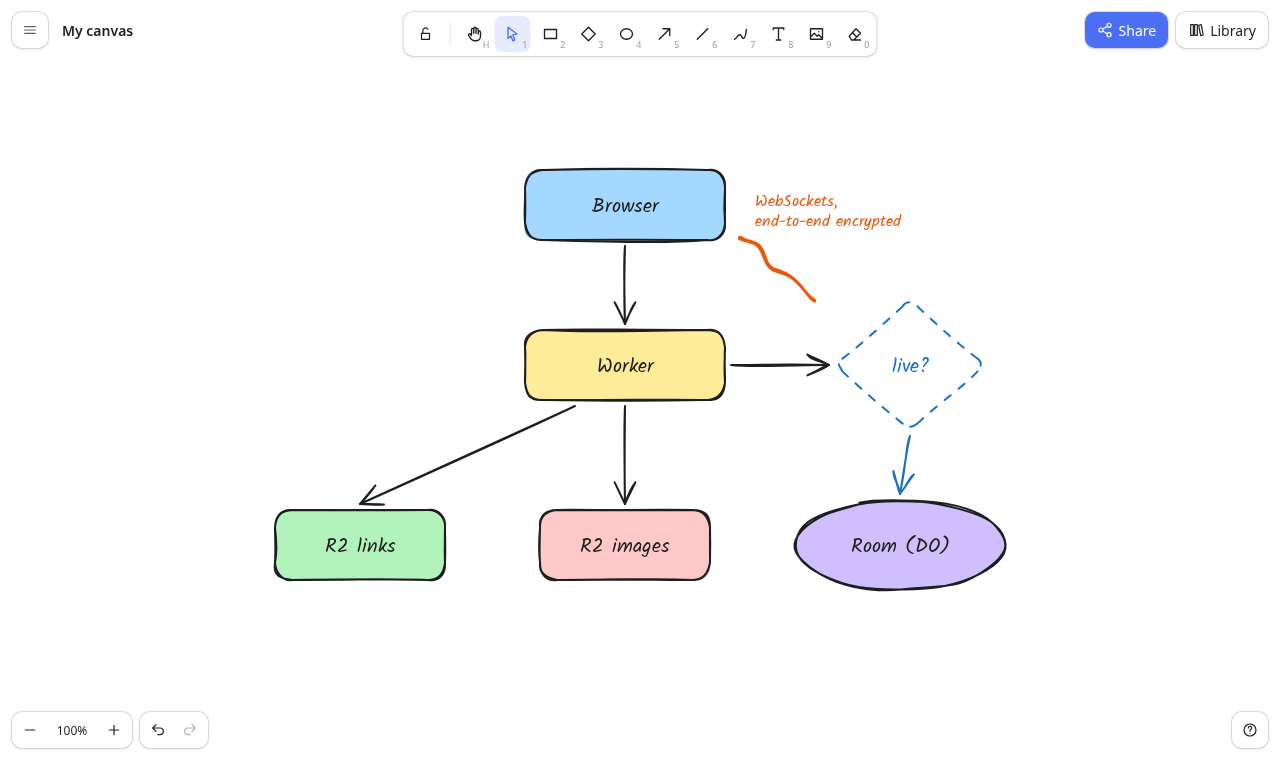
What does the result look like?
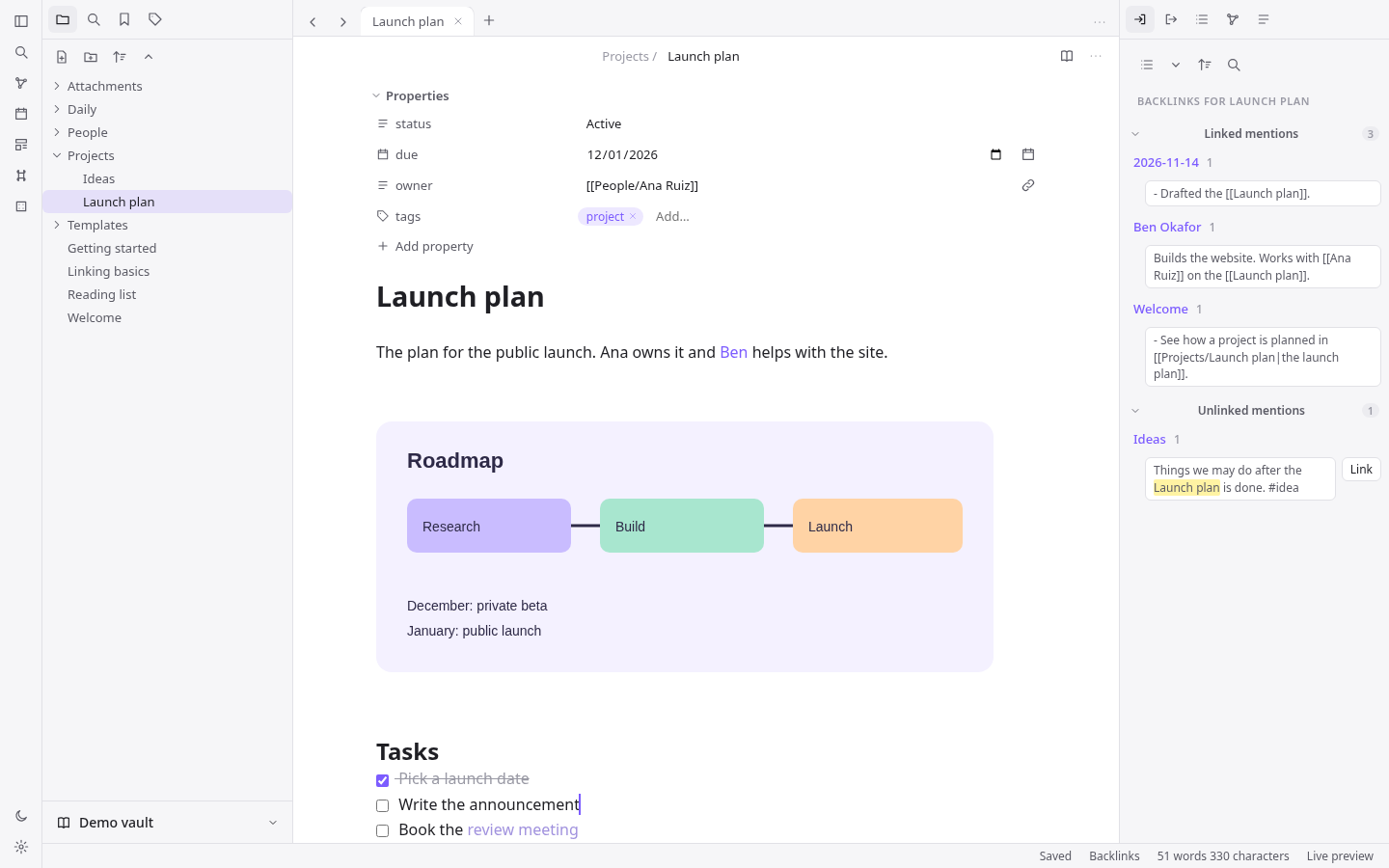
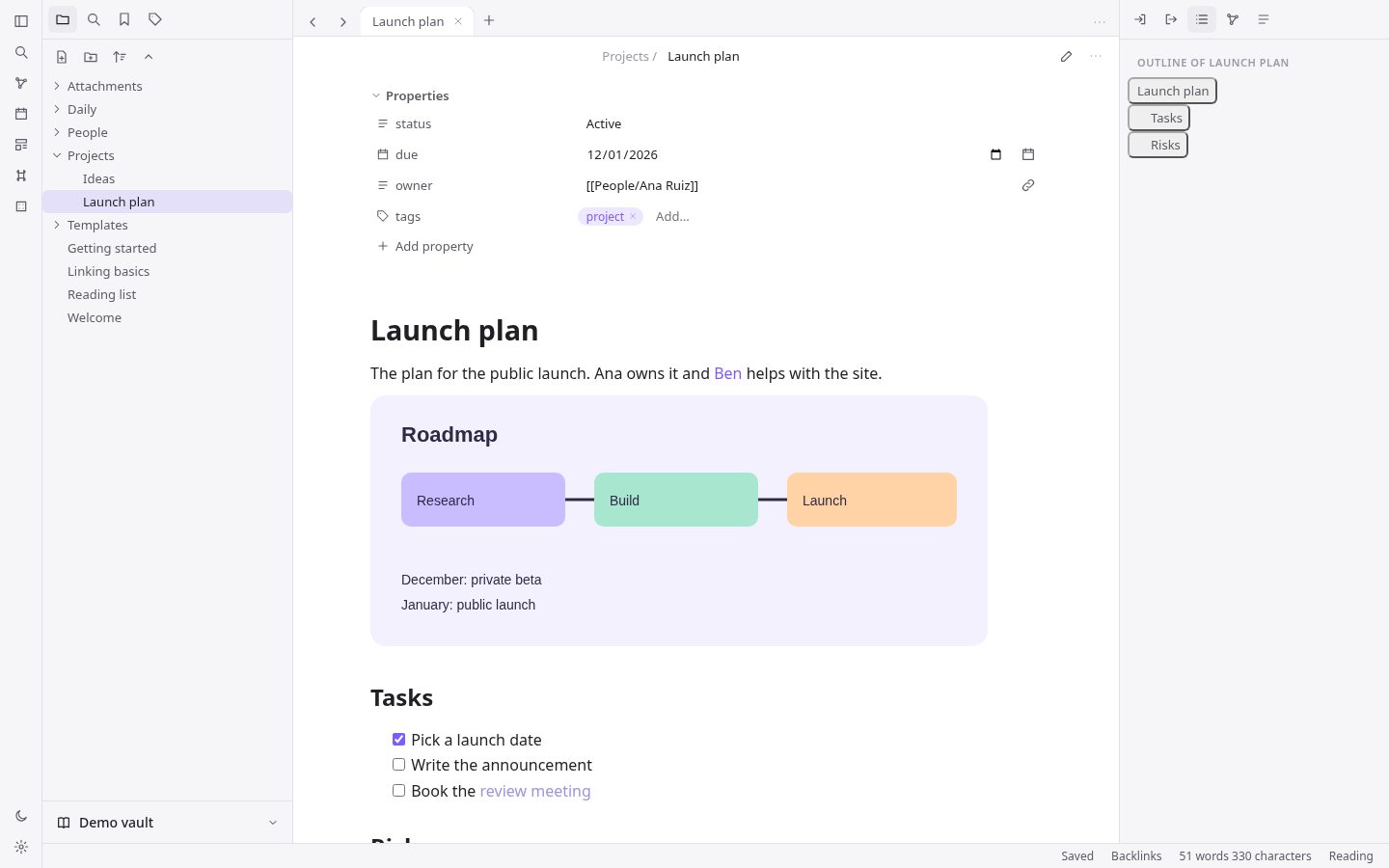
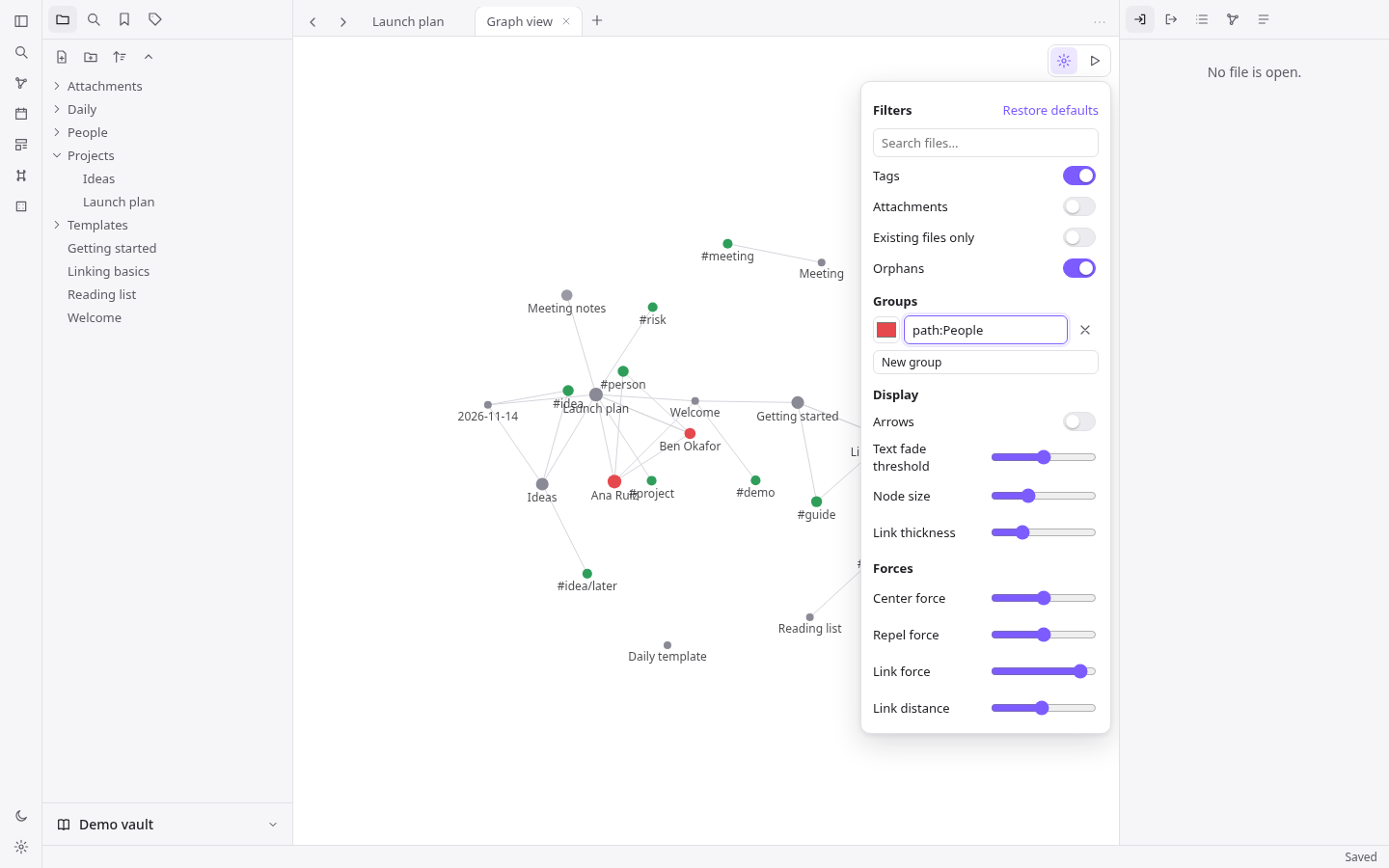
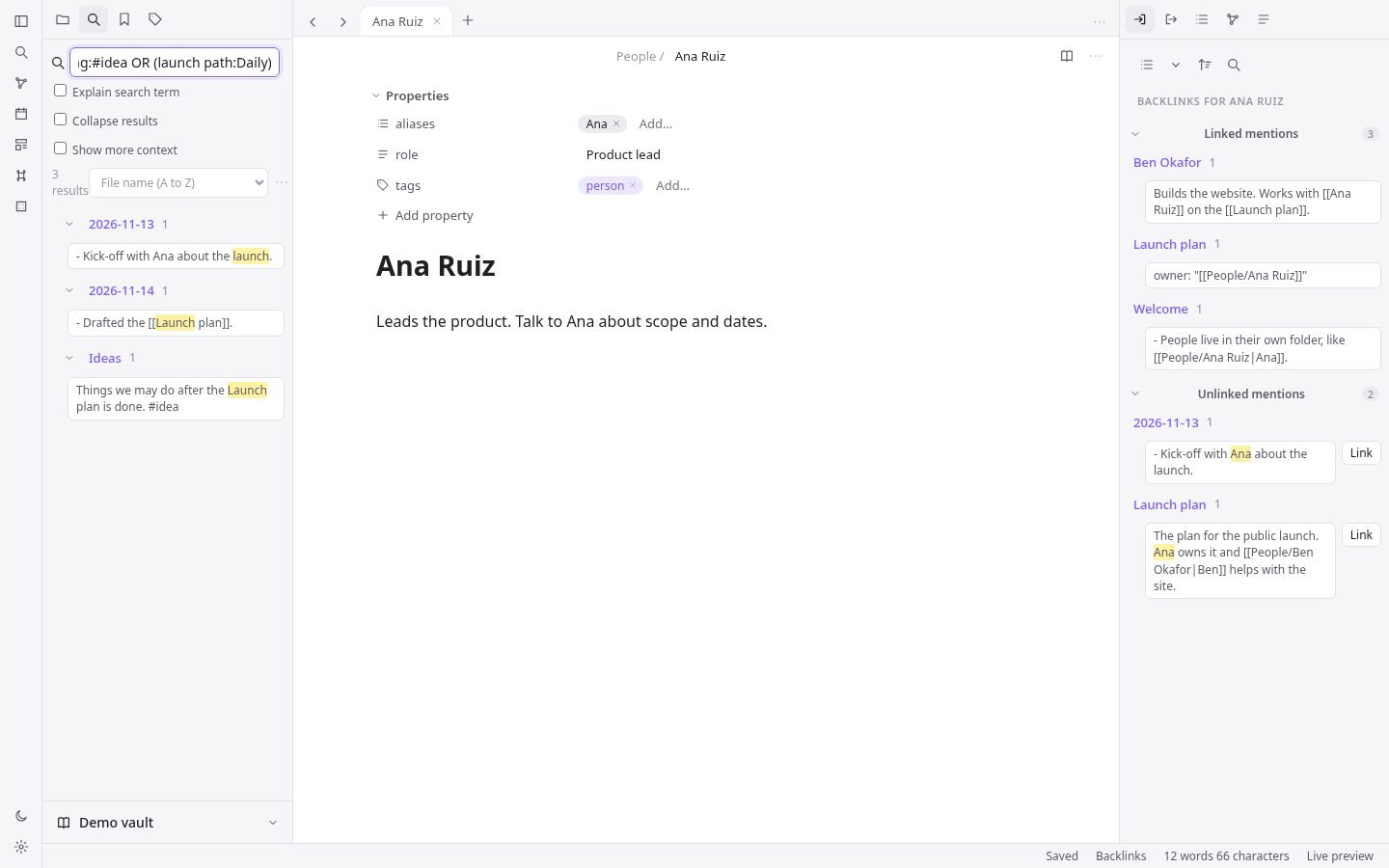
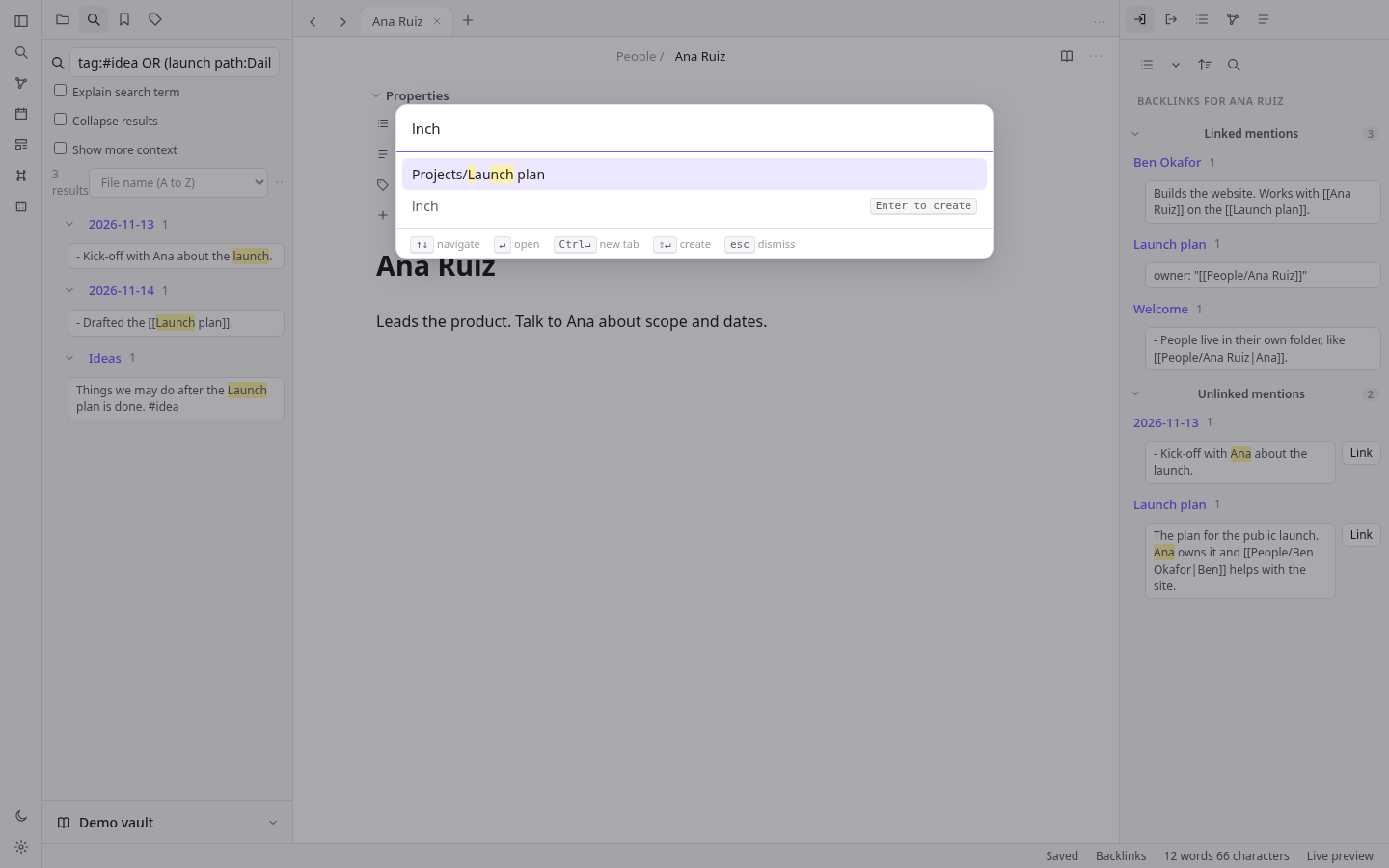
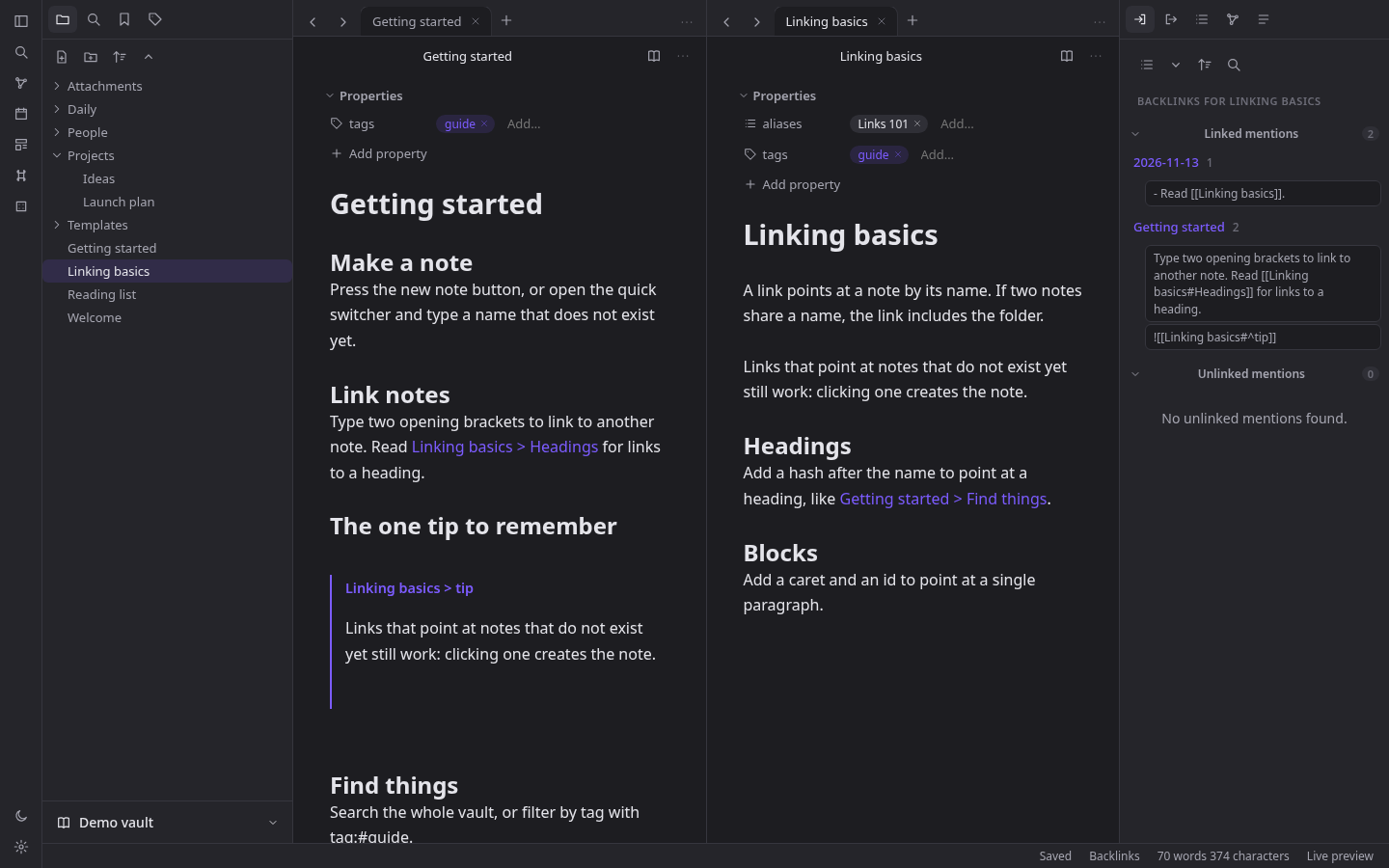
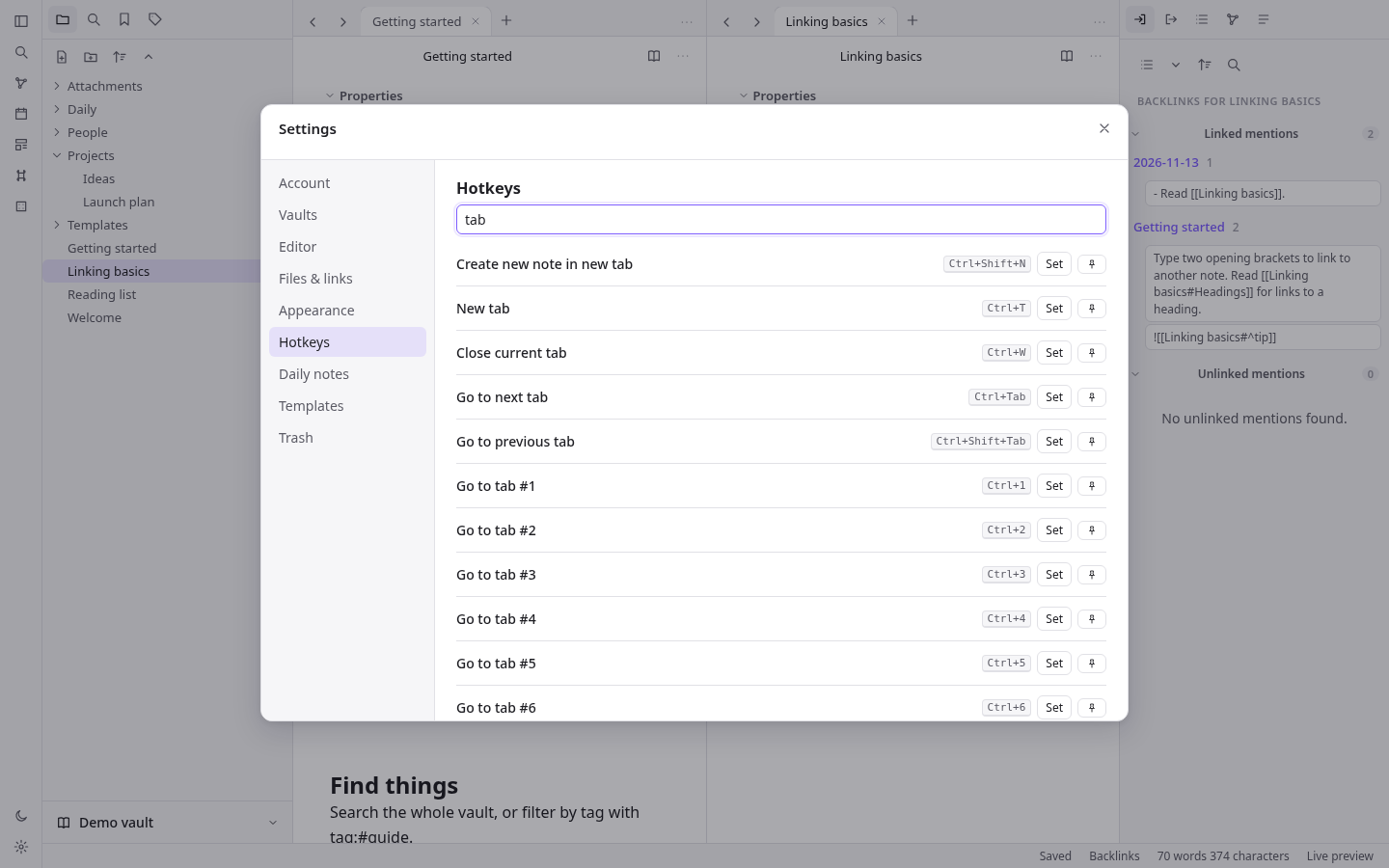
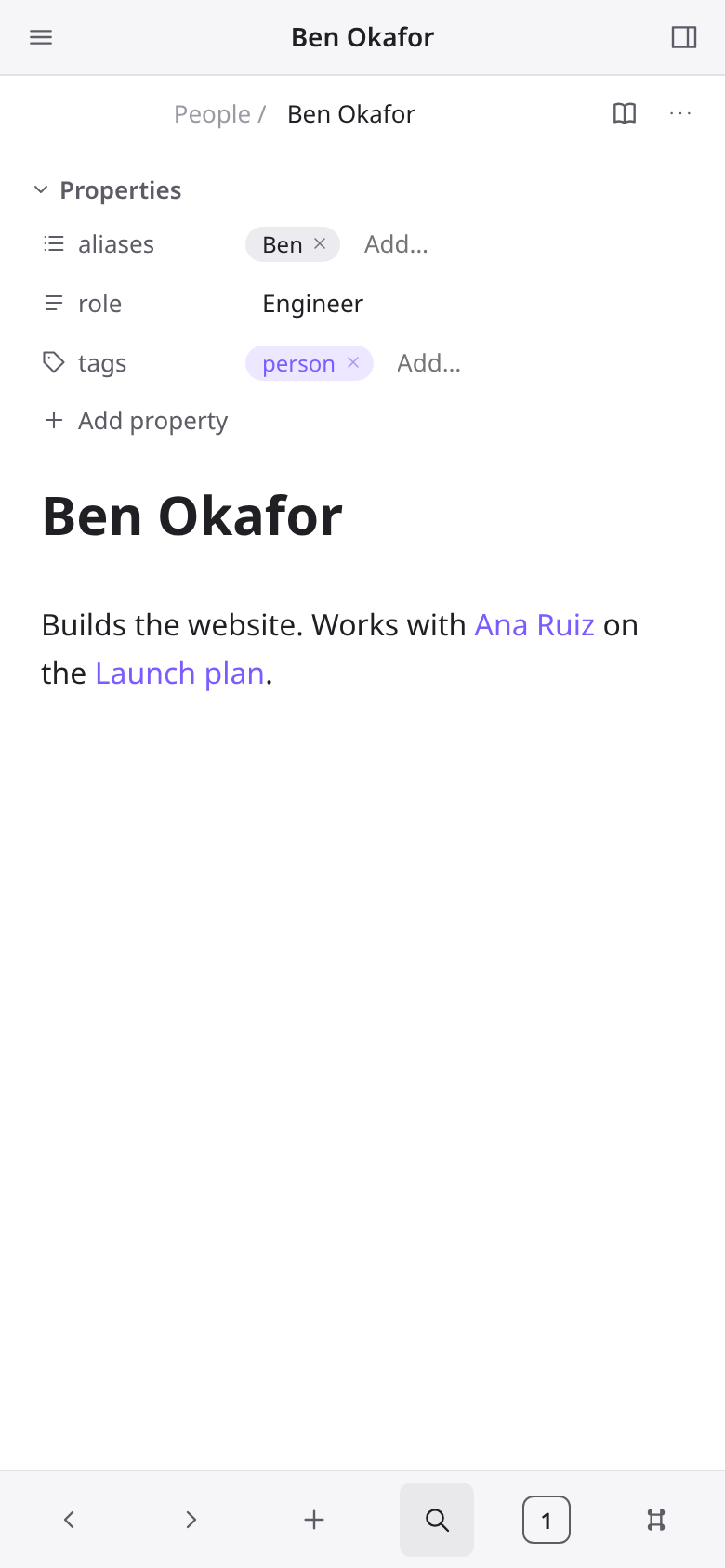
What can I customize?
Your choices go into the line you copy. Anything else is yours to edit, but it leaves the tested path.
What do I get?
-
spec.mdRequirements R1–R24 with acceptance checks, including who can sign up.Linked notes
What this builds
A web app for writing notes in Markdown and linking them together into a personal knowledge base. A person signs up and gets a vault: a tree of folders, Markdown notes and attachments. They write in an editor that hides Markdown syntax while they type (live preview), link notes with
[[double brackets]], and see for any note which other notes link to it. Tags, properties, full-text search with operators, a quick switcher, a command palette, a force-directed graph of the links, daily notes, templates, tabs and split panes, bookmarks, and image attachments are all included. Notes sync between the person's devices through the server.It is one Cloudflare Worker. The React single-page app is the Worker's static assets, the JSON API runs in the Worker, notes and the link/tag/search index live in one D1 database (SQLite, with FTS5 for search), and attachments live in one R2 bucket. It runs on a laptop with
npm installandnpm run dev(wrangler dev, local D1 and R2, no Cloudflare account), deploys withnpm run deploy, and needs no other service.Read
spekkr.inputs.jsonfirst.app_nameis the product name (page title, sign-in page, Settings > About).accent_coloris the accent colour (links, selection, active items, primary buttons, focus rings).seed_demoturns the demo vault indesign.md("Demo data") on or off.access(only_me,invite_onlyoropen; defaultonly_me) says who can create an account (R24).cloudflare_access(default off) adds the Cloudflare Access deploy steps to the README and turns off workers.dev and preview URLs (R24).design.mdhas the stack, Cloudflare config, data model, API, the parsing and link rules in full, the sync protocol, every screen and the look.tasks.mdis the build order.research.mdrecords what the design was modelled on; the builder does not need it, and nothing in it is a requirement.Names and words
- The product is called
app_nameeverywhere. The built app never shows the name, logo, icons or wording of any other notes product. - Interface text the spec quotes is the text to use. Other text is the builder's own, short and plain.
- No image, font or icon file is copied from anywhere. Icons are inline SVG drawn in the app's own code.
Words used here
- Vault: one person's collection of files. A person can have several.
- File: a note (
.md), a folder, or an attachment (image, audio, video, PDF). Every file has a vault path likeProjects/Launch plan.md. - Note name: the last path segment without
.md(Launch plan). - Link:
[[target]],[[target|shown text]],[[target#Heading]],[[target#^blockid]], or a Markdown link[text](path.md). Embed: the same with!in front; the target is shown inline. - Resolved / unresolved: whether a link's target exists.
- Backlink: a link from another note to this one. Unlinked mention: the note's name (or an alias) written as plain text in another note.
- MB: 1,048,576 bytes (so 1 MB = 1,048,576 bytes, 20 MB = 20,971,520 bytes, 25 MB = 26,214,400 bytes).
- Owner: the first account created on the site (the demo account never counts). Member: any later account.
Out of scope
Plugins and themes from others, canvas boards, database views, publishing, sharing a vault with other people, end-to-end encryption, version history (beyond the trash), PDF annotation, vault-wide block search (
[[^^), updating links when a heading is renamed, excluded-files rules, offline editing across reloads (edits made while offline are kept in memory and sent when the connection returns).Requirements
Each requirement has an id. Tests name the id they cover.
R1. Run and store
- Cloudflare Workers only. Worker code uses Web APIs (
fetch,Request,Response,crypto.subtle,crypto.getRandomValues,Intl,TextEncoder) and no Node.js built-in (node:*,fs,Buffer,process); nonodejs_compatflag. wrangler.jsonc(exact shape indesign.md) servesdist/as static assets with single-page-app fallback, runs the Worker first for/api/*, binds D1 asDB, R2 asFILES, declares varsNOW,TEST_CLOCKandALLOW_SIGNUP(R24), and turns on observability.npm run buildbuilds the client with Vite.npm run devbuilds, applies migrations to the local D1 and runswrangler dev.npm run deploybuilds and deploys. The README gives the one-time deploy steps.- Schema in
migrations/0001_init.sqlandmigrations/0002_access.sql(R24); the Worker never creates tables. Note text is stored in D1 (up to 1 MB per note). Attachment bytes are stored in R2 (up to 20 MB each); D1 keeps their metadata. - Clock:
NOW(ISO time) freezes the server clock when set. WhenTEST_CLOCKis"1"atest_nowcookie overrides it per request. The client asksGET /api/nowand keeps the offset, so dates (daily notes, template dates, conflict copies) follow the server clock in the browser's time zone.
Accept when: a fresh clone runs with
npm installandnpm run devwithout a Cloudflare login,wrangler deploy --dry-runbundles with no Node.js compatibility warnings, andGET /api/nowreturnsNOWwhen set.R2. Accounts and vaults
- Sign up (when R24 allows it) with name (1–80 characters), email and password (8–200 characters). Emails are compared lower-case; a second account with the same email gets "That email already has an account". Sign in with email and password; a wrong pair gets "Email or password is wrong" (same text for an unknown email). Sign out ends the session.
- Sessions: a random token in an
HttpOnly,SameSite=Laxcookie that is alsoSecureon every host exceptlocalhostand127.0.0.1(plain-http local development); the database keeps only its SHA-256. 30 days. - Passwords: PBKDF2-SHA256, 100000 iterations, 16-byte salt.
- A new account gets one vault named "My notes" holding a short "Welcome" note. The person can create more vaults, rename them, switch between them (the vault id is in the address:
/app?vault=ID) and delete one by typing its exact name; the last vault cannot be deleted. Deleting a vault removes its R2 objects. - Settings > Account: change name, change password (needs the current one), sign out.
- Every
/api/vaults/:v/...request checks the vault belongs to the signed-in person, else 404. Signed-out requests get 401 and the client goes to/login. Requests that change data with anOriginheader from another site get 403.
Accept when: the R2 tests pass (sign-up, duplicate email, bad password, sign-out guard, vault create/switch/delete-confirmation) and the unit test "Access and cookies" passes (the Secure rule).
R3. File explorer
- Left sidebar tab "Files": the vault tree, folders first then files, each level sorted by the chosen order (name A→Z, Z→A, modified new→old / old→new, created new→old / old→new; saved on the device). Attachments show their extension as a small badge. The active file is highlighted.
- Toolbar: New note, New folder, Change sort order, Expand all / Collapse all.
- New note creates
Untitled.md(orUntitled 1.md,Untitled 2.md... if taken) in the default location (Settings > Files & links: vault root, the current file's folder, or a chosen folder), opens it and selects its title so typing renames it. - Context menu on a file: Open in new tab, Open to the right, Rename…, Move file to…, Make a copy (notes), Bookmark, Copy path, Delete. On a folder: New note, New folder, Rename…, Move folder to…, Bookmark, Delete.
- Rename: from the context menu, F2, or by editing the title above the note. Names cannot contain
\ / : * ? " < > | # ^ [ ]or start with., and cannot be empty; refused names keep the old name and show "Names cannot contain any of \ / : * ? " < > | # ^ [ ]" (or the matching message). A name already used in that folder (compared without case) is refused with "A file with that name already exists". - Drag a file or folder onto a folder (or the empty area for the root) to move it; a folder cannot move into itself. Dragging files from the computer onto the tree uploads them there (R19).
- Keyboard: arrow keys move through the tree, Right/Left open/close folders, Enter opens, F2 renames, Delete deletes.
Delete asks first. By default deleted files go to the trash (Settings > Files & links "Deleted files": Move to trash / Permanently delete). Settings
Trash lists them with Restore and Delete, and Empty trash. Restoring to a
taken path picks a free name. Deleting a folder deletes what is in it.
Accept when: the R3 test passes (create, free names, invalid name, folder, drag move, F2 rename, duplicate refused, trash and restore, folder delete).
R4. Editor and view modes
- Each note tab has three modes: Live preview (default), Source mode and Reading view. The title bar has a button that switches between reading and editing (Ctrl/Cmd+E); the "More options" menu and the status bar switch live preview / source. Settings > Editor "Default view for new tabs" picks the mode new tabs start in.
- Live preview is a CodeMirror 6 editor that renders Markdown in place: headings sized, bold/italic/strikethrough/highlight/inline code styled with their markers hidden except on lines that contain the cursor or selection; links show only their text; checkboxes are clickable; horizontal rules, bullets and block quotes are drawn; embeds are shown inline below their line; the properties block at the top is hidden from the text and shown as the Properties panel (R9). Source mode shows the raw text in a monospace font.
- The properties block is hidden from the moment the note opens, wherever the cursor is (it is never revealed by the cursor, unlike inline syntax). A note opens with the cursor at the start of the body, just after the block, and a cursor that would land inside the block (arrow keys, undo, a click above the first line) is put at the start of the body instead. Only Source mode and the "Properties in document: Source" setting show the block as text.
- Reading view renders the note as HTML (CommonMark plus tables, task lists,
==highlight==,#tags, wikilinks, embeds, callouts> [!note] Title, and%%comments%%hidden). Clicking a task box toggles it in the file. - Editing commands: Ctrl/Cmd+B bold, Ctrl/Cmd+I italic, Ctrl/Cmd+K Markdown link, Ctrl/Cmd+Enter toggle checkbox, Ctrl/Cmd+F find in note, Undo/Redo.
- Wrapping a selection: typing
[while text is selected does not replace the text; the first[wraps it as[text]and keeps the text selected, and a second[makes it[[text]](a link) with the text still selected. With no selection[is typed normally (with its closing bracket). - Autosave: changes are saved 800 ms after typing stops, on tab close, on switching notes and before the page unloads. The status bar shows "Saving…" then "Saved", "Offline – changes are kept here until you reconnect", or "Not saved – retrying". It also shows the word and character count of the note body (without properties).
- Settings > Editor "Readable line length" limits the text width.
- The same note open in two panes stays in step as you type in either.
Accept when: the R4 test passes (including the properties block being hidden as soon as the note opens, checked in the R9 test).
R5. Links and autocomplete
- Typing
[[opens a suggestion list of every note and attachment (fuzzy match on the name, then the path). Notes with aliases also list each alias; choosing one writes[[Note|Alias]]. If nothing matches exactly, the last entry is "Link to a new note" with what was typed. [[Note#lists the headings of that note;[[Note#^lists its paragraphs and list items; choosing one that has no block id adds a random 6-character id (^a1b2c3) to the end of that line in the target note and writes[[Note#^a1b2c3]].[[#lists headings of the current note.- The written link text follows Settings > Files & links "New link format": Shortest path when possible (just the name when no other file has that name, otherwise the full vault path), Relative path to file, or Absolute path in vault. "Use [[Wikilinks]]" off writes
[text](path%20with%20spaces.md)instead. - Links are followed by clicking them in reading view, or Ctrl/Cmd+click (or click on the rendered text) in live preview; Ctrl/Cmd adds a new tab. A heading or block link scrolls to that place. Following an unresolved link creates the note (in the folder the link names, else the default location) and opens it. Unresolved links are drawn in a faded colour.
- Link resolution and parsing follow
design.md("Link rules") exactly.
Accept when: the R5 test and the unit tests "Parsing" and "Link resolution" pass.
R6. Embeds
![[Note]]shows the whole note,![[Note#Heading]]that section (to the next heading of the same or higher level),![[Note#^id]]that block. Embedded notes render in a framed box with the source name; nesting stops at depth 3 and a note never embeds itself (cycle shows the link only).![[image.png]]shows the image;![[image.png|200]]or|200x100sets the size. Audio and video show players; PDF shows in a frame. Missing targets show"name" could not be found.- Markdown image syntax to a vault file works the same.
Accept when: the R6 test passes.
R7. Keeping links correct on rename and move
- When a file is renamed or moved (including a folder, which moves everything in it), every link in the vault that pointed at a moved file is rewritten so it still points at it, keeping its heading/block part, shown text and embed
!. Wikilinks stay wikilinks and Markdown links stay Markdown links. - Rewritten links keep their form:
.//../links stay relative to the linking note, links written with folders stay full vault paths, bare names use the vault's "New link format" (so they become a full path only if the bare name would now be ambiguous). - Links in a moved note that pointed at files that did not move are rewritten only if they would otherwise stop resolving to the same file.
- Unresolved links are not touched. A move that makes an unresolved link resolve simply resolves it.
- Settings > Files & links "Automatically update internal links" (on by default). When off, the app asks "Update links?" with the count of links and notes ("Update 3 links in 2 notes to point at the new name?") and Cancel leaves them as written.
- The server does the rewrite inside the move request, as D1 batches of up to 400 statements (one batch for ordinary vaults), and returns how many notes and links changed.
dryRunreturns the counts without changing anything.
Accept when: the R7 test and the unit tests "Rewriting" pass.
R8. Backlinks and outgoing links
- Right sidebar tab "Backlinks" for the active note: Linked mentions — each note that links here, with every linking line shown with the link highlighted, clicking a line opens that note at that line; Unlinked mentions — each place another note contains this note's name or one of its aliases as whole words (case-insensitive), outside links, tags, code and properties. Each unlinked mention has a "Link" button that turns that text into a link (
[[Name]], or[[Name|text]]when the text differs from the link text). - Toolbar: Collapse results, Show more context, sort (file name / modified time), and a filter box.
- Tab "Outgoing links": links from the active note (resolved first, then unresolved shown faded with a "+" to create), and unlinked mentions of other notes' names in this note, each with a button that links it.
- Both update as notes change.
Accept when: the R8 test passes.
R9. Properties
- A YAML block between
---lines at the very top of a note holds its properties. Types: Text, List, Number, Checkbox, Date, Date & time, and the fixed Tags type fortags.aliasesandcssclassesare lists. A type is chosen once per vault per property name (stored on the server); when none is chosen it is inferred from the value. - In live preview and reading view the block is shown as a Properties panel (Settings > Editor "Properties in document": Visible / Hidden / Source) and never as text in live preview (R4). Each row: an icon for the type and the name (click for a menu: Rename…, change type, Remove) and an editor for the value (text input; chips with × and an "Add…" input for lists and tags; number input; checkbox; date and date-time inputs, with a button to open that day's daily note). "Add property" (also Ctrl/Cmd+; "Add file property") asks for a name.
- Editing the panel rewrites only the YAML block, as one undoable change. Invalid YAML is never overwritten: the panel says "These properties are not valid YAML. Switch to source mode to fix them."
- Right sidebar tab "All properties": every property name in the vault with its type and how many notes use it; clicking one searches
[name]. - Links inside text properties (
"[[Note]]") count as links (R5, R8, R7).
Accept when: the R9 test passes.
R10. Tags
- A tag is
#followed by letters, digits,_,-,/or emoji, containing at least one non-digit, not inside code, links or URLs, and preceded by start of line, a space or( , ;./makes nested tags (#idea/lateris also under#idea). Tags in thetagsproperty count too. Case-insensitive for matching; shown as first written. - Left sidebar tab "Tags": tag tree with counts (notes using the tag or any nested tag), sort by name or by count, nested or flat, expand/collapse all. Clicking a tag searches
tag:#name; Ctrl/Cmd+click adds it to the current search. - Typing
#in the editor suggests existing tags.
Accept when: the R10 test passes.
R11. Search
- Left sidebar tab "Search" with a query box, Match case toggle, Explain search term option, Collapse results, Show more context, sort (file name A→Z / Z→A, modified new→old / old→new, created new→old / old→new), recent searches (last 10, on the device), "Copy search results" and "Bookmark this search".
- Query language (full grammar in
design.md, "Search"): words (all must appear, anywhere in the note or its path),"exact phrase",OR,-to exclude,( )to group,/regex/, and the operatorsfile:path:content:tag:line:block:section:task:task-todo:task-done:match-case:ignore-case:, and property filters[name],[name:value],[name:null],[name:>3],[name:<3]. An operator's value may be a group:line:(a b). - Each result shows the note and its matching lines with the matches highlighted; clicking a line opens the note there. A query that does not parse shows the problem (for example "A bracket is not closed") instead of results.
- Server side: FTS5 (trigram) narrows the candidates using the required words of 3+ characters; the exact rules are then applied in the Worker to the candidates. Results are capped at 500 files, 20 lines each.
- Ctrl/Cmd+Shift+F opens search, filled with the editor selection if any.
Accept when: the R11 test and the unit tests "Search" pass.
R12. Quick switcher
- Ctrl/Cmd+O. With an empty query it lists recently opened files, then the rest by modified time. Typing fuzzy-matches names, paths and aliases, best first (name matches before path matches; an alias match shows the alias with the note path under it). Matched letters are highlighted.
- Enter opens; Ctrl/Cmd+Enter opens in a new tab; Shift+Enter creates a note with the typed name even if one matches; when nothing matches exactly the last entry is the typed text with "Enter to create". A name with
/creates the folders. Up/Down (and Ctrl+N/P) move, Esc closes. A footer lists these keys.
Accept when: the R12 test passes.
R13. Command palette and hotkeys
- Ctrl/Cmd+P lists every command available now (commands that need an open note are hidden when none is open), pinned commands first, then recently used, then A→Z, each with its hotkey. Fuzzy filter; Enter runs.
- The command list and default hotkeys are in
design.md("Commands"). - Settings > Hotkeys: filter by name or key, "Set" records the next key combination (Esc cancels), a combination already in use is moved off the other command with a notice, "Reset" restores the default, and a pin button pins the command to the top of the palette. Hotkeys and pins are vault settings, so they follow the person between devices.
- "Mod" means Cmd on macOS and Ctrl elsewhere. Hotkeys work everywhere except while a dialog is open; editor-only keys work only in the editor.
Accept when: the R13 test passes.
R14. Graph view
- "Open graph view" (Ctrl/Cmd+G) opens the vault graph in a tab: one dot per note (and per attachment and tag when turned on), one line per link between two notes, unresolved link targets as faded dots. A dot grows with the number of notes linking to it. Laid out by a force simulation (d3-force), drawn on a
<canvas>. - Mouse: hover highlights the dot, its lines and neighbours and fades the rest and shows its name; click opens the note (Ctrl/Cmd+click: new tab); dragging a dot moves it; dragging the background pans; wheel zooms at the pointer; right-click a dot: Open in new tab, Open to the right. Keyboard with the canvas focused: arrows pan,
+/-zoom. A hidden list of the shown notes (as buttons) gives screen readers the same choices. - Settings panel (gear button): Filters — search box (same language as R11) that limits which files are shown, Tags, Attachments, Existing files only, Orphans; Groups — rows of a search plus a colour, the first matching group colours a dot; Display — Arrows, Text fade threshold, Node size, Link thickness; Forces — Center, Repel, Link force, Link distance; "Restore defaults". Saved per vault on the device. A play button animates the notes appearing in order of creation.
- Right sidebar tab "Local graph": the graph around the active note, with Depth 1–3 and Incoming / Outgoing links toggles; the active note is drawn in the accent colour.
Accept when: the R14 test passes.
R15. Daily notes
- "Open today's daily note" (ribbon and palette) opens the note for today (server clock, browser time zone) at
<folder>/<date formatted>.md, creating it from the template if missing. "Open previous daily note" and "Open next daily note" step through existing daily notes. - Settings > Daily notes: Date format (tokens in
design.md, with a live example;/in the format makes folders), New file location, Template file location, Open daily note on startup. - Date properties (R9) have a button that opens that day's daily note.
Accept when: the R15 test passes.
R16. Templates
- Settings > Templates: Template folder location, Date format, Time format. "Templates: Insert template" lists notes in the template folder and inserts the chosen one at the cursor, replacing
{{title}}(note name),{{date}},{{time}}, and{{date:FORMAT}}/{{time:FORMAT}}. If the template has properties they are merged into the note's: the note's existing values win, lists are combined without duplicates. "Insert current date" / "Insert current time" insert the formatted now. - Daily notes use the same variables.
Accept when: the R16 test passes.
R17. Tabs, splits and navigation
- The main area holds tab groups arranged in nested horizontal/vertical splits with draggable dividers. Each tab has its own back/forward history (buttons and Ctrl/Cmd+Alt+←/→). Tabs can be dragged to reorder or onto another group; a context menu has Close, Close others, Pin/Unpin, Split right, Split down. Pinned tabs show no close button and following a link from a pinned tab opens a new tab.
- Ctrl/Cmd+T new tab (an empty tab with: Create new note, Go to file, Open today's daily note, Close), Ctrl/Cmd+W close, Ctrl+Tab / Ctrl+Shift+Tab next/previous, Ctrl/Cmd+1…7 go to tab 1–7, Ctrl/Cmd+8 "Go to last tab". Opening a file replaces the active tab unless it is pinned.
- Closing a group's last tab removes the group (the last group stays with an empty tab). The layout, open tabs, sidebar widths and open/closed states are saved per vault on the device and restored on load; tabs for files that no longer exist are dropped.
- Left ribbon: toggle sidebar, quick switcher, graph, daily note, insert template, command palette, random note, theme, settings. Both sidebars can be resized and hidden (Ctrl/Cmd+\ and Ctrl/Cmd+Shift+).
Accept when: the R17 test passes.
R18. Bookmarks
- Left sidebar tab "Bookmarks": bookmarked files, folders, headings, blocks, searches, the graph, and groups that hold other bookmarks. Click opens (a search bookmark fills the search pane). Drag to reorder or into a group. Context menu: Edit title / Rename, Move out of group, Remove. "Bookmark the active tab" and Ctrl/Cmd+D bookmark what is open; "New bookmark group".
- Bookmarks are stored on the server and follow file renames and moves.
Accept when: the R18 test passes.
R19. Attachments
- Paste or drop images/files into the editor, or drop them on the explorer, to upload. Allowed: png, jpg/jpeg, gif, webp, svg, bmp, avif, mp3, wav, m4a, ogg, mp4, webm, mov, pdf; up to 20 MB each. Others get 415 "That kind of file cannot be added. Use an image, audio, video or PDF file." and too big gets 413.
- Saved to the attachment location (Settings > Files & links: vault root, a folder — default
Attachments—, the note's folder, or a subfolder of it). A pasted image is namedPasted image YYYYMMDDHHmmss.png. A taken name gets a number. The editor inserts an embed (![[...]]or Markdown image) at the drop point. - Bytes go to R2 under
v<vault id>/<random>;GET /api/vaults/:v/raw/:idstreams them with the right type,Cache-Control: private, max-age=3600,X-Content-Type-Options: nosniff, and for SVG aContent-Security-Policy: sandboxheader. - Opening an attachment shows it in a file view (image, player, PDF frame) with Rename, Move, Delete and "Open in a new browser tab".
Accept when: the R19 test passes.
R20. Sync between devices
- Every change bumps the vault's
seqcounter and stamps the file with it. Each open client pollsGET /changes?since=<seq>every 5 s and when the window gets focus, and applies created, changed, moved and deleted files. An open note whose server text changed is reloaded in the editor when the person has no unsaved edits in it. - Saves send the version they were based on. If the server's version moved on, the server answers 409 with the current text and version. The client then does a three-way line merge (base = the last text it had from the server, mine, theirs). A clean merge is saved and shown in the editor. If the same lines changed on both sides the server text stays in the note and the local text is saved next to it as
<Name> (conflict YYYYMMDDHHmm).md(server clock, browser time zone), and a notice says exactly:This note also changed on another device. Your version was saved as "<file name>".— for example... saved as "Reading list (conflict 202611150700).md".(straight double quotes, the file name with.md). Nothing typed is ever silently lost. - Moves and deletes use the server's current state. A save to a note that was deleted elsewhere gets 404; the client saves its text as a new note at a free name in the same folder and says exactly:
This note was deleted on another device. Your text was saved as "<file name>".(same quoting).
Accept when: the R20 test and the unit tests "Merge" pass.
R21. Appearance and settings
- Light and dark themes (Settings > Appearance "Base color scheme": Adapt to system / Light / Dark; also a ribbon button) and font size, stored on the device and applied before first paint. Colours are CSS variables; the accent is
accent_color. - Settings is a dialog with sections Account, People (only for the owner of an invite-only site, R24), Vaults, Editor, Files & links, Appearance, Hotkeys, Daily notes, Templates, Trash, About. Vault settings are saved on the server and apply on every device.
- Settings > About shows the heading "About
app_name", one line saying the app keeps Markdown notes, links and attachments on this site, and two rows: "Who can sign up" (theaccesschoice: "Only me — sign-up closes after the first account", "Invite only — the owner invites people by email", or "Open — anyone can create an account") and "New accounts right now" ("Anyone can create an account", "Only people with an invite link", or "Nobody — sign-up is closed", after theALLOW_SIGNUPoverride).
Accept when: the R21 test passes.
R22. Mobile layout
- Under 768 px wide: no ribbon or tab bar; a top bar with the menu (left drawer), the note name, and the right drawer button; sidebars open as drawers over the note with a dimmed backdrop and start closed; a bottom bar with back, forward, quick switcher, new note, command palette and a tab-count button listing open tabs. Only the active pane of a split is shown. Opening a file closes the drawers. Settings shows its sections as a scrolling row.
Accept when: the R22 test passes.
R23. Safety and limits
- All SQL uses bound parameters. Paths are normalised (no
.., no empty segments, no leading/), at most 400 characters; names follow R3. - Request bodies over 25 MB (26,214,400 bytes) are refused (413 "That upload is too big"); note text over 1 MB is refused with 413 "Notes can be up to 1 MB"; attachments over 20 MB with 413 "Attachments can be up to 20 MB".
- Rendered Markdown escapes raw HTML (HTML in notes is shown as text), and
javascript:,vbscript:,file:and non-imagedata:URLs are never made into links. External links open in a new browser tab withrel="noopener". - Unexpected errors return JSON
{ "error": "Something went wrong on our side. Try again." }with 500 and are logged; no stack traces in responses.
Accept when: the R23 test passes.
R24. Who can sign up
The
accessinput picks one of three modes. In every mode the first account created on the site becomes the owner (stored as a role on the account; the demo account fromseed_demois never the owner and does not count). Later accounts are members. Each person still has only their own vaults; nobody sees anyone else's notes.only_me(default): once the owner exists, sign-up is closed.invite_only: once the owner exists, a new account needs an invite link from the owner.open: anyone can create an account at any time.
GET /api/config(no sign-in) returns{ access, signup, firstAccount }wheresignupisopen,inviteorclosedright now. The sign-in page shows "New here? Create an account" only whensignupisopen. While no owner exists inonly_meorinvite_only, the sign-up page says "This is the first account. It becomes the owner of this site."- Closed:
/signupshows "Sign-up is closed on this site." with a link to sign in instead of the form, andPOST /api/auth/signupreturns 403 "Sign-up is closed on this site". Existing accounts still sign in. - Invites (
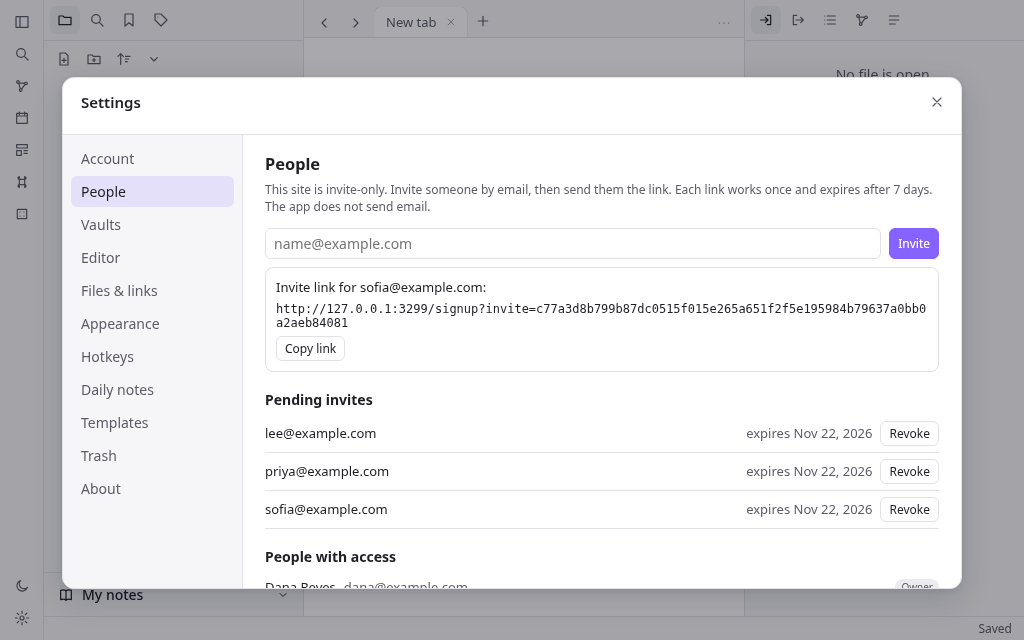
invite_only): Settings > People (owner only) says "This site is invite-only. Invite someone by email, then send them the link. Each link works once and expires after 7 days. The app does not send email." The owner types an email and presses "Invite"; the app shows "Invite link for <email>:" with the link<origin>/signup?invite=<64 hex characters>and a "Copy link" button. Only the SHA-256 of the token is stored, so the link is shown once; inviting the same email again replaces the old link. Inviting an email that already has an account is refused with "That email already has an account". Lists: "Pending invites" (email, "expires <date>", Revoke) and "People with access" (name, email, Owner / Member / No access, and for members "Remove access" (asks first; signs them out everywhere and refuses their sign-in with 403 "This account no longer has access to this site"; their notes are kept) or "Give access back"). Non-owners get 403 "Only the owner can do that" from these APIs. - Opening a valid invite link shows the sign-up form with "You were invited as <email>." and the email filled in and read-only; the server also refuses another email ("Use the email address the invite was sent to"). An invite link that was used, revoked or is past its 7 days shows "This invite link is not valid or has expired. Ask the owner for a new one.";
/signupwith no link shows "You need an invite to create an account here. Ask the owner to invite you." The API answers 403 "You need an invite to create an account here" or "This invite link is not valid or has expired". A link is marked used in the same request that creates the account, so it works once. - Race safety: when only the owner may sign up, the insert of the new account itself checks that no owner exists, so two people signing up at once cannot both become the owner.
- Override without a rebuild: the Worker var
ALLOW_SIGNUP— empty (the default) followsaccess;"0"refuses every new account in every mode (invite links included, and the first account too);"1"lets anyone sign up in every mode (new accounts are members once an owner exists). - Cloudflare Access (
cloudflare_access, default off): the app's own accounts always apply. When on,wrangler.jsonchas"workers_dev": falseand"preview_urls": false, and the README's deploy steps include putting Cloudflare Access in front of the site: serve it on a custom domain (routeswithcustom_domain: true); in Zero Trust > Access controls > Applications add a Self-hosted application for that hostname; add an Allow policy that includes the allowed emails; keep One-time PIN as a login method so allowed people get a code by email; check in the dashboard that workers.dev and Preview URLs are disabled for the Worker; open the site in a private window to see the Access step before the app's sign-in. When off, the README still has these steps under "Optional: Cloudflare Access in front of the site".
Accept when: the three R24 tests pass (only me: first account is owner, then closed in the page, the sign-in link and the API; invite only: invite, email lock, single use, revoke, 7-day expiry, member cannot manage, remove and give back access; open sign-up and the
ALLOW_SIGNUPoverride), and the unit test "Access and cookies" passes.Tests
- Unit (Vitest,
tests/): the cases listed indesign.mdunder "Unit tests" — parsing, link resolution, rewriting, search, merge, dates, templates, fuzzy match. - End to end (Playwright,
e2e/): at least one test per requirement above, each titled with its own requirement id (R2 …for R2), againstwrangler devwith a fresh local D1/R2 in.e2e/,NOWfrozen at2026-11-15T12:00:00.000Z,TEST_CLOCK=1,ALLOW_SIGNUP=1(so tests can create accounts), browser zoneAmerica/New_York, the demo vault seeded. WhenTEST_CLOCKis"1", the cookiestest_access(a mode name) andtest_allow_signup(0,1, orautofor "follow the mode") overrideaccessandALLOW_SIGNUPper request, liketest_now. The R24 tests live ine2e/0-access.spec.tsso they run first, on the empty database.
# Linked notes ## What this builds A web app for writing notes in Markdown and linking them together into a personal knowledge base. A person signs up and gets a **vault**: a tree of folders, Markdown notes and attachments. They write in an editor that hides Markdown syntax while they type (live preview), link notes with `[[double brackets]]`, and see for any note which other notes link to it. Tags, properties, full-text search with operators, a quick switcher, a command palette, a force-directed graph of the links, daily notes, templates, tabs and split panes, bookmarks, and image attachments are all included. Notes sync between the person's devices through the server. It is one Cloudflare Worker. The React single-page app is the Worker's static assets, the JSON API runs in the Worker, notes and the link/tag/search index live in one D1 database (SQLite, with FTS5 for search), and attachments live in one R2 bucket. It runs on a laptop with `npm install` and `npm run dev` (`wrangler dev`, local D1 and R2, no Cloudflare account), deploys with `npm run deploy`, and needs no other service. Read `spekkr.inputs.json` first. `app_name` is the product name (page title, sign-in page, Settings > About). `accent_color` is the accent colour (links, selection, active items, primary buttons, focus rings). `seed_demo` turns the demo vault in `design.md` ("Demo data") on or off. `access` (`only_me`, `invite_only` or `open`; default `only_me`) says who can create an account (R24). `cloudflare_access` (default off) adds the Cloudflare Access deploy steps to the README and turns off workers.dev and preview URLs (R24). `design.md` has the stack, Cloudflare config, data model, API, the parsing and link rules in full, the sync protocol, every screen and the look. `tasks.md` is the build order. `research.md` records what the design was modelled on; the builder does not need it, and nothing in it is a requirement. ## Names and words - The product is called `app_name` everywhere. The built app never shows the name, logo, icons or wording of any other notes product. - Interface text the spec quotes is the text to use. Other text is the builder's own, short and plain. - No image, font or icon file is copied from anywhere. Icons are inline SVG drawn in the app's own code. ## Words used here - **Vault**: one person's collection of files. A person can have several. - **File**: a note (`.md`), a folder, or an attachment (image, audio, video, PDF). Every file has a vault path like `Projects/Launch plan.md`. - **Note name**: the last path segment without `.md` (`Launch plan`). - **Link**: `[[target]]`, `[[target|shown text]]`, `[[target#Heading]]`, `[[target#^blockid]]`, or a Markdown link `[text](path.md)`. **Embed**: the same with `!` in front; the target is shown inline. - **Resolved / unresolved**: whether a link's target exists. - **Backlink**: a link from another note to this one. **Unlinked mention**: the note's name (or an alias) written as plain text in another note. - **MB**: 1,048,576 bytes (so 1 MB = 1,048,576 bytes, 20 MB = 20,971,520 bytes, 25 MB = 26,214,400 bytes). - **Owner**: the first account created on the site (the demo account never counts). **Member**: any later account. ## Out of scope Plugins and themes from others, canvas boards, database views, publishing, sharing a vault with other people, end-to-end encryption, version history (beyond the trash), PDF annotation, vault-wide block search (`[[^^`), updating links when a heading is renamed, excluded-files rules, offline editing across reloads (edits made while offline are kept in memory and sent when the connection returns). ## Requirements Each requirement has an id. Tests name the id they cover. ### R1. Run and store - Cloudflare Workers only. Worker code uses Web APIs (`fetch`, `Request`, `Response`, `crypto.subtle`, `crypto.getRandomValues`, `Intl`, `TextEncoder`) and no Node.js built-in (`node:*`, `fs`, `Buffer`, `process`); no `nodejs_compat` flag. - `wrangler.jsonc` (exact shape in `design.md`) serves `dist/` as static assets with single-page-app fallback, runs the Worker first for `/api/*`, binds D1 as `DB`, R2 as `FILES`, declares vars `NOW`, `TEST_CLOCK` and `ALLOW_SIGNUP` (R24), and turns on observability. - `npm run build` builds the client with Vite. `npm run dev` builds, applies migrations to the local D1 and runs `wrangler dev`. `npm run deploy` builds and deploys. The README gives the one-time deploy steps. - Schema in `migrations/0001_init.sql` and `migrations/0002_access.sql` (R24); the Worker never creates tables. Note text is stored in D1 (up to 1 MB per note). Attachment bytes are stored in R2 (up to 20 MB each); D1 keeps their metadata. - Clock: `NOW` (ISO time) freezes the server clock when set. When `TEST_CLOCK` is `"1"` a `test_now` cookie overrides it per request. The client asks `GET /api/now` and keeps the offset, so dates (daily notes, template dates, conflict copies) follow the server clock in the browser's time zone. Accept when: a fresh clone runs with `npm install` and `npm run dev` without a Cloudflare login, `wrangler deploy --dry-run` bundles with no Node.js compatibility warnings, and `GET /api/now` returns `NOW` when set. ### R2. Accounts and vaults - Sign up (when R24 allows it) with name (1–80 characters), email and password (8–200 characters). Emails are compared lower-case; a second account with the same email gets "That email already has an account". Sign in with email and password; a wrong pair gets "Email or password is wrong" (same text for an unknown email). Sign out ends the session. - Sessions: a random token in an `HttpOnly`, `SameSite=Lax` cookie that is also `Secure` on every host except `localhost` and `127.0.0.1` (plain-http local development); the database keeps only its SHA-256. 30 days. - Passwords: PBKDF2-SHA256, 100000 iterations, 16-byte salt. - A new account gets one vault named "My notes" holding a short "Welcome" note. The person can create more vaults, rename them, switch between them (the vault id is in the address: `/app?vault=ID`) and delete one by typing its exact name; the last vault cannot be deleted. Deleting a vault removes its R2 objects. - Settings > Account: change name, change password (needs the current one), sign out. - Every `/api/vaults/:v/...` request checks the vault belongs to the signed-in person, else 404. Signed-out requests get 401 and the client goes to `/login`. Requests that change data with an `Origin` header from another site get 403. Accept when: the R2 tests pass (sign-up, duplicate email, bad password, sign-out guard, vault create/switch/delete-confirmation) and the unit test "Access and cookies" passes (the Secure rule). ### R3. File explorer - Left sidebar tab "Files": the vault tree, folders first then files, each level sorted by the chosen order (name A→Z, Z→A, modified new→old / old→new, created new→old / old→new; saved on the device). Attachments show their extension as a small badge. The active file is highlighted. - Toolbar: New note, New folder, Change sort order, Expand all / Collapse all. - New note creates `Untitled.md` (or `Untitled 1.md`, `Untitled 2.md`... if taken) in the default location (Settings > Files & links: vault root, the current file's folder, or a chosen folder), opens it and selects its title so typing renames it. - Context menu on a file: Open in new tab, Open to the right, Rename…, Move file to…, Make a copy (notes), Bookmark, Copy path, Delete. On a folder: New note, New folder, Rename…, Move folder to…, Bookmark, Delete. - Rename: from the context menu, F2, or by editing the title above the note. Names cannot contain `\ / : * ? " < > | # ^ [ ]` or start with `.`, and cannot be empty; refused names keep the old name and show "Names cannot contain any of \ / : * ? " < > | # ^ [ ]" (or the matching message). A name already used in that folder (compared without case) is refused with "A file with that name already exists". - Drag a file or folder onto a folder (or the empty area for the root) to move it; a folder cannot move into itself. Dragging files from the computer onto the tree uploads them there (R19). - Keyboard: arrow keys move through the tree, Right/Left open/close folders, Enter opens, F2 renames, Delete deletes. - Delete asks first. By default deleted files go to the trash (Settings > Files & links "Deleted files": Move to trash / Permanently delete). Settings > Trash lists them with Restore and Delete, and Empty trash. Restoring to a taken path picks a free name. Deleting a folder deletes what is in it. Accept when: the R3 test passes (create, free names, invalid name, folder, drag move, F2 rename, duplicate refused, trash and restore, folder delete). ### R4. Editor and view modes - Each note tab has three modes: **Live preview** (default), **Source mode** and **Reading view**. The title bar has a button that switches between reading and editing (Ctrl/Cmd+E); the "More options" menu and the status bar switch live preview / source. Settings > Editor "Default view for new tabs" picks the mode new tabs start in. - Live preview is a CodeMirror 6 editor that renders Markdown in place: headings sized, bold/italic/strikethrough/highlight/inline code styled with their markers hidden except on lines that contain the cursor or selection; links show only their text; checkboxes are clickable; horizontal rules, bullets and block quotes are drawn; embeds are shown inline below their line; the properties block at the top is hidden from the text and shown as the Properties panel (R9). Source mode shows the raw text in a monospace font. - The properties block is hidden from the moment the note opens, wherever the cursor is (it is never revealed by the cursor, unlike inline syntax). A note opens with the cursor at the start of the body, just after the block, and a cursor that would land inside the block (arrow keys, undo, a click above the first line) is put at the start of the body instead. Only Source mode and the "Properties in document: Source" setting show the block as text. - Reading view renders the note as HTML (CommonMark plus tables, task lists, `==highlight==`, `#tags`, wikilinks, embeds, callouts `> [!note] Title`, and `%%comments%%` hidden). Clicking a task box toggles it in the file. - Editing commands: Ctrl/Cmd+B bold, Ctrl/Cmd+I italic, Ctrl/Cmd+K Markdown link, Ctrl/Cmd+Enter toggle checkbox, Ctrl/Cmd+F find in note, Undo/Redo. - Wrapping a selection: typing `[` while text is selected does not replace the text; the first `[` wraps it as `[text]` and keeps the text selected, and a second `[` makes it `[[text]]` (a link) with the text still selected. With no selection `[` is typed normally (with its closing bracket). - Autosave: changes are saved 800 ms after typing stops, on tab close, on switching notes and before the page unloads. The status bar shows "Saving…" then "Saved", "Offline – changes are kept here until you reconnect", or "Not saved – retrying". It also shows the word and character count of the note body (without properties). - Settings > Editor "Readable line length" limits the text width. - The same note open in two panes stays in step as you type in either. Accept when: the R4 test passes (including the properties block being hidden as soon as the note opens, checked in the R9 test). ### R5. Links and autocomplete - Typing `[[` opens a suggestion list of every note and attachment (fuzzy match on the name, then the path). Notes with aliases also list each alias; choosing one writes `[[Note|Alias]]`. If nothing matches exactly, the last entry is "Link to a new note" with what was typed. - `[[Note#` lists the headings of that note; `[[Note#^` lists its paragraphs and list items; choosing one that has no block id adds a random 6-character id (`^a1b2c3`) to the end of that line in the target note and writes `[[Note#^a1b2c3]]`. `[[#` lists headings of the current note. - The written link text follows Settings > Files & links "New link format": **Shortest path when possible** (just the name when no other file has that name, otherwise the full vault path), **Relative path to file**, or **Absolute path in vault**. "Use [[Wikilinks]]" off writes `[text](path%20with%20spaces.md)` instead. - Links are followed by clicking them in reading view, or Ctrl/Cmd+click (or click on the rendered text) in live preview; Ctrl/Cmd adds a new tab. A heading or block link scrolls to that place. Following an unresolved link creates the note (in the folder the link names, else the default location) and opens it. Unresolved links are drawn in a faded colour. - Link resolution and parsing follow `design.md` ("Link rules") exactly. Accept when: the R5 test and the unit tests "Parsing" and "Link resolution" pass. ### R6. Embeds - `![[Note]]` shows the whole note, `![[Note#Heading]]` that section (to the next heading of the same or higher level), `![[Note#^id]]` that block. Embedded notes render in a framed box with the source name; nesting stops at depth 3 and a note never embeds itself (cycle shows the link only). - `![[image.png]]` shows the image; `![[image.png|200]]` or `|200x100` sets the size. Audio and video show players; PDF shows in a frame. Missing targets show `"name" could not be found.` - Markdown image syntax to a vault file works the same. Accept when: the R6 test passes. ### R7. Keeping links correct on rename and move - When a file is renamed or moved (including a folder, which moves everything in it), every link in the vault that pointed at a moved file is rewritten so it still points at it, keeping its heading/block part, shown text and embed `!`. Wikilinks stay wikilinks and Markdown links stay Markdown links. - Rewritten links keep their form: `./`/`../` links stay relative to the linking note, links written with folders stay full vault paths, bare names use the vault's "New link format" (so they become a full path only if the bare name would now be ambiguous). - Links in a moved note that pointed at files that did not move are rewritten only if they would otherwise stop resolving to the same file. - Unresolved links are not touched. A move that makes an unresolved link resolve simply resolves it. - Settings > Files & links "Automatically update internal links" (on by default). When off, the app asks "Update links?" with the count of links and notes ("Update 3 links in 2 notes to point at the new name?") and Cancel leaves them as written. - The server does the rewrite inside the move request, as D1 batches of up to 400 statements (one batch for ordinary vaults), and returns how many notes and links changed. `dryRun` returns the counts without changing anything. Accept when: the R7 test and the unit tests "Rewriting" pass. ### R8. Backlinks and outgoing links - Right sidebar tab "Backlinks" for the active note: **Linked mentions** — each note that links here, with every linking line shown with the link highlighted, clicking a line opens that note at that line; **Unlinked mentions** — each place another note contains this note's name or one of its aliases as whole words (case-insensitive), outside links, tags, code and properties. Each unlinked mention has a "Link" button that turns that text into a link (`[[Name]]`, or `[[Name|text]]` when the text differs from the link text). - Toolbar: Collapse results, Show more context, sort (file name / modified time), and a filter box. - Tab "Outgoing links": links from the active note (resolved first, then unresolved shown faded with a "+" to create), and unlinked mentions of other notes' names in this note, each with a button that links it. - Both update as notes change. Accept when: the R8 test passes. ### R9. Properties - A YAML block between `---` lines at the very top of a note holds its properties. Types: Text, List, Number, Checkbox, Date, Date & time, and the fixed Tags type for `tags`. `aliases` and `cssclasses` are lists. A type is chosen once per vault per property name (stored on the server); when none is chosen it is inferred from the value. - In live preview and reading view the block is shown as a Properties panel (Settings > Editor "Properties in document": Visible / Hidden / Source) and never as text in live preview (R4). Each row: an icon for the type and the name (click for a menu: Rename…, change type, Remove) and an editor for the value (text input; chips with × and an "Add…" input for lists and tags; number input; checkbox; date and date-time inputs, with a button to open that day's daily note). "Add property" (also Ctrl/Cmd+; "Add file property") asks for a name. - Editing the panel rewrites only the YAML block, as one undoable change. Invalid YAML is never overwritten: the panel says "These properties are not valid YAML. Switch to source mode to fix them." - Right sidebar tab "All properties": every property name in the vault with its type and how many notes use it; clicking one searches `[name]`. - Links inside text properties (`"[[Note]]"`) count as links (R5, R8, R7). Accept when: the R9 test passes. ### R10. Tags - A tag is `#` followed by letters, digits, `_`, `-`, `/` or emoji, containing at least one non-digit, not inside code, links or URLs, and preceded by start of line, a space or `( , ;`. `/` makes nested tags (`#idea/later` is also under `#idea`). Tags in the `tags` property count too. Case-insensitive for matching; shown as first written. - Left sidebar tab "Tags": tag tree with counts (notes using the tag or any nested tag), sort by name or by count, nested or flat, expand/collapse all. Clicking a tag searches `tag:#name`; Ctrl/Cmd+click adds it to the current search. - Typing `#` in the editor suggests existing tags. Accept when: the R10 test passes. ### R11. Search - Left sidebar tab "Search" with a query box, Match case toggle, Explain search term option, Collapse results, Show more context, sort (file name A→Z / Z→A, modified new→old / old→new, created new→old / old→new), recent searches (last 10, on the device), "Copy search results" and "Bookmark this search". - Query language (full grammar in `design.md`, "Search"): words (all must appear, anywhere in the note or its path), `"exact phrase"`, `OR`, `-` to exclude, `( )` to group, `/regex/`, and the operators `file:` `path:` `content:` `tag:` `line:` `block:` `section:` `task:` `task-todo:` `task-done:` `match-case:` `ignore-case:`, and property filters `[name]`, `[name:value]`, `[name:null]`, `[name:>3]`, `[name:<3]`. An operator's value may be a group: `line:(a b)`. - Each result shows the note and its matching lines with the matches highlighted; clicking a line opens the note there. A query that does not parse shows the problem (for example "A bracket is not closed") instead of results. - Server side: FTS5 (trigram) narrows the candidates using the required words of 3+ characters; the exact rules are then applied in the Worker to the candidates. Results are capped at 500 files, 20 lines each. - Ctrl/Cmd+Shift+F opens search, filled with the editor selection if any. Accept when: the R11 test and the unit tests "Search" pass. ### R12. Quick switcher - Ctrl/Cmd+O. With an empty query it lists recently opened files, then the rest by modified time. Typing fuzzy-matches names, paths and aliases, best first (name matches before path matches; an alias match shows the alias with the note path under it). Matched letters are highlighted. - Enter opens; Ctrl/Cmd+Enter opens in a new tab; Shift+Enter creates a note with the typed name even if one matches; when nothing matches exactly the last entry is the typed text with "Enter to create". A name with `/` creates the folders. Up/Down (and Ctrl+N/P) move, Esc closes. A footer lists these keys. Accept when: the R12 test passes. ### R13. Command palette and hotkeys - Ctrl/Cmd+P lists every command available now (commands that need an open note are hidden when none is open), pinned commands first, then recently used, then A→Z, each with its hotkey. Fuzzy filter; Enter runs. - The command list and default hotkeys are in `design.md` ("Commands"). - Settings > Hotkeys: filter by name or key, "Set" records the next key combination (Esc cancels), a combination already in use is moved off the other command with a notice, "Reset" restores the default, and a pin button pins the command to the top of the palette. Hotkeys and pins are vault settings, so they follow the person between devices. - "Mod" means Cmd on macOS and Ctrl elsewhere. Hotkeys work everywhere except while a dialog is open; editor-only keys work only in the editor. Accept when: the R13 test passes. ### R14. Graph view - "Open graph view" (Ctrl/Cmd+G) opens the vault graph in a tab: one dot per note (and per attachment and tag when turned on), one line per link between two notes, unresolved link targets as faded dots. A dot grows with the number of notes linking to it. Laid out by a force simulation (d3-force), drawn on a `<canvas>`. - Mouse: hover highlights the dot, its lines and neighbours and fades the rest and shows its name; click opens the note (Ctrl/Cmd+click: new tab); dragging a dot moves it; dragging the background pans; wheel zooms at the pointer; right-click a dot: Open in new tab, Open to the right. Keyboard with the canvas focused: arrows pan, `+`/`-` zoom. A hidden list of the shown notes (as buttons) gives screen readers the same choices. - Settings panel (gear button): **Filters** — search box (same language as R11) that limits which files are shown, Tags, Attachments, Existing files only, Orphans; **Groups** — rows of a search plus a colour, the first matching group colours a dot; **Display** — Arrows, Text fade threshold, Node size, Link thickness; **Forces** — Center, Repel, Link force, Link distance; "Restore defaults". Saved per vault on the device. A play button animates the notes appearing in order of creation. - Right sidebar tab "Local graph": the graph around the active note, with Depth 1–3 and Incoming / Outgoing links toggles; the active note is drawn in the accent colour. Accept when: the R14 test passes. ### R15. Daily notes - "Open today's daily note" (ribbon and palette) opens the note for today (server clock, browser time zone) at `<folder>/<date formatted>.md`, creating it from the template if missing. "Open previous daily note" and "Open next daily note" step through existing daily notes. - Settings > Daily notes: Date format (tokens in `design.md`, with a live example; `/` in the format makes folders), New file location, Template file location, Open daily note on startup. - Date properties (R9) have a button that opens that day's daily note. Accept when: the R15 test passes. ### R16. Templates - Settings > Templates: Template folder location, Date format, Time format. "Templates: Insert template" lists notes in the template folder and inserts the chosen one at the cursor, replacing `{{title}}` (note name), `{{date}}`, `{{time}}`, and `{{date:FORMAT}}` / `{{time:FORMAT}}`. If the template has properties they are merged into the note's: the note's existing values win, lists are combined without duplicates. "Insert current date" / "Insert current time" insert the formatted now. - Daily notes use the same variables. Accept when: the R16 test passes. ### R17. Tabs, splits and navigation - The main area holds tab groups arranged in nested horizontal/vertical splits with draggable dividers. Each tab has its own back/forward history (buttons and Ctrl/Cmd+Alt+←/→). Tabs can be dragged to reorder or onto another group; a context menu has Close, Close others, Pin/Unpin, Split right, Split down. Pinned tabs show no close button and following a link from a pinned tab opens a new tab. - Ctrl/Cmd+T new tab (an empty tab with: Create new note, Go to file, Open today's daily note, Close), Ctrl/Cmd+W close, Ctrl+Tab / Ctrl+Shift+Tab next/previous, Ctrl/Cmd+1…7 go to tab 1–7, Ctrl/Cmd+8 "Go to last tab". Opening a file replaces the active tab unless it is pinned. - Closing a group's last tab removes the group (the last group stays with an empty tab). The layout, open tabs, sidebar widths and open/closed states are saved per vault on the device and restored on load; tabs for files that no longer exist are dropped. - Left ribbon: toggle sidebar, quick switcher, graph, daily note, insert template, command palette, random note, theme, settings. Both sidebars can be resized and hidden (Ctrl/Cmd+\ and Ctrl/Cmd+Shift+\). Accept when: the R17 test passes. ### R18. Bookmarks - Left sidebar tab "Bookmarks": bookmarked files, folders, headings, blocks, searches, the graph, and groups that hold other bookmarks. Click opens (a search bookmark fills the search pane). Drag to reorder or into a group. Context menu: Edit title / Rename, Move out of group, Remove. "Bookmark the active tab" and Ctrl/Cmd+D bookmark what is open; "New bookmark group". - Bookmarks are stored on the server and follow file renames and moves. Accept when: the R18 test passes. ### R19. Attachments - Paste or drop images/files into the editor, or drop them on the explorer, to upload. Allowed: png, jpg/jpeg, gif, webp, svg, bmp, avif, mp3, wav, m4a, ogg, mp4, webm, mov, pdf; up to 20 MB each. Others get 415 "That kind of file cannot be added. Use an image, audio, video or PDF file." and too big gets 413. - Saved to the attachment location (Settings > Files & links: vault root, a folder — default `Attachments` —, the note's folder, or a subfolder of it). A pasted image is named `Pasted image YYYYMMDDHHmmss.png`. A taken name gets a number. The editor inserts an embed (`![[...]]` or Markdown image) at the drop point. - Bytes go to R2 under `v<vault id>/<random>`; `GET /api/vaults/:v/raw/:id` streams them with the right type, `Cache-Control: private, max-age=3600`, `X-Content-Type-Options: nosniff`, and for SVG a `Content-Security-Policy: sandbox` header. - Opening an attachment shows it in a file view (image, player, PDF frame) with Rename, Move, Delete and "Open in a new browser tab". Accept when: the R19 test passes. ### R20. Sync between devices - Every change bumps the vault's `seq` counter and stamps the file with it. Each open client polls `GET /changes?since=<seq>` every 5 s and when the window gets focus, and applies created, changed, moved and deleted files. An open note whose server text changed is reloaded in the editor when the person has no unsaved edits in it. - Saves send the version they were based on. If the server's version moved on, the server answers 409 with the current text and version. The client then does a three-way line merge (base = the last text it had from the server, mine, theirs). A clean merge is saved and shown in the editor. If the same lines changed on both sides the server text stays in the note and the local text is saved next to it as `<Name> (conflict YYYYMMDDHHmm).md` (server clock, browser time zone), and a notice says exactly: `This note also changed on another device. Your version was saved as "<file name>".` — for example `... saved as "Reading list (conflict 202611150700).md".` (straight double quotes, the file name with `.md`). Nothing typed is ever silently lost. - Moves and deletes use the server's current state. A save to a note that was deleted elsewhere gets 404; the client saves its text as a new note at a free name in the same folder and says exactly: `This note was deleted on another device. Your text was saved as "<file name>".` (same quoting). Accept when: the R20 test and the unit tests "Merge" pass. ### R21. Appearance and settings - Light and dark themes (Settings > Appearance "Base color scheme": Adapt to system / Light / Dark; also a ribbon button) and font size, stored on the device and applied before first paint. Colours are CSS variables; the accent is `accent_color`. - Settings is a dialog with sections Account, People (only for the owner of an invite-only site, R24), Vaults, Editor, Files & links, Appearance, Hotkeys, Daily notes, Templates, Trash, About. Vault settings are saved on the server and apply on every device. - Settings > About shows the heading "About `app_name`", one line saying the app keeps Markdown notes, links and attachments on this site, and two rows: "Who can sign up" (the `access` choice: "Only me — sign-up closes after the first account", "Invite only — the owner invites people by email", or "Open — anyone can create an account") and "New accounts right now" ("Anyone can create an account", "Only people with an invite link", or "Nobody — sign-up is closed", after the `ALLOW_SIGNUP` override). Accept when: the R21 test passes. ### R22. Mobile layout - Under 768 px wide: no ribbon or tab bar; a top bar with the menu (left drawer), the note name, and the right drawer button; sidebars open as drawers over the note with a dimmed backdrop and start closed; a bottom bar with back, forward, quick switcher, new note, command palette and a tab-count button listing open tabs. Only the active pane of a split is shown. Opening a file closes the drawers. Settings shows its sections as a scrolling row. Accept when: the R22 test passes. ### R23. Safety and limits - All SQL uses bound parameters. Paths are normalised (no `..`, no empty segments, no leading `/`), at most 400 characters; names follow R3. - Request bodies over 25 MB (26,214,400 bytes) are refused (413 "That upload is too big"); note text over 1 MB is refused with 413 "Notes can be up to 1 MB"; attachments over 20 MB with 413 "Attachments can be up to 20 MB". - Rendered Markdown escapes raw HTML (HTML in notes is shown as text), and `javascript:`, `vbscript:`, `file:` and non-image `data:` URLs are never made into links. External links open in a new browser tab with `rel="noopener"`. - Unexpected errors return JSON `{ "error": "Something went wrong on our side. Try again." }` with 500 and are logged; no stack traces in responses. Accept when: the R23 test passes. ### R24. Who can sign up - The `access` input picks one of three modes. In every mode the first account created on the site becomes the **owner** (stored as a role on the account; the demo account from `seed_demo` is never the owner and does not count). Later accounts are **members**. Each person still has only their own vaults; nobody sees anyone else's notes. - `only_me` (default): once the owner exists, sign-up is closed. - `invite_only`: once the owner exists, a new account needs an invite link from the owner. - `open`: anyone can create an account at any time. - `GET /api/config` (no sign-in) returns `{ access, signup, firstAccount }` where `signup` is `open`, `invite` or `closed` right now. The sign-in page shows "New here? Create an account" only when `signup` is `open`. While no owner exists in `only_me` or `invite_only`, the sign-up page says "This is the first account. It becomes the owner of this site." - Closed: `/signup` shows "Sign-up is closed on this site." with a link to sign in instead of the form, and `POST /api/auth/signup` returns 403 "Sign-up is closed on this site". Existing accounts still sign in. - Invites (`invite_only`): Settings > People (owner only) says "This site is invite-only. Invite someone by email, then send them the link. Each link works once and expires after 7 days. The app does not send email." The owner types an email and presses "Invite"; the app shows "Invite link for <email>:" with the link `<origin>/signup?invite=<64 hex characters>` and a "Copy link" button. Only the SHA-256 of the token is stored, so the link is shown once; inviting the same email again replaces the old link. Inviting an email that already has an account is refused with "That email already has an account". Lists: "Pending invites" (email, "expires <date>", Revoke) and "People with access" (name, email, Owner / Member / No access, and for members "Remove access" (asks first; signs them out everywhere and refuses their sign-in with 403 "This account no longer has access to this site"; their notes are kept) or "Give access back"). Non-owners get 403 "Only the owner can do that" from these APIs. - Opening a valid invite link shows the sign-up form with "You were invited as <email>." and the email filled in and read-only; the server also refuses another email ("Use the email address the invite was sent to"). An invite link that was used, revoked or is past its 7 days shows "This invite link is not valid or has expired. Ask the owner for a new one."; `/signup` with no link shows "You need an invite to create an account here. Ask the owner to invite you." The API answers 403 "You need an invite to create an account here" or "This invite link is not valid or has expired". A link is marked used in the same request that creates the account, so it works once. - Race safety: when only the owner may sign up, the insert of the new account itself checks that no owner exists, so two people signing up at once cannot both become the owner. - Override without a rebuild: the Worker var `ALLOW_SIGNUP` — empty (the default) follows `access`; `"0"` refuses every new account in every mode (invite links included, and the first account too); `"1"` lets anyone sign up in every mode (new accounts are members once an owner exists). - Cloudflare Access (`cloudflare_access`, default off): the app's own accounts always apply. When on, `wrangler.jsonc` has `"workers_dev": false` and `"preview_urls": false`, and the README's deploy steps include putting Cloudflare Access in front of the site: serve it on a custom domain (`routes` with `custom_domain: true`); in Zero Trust > Access controls > Applications add a **Self-hosted** application for that hostname; add an Allow policy that includes the allowed **emails**; keep **One-time PIN** as a login method so allowed people get a code by email; check in the dashboard that workers.dev and Preview URLs are disabled for the Worker; open the site in a private window to see the Access step before the app's sign-in. When off, the README still has these steps under "Optional: Cloudflare Access in front of the site". Accept when: the three R24 tests pass (only me: first account is owner, then closed in the page, the sign-in link and the API; invite only: invite, email lock, single use, revoke, 7-day expiry, member cannot manage, remove and give back access; open sign-up and the `ALLOW_SIGNUP` override), and the unit test "Access and cookies" passes. ## Tests - Unit (Vitest, `tests/`): the cases listed in `design.md` under "Unit tests" — parsing, link resolution, rewriting, search, merge, dates, templates, fuzzy match. - End to end (Playwright, `e2e/`): at least one test per requirement above, each titled with its own requirement id (`R2 …` for R2), against `wrangler dev` with a fresh local D1/R2 in `.e2e/`, `NOW` frozen at `2026-11-15T12:00:00.000Z`, `TEST_CLOCK=1`, `ALLOW_SIGNUP=1` (so tests can create accounts), browser zone `America/New_York`, the demo vault seeded. When `TEST_CLOCK` is `"1"`, the cookies `test_access` (a mode name) and `test_allow_signup` (`0`, `1`, or `auto` for "follow the mode") override `access` and `ALLOW_SIGNUP` per request, like `test_now`. The R24 tests live in `e2e/0-access.spec.ts` so they run first, on the empty database. - The product is called
-
design.mdStack, Cloudflare config, deploy and Cloudflare Access steps, schema, sign-up policy, parsing and link rules, search grammar, sync, API, commands, demo data, unit tests, screens, look.Design
Stack
TypeScript everywhere. One npm package:
src/client— React 18 single-page app built by Vite 6.src/worker— the Cloudflare Worker (JSON API).src/shared— code used by both: parsing, paths and link rules, link rewriting, search, merge, dates, templates, fuzzy match, settings.
- Editor: CodeMirror 6 (
@codemirror/state,view,commands,language,lang-markdown,autocomplete,search,@lezer/highlight). - Reading view and embeds:
markdown-itwithhtml: false. - Properties:
yaml(parse and stringify). Graph:d3-forceon a canvas. - Tests: Vitest (unit,
tests/), Playwright (end to end,e2e/). - Wrangler 4 for dev, migrations, types and deploy.
- Read
spekkr.inputs.jsoninsrc/shared/settings.ts(imported by both sides, bundled at build time):appName,accentColor,seedDemo. Vite replaces%APP_NAME%inindex.html; an inline script inindex.htmlsetsdata-themefromlocalStorage.themebefore paint.
Cloudflare config
wrangler.jsonc:{ "$schema": "node_modules/wrangler/config-schema.json", "name": "linked-notes", "main": "src/worker/index.ts", "compatibility_date": "2026-11-16", "assets": { "directory": "./dist", "binding": "ASSETS", "not_found_handling": "single-page-application", "run_worker_first": ["/api/*"] }, "d1_databases": [ { "binding": "DB", "database_name": "linked-notes", // Local dev works with this placeholder; replace it before deploying. "database_id": "00000000-0000-0000-0000-000000000000", "migrations_dir": "migrations" } ], "r2_buckets": [{ "binding": "FILES", "bucket_name": "linked-notes-files" }], "vars": { "NOW": "", "TEST_CLOCK": "0", "ALLOW_SIGNUP": "" }, "observability": { "enabled": true, "traces": { "enabled": true } } }When
cloudflare_accessis on, also add"workers_dev": falseand"preview_urls": false(the site is then reached only through its custom domain, behind Cloudflare Access).src/shared/settings.tsreadsspekkr.inputs.json:appName,accentColor,seedDemo,access(one ofonly_me,invite_only,open; anything else meansonly_me) andcloudflareAccess.Scripts:
script command buildvite builddb:migrate:localwrangler d1 migrations apply DB --localdevnpm run build && npm run db:migrate:local && wrangler devtestvitest rune2eplaywright testdeploynpm run build && wrangler deploytypeswrangler types --strict-vars=falseTwo tsconfigs:
tsconfig.json(client, shared, tests, e2e; DOM libs) andtsconfig.worker.json(worker + shared +worker-configuration.d.ts,"types": [], no DOM, no Node types) so Node-only APIs fail to type-check in the Worker.Deploy
Once, with a Cloudflare account:
npx wrangler login;npx wrangler d1 create linked-notesand put the id inwrangler.jsonc;npx wrangler r2 bucket create linked-notes-files;npx wrangler d1 migrations apply DB --remote; thennpm run deploy. LeaveNOWempty andTEST_CLOCK"0"in production;ALLOW_SIGNUPempty followsaccess.The README has these sections: run it on your computer (with the demo login), tests, "Who can sign up" (the three modes, the owner, invites,
ALLOW_SIGNUP), deploy (the steps above), and "Optional: Cloudflare Access in front of the site" with these numbered steps (part of the deploy whencloudflare_accessis on):- Serve the app on a custom domain in a zone on the account:
"routes": [{ "pattern": "notes.example.com", "custom_domain": true }]. - Set
"workers_dev": falseand"preview_urls": false, deploy, and check in Workers & Pages > the Worker > Settings > Domains & Routes that workers.dev and Preview URLs are disabled. - Zero Trust > Access controls > Applications > Add an application > Self-hosted; name it; public hostname
notes.example.com; save. - Add an Allow policy: Include > Emails > the allowed addresses (or Emails ending in
@domain). An application with no policy lets nobody in. - Keep One-time PIN enabled as a login method (Zero Trust > Integrations > Identity providers) so allowed people get a code by email; choose a session duration.
- Check in a private window: the Access email-and-code step comes first, then the app's own sign-in.
Data model
migrations/0001_init.sql:-- Linked notes: accounts, vaults, files and the link/tag/search index. CREATE TABLE users ( id INTEGER PRIMARY KEY, email TEXT NOT NULL UNIQUE, -- stored lower-case name TEXT NOT NULL, password_hash TEXT NOT NULL, created_at TEXT NOT NULL ); CREATE TABLE sessions ( token_hash TEXT PRIMARY KEY, -- SHA-256 hex of the cookie token user_id INTEGER NOT NULL REFERENCES users(id) ON DELETE CASCADE, expires_at TEXT NOT NULL ); CREATE TABLE vaults ( id INTEGER PRIMARY KEY, user_id INTEGER NOT NULL REFERENCES users(id) ON DELETE CASCADE, name TEXT NOT NULL, seq INTEGER NOT NULL DEFAULT 0, -- bumped by every change; the sync cursor settings TEXT NOT NULL DEFAULT '{}', -- JSON, see design.md "Vault settings" created_at TEXT NOT NULL, UNIQUE (user_id, name) ); CREATE TABLE files ( id INTEGER PRIMARY KEY, vault_id INTEGER NOT NULL REFERENCES vaults(id) ON DELETE CASCADE, path TEXT NOT NULL, -- "Folder/Note.md"; folders have no extension path_lc TEXT NOT NULL, key TEXT NOT NULL, -- lower-case last segment without ".md" kind TEXT NOT NULL CHECK (kind IN ('note','folder','attachment')), content TEXT, -- notes only size INTEGER NOT NULL DEFAULT 0, mime TEXT, -- attachments only r2_key TEXT, -- attachments only version INTEGER NOT NULL DEFAULT 1, rev TEXT NOT NULL, -- random token of the last write (guards index writes) seq INTEGER NOT NULL, ctime TEXT NOT NULL, mtime TEXT NOT NULL, deleted_at TEXT -- set while in the trash ); CREATE UNIQUE INDEX files_live_path ON files (vault_id, path_lc) WHERE deleted_at IS NULL; CREATE INDEX files_key ON files (vault_id, key); CREATE INDEX files_seq ON files (vault_id, seq); CREATE TABLE links ( id INTEGER PRIMARY KEY, vault_id INTEGER NOT NULL, source_id INTEGER NOT NULL REFERENCES files(id) ON DELETE CASCADE, kind TEXT NOT NULL, -- link | embed format TEXT NOT NULL, -- wiki | md linkpath TEXT NOT NULL, subpath TEXT NOT NULL, display TEXT, line INTEGER NOT NULL, prop TEXT, -- property name when the link is in frontmatter target_key TEXT NOT NULL, target_id INTEGER -- NULL while unresolved ); CREATE INDEX links_source ON links (source_id); CREATE INDEX links_target ON links (vault_id, target_id); CREATE INDEX links_key ON links (vault_id, target_key); CREATE TABLE tags (vault_id INTEGER NOT NULL, file_id INTEGER NOT NULL REFERENCES files(id) ON DELETE CASCADE, tag TEXT NOT NULL, tag_lc TEXT NOT NULL, line INTEGER NOT NULL); CREATE INDEX tags_file ON tags (file_id); CREATE INDEX tags_vault ON tags (vault_id, tag_lc); CREATE TABLE headings (file_id INTEGER NOT NULL REFERENCES files(id) ON DELETE CASCADE, vault_id INTEGER NOT NULL, level INTEGER NOT NULL, text TEXT NOT NULL, line INTEGER NOT NULL); CREATE INDEX headings_file ON headings (file_id); CREATE TABLE blocks (file_id INTEGER NOT NULL REFERENCES files(id) ON DELETE CASCADE, block_id TEXT NOT NULL, line INTEGER NOT NULL, text TEXT NOT NULL); CREATE INDEX blocks_file ON blocks (file_id); CREATE TABLE aliases (vault_id INTEGER NOT NULL, file_id INTEGER NOT NULL REFERENCES files(id) ON DELETE CASCADE, alias TEXT NOT NULL, alias_lc TEXT NOT NULL); CREATE INDEX aliases_file ON aliases (file_id); CREATE INDEX aliases_vault ON aliases (vault_id, alias_lc); CREATE TABLE props (vault_id INTEGER NOT NULL, file_id INTEGER NOT NULL REFERENCES files(id) ON DELETE CASCADE, key TEXT NOT NULL, key_lc TEXT NOT NULL, value TEXT NOT NULL); CREATE INDEX props_file ON props (file_id); CREATE INDEX props_vault ON props (vault_id, key_lc); CREATE TABLE prop_types (vault_id INTEGER NOT NULL REFERENCES vaults(id) ON DELETE CASCADE, key_lc TEXT NOT NULL, type TEXT NOT NULL, PRIMARY KEY (vault_id, key_lc)); CREATE TABLE bookmarks ( id INTEGER PRIMARY KEY, vault_id INTEGER NOT NULL REFERENCES vaults(id) ON DELETE CASCADE, parent_id INTEGER REFERENCES bookmarks(id) ON DELETE CASCADE, position REAL NOT NULL, type TEXT NOT NULL CHECK (type IN ('group','file','folder','search','heading','block','graph')), title TEXT, path TEXT, subpath TEXT, query TEXT ); CREATE INDEX bookmarks_vault ON bookmarks (vault_id); -- Full-text index of note names and bodies. rowid = files.id. Trigram tokens give substring matches. CREATE VIRTUAL TABLE notes_fts USING fts5 (name, body, vault_id UNINDEXED, tokenize = 'trigram');migrations/0002_access.sql(R24; also upgrades an existing database):ALTER TABLE users ADD COLUMN role TEXT NOT NULL DEFAULT 'member'; -- 'owner' | 'member' | 'demo' ALTER TABLE users ADD COLUMN disabled_at TEXT; -- set when the owner removes access UPDATE users SET role = 'demo' WHERE email = 'sam@example.com'; UPDATE users SET role = 'owner' WHERE id = (SELECT MIN(id) FROM users WHERE role = 'member'); CREATE UNIQUE INDEX users_one_owner ON users(role) WHERE role = 'owner'; CREATE TABLE invites ( id INTEGER PRIMARY KEY, email TEXT NOT NULL, -- lower-case token_hash TEXT NOT NULL UNIQUE, -- SHA-256 hex of the link token created_by INTEGER NOT NULL REFERENCES users(id) ON DELETE CASCADE, created_at TEXT NOT NULL, expires_at TEXT NOT NULL, -- created_at + 7 days used_at TEXT ); CREATE INDEX invites_email ON invites(email);Sign-up policy (
signupPolicy(env, req)in the Worker): mode =access(or thetest_accesscookie whenTEST_CLOCKis"1"); override =ALLOW_SIGNUP(ortest_allow_signup, whereautomeans empty);firstAccount= no row with roleowner.signupisclosedwhen the override is"0"; elseopenwhen the override is"1", orfirstAccount, or mode isopen; elseinviteforinvite_onlyandclosedforonly_me. The account insert isINSERT INTO users (...) SELECT ?, ..., CASE WHEN EXISTS (owner) THEN 'member' ELSE 'owner' END WHERE ? = 0 OR NOT EXISTS (owner), with the flag set to 1 when only an owner may be created (mode notopen, no override"1", no invite), and 0 changes means 403 "Sign-up is closed on this site". An invite is marked used (UPDATE ... WHERE used_at IS NULL AND expires_at > now, must change one row) before the account is inserted. Sessions of a person whose access is removed are deleted, and session lookups requiredisabled_at IS NULL.Notes:
files.keyis the lower-cased name without.md(for a note) or the lower-cased file name (for an attachment). Links storetarget_key, the same thing computed from their link path, so "which links might point at this name" is one indexed lookup.files.versiongoes up by one on every content save or move.files.seqis the vaultseqat the file's last change (sync cursor).files.revis a random token written by each change. Index rows for a file are written in the same D1 batch as the change, and each index statement is guarded withWHERE (SELECT rev FROM files WHERE id=?)=?, so if two saves race, only the index of the winning write survives.- Deleted files keep their row with
deleted_atset (the trash). Their index rows are removed. Purging deletes the row and, for attachments, the R2 object. props.valueis the JSON of the property's value.prop_typesholds the chosen type per property name per vault; when absent the type is inferred (array → list, number → number, boolean → checkbox,YYYY-MM-DD→ date,YYYY-MM-DDTHH:mm→ datetime, else text;tagsis always tags,aliasesandcssclassesare lists).notes_ftsuses the trigram tokenizer (substring matching, any language).rowidisfiles.id. Attachments are not in it.
Vault settings
Stored as JSON in
vaults.settings; the server fills in defaults and drops unknown keys or bad values (cleanSettings):key default values newNoteLocationrootroot,current,foldernewNoteFolder""folder path attachmentLocationfolderroot,current,folder,subfolderattachmentFolderAttachmentsfolder path (or subfolder name) linkFormatshortestshortest,relative,absoluteuseWikilinkstrueautoUpdateLinkstruedefaultModelivelive,source,readingpropertiesInDocumentvisiblevisible,hidden,sourcereadableLineLengthtruedeleteBehaviortrashtrash,permanentdailyFolder""dailyFormatYYYY-MM-DDdate format dailyTemplate""note path openDailyOnStartfalsetemplatesFolderTemplatestemplateDateFormatYYYY-MM-DDtemplateTimeFormatHH:mmhotkeys{}command id → combo ( ""= none)pinnedCommands[]up to 20 command ids Device-only state lives in
localStorage:theme,font-size,ws:<vaultId>(workspace layout),graph:<vaultId>:global|local,recent-commands, recent searches, explorer sort,lastVault. The client applies settings changes at once and rolls back if the server refuses.Parsing (src/shared/parse.ts)
parseNote(text)returns frontmatter, headings, blocks, links, tags, tasks, aliases and line offsets. Rules:- Frontmatter: only when the very first line is
---; ends at the next line that is---(or...). Parsed withyaml; a parse error or a non-object marks it invalid, and invalid frontmatter contributes nothing. - Masked regions: fenced code blocks (``
or ~~~, until the same fence), inline code spans, and%% ... %%` comments (can span lines) are ignored for links, tags, headings and blocks. - Headings: ATX
#–######followed by a space. A trailing block id is not part of the text. - Blocks: a line ending in
^id(letters, digits,-) gives that id to the paragraph or list item it ends. A line holding only^idgives the id to the block just above it (one blank line between is allowed). - Wikilinks:
[[inner]], embed when preceded by!.innersplits at the first unescaped|into target and display;\|(as in tables) also splits. The target splits at the first#into link path and subpath. A subpath is a chain of headings#A#Bor a block#^id. - Markdown links:
[text](dest)andwhere dest is not a URL with a scheme; dest is percent-decoded;<dest with spaces>allowed.|300or|300x200at the end of an embed's display/alt text is a size. - Links in properties: string values (also inside lists) that are exactly
[[...]]are links withpropset to the property name. - Tags: see R10;
TAG_RE = /(^|[\s(,;])#([\p{L}\p{N}\p{Extended_Pictographic}_\-/]+)/gu, must contain a character that is not a digit or/, not in headings' leading#s, not inside links/URLs/masked regions. Plus each entry of thetagsproperty (with or without#, comma or space separated strings allowed). - Tasks: list items
- [ ],* [x],1. [ ]; any character other than space in the brackets counts as done. resolveSubpath(note, "#A#B" | "#^id")gives the line range: a heading section runs to the next heading of the same or higher level; nested headings must appear in order; heading text compares after removing# | ^ : [ ] %, collapsing spaces and ignoring case.
Live preview and the properties block: the editor hides the block with a CodeMirror
StateFieldholding one blockDecoration.replacefrom 0 to the end of the closing---line. It is computed when the editor is created and on every document change, reconfigure and refresh (so it never depends on where the cursor is), and anEditorState.transactionFiltermoves an empty cursor that would land before the body start to the body start. The editor is created with its selection at the body start. Source mode and "Properties in document: Source" skip both.Link rules (src/shared/paths.ts)
resolveLink(linkpath, sourcePath, files):- Empty link path (
[[#Heading]]) is the source note. - A link path starting
./or../is joined to the source note's folder and normalised; it matches that exact path only. - Otherwise, candidate names are
lp + ".md"andlp(or justlpif it already ends in.md). Notes may omit.md; every other file needs its extension. Matching ignores case. Leading/is ignored. - An exact vault path match wins.
- Else the same path inside the source note's folder.
- Else every file whose path ends with
/+ candidate: the one with the fewest folders, then the shortest path, then A→Z. - Else the link is unresolved.
linktextFor(target, source, allPaths, format):shortest: the name (without.mdfor notes) when no other file in the vault has the same name (ignoring case), else the full vault path without.md.relative: path from the source note's folder, starting./or../.absolute: full vault path without.md. Markdown links percent-encode each path segment and keep.md.
Rewrite on move (
rewriteLinks,src/shared/rewrite.ts): for each link in each note that could be affected (notes whose links resolved to a moved file, plus the moved notes themselves), compare where it resolved before the move with where its text resolves after. If it pointed at a moved file, or it would no longer resolve to the same file, write a new link to the same file: same kind (wiki/md), same embed!, same subpath and display text, and the same form (.//../→ relative, contains/→ absolute, bare name → vault link format). Unresolved links are left alone. Edits are applied from the end of the text backwards.Server move algorithm (
Vault.move): validate the new path, refuse a taken path or a folder into itself; collect every moved file (the file, or the folder and everything under it); collect affected notes; compute new texts; then D1 batches of at most 400 statements (normally just one): bumpseq, update paths (in two steps through a temporary prefix to dodge the unique index), write rewritten texts withversion+1, re-index changed notes, and re-resolve links whosetarget_keymatches an old or new name, and move bookmarks that point at moved paths. Returns{ file, updatedNotes, updatedLinks }.dryRun: truereturns the counts only.updateLinks: falseskips rewriting.Search (src/shared/search.ts)
Grammar (case-insensitive keywords):
query := or or := and ("OR" and)* and := unary+ -- juxtaposition is AND unary := "-" unary | primary primary := "(" or ")" | OPERATOR ":" (primary) -- file: path: content: tag: line: block: -- section: task: task-todo: task-done: -- match-case: ignore-case: | "[" key (":" value)? "]" -- value: "null", ">N", "<N", ">=N", "<=N", or a primary | "\"" phrase "\"" | "/" regex "/" | word- A bare word or phrase matches the note text or its path.
file:matches the file name,path:the full path,content:the text only.tag:matches a tag or any tag nested under it (tag:#ideamatches#idea/later),#optional.line:,block:,section:require all inner terms within one line / one block (paragraph or list item) / one heading section.task:searches task lines;task-todo:/task-done:only unfinished/finished ones.[key]means the property exists,[key:null]that it is empty,[key:value]matches the value (lists match any item),[key:>3]compares numbers. - Case: ignore case unless the Match case toggle or
match-case:is on. - Errors (
QueryError) are shown in the search pane instead of results: "A bracket is not closed", "A bracket is closed but was never opened", "A property filter is missing its closing ]", "A property filter needs a property name", "A property filter is missing its value", "Something is missing around OR or a bracket", "That regular expression is not valid", and "Unexpected …" for any other stray token. requiredTerms(ast): words and phrases that every match must contain (inside ANDs only, not under-orOR), used to build an FTS5 query of quoted terms of 3+ characters. If there are none the Worker scans every live note of the vault.- Each result returns up to 20 matched lines with
[start, end]ranges for highlighting, andexplain(ast)gives the plain-language reading used by "Explain search term".
Sync protocol
GET /api/vaults/:v/changes?since=N→{ seq, files: FileMeta[] }with every file (including trashed ones,deleted: true) whoseseq > N. The client applies them, and for open notes whoseversionmoved on fetches the new text: if the note has no unsaved edits the editor shows the new text; otherwise the next save handles it as below.PUT /files/:id/content { content, baseVersion }: the Worker runs a batch[bump seq, UPDATE files SET content=?, version=version+1, ... WHERE id=? AND version=?, ...guarded index writes]and checks the update'schanges. 0 changes → 409{ error: "This note changed on another device", current: { ...meta, content } }.- Client on 409:
merge3(base, mine, theirs)(line-based diff3 over LCS): non-overlapping changes merge; identical changes merge; anything else is a conflict. Clean → save the merged text against the new version. Conflict → keep theirs in the note, create<Name> (conflict YYYYMMDDHHmm).md(app clock, browser zone) with mine, toast. - 404 on save → create a free-named note in the same folder with the text.
- Network failure → status "Offline – ...", retry every 5 s; other errors → "Not saved – retrying".
API
JSON in and out (
content-type: application/json) except uploads (raw body) andraw/:id. Errors are{ error, fields? }with 400/401/403/404/ 409/413/415.FileMeta = { id, path, kind, size, mime, version, seq, ctime, mtime, deleted, aliases }.method path does GET /api/now{ now }(frozen/test clock aware)GET /api/configno sign-in; { access, signup: "open"|"invite"|"closed", firstAccount }(R24)POST /api/auth/signup{ name, email, password, invite? }→ session, "My notes" vault with Welcome;{ id, name, email, role }; 403 when closed or the invite is missing/badPOST /api/auth/login{ email, password }; 403 "This account no longer has access to this site" when removedPOST /api/auth/logoutGET/PATCH /api/me{ id, email, name, role }; PATCH{ name }GET /api/invites/check?token=no sign-in; { email }or 404 "This invite link is not valid or has expired"GET /api/peopleowner only; { members: [{ id, name, email, role, createdAt, removed }], invites: [{ id, email, createdAt, expiresAt }] }(pending only; demo account left out)POST /api/invitesowner only, invite_onlyonly;{ email }→ 201{ id, email, expiresAt, link }; replaces a pending invite to the same emailDELETE /api/invites/:idowner only; revoke a pending invite POST /api/people/:id/accessowner only; { access: false }removes access (and sessions),{ access: true }gives it back; not for the ownerPOST /api/me/password{ current, next }GET/POST /api/vaultslist; create { name }(1–60, unique per person)PATCH /api/vaults/:v{ name?, settings? }(settings patch, merged)DELETE /api/vaults/:v{ confirm: <exact name> }; not the last oneGET /api/vaults/:v/tree{ seq, files }live filesGET /api/vaults/:v/changes?since=see Sync GET /api/vaults/:v/files/:idmeta + contentfor notesPOST /api/vaults/:v/notes{ path, content? }→ 201; creates missing folders; 409 if takenPOST /api/vaults/:v/folders{ path }PUT /api/vaults/:v/files/:id/content{ content, baseVersion }POST /api/vaults/:v/files/:id/move{ path, updateLinks?, dryRun? }DELETE /api/vaults/:v/files/:idto the trash, or deletes for good when the vault setting deleteBehaviorispermanentGET /api/vaults/:v/trashtrashed files (top-level of each deletion) POST /api/vaults/:v/trash/:id/restorefree name if taken DELETE /api/vaults/:v/trash/:idand/trashpurge one / all POST /api/vaults/:v/attachments?path=raw bytes → 201 meta GET /api/vaults/:v/raw/:idattachment bytes GET /api/vaults/:v/search?q=&sort=&case={ results: [{ ...meta, matches: [{ line, text, ranges }], matchCount }], total, explain }(at most 500 results, 20 lines each)GET /api/vaults/:v/files/:id/backlinks{ linked: [...], unlinked: [...] }with lines and rangesGET /api/vaults/:v/tags[{ tag, count }]GET /api/vaults/:v/graph{ nodes, links: [{ source, target | unresolved }], tags }GET /api/vaults/:v/headings?q=headings across the vault (for [[##)GET /api/vaults/:v/properties[{ key, count, type }]incl. typed-but-unused keysGET /api/vaults/:v/properties/:key/valuesdistinct values (suggestions) PUT /api/vaults/:v/properties/:key/type{ type }GET/POST /api/vaults/:v/bookmarkslist; create { type, path?, subpath?, query?, title?, parentId? }PATCH/DELETE /api/vaults/:v/bookmarks/:id{ title?, parentId?, position? }Bookmarks of files are stored by path and rewritten in the move batch.
Commands
Ids, names and default keys ("Mod" = Cmd on macOS, Ctrl elsewhere):
id name key switcher:openQuick switcher: Open Mod+O palette:openCommand palette: Open Mod+P file:newCreate new note Mod+N file:new-tabCreate new note in new tab Mod+Shift+N file:new-folderCreate new folder file:renameRename file F2 file:moveMove current file to another folder file:duplicateMake a copy of the current file file:deleteDelete current file file:revealReveal current file in navigation editor:toggle-readingToggle reading view Mod+E editor:toggle-sourceToggle live preview/source mode editor:bold/italic/highlight/codeToggle bold / italics / highlight / code Mod+B / Mod+I / – / – editor:md-linkInsert Markdown link Mod+K editor:internal-linkAdd internal link editor:taskToggle checkbox status Mod+Enter editor:add-propertyAdd file property Mod+; search:openSearch: Search in all files Mod+Shift+F find:in-noteSearch current file Mod+F graph:openGraph view: Open graph view Mod+G graph:localGraph view: Open local graph daily:today/prev/nextDaily notes: Open today's / previous / next daily note templates:insertTemplates: Insert template templates:date/timeTemplates: Insert current date / time bookmarks:addBookmarks: Bookmark current view Mod+D bookmarks:show,files:show,tags:show,backlinks:show,outgoing:show,outline:show,properties:showShow that pane tab:new/tab:closeNew tab / Close current tab Mod+T / Mod+W tab:next/tab:prevGo to next / previous tab Ctrl+Tab / Ctrl+Shift+Tab tab:goto-1…tab:goto-7,tab:goto-8Go to tab #N / Go to last tab Mod+1…Mod+8 tab:split-right/tab:split-downSplit right / down nav:back/nav:forwardNavigate back / forward Mod+Alt+← / → sidebar:left/sidebar:rightToggle left / right sidebar Mod+\ / Mod+Shift+\ random:openOpen random note theme:toggleToggle light/dark mode settings:openOpen settings Mod+, app:sign-outSign out Dates (src/shared/dates.ts)
Tokens:
YYYY YY MMMM MMM MM M Do DD D dddd ddd dd d HH H hh h mm m ss s A a,[literal]. English month and weekday names.parseDate(text, fmt)reads date tokens back (used to find daily notes for previous/next) and rejects impossible dates.partsInZone(iso, zone)viaIntl.Templates (src/shared/templates.ts)
applyVariables(text, { title, now, dateFormat, timeFormat })replaces{{title}},{{date}},{{time}},{{date:FMT}},{{time:FMT}}(spaces inside braces allowed).insertTemplate(doc, cursor, tpl)inserts the template body at the cursor and merges the template's frontmatter into the note's (note values win; lists are unioned; a note without frontmatter gets the template's). Returns the new text and cursor.Demo data
When
seed_demois on and the users table is empty, the first request createssam@example.com/demo-pass-123("Sam Lee", roledemo, so it is never the owner in R24) with the vault "Demo vault" (settings:dailyFolder: "Daily",dailyTemplate: "Templates/Daily template.md"). Creation times are an hour apart in the order below (for the graph time-lapse):Attachments/Roadmap.svg— a small drawn roadmap (three boxes).Welcome.md— links[[Getting started]],[[Projects/Launch plan|the launch plan]],[[People/Ana Ruiz|Ana]], tag#demo.Getting started.md— tag propertyguide; headings "Make a note", "Link notes", "The one tip to remember", "Find things"; links[[Linking basics#Headings]]; embeds![[Linking basics#^tip]].Linking basics.md— alias "Links 101", tagguide, a paragraph ending^tip, headings "Headings" and "Blocks", link[[Getting started#Find things]].Projects/Launch plan.md— propertiesstatus: Active,due: 2026-12-01,owner: "[[People/Ana Ruiz]]", tagsproject; mentions "Ana" as plain text; links[[People/Ben Okafor|Ben]], embeds![[Attachments/Roadmap.svg]]; tasks (one done); an unresolved[[Meeting notes|review meeting]]; a "Risks" section mentioning testing with[[Ideas]]and#risk.Projects/Ideas.md— mentions "Launch plan" as plain text;#idea,#idea/later.People/Ana Ruiz.md(alias Ana, role Product lead, tag person),People/Ben Okafor.md(alias Ben, role Engineer, links[[Ana Ruiz]]and[[Launch plan]]).Daily/2026-11-13.md(plain-text "Ana", link to Linking basics),Daily/2026-11-14.md(links Launch plan and[[Ideas|ideas list]],#idea).Reading list.md(tag reading, three tasks),Templates/Daily template.md(# {{date:dddd D MMMM}}, Plan, Log),Templates/Meeting.md(tags meeting,attendees: [],# {{title}},Date: {{date}} {{time}}).- Bookmarks: Welcome; search "Open projects" =
tag:#project; group "People" holding Ana Ruiz.
New accounts get only
Welcome.mdexplaining links, tags, Ctrl/Cmd+O and Ctrl/Cmd+P.Unit tests
Parsing: P1 wikilinks with heading, block and display text; P2 embeds and Markdown links, URLs are not vault links; P3 links and tags inside code and comments are ignored; P4 tags: nested, unicode, need a non-digit, not in URLs or headings; P5 frontmatter tags, aliases and links in properties; P6 invalid frontmatter is flagged and ignored; P7 headings and block ids (end of line and on their own line after a blank line); P8 resolveSubpath for nested headings and blocks; P9 escaped pipe in tables splits display text; P10 tasks.
Link resolution: L1 exact vault path wins, case-insensitive,
.mdoptional; L2 vault root beats same folder for an exact path, same folder beats other folders; L3 bare name with no exact match: fewest folders, then shortest path, then A→Z; L4 relative paths, and attachments need the extension; L5 empty link path is the note itself, unknown names are unresolved; L6 shortest link text uses the bare name only when unique.Rewriting: W1 rename keeps subpath, display text and embeds and leaves other links (
[o](Old.md)→[o](New%20name.md)); W2 moving into a folder where the name clashes writes the path; W3 moving the linking note itself keeps a./link relative ([[./Sib]]fromA/nmoved toB/n→[[../A/Sib]]), and nothing to do returns null; W4 links in frontmatter are rewritten in place.Search: S1 AND, OR, parentheses, negation; S2 phrases, case and regex; S3
file:/path:match attachments too; S4tag:matches nested and frontmatter tags but not plain text; S5line:,section:,block:, task operators; S6 properties; S7 match line ranges; S8 required terms and errors.Access and cookies: the session cookie has
Secureon any host exceptlocalhostand127.0.0.1; the defaultaccessisonly_meandcloudflare_accessis off.Other: M1 different lines merge; M2 same line differently is a conflict, identical edits are fine; M3 insertions at both ends; D1 format tokens and literals; D2 parse back, reject impossible dates, add days across months; T1 variables; T2 template properties merge; F1 fuzzy: letters in order, prefix beats scattered.
Screens
- /login, /signup: centred card on a soft accent-tinted background; product mark (a rounded accent square) and
app_name; fields; primary button; link to the other page (the sign-up link only while sign-up is open). When sign-up is not possible the card shows the reason (R24) instead of the form; a short muted note above the fields for the first account and for an invite. - Settings > People: an email input with "Invite"; the new link in a bordered box with "Copy link"; "Pending invites" and "People with access" as compact rows with small buttons and an Owner / Member / No access badge. Settings > About: heading, one line, two rows.
- /app?vault=ID (desktop): a 44 px icon ribbon at the far left; the left sidebar (tabs Files, Search, Bookmarks, Tags; vault switcher at the bottom: menu of vaults plus "Manage vaults…"); the main area with tab groups; the right sidebar (tabs Backlinks, Outgoing links, Outline, Local graph, All properties); a thin status bar (sync state, Backlinks, word and character count, view mode menu).
- Note view: header row with the folder path faded and the note name as an inline editable input (
.view-title-input), reading/editing toggle and More options; the Properties panel; the editor or reading view with generous padding; readable width 760 px. - Graph view: full-bleed canvas; floating control box top right (gear, play); settings panel as a floating card with Filters, Groups, Display, Forces.
- Dialogs: quick switcher, command palette and pickers are a 620 px card near the top with a borderless input, a list, and a key-hint footer. Settings is a 900×640 dialog with a left section list.
- Mobile: see R22.
Look
Own design; system font stack; 14 px UI, 16 px note text (adjustable). Light: white canvas,
#f6f6f8sidebars,#e1e1e6borders, text#1f1f24. Dark:#1d1d21canvas,#25252asidebars,#36363eborders, text#e4e4ea. Accent fromaccent_color(default#7c5cff) for links, active items, selection tints (14 % mix), switches and focus rings. Unresolved links use a faded accent. Tags are small accent-tinted pills. Radius 6 px, cards 12 px, soft shadows. All icons are simple inline SVG strokes drawn for this app.# Design ## Stack - TypeScript everywhere. One npm package: - `src/client` — React 18 single-page app built by Vite 6. - `src/worker` — the Cloudflare Worker (JSON API). - `src/shared` — code used by both: parsing, paths and link rules, link rewriting, search, merge, dates, templates, fuzzy match, settings. - Editor: CodeMirror 6 (`@codemirror/state`, `view`, `commands`, `language`, `lang-markdown`, `autocomplete`, `search`, `@lezer/highlight`). - Reading view and embeds: `markdown-it` with `html: false`. - Properties: `yaml` (parse and stringify). Graph: `d3-force` on a canvas. - Tests: Vitest (unit, `tests/`), Playwright (end to end, `e2e/`). - Wrangler 4 for dev, migrations, types and deploy. - Read `spekkr.inputs.json` in `src/shared/settings.ts` (imported by both sides, bundled at build time): `appName`, `accentColor`, `seedDemo`. Vite replaces `%APP_NAME%` in `index.html`; an inline script in `index.html` sets `data-theme` from `localStorage.theme` before paint. ## Cloudflare config `wrangler.jsonc`: ```jsonc { "$schema": "node_modules/wrangler/config-schema.json", "name": "linked-notes", "main": "src/worker/index.ts", "compatibility_date": "2026-11-16", "assets": { "directory": "./dist", "binding": "ASSETS", "not_found_handling": "single-page-application", "run_worker_first": ["/api/*"] }, "d1_databases": [ { "binding": "DB", "database_name": "linked-notes", // Local dev works with this placeholder; replace it before deploying. "database_id": "00000000-0000-0000-0000-000000000000", "migrations_dir": "migrations" } ], "r2_buckets": [{ "binding": "FILES", "bucket_name": "linked-notes-files" }], "vars": { "NOW": "", "TEST_CLOCK": "0", "ALLOW_SIGNUP": "" }, "observability": { "enabled": true, "traces": { "enabled": true } } } ``` When `cloudflare_access` is on, also add `"workers_dev": false` and `"preview_urls": false` (the site is then reached only through its custom domain, behind Cloudflare Access). `src/shared/settings.ts` reads `spekkr.inputs.json`: `appName`, `accentColor`, `seedDemo`, `access` (one of `only_me`, `invite_only`, `open`; anything else means `only_me`) and `cloudflareAccess`. Scripts: | script | command | |---|---| | `build` | `vite build` | | `db:migrate:local` | `wrangler d1 migrations apply DB --local` | | `dev` | `npm run build && npm run db:migrate:local && wrangler dev` | | `test` | `vitest run` | | `e2e` | `playwright test` | | `deploy` | `npm run build && wrangler deploy` | | `types` | `wrangler types --strict-vars=false` | Two tsconfigs: `tsconfig.json` (client, shared, tests, e2e; DOM libs) and `tsconfig.worker.json` (worker + shared + `worker-configuration.d.ts`, `"types": []`, no DOM, no Node types) so Node-only APIs fail to type-check in the Worker. ## Deploy Once, with a Cloudflare account: `npx wrangler login`; `npx wrangler d1 create linked-notes` and put the id in `wrangler.jsonc`; `npx wrangler r2 bucket create linked-notes-files`; `npx wrangler d1 migrations apply DB --remote`; then `npm run deploy`. Leave `NOW` empty and `TEST_CLOCK` `"0"` in production; `ALLOW_SIGNUP` empty follows `access`. The README has these sections: run it on your computer (with the demo login), tests, "Who can sign up" (the three modes, the owner, invites, `ALLOW_SIGNUP`), deploy (the steps above), and "Optional: Cloudflare Access in front of the site" with these numbered steps (part of the deploy when `cloudflare_access` is on): 1. Serve the app on a custom domain in a zone on the account: `"routes": [{ "pattern": "notes.example.com", "custom_domain": true }]`. 2. Set `"workers_dev": false` and `"preview_urls": false`, deploy, and check in Workers & Pages > the Worker > Settings > Domains & Routes that workers.dev and Preview URLs are disabled. 3. Zero Trust > Access controls > Applications > Add an application > Self-hosted; name it; public hostname `notes.example.com`; save. 4. Add an Allow policy: Include > Emails > the allowed addresses (or Emails ending in `@domain`). An application with no policy lets nobody in. 5. Keep One-time PIN enabled as a login method (Zero Trust > Integrations > Identity providers) so allowed people get a code by email; choose a session duration. 6. Check in a private window: the Access email-and-code step comes first, then the app's own sign-in. ## Data model `migrations/0001_init.sql`: ```sql -- Linked notes: accounts, vaults, files and the link/tag/search index. CREATE TABLE users ( id INTEGER PRIMARY KEY, email TEXT NOT NULL UNIQUE, -- stored lower-case name TEXT NOT NULL, password_hash TEXT NOT NULL, created_at TEXT NOT NULL ); CREATE TABLE sessions ( token_hash TEXT PRIMARY KEY, -- SHA-256 hex of the cookie token user_id INTEGER NOT NULL REFERENCES users(id) ON DELETE CASCADE, expires_at TEXT NOT NULL ); CREATE TABLE vaults ( id INTEGER PRIMARY KEY, user_id INTEGER NOT NULL REFERENCES users(id) ON DELETE CASCADE, name TEXT NOT NULL, seq INTEGER NOT NULL DEFAULT 0, -- bumped by every change; the sync cursor settings TEXT NOT NULL DEFAULT '{}', -- JSON, see design.md "Vault settings" created_at TEXT NOT NULL, UNIQUE (user_id, name) ); CREATE TABLE files ( id INTEGER PRIMARY KEY, vault_id INTEGER NOT NULL REFERENCES vaults(id) ON DELETE CASCADE, path TEXT NOT NULL, -- "Folder/Note.md"; folders have no extension path_lc TEXT NOT NULL, key TEXT NOT NULL, -- lower-case last segment without ".md" kind TEXT NOT NULL CHECK (kind IN ('note','folder','attachment')), content TEXT, -- notes only size INTEGER NOT NULL DEFAULT 0, mime TEXT, -- attachments only r2_key TEXT, -- attachments only version INTEGER NOT NULL DEFAULT 1, rev TEXT NOT NULL, -- random token of the last write (guards index writes) seq INTEGER NOT NULL, ctime TEXT NOT NULL, mtime TEXT NOT NULL, deleted_at TEXT -- set while in the trash ); CREATE UNIQUE INDEX files_live_path ON files (vault_id, path_lc) WHERE deleted_at IS NULL; CREATE INDEX files_key ON files (vault_id, key); CREATE INDEX files_seq ON files (vault_id, seq); CREATE TABLE links ( id INTEGER PRIMARY KEY, vault_id INTEGER NOT NULL, source_id INTEGER NOT NULL REFERENCES files(id) ON DELETE CASCADE, kind TEXT NOT NULL, -- link | embed format TEXT NOT NULL, -- wiki | md linkpath TEXT NOT NULL, subpath TEXT NOT NULL, display TEXT, line INTEGER NOT NULL, prop TEXT, -- property name when the link is in frontmatter target_key TEXT NOT NULL, target_id INTEGER -- NULL while unresolved ); CREATE INDEX links_source ON links (source_id); CREATE INDEX links_target ON links (vault_id, target_id); CREATE INDEX links_key ON links (vault_id, target_key); CREATE TABLE tags (vault_id INTEGER NOT NULL, file_id INTEGER NOT NULL REFERENCES files(id) ON DELETE CASCADE, tag TEXT NOT NULL, tag_lc TEXT NOT NULL, line INTEGER NOT NULL); CREATE INDEX tags_file ON tags (file_id); CREATE INDEX tags_vault ON tags (vault_id, tag_lc); CREATE TABLE headings (file_id INTEGER NOT NULL REFERENCES files(id) ON DELETE CASCADE, vault_id INTEGER NOT NULL, level INTEGER NOT NULL, text TEXT NOT NULL, line INTEGER NOT NULL); CREATE INDEX headings_file ON headings (file_id); CREATE TABLE blocks (file_id INTEGER NOT NULL REFERENCES files(id) ON DELETE CASCADE, block_id TEXT NOT NULL, line INTEGER NOT NULL, text TEXT NOT NULL); CREATE INDEX blocks_file ON blocks (file_id); CREATE TABLE aliases (vault_id INTEGER NOT NULL, file_id INTEGER NOT NULL REFERENCES files(id) ON DELETE CASCADE, alias TEXT NOT NULL, alias_lc TEXT NOT NULL); CREATE INDEX aliases_file ON aliases (file_id); CREATE INDEX aliases_vault ON aliases (vault_id, alias_lc); CREATE TABLE props (vault_id INTEGER NOT NULL, file_id INTEGER NOT NULL REFERENCES files(id) ON DELETE CASCADE, key TEXT NOT NULL, key_lc TEXT NOT NULL, value TEXT NOT NULL); CREATE INDEX props_file ON props (file_id); CREATE INDEX props_vault ON props (vault_id, key_lc); CREATE TABLE prop_types (vault_id INTEGER NOT NULL REFERENCES vaults(id) ON DELETE CASCADE, key_lc TEXT NOT NULL, type TEXT NOT NULL, PRIMARY KEY (vault_id, key_lc)); CREATE TABLE bookmarks ( id INTEGER PRIMARY KEY, vault_id INTEGER NOT NULL REFERENCES vaults(id) ON DELETE CASCADE, parent_id INTEGER REFERENCES bookmarks(id) ON DELETE CASCADE, position REAL NOT NULL, type TEXT NOT NULL CHECK (type IN ('group','file','folder','search','heading','block','graph')), title TEXT, path TEXT, subpath TEXT, query TEXT ); CREATE INDEX bookmarks_vault ON bookmarks (vault_id); -- Full-text index of note names and bodies. rowid = files.id. Trigram tokens give substring matches. CREATE VIRTUAL TABLE notes_fts USING fts5 (name, body, vault_id UNINDEXED, tokenize = 'trigram'); ``` `migrations/0002_access.sql` (R24; also upgrades an existing database): ```sql ALTER TABLE users ADD COLUMN role TEXT NOT NULL DEFAULT 'member'; -- 'owner' | 'member' | 'demo' ALTER TABLE users ADD COLUMN disabled_at TEXT; -- set when the owner removes access UPDATE users SET role = 'demo' WHERE email = 'sam@example.com'; UPDATE users SET role = 'owner' WHERE id = (SELECT MIN(id) FROM users WHERE role = 'member'); CREATE UNIQUE INDEX users_one_owner ON users(role) WHERE role = 'owner'; CREATE TABLE invites ( id INTEGER PRIMARY KEY, email TEXT NOT NULL, -- lower-case token_hash TEXT NOT NULL UNIQUE, -- SHA-256 hex of the link token created_by INTEGER NOT NULL REFERENCES users(id) ON DELETE CASCADE, created_at TEXT NOT NULL, expires_at TEXT NOT NULL, -- created_at + 7 days used_at TEXT ); CREATE INDEX invites_email ON invites(email); ``` Sign-up policy (`signupPolicy(env, req)` in the Worker): mode = `access` (or the `test_access` cookie when `TEST_CLOCK` is `"1"`); override = `ALLOW_SIGNUP` (or `test_allow_signup`, where `auto` means empty); `firstAccount` = no row with role `owner`. `signup` is `closed` when the override is `"0"`; else `open` when the override is `"1"`, or `firstAccount`, or mode is `open`; else `invite` for `invite_only` and `closed` for `only_me`. The account insert is `INSERT INTO users (...) SELECT ?, ..., CASE WHEN EXISTS (owner) THEN 'member' ELSE 'owner' END WHERE ? = 0 OR NOT EXISTS (owner)`, with the flag set to 1 when only an owner may be created (mode not `open`, no override `"1"`, no invite), and 0 changes means 403 "Sign-up is closed on this site". An invite is marked used (`UPDATE ... WHERE used_at IS NULL AND expires_at > now`, must change one row) before the account is inserted. Sessions of a person whose access is removed are deleted, and session lookups require `disabled_at IS NULL`. Notes: - `files.key` is the lower-cased name without `.md` (for a note) or the lower-cased file name (for an attachment). Links store `target_key`, the same thing computed from their link path, so "which links might point at this name" is one indexed lookup. - `files.version` goes up by one on every content save or move. `files.seq` is the vault `seq` at the file's last change (sync cursor). - `files.rev` is a random token written by each change. Index rows for a file are written in the same D1 batch as the change, and each index statement is guarded with `WHERE (SELECT rev FROM files WHERE id=?)=?`, so if two saves race, only the index of the winning write survives. - Deleted files keep their row with `deleted_at` set (the trash). Their index rows are removed. Purging deletes the row and, for attachments, the R2 object. - `props.value` is the JSON of the property's value. `prop_types` holds the chosen type per property name per vault; when absent the type is inferred (array → list, number → number, boolean → checkbox, `YYYY-MM-DD` → date, `YYYY-MM-DDTHH:mm` → datetime, else text; `tags` is always tags, `aliases` and `cssclasses` are lists). - `notes_fts` uses the trigram tokenizer (substring matching, any language). `rowid` is `files.id`. Attachments are not in it. ## Vault settings Stored as JSON in `vaults.settings`; the server fills in defaults and drops unknown keys or bad values (`cleanSettings`): | key | default | values | |---|---|---| | `newNoteLocation` | `root` | `root`, `current`, `folder` | | `newNoteFolder` | `""` | folder path | | `attachmentLocation` | `folder` | `root`, `current`, `folder`, `subfolder` | | `attachmentFolder` | `Attachments` | folder path (or subfolder name) | | `linkFormat` | `shortest` | `shortest`, `relative`, `absolute` | | `useWikilinks` | `true` | | | `autoUpdateLinks` | `true` | | | `defaultMode` | `live` | `live`, `source`, `reading` | | `propertiesInDocument` | `visible` | `visible`, `hidden`, `source` | | `readableLineLength` | `true` | | | `deleteBehavior` | `trash` | `trash`, `permanent` | | `dailyFolder` | `""` | | | `dailyFormat` | `YYYY-MM-DD` | date format | | `dailyTemplate` | `""` | note path | | `openDailyOnStart` | `false` | | | `templatesFolder` | `Templates` | | | `templateDateFormat` | `YYYY-MM-DD` | | | `templateTimeFormat` | `HH:mm` | | | `hotkeys` | `{}` | command id → combo (`""` = none) | | `pinnedCommands` | `[]` | up to 20 command ids | Device-only state lives in `localStorage`: `theme`, `font-size`, `ws:<vaultId>` (workspace layout), `graph:<vaultId>:global|local`, `recent-commands`, recent searches, explorer sort, `lastVault`. The client applies settings changes at once and rolls back if the server refuses. ## Parsing (src/shared/parse.ts) `parseNote(text)` returns frontmatter, headings, blocks, links, tags, tasks, aliases and line offsets. Rules: - **Frontmatter**: only when the very first line is `---`; ends at the next line that is `---` (or `...`). Parsed with `yaml`; a parse error or a non-object marks it invalid, and invalid frontmatter contributes nothing. - **Masked regions**: fenced code blocks (``` or ~~~, until the same fence), inline code spans, and `%% ... %%` comments (can span lines) are ignored for links, tags, headings and blocks. - **Headings**: ATX `#`–`######` followed by a space. A trailing block id is not part of the text. - **Blocks**: a line ending in ` ^id` (letters, digits, `-`) gives that id to the paragraph or list item it ends. A line holding only `^id` gives the id to the block just above it (one blank line between is allowed). - **Wikilinks**: `[[inner]]`, embed when preceded by `!`. `inner` splits at the first unescaped `|` into target and display; `\|` (as in tables) also splits. The target splits at the first `#` into link path and subpath. A subpath is a chain of headings `#A#B` or a block `#^id`. - **Markdown links**: `[text](dest)` and `` where dest is not a URL with a scheme; dest is percent-decoded; `<dest with spaces>` allowed. `|300` or `|300x200` at the end of an embed's display/alt text is a size. - **Links in properties**: string values (also inside lists) that are exactly `[[...]]` are links with `prop` set to the property name. - **Tags**: see R10; `TAG_RE = /(^|[\s(,;])#([\p{L}\p{N}\p{Extended_Pictographic}_\-/]+)/gu`, must contain a character that is not a digit or `/`, not in headings' leading `#`s, not inside links/URLs/masked regions. Plus each entry of the `tags` property (with or without `#`, comma or space separated strings allowed). - **Tasks**: list items `- [ ]`, `* [x]`, `1. [ ]`; any character other than space in the brackets counts as done. - `resolveSubpath(note, "#A#B" | "#^id")` gives the line range: a heading section runs to the next heading of the same or higher level; nested headings must appear in order; heading text compares after removing `# | ^ : [ ] %`, collapsing spaces and ignoring case. Live preview and the properties block: the editor hides the block with a CodeMirror `StateField` holding one block `Decoration.replace` from 0 to the end of the closing `---` line. It is computed when the editor is created and on every document change, reconfigure and refresh (so it never depends on where the cursor is), and an `EditorState.transactionFilter` moves an empty cursor that would land before the body start to the body start. The editor is created with its selection at the body start. Source mode and "Properties in document: Source" skip both. ## Link rules (src/shared/paths.ts) `resolveLink(linkpath, sourcePath, files)`: 1. Empty link path (`[[#Heading]]`) is the source note. 2. A link path starting `./` or `../` is joined to the source note's folder and normalised; it matches that exact path only. 3. Otherwise, candidate names are `lp + ".md"` and `lp` (or just `lp` if it already ends in `.md`). Notes may omit `.md`; every other file needs its extension. Matching ignores case. Leading `/` is ignored. 4. An exact vault path match wins. 5. Else the same path inside the source note's folder. 6. Else every file whose path ends with `/` + candidate: the one with the fewest folders, then the shortest path, then A→Z. 7. Else the link is unresolved. `linktextFor(target, source, allPaths, format)`: - `shortest`: the name (without `.md` for notes) when no other file in the vault has the same name (ignoring case), else the full vault path without `.md`. - `relative`: path from the source note's folder, starting `./` or `../`. - `absolute`: full vault path without `.md`. Markdown links percent-encode each path segment and keep `.md`. **Rewrite on move** (`rewriteLinks`, `src/shared/rewrite.ts`): for each link in each note that could be affected (notes whose links resolved to a moved file, plus the moved notes themselves), compare where it resolved before the move with where its text resolves after. If it pointed at a moved file, or it would no longer resolve to the same file, write a new link to the same file: same kind (wiki/md), same embed `!`, same subpath and display text, and the same form (`./`/`../` → relative, contains `/` → absolute, bare name → vault link format). Unresolved links are left alone. Edits are applied from the end of the text backwards. **Server move algorithm** (`Vault.move`): validate the new path, refuse a taken path or a folder into itself; collect every moved file (the file, or the folder and everything under it); collect affected notes; compute new texts; then D1 batches of at most 400 statements (normally just one): bump `seq`, update paths (in two steps through a temporary prefix to dodge the unique index), write rewritten texts with `version+1`, re-index changed notes, and re-resolve links whose `target_key` matches an old or new name, and move bookmarks that point at moved paths. Returns `{ file, updatedNotes, updatedLinks }`. `dryRun: true` returns the counts only. `updateLinks: false` skips rewriting. ## Search (src/shared/search.ts) Grammar (case-insensitive keywords): ``` query := or or := and ("OR" and)* and := unary+ -- juxtaposition is AND unary := "-" unary | primary primary := "(" or ")" | OPERATOR ":" (primary) -- file: path: content: tag: line: block: -- section: task: task-todo: task-done: -- match-case: ignore-case: | "[" key (":" value)? "]" -- value: "null", ">N", "<N", ">=N", "<=N", or a primary | "\"" phrase "\"" | "/" regex "/" | word ``` - A bare word or phrase matches the note text or its path. `file:` matches the file name, `path:` the full path, `content:` the text only. `tag:` matches a tag or any tag nested under it (`tag:#idea` matches `#idea/later`), `#` optional. `line:`, `block:`, `section:` require all inner terms within one line / one block (paragraph or list item) / one heading section. `task:` searches task lines; `task-todo:`/`task-done:` only unfinished/finished ones. `[key]` means the property exists, `[key:null]` that it is empty, `[key:value]` matches the value (lists match any item), `[key:>3]` compares numbers. - Case: ignore case unless the Match case toggle or `match-case:` is on. - Errors (`QueryError`) are shown in the search pane instead of results: "A bracket is not closed", "A bracket is closed but was never opened", "A property filter is missing its closing ]", "A property filter needs a property name", "A property filter is missing its value", "Something is missing around OR or a bracket", "That regular expression is not valid", and "Unexpected …" for any other stray token. - `requiredTerms(ast)`: words and phrases that every match must contain (inside ANDs only, not under `-` or `OR`), used to build an FTS5 query of quoted terms of 3+ characters. If there are none the Worker scans every live note of the vault. - Each result returns up to 20 matched lines with `[start, end]` ranges for highlighting, and `explain(ast)` gives the plain-language reading used by "Explain search term". ## Sync protocol - `GET /api/vaults/:v/changes?since=N` → `{ seq, files: FileMeta[] }` with every file (including trashed ones, `deleted: true`) whose `seq > N`. The client applies them, and for open notes whose `version` moved on fetches the new text: if the note has no unsaved edits the editor shows the new text; otherwise the next save handles it as below. - `PUT /files/:id/content { content, baseVersion }`: the Worker runs a batch `[bump seq, UPDATE files SET content=?, version=version+1, ... WHERE id=? AND version=?, ...guarded index writes]` and checks the update's `changes`. 0 changes → 409 `{ error: "This note changed on another device", current: { ...meta, content } }`. - Client on 409: `merge3(base, mine, theirs)` (line-based diff3 over LCS): non-overlapping changes merge; identical changes merge; anything else is a conflict. Clean → save the merged text against the new version. Conflict → keep theirs in the note, create `<Name> (conflict YYYYMMDDHHmm).md` (app clock, browser zone) with mine, toast. - 404 on save → create a free-named note in the same folder with the text. - Network failure → status "Offline – ...", retry every 5 s; other errors → "Not saved – retrying". ## API JSON in and out (`content-type: application/json`) except uploads (raw body) and `raw/:id`. Errors are `{ error, fields? }` with 400/401/403/404/ 409/413/415. `FileMeta = { id, path, kind, size, mime, version, seq, ctime, mtime, deleted, aliases }`. | method | path | does | |---|---|---| | GET | `/api/now` | `{ now }` (frozen/test clock aware) | | GET | `/api/config` | no sign-in; `{ access, signup: "open"\|"invite"\|"closed", firstAccount }` (R24) | | POST | `/api/auth/signup` | `{ name, email, password, invite? }` → session, "My notes" vault with Welcome; `{ id, name, email, role }`; 403 when closed or the invite is missing/bad | | POST | `/api/auth/login` | `{ email, password }`; 403 "This account no longer has access to this site" when removed | | POST | `/api/auth/logout` | | | GET/PATCH | `/api/me` | `{ id, email, name, role }`; PATCH `{ name }` | | GET | `/api/invites/check?token=` | no sign-in; `{ email }` or 404 "This invite link is not valid or has expired" | | GET | `/api/people` | owner only; `{ members: [{ id, name, email, role, createdAt, removed }], invites: [{ id, email, createdAt, expiresAt }] }` (pending only; demo account left out) | | POST | `/api/invites` | owner only, `invite_only` only; `{ email }` → 201 `{ id, email, expiresAt, link }`; replaces a pending invite to the same email | | DELETE | `/api/invites/:id` | owner only; revoke a pending invite | | POST | `/api/people/:id/access` | owner only; `{ access: false }` removes access (and sessions), `{ access: true }` gives it back; not for the owner | | POST | `/api/me/password` | `{ current, next }` | | GET/POST | `/api/vaults` | list; create `{ name }` (1–60, unique per person) | | PATCH | `/api/vaults/:v` | `{ name?, settings? }` (settings patch, merged) | | DELETE | `/api/vaults/:v` | `{ confirm: <exact name> }`; not the last one | | GET | `/api/vaults/:v/tree` | `{ seq, files }` live files | | GET | `/api/vaults/:v/changes?since=` | see Sync | | GET | `/api/vaults/:v/files/:id` | meta + `content` for notes | | POST | `/api/vaults/:v/notes` | `{ path, content? }` → 201; creates missing folders; 409 if taken | | POST | `/api/vaults/:v/folders` | `{ path }` | | PUT | `/api/vaults/:v/files/:id/content` | `{ content, baseVersion }` | | POST | `/api/vaults/:v/files/:id/move` | `{ path, updateLinks?, dryRun? }` | | DELETE | `/api/vaults/:v/files/:id` | to the trash, or deletes for good when the vault setting `deleteBehavior` is `permanent` | | GET | `/api/vaults/:v/trash` | trashed files (top-level of each deletion) | | POST | `/api/vaults/:v/trash/:id/restore` | free name if taken | | DELETE | `/api/vaults/:v/trash/:id` and `/trash` | purge one / all | | POST | `/api/vaults/:v/attachments?path=` | raw bytes → 201 meta | | GET | `/api/vaults/:v/raw/:id` | attachment bytes | | GET | `/api/vaults/:v/search?q=&sort=&case=` | `{ results: [{ ...meta, matches: [{ line, text, ranges }], matchCount }], total, explain }` (at most 500 results, 20 lines each) | | GET | `/api/vaults/:v/files/:id/backlinks` | `{ linked: [...], unlinked: [...] }` with lines and ranges | | GET | `/api/vaults/:v/tags` | `[{ tag, count }]` | | GET | `/api/vaults/:v/graph` | `{ nodes, links: [{ source, target \| unresolved }], tags }` | | GET | `/api/vaults/:v/headings?q=` | headings across the vault (for `[[##`) | | GET | `/api/vaults/:v/properties` | `[{ key, count, type }]` incl. typed-but-unused keys | | GET | `/api/vaults/:v/properties/:key/values` | distinct values (suggestions) | | PUT | `/api/vaults/:v/properties/:key/type` | `{ type }` | | GET/POST | `/api/vaults/:v/bookmarks` | list; create `{ type, path?, subpath?, query?, title?, parentId? }` | | PATCH/DELETE | `/api/vaults/:v/bookmarks/:id` | `{ title?, parentId?, position? }` | Bookmarks of files are stored by path and rewritten in the move batch. ## Commands Ids, names and default keys ("Mod" = Cmd on macOS, Ctrl elsewhere): | id | name | key | |---|---|---| | `switcher:open` | Quick switcher: Open | Mod+O | | `palette:open` | Command palette: Open | Mod+P | | `file:new` | Create new note | Mod+N | | `file:new-tab` | Create new note in new tab | Mod+Shift+N | | `file:new-folder` | Create new folder | | | `file:rename` | Rename file | F2 | | `file:move` | Move current file to another folder | | | `file:duplicate` | Make a copy of the current file | | | `file:delete` | Delete current file | | | `file:reveal` | Reveal current file in navigation | | | `editor:toggle-reading` | Toggle reading view | Mod+E | | `editor:toggle-source` | Toggle live preview/source mode | | | `editor:bold` / `italic` / `highlight` / `code` | Toggle bold / italics / highlight / code | Mod+B / Mod+I / – / – | | `editor:md-link` | Insert Markdown link | Mod+K | | `editor:internal-link` | Add internal link | | | `editor:task` | Toggle checkbox status | Mod+Enter | | `editor:add-property` | Add file property | Mod+; | | `search:open` | Search: Search in all files | Mod+Shift+F | | `find:in-note` | Search current file | Mod+F | | `graph:open` | Graph view: Open graph view | Mod+G | | `graph:local` | Graph view: Open local graph | | | `daily:today` / `prev` / `next` | Daily notes: Open today's / previous / next daily note | | | `templates:insert` | Templates: Insert template | | | `templates:date` / `time` | Templates: Insert current date / time | | | `bookmarks:add` | Bookmarks: Bookmark current view | Mod+D | | `bookmarks:show`, `files:show`, `tags:show`, `backlinks:show`, `outgoing:show`, `outline:show`, `properties:show` | Show that pane | | | `tab:new` / `tab:close` | New tab / Close current tab | Mod+T / Mod+W | | `tab:next` / `tab:prev` | Go to next / previous tab | Ctrl+Tab / Ctrl+Shift+Tab | | `tab:goto-1`…`tab:goto-7`, `tab:goto-8` | Go to tab #N / Go to last tab | Mod+1…Mod+8 | | `tab:split-right` / `tab:split-down` | Split right / down | | | `nav:back` / `nav:forward` | Navigate back / forward | Mod+Alt+← / → | | `sidebar:left` / `sidebar:right` | Toggle left / right sidebar | Mod+\ / Mod+Shift+\ | | `random:open` | Open random note | | | `theme:toggle` | Toggle light/dark mode | | | `settings:open` | Open settings | Mod+, | | `app:sign-out` | Sign out | | ## Dates (src/shared/dates.ts) Tokens: `YYYY YY MMMM MMM MM M Do DD D dddd ddd dd d HH H hh h mm m ss s A a`, `[literal]`. English month and weekday names. `parseDate(text, fmt)` reads date tokens back (used to find daily notes for previous/next) and rejects impossible dates. `partsInZone(iso, zone)` via `Intl`. ## Templates (src/shared/templates.ts) `applyVariables(text, { title, now, dateFormat, timeFormat })` replaces `{{title}}`, `{{date}}`, `{{time}}`, `{{date:FMT}}`, `{{time:FMT}}` (spaces inside braces allowed). `insertTemplate(doc, cursor, tpl)` inserts the template body at the cursor and merges the template's frontmatter into the note's (note values win; lists are unioned; a note without frontmatter gets the template's). Returns the new text and cursor. ## Demo data When `seed_demo` is on and the users table is empty, the first request creates `sam@example.com` / `demo-pass-123` ("Sam Lee", role `demo`, so it is never the owner in R24) with the vault "Demo vault" (settings: `dailyFolder: "Daily"`, `dailyTemplate: "Templates/Daily template.md"`). Creation times are an hour apart in the order below (for the graph time-lapse): - `Attachments/Roadmap.svg` — a small drawn roadmap (three boxes). - `Welcome.md` — links `[[Getting started]]`, `[[Projects/Launch plan|the launch plan]]`, `[[People/Ana Ruiz|Ana]]`, tag `#demo`. - `Getting started.md` — tag property `guide`; headings "Make a note", "Link notes", "The one tip to remember", "Find things"; links `[[Linking basics#Headings]]`; embeds `![[Linking basics#^tip]]`. - `Linking basics.md` — alias "Links 101", tag `guide`, a paragraph ending ` ^tip`, headings "Headings" and "Blocks", link `[[Getting started#Find things]]`. - `Projects/Launch plan.md` — properties `status: Active`, `due: 2026-12-01`, `owner: "[[People/Ana Ruiz]]"`, tags `project`; mentions "Ana" as plain text; links `[[People/Ben Okafor|Ben]]`, embeds `![[Attachments/Roadmap.svg]]`; tasks (one done); an unresolved `[[Meeting notes|review meeting]]`; a "Risks" section mentioning testing with `[[Ideas]]` and `#risk`. - `Projects/Ideas.md` — mentions "Launch plan" as plain text; `#idea`, `#idea/later`. - `People/Ana Ruiz.md` (alias Ana, role Product lead, tag person), `People/Ben Okafor.md` (alias Ben, role Engineer, links `[[Ana Ruiz]]` and `[[Launch plan]]`). - `Daily/2026-11-13.md` (plain-text "Ana", link to Linking basics), `Daily/2026-11-14.md` (links Launch plan and `[[Ideas|ideas list]]`, `#idea`). - `Reading list.md` (tag reading, three tasks), `Templates/Daily template.md` (`# {{date:dddd D MMMM}}`, Plan, Log), `Templates/Meeting.md` (tags meeting, `attendees: []`, `# {{title}}`, `Date: {{date}} {{time}}`). - Bookmarks: Welcome; search "Open projects" = `tag:#project`; group "People" holding Ana Ruiz. New accounts get only `Welcome.md` explaining links, tags, Ctrl/Cmd+O and Ctrl/Cmd+P. ## Unit tests Parsing: P1 wikilinks with heading, block and display text; P2 embeds and Markdown links, URLs are not vault links; P3 links and tags inside code and comments are ignored; P4 tags: nested, unicode, need a non-digit, not in URLs or headings; P5 frontmatter tags, aliases and links in properties; P6 invalid frontmatter is flagged and ignored; P7 headings and block ids (end of line and on their own line after a blank line); P8 resolveSubpath for nested headings and blocks; P9 escaped pipe in tables splits display text; P10 tasks. Link resolution: L1 exact vault path wins, case-insensitive, `.md` optional; L2 vault root beats same folder for an exact path, same folder beats other folders; L3 bare name with no exact match: fewest folders, then shortest path, then A→Z; L4 relative paths, and attachments need the extension; L5 empty link path is the note itself, unknown names are unresolved; L6 shortest link text uses the bare name only when unique. Rewriting: W1 rename keeps subpath, display text and embeds and leaves other links (`[o](Old.md)` → `[o](New%20name.md)`); W2 moving into a folder where the name clashes writes the path; W3 moving the linking note itself keeps a `./` link relative (`[[./Sib]]` from `A/n` moved to `B/n` → `[[../A/Sib]]`), and nothing to do returns null; W4 links in frontmatter are rewritten in place. Search: S1 AND, OR, parentheses, negation; S2 phrases, case and regex; S3 `file:`/`path:` match attachments too; S4 `tag:` matches nested and frontmatter tags but not plain text; S5 `line:`, `section:`, `block:`, task operators; S6 properties; S7 match line ranges; S8 required terms and errors. Access and cookies: the session cookie has `Secure` on any host except `localhost` and `127.0.0.1`; the default `access` is `only_me` and `cloudflare_access` is off. Other: M1 different lines merge; M2 same line differently is a conflict, identical edits are fine; M3 insertions at both ends; D1 format tokens and literals; D2 parse back, reject impossible dates, add days across months; T1 variables; T2 template properties merge; F1 fuzzy: letters in order, prefix beats scattered. ## Screens - **/login, /signup**: centred card on a soft accent-tinted background; product mark (a rounded accent square) and `app_name`; fields; primary button; link to the other page (the sign-up link only while sign-up is open). When sign-up is not possible the card shows the reason (R24) instead of the form; a short muted note above the fields for the first account and for an invite. - **Settings > People**: an email input with "Invite"; the new link in a bordered box with "Copy link"; "Pending invites" and "People with access" as compact rows with small buttons and an Owner / Member / No access badge. **Settings > About**: heading, one line, two rows. - **/app?vault=ID** (desktop): a 44 px icon ribbon at the far left; the left sidebar (tabs Files, Search, Bookmarks, Tags; vault switcher at the bottom: menu of vaults plus "Manage vaults…"); the main area with tab groups; the right sidebar (tabs Backlinks, Outgoing links, Outline, Local graph, All properties); a thin status bar (sync state, Backlinks, word and character count, view mode menu). - **Note view**: header row with the folder path faded and the note name as an inline editable input (`.view-title-input`), reading/editing toggle and More options; the Properties panel; the editor or reading view with generous padding; readable width 760 px. - **Graph view**: full-bleed canvas; floating control box top right (gear, play); settings panel as a floating card with Filters, Groups, Display, Forces. - **Dialogs**: quick switcher, command palette and pickers are a 620 px card near the top with a borderless input, a list, and a key-hint footer. Settings is a 900×640 dialog with a left section list. - **Mobile**: see R22. ## Look Own design; system font stack; 14 px UI, 16 px note text (adjustable). Light: white canvas, `#f6f6f8` sidebars, `#e1e1e6` borders, text `#1f1f24`. Dark: `#1d1d21` canvas, `#25252a` sidebars, `#36363e` borders, text `#e4e4ea`. Accent from `accent_color` (default `#7c5cff`) for links, active items, selection tints (14 % mix), switches and focus rings. Unresolved links use a faded accent. Tags are small accent-tinted pills. Radius 6 px, cards 12 px, soft shadows. All icons are simple inline SVG strokes drawn for this app. -
tasks.mdBuild tasks in order, each with a check.Tasks
Work in this order. Finish a task's check before starting the next.
- Set up. One npm package with
src/client,src/worker,src/shared;wrangler.jsonc, scripts and the two tsconfigs fromdesign.md; runnpm run types. Readspekkr.inputs.jsonintosrc/shared/settings.ts.GET /api/nowwith the clock rules. Check:npm run devserves a page titledapp_name;/api/nowanswers;npx wrangler deploy --dry-run --outdir /tmp/drybundles (R1). Do not log in to Cloudflare or deploy. - Database.
migrations/0001_init.sqlandmigrations/0002_access.sqlfromdesign.md. Check: migrations apply to an empty--persist-tofolder; FTS5 withtokenize='trigram'works in local D1. - Shared rules.
parse.ts,paths.ts,rewrite.ts,search.ts,merge.ts,dates.ts,templates.ts,fuzzy.ts,vaultSettings.ts. Check:npm testpasses every case in "Unit tests". - Accounts and vaults (R2, R23, R24). Auth, sessions (Secure except on localhost/127.0.0.1), Origin check, body limits, JSON errors, vault CRUD, the starter note, the demo seed (role
demo); the sign-up policy (access,ALLOW_SIGNUP, test cookies), owner/member roles, invites and removing access,GET /api/config. Check: with curl, the first sign-up gets roleownerand, withaccess=only_me, a second sign-up gets 403 "Sign-up is closed on this site"; seeded demo user exists with roledemo. - Files and index (R3, R7, R10, R9). The
Vaultclass: create, save with the version guard and rev-guarded index writes, move with link rewriting and bookmark moves, trash/restore/purge; tree and changes. Check: renaming "Launch plan" in the demo vault updates the notes that link to it; a stalebaseVersiongets 409 with the current text. - Attachments (R19). Upload to R2, raw download with headers. Check: upload a PNG, download it, a
.exegets 415. - Index queries (R8, R11, R14). Search, backlinks with unlinked mentions, tags, graph, headings, properties, bookmarks. Check:
search?q=tag:%23ideareturns Ideas and 2026-11-14. - Client shell (R17, R21, R22, R24). Login/sign-up pages (closed, invite and first-account states), Settings > People and About, workspace model (groups, splits, tabs, history, persistence), ribbon, sidebars, status bar, mobile bars and drawers, themes, settings dialog.
- Editor and reading (R4, R5, R6, R9). CodeMirror live preview, source mode, reading view renderer, embeds, link and tag autocomplete, properties panel (the YAML block hidden from the moment a note opens, cursor kept in the body), autosave and the store's sync/merge.
- Panes and tools (R3, R8, R10–R16, R18). Explorer with drag and keyboard, search, bookmarks, tags, backlinks, outgoing, outline, all properties, quick switcher, command palette and hotkeys, graph (global and local), daily notes, templates.
- End to end and README.
playwright.config.tsas inspec.md"Tests" (port 3210, fresh.e2e,NOW2026-11-15T12:00:00Z,TEST_CLOCK=1,ALLOW_SIGNUP=1,America/New_York), tests titled with their own requirement id, the R24 tests ine2e/0-access.spec.ts. The README: run, test, who can sign up, deploy, and the Cloudflare Access steps (R24). Check:npm testandnpm run e2epass;wrangler deploy --dry-runstill bundles.
# Tasks Work in this order. Finish a task's check before starting the next. 1. **Set up.** One npm package with `src/client`, `src/worker`, `src/shared`; `wrangler.jsonc`, scripts and the two tsconfigs from `design.md`; run `npm run types`. Read `spekkr.inputs.json` into `src/shared/settings.ts`. `GET /api/now` with the clock rules. Check: `npm run dev` serves a page titled `app_name`; `/api/now` answers; `npx wrangler deploy --dry-run --outdir /tmp/dry` bundles (R1). Do not log in to Cloudflare or deploy. 2. **Database.** `migrations/0001_init.sql` and `migrations/0002_access.sql` from `design.md`. Check: migrations apply to an empty `--persist-to` folder; FTS5 with `tokenize='trigram'` works in local D1. 3. **Shared rules.** `parse.ts`, `paths.ts`, `rewrite.ts`, `search.ts`, `merge.ts`, `dates.ts`, `templates.ts`, `fuzzy.ts`, `vaultSettings.ts`. Check: `npm test` passes every case in "Unit tests". 4. **Accounts and vaults (R2, R23, R24).** Auth, sessions (Secure except on localhost/127.0.0.1), Origin check, body limits, JSON errors, vault CRUD, the starter note, the demo seed (role `demo`); the sign-up policy (`access`, `ALLOW_SIGNUP`, test cookies), owner/member roles, invites and removing access, `GET /api/config`. Check: with curl, the first sign-up gets role `owner` and, with `access` = `only_me`, a second sign-up gets 403 "Sign-up is closed on this site"; seeded demo user exists with role `demo`. 5. **Files and index (R3, R7, R10, R9).** The `Vault` class: create, save with the version guard and rev-guarded index writes, move with link rewriting and bookmark moves, trash/restore/purge; tree and changes. Check: renaming "Launch plan" in the demo vault updates the notes that link to it; a stale `baseVersion` gets 409 with the current text. 6. **Attachments (R19).** Upload to R2, raw download with headers. Check: upload a PNG, download it, a `.exe` gets 415. 7. **Index queries (R8, R11, R14).** Search, backlinks with unlinked mentions, tags, graph, headings, properties, bookmarks. Check: `search?q=tag:%23idea` returns Ideas and 2026-11-14. 8. **Client shell (R17, R21, R22, R24).** Login/sign-up pages (closed, invite and first-account states), Settings > People and About, workspace model (groups, splits, tabs, history, persistence), ribbon, sidebars, status bar, mobile bars and drawers, themes, settings dialog. 9. **Editor and reading (R4, R5, R6, R9).** CodeMirror live preview, source mode, reading view renderer, embeds, link and tag autocomplete, properties panel (the YAML block hidden from the moment a note opens, cursor kept in the body), autosave and the store's sync/merge. 10. **Panes and tools (R3, R8, R10–R16, R18).** Explorer with drag and keyboard, search, bookmarks, tags, backlinks, outgoing, outline, all properties, quick switcher, command palette and hotkeys, graph (global and local), daily notes, templates. 11. **End to end and README.** `playwright.config.ts` as in `spec.md` "Tests" (port 3210, fresh `.e2e`, `NOW` 2026-11-15T12:00:00Z, `TEST_CLOCK=1`, `ALLOW_SIGNUP=1`, `America/New_York`), tests titled with their own requirement id, the R24 tests in `e2e/0-access.spec.ts`. The README: run, test, who can sign up, deploy, and the Cloudflare Access steps (R24). Check: `npm test` and `npm run e2e` pass; `wrangler deploy --dry-run` still bundles. - Set up. One npm package with
-
research.mdProvenance only, not needed to build: what the design was modelled on, sources, and where it differs.Research notes
The builder does not need this file. It records where the design came from (provenance) and how the spec was checked; nothing in it is a requirement, and
spec.md,design.mdandtasks.mdare complete without it.This spec describes a linked-notes app modelled on Obsidian, the Markdown knowledge-base app. Obsidian is proprietary. Everything here is written in our own words from its public help pages, its public plugin API typings and watching its public web pages. No Obsidian code, binaries, text, images, icons or branding were copied, and the built app must not use any of them (see "Names and words" in
spec.md). The app bundle was not decompiled, disassembled or unpacked.Sources
- Help pages:
help.obsidian.mdand its source repositorygithub.com/obsidianmd/obsidian-help(commit0a01159, 2026-11-12), read for behaviour only. Pages read: internal links, aliases, embedding files, backlinks, outgoing links, search (operators, property filters, sorting, regular expressions, explaining a query, embedded queries), graph view (filters, groups, display, forces, local graph depth, time-lapse), tags and the tags view, quick switcher, command palette (pinned and recent commands), daily notes (date format, folder, template), templates (title/date/time variables, formats, merging properties), bookmarks (kinds and groups), properties (types, defaulttags/aliases/cssclasses, display modes), views and editing modes, managing notes (create, rename, delete), the file explorer, settings for new link format, automatic link updates and default locations, attachments, tabs and splits, and editing shortcuts. - API typings:
github.com/obsidianmd/obsidian-api(MIT, commit879c936, 2026-11-10), read for the data shapes and documented rules: how a link path resolves to a file (getFirstLinkpathDest), how the shortest link text is chosen (the bare name when it is unique, otherwise the full path, perfileToLinktext), the resolved/unresolved link maps, and the cached metadata shapes for links, embeds, headings, blocks, tags and frontmatter links. - Observed behaviour: with REA (
rea-agents6.9.0 from npm, the official package),rea capture-browser-scenarioof the public help site's "links" page in headless Chromium on 2026-11-16, with accessibility text and a screenshot. It showed the published-site rendering of wikilinks, a "links to this page" (backlinks) list and an interactive local graph, which informed the backlinks pane and local graph.
Evidence files (kept by the spec author, not shipped): the scenario input, the Evidence JSON and its summary (
ev_ff3b64c7…→ summary viewev_84ccadd8…).Where this spec chooses differently
- A web app with a server. The original is a desktop/mobile app over local files, with paid sync. Here the vault lives in Cloudflare D1 (notes, index) and R2 (attachments), and sync is the app's own polling API with versioned saves and a three-way merge; a clash is kept as a separate "conflict" note rather than lost.
- Link resolution is written down exactly. The documented rule is "closest match"; this spec fixes the order (exact path, then the source note's folder, then fewest folders, shortest path, A→Z) so tests are stable.
- Rewritten links keep their form (relative stays relative, full path stays full path), and links inside a moved note are rewritten only when they would otherwise break.
- Search is evaluated in the Worker after FTS5 trigram narrowing, and supports the documented operators and property filters; embedded query blocks in notes are not included.
- Out of scope: plugins, themes, canvas, database views, publishing, shared vaults, vault-wide block search, heading-rename updates, excluded files, file recovery snapshots.
- Own look: own colours, icons, layout details and wording.
- Accounts and who can sign up. The original has no server accounts. This spec adds accounts, an owner, a builder-chosen sign-up mode (
only_meby default,invite_only,open), anALLOW_SIGNUPoverride, and optional Cloudflare Access in front; these follow Cloudflare's documentation for Access self-hosted applications, not the original app.
Checked by building it
A build from these files (
linked-notes) ran underwrangler devwith a local D1 and R2 (no Cloudflare account): 38 unit tests and 26 Playwright tests (one or more per requirement, each titled with its own requirement id) passed.wrangler deploy --dry-runbundled the Worker (about 70 KiB gzipped) without Node.js compatibility flags. A second, independent build made only fromspekkr.json,spec.md,design.mdandtasks.mdalso passed every requirement. Gaps found while building were fixed in the spec: rewritten links keeping their form, optimistic settings switches, conflict-copy timestamps on the app clock, saving text from a note deleted on another device, bookmarks following moves, property types for properties that have no value yet, drawers starting closed on phones, "Accept when" lines naming their own requirement, the properties block hidden from the moment a note opens, how[wraps a selection, the exact conflict notices, MB as 1,048,576 bytes, theSecurecookie exception forlocalhostand127.0.0.1, and Settings > About.# Research notes The builder does not need this file. It records where the design came from (provenance) and how the spec was checked; nothing in it is a requirement, and `spec.md`, `design.md` and `tasks.md` are complete without it. This spec describes a linked-notes app modelled on Obsidian, the Markdown knowledge-base app. Obsidian is proprietary. Everything here is written in our own words from its public help pages, its public plugin API typings and watching its public web pages. No Obsidian code, binaries, text, images, icons or branding were copied, and the built app must not use any of them (see "Names and words" in `spec.md`). The app bundle was not decompiled, disassembled or unpacked. ## Sources - **Help pages**: `help.obsidian.md` and its source repository `github.com/obsidianmd/obsidian-help` (commit `0a01159`, 2026-11-12), read for behaviour only. Pages read: internal links, aliases, embedding files, backlinks, outgoing links, search (operators, property filters, sorting, regular expressions, explaining a query, embedded queries), graph view (filters, groups, display, forces, local graph depth, time-lapse), tags and the tags view, quick switcher, command palette (pinned and recent commands), daily notes (date format, folder, template), templates (title/date/time variables, formats, merging properties), bookmarks (kinds and groups), properties (types, default `tags`/`aliases`/`cssclasses`, display modes), views and editing modes, managing notes (create, rename, delete), the file explorer, settings for new link format, automatic link updates and default locations, attachments, tabs and splits, and editing shortcuts. - **API typings**: `github.com/obsidianmd/obsidian-api` (MIT, commit `879c936`, 2026-11-10), read for the data shapes and documented rules: how a link path resolves to a file (`getFirstLinkpathDest`), how the shortest link text is chosen (the bare name when it is unique, otherwise the full path, per `fileToLinktext`), the resolved/unresolved link maps, and the cached metadata shapes for links, embeds, headings, blocks, tags and frontmatter links. - **Observed behaviour**: with REA (`rea-agents` 6.9.0 from npm, the official package), `rea capture-browser-scenario` of the public help site's "links" page in headless Chromium on 2026-11-16, with accessibility text and a screenshot. It showed the published-site rendering of wikilinks, a "links to this page" (backlinks) list and an interactive local graph, which informed the backlinks pane and local graph. Evidence files (kept by the spec author, not shipped): the scenario input, the Evidence JSON and its summary (`ev_ff3b64c7…` → summary view `ev_84ccadd8…`). ## Where this spec chooses differently - **A web app with a server.** The original is a desktop/mobile app over local files, with paid sync. Here the vault lives in Cloudflare D1 (notes, index) and R2 (attachments), and sync is the app's own polling API with versioned saves and a three-way merge; a clash is kept as a separate "conflict" note rather than lost. - **Link resolution is written down exactly.** The documented rule is "closest match"; this spec fixes the order (exact path, then the source note's folder, then fewest folders, shortest path, A→Z) so tests are stable. - **Rewritten links keep their form** (relative stays relative, full path stays full path), and links inside a moved note are rewritten only when they would otherwise break. - **Search** is evaluated in the Worker after FTS5 trigram narrowing, and supports the documented operators and property filters; embedded query blocks in notes are not included. - **Out of scope**: plugins, themes, canvas, database views, publishing, shared vaults, vault-wide block search, heading-rename updates, excluded files, file recovery snapshots. - **Own look**: own colours, icons, layout details and wording. - **Accounts and who can sign up.** The original has no server accounts. This spec adds accounts, an owner, a builder-chosen sign-up mode (`only_me` by default, `invite_only`, `open`), an `ALLOW_SIGNUP` override, and optional Cloudflare Access in front; these follow Cloudflare's documentation for Access self-hosted applications, not the original app. ## Checked by building it A build from these files (`linked-notes`) ran under `wrangler dev` with a local D1 and R2 (no Cloudflare account): 38 unit tests and 26 Playwright tests (one or more per requirement, each titled with its own requirement id) passed. `wrangler deploy --dry-run` bundled the Worker (about 70 KiB gzipped) without Node.js compatibility flags. A second, independent build made only from `spekkr.json`, `spec.md`, `design.md` and `tasks.md` also passed every requirement. Gaps found while building were fixed in the spec: rewritten links keeping their form, optimistic settings switches, conflict-copy timestamps on the app clock, saving text from a note deleted on another device, bookmarks following moves, property types for properties that have no value yet, drawers starting closed on phones, "Accept when" lines naming their own requirement, the properties block hidden from the moment a note opens, how `[` wraps a selection, the exact conflict notices, MB as 1,048,576 bytes, the `Secure` cookie exception for `localhost` and `127.0.0.1`, and Settings > About.
- Help pages:
Is it for me?
- Kind
- web app
- Platforms
- web, backend
- Tools
- TypeScript, Cloudflare Workers, Cloudflare D1, Cloudflare R2, Wrangler, React, Vite, CodeMirror 6, markdown-it, d3-force, Vitest, Playwright
What does it need?
- Agent permissions
- shell, network
- Commands it runs
npm installnpx wrangler d1 migrations apply DB --localnpx wrangler devnpx playwright install chromium
What changed?
- 0.1.016 Nov 2026First version.
For agents: start.md says how to build this spec, spec.json holds everything on this page, and bundle.tar.gz holds its files.