Scheduling app
Booking app on Cloudflare Workers and D1: event types, hours, any-time-zone booking, reschedule, cancel; optional email and calendar sync.
This is a web app spec on Spekkr, published by dwrtz. It is listed with the other specs. Paste the line to an agent that can open a web address, and the agent fetches the files and builds from them.
- Spec
dwrtz/scheduling-app- Version
- 0.1.2
- Published by
- dwrtz
- Updated
- 16 Nov 2026
Build this spec
Build the spec at https://spekkr.com/dwrtz/scheduling-app/start.md.
Paste this to your AI agent. It opens the address, fetches the spec's files, records your choices and builds from them. Nothing to install, no account.
Published by dwrtz.
What does the result look like?
What can I customize?
Your choices go into the line you copy. Anything else is yours to edit, but it leaves the tested path.
What do I get?
-
spec.mdRequirements and acceptance checks, including the guidance copy (R14) and optional integrations (R15-R18).Scheduling app
What this builds
A complete, self-hosted scheduling web app in the style of the well-known open-source booking tools. A host signs up, sets the hours they can meet, creates kinds of meeting ("event types"), and shares a public booking page. A visitor opens that page in any time zone, picks a day and a free time, fills in a short form and gets a confirmation page from which they can reschedule or cancel. The host sees every booking in a list, accepts or declines the ones that need approval, and can cancel or move them.
It is one Cloudflare Worker: the React single-page app is served as the Worker's static assets, the JSON API runs in the Worker, and the data lives in one Cloudflare D1 (SQLite) database. It runs on a laptop with
npm installandnpm run dev(which useswrangler devand a local D1, with no Cloudflare account), deploys withnpm run deploy, and needs no other service by default: no email, calendar or video provider, no KV, no Durable Object. Email and calendar connections are optional add-ons (R15-R18), each off until configured.Read
spekkr.inputs.jsonfirst.app_nameis the product name shown in the sidebar, the page titles and the booking page footer.brand_coloris the accent colour (primary buttons, selected day, focus rings).seed_demoturns the demo data indesign.md("Demo data") on or off.design.mdhas the data model, the API, the slot maths, every screen and the visual style.tasks.mdgives the order to build in.research.mdsays what the design was modelled on and why some choices differ. It ships with the spec as provenance and verification notes; read it for context, not for additional build requirements. All build requirements are in the first three files above.Names and words
- The product is called
app_nameeverywhere. The built app never shows the name, logo, icons or wording of any other scheduling product. - Every piece of interface text the spec quotes is the text to use. Text the spec does not quote is the builder's own, short and plain.
- No image, font or icon file is copied from anywhere. Icons are inline SVG drawn in the app's own code, or plain text.
Out of scope
- Teams, round-robin, collective or managed events, organisations, routing forms, workflows, webhooks, an app store.
- Video services, payments, SMS. Outside calendars and email only through the optional integrations R15-R18, each off unless configured.
- Sending email when R15 is not configured. Then, where a real product would email someone, the Worker writes a line to the server log that starts with
[mail], with the address masked to its first character and domain (p***@example.com) and what happened, and nothing else. Logs never hold a full guest address. - Recurring events and seats (more than one booker per slot).
Landing page
/is a small entry route, not a marketing page. It checks the session and redirects a signed-in host to/event-types, or a signed-out visitor to/login. Show a short loading state while the check runs. The login page links to sign-up.Requirements
Each requirement has an id. Tests name the id they cover.
R1. Run and store
- Runtime: Cloudflare Workers only. The Worker code uses Web APIs (
fetchhandler,Request,Response,crypto.subtle,crypto.getRandomValues,Intl) and no Node.js built-in module (node:*,fs,Buffer,process), so it needs nonodejs_compatflag. Node.js is only the build and test tool on the developer's machine. wrangler.jsonc(exact shape indesign.md, "Cloudflare config") names the Worker, setsmainto the Worker entry, servesdist/as static assets with single-page-app fallback, routes/api/*to the Worker first, binds one D1 database asDB, declares the varsNOWandTEST_CLOCK, and turns on observability (logs and traces).npm run buildbuilds the client intodist/with Vite; Wrangler bundles the Worker itself.npm run devbuilds, applies the D1 migrations to the local database (wrangler d1 migrations apply DB --local) and runswrangler dev(default port 8787).npm run deploybuilds and runswrangler deploy. The README gives the one-time deploy steps fromdesign.md("Deploy").- Data is kept in D1. The schema lives in
migrations/0001_init.sqland is applied withwrangler d1 migrations apply; the Worker never creates tables. Every time is stored as a UTC ISO 8601 string ending inZ, or as minutes from local midnight wheredesign.mdsays so; bookings also keep their start and end as integer epoch milliseconds for the overlap guard. - The clock: the var
NOW(an ISO time), when not empty, freezes the Worker's clock at that moment for tests and screenshots. When the varTEST_CLOCKis"1"(tests only, never in production), atest_nowcookie on a request overrides the clock for that request. Otherwise the real clock is used. The client always asks the server what time it is (GET /api/now) rather than trusting the browser's clock, so tests stay in step.
Accept when: a fresh clone runs with
npm installthennpm run devwithout logging in to Cloudflare,wrangler deploy --dry-runbundles without errors or Node.js compatibility warnings, andGET /api/nowreturns theNOWvalue when set (wrangler dev --var NOW:...).R2. Accounts
- Sign up with name (up to 80 characters), email, username and password (8–200 characters). Usernames are 3 to 30 characters of
a-z,0-9and-, unique, and may not be one of the reserved words indesign.md. Emails are unique and compared without case. - Each user has exactly one default schedule (enforce at most one with a partial unique index on
schedules(user_id) WHERE is_default=1; create one at sign-up and never delete or unset it without a replacement). - The new account gets the browser's time zone (sent by the client), a default schedule named "Working hours" with Monday to Friday 09:00 to 17:00 in that zone, and two event types: "Quick chat" (15 minutes, slug
quick-chat) and "Meeting" (30 minutes, slugmeeting). - Log in with email and password; log out. A session is a random token in an
HttpOnly,SameSite=Laxcookie namedsession(alsoSecurewhen the request is HTTPS), valid for 30 days, made from 32 bytes ofcrypto.getRandomValues. Passwords are hashed with Web Crypto PBKDF2 (SHA-256, 100000 iterations, the most Workers allow, 16-byte random salt, 32-byte key), stored aspbkdf2-sha256$100000$<salt hex>$<hash hex>and compared withcrypto.subtle.timingSafeEqual. - Every page under the app (not the public pages) needs a session and sends a visitor without one to
/login.
Accept when: sign-up creates the schedule and both event types, a duplicate email or username is refused with a message on the form, a reserved username is refused, a wrong password says "Email or password is wrong", and logging out then opening
/event-typeslands on/login.Owner-only deployments. Two Worker vars, both optional:
ALLOWED_EMAILS: a comma-separated list, compared case-insensitively. When it is not empty, only those emails can sign up (403 "This site doesn't accept new accounts for that email"), sign in (403 "This email can't sign in here"), keep a session (a session whose user's email is not on the list counts as signed out), or change their account email to an address off the list ("This site only accepts its owner's email" on the email field). Empty means anyone. Public pages and guest booking, rescheduling and cancelling are never affected.ALLOW_SIGNUP:"0"refuses every new account (403 "New accounts are turned off on this site"); existing accounts still sign in. Anything else, or unset, allows sign-up.
Accept when: with
ALLOWED_EMAILSset to one address, signing up or signing in with another address gets 403 and the listed address works; withALLOW_SIGNUP"0"sign-up gets 403.R3. App layout
- A left sidebar 240 px wide on screens 1024 px and wider:
app_nameat the top, then "Event types", "Bookings", "Availability" and "Settings", each with a small inline SVG icon, the current one highlighted. At the bottom, the host's initials in a circle, their name, and a menu with "View public page" (opens/{username}in a new tab) and "Sign out". - Under 1024 px the sidebar becomes a bar along the bottom with the same four items, and the user menu moves to the top right.
- Every app page has a header: a title, a one-line grey subtitle, and the page's main action button on the right where it has one.
- Pages are in
design.md("Screens"). Every list has an empty state: an icon, one bold line, one grey line and, where it makes sense, a button.
Accept when: at 1280 px the sidebar shows the four items and the user menu, at 390 px the bottom bar shows them, and each item opens its page.
R4. Event types
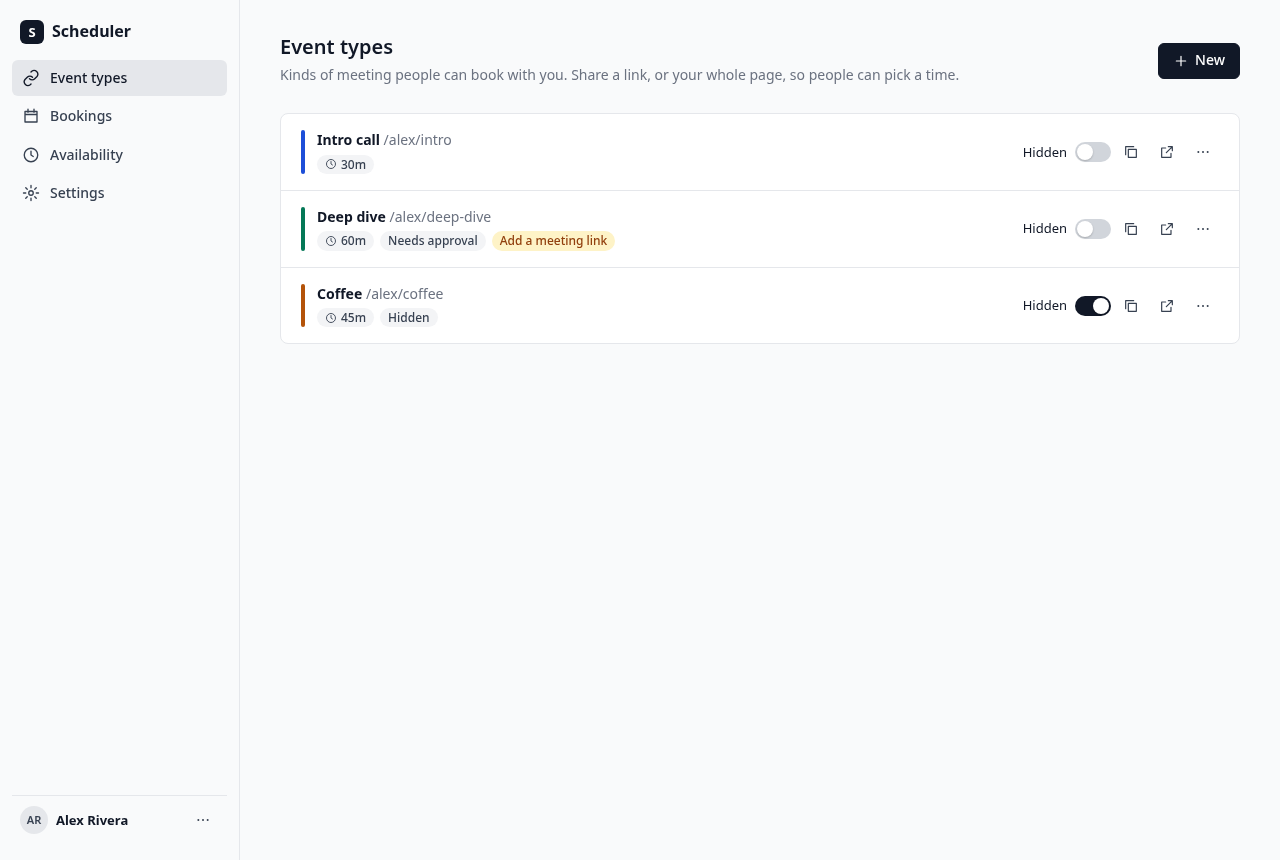
/event-typeslists the host's event types in their saved order. Each row shows the title, the public path/{username}/{slug}in grey, a duration badge such as30m, a "Needs approval" badge when it requires confirmation, and on the right: a "Hidden" switch, a copy-link button, a preview button (opens the public page in a new tab) and a menu with "Edit", "Duplicate", "Move up", "Move down" and "Delete".- "New" opens a dialog with title, URL slug (filled from the title as it is typed, until the slug is edited by hand), description and duration in minutes. "Continue" creates it and opens its editor. A slug already used by this host is refused on the field.
- Delete asks first, in a dialog. Bookings of a deleted event type stay in the bookings list.
- Duplicate copies every setting, adds " (copy)" to the title and
-copyto the slug (then-copy-2, and so on, until free), and opens the copy. The editor at
/event-types/{id}has a back arrow, the title, the "Hidden" switch and a "Save" button (disabled until something changes) in its header, and four tabs, kept in the address as?tab=:- Setup: title, description, URL slug (shown after the fixed prefix
{origin}/{username}/), duration in minutes (5 to 720), and location: one of "Video call" with a link field, "Phone call" (the booker gives their number), "In person" with an address field, or "Custom" with a text field. - Availability: which schedule this event uses (a select of the host's schedules, with the default marked) and a read-only weekly summary of it.
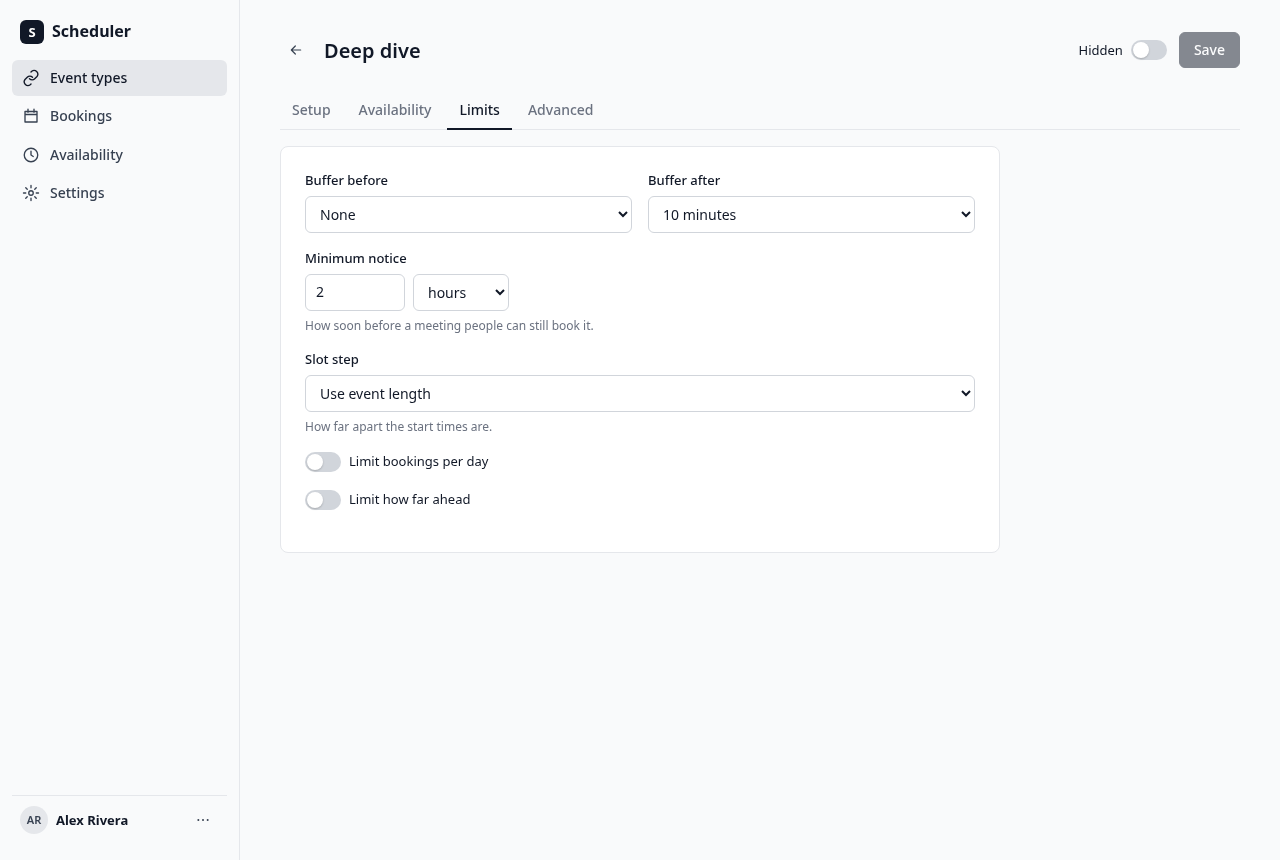
- Limits: buffer before and buffer after (none, 5, 10, 15, 20, 30, 45, 60, 90 or 120 minutes), minimum notice (a number and a unit: minutes, hours or days; default 2 hours), slot step ("Use event length" or 5, 10, 15, 20, 30, 45, 60, 75, 90, 105 or 120 minutes), "Limit bookings per day" (off, or a number), and "Limit how far ahead" (off, or a number of days).
- Advanced: "Requires approval", "Hide guests field", and an event colour used on the event type row and bookings. Swatches, in order:
#111827,#1d4ed8,#047857,#b45309,#be123c,#6d28d9,#0f766e,#c2410c. Default#111827.
- Setup: title, description, URL slug (shown after the fixed prefix
- Field limits: event title 120 characters, description 2000, location 500; names (profile, booker and schedule) 80; password 8–200 characters; bookings/day 1–100, days ahead 1–730 (both whole numbers, or off); minimum notice 0–365 days (0–525600 minutes inclusive).
- Every field is checked on the server too; a bad value comes back as a field error and is shown under the field.
Accept when: a Playwright test creates an event type, edits each tab, saves, reloads and sees the values kept; a hidden event type is missing from the public profile but its own page still takes bookings; duplicate and delete behave as above.
Meeting link prompt: a video event type with no meeting link shows the badge "Add a meeting link" on its row in the list, and the editor's "Meeting link" field has the help "Guests see this link on their confirmation page. If you leave it empty, they're told you'll share the link."
R5. Availability
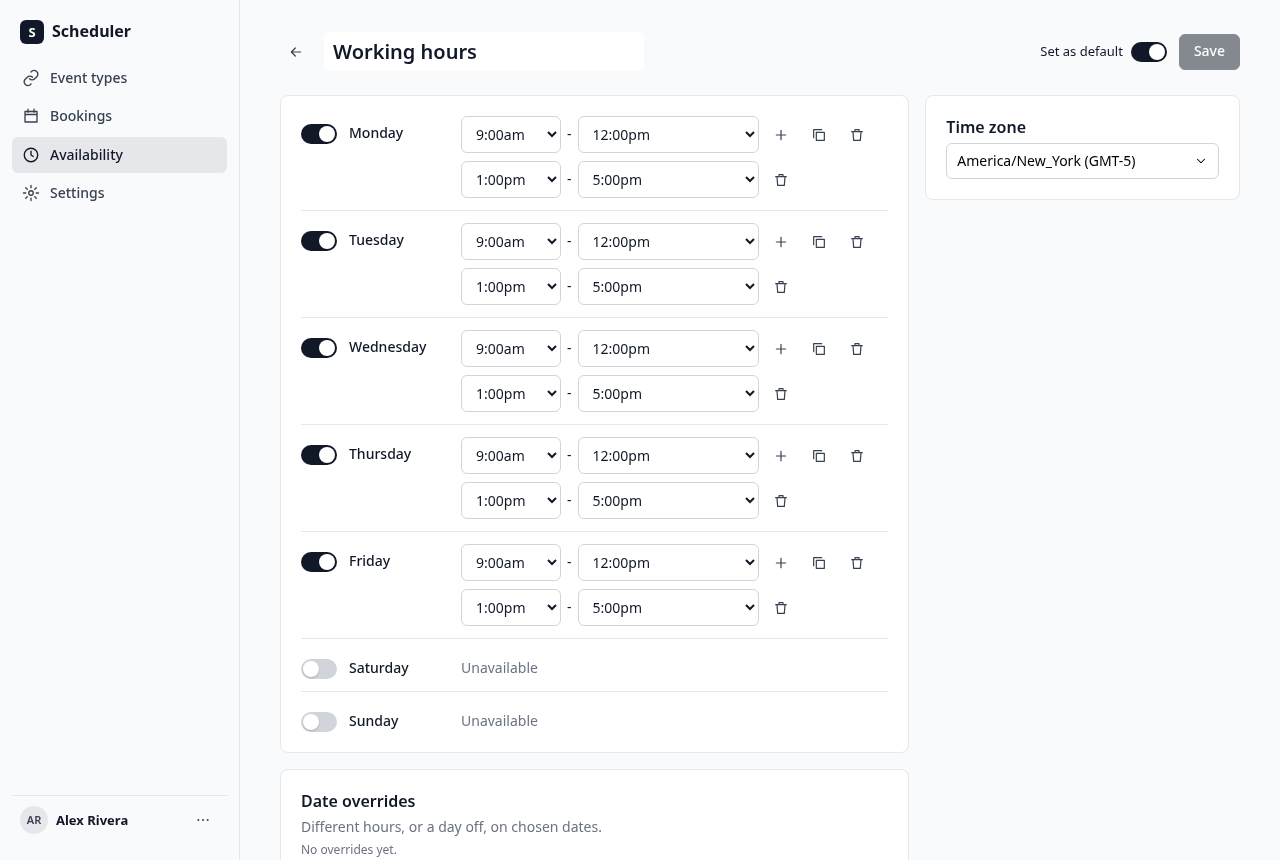
/availabilitylists schedules: name, a "Default" badge on the default one, a summary of its hours such asMon - Fri, 9:00am - 5:00pm(in the host's time format), and its time zone. A menu offers "Set as default", "Duplicate" and "Delete". Duplicate copies the hours, overrides and zone, appends " (copy)" to the name, and is not the default. The default schedule cannot be deleted, and neither can the only one. "New" asks for a name and makes a schedule with the Monday to Friday 09:00 to 17:00 hours in the host's zone.The schedule editor at
/availability/{id}:- The name, editable in place, a "Set as default" switch and "Save".
- Seven day rows in the host's week order. Each has an on/off switch and, when on, one or more time ranges. Each range is two selects with times in 15-minute steps from 12:00am to 11:45pm for the start, and 12:15am to "12:00am (end of day)" for the end. A "+" adds a range after the last one (one hour after it ends, one hour long, if it fits), a bin icon removes one, and a copy icon opens "Copy times to" with a checkbox per day and an "Apply" button.
- A range must end after it starts and ranges on one day may not overlap; the row shows the problem in red and "Save" is disabled.
- A time zone select, searchable, of every zone the browser knows (
Intl.supportedValuesOf('timeZone')), showing each with its current UTC offset, such asAmerica/New_York (GMT-5). - Date overrides: a list of upcoming overrides (date, then its ranges or "Unavailable") with a bin icon each, and "Add an override". That opens a dialog with a month calendar where one or more dates are picked, and on the right either time ranges (as in a day row) or the switch "Mark unavailable (all day)". "Add override" adds them to the list. Overrides for dates already past are not shown and are removed on save.
- An override replaces the weekly hours for that date completely.
Accept when: a test turns a day off, adds a second range, copies a day's times to two others, adds an override with custom hours and an all-day unavailable override, saves, reloads and sees them kept; the booking page then shows exactly the slots the new hours allow (R8).
R6. Public profile page
/{username}shows the host's initials avatar, name and bio, then the heading "Choose a meeting type" and the line "Pick the kind of meeting you'd like with {first name}. Next you'll choose a date and time.", then a list of their event types that are not hidden. Each row shows the title, the description (first two lines), a duration badge (30 min), a location badge (Video call,Phone call,In person,Custom) and "Choose a time" with a chevron, and links to its booking page. The link's spoken name is "{title}, {n} minutes. Choose a time".- With no visible event types the heading and line are left out and the list shows "Nothing to book right now" and "{first name} has no meeting types open for booking. Check back later."
- An unknown username's API request returns 404. The page shows a plain "Nobody here by that name" message; its HTML response is 200 from the SPA fallback, not an HTTP 404.
Accept when: the profile shows the heading and line, lists only visible event types in order with description, duration and location, each link opens the right booking page, and a host with every type hidden shows the empty message.
R7. The booking page
At
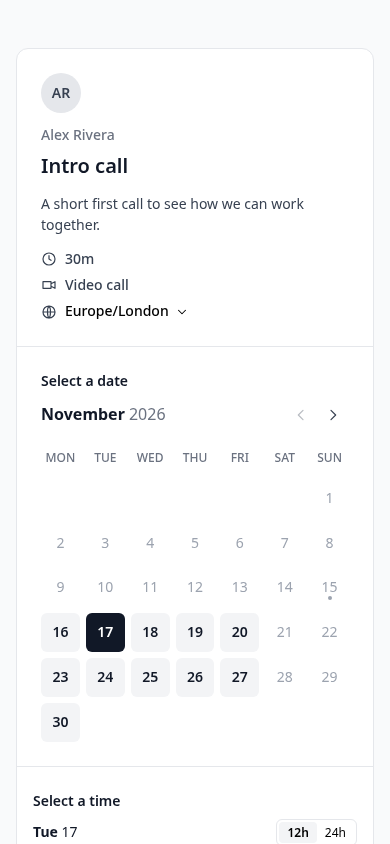
/{username}/{slug}. Layout and look are indesign.md("The booker").- Event details column: host avatar and name, event title, description, duration, location kind, "Needs approval" when it applies, and the visitor's time zone as a select (same list as R5). The zone starts as the browser's zone, is remembered in
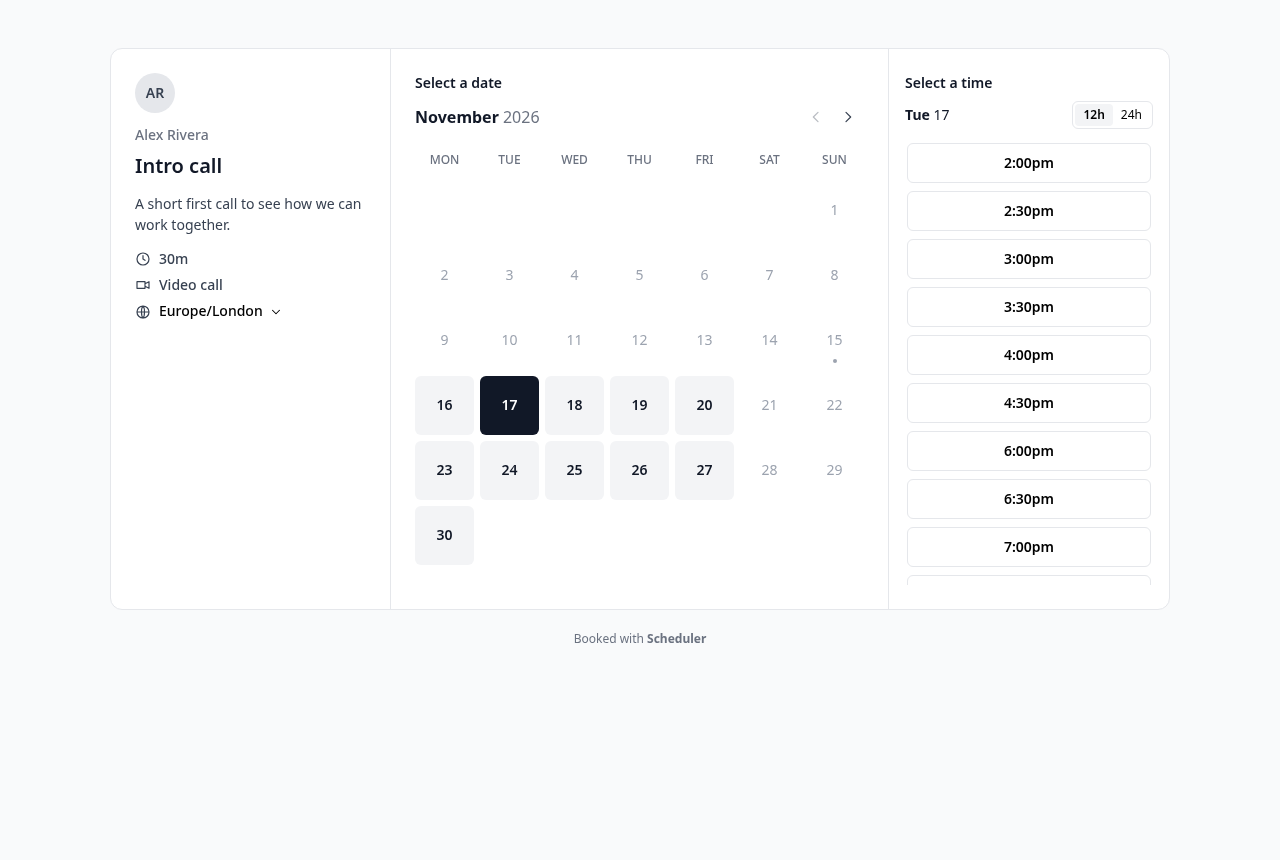
localStorageunderbooker.tz, and can be changed at any time; every date and time on the page changes with it, and changing it clears the chosen day and time. Browsers may report an old alias for a zone (Chromium saysAsia/CalcuttaforAsia/Kolkata); treat aliases as valid zones and show what the browser gives. - Month calendar: a month title with previous and next arrows (previous is disabled on the current month), weekday headings in the host's week order, and the days of the month. A day with at least one free slot, in the visitor's zone, is a dark-text button on a light grey tile; any other day is plain grey text and cannot be picked. Today has a small dot under its number. Above the calendar a small heading says "Select a date" ("Select a new date" when rescheduling). The first day with free slots in the shown month is selected when the page opens, if any, replacing the history entry rather than adding one. In reschedule mode the page opens on the month of the booking being moved and selects that booking's day when it has free slots (the moved booking does not block its own slot), otherwise the first free day. "This month is fully booked" with a "View next month" button shows over the grid when the month has no free day.
- Times column: a small heading "Select a time", the selected day as
Mon 16(or "No date picked" with "Pick a highlighted date to see open times." under it), a12h/24htoggle (starts on the host's choice, remembered underbooker.timeFormat), and a button per free slot showing its start time in the visitor's zone, such as9:30amor09:30. A day with no slots left says "No times left on this day. Try another highlighted date." - The address holds the state:
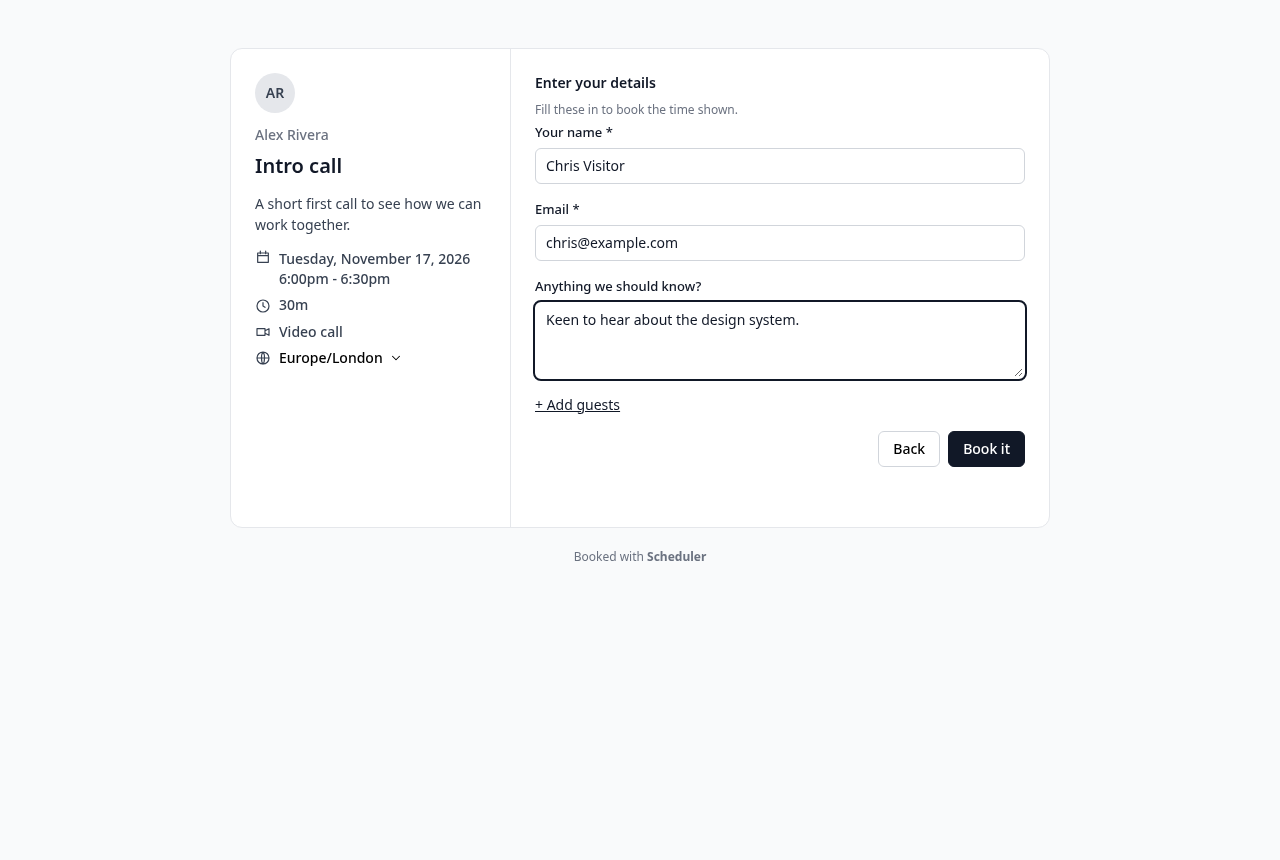
?month=YYYY-MM&date=YYYY-MM-DD&slot=<UTC ISO>, so reload and back and forward work. - Clicking a time opens the booking form in place of the calendar and times: the event details column now also shows the chosen day and time range (for example
Monday, November 16, 2026and9:30am - 10:00am). The form starts with the heading "Enter your details" and the line "Fill these in to book the time shown." (for an event that needs approval: "{host name} confirms requests for this meeting. You'll see the status on the next page."). Fields: "Your name" (required), "Email" (required, checked), "Phone number" (required, only when the location is "Phone call"), "Anything we should know?" (optional, up to 1000 characters), and "+ Add guests" which opens up to 10 more email fields, unless the event hides guests. Buttons: "Back" and "Book it" (or "Request booking" when the event needs approval). While the request runs the button shows a spinner and cannot be pressed again. - If the slot was taken in the meantime the form shows "Someone just took this time. Pick another." and goes back to the times with fresh slots.
- On success the page goes to
/booking/{uid}.
Accept when: a test with the browser in
Asia/Kolkatabooks a host whose schedule is inAmerica/New_York, the times shown are the host's hours converted (09:00 New York shows as 7:30pm in November), the booking is stored at the right UTC instant, and the address state survives a reload.R8. Which slots are free
The slot rules are in
design.md("Slot maths") and must be one pure function,computeSlots, used both to list slots and to check a booking. In short:- Slots come from the event's schedule: weekly hours, replaced by a date override on its date, read as wall-clock time in the schedule's zone.
- A slot starts on the slot step (or the duration), counted from the start of each available range, and must fit wholly inside the range.
- Nothing starts before now plus the minimum notice, or after the "how far ahead" limit.
- A slot is not free if it, padded by this event's buffers, overlaps an accepted or pending booking of the same host, padded by that booking's event's buffers.
- A day that already has "Limit bookings per day" bookings of this event (accepted or pending) has no free slots.
Accept when: the unit tests listed in
design.md("Slot tests") pass, including the DST, half-hour-zone, midnight and buffer cases.R9. Making a booking
- The Worker re-runs
computeSlotsfor that day and answers 409 if the start is not a free slot. D1 has no interactive transactions, so the write itself is the guard: the booking is stored by one conditionalINSERT ... SELECT ... WHERE NOT EXISTS (overlapping active booking of the host, buffers included) AND (daily limit not reached), given indesign.md("Double-booking guard"). D1 runs each statement atomically and one at a time, so if the insert changes no row the answer is 409. Two bookings sent at the same moment for the same or overlapping times, of the same or different event types of one host, give one booking and 409s for the rest. Do not add a unique index on(host_id, start_ms): rescheduling onto the same start is valid and temporarily needs both rows in the atomic batch. The conditional insert is the concurrency guard. No Durable Object or KV is used. - The booking stores the event's title then, the host, start and end in UTC, the booker's name, email, phone, notes, guests and time zone, the location, and status
accepted, orpendingwhen the event needs approval. - The uid is 22 random URL-safe characters.
Accept when: a test sends two booking requests for the same slot at once and gets exactly one 201 and one 409; a test sends eight requests at once for one start and the start 30 minutes later across a 30-minute and a 60-minute event type and never gets two overlapping bookings; and a booking with a start that is not a slot (wrong minute, outside hours, past) gets 409.
R10. Confirmation, reschedule and cancel (visitor side)
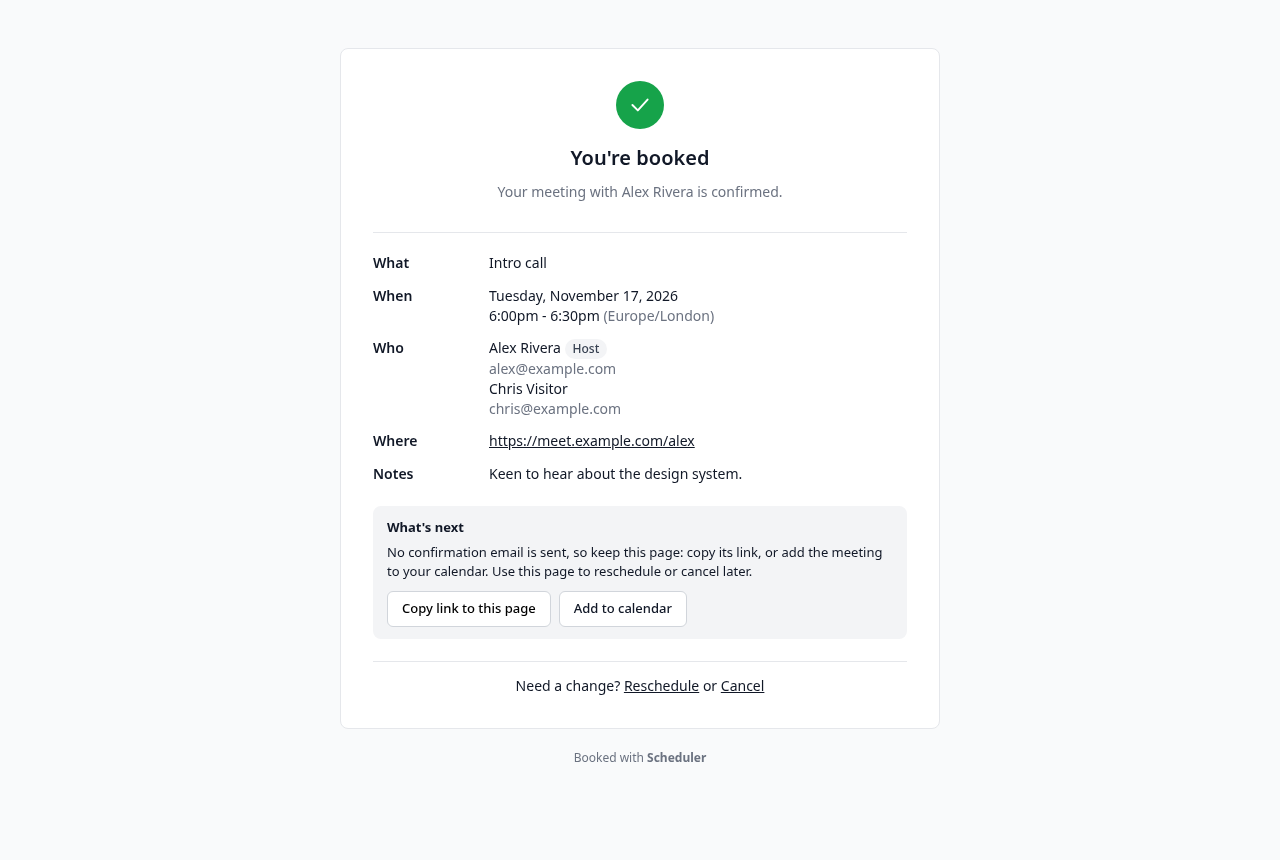
/booking/{uid}shows a large check mark, a heading and one line that say what happened (exact copy in R14): "You're booked" / "Your meeting with {host} is confirmed."; "Request sent" / "{host} needs to confirm this request. Come back to this page to see if it's confirmed."; "Booking moved" / "Your meeting with {host} is now at the time below. The old time is cancelled.". Then rows "What", "When" (day, time range and zone, in the visitor's zone frombooker.tz), "Who" (host and booker with their emails, guests), "Where" and "Notes". "Where" is a link when the location is a web address; a video event with no link says "Video call ({host} will share the link)".- For a booking that has not started and is not cancelled, a "What's next" box says "No confirmation email is sent, so keep this page: copy its link, or add the meeting to your calendar. Use this page to reschedule or cancel later." with buttons "Copy link to this page" (copies the address, toast "Link copied") and "Add to calendar" (downloads the
.ics). When email (R15) is configured the first sentence becomes "We've emailed you the details." Below: "Need a change?" with "Reschedule" and "Cancel". - "Reschedule" opens the booking page of the same event at
/{username}/{slug}?reschedule={uid}. There, the details column shows a note "Rescheduling your booking" / "Pick a new date and time. The current time stays booked until you confirm the new one.", and "Current time: " with the old time struck through; the form heading is "Confirm your new time" with "Check your details, then move the booking. Your old time is released when you do."; the form is filled with the old answers, there is an optional "Reason for change" field, and the button says "Move booking". The booking being moved does not block its own slot. A reschedule onto the exact same start is allowed: create the new row and cancel the old row in the same guarded D1 batch, just like any other move. On success the old booking becomescancelledwithrescheduledset, the new one keeps the same answers and points back to the old one (fromUid), and the page goes to the new booking's page, which says "Booking moved". - "Cancel" shows, on the same page, "Cancel this booking? {host} will see it's cancelled and the time opens up again. This can't be undone.", a "Reason (optional)" box, "Keep it" and "Cancel booking". After it, the page shows "This booking was cancelled" / "It's cancelled, and {host} can see that in their bookings.", the reason, and a link "Book another time" to the event page. A booking the host cancelled says "{host} cancelled this meeting."; a declined request says "This request was declined" / "{host} can't make this one. You can pick another time."
- A cancelled booking cannot be moved or cancelled again: its page says so and shows "Book another time" unless the event type was deleted, but no reschedule or cancel links;
/{username}/{slug}?reschedule={uid}for it shows "This booking was cancelled, so it can't be moved." with a link to book anew. - A booking that was moved shows "This booking was moved", then "It now has a new time. This old time is released." (or "{host} moved this meeting to a new time." when the host moved it) and a link "See the new time" to the new booking, and no other links.
- "Book another time" is left out when the event type has been deleted.
- A booking whose start has passed says "This meeting has started or already happened." and shows no "What's next" box and no "Need a change?" links.
Accept when: a test books, reschedules from the confirmation page (the page opens on the booking's own day, not the first free day; the old slot comes free again, the new one is taken, the old booking shows as rescheduled with the reason, and its page links to the new one), then cancels the new booking and sees its slot come free; and every heading, line and box above is checked word for word.
R11. Bookings list (host side)
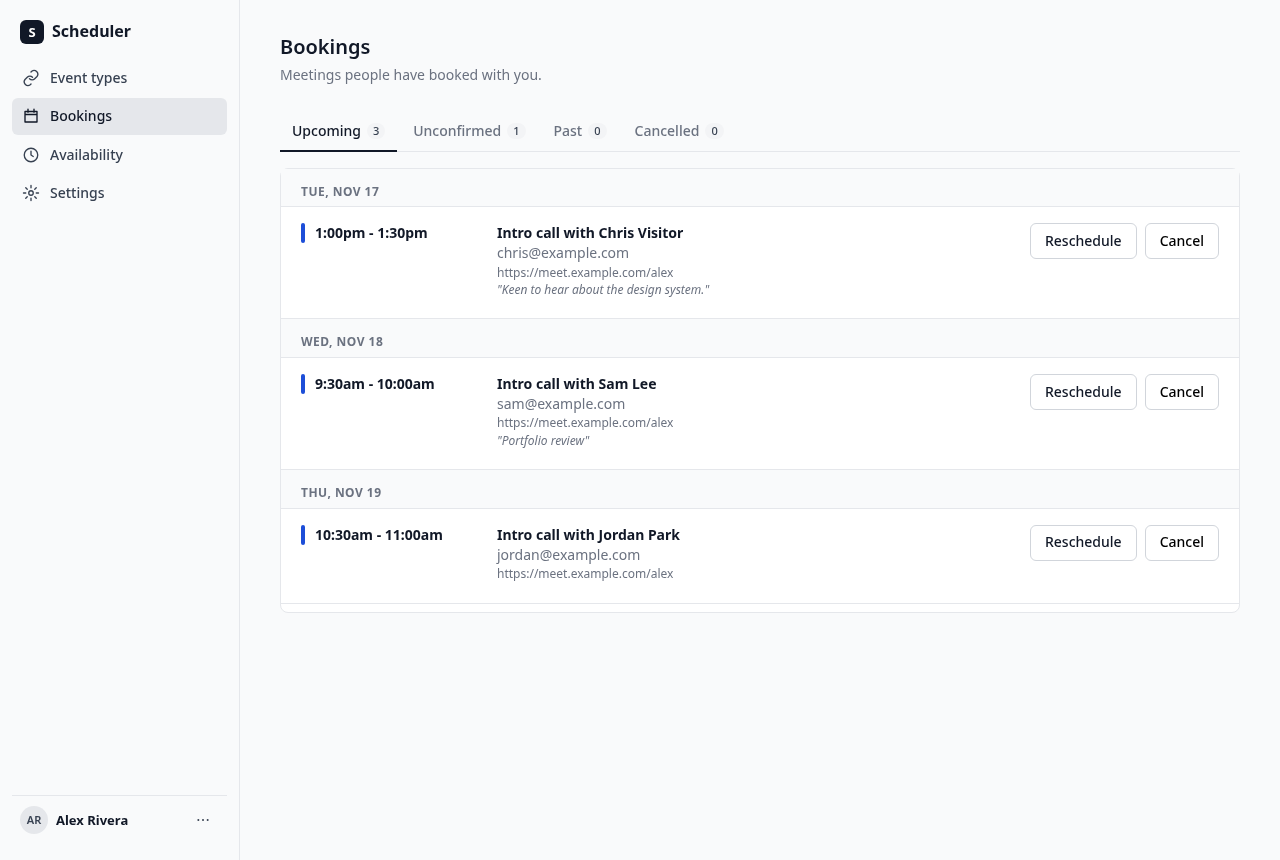
/bookings/upcoming,/bookings/unconfirmed,/bookings/pastand/bookings/cancelled, as tabs, each with a count. Definitions are indesign.md.- Rows are grouped under day headings ("Today", "Tomorrow", or like
Wed, Nov 18) in the host's zone. Each row shows the time range, the event colour, the title "{event title} with {booker name}", the booker's email and the guests, the location, notes in grey, and badges "Needs approval", "Moved" (a booking made by rescheduling) or "Cancelled by host" / "Cancelled by guest". - Actions: upcoming rows have "Reschedule" and "Cancel" (dialog with a reason); unconfirmed rows have "Accept", "Decline" (dialog with a reason) and "Reschedule".
- Host reschedule: "Reschedule" opens
/{username}/{slug}?reschedule={uid}&host=1. The note says "Moving {booker name}'s booking" and the same instruction as the guest flow. Picking a time does not show the guest form: the step is "Confirm the new time" with "{booker name} ({booker email}) keeps the same details. The old time is released when you move it.", an optional "Reason for change", "Back" and "Move booking". It postsasHost: true(seedesign.md); the server requires the signed-in host of that booking (401 without a session, 404 for someone else's booking), copies the guest's name, email, phone, notes, guests and zone from the old booking, stores the new booking asacceptedeven if the event needs approval, and marks the old onecancelled,rescheduled,cancelled_byhost. The app then goes back to/bookings/upcomingwith the toast "Booking moved". - The upcoming empty state says "Nothing coming up" / "Share your booking page so people can pick a time. New bookings show up here." with a button "Open your booking page" (opens
/{username}in a new tab). A declined booking goes to cancelled with statusrejected. Past and cancelled rows have no actions. - Upcoming and unconfirmed are sorted soonest first; past and cancelled most recent first. Lists load 20 at a time with "Load more".
Accept when: the host moves a booking from the list without typing the guest's details and the guest's answers are kept, the old booking says the host moved it, and a pending request can be moved and comes out accepted; a booking made on the public page appears in upcoming with the right time in the host's zone; one needing approval appears in unconfirmed and moves to upcoming on "Accept"; "Decline" and "Cancel" move rows to cancelled; a past booking (seen with the clock moved a month forward by the
test_nowcookie) is in past and has no actions.R12. Settings
/settings/profile: name, username (with a warning that public links change), email and bio (up to 300 characters)./settings/general: time zone (same select as R5), time format (12 or 24 hour) and week start (Monday or Sunday). These drive every time shown in the app and the booker's starting time format and week layout.- A left sub-menu lists the two pages; "Save" on each; a short "Saved" toast after a save.
Accept when: changing the week start to Sunday changes the order of days on the booking page and the schedule editor, and changing the time format changes the bookings list times.
R13. Quality
- Keyboard: every control is reachable with Tab and has a visible focus ring in
brand_color; dialogs trap focus and close on Escape; calendar days and time buttons have full spoken names such as "Monday, November 16, 2026" and "9:30am, Monday, November 16, 2026". - The booking page is usable at 390 px wide: the columns stack in the order details, calendar, times.
- API errors show as a toast with the server's message; nothing fails silently.
- The server answers JSON errors as
{ "error": "...", "fields": {...} }.
Accept when: a test tabs through the booking page from the time zone select to a time button and books with the keyboard alone.
R14. Guidance on every page
Every public step says what it is and what to do next, the way well-known booking tools do. The exact copy is in R6, R7, R10 and R11; in one place:
Where Copy Profile, list heading "Choose a meeting type" Profile, line "Pick the kind of meeting you'd like with {first name}. Next you'll choose a date and time." Profile, row action "Choose a time" Profile, nothing to book "Nothing to book right now" / "{first name} has no meeting types open for booking. Check back later." Booker, calendar "Select a date" (reschedule: "Select a new date") Booker, times "Select a time"; no day yet: "Pick a highlighted date to see open times."; day full: "No times left on this day. Try another highlighted date." Booker, form "Enter your details" / "Fill these in to book the time shown." Booker, reschedule note "Rescheduling your booking" / "Pick a new date and time. The current time stays booked until you confirm the new one." Booker, reschedule form "Confirm your new time" / "Check your details, then move the booking. Your old time is released when you do." Booker, host reschedule "Moving {booker}'s booking"; form "Confirm the new time" Booking page, next steps "What's next" box with "Copy link to this page" and "Add to calendar" Booking page, cancel "Cancel this booking? {host} will see it's cancelled and the time opens up again. This can't be undone." Bookings, nothing upcoming "Share your booking page so people can pick a time. New bookings show up here." + "Open your booking page" Event types, empty "Make one, like a 30-minute call, then share its link so people can book you." Event types, subtitle "Kinds of meeting people can book with you. Share a link, or your whole page, so people can pick a time." The footer under public pages is "Booked with {app_name}" as plain text; it does not link to
/, which would send guests to the host sign-in page.Accept when: a test checks each row of the table on the page it names, on a desktop and a 390 px wide viewport.
Optional integrations
R15-R18 are each off unless configured, and the app must build, run and pass R1-R14 with none of them set. Configuration lives in Worker vars, secrets and bindings (names in
design.md, "Integrations"). Secrets are set withwrangler secret putand are never written towrangler.jsonc, the database in clear text, logs or API responses. A settings page,/settings/integrations, shows each integration as "Off", "On" or "Needs attention" with a one-line reason, and the last error, if any.R15. Email (optional)
A pluggable sender with one interface,
sendEmail({ to, replyTo, subject, text, html, attachments }), and three implementations chosen byEMAIL_PROVIDER:cloudflare: Cloudflare Email Sending through asend_emailbinding namedEMAIL. The message is built as raw MIME (see R16) and sent withenv.EMAIL.send(new EmailMessage(fromAddress, to, raw))fromcloudflare:email, because the structuredenv.EMAIL.send({...})form can only add the invite as a file attachment, and Gmail needs an inlinetext/calendarpart.FromisEMAIL_FROM(for example"Scheduler" <bookings@example.com>, split into address and display name), which must be on a domain onboarded to Email Sending and listed in the binding'sallowed_sender_addresses.Reply-Tois the host's email for guests (a guest's reply goes to the host) and the booker's email for the host.resend: Resend's HTTP API (POST https://api.resend.com/emails) with the secretRESEND_API_KEY, the sameFromandReply-Torules, and attachments as base64.- empty or unset: the
[mail]log line from "Out of scope", nothing sent.
Emails, each to the guest (and guests listed on the booking) and, separately, to the host:
- booking confirmed (or request received / request accepted / declined for events that need approval),
- booking rescheduled (to the new time; says the old time is cancelled),
- booking cancelled (by whom, and the reason),
- reminders before the start. Each email has a plain-text and an HTML part with: what, when (in the recipient's zone: the guest's
booker_tz, the host's zone for the host), where (the link when there is one), and links to/booking/{uid}with "Reschedule" and "Cancel" for the guest. Subjects: "Confirmed: {title} with {host} on {day, time}", "Moved: ...", "Cancelled: ...", "Reminder: ... starts in {offset}".
- Reminders: a Cron Trigger (
*/5 * * * *) scans D1 for accepted bookings whose start minus a reminder offset falls in the window since the last run. Offsets are per event type, default[1440, 60]minutes, editable on the event's "Limits" tab as checkboxes 1 week / 1 day / 1 hour / 15 minutes. Each send (booking uid, kind, offset, recipient) is recorded inemail_logwith a unique key before sending, so a retry, an overlapping cron run or a second Worker instance never sends the same email twice; a failed send is markedfailedwith the error and retried on the next run up to 3 times. A booking moved or cancelled before its reminder gets no reminder for the old time. - Sending never blocks or fails a booking: the booking is stored first, the email goes out through
ctx.waitUntil, and a send error is logged and shown under/settings/integrations. Setup, written into the README and shown on
/settings/integrations:- Cloudflare: Email Sending needs the Workers Paid plan to send to arbitrary recipients (Workers Free can only send to verified addresses in your own account); Paid includes 3,000 emails a month, then $0.35 per 1,000. The domain must use Cloudflare DNS. In the dashboard, Compute > Email Service > Email Sending > Onboard Domain, pick the domain; it adds the SPF and DKIM TXT records, a DMARC TXT record on
_dmarc.<domain>andcf-bounceMX records. Wait for the domain to show as verified (usually 5-15 minutes), add"send_email": [{ "name": "EMAIL" }]towrangler.jsonc, setEMAIL_PROVIDER=cloudflareandEMAIL_FROM. - Resend: verify the domain in Resend (it gives SPF, DKIM and an optional DMARC record to add in Cloudflare DNS), then
wrangler secret put RESEND_API_KEY, setEMAIL_PROVIDER=resendandEMAIL_FROM.
- Cloudflare: Email Sending needs the Workers Paid plan to send to arbitrary recipients (Workers Free can only send to verified addresses in your own account); Paid includes 3,000 emails a month, then $0.35 per 1,000. The domain must use Cloudflare DNS. In the dashboard, Compute > Email Service > Email Sending > Onboard Domain, pick the domain; it adds the SPF and DKIM TXT records, a DMARC TXT record on
- With email on, the booking page's "What's next" says "We've emailed you the details." instead of "No confirmation email is sent".
Accept when: with a fake sender bound in tests, booking, moving and cancelling each produce one guest email and one host email with the right subject, zone and links; the cron handler run twice over the same window sends each reminder once; a moved booking gets reminders only for its new time; and a sender that throws leaves the booking stored and the error shown.
R16. Calendar invites (.ics, optional, with R15)
Every booking email from R15 carries the invite built by one pure function,
buildInvite(booking, kind, sequence, { audience, organizer? }), following RFC 5545. The email is a MIME message shaped the way Google Calendar and Outlook send invites (one pure function,buildMime, CRLF line ends, base64 bodies wrapped at 76 characters):multipart/mixed multipart/alternative text/plain; charset=UTF-8 text/html; charset=UTF-8 text/calendar; charset=UTF-8; method=REQUEST (or CANCEL) application/ics; name="invite.ics" (Content-Disposition: attachment)Headers:
From,To,Reply-To,Subject(RFC 2047 encoded when not ASCII),Date,Message-IDon the sending domain,MIME-Version: 1.0. Gmail shows its event card and adds the event from the inlinetext/calendarpart; the attachment is for other clients. Emails without an invite (reminders, pending requests) are a plainmultipart/alternative. The Resend sender sends the same.icsas an attachment withcontent_type: text/calendar; method=....VCALENDARwithVERSION:2.0,PRODID:-//{app_name}//Scheduler//EN,CALSCALE:GREGORIAN, andMETHOD:REQUESTfor confirmed and moved bookings,METHOD:CANCELfor cancellations.One
VEVENT:UID:{first booking uid in the chain}@{host name of the site}. A reschedule keeps the UID of the booking it came from (followfrom_uidto the first booking), so calendars update the existing event instead of adding a second one.SEQUENCE: 0 for the first invite, plus one on every reschedule and on the cancel, stored inbookings.ics_sequence.DTSTAMP(now),DTSTARTandDTENDin UTC (YYYYMMDDTHHMMSSZ).SUMMARY:{title} with {booker name}for the host,{title} with {host name}for guests.Organizer depends on who the email is for:
- Guest copies and the download:
ORGANIZER;CN={host name}:mailto:{host email}and the hostATTENDEE;CN={host name};ROLE=CHAIR;PARTSTAT=ACCEPTED;RSVP=FALSE:mailto:{host email}. - The host's copy:
ORGANIZER;CN={app_name}:mailto:{EMAIL_FROM address}and the hostATTENDEE;CN={host name};ROLE=REQ-PARTICIPANT;PARTSTAT=ACCEPTED;RSVP=FALSE:mailto:{host email}. Gmail will not load an invite whoseORGANIZERis the recipient: it looks for the event in the recipient's own calendar, finds nothing and shows "Unable to load event", and nothing is added. With the sending address as organizer, the host gets a normal invite that is added as accepted. Every host email for a booking (confirm, move, cancel) uses the same organizer, so updates and cancels match the event.
- Guest copies and the download:
- For the booker and each guest
ATTENDEE;CN=...;ROLE=REQ-PARTICIPANT;PARTSTAT=ACCEPTED;RSVP=FALSE:mailto:.... STATUS:CONFIRMEDfor accepted bookings andSTATUS:CANCELLEDwithMETHOD:CANCEL. A pending request gets no invite; the invite goes out when the host accepts it.TRANSP:OPAQUE,LOCATION:the link or address,URL:the booking page, andDESCRIPTION:the notes, the meeting link and the lines "Reschedule: {origin}/booking/{uid}" and "Cancel: {origin}/booking/{uid}".- Text escaped per RFC 5545 (backslash, semicolon, comma, newline), lines folded at 75 octets with CRLF + space, CRLF line ends.
- Requirement: the event a guest or the host adds from the invite shows as confirmed and accepted in the calendar, not tentative and not "needs action" for the host. That is why the host attendee is
PARTSTAT=ACCEPTEDwithRSVP=FALSEand the event isSTATUS:CONFIRMED. - The "Add to calendar" download (
/api/public/bookings/:uid/ics) uses the same function withMETHOD:PUBLISH, the same UID and sequence.
Accept when: unit tests parse the generated
.ics(a small RFC 5545 parser in the tests: unfold lines, split properties and parameters) and check, for a booking, its reschedule and its cancel: the same UID across all three;SEQUENCE0, 1, 2;METHODREQUEST, REQUEST, CANCEL;STATUSCONFIRMED, CONFIRMED, CANCELLED;DTSTART/DTENDin UTC matching the stored times;ORGANIZERis the host for guests and the sending address for the host; the hostATTENDEEhasPARTSTAT=ACCEPTED; the description holds the reschedule and cancel links; no unfolded line is over 75 octets; and every line ends with CRLF. A MIME test parses the message (headers, boundaries, base64 parts) and checks themultipart/mixed>multipart/alternativetree, thetext/calendar; method=REQUESTpart equal to the.ics, theinvite.icsattachment, CRLF only, and encoded non-ASCII headers. End-to-end tests read the stored MIME from the test outbox and check the organizer per recipient.R17. Busy times from a secret iCal address (optional)
/settings/calendarshas a field "Secret iCal address" with instructions: "In Google Calendar on the web, open Settings (the gear), choose your calendar under 'Settings for my calendars', open 'Integrate calendar', and copy 'Secret address in iCal format'. It ends inbasic.ics. Anyone with this address can see your events, so it is stored encrypted and never shown again." Anyhttps://iCal URL works (Outlook and iCloud publish them too).- The address is stored encrypted in D1 (AES-GCM with the secret
ENCRYPTION_KEY, a fresh random IV per value). After saving, the page shows only the host and the last 6 characters (calendar.google.com/...basic.icsending…a1b2c3), with "Replace" and "Remove". The API never returns it. A Cron Trigger polls each feed every
ICAL_POLL_MINUTES(5-15, default- with
If-None-Match/If-Modified-Since. It parsesVEVENTs:DTSTART/DTEND(orDURATION) withTZID(IANA names and Windows names mapped), all-dayVALUE=DATEevents (busy for the whole day in the host's zone),RRULE(DAILY, WEEKLY with BYDAY, MONTHLY with BYMONTHDAY or BYDAY+BYSETPOS, YEARLY; COUNT, UNTIL, INTERVAL),EXDATE, and overriding instances (RECURRENCE-ID). Events withTRANSP:TRANSPARENTorSTATUS:CANCELLEDare skipped. It expands instances from now to the booking horizon (max 60 days) and replaces the host's rows inbusy_blocks(start_ms, end_ms, source) in one batch.
- with
computeSlotstreats each busy block like an accepted booking with no buffers, so a busy event removes the slots it overlaps. The booking guard (R9) checks busy blocks too.- The page shows "Last synced {time ago}" and the last error in plain words ("The address returned 404. It may have been reset in Google Calendar."). After 3 failed polls in a row the status is "Needs attention" and slots stop using stale blocks older than 24 hours.
Accept when: unit tests expand a fixture
.icswith a weeklyRRULE, anEXDATE, a moved instance, an all-day event, aTZIDevent across a DST change and a transparent event, and get exactly the expected busy ranges; a slot test shows busy blocks removing slots; an e2e test serves a fixture feed from a local route, saves its address, runs the scheduled handler and sees the slots disappear and "Last synced" appear; and the saved address is not in any API response.R18. Google Calendar, two-way (optional)
- Off unless
GOOGLE_CLIENT_ID(var) andGOOGLE_CLIENT_SECRET(secret) are set./settings/calendarsthen shows "Connect Google Calendar". - OAuth 2.0 authorization code flow with PKCE and a
statebound to the session: scopeshttps://www.googleapis.com/auth/calendar.freebusyandhttps://www.googleapis.com/auth/calendar.events.owned,access_type=offline,prompt=consent, redirect URI{origin}/oauth/google/callback. The refresh token is stored encrypted in D1 (as in R17); access tokens are kept only in memory for their lifetime. - On book, reschedule and cancel the Worker creates, updates (same event id, stored on the booking) or deletes the event in the host's primary calendar with the guest as attendee,
sendUpdates=none(R15 sends the email), and the eventstatus: confirmed. Free/busy fromfreeBusy.queryblocks slots like R17; results are cached inbusy_blockswith sourcegoogleand refreshed by the cron (every 10 minutes) as a fallback when a live query fails. - Errors (revoked access, expired consent) set "Needs attention" with "Reconnect"; a booking never fails because Google is unreachable, and a failed calendar write is retried by the cron.
- A setup walkthrough on
/settings/calendars(and in the README): create a Google Cloud project; enable the Google Calendar API; OAuth consent screen with user type External; add the two scopes; add yourself as a test user while testing; create an OAuth client of type "Web application" with the redirect URI above; then publish the app to "In production", because refresh tokens for apps left in "Testing" expire after 7 days. An unverified app shows Google's "unverified app" warning, which is fine for the owner's own account; verification is needed only for other users. Thenwrangler secret put GOOGLE_CLIENT_SECRETand setGOOGLE_CLIENT_ID.
Accept when: with Google's endpoints replaced by a local fake in tests, connecting stores an encrypted refresh token, booking creates an event, moving updates the same event id, cancelling deletes it, and a busy range from the fake free/busy removes slots; disconnecting deletes the token.
Definition of done
npm testruns the unit tests (Vitest), including every slot test.npm run e2eruns the Playwright tests against the real Worker underwrangler devwith a fresh local D1 (--persist-to .e2e, migrations applied first), and they cover every "Accept when" a browser can check. They pass.npx tscpasses for the client and, with the types fromwrangler types, for the Worker.- A README says how to install, run locally, seed, test and deploy.
- Searching the built
dist/for the names of other scheduling products finds nothing. - With none of R15-R18 configured, the app behaves exactly as in R1-R14 and the integration tests that need no network (
.icsbuilding and parsing, iCal expansion, reminder selection, encryption round trip) still pass.
# Scheduling app ## What this builds A complete, self-hosted scheduling web app in the style of the well-known open-source booking tools. A host signs up, sets the hours they can meet, creates kinds of meeting ("event types"), and shares a public booking page. A visitor opens that page in any time zone, picks a day and a free time, fills in a short form and gets a confirmation page from which they can reschedule or cancel. The host sees every booking in a list, accepts or declines the ones that need approval, and can cancel or move them. It is one Cloudflare Worker: the React single-page app is served as the Worker's static assets, the JSON API runs in the Worker, and the data lives in one Cloudflare D1 (SQLite) database. It runs on a laptop with `npm install` and `npm run dev` (which uses `wrangler dev` and a local D1, with no Cloudflare account), deploys with `npm run deploy`, and needs no other service by default: no email, calendar or video provider, no KV, no Durable Object. Email and calendar connections are optional add-ons (R15-R18), each off until configured. Read `spekkr.inputs.json` first. `app_name` is the product name shown in the sidebar, the page titles and the booking page footer. `brand_color` is the accent colour (primary buttons, selected day, focus rings). `seed_demo` turns the demo data in `design.md` ("Demo data") on or off. `design.md` has the data model, the API, the slot maths, every screen and the visual style. `tasks.md` gives the order to build in. `research.md` says what the design was modelled on and why some choices differ. It ships with the spec as provenance and verification notes; read it for context, not for additional build requirements. All build requirements are in the first three files above. ## Names and words - The product is called `app_name` everywhere. The built app never shows the name, logo, icons or wording of any other scheduling product. - Every piece of interface text the spec quotes is the text to use. Text the spec does not quote is the builder's own, short and plain. - No image, font or icon file is copied from anywhere. Icons are inline SVG drawn in the app's own code, or plain text. ## Out of scope - Teams, round-robin, collective or managed events, organisations, routing forms, workflows, webhooks, an app store. - Video services, payments, SMS. Outside calendars and email only through the optional integrations R15-R18, each off unless configured. - Sending email when R15 is not configured. Then, where a real product would email someone, the Worker writes a line to the server log that starts with `[mail]`, with the address masked to its first character and domain (`p***@example.com`) and what happened, and nothing else. Logs never hold a full guest address. - Recurring events and seats (more than one booker per slot). ## Landing page `/` is a small entry route, not a marketing page. It checks the session and redirects a signed-in host to `/event-types`, or a signed-out visitor to `/login`. Show a short loading state while the check runs. The login page links to sign-up. ## Requirements Each requirement has an id. Tests name the id they cover. ### R1. Run and store - Runtime: Cloudflare Workers only. The Worker code uses Web APIs (`fetch` handler, `Request`, `Response`, `crypto.subtle`, `crypto.getRandomValues`, `Intl`) and no Node.js built-in module (`node:*`, `fs`, `Buffer`, `process`), so it needs no `nodejs_compat` flag. Node.js is only the build and test tool on the developer's machine. - `wrangler.jsonc` (exact shape in `design.md`, "Cloudflare config") names the Worker, sets `main` to the Worker entry, serves `dist/` as static assets with single-page-app fallback, routes `/api/*` to the Worker first, binds one D1 database as `DB`, declares the vars `NOW` and `TEST_CLOCK`, and turns on observability (logs and traces). - `npm run build` builds the client into `dist/` with Vite; Wrangler bundles the Worker itself. `npm run dev` builds, applies the D1 migrations to the local database (`wrangler d1 migrations apply DB --local`) and runs `wrangler dev` (default port 8787). `npm run deploy` builds and runs `wrangler deploy`. The README gives the one-time deploy steps from `design.md` ("Deploy"). - Data is kept in D1. The schema lives in `migrations/0001_init.sql` and is applied with `wrangler d1 migrations apply`; the Worker never creates tables. Every time is stored as a UTC ISO 8601 string ending in `Z`, or as minutes from local midnight where `design.md` says so; bookings also keep their start and end as integer epoch milliseconds for the overlap guard. - The clock: the var `NOW` (an ISO time), when not empty, freezes the Worker's clock at that moment for tests and screenshots. When the var `TEST_CLOCK` is `"1"` (tests only, never in production), a `test_now` cookie on a request overrides the clock for that request. Otherwise the real clock is used. The client always asks the server what time it is (`GET /api/now`) rather than trusting the browser's clock, so tests stay in step. Accept when: a fresh clone runs with `npm install` then `npm run dev` without logging in to Cloudflare, `wrangler deploy --dry-run` bundles without errors or Node.js compatibility warnings, and `GET /api/now` returns the `NOW` value when set (`wrangler dev --var NOW:...`). ### R2. Accounts - Sign up with name (up to 80 characters), email, username and password (8–200 characters). Usernames are 3 to 30 characters of `a-z`, `0-9` and `-`, unique, and may not be one of the reserved words in `design.md`. Emails are unique and compared without case. - Each user has exactly one default schedule (enforce at most one with a partial unique index on `schedules(user_id) WHERE is_default=1`; create one at sign-up and never delete or unset it without a replacement). - The new account gets the browser's time zone (sent by the client), a default schedule named "Working hours" with Monday to Friday 09:00 to 17:00 in that zone, and two event types: "Quick chat" (15 minutes, slug `quick-chat`) and "Meeting" (30 minutes, slug `meeting`). - Log in with email and password; log out. A session is a random token in an `HttpOnly`, `SameSite=Lax` cookie named `session` (also `Secure` when the request is HTTPS), valid for 30 days, made from 32 bytes of `crypto.getRandomValues`. Passwords are hashed with Web Crypto PBKDF2 (SHA-256, 100000 iterations, the most Workers allow, 16-byte random salt, 32-byte key), stored as `pbkdf2-sha256$100000$<salt hex>$<hash hex>` and compared with `crypto.subtle.timingSafeEqual`. - Every page under the app (not the public pages) needs a session and sends a visitor without one to `/login`. Accept when: sign-up creates the schedule and both event types, a duplicate email or username is refused with a message on the form, a reserved username is refused, a wrong password says "Email or password is wrong", and logging out then opening `/event-types` lands on `/login`. Owner-only deployments. Two Worker vars, both optional: - `ALLOWED_EMAILS`: a comma-separated list, compared case-insensitively. When it is not empty, only those emails can sign up (403 "This site doesn't accept new accounts for that email"), sign in (403 "This email can't sign in here"), keep a session (a session whose user's email is not on the list counts as signed out), or change their account email to an address off the list ("This site only accepts its owner's email" on the email field). Empty means anyone. Public pages and guest booking, rescheduling and cancelling are never affected. - `ALLOW_SIGNUP`: `"0"` refuses every new account (403 "New accounts are turned off on this site"); existing accounts still sign in. Anything else, or unset, allows sign-up. Accept when: with `ALLOWED_EMAILS` set to one address, signing up or signing in with another address gets 403 and the listed address works; with `ALLOW_SIGNUP` `"0"` sign-up gets 403. ### R3. App layout - A left sidebar 240 px wide on screens 1024 px and wider: `app_name` at the top, then "Event types", "Bookings", "Availability" and "Settings", each with a small inline SVG icon, the current one highlighted. At the bottom, the host's initials in a circle, their name, and a menu with "View public page" (opens `/{username}` in a new tab) and "Sign out". - Under 1024 px the sidebar becomes a bar along the bottom with the same four items, and the user menu moves to the top right. - Every app page has a header: a title, a one-line grey subtitle, and the page's main action button on the right where it has one. - Pages are in `design.md` ("Screens"). Every list has an empty state: an icon, one bold line, one grey line and, where it makes sense, a button. Accept when: at 1280 px the sidebar shows the four items and the user menu, at 390 px the bottom bar shows them, and each item opens its page. ### R4. Event types - `/event-types` lists the host's event types in their saved order. Each row shows the title, the public path `/{username}/{slug}` in grey, a duration badge such as `30m`, a "Needs approval" badge when it requires confirmation, and on the right: a "Hidden" switch, a copy-link button, a preview button (opens the public page in a new tab) and a menu with "Edit", "Duplicate", "Move up", "Move down" and "Delete". - "New" opens a dialog with title, URL slug (filled from the title as it is typed, until the slug is edited by hand), description and duration in minutes. "Continue" creates it and opens its editor. A slug already used by this host is refused on the field. - Delete asks first, in a dialog. Bookings of a deleted event type stay in the bookings list. - Duplicate copies every setting, adds " (copy)" to the title and `-copy` to the slug (then `-copy-2`, and so on, until free), and opens the copy. - The editor at `/event-types/{id}` has a back arrow, the title, the "Hidden" switch and a "Save" button (disabled until something changes) in its header, and four tabs, kept in the address as `?tab=`: - **Setup**: title, description, URL slug (shown after the fixed prefix `{origin}/{username}/`), duration in minutes (5 to 720), and location: one of "Video call" with a link field, "Phone call" (the booker gives their number), "In person" with an address field, or "Custom" with a text field. - **Availability**: which schedule this event uses (a select of the host's schedules, with the default marked) and a read-only weekly summary of it. - **Limits**: buffer before and buffer after (none, 5, 10, 15, 20, 30, 45, 60, 90 or 120 minutes), minimum notice (a number and a unit: minutes, hours or days; default 2 hours), slot step ("Use event length" or 5, 10, 15, 20, 30, 45, 60, 75, 90, 105 or 120 minutes), "Limit bookings per day" (off, or a number), and "Limit how far ahead" (off, or a number of days). - **Advanced**: "Requires approval", "Hide guests field", and an event colour used on the event type row and bookings. Swatches, in order: `#111827`, `#1d4ed8`, `#047857`, `#b45309`, `#be123c`, `#6d28d9`, `#0f766e`, `#c2410c`. Default `#111827`. - Field limits: event title 120 characters, description 2000, location 500; names (profile, booker and schedule) 80; password 8–200 characters; bookings/day 1–100, days ahead 1–730 (both whole numbers, or off); minimum notice 0–365 days (0–525600 minutes inclusive). - Every field is checked on the server too; a bad value comes back as a field error and is shown under the field. Accept when: a Playwright test creates an event type, edits each tab, saves, reloads and sees the values kept; a hidden event type is missing from the public profile but its own page still takes bookings; duplicate and delete behave as above. Meeting link prompt: a video event type with no meeting link shows the badge "Add a meeting link" on its row in the list, and the editor's "Meeting link" field has the help "Guests see this link on their confirmation page. If you leave it empty, they're told you'll share the link." ### R5. Availability - `/availability` lists schedules: name, a "Default" badge on the default one, a summary of its hours such as `Mon - Fri, 9:00am - 5:00pm` (in the host's time format), and its time zone. A menu offers "Set as default", "Duplicate" and "Delete". Duplicate copies the hours, overrides and zone, appends " (copy)" to the name, and is not the default. The default schedule cannot be deleted, and neither can the only one. "New" asks for a name and makes a schedule with the Monday to Friday 09:00 to 17:00 hours in the host's zone. - The schedule editor at `/availability/{id}`: - The name, editable in place, a "Set as default" switch and "Save". - Seven day rows in the host's week order. Each has an on/off switch and, when on, one or more time ranges. Each range is two selects with times in 15-minute steps from 12:00am to 11:45pm for the start, and 12:15am to "12:00am (end of day)" for the end. A "+" adds a range after the last one (one hour after it ends, one hour long, if it fits), a bin icon removes one, and a copy icon opens "Copy times to" with a checkbox per day and an "Apply" button. - A range must end after it starts and ranges on one day may not overlap; the row shows the problem in red and "Save" is disabled. - A time zone select, searchable, of every zone the browser knows (`Intl.supportedValuesOf('timeZone')`), showing each with its current UTC offset, such as `America/New_York (GMT-5)`. - **Date overrides**: a list of upcoming overrides (date, then its ranges or "Unavailable") with a bin icon each, and "Add an override". That opens a dialog with a month calendar where one or more dates are picked, and on the right either time ranges (as in a day row) or the switch "Mark unavailable (all day)". "Add override" adds them to the list. Overrides for dates already past are not shown and are removed on save. - An override replaces the weekly hours for that date completely. Accept when: a test turns a day off, adds a second range, copies a day's times to two others, adds an override with custom hours and an all-day unavailable override, saves, reloads and sees them kept; the booking page then shows exactly the slots the new hours allow (R8). ### R6. Public profile page - `/{username}` shows the host's initials avatar, name and bio, then the heading "Choose a meeting type" and the line "Pick the kind of meeting you'd like with {first name}. Next you'll choose a date and time.", then a list of their event types that are not hidden. Each row shows the title, the description (first two lines), a duration badge (`30 min`), a location badge (`Video call`, `Phone call`, `In person`, `Custom`) and "Choose a time" with a chevron, and links to its booking page. The link's spoken name is "{title}, {n} minutes. Choose a time". - With no visible event types the heading and line are left out and the list shows "Nothing to book right now" and "{first name} has no meeting types open for booking. Check back later." - An unknown username's API request returns 404. The page shows a plain "Nobody here by that name" message; its HTML response is 200 from the SPA fallback, not an HTTP 404. Accept when: the profile shows the heading and line, lists only visible event types in order with description, duration and location, each link opens the right booking page, and a host with every type hidden shows the empty message. ### R7. The booking page At `/{username}/{slug}`. Layout and look are in `design.md` ("The booker"). - **Event details** column: host avatar and name, event title, description, duration, location kind, "Needs approval" when it applies, and the visitor's time zone as a select (same list as R5). The zone starts as the browser's zone, is remembered in `localStorage` under `booker.tz`, and can be changed at any time; every date and time on the page changes with it, and changing it clears the chosen day and time. Browsers may report an old alias for a zone (Chromium says `Asia/Calcutta` for `Asia/Kolkata`); treat aliases as valid zones and show what the browser gives. - **Month calendar**: a month title with previous and next arrows (previous is disabled on the current month), weekday headings in the host's week order, and the days of the month. A day with at least one free slot, in the visitor's zone, is a dark-text button on a light grey tile; any other day is plain grey text and cannot be picked. Today has a small dot under its number. Above the calendar a small heading says "Select a date" ("Select a new date" when rescheduling). The first day with free slots in the shown month is selected when the page opens, if any, replacing the history entry rather than adding one. In reschedule mode the page opens on the month of the booking being moved and selects that booking's day when it has free slots (the moved booking does not block its own slot), otherwise the first free day. "This month is fully booked" with a "View next month" button shows over the grid when the month has no free day. - **Times** column: a small heading "Select a time", the selected day as `Mon 16` (or "No date picked" with "Pick a highlighted date to see open times." under it), a `12h` / `24h` toggle (starts on the host's choice, remembered under `booker.timeFormat`), and a button per free slot showing its start time in the visitor's zone, such as `9:30am` or `09:30`. A day with no slots left says "No times left on this day. Try another highlighted date." - The address holds the state: `?month=YYYY-MM&date=YYYY-MM-DD&slot=<UTC ISO>`, so reload and back and forward work. - Clicking a time opens the **booking form** in place of the calendar and times: the event details column now also shows the chosen day and time range (for example `Monday, November 16, 2026` and `9:30am - 10:00am`). The form starts with the heading "Enter your details" and the line "Fill these in to book the time shown." (for an event that needs approval: "{host name} confirms requests for this meeting. You'll see the status on the next page."). Fields: "Your name" (required), "Email" (required, checked), "Phone number" (required, only when the location is "Phone call"), "Anything we should know?" (optional, up to 1000 characters), and "+ Add guests" which opens up to 10 more email fields, unless the event hides guests. Buttons: "Back" and "Book it" (or "Request booking" when the event needs approval). While the request runs the button shows a spinner and cannot be pressed again. - If the slot was taken in the meantime the form shows "Someone just took this time. Pick another." and goes back to the times with fresh slots. - On success the page goes to `/booking/{uid}`. Accept when: a test with the browser in `Asia/Kolkata` books a host whose schedule is in `America/New_York`, the times shown are the host's hours converted (09:00 New York shows as 7:30pm in November), the booking is stored at the right UTC instant, and the address state survives a reload. ### R8. Which slots are free The slot rules are in `design.md` ("Slot maths") and must be one pure function, `computeSlots`, used both to list slots and to check a booking. In short: - Slots come from the event's schedule: weekly hours, replaced by a date override on its date, read as wall-clock time in the schedule's zone. - A slot starts on the slot step (or the duration), counted from the start of each available range, and must fit wholly inside the range. - Nothing starts before now plus the minimum notice, or after the "how far ahead" limit. - A slot is not free if it, padded by this event's buffers, overlaps an accepted or pending booking of the same host, padded by that booking's event's buffers. - A day that already has "Limit bookings per day" bookings of this event (accepted or pending) has no free slots. Accept when: the unit tests listed in `design.md` ("Slot tests") pass, including the DST, half-hour-zone, midnight and buffer cases. ### R9. Making a booking - The Worker re-runs `computeSlots` for that day and answers 409 if the start is not a free slot. D1 has no interactive transactions, so the write itself is the guard: the booking is stored by one conditional `INSERT ... SELECT ... WHERE NOT EXISTS (overlapping active booking of the host, buffers included) AND (daily limit not reached)`, given in `design.md` ("Double-booking guard"). D1 runs each statement atomically and one at a time, so if the insert changes no row the answer is 409. Two bookings sent at the same moment for the same or overlapping times, of the same or different event types of one host, give one booking and 409s for the rest. Do not add a unique index on `(host_id, start_ms)`: rescheduling onto the same start is valid and temporarily needs both rows in the atomic batch. The conditional insert is the concurrency guard. No Durable Object or KV is used. - The booking stores the event's title then, the host, start and end in UTC, the booker's name, email, phone, notes, guests and time zone, the location, and status `accepted`, or `pending` when the event needs approval. - The uid is 22 random URL-safe characters. Accept when: a test sends two booking requests for the same slot at once and gets exactly one 201 and one 409; a test sends eight requests at once for one start and the start 30 minutes later across a 30-minute and a 60-minute event type and never gets two overlapping bookings; and a booking with a start that is not a slot (wrong minute, outside hours, past) gets 409. ### R10. Confirmation, reschedule and cancel (visitor side) - `/booking/{uid}` shows a large check mark, a heading and one line that say what happened (exact copy in R14): "You're booked" / "Your meeting with {host} is confirmed."; "Request sent" / "{host} needs to confirm this request. Come back to this page to see if it's confirmed."; "Booking moved" / "Your meeting with {host} is now at the time below. The old time is cancelled.". Then rows "What", "When" (day, time range and zone, in the visitor's zone from `booker.tz`), "Who" (host and booker with their emails, guests), "Where" and "Notes". "Where" is a link when the location is a web address; a video event with no link says "Video call ({host} will share the link)". - For a booking that has not started and is not cancelled, a "What's next" box says "No confirmation email is sent, so keep this page: copy its link, or add the meeting to your calendar. Use this page to reschedule or cancel later." with buttons "Copy link to this page" (copies the address, toast "Link copied") and "Add to calendar" (downloads the `.ics`). When email (R15) is configured the first sentence becomes "We've emailed you the details." Below: "Need a change?" with "Reschedule" and "Cancel". - "Reschedule" opens the booking page of the same event at `/{username}/{slug}?reschedule={uid}`. There, the details column shows a note "Rescheduling your booking" / "Pick a new date and time. The current time stays booked until you confirm the new one.", and "Current time: " with the old time struck through; the form heading is "Confirm your new time" with "Check your details, then move the booking. Your old time is released when you do."; the form is filled with the old answers, there is an optional "Reason for change" field, and the button says "Move booking". The booking being moved does not block its own slot. A reschedule onto the exact same start is allowed: create the new row and cancel the old row in the same guarded D1 batch, just like any other move. On success the old booking becomes `cancelled` with `rescheduled` set, the new one keeps the same answers and points back to the old one (`fromUid`), and the page goes to the new booking's page, which says "Booking moved". - "Cancel" shows, on the same page, "Cancel this booking? {host} will see it's cancelled and the time opens up again. This can't be undone.", a "Reason (optional)" box, "Keep it" and "Cancel booking". After it, the page shows "This booking was cancelled" / "It's cancelled, and {host} can see that in their bookings.", the reason, and a link "Book another time" to the event page. A booking the host cancelled says "{host} cancelled this meeting."; a declined request says "This request was declined" / "{host} can't make this one. You can pick another time." - A cancelled booking cannot be moved or cancelled again: its page says so and shows "Book another time" unless the event type was deleted, but no reschedule or cancel links; `/{username}/{slug}?reschedule={uid}` for it shows "This booking was cancelled, so it can't be moved." with a link to book anew. - A booking that was moved shows "This booking was moved", then "It now has a new time. This old time is released." (or "{host} moved this meeting to a new time." when the host moved it) and a link "See the new time" to the new booking, and no other links. - "Book another time" is left out when the event type has been deleted. - A booking whose start has passed says "This meeting has started or already happened." and shows no "What's next" box and no "Need a change?" links. Accept when: a test books, reschedules from the confirmation page (the page opens on the booking's own day, not the first free day; the old slot comes free again, the new one is taken, the old booking shows as rescheduled with the reason, and its page links to the new one), then cancels the new booking and sees its slot come free; and every heading, line and box above is checked word for word. ### R11. Bookings list (host side) - `/bookings/upcoming`, `/bookings/unconfirmed`, `/bookings/past` and `/bookings/cancelled`, as tabs, each with a count. Definitions are in `design.md`. - Rows are grouped under day headings ("Today", "Tomorrow", or like `Wed, Nov 18`) in the host's zone. Each row shows the time range, the event colour, the title "{event title} with {booker name}", the booker's email and the guests, the location, notes in grey, and badges "Needs approval", "Moved" (a booking made by rescheduling) or "Cancelled by host" / "Cancelled by guest". - Actions: upcoming rows have "Reschedule" and "Cancel" (dialog with a reason); unconfirmed rows have "Accept", "Decline" (dialog with a reason) and "Reschedule". - Host reschedule: "Reschedule" opens `/{username}/{slug}?reschedule={uid}&host=1`. The note says "Moving {booker name}'s booking" and the same instruction as the guest flow. Picking a time does not show the guest form: the step is "Confirm the new time" with "{booker name} ({booker email}) keeps the same details. The old time is released when you move it.", an optional "Reason for change", "Back" and "Move booking". It posts `asHost: true` (see `design.md`); the server requires the signed-in host of that booking (401 without a session, 404 for someone else's booking), copies the guest's name, email, phone, notes, guests and zone from the old booking, stores the new booking as `accepted` even if the event needs approval, and marks the old one `cancelled`, `rescheduled`, `cancelled_by` `host`. The app then goes back to `/bookings/upcoming` with the toast "Booking moved". - The upcoming empty state says "Nothing coming up" / "Share your booking page so people can pick a time. New bookings show up here." with a button "Open your booking page" (opens `/{username}` in a new tab). A declined booking goes to cancelled with status `rejected`. Past and cancelled rows have no actions. - Upcoming and unconfirmed are sorted soonest first; past and cancelled most recent first. Lists load 20 at a time with "Load more". Accept when: the host moves a booking from the list without typing the guest's details and the guest's answers are kept, the old booking says the host moved it, and a pending request can be moved and comes out accepted; a booking made on the public page appears in upcoming with the right time in the host's zone; one needing approval appears in unconfirmed and moves to upcoming on "Accept"; "Decline" and "Cancel" move rows to cancelled; a past booking (seen with the clock moved a month forward by the `test_now` cookie) is in past and has no actions. ### R12. Settings - `/settings/profile`: name, username (with a warning that public links change), email and bio (up to 300 characters). - `/settings/general`: time zone (same select as R5), time format (12 or 24 hour) and week start (Monday or Sunday). These drive every time shown in the app and the booker's starting time format and week layout. - A left sub-menu lists the two pages; "Save" on each; a short "Saved" toast after a save. Accept when: changing the week start to Sunday changes the order of days on the booking page and the schedule editor, and changing the time format changes the bookings list times. ### R13. Quality - Keyboard: every control is reachable with Tab and has a visible focus ring in `brand_color`; dialogs trap focus and close on Escape; calendar days and time buttons have full spoken names such as "Monday, November 16, 2026" and "9:30am, Monday, November 16, 2026". - The booking page is usable at 390 px wide: the columns stack in the order details, calendar, times. - API errors show as a toast with the server's message; nothing fails silently. - The server answers JSON errors as `{ "error": "...", "fields": {...} }`. Accept when: a test tabs through the booking page from the time zone select to a time button and books with the keyboard alone. ### R14. Guidance on every page Every public step says what it is and what to do next, the way well-known booking tools do. The exact copy is in R6, R7, R10 and R11; in one place: | Where | Copy | |---|---| | Profile, list heading | "Choose a meeting type" | | Profile, line | "Pick the kind of meeting you'd like with {first name}. Next you'll choose a date and time." | | Profile, row action | "Choose a time" | | Profile, nothing to book | "Nothing to book right now" / "{first name} has no meeting types open for booking. Check back later." | | Booker, calendar | "Select a date" (reschedule: "Select a new date") | | Booker, times | "Select a time"; no day yet: "Pick a highlighted date to see open times."; day full: "No times left on this day. Try another highlighted date." | | Booker, form | "Enter your details" / "Fill these in to book the time shown." | | Booker, reschedule note | "Rescheduling your booking" / "Pick a new date and time. The current time stays booked until you confirm the new one." | | Booker, reschedule form | "Confirm your new time" / "Check your details, then move the booking. Your old time is released when you do." | | Booker, host reschedule | "Moving {booker}'s booking"; form "Confirm the new time" | | Booking page, next steps | "What's next" box with "Copy link to this page" and "Add to calendar" | | Booking page, cancel | "Cancel this booking? {host} will see it's cancelled and the time opens up again. This can't be undone." | | Bookings, nothing upcoming | "Share your booking page so people can pick a time. New bookings show up here." + "Open your booking page" | | Event types, empty | "Make one, like a 30-minute call, then share its link so people can book you." | | Event types, subtitle | "Kinds of meeting people can book with you. Share a link, or your whole page, so people can pick a time." | The footer under public pages is "Booked with **{app_name}**" as plain text; it does not link to `/`, which would send guests to the host sign-in page. Accept when: a test checks each row of the table on the page it names, on a desktop and a 390 px wide viewport. ## Optional integrations R15-R18 are each off unless configured, and the app must build, run and pass R1-R14 with none of them set. Configuration lives in Worker vars, secrets and bindings (names in `design.md`, "Integrations"). Secrets are set with `wrangler secret put` and are never written to `wrangler.jsonc`, the database in clear text, logs or API responses. A settings page, `/settings/integrations`, shows each integration as "Off", "On" or "Needs attention" with a one-line reason, and the last error, if any. ### R15. Email (optional) - A pluggable sender with one interface, `sendEmail({ to, replyTo, subject, text, html, attachments })`, and three implementations chosen by `EMAIL_PROVIDER`: - `cloudflare`: Cloudflare Email Sending through a `send_email` binding named `EMAIL`. The message is built as raw MIME (see R16) and sent with `env.EMAIL.send(new EmailMessage(fromAddress, to, raw))` from `cloudflare:email`, because the structured `env.EMAIL.send({...})` form can only add the invite as a file attachment, and Gmail needs an inline `text/calendar` part. `From` is `EMAIL_FROM` (for example `"Scheduler" <bookings@example.com>`, split into address and display name), which must be on a domain onboarded to Email Sending and listed in the binding's `allowed_sender_addresses`. `Reply-To` is the host's email for guests (a guest's reply goes to the host) and the booker's email for the host. - `resend`: Resend's HTTP API (`POST https://api.resend.com/emails`) with the secret `RESEND_API_KEY`, the same `From` and `Reply-To` rules, and attachments as base64. - empty or unset: the `[mail]` log line from "Out of scope", nothing sent. - Emails, each to the guest (and guests listed on the booking) and, separately, to the host: - booking confirmed (or request received / request accepted / declined for events that need approval), - booking rescheduled (to the new time; says the old time is cancelled), - booking cancelled (by whom, and the reason), - reminders before the start. Each email has a plain-text and an HTML part with: what, when (in the recipient's zone: the guest's `booker_tz`, the host's zone for the host), where (the link when there is one), and links to `/booking/{uid}` with "Reschedule" and "Cancel" for the guest. Subjects: "Confirmed: {title} with {host} on {day, time}", "Moved: ...", "Cancelled: ...", "Reminder: ... starts in {offset}". - Reminders: a Cron Trigger (`*/5 * * * *`) scans D1 for accepted bookings whose start minus a reminder offset falls in the window since the last run. Offsets are per event type, default `[1440, 60]` minutes, editable on the event's "Limits" tab as checkboxes 1 week / 1 day / 1 hour / 15 minutes. Each send (booking uid, kind, offset, recipient) is recorded in `email_log` with a unique key before sending, so a retry, an overlapping cron run or a second Worker instance never sends the same email twice; a failed send is marked `failed` with the error and retried on the next run up to 3 times. A booking moved or cancelled before its reminder gets no reminder for the old time. - Sending never blocks or fails a booking: the booking is stored first, the email goes out through `ctx.waitUntil`, and a send error is logged and shown under `/settings/integrations`. - Setup, written into the README and shown on `/settings/integrations`: - Cloudflare: Email Sending needs the Workers Paid plan to send to arbitrary recipients (Workers Free can only send to verified addresses in your own account); Paid includes 3,000 emails a month, then $0.35 per 1,000. The domain must use Cloudflare DNS. In the dashboard, Compute > Email Service > Email Sending > Onboard Domain, pick the domain; it adds the SPF and DKIM TXT records, a DMARC TXT record on `_dmarc.<domain>` and `cf-bounce` MX records. Wait for the domain to show as verified (usually 5-15 minutes), add `"send_email": [{ "name": "EMAIL" }]` to `wrangler.jsonc`, set `EMAIL_PROVIDER=cloudflare` and `EMAIL_FROM`. - Resend: verify the domain in Resend (it gives SPF, DKIM and an optional DMARC record to add in Cloudflare DNS), then `wrangler secret put RESEND_API_KEY`, set `EMAIL_PROVIDER=resend` and `EMAIL_FROM`. - With email on, the booking page's "What's next" says "We've emailed you the details." instead of "No confirmation email is sent". Accept when: with a fake sender bound in tests, booking, moving and cancelling each produce one guest email and one host email with the right subject, zone and links; the cron handler run twice over the same window sends each reminder once; a moved booking gets reminders only for its new time; and a sender that throws leaves the booking stored and the error shown. ### R16. Calendar invites (.ics, optional, with R15) Every booking email from R15 carries the invite built by one pure function, `buildInvite(booking, kind, sequence, { audience, organizer? })`, following RFC 5545. The email is a MIME message shaped the way Google Calendar and Outlook send invites (one pure function, `buildMime`, CRLF line ends, base64 bodies wrapped at 76 characters): ``` multipart/mixed multipart/alternative text/plain; charset=UTF-8 text/html; charset=UTF-8 text/calendar; charset=UTF-8; method=REQUEST (or CANCEL) application/ics; name="invite.ics" (Content-Disposition: attachment) ``` Headers: `From`, `To`, `Reply-To`, `Subject` (RFC 2047 encoded when not ASCII), `Date`, `Message-ID` on the sending domain, `MIME-Version: 1.0`. Gmail shows its event card and adds the event from the inline `text/calendar` part; the attachment is for other clients. Emails without an invite (reminders, pending requests) are a plain `multipart/alternative`. The Resend sender sends the same `.ics` as an attachment with `content_type: text/calendar; method=...`. - `VCALENDAR` with `VERSION:2.0`, `PRODID:-//{app_name}//Scheduler//EN`, `CALSCALE:GREGORIAN`, and `METHOD:REQUEST` for confirmed and moved bookings, `METHOD:CANCEL` for cancellations. - One `VEVENT`: - `UID:{first booking uid in the chain}@{host name of the site}`. A reschedule keeps the UID of the booking it came from (follow `from_uid` to the first booking), so calendars update the existing event instead of adding a second one. - `SEQUENCE`: 0 for the first invite, plus one on every reschedule and on the cancel, stored in `bookings.ics_sequence`. - `DTSTAMP` (now), `DTSTART` and `DTEND` in UTC (`YYYYMMDDTHHMMSSZ`). - `SUMMARY:{title} with {booker name}` for the host, `{title} with {host name}` for guests. - Organizer depends on who the email is for: - Guest copies and the download: `ORGANIZER;CN={host name}:mailto:{host email}` and the host `ATTENDEE;CN={host name};ROLE=CHAIR;PARTSTAT=ACCEPTED;RSVP=FALSE:mailto:{host email}`. - The host's copy: `ORGANIZER;CN={app_name}:mailto:{EMAIL_FROM address}` and the host `ATTENDEE;CN={host name};ROLE=REQ-PARTICIPANT;PARTSTAT=ACCEPTED;RSVP=FALSE:mailto:{host email}`. Gmail will not load an invite whose `ORGANIZER` is the recipient: it looks for the event in the recipient's own calendar, finds nothing and shows "Unable to load event", and nothing is added. With the sending address as organizer, the host gets a normal invite that is added as accepted. Every host email for a booking (confirm, move, cancel) uses the same organizer, so updates and cancels match the event. - For the booker and each guest `ATTENDEE;CN=...;ROLE=REQ-PARTICIPANT;PARTSTAT=ACCEPTED;RSVP=FALSE:mailto:...`. - `STATUS:CONFIRMED` for accepted bookings and `STATUS:CANCELLED` with `METHOD:CANCEL`. A pending request gets no invite; the invite goes out when the host accepts it. - `TRANSP:OPAQUE`, `LOCATION:` the link or address, `URL:` the booking page, and `DESCRIPTION:` the notes, the meeting link and the lines "Reschedule: {origin}/booking/{uid}" and "Cancel: {origin}/booking/{uid}". - Text escaped per RFC 5545 (backslash, semicolon, comma, newline), lines folded at 75 octets with CRLF + space, CRLF line ends. - Requirement: the event a guest or the host adds from the invite shows as confirmed and accepted in the calendar, not tentative and not "needs action" for the host. That is why the host attendee is `PARTSTAT=ACCEPTED` with `RSVP=FALSE` and the event is `STATUS:CONFIRMED`. - The "Add to calendar" download (`/api/public/bookings/:uid/ics`) uses the same function with `METHOD:PUBLISH`, the same UID and sequence. Accept when: unit tests parse the generated `.ics` (a small RFC 5545 parser in the tests: unfold lines, split properties and parameters) and check, for a booking, its reschedule and its cancel: the same UID across all three; `SEQUENCE` 0, 1, 2; `METHOD` REQUEST, REQUEST, CANCEL; `STATUS` CONFIRMED, CONFIRMED, CANCELLED; `DTSTART`/`DTEND` in UTC matching the stored times; `ORGANIZER` is the host for guests and the sending address for the host; the host `ATTENDEE` has `PARTSTAT=ACCEPTED`; the description holds the reschedule and cancel links; no unfolded line is over 75 octets; and every line ends with CRLF. A MIME test parses the message (headers, boundaries, base64 parts) and checks the `multipart/mixed` > `multipart/alternative` tree, the `text/calendar; method=REQUEST` part equal to the `.ics`, the `invite.ics` attachment, CRLF only, and encoded non-ASCII headers. End-to-end tests read the stored MIME from the test outbox and check the organizer per recipient. ### R17. Busy times from a secret iCal address (optional) - `/settings/calendars` has a field "Secret iCal address" with instructions: "In Google Calendar on the web, open Settings (the gear), choose your calendar under 'Settings for my calendars', open 'Integrate calendar', and copy 'Secret address in iCal format'. It ends in `basic.ics`. Anyone with this address can see your events, so it is stored encrypted and never shown again." Any `https://` iCal URL works (Outlook and iCloud publish them too). - The address is stored encrypted in D1 (AES-GCM with the secret `ENCRYPTION_KEY`, a fresh random IV per value). After saving, the page shows only the host and the last 6 characters (`calendar.google.com/...basic.ics` ending `…a1b2c3`), with "Replace" and "Remove". The API never returns it. - A Cron Trigger polls each feed every `ICAL_POLL_MINUTES` (5-15, default 10) with `If-None-Match` / `If-Modified-Since`. It parses `VEVENT`s: `DTSTART`/`DTEND` (or `DURATION`) with `TZID` (IANA names and Windows names mapped), all-day `VALUE=DATE` events (busy for the whole day in the host's zone), `RRULE` (DAILY, WEEKLY with BYDAY, MONTHLY with BYMONTHDAY or BYDAY+BYSETPOS, YEARLY; COUNT, UNTIL, INTERVAL), `EXDATE`, and overriding instances (`RECURRENCE-ID`). Events with `TRANSP:TRANSPARENT` or `STATUS:CANCELLED` are skipped. It expands instances from now to the booking horizon (max 60 days) and replaces the host's rows in `busy_blocks` (start_ms, end_ms, source) in one batch. - `computeSlots` treats each busy block like an accepted booking with no buffers, so a busy event removes the slots it overlaps. The booking guard (R9) checks busy blocks too. - The page shows "Last synced {time ago}" and the last error in plain words ("The address returned 404. It may have been reset in Google Calendar."). After 3 failed polls in a row the status is "Needs attention" and slots stop using stale blocks older than 24 hours. Accept when: unit tests expand a fixture `.ics` with a weekly `RRULE`, an `EXDATE`, a moved instance, an all-day event, a `TZID` event across a DST change and a transparent event, and get exactly the expected busy ranges; a slot test shows busy blocks removing slots; an e2e test serves a fixture feed from a local route, saves its address, runs the scheduled handler and sees the slots disappear and "Last synced" appear; and the saved address is not in any API response. ### R18. Google Calendar, two-way (optional) - Off unless `GOOGLE_CLIENT_ID` (var) and `GOOGLE_CLIENT_SECRET` (secret) are set. `/settings/calendars` then shows "Connect Google Calendar". - OAuth 2.0 authorization code flow with PKCE and a `state` bound to the session: scopes `https://www.googleapis.com/auth/calendar.freebusy` and `https://www.googleapis.com/auth/calendar.events.owned`, `access_type=offline`, `prompt=consent`, redirect URI `{origin}/oauth/google/callback`. The refresh token is stored encrypted in D1 (as in R17); access tokens are kept only in memory for their lifetime. - On book, reschedule and cancel the Worker creates, updates (same event id, stored on the booking) or deletes the event in the host's primary calendar with the guest as attendee, `sendUpdates=none` (R15 sends the email), and the event `status: confirmed`. Free/busy from `freeBusy.query` blocks slots like R17; results are cached in `busy_blocks` with source `google` and refreshed by the cron (every 10 minutes) as a fallback when a live query fails. - Errors (revoked access, expired consent) set "Needs attention" with "Reconnect"; a booking never fails because Google is unreachable, and a failed calendar write is retried by the cron. - A setup walkthrough on `/settings/calendars` (and in the README): create a Google Cloud project; enable the Google Calendar API; OAuth consent screen with user type External; add the two scopes; add yourself as a test user while testing; create an OAuth client of type "Web application" with the redirect URI above; then publish the app to "In production", because refresh tokens for apps left in "Testing" expire after 7 days. An unverified app shows Google's "unverified app" warning, which is fine for the owner's own account; verification is needed only for other users. Then `wrangler secret put GOOGLE_CLIENT_SECRET` and set `GOOGLE_CLIENT_ID`. Accept when: with Google's endpoints replaced by a local fake in tests, connecting stores an encrypted refresh token, booking creates an event, moving updates the same event id, cancelling deletes it, and a busy range from the fake free/busy removes slots; disconnecting deletes the token. ## Definition of done - `npm test` runs the unit tests (Vitest), including every slot test. - `npm run e2e` runs the Playwright tests against the real Worker under `wrangler dev` with a fresh local D1 (`--persist-to .e2e`, migrations applied first), and they cover every "Accept when" a browser can check. They pass. - `npx tsc` passes for the client and, with the types from `wrangler types`, for the Worker. - A README says how to install, run locally, seed, test and deploy. - Searching the built `dist/` for the names of other scheduling products finds nothing. - With none of R15-R18 configured, the app behaves exactly as in R1-R14 and the integration tests that need no network (`.ics` building and parsing, iCal expansion, reminder selection, encryption round trip) still pass. - The product is called
-
design.mdStack, Cloudflare config, deploy steps, data model, API, double-booking guard, slot maths and tests, screens, look, optional integrations.Design
Stack
- Cloudflare Workers runtime for the server; Node.js 20 or later only to install, build and test. TypeScript throughout, ES modules.
- Server: one Worker (
src/worker/index.ts,export default { fetch }), a small hand-written router or Hono (either is fine), Cloudflare D1 through theDBbinding withprepare().bind()andbatch(),luxonfor every time-zone sum. No ORM. No Node.js built-ins, nonodejs_compat. Web Crypto for passwords and tokens. - Tooling:
wrangler4 (dev dependency) forwrangler dev, D1 migrations,wrangler types(writesworker-configuration.d.tswith theEnvtype; use--strict-vars=falseso vars type asstring) and deploy. Keep the Worker's tsconfig separate from the client's (Worker:types: []plusworker-configuration.d.ts; client: DOM libs). - Client: React 18 or 19, React Router, Vite. Plain CSS with custom properties (one stylesheet, or CSS modules). No UI kit.
- Tests: Vitest for units, Playwright (Chromium) for end-to-end.
- Use React Router's data router (
createBrowserRouterandRouterProvider): the editor's "Discard changes?" guard needsuseBlocker, which the plainBrowserRouterdoes not support. - The client asks
GET /api/nowbefore its first render. Do it with a promise, not a top-levelawait, which Vite's default build target refuses. - Public pages (profile, booker, booking page) do not ask for the session.
- Static assets: Workers static assets serve
dist/, withnot_found_handling: "single-page-application"so every app path getsindex.html, andrun_worker_first: ["/api/*"]so only API calls run the Worker. Unknown/api/...paths answer JSON 404. - The Worker checks that a
POST,PATCHorDELETEcarrying anOriginheader comes from the same origin (403 otherwise), refuses bodies over 200 KB (413), and turns any unexpected error into a JSON 500 with a plain message, logging the detail withconsole.error.
Cloudflare config
wrangler.jsonc:{ "$schema": "node_modules/wrangler/config-schema.json", "name": "scheduler", "main": "src/worker/index.ts", "compatibility_date": "<today's date when you build, YYYY-MM-DD>", "assets": { "directory": "./dist", "binding": "ASSETS", "not_found_handling": "single-page-application", "run_worker_first": ["/api/*"] }, "d1_databases": [ { "binding": "DB", "database_name": "scheduler", // Local dev works with this placeholder; replace it before deploying. "database_id": "00000000-0000-0000-0000-000000000000", "migrations_dir": "migrations" } ], // ALLOWED_EMAILS / ALLOW_SIGNUP: see R2 (owner-only deployments). "vars": { "NOW": "", "TEST_CLOCK": "0", "ALLOWED_EMAILS": "", "ALLOW_SIGNUP": "1" }, "observability": { "enabled": true, "traces": { "enabled": true } } }package.jsonscripts:build:vite builddb:migrate:local:wrangler d1 migrations apply DB --localdev:npm run build && npm run db:migrate:local && wrangler devtest:vitest rune2e:playwright testdeploy:npm run build && wrangler deploytypes:wrangler types --strict-vars=false
The clock helper reads, in order: the
test_nowcookie whenTEST_CLOCKis"1", thenNOWwhen not empty, then the real time. It is used for every "now" on the server (sessions, notice, tabs, today's overrides).Deploy
Written into the README. Needs the user's own Cloudflare account; never done by tests.
npx wrangler login(or setCLOUDFLARE_API_TOKENto a token that can edit Workers and D1).npx wrangler d1 create schedulerand paste the printeddatabase_idintowrangler.jsonc.npx wrangler d1 migrations apply DB --remote.npm run deploy. The app is onhttps://scheduler.<subdomain>.workers.dev. The demo user is created on the first API request whenseed_demois on; turnseed_demooff for a real deployment.- Logs:
npx wrangler tail, or the Workers dashboard (observability is on).
Leave
NOWempty andTEST_CLOCK"0"in production.For a personal deployment set
ALLOWED_EMAILSto the owner's email, create the account, then setALLOW_SIGNUPto"0"(dashboard: Workers & Pages > the Worker > Settings > Variables and Secrets, or editwrangler.jsoncand deploy). Keepworkers_devon only if you want theworkers.devaddress.Field maxima and colour swatches are defined in R4 of
spec.md; apply the same limits on forms and API validation. Account names and booker names also use the 80-character name limit.Data model
D1 (SQLite) tables, created only by
migrations/0001_init.sql(later changes go in new numbered files).idcolumns areINTEGER PRIMARY KEY. Foreign keys useON DELETE CASCADEfrom users, schedules and their rows;event_types.schedule_idusesON DELETE SET NULL. Times marked UTC are ISO strings like2026-11-16T14:00:00.000Z. Booleans are 0 or 1.users:
id,email(unique, stored lower case),password_hash(pbkdf2-sha256$100000$<salt hex>$<hash hex>, Web Crypto PBKDF2-SHA256, 100000 iterations, 16-byte salt, 32-byte key),name,username(unique),bio,time_zone(IANA),time_format(12 or 24, default 12),week_start(mondayorsunday, defaultmonday),created_atUTC.The session cookie is named
session.sessions:
token(32 random bytes, hex, primary key),user_id,expires_atUTC.schedules:
id,user_id,name,time_zone,is_default. Each user has exactly one default schedule; setting another as default clears the old first in the same batch. AddCREATE UNIQUE INDEX s_one_default ON schedules(user_id) WHERE is_default=1. The default cannot be deleted or unset without a replacement. A duplicate appends " (copy)" to the name and is not the default.schedule_hours:
id,schedule_id,weekday(0 = Sunday ... 6 = Saturday),start_min,end_min. Minutes from local midnight,0 <= start_min < end_min <= 1440, multiples of 15. Several rows per weekday allowed, not overlapping.date_overrides:
id,schedule_id,date(YYYY-MM-DD),start_min,end_min. A row with both null means unavailable all day. Several rows per date allowed (ranges); a date has either one null row or ranges, never both.event_types:
id,user_id,title,slug(unique per user,a-z0-9-, 1 to 60),description,duration_min,position(order on lists, lower first),hidden,location_kind(video,phone,in_person,custom),location_value,schedule_id(null = the user's default schedule),min_notice_min(default 120),buffer_before_min,buffer_after_min,slot_step_min(null = use the duration),max_per_day(null = no limit),future_days(null = no limit),requires_approval,hide_guests,color(#rrggbb),created_atUTC.bookings:
id,uid(unique),event_type_id(kept even if the event type is deleted: delete sets adeleted_aton the event type instead of removing the row),host_id,title(event title at booking time),start_utc,end_utc,start_ms,end_ms(the same instants as integer epoch milliseconds, for the guard),buffer_before_min,buffer_after_min(the event type's buffers copied at booking time, so later edits to the event do not move existing bookings' guard zones),status(accepted,pending,cancelled,rejected),booker_name,booker_email,booker_phone,booker_tz,notes,guests(JSON array of emails),location,cancel_reason,cancelled_by(hostorguest),rescheduled(1 when it was cancelled by being moved),from_uid(the booking it was moved from),reschedule_reason,created_atUTC.Indexes: bookings by
(host_id, start_ms), unique byuid; event types by(user_id, slug). No unique index on the active host/start pair: same-start rescheduling relies on the conditional insert, which excludes the old uid, then cancels the old row in the same batch.Reserved usernames:
api,login,signup,logout,event-types,bookings,booking,availability,settings,reschedule,assets,static,admin,app,new.API
JSON in and out. Errors: status 400 (bad input, with
fields), 401 (no session), 403, 404, 409 (slot taken or state conflict). Times in and out are UTC ISO.Public, no session:
GET /api/now->{ now }.GET /api/public/users/:username->{ user: {name, username, bio, weekStart, timeFormat}, eventTypes: [{title, slug, description, durationMin, locationKind}] }(visible, not deleted, by position).GET /api/public/users/:username/events/:slug-> the event type's public fields,requiresApproval,hideGuests, and the host's public fields. Hidden event types are returned; deleted ones are 404.GET /api/public/slots?username=&slug=&start=&end=&tz=&reschedule=->{ slots: { "YYYY-MM-DD": ["<UTC ISO>", ...] } }.startandendare UTC ISO and at most 45 days apart; keys are dates intz. The client asks for the whole visible month in the visitor's zone.POST /api/public/bookings{ username, slug, start, name, email, phone?, notes?, guests?, timeZone, reschedule?, rescheduleReason? }-> 201{ uid }. WithasHost: true(host reschedule, R11) onlyusername,slug,start,rescheduleandrescheduleReasonare read: the signed-in user must be the old booking's host (401 / 404), the guest's details are copied from the old booking, the new booking isaccepted, and the old one getscancelled_by = host. Whenrescheduleis a uid, it must be a booking of this host and event with statusacceptedorpendingthat has not started; the new booking copies the status rule of the event (approval again if needed), and the old one is set tocancelled,rescheduled = 1,cancelled_by = guest, in the same D1batch()(one transaction) as the insert; see "Double-booking guard".GET /api/public/bookings/:uid-> the booking with event title, duration, location, host name, email and username, event slug,fromUid, and whether a newer booking was moved from it (movedToUid).POST /api/public/bookings/:uid/cancel{ reason? }-> the booking. 409 if already cancelled or rejected, or if it has started.GET /api/public/bookings/:uid/ics->text/calendarwith oneVEVENT(PRODID-//<app_name>//EN, UID{uid}@scheduler, DTSTART and DTEND in UTC, SUMMARY, LOCATION, DESCRIPTION with the notes),METHOD:PUBLISH.
Session needed:
POST /api/auth/signup,POST /api/auth/login,POST /api/auth/logout,GET /api/me,PATCH /api/me.GET/POST /api/event-types,GET/PATCH/DELETE /api/event-types/:id,POST /api/event-types/:id/duplicate,POST /api/event-types/:id/move{ direction: "up" | "down" }.GET/POST /api/schedules,GET/PATCH/DELETE /api/schedules/:id(PATCH takes the whole schedule: name, timeZone, isDefault, hours[], overrides[], and replaces the rows in one D1batch()),POST /api/schedules/:id/duplicate.GET /api/bookings?status=upcoming|unconfirmed|past|cancelled&cursor=->{ items, nextCursor, counts: {upcoming, unconfirmed, past, cancelled} }. Each item also carries its event type's slug and colour, so the row can link to/{username}/{slug}?reschedule={uid}and draw its colour bar.POST /api/bookings/:uid/accept,/decline{reason?},/cancel{reason?}(setscancelled_by = host).
Tab definitions, with
nowthe server clock:- upcoming: status
accepted,end_utc > now. - unconfirmed: status
pending,end_utc > now. - past: status
acceptedorpending,end_utc <= now. - cancelled: status
cancelledorrejected, any time.
Slot maths
One pure module,
src/shared/slots.ts, with no database or clock access:computeSlots(input: { now: string; // UTC ISO rangeStart: string; // UTC ISO, inclusive rangeEnd: string; // UTC ISO, exclusive schedule: { timeZone: string; hours: {weekday:number; startMin:number; endMin:number}[]; overrides: {date:string; startMin:number|null; endMin:number|null}[] }; event: { durationMin:number; stepMin:number|null; minNoticeMin:number; bufferBeforeMin:number; bufferAfterMin:number; maxPerDay:number|null; futureDays:number|null }; busy: { start:string; end:string; bufferBeforeMin:number; bufferAfterMin:number; sameEvent:boolean }[]; // the host's accepted + pending bookings near the range }): string[] // free slot starts, UTC ISO, sortedSteps:
- Windows. For each local date
din the schedule's zone from the day beforerangeStartto the day afterrangeEnd: if any override hasdate = d, use the override rows (none if the row is all-day unavailable); otherwise use thehoursrows whose weekday isd's weekday. Each row becomes a window fromdatstartMintodatendMin, built with Luxon as wall-clock time in the zone (DateTime.fromObject({year, month, day}, {zone}).plus({minutes})is wrong on DST days; build the hour and minute directly withDateTime.fromObject({year, month, day, hour, minute}, {zone}), andendMin = 1440means the next date at 00:00). A wall time that does not exist (the spring-forward gap) moves forward to the first real time, which Luxon does by default. Sort windows and merge any that overlap or touch, so 23:00-24:00 and the next day's 00:00-01:00 make one window. - Candidates.
step = stepMin ?? durationMin. In each window, the candidates arewindow.start + k * stepfor k = 0, 1, 2, ... whilestart + durationMin <= window.end. Counting from the window start (not from the hour) keeps slots the same for every visitor whatever their zone. - Notice and horizon. Drop a candidate whose start is before
now + minNoticeMin. IffutureDaysis set, drop a candidate that starts on or after the start of the local date (schedule zone) that isfutureDaysdays after today's local date. Drop candidates outside[rangeStart, rangeEnd). - Conflicts. A candidate
[s, e)clashes with busy bookingbwhens - event.bufferBeforeMin - b.bufferAfterMin < b.endande + event.bufferAfterMin + b.bufferBeforeMin > b.start. That is, the gap between them must fit both events' buffers on that side. Drop clashes. - Per-day limit. If
maxPerDayis set, count busy bookings withsameEventfor each local date (schedule zone) of their start; drop every candidate on a date whose count is at leastmaxPerDay.
The server builds
busyfrom the host's bookings with statusacceptedorpendingwhose times fall within the range widened by 1 day each side, leaving out the booking being rescheduled. Each busy entry's buffers are the buffers stored on that booking. The booking endpoint callscomputeSlotsfrom 12 hours before to 12 hours after the asked start and checks that the exact start string is in the answer (409 if not), then writes through the guard below.Double-booking guard
D1 has no interactive transactions (no
BEGINacross awaits), but runs each statement, and eachbatch(), atomically and one at a time. So the check that matters is inside the write. With numbered parameters:INSERT INTO bookings (uid, event_type_id, host_id, title, start_utc, end_utc, start_ms, end_ms, buffer_before_min, buffer_after_min, status, booker_name, booker_email, booker_phone, booker_tz, notes, guests, location, from_uid, reschedule_reason, created_at) SELECT ?1, ?2, ?3, ?4, ?5, ?6, ?7, ?8, ?9, ?10, ?11, ?12, ?13, ?14, ?15, ?16, ?17, ?18, ?19, ?20, ?21 WHERE NOT EXISTS ( SELECT 1 FROM bookings x WHERE x.host_id = ?3 AND x.status IN ('accepted','pending') AND x.uid IS NOT ?19 AND ?7 - ?9*60000 - x.buffer_after_min*60000 < x.end_ms AND ?8 + ?10*60000 + x.buffer_before_min*60000 > x.start_ms) AND (?22 IS NULL OR ( SELECT COUNT(*) FROM bookings y WHERE y.event_type_id = ?2 AND y.status IN ('accepted','pending') AND y.uid IS NOT ?19 AND y.start_ms >= ?23 AND y.start_ms < ?24) < ?22) AND (?19 IS NULL OR EXISTS ( SELECT 1 FROM bookings z WHERE z.uid = ?19 AND z.status IN ('accepted','pending')));?7/?8are the new start and end in ms,?9/?10the event's buffers,?19the uid being rescheduled (or null),?22max_per_day(or null),?23/?24the start and end in ms of the start's local day in the schedule's zone (worked out with luxon, as SQL cannot do zones). The overlap test is the same rule as step 4 of the slot maths.For a reschedule, send the insert and
UPDATE bookings SET status='cancelled', rescheduled=1, cancelled_by='guest', cancel_reason=? WHERE uid=?old AND EXISTS (SELECT 1 FROM bookings WHERE uid=?new)together in onebatch(). If the insert'smeta.changesis 0, answer 409 "Someone just took this time. Pick another." Durable Objects and KV are not needed.Other multi-row writes (sign-up with its schedule, hours and two event types; the demo seed; saving a schedule; reordering event types) are one
batch()each, so they land whole or not at all. Rows that need an id made earlier in the same batch find it with a subquery such as(SELECT id FROM users WHERE username = ?).Grouping for the API: each slot goes under its date in the visitor's zone.
Slot tests
Vitest cases for
computeSlots. Each uses a fixednow.- Basic: zone
America/New_York, Mon-Fri 09:00-17:00, 30-minute event, no notice,nowa Sunday. Monday 2026-11-16 has 16 slots, the first at2026-11-16T14:00:00.000Z, the last at2026-11-16T21:30:00.000Z. - Step: same with a 60-minute event and step 30: 15 slots, last at 16:00 local.
- Fit: 45-minute event in 09:00-10:00: one slot at 09:00.
- Notice:
now= Monday 10:10 local, notice 60 minutes: first slot Monday 11:30 local (11:10 is not a slot start; slots are 30 minutes from 09:00). - DST forward: zone
America/New_York, Sun 2027-03-14 is the change day with Sunday hours 01:00-04:00, 60-minute event: slots at 01:00 (06:00Z) and 03:00 (07:00Z) local; 02:00 does not exist and 01:00-02:00 runs into 03:00, so the window is two hours long, 01:00 EST to 04:00 EDT. Monday 2027-03-15 09:00 local is13:00Z, while Friday 2027-03-12 09:00 local is14:00Z. - DST back: Sun 2026-11-01 hours 00:00-03:00, 60-minute event: four slots (00:00, 01:00 EDT, 01:00 EST, 02:00), because the day has 25 hours.
- Half-hour zone: schedule in
Asia/Kolkata09:00-10:00, 30-minute event: slots at03:30Zand04:00Z. - Midnight: hours 22:00-24:00 on Monday and 00:00-02:00 on Tuesday in
Europe/Londonwith a 120-minute event and step 60, on Monday 2026-11-16: slots at 22:00, 23:00 and 00:00 (2026-11-16T22:00:00.000Z,2026-11-16T23:00:00.000Z,2026-11-17T00:00:00.000Z); the 23:00 slot runs past midnight because the two windows were merged. - Override replaces: Monday override 13:00-14:00 gives only 13:00 and 13:30 that day; an all-day unavailable override gives none; other Mondays are unchanged.
- Busy: a booking 10:00-10:30 removes only the 10:00 slot.
- Buffers: this event has 15 after; the busy booking at 10:00-10:30 has 10 before. The 09:30 slot ends at 10:00, plus 15 + 10 = 10:25 > 10:00, so it is dropped; 09:00 stays. With both buffers 0 it stays.
- Per day:
maxPerDay1 and one same-event booking on Monday: no Monday slots; Tuesday unaffected. A booking of another event does not count. - Horizon:
futureDays7 withnowSunday 2026-11-15: slots on Friday 2026-11-20, none on or after Sunday 2026-11-22. - Visitor zone does not change slots: grouping the basic case's slots by date in
Pacific/Kiritimati(UTC+14) puts every one of Monday's slots under2026-11-17, and the slot instants are identical to case 1.
Screens
Widths are desktop (1280 px) unless said.
Look
- Background
#f9fafbfor the app, white panels with a 1 px#e5e7ebborder and 8 px radius. Text#111827, secondary#6b7280. System font stack (ui-sans-serif, system-ui, -apple-system, "Segoe UI", Roboto, sans-serif), 14 px body, 600 weight headings (page title 20 px). - Primary button:
brand_colorbackground, white text, 6 px radius, 36 px high. Secondary: white with border. Ghost icon buttons for row actions. Destructive: red text, and red fill inside a confirm dialog. - Switches: 36 x 20 px pill,
brand_colorwhen on. - Badges: 12 px text on a light grey (or light colour) pill.
- Toasts in the bottom centre, dark, 3 seconds.
- Dialogs: centred, 480 px wide, dimmed backdrop, title, body, and buttons on the right of the footer.
Login and sign-up
A centred 400 px card with
app_name, the fields, a primary full-width button, and a link to the other page. Sign-up shows the public link preview{origin}/{username}under the username field as it is typed.Event types (
/event-types)Header "Event types", subtitle "Kinds of meeting people can book with you.", button "New". One white panel holding the rows, separated by borders. Empty state: "No event types yet" / "Make one so people can book you.".
Event type editor (
/event-types/{id})Header with a back arrow to the list, the title in 20 px, the hidden switch labelled "Hidden", and "Save". Tabs as a horizontal row under the header on desktop (Setup, Availability, Limits, Advanced). Each tab is a white panel of labelled fields, label above field, help text in grey under it. Leaving with unsaved changes asks "Discard changes?".
Availability (
/availabilityand/availability/{id})List header "Availability", subtitle "When people can book you.", button "New". Rows show the schedule name, the "Default" badge, the summary and the zone with a small globe icon.
Editor: header with back arrow, editable name, "Set as default" switch and "Save". Two columns: left (about two thirds) the panel of day rows, then the "Date overrides" panel; right a narrow panel "Time zone" with the select.
A day row: switch, day name (100 px), then the ranges stacked, each `[start]
- [end]` with the bin icon; "+" and the copy icon on the first range's line. An off day shows "Unavailable" in grey.
Summary text: consecutive days with identical ranges are joined (
Mon - Fri), others listed with commas (Mon, Wed), then the ranges (9:00am - 5:00pm, several joined with,). A schedule with no hours says "No hours set".Bookings (
/bookings/{status})Header "Bookings", subtitle "Meetings people have booked with you." Tabs "Upcoming", "Unconfirmed", "Past", "Cancelled", each with its count in a small badge. Day headings in 12 px uppercase grey. Rows in a white panel: left column 180 px with the time range and a 4 px colour bar in the event colour, middle the title, people, location and notes, right the action buttons. Empty states: "Nothing coming up", "Nothing waiting for you", "No past bookings", "No cancelled bookings", each with a short grey line (R14); the upcoming one adds an "Open your booking page" button. Upcoming and unconfirmed rows both have "Reschedule" (host mode,
&host=1).Settings (
/settings/profile,/settings/general)A 200 px sub-menu on the left ("Profile", "General"), the form panel on the right, "Save" under the form.
The booker (
/{username}/{slug})Grey page background. One white panel, centred, with a 1 px border and 12 px radius, 1060 px wide at most, three columns: details (280 px), calendar (flexible, about 460 px), times (280 px, scrolls on its own, as tall as the calendar). Thin borders between columns. Under the panel in small grey text: "Booked with
app_name" as plain text (no link:/sends a guest to the host sign-in page).- Details: 40 px initials avatar, host name in grey, event title 20 px bold, description, then lines with small icons: clock + duration (
30m), place icon + location kind, check icon + "Needs approval" when needed, globe + the time zone select (plain text with a chevron until opened). - Calendar: month and year at the top left (
November 2026, month in bold), arrows top right. Weekday headings in 12 px uppercase grey. Day tiles are square, 6 px radius, about 56 px. Free days:#f3f4f6tile, dark bold number, hover border. Selected:brand_colortile, white number. Unavailable: no tile, grey number. Days of other months are not shown (empty cells). - Times: day heading
Mon 16(weekday bold), the 12h/24h toggle as a small two-part pill, then the time buttons: full width, 40 px high, white with border, centred text,brand_colorborder on hover. If the day has no slots, "No times left on this day". - Form view: the calendar and times columns are replaced by one form column. The details column adds a calendar icon with the day and time range. In reschedule mode it also shows a light blue note ("Rescheduling your booking" or "Moving {booker}'s booking", bold, then the instruction) and "Current time: " with the old time struck through.
- Step headings: 14 px semibold "Select a date" over the calendar, "Select a time" over the times, "Enter your details" / "Confirm your new time" / "Confirm the new time" over the form, each with the grey line from R14.
- Under 1024 px: one column, details, then the calendar, then the times below it; the form takes the full width.
Booking page (
/booking/{uid})A white panel 600 px wide, centred. A 48 px green circle with a white check (or a grey circle with a clock for pending, a red circle with a cross for cancelled), the heading, one grey line, then a two-column grid of the rows (label 100 px, bold). Then the grey "What's next" box (R10) with "Copy link to this page" and "Add to calendar" buttons, then a border and the "Need a change?" line.
Integrations (optional, R15-R18)
None of this is needed for R1-R14. Build it behind checks so the app works with every integration unset.
Config
Name Kind Used by Notes EMAIL_PROVIDERvar R15 ""(log only),cloudflareorresendEMAIL_FROMvar R15 "Name" <addr@domain>on a verified domainEMAILsend_emailbindingR15 "send_email": [{ "name": "EMAIL" }]; only withcloudflareRESEND_API_KEYsecret R15 only with resendENCRYPTION_KEYsecret R17, R18 32 random bytes, base64; openssl rand -base64 32ICAL_POLL_MINUTESvar R17 5-15, default 10 SITE_URLvar R15-R17 public origin for links in emails and invites sent from cron (no request to read it from) GOOGLE_CLIENT_IDvar R18 GOOGLE_CLIENT_SECRETsecret R18 "triggers": { "crons": ["*/5 * * * *"] }inwrangler.jsonc, handled byscheduled(controller, env, ctx). Each run: send due reminders and retry failed emails (R15), poll iCal feeds that are due (R17), refresh Google free/busy and retry failed calendar writes (R18). Every step is wrapped so one failure does not stop the others, and each run takes a lease row incron_runs(INSERT ... WHERE NOT EXISTSa lease younger than 4 minutes) so overlapping runs do nothing.Data (migration
0002_integrations.sql, additive only)ALTER TABLE event_types ADD COLUMN reminder_offsets TEXT NOT NULL DEFAULT '[1440,60]'ALTER TABLE bookings ADD COLUMN ics_sequence INTEGER NOT NULL DEFAULT 0,ADD COLUMN ics_uid TEXT(the chain's first uid),ADD COLUMN google_event_id TEXT.email_log(id,booking_uid,kind(confirmed,requested,accepted,declined,moved,cancelled,reminder),offset_min(0 except reminders),recipient,status(sending,sent,failed),attempts,error,created_at,sent_at),UNIQUE (booking_uid, kind, offset_min, recipient). A sender first inserts the row withINSERT OR IGNORE; it sends only if that insert changed a row, or if the row isfailedwith fewer than 3 attempts (claimed with a conditionalUPDATE).calendar_feeds(id,user_idunique,url_enc,url_hint,etag,last_modified,last_sync_at,last_ok_at(last successful fetch),last_error,fail_count).busy_blocks(id,user_id,source(ical,google),start_ms,end_ms), index(user_id, start_ms).google_accounts(user_idunique,email,refresh_token_enc,connected_at,last_error),oauth_states(state,user_id,verifier,expires_at).cron_runs(nameprimary key,started_at).
Encryption:
src/worker/crypto.tswithencrypt(text)/decrypt(blob)using WebCrypto AES-GCM, the key imported fromENCRYPTION_KEY, a random 12-byte IV per value, stored asv1.<iv b64url>.<ciphertext b64url>. Saving a feed or Google token withoutENCRYPTION_KEYset is refused with "Set ENCRYPTION_KEY first".API
GET /api/integrations-> status of each integration:{ email: { provider, from, state, lastError }, ical: { hint, lastSyncAt, lastError, state }, google: { connected, email, state, lastError }, configured: {...} }. Never returns a URL, key or token.PUT /api/integrations/ical{ url }(must behttps://, fetched once to check it parses),DELETE /api/integrations/ical,POST /api/integrations/ical/sync(sync now).GET /oauth/google/start-> 302 to Google;GET /oauth/google/callbackchecksstate, swaps the code, stores the refresh token, -> 302/settings/calendars.DELETE /api/integrations/googlerevokes and deletes.- Booking, reschedule, cancel, accept and decline call
notify(kind, booking)throughctx.waitUntilafter the D1 write.
Files
src/worker/email.ts: theSenderinterface,cloudflareSender,resendSender,logSender, templates (text + HTML) per kind.src/shared/ics.ts:buildInvite(R16) andfoldLine/escapeText.src/shared/ical-parse.ts: the iCal reader and recurrence expansion (R17), pure, with fixtures intests/fixtures/*.ics.src/worker/google.ts: OAuth, events insert/patch/delete,freeBusy.query.src/worker/cron.ts: the scheduled handler.- Screens:
/settings/integrations(status list) and/settings/calendars(iCal field with the Google Calendar instructions, Google connect and the setup walkthrough), as two more entries in the settings sub-menu.
Tests
- Unit:
tests/ics.test.ts(R16 checks with a small parser),tests/mime.test.ts(R16 MIME structure with a small MIME parser),tests/ical.test.ts(R17 fixtures),tests/email.test.ts(templates, masking, dedupe with an in-memory D1 stand-in),tests/crypto.test.ts(round trip, wrong key fails). - E2E:
wrangler devwithEMAIL_PROVIDERset totest, which records emails in atest_outboxtable (recipient, reply_to, subject, text, html, ics, mime, created_at) readable atGET /api/test/outboxonly whenTEST_CLOCKis"1"; the iCal feed served fromGET /api/test/feed.ics(also test-only); the scheduled handler triggered withPOST /api/test/scheduled?now=...(test-only, runs the cron work at a given time); Google replaced by a fake under/api/test/google/*selected byGOOGLE_API_BASE.
Demo data
When
seed_demois true and the database is empty, the Worker creates this in onebatch()on the first API request (a request that loses the race to seed sees the unique-email error and carries on):- User "Alex Rivera", email
alex@example.com, passworddemo-pass-123, usernamealex, zoneAmerica/New_York, 12-hour, week starts Monday, bio "Product designer. Happy to talk shop." - Default schedule "Working hours", Mon-Fri 09:00-12:00 and 13:00-17:00, in
America/New_York. - Event types: "Intro call" (
intro, 30 minutes, video linkhttps://meet.example.com/alex), "Deep dive" (deep-dive, 60 minutes, 10 minutes buffer after, needs approval), "Coffee" (coffee, 45 minutes, in person "Corner cafe, 5th Ave", hidden). Descriptions: Intro call: "A short first call to see how we can work together."; Deep dive: "An hour on one problem. I'll confirm the request."; Coffee: "Coffee and an open chat, in person." Colours respectively#1d4ed8,#047857,#b45309from the R4 swatches. - No bookings.
The README lists these logins.
# Design ## Stack - Cloudflare Workers runtime for the server; Node.js 20 or later only to install, build and test. TypeScript throughout, ES modules. - Server: one Worker (`src/worker/index.ts`, `export default { fetch }`), a small hand-written router or Hono (either is fine), Cloudflare D1 through the `DB` binding with `prepare().bind()` and `batch()`, `luxon` for every time-zone sum. No ORM. No Node.js built-ins, no `nodejs_compat`. Web Crypto for passwords and tokens. - Tooling: `wrangler` 4 (dev dependency) for `wrangler dev`, D1 migrations, `wrangler types` (writes `worker-configuration.d.ts` with the `Env` type; use `--strict-vars=false` so vars type as `string`) and deploy. Keep the Worker's tsconfig separate from the client's (Worker: `types: []` plus `worker-configuration.d.ts`; client: DOM libs). - Client: React 18 or 19, React Router, Vite. Plain CSS with custom properties (one stylesheet, or CSS modules). No UI kit. - Tests: Vitest for units, Playwright (Chromium) for end-to-end. - Use React Router's data router (`createBrowserRouter` and `RouterProvider`): the editor's "Discard changes?" guard needs `useBlocker`, which the plain `BrowserRouter` does not support. - The client asks `GET /api/now` before its first render. Do it with a promise, not a top-level `await`, which Vite's default build target refuses. - Public pages (profile, booker, booking page) do not ask for the session. - Static assets: Workers static assets serve `dist/`, with `not_found_handling: "single-page-application"` so every app path gets `index.html`, and `run_worker_first: ["/api/*"]` so only API calls run the Worker. Unknown `/api/...` paths answer JSON 404. - The Worker checks that a `POST`, `PATCH` or `DELETE` carrying an `Origin` header comes from the same origin (403 otherwise), refuses bodies over 200 KB (413), and turns any unexpected error into a JSON 500 with a plain message, logging the detail with `console.error`. ## Cloudflare config `wrangler.jsonc`: ```jsonc { "$schema": "node_modules/wrangler/config-schema.json", "name": "scheduler", "main": "src/worker/index.ts", "compatibility_date": "<today's date when you build, YYYY-MM-DD>", "assets": { "directory": "./dist", "binding": "ASSETS", "not_found_handling": "single-page-application", "run_worker_first": ["/api/*"] }, "d1_databases": [ { "binding": "DB", "database_name": "scheduler", // Local dev works with this placeholder; replace it before deploying. "database_id": "00000000-0000-0000-0000-000000000000", "migrations_dir": "migrations" } ], // ALLOWED_EMAILS / ALLOW_SIGNUP: see R2 (owner-only deployments). "vars": { "NOW": "", "TEST_CLOCK": "0", "ALLOWED_EMAILS": "", "ALLOW_SIGNUP": "1" }, "observability": { "enabled": true, "traces": { "enabled": true } } } ``` `package.json` scripts: - `build`: `vite build` - `db:migrate:local`: `wrangler d1 migrations apply DB --local` - `dev`: `npm run build && npm run db:migrate:local && wrangler dev` - `test`: `vitest run` - `e2e`: `playwright test` - `deploy`: `npm run build && wrangler deploy` - `types`: `wrangler types --strict-vars=false` The clock helper reads, in order: the `test_now` cookie when `TEST_CLOCK` is `"1"`, then `NOW` when not empty, then the real time. It is used for every "now" on the server (sessions, notice, tabs, today's overrides). ## Deploy Written into the README. Needs the user's own Cloudflare account; never done by tests. 1. `npx wrangler login` (or set `CLOUDFLARE_API_TOKEN` to a token that can edit Workers and D1). 2. `npx wrangler d1 create scheduler` and paste the printed `database_id` into `wrangler.jsonc`. 3. `npx wrangler d1 migrations apply DB --remote`. 4. `npm run deploy`. The app is on `https://scheduler.<subdomain>.workers.dev`. The demo user is created on the first API request when `seed_demo` is on; turn `seed_demo` off for a real deployment. 5. Logs: `npx wrangler tail`, or the Workers dashboard (observability is on). Leave `NOW` empty and `TEST_CLOCK` `"0"` in production. For a personal deployment set `ALLOWED_EMAILS` to the owner's email, create the account, then set `ALLOW_SIGNUP` to `"0"` (dashboard: Workers & Pages > the Worker > Settings > Variables and Secrets, or edit `wrangler.jsonc` and deploy). Keep `workers_dev` on only if you want the `workers.dev` address. Field maxima and colour swatches are defined in R4 of `spec.md`; apply the same limits on forms and API validation. Account names and booker names also use the 80-character name limit. ## Data model D1 (SQLite) tables, created only by `migrations/0001_init.sql` (later changes go in new numbered files). `id` columns are `INTEGER PRIMARY KEY`. Foreign keys use `ON DELETE CASCADE` from users, schedules and their rows; `event_types.schedule_id` uses `ON DELETE SET NULL`. Times marked UTC are ISO strings like `2026-11-16T14:00:00.000Z`. Booleans are 0 or 1. **users**: `id`, `email` (unique, stored lower case), `password_hash` (`pbkdf2-sha256$100000$<salt hex>$<hash hex>`, Web Crypto PBKDF2-SHA256, 100000 iterations, 16-byte salt, 32-byte key), `name`, `username` (unique), `bio`, `time_zone` (IANA), `time_format` (12 or 24, default 12), `week_start` (`monday` or `sunday`, default `monday`), `created_at` UTC. The session cookie is named `session`. **sessions**: `token` (32 random bytes, hex, primary key), `user_id`, `expires_at` UTC. **schedules**: `id`, `user_id`, `name`, `time_zone`, `is_default`. Each user has exactly one default schedule; setting another as default clears the old first in the same batch. Add `CREATE UNIQUE INDEX s_one_default ON schedules(user_id) WHERE is_default=1`. The default cannot be deleted or unset without a replacement. A duplicate appends " (copy)" to the name and is not the default. **schedule_hours**: `id`, `schedule_id`, `weekday` (0 = Sunday ... 6 = Saturday), `start_min`, `end_min`. Minutes from local midnight, `0 <= start_min < end_min <= 1440`, multiples of 15. Several rows per weekday allowed, not overlapping. **date_overrides**: `id`, `schedule_id`, `date` (`YYYY-MM-DD`), `start_min`, `end_min`. A row with both null means unavailable all day. Several rows per date allowed (ranges); a date has either one null row or ranges, never both. **event_types**: `id`, `user_id`, `title`, `slug` (unique per user, `a-z0-9-`, 1 to 60), `description`, `duration_min`, `position` (order on lists, lower first), `hidden`, `location_kind` (`video`, `phone`, `in_person`, `custom`), `location_value`, `schedule_id` (null = the user's default schedule), `min_notice_min` (default 120), `buffer_before_min`, `buffer_after_min`, `slot_step_min` (null = use the duration), `max_per_day` (null = no limit), `future_days` (null = no limit), `requires_approval`, `hide_guests`, `color` (`#rrggbb`), `created_at` UTC. **bookings**: `id`, `uid` (unique), `event_type_id` (kept even if the event type is deleted: delete sets a `deleted_at` on the event type instead of removing the row), `host_id`, `title` (event title at booking time), `start_utc`, `end_utc`, `start_ms`, `end_ms` (the same instants as integer epoch milliseconds, for the guard), `buffer_before_min`, `buffer_after_min` (the event type's buffers copied at booking time, so later edits to the event do not move existing bookings' guard zones), `status` (`accepted`, `pending`, `cancelled`, `rejected`), `booker_name`, `booker_email`, `booker_phone`, `booker_tz`, `notes`, `guests` (JSON array of emails), `location`, `cancel_reason`, `cancelled_by` (`host` or `guest`), `rescheduled` (1 when it was cancelled by being moved), `from_uid` (the booking it was moved from), `reschedule_reason`, `created_at` UTC. Indexes: bookings by `(host_id, start_ms)`, unique by `uid`; event types by `(user_id, slug)`. No unique index on the active host/start pair: same-start rescheduling relies on the conditional insert, which excludes the old uid, then cancels the old row in the same batch. Reserved usernames: `api`, `login`, `signup`, `logout`, `event-types`, `bookings`, `booking`, `availability`, `settings`, `reschedule`, `assets`, `static`, `admin`, `app`, `new`. ## API JSON in and out. Errors: status 400 (bad input, with `fields`), 401 (no session), 403, 404, 409 (slot taken or state conflict). Times in and out are UTC ISO. Public, no session: - `GET /api/now` -> `{ now }`. - `GET /api/public/users/:username` -> `{ user: {name, username, bio, weekStart, timeFormat}, eventTypes: [{title, slug, description, durationMin, locationKind}] }` (visible, not deleted, by position). - `GET /api/public/users/:username/events/:slug` -> the event type's public fields, `requiresApproval`, `hideGuests`, and the host's public fields. Hidden event types are returned; deleted ones are 404. - `GET /api/public/slots?username=&slug=&start=&end=&tz=&reschedule=` -> `{ slots: { "YYYY-MM-DD": ["<UTC ISO>", ...] } }`. `start` and `end` are UTC ISO and at most 45 days apart; keys are dates in `tz`. The client asks for the whole visible month in the visitor's zone. - `POST /api/public/bookings` `{ username, slug, start, name, email, phone?, notes?, guests?, timeZone, reschedule?, rescheduleReason? }` -> 201 `{ uid }`. With `asHost: true` (host reschedule, R11) only `username`, `slug`, `start`, `reschedule` and `rescheduleReason` are read: the signed-in user must be the old booking's host (401 / 404), the guest's details are copied from the old booking, the new booking is `accepted`, and the old one gets `cancelled_by = host`. When `reschedule` is a uid, it must be a booking of this host and event with status `accepted` or `pending` that has not started; the new booking copies the status rule of the event (approval again if needed), and the old one is set to `cancelled`, `rescheduled = 1`, `cancelled_by = guest`, in the same D1 `batch()` (one transaction) as the insert; see "Double-booking guard". - `GET /api/public/bookings/:uid` -> the booking with event title, duration, location, host name, email and username, event slug, `fromUid`, and whether a newer booking was moved from it (`movedToUid`). - `POST /api/public/bookings/:uid/cancel` `{ reason? }` -> the booking. 409 if already cancelled or rejected, or if it has started. - `GET /api/public/bookings/:uid/ics` -> `text/calendar` with one `VEVENT` (PRODID `-//<app_name>//EN`, UID `{uid}@scheduler`, DTSTART and DTEND in UTC, SUMMARY, LOCATION, DESCRIPTION with the notes), `METHOD:PUBLISH`. Session needed: - `POST /api/auth/signup`, `POST /api/auth/login`, `POST /api/auth/logout`, `GET /api/me`, `PATCH /api/me`. - `GET/POST /api/event-types`, `GET/PATCH/DELETE /api/event-types/:id`, `POST /api/event-types/:id/duplicate`, `POST /api/event-types/:id/move` `{ direction: "up" | "down" }`. - `GET/POST /api/schedules`, `GET/PATCH/DELETE /api/schedules/:id` (PATCH takes the whole schedule: name, timeZone, isDefault, hours[], overrides[], and replaces the rows in one D1 `batch()`), `POST /api/schedules/:id/duplicate`. - `GET /api/bookings?status=upcoming|unconfirmed|past|cancelled&cursor=` -> `{ items, nextCursor, counts: {upcoming, unconfirmed, past, cancelled} }`. Each item also carries its event type's slug and colour, so the row can link to `/{username}/{slug}?reschedule={uid}` and draw its colour bar. - `POST /api/bookings/:uid/accept`, `/decline` `{reason?}`, `/cancel` `{reason?}` (sets `cancelled_by = host`). Tab definitions, with `now` the server clock: - **upcoming**: status `accepted`, `end_utc > now`. - **unconfirmed**: status `pending`, `end_utc > now`. - **past**: status `accepted` or `pending`, `end_utc <= now`. - **cancelled**: status `cancelled` or `rejected`, any time. ## Slot maths One pure module, `src/shared/slots.ts`, with no database or clock access: ```ts computeSlots(input: { now: string; // UTC ISO rangeStart: string; // UTC ISO, inclusive rangeEnd: string; // UTC ISO, exclusive schedule: { timeZone: string; hours: {weekday:number; startMin:number; endMin:number}[]; overrides: {date:string; startMin:number|null; endMin:number|null}[] }; event: { durationMin:number; stepMin:number|null; minNoticeMin:number; bufferBeforeMin:number; bufferAfterMin:number; maxPerDay:number|null; futureDays:number|null }; busy: { start:string; end:string; bufferBeforeMin:number; bufferAfterMin:number; sameEvent:boolean }[]; // the host's accepted + pending bookings near the range }): string[] // free slot starts, UTC ISO, sorted ``` Steps: 1. **Windows.** For each local date `d` in the schedule's zone from the day before `rangeStart` to the day after `rangeEnd`: if any override has `date = d`, use the override rows (none if the row is all-day unavailable); otherwise use the `hours` rows whose weekday is `d`'s weekday. Each row becomes a window from `d` at `startMin` to `d` at `endMin`, built with Luxon as wall-clock time in the zone (`DateTime.fromObject({year, month, day}, {zone}).plus({minutes})` is wrong on DST days; build the hour and minute directly with `DateTime.fromObject({year, month, day, hour, minute}, {zone})`, and `endMin = 1440` means the next date at 00:00). A wall time that does not exist (the spring-forward gap) moves forward to the first real time, which Luxon does by default. Sort windows and merge any that overlap or touch, so 23:00-24:00 and the next day's 00:00-01:00 make one window. 2. **Candidates.** `step = stepMin ?? durationMin`. In each window, the candidates are `window.start + k * step` for k = 0, 1, 2, ... while `start + durationMin <= window.end`. Counting from the window start (not from the hour) keeps slots the same for every visitor whatever their zone. 3. **Notice and horizon.** Drop a candidate whose start is before `now + minNoticeMin`. If `futureDays` is set, drop a candidate that starts on or after the start of the local date (schedule zone) that is `futureDays` days after today's local date. Drop candidates outside `[rangeStart, rangeEnd)`. 4. **Conflicts.** A candidate `[s, e)` clashes with busy booking `b` when `s - event.bufferBeforeMin - b.bufferAfterMin < b.end` and `e + event.bufferAfterMin + b.bufferBeforeMin > b.start`. That is, the gap between them must fit both events' buffers on that side. Drop clashes. 5. **Per-day limit.** If `maxPerDay` is set, count busy bookings with `sameEvent` for each local date (schedule zone) of their start; drop every candidate on a date whose count is at least `maxPerDay`. The server builds `busy` from the host's bookings with status `accepted` or `pending` whose times fall within the range widened by 1 day each side, leaving out the booking being rescheduled. Each busy entry's buffers are the buffers stored on that booking. The booking endpoint calls `computeSlots` from 12 hours before to 12 hours after the asked start and checks that the exact start string is in the answer (409 if not), then writes through the guard below. ### Double-booking guard D1 has no interactive transactions (no `BEGIN` across awaits), but runs each statement, and each `batch()`, atomically and one at a time. So the check that matters is inside the write. With numbered parameters: ```sql INSERT INTO bookings (uid, event_type_id, host_id, title, start_utc, end_utc, start_ms, end_ms, buffer_before_min, buffer_after_min, status, booker_name, booker_email, booker_phone, booker_tz, notes, guests, location, from_uid, reschedule_reason, created_at) SELECT ?1, ?2, ?3, ?4, ?5, ?6, ?7, ?8, ?9, ?10, ?11, ?12, ?13, ?14, ?15, ?16, ?17, ?18, ?19, ?20, ?21 WHERE NOT EXISTS ( SELECT 1 FROM bookings x WHERE x.host_id = ?3 AND x.status IN ('accepted','pending') AND x.uid IS NOT ?19 AND ?7 - ?9*60000 - x.buffer_after_min*60000 < x.end_ms AND ?8 + ?10*60000 + x.buffer_before_min*60000 > x.start_ms) AND (?22 IS NULL OR ( SELECT COUNT(*) FROM bookings y WHERE y.event_type_id = ?2 AND y.status IN ('accepted','pending') AND y.uid IS NOT ?19 AND y.start_ms >= ?23 AND y.start_ms < ?24) < ?22) AND (?19 IS NULL OR EXISTS ( SELECT 1 FROM bookings z WHERE z.uid = ?19 AND z.status IN ('accepted','pending'))); ``` `?7`/`?8` are the new start and end in ms, `?9`/`?10` the event's buffers, `?19` the uid being rescheduled (or null), `?22` `max_per_day` (or null), `?23`/`?24` the start and end in ms of the start's local day in the schedule's zone (worked out with luxon, as SQL cannot do zones). The overlap test is the same rule as step 4 of the slot maths. For a reschedule, send the insert and `UPDATE bookings SET status='cancelled', rescheduled=1, cancelled_by='guest', cancel_reason=? WHERE uid=?old AND EXISTS (SELECT 1 FROM bookings WHERE uid=?new)` together in one `batch()`. If the insert's `meta.changes` is 0, answer 409 "Someone just took this time. Pick another." Durable Objects and KV are not needed. Other multi-row writes (sign-up with its schedule, hours and two event types; the demo seed; saving a schedule; reordering event types) are one `batch()` each, so they land whole or not at all. Rows that need an id made earlier in the same batch find it with a subquery such as `(SELECT id FROM users WHERE username = ?)`. Grouping for the API: each slot goes under its date in the visitor's zone. ### Slot tests Vitest cases for `computeSlots`. Each uses a fixed `now`. 1. Basic: zone `America/New_York`, Mon-Fri 09:00-17:00, 30-minute event, no notice, `now` a Sunday. Monday 2026-11-16 has 16 slots, the first at `2026-11-16T14:00:00.000Z`, the last at `2026-11-16T21:30:00.000Z`. 2. Step: same with a 60-minute event and step 30: 15 slots, last at 16:00 local. 3. Fit: 45-minute event in 09:00-10:00: one slot at 09:00. 4. Notice: `now` = Monday 10:10 local, notice 60 minutes: first slot Monday 11:30 local (11:10 is not a slot start; slots are 30 minutes from 09:00). 5. DST forward: zone `America/New_York`, Sun 2027-03-14 is the change day with Sunday hours 01:00-04:00, 60-minute event: slots at 01:00 (06:00Z) and 03:00 (07:00Z) local; 02:00 does not exist and 01:00-02:00 runs into 03:00, so the window is two hours long, 01:00 EST to 04:00 EDT. Monday 2027-03-15 09:00 local is `13:00Z`, while Friday 2027-03-12 09:00 local is `14:00Z`. 6. DST back: Sun 2026-11-01 hours 00:00-03:00, 60-minute event: four slots (00:00, 01:00 EDT, 01:00 EST, 02:00), because the day has 25 hours. 7. Half-hour zone: schedule in `Asia/Kolkata` 09:00-10:00, 30-minute event: slots at `03:30Z` and `04:00Z`. 8. Midnight: hours 22:00-24:00 on Monday and 00:00-02:00 on Tuesday in `Europe/London` with a 120-minute event and step 60, on Monday 2026-11-16: slots at 22:00, 23:00 and 00:00 (`2026-11-16T22:00:00.000Z`, `2026-11-16T23:00:00.000Z`, `2026-11-17T00:00:00.000Z`); the 23:00 slot runs past midnight because the two windows were merged. 9. Override replaces: Monday override 13:00-14:00 gives only 13:00 and 13:30 that day; an all-day unavailable override gives none; other Mondays are unchanged. 10. Busy: a booking 10:00-10:30 removes only the 10:00 slot. 11. Buffers: this event has 15 after; the busy booking at 10:00-10:30 has 10 before. The 09:30 slot ends at 10:00, plus 15 + 10 = 10:25 > 10:00, so it is dropped; 09:00 stays. With both buffers 0 it stays. 12. Per day: `maxPerDay` 1 and one same-event booking on Monday: no Monday slots; Tuesday unaffected. A booking of another event does not count. 13. Horizon: `futureDays` 7 with `now` Sunday 2026-11-15: slots on Friday 2026-11-20, none on or after Sunday 2026-11-22. 14. Visitor zone does not change slots: grouping the basic case's slots by date in `Pacific/Kiritimati` (UTC+14) puts every one of Monday's slots under `2026-11-17`, and the slot instants are identical to case 1. ## Screens Widths are desktop (1280 px) unless said. ### Look - Background `#f9fafb` for the app, white panels with a 1 px `#e5e7eb` border and 8 px radius. Text `#111827`, secondary `#6b7280`. System font stack (`ui-sans-serif, system-ui, -apple-system, "Segoe UI", Roboto, sans-serif`), 14 px body, 600 weight headings (page title 20 px). - Primary button: `brand_color` background, white text, 6 px radius, 36 px high. Secondary: white with border. Ghost icon buttons for row actions. Destructive: red text, and red fill inside a confirm dialog. - Switches: 36 x 20 px pill, `brand_color` when on. - Badges: 12 px text on a light grey (or light colour) pill. - Toasts in the bottom centre, dark, 3 seconds. - Dialogs: centred, 480 px wide, dimmed backdrop, title, body, and buttons on the right of the footer. ### Login and sign-up A centred 400 px card with `app_name`, the fields, a primary full-width button, and a link to the other page. Sign-up shows the public link preview `{origin}/{username}` under the username field as it is typed. ### Event types (`/event-types`) Header "Event types", subtitle "Kinds of meeting people can book with you.", button "New". One white panel holding the rows, separated by borders. Empty state: "No event types yet" / "Make one so people can book you.". ### Event type editor (`/event-types/{id}`) Header with a back arrow to the list, the title in 20 px, the hidden switch labelled "Hidden", and "Save". Tabs as a horizontal row under the header on desktop (Setup, Availability, Limits, Advanced). Each tab is a white panel of labelled fields, label above field, help text in grey under it. Leaving with unsaved changes asks "Discard changes?". ### Availability (`/availability` and `/availability/{id}`) List header "Availability", subtitle "When people can book you.", button "New". Rows show the schedule name, the "Default" badge, the summary and the zone with a small globe icon. Editor: header with back arrow, editable name, "Set as default" switch and "Save". Two columns: left (about two thirds) the panel of day rows, then the "Date overrides" panel; right a narrow panel "Time zone" with the select. A day row: switch, day name (100 px), then the ranges stacked, each `[start] - [end]` with the bin icon; "+" and the copy icon on the first range's line. An off day shows "Unavailable" in grey. Summary text: consecutive days with identical ranges are joined (`Mon - Fri`), others listed with commas (`Mon, Wed`), then the ranges (`9:00am - 5:00pm`, several joined with `, `). A schedule with no hours says "No hours set". ### Bookings (`/bookings/{status}`) Header "Bookings", subtitle "Meetings people have booked with you." Tabs "Upcoming", "Unconfirmed", "Past", "Cancelled", each with its count in a small badge. Day headings in 12 px uppercase grey. Rows in a white panel: left column 180 px with the time range and a 4 px colour bar in the event colour, middle the title, people, location and notes, right the action buttons. Empty states: "Nothing coming up", "Nothing waiting for you", "No past bookings", "No cancelled bookings", each with a short grey line (R14); the upcoming one adds an "Open your booking page" button. Upcoming and unconfirmed rows both have "Reschedule" (host mode, `&host=1`). ### Settings (`/settings/profile`, `/settings/general`) A 200 px sub-menu on the left ("Profile", "General"), the form panel on the right, "Save" under the form. ### The booker (`/{username}/{slug}`) Grey page background. One white panel, centred, with a 1 px border and 12 px radius, 1060 px wide at most, three columns: details (280 px), calendar (flexible, about 460 px), times (280 px, scrolls on its own, as tall as the calendar). Thin borders between columns. Under the panel in small grey text: "Booked with **`app_name`**" as plain text (no link: `/` sends a guest to the host sign-in page). - Details: 40 px initials avatar, host name in grey, event title 20 px bold, description, then lines with small icons: clock + duration (`30m`), place icon + location kind, check icon + "Needs approval" when needed, globe + the time zone select (plain text with a chevron until opened). - Calendar: month and year at the top left (`November 2026`, month in bold), arrows top right. Weekday headings in 12 px uppercase grey. Day tiles are square, 6 px radius, about 56 px. Free days: `#f3f4f6` tile, dark bold number, hover border. Selected: `brand_color` tile, white number. Unavailable: no tile, grey number. Days of other months are not shown (empty cells). - Times: day heading `Mon 16` (weekday bold), the 12h/24h toggle as a small two-part pill, then the time buttons: full width, 40 px high, white with border, centred text, `brand_color` border on hover. If the day has no slots, "No times left on this day". - Form view: the calendar and times columns are replaced by one form column. The details column adds a calendar icon with the day and time range. In reschedule mode it also shows a light blue note ("Rescheduling your booking" or "Moving {booker}'s booking", bold, then the instruction) and "Current time: " with the old time struck through. - Step headings: 14 px semibold "Select a date" over the calendar, "Select a time" over the times, "Enter your details" / "Confirm your new time" / "Confirm the new time" over the form, each with the grey line from R14. - Under 1024 px: one column, details, then the calendar, then the times below it; the form takes the full width. ### Booking page (`/booking/{uid}`) A white panel 600 px wide, centred. A 48 px green circle with a white check (or a grey circle with a clock for pending, a red circle with a cross for cancelled), the heading, one grey line, then a two-column grid of the rows (label 100 px, bold). Then the grey "What's next" box (R10) with "Copy link to this page" and "Add to calendar" buttons, then a border and the "Need a change?" line. ## Integrations (optional, R15-R18) None of this is needed for R1-R14. Build it behind checks so the app works with every integration unset. ### Config | Name | Kind | Used by | Notes | |---|---|---|---| | `EMAIL_PROVIDER` | var | R15 | `""` (log only), `cloudflare` or `resend` | | `EMAIL_FROM` | var | R15 | `"Name" <addr@domain>` on a verified domain | | `EMAIL` | `send_email` binding | R15 | `"send_email": [{ "name": "EMAIL" }]`; only with `cloudflare` | | `RESEND_API_KEY` | secret | R15 | only with `resend` | | `ENCRYPTION_KEY` | secret | R17, R18 | 32 random bytes, base64; `openssl rand -base64 32` | | `ICAL_POLL_MINUTES` | var | R17 | 5-15, default 10 | | `SITE_URL` | var | R15-R17 | public origin for links in emails and invites sent from cron (no request to read it from) | | `GOOGLE_CLIENT_ID` | var | R18 | | | `GOOGLE_CLIENT_SECRET` | secret | R18 | | `"triggers": { "crons": ["*/5 * * * *"] }` in `wrangler.jsonc`, handled by `scheduled(controller, env, ctx)`. Each run: send due reminders and retry failed emails (R15), poll iCal feeds that are due (R17), refresh Google free/busy and retry failed calendar writes (R18). Every step is wrapped so one failure does not stop the others, and each run takes a lease row in `cron_runs` (`INSERT ... WHERE NOT EXISTS` a lease younger than 4 minutes) so overlapping runs do nothing. ### Data (migration `0002_integrations.sql`, additive only) - `ALTER TABLE event_types ADD COLUMN reminder_offsets TEXT NOT NULL DEFAULT '[1440,60]'` - `ALTER TABLE bookings ADD COLUMN ics_sequence INTEGER NOT NULL DEFAULT 0`, `ADD COLUMN ics_uid TEXT` (the chain's first uid), `ADD COLUMN google_event_id TEXT`. - `email_log` (`id`, `booking_uid`, `kind` (`confirmed`, `requested`, `accepted`, `declined`, `moved`, `cancelled`, `reminder`), `offset_min` (0 except reminders), `recipient`, `status` (`sending`, `sent`, `failed`), `attempts`, `error`, `created_at`, `sent_at`), `UNIQUE (booking_uid, kind, offset_min, recipient)`. A sender first inserts the row with `INSERT OR IGNORE`; it sends only if that insert changed a row, or if the row is `failed` with fewer than 3 attempts (claimed with a conditional `UPDATE`). - `calendar_feeds` (`id`, `user_id` unique, `url_enc`, `url_hint`, `etag`, `last_modified`, `last_sync_at`, `last_ok_at` (last successful fetch), `last_error`, `fail_count`). - `busy_blocks` (`id`, `user_id`, `source` (`ical`, `google`), `start_ms`, `end_ms`), index `(user_id, start_ms)`. - `google_accounts` (`user_id` unique, `email`, `refresh_token_enc`, `connected_at`, `last_error`), `oauth_states` (`state`, `user_id`, `verifier`, `expires_at`). - `cron_runs` (`name` primary key, `started_at`). Encryption: `src/worker/crypto.ts` with `encrypt(text)` / `decrypt(blob)` using WebCrypto AES-GCM, the key imported from `ENCRYPTION_KEY`, a random 12-byte IV per value, stored as `v1.<iv b64url>.<ciphertext b64url>`. Saving a feed or Google token without `ENCRYPTION_KEY` set is refused with "Set ENCRYPTION_KEY first". ### API - `GET /api/integrations` -> status of each integration: `{ email: { provider, from, state, lastError }, ical: { hint, lastSyncAt, lastError, state }, google: { connected, email, state, lastError }, configured: {...} }`. Never returns a URL, key or token. - `PUT /api/integrations/ical` `{ url }` (must be `https://`, fetched once to check it parses), `DELETE /api/integrations/ical`, `POST /api/integrations/ical/sync` (sync now). - `GET /oauth/google/start` -> 302 to Google; `GET /oauth/google/callback` checks `state`, swaps the code, stores the refresh token, -> 302 `/settings/calendars`. `DELETE /api/integrations/google` revokes and deletes. - Booking, reschedule, cancel, accept and decline call `notify(kind, booking)` through `ctx.waitUntil` after the D1 write. ### Files - `src/worker/email.ts`: the `Sender` interface, `cloudflareSender`, `resendSender`, `logSender`, templates (text + HTML) per kind. - `src/shared/ics.ts`: `buildInvite` (R16) and `foldLine` / `escapeText`. - `src/shared/ical-parse.ts`: the iCal reader and recurrence expansion (R17), pure, with fixtures in `tests/fixtures/*.ics`. - `src/worker/google.ts`: OAuth, events insert/patch/delete, `freeBusy.query`. - `src/worker/cron.ts`: the scheduled handler. - Screens: `/settings/integrations` (status list) and `/settings/calendars` (iCal field with the Google Calendar instructions, Google connect and the setup walkthrough), as two more entries in the settings sub-menu. ### Tests - Unit: `tests/ics.test.ts` (R16 checks with a small parser), `tests/mime.test.ts` (R16 MIME structure with a small MIME parser), `tests/ical.test.ts` (R17 fixtures), `tests/email.test.ts` (templates, masking, dedupe with an in-memory D1 stand-in), `tests/crypto.test.ts` (round trip, wrong key fails). - E2E: `wrangler dev` with `EMAIL_PROVIDER` set to `test`, which records emails in a `test_outbox` table (recipient, reply_to, subject, text, html, ics, mime, created_at) readable at `GET /api/test/outbox` only when `TEST_CLOCK` is `"1"`; the iCal feed served from `GET /api/test/feed.ics` (also test-only); the scheduled handler triggered with `POST /api/test/scheduled?now=...` (test-only, runs the cron work at a given time); Google replaced by a fake under `/api/test/google/*` selected by `GOOGLE_API_BASE`. ## Demo data When `seed_demo` is true and the database is empty, the Worker creates this in one `batch()` on the first API request (a request that loses the race to seed sees the unique-email error and carries on): - User "Alex Rivera", email `alex@example.com`, password `demo-pass-123`, username `alex`, zone `America/New_York`, 12-hour, week starts Monday, bio "Product designer. Happy to talk shop." - Default schedule "Working hours", Mon-Fri 09:00-12:00 and 13:00-17:00, in `America/New_York`. - Event types: "Intro call" (`intro`, 30 minutes, video link `https://meet.example.com/alex`), "Deep dive" (`deep-dive`, 60 minutes, 10 minutes buffer after, needs approval), "Coffee" (`coffee`, 45 minutes, in person "Corner cafe, 5th Ave", hidden). Descriptions: Intro call: "A short first call to see how we can work together."; Deep dive: "An hour on one problem. I'll confirm the request."; Coffee: "Coffee and an open chat, in person." Colours respectively `#1d4ed8`, `#047857`, `#b45309` from the R4 swatches. - No bookings. The README lists these logins. -
tasks.mdBuild tasks in order, each with a check.Tasks
Work in this order. Finish a task's check before starting the next.
- Set up. One npm package: Vite + React client in
src/client, the Worker insrc/worker, shared code insrc/shared.wrangler.jsoncand the scripts fromdesign.md("Cloudflare config"); runnpm run types. Readspekkr.inputs.jsonintosrc/shared/settings.tsat build time (the Worker imports it too).GET /api/nowand the clock helper. Check:npm run devserves a page titledapp_nameon port 8787 and/api/nowanswers;npx wrangler deploy --dry-run --outdir /tmp/drybundles (R1). Do not log in to Cloudflare or deploy. - Database.
migrations/0001_init.sqlfromdesign.md; the demo seed as onebatch(). Check:wrangler d1 migrations apply DB --local --persist-to /tmp/xon an empty folder makes all tables, and the first API request withseed_demoon creates the demo user, schedule and three event types. - Slot maths (R8).
src/shared/slots.tsand every case under "Slot tests". Check:npm testpasses all 14 cases. - Accounts and layout (R2, R3). Auth endpoints, sessions, login and sign-up pages, the shell with sidebar and bottom bar, the guard. Check: sign up, sign out, sign in in the browser; the guard sends a signed-out visitor to
/login. - Event types (R4). List, create dialog, editor tabs, duplicate, move, hide, delete. Check: the R4 Playwright test.
- Availability (R5). List, editor, day rows, copy times, time zone select, overrides dialog; schedule validation on client and server. Check: the R5 Playwright test (without the booking-page part).
- Public pages and booking (R6, R7, R9). Profile, booker with calendar, times, zone and format switches, URL state, form, the guarded create (the conditional insert in
design.md). Check: the R6, R7 and both R9 tests, and the last part of the R5 test. Also run the overlapping-request race and the same-start reschedule test with thecomputeSlotspre-check commented out, to prove the SQL guard alone stops overlaps; then put it back. Wrong-minute/outside-hours/past cases still require the pre-check and should not be run with it off. - Booking page, reschedule, cancel, .ics (R10). Including the "What's next" box, the reschedule note and opening on the booking's own day. Check: the R10 tests.
- Bookings list (R11) and settings (R12). Including host reschedule (
asHost) from upcoming and unconfirmed rows, and the R2 owner-only vars. Check: the R11 and R12 tests, and the R2 allowlist test. - Guidance copy (R14). Every row of the R14 table, the meeting-link prompt (R4), the plain-text footer. Check: the R14 tests at desktop and 390 px.
- Quality and finish (R13). Keyboard paths, focus rings, toasts, mobile widths, README. Check: every item under "Definition of done" in
spec.mdis true for R1-R14. Stop here unless the person asked for integrations.
Optional, only when asked for (each stays off until configured):
- Integration base.
0002_integrations.sql,crypto.ts, the cron handler with its lease,/settings/integrations. Check:tests/crypto.test.ts; with nothing configured R1-R14 still pass. - Email and invites (R15, R16). Sender interface, three senders, templates,
email_logdedupe, reminders,buildInvite. Check: the R15 tests with the test outbox andtests/ics.test.ts. - iCal busy times (R17). Parser, recurrence expansion, polling,
busy_blocksincomputeSlotsand the guard,/settings/calendars. Check:tests/ical.test.tsand the R17 e2e test with the fixture feed. - Google Calendar (R18). OAuth with PKCE, token storage, event writes, free/busy, the walkthrough. Check: the R18 tests against the local fake.
Testing notes
- Playwright's
webServerruns, joined with&&:rm -rf .e2e,npm run build,npx wrangler d1 migrations apply DB --local --persist-to .e2e, thennpx wrangler dev --port 3210 --ip 127.0.0.1 --persist-to .e2e --var NOW:2026-11-15T12:00:00.000Z --var TEST_CLOCK:1 --show-interactive-dev-session=false, waiting on/api/now. Seed on, timezoneAmerica/New_York, one worker, files in order.NOWis a Sunday, 07:00 in New York, so Monday 2026-11-16 is the first day with slots for the demo host. SetWRANGLER_SEND_METRICS=false. - The "past" check in R11 opens a new browser context with the cookie
test_now=2026-12-20T12:00:00.000Z, signs in again there (the old session has expired at that clock) and opens/bookings/paston the same server. - The second R9 test fires eight booking requests at once: three for a start
tof "Intro call", two fort + 30 minof "Intro call", three fortof "Deep dive" (ta Friday or later that both events offer). Every answer is 201 or 409, at most one 201 per start, and if a deep dive won there is exactly one 201. - Match labels and button names exactly (
{ exact: true }): "Name" is part of "Username", and every day button's name ("Monday, November 16, 2026") is part of that day's time buttons' names.
# Tasks Work in this order. Finish a task's check before starting the next. 1. **Set up.** One npm package: Vite + React client in `src/client`, the Worker in `src/worker`, shared code in `src/shared`. `wrangler.jsonc` and the scripts from `design.md` ("Cloudflare config"); run `npm run types`. Read `spekkr.inputs.json` into `src/shared/settings.ts` at build time (the Worker imports it too). `GET /api/now` and the clock helper. Check: `npm run dev` serves a page titled `app_name` on port 8787 and `/api/now` answers; `npx wrangler deploy --dry-run --outdir /tmp/dry` bundles (R1). Do not log in to Cloudflare or deploy. 2. **Database.** `migrations/0001_init.sql` from `design.md`; the demo seed as one `batch()`. Check: `wrangler d1 migrations apply DB --local --persist-to /tmp/x` on an empty folder makes all tables, and the first API request with `seed_demo` on creates the demo user, schedule and three event types. 3. **Slot maths (R8).** `src/shared/slots.ts` and every case under "Slot tests". Check: `npm test` passes all 14 cases. 4. **Accounts and layout (R2, R3).** Auth endpoints, sessions, login and sign-up pages, the shell with sidebar and bottom bar, the guard. Check: sign up, sign out, sign in in the browser; the guard sends a signed-out visitor to `/login`. 5. **Event types (R4).** List, create dialog, editor tabs, duplicate, move, hide, delete. Check: the R4 Playwright test. 6. **Availability (R5).** List, editor, day rows, copy times, time zone select, overrides dialog; schedule validation on client and server. Check: the R5 Playwright test (without the booking-page part). 7. **Public pages and booking (R6, R7, R9).** Profile, booker with calendar, times, zone and format switches, URL state, form, the guarded create (the conditional insert in `design.md`). Check: the R6, R7 and both R9 tests, and the last part of the R5 test. Also run the overlapping-request race and the same-start reschedule test with the `computeSlots` pre-check commented out, to prove the SQL guard alone stops overlaps; then put it back. Wrong-minute/outside-hours/past cases still require the pre-check and should not be run with it off. 8. **Booking page, reschedule, cancel, .ics (R10).** Including the "What's next" box, the reschedule note and opening on the booking's own day. Check: the R10 tests. 9. **Bookings list (R11) and settings (R12).** Including host reschedule (`asHost`) from upcoming and unconfirmed rows, and the R2 owner-only vars. Check: the R11 and R12 tests, and the R2 allowlist test. 10. **Guidance copy (R14).** Every row of the R14 table, the meeting-link prompt (R4), the plain-text footer. Check: the R14 tests at desktop and 390 px. 11. **Quality and finish (R13).** Keyboard paths, focus rings, toasts, mobile widths, README. Check: every item under "Definition of done" in `spec.md` is true for R1-R14. Stop here unless the person asked for integrations. Optional, only when asked for (each stays off until configured): 12. **Integration base.** `0002_integrations.sql`, `crypto.ts`, the cron handler with its lease, `/settings/integrations`. Check: `tests/crypto.test.ts`; with nothing configured R1-R14 still pass. 13. **Email and invites (R15, R16).** Sender interface, three senders, templates, `email_log` dedupe, reminders, `buildInvite`. Check: the R15 tests with the test outbox and `tests/ics.test.ts`. 14. **iCal busy times (R17).** Parser, recurrence expansion, polling, `busy_blocks` in `computeSlots` and the guard, `/settings/calendars`. Check: `tests/ical.test.ts` and the R17 e2e test with the fixture feed. 15. **Google Calendar (R18).** OAuth with PKCE, token storage, event writes, free/busy, the walkthrough. Check: the R18 tests against the local fake. ## Testing notes - Playwright's `webServer` runs, joined with `&&`: `rm -rf .e2e`, `npm run build`, `npx wrangler d1 migrations apply DB --local --persist-to .e2e`, then `npx wrangler dev --port 3210 --ip 127.0.0.1 --persist-to .e2e --var NOW:2026-11-15T12:00:00.000Z --var TEST_CLOCK:1 --show-interactive-dev-session=false`, waiting on `/api/now`. Seed on, timezone `America/New_York`, one worker, files in order. `NOW` is a Sunday, 07:00 in New York, so Monday 2026-11-16 is the first day with slots for the demo host. Set `WRANGLER_SEND_METRICS=false`. - The "past" check in R11 opens a new browser context with the cookie `test_now=2026-12-20T12:00:00.000Z`, signs in again there (the old session has expired at that clock) and opens `/bookings/past` on the same server. - The second R9 test fires eight booking requests at once: three for a start `t` of "Intro call", two for `t + 30 min` of "Intro call", three for `t` of "Deep dive" (`t` a Friday or later that both events offer). Every answer is 201 or 409, at most one 201 per start, and if a deep dive won there is exactly one 201. - Match labels and button names exactly (`{ exact: true }`): "Name" is part of "Username", and every day button's name ("Monday, November 16, 2026") is part of that day's time buttons' names. - Set up. One npm package: Vite + React client in
-
research.mdWhat the design was modelled on, how it was studied, and where it differs.Research notes
This spec describes a scheduling app modelled on the design of Cal.com, the open-source scheduling product (AGPL-3.0). Everything here is described in our own words from watching the public product and reading how it behaves. No source code, text, images, icons or branding were copied, and the built app must not use any of them (see "Names and words" in
spec.md).How it was studied
With REA (Reverse Engineer Anything,
rea-agents6.9.0 from npm, the official package of github.com/morluto/rea), on 2026-11-15:rea inspect-web-pageagainst a live public booking page in headless Chromium over CDP, with accessibility text and storage key names. It gave the page's structure: three columns (event details, month grid, times), spoken names on every day button ("Monday, November 16, 2026", "..., Unavailable", "..., Out of office", "..., Today"), and the 12h/24h group.rea capture-browser-scenarioruns of the same page (one in UTC, one with the browser inAmerica/New_York), stepping through next month, previous month, the 24h toggle and picking a time, with accessibility and screenshots after each step and the network recorded. It showed:- the state kept in the address:
?month=YYYY-MM&date=YYYY-MM-DDand then&slot=<UTC ISO>once a time is picked; - the visitor's zone shown under the details with a "Timezone Select" combobox, and every time button named with its zone;
- previous-month disabled on the current month; the selected day pressed; today marked;
- the slot list fetched for the whole visible grid as one UTC range (for example 2026-11-30 to 2027-01-02 for December), by username, event slug and a reschedule uid when moving a booking;
- the booking form fields (name, email, notes, add guests) and the Back and Confirm buttons, replacing the calendar in place;
- the "requires confirmation" flag shown in the details column.
- the state kept in the address:
rea import-reference-sourceon the open-source repository (commitae027bb7, 2026-11-13) to inventory the scheduling modules, which were then read to learn the rules: weekly hours plus date overrides read as wall clock in the schedule's zone (kept at the same wall time across DST), minimum notice (default two hours), buffers before and after, a slot step, per-day and how-far-ahead limits, booking statuses (accepted, pending, cancelled, rejected), reschedule creating a new booking and cancelling the old one with a link back, and the host's bookings tabs.
Evidence files (kept by the spec author, not shipped): the inspect and scenario Evidence JSON, per-step accessibility text and screenshots.
Where this spec chooses differently
- Slot alignment. The original rounds slot starts to round minutes in the visitor's zone, so a visitor in a half-hour zone can see different starts from one in a whole-hour zone. This spec counts slots from the start of each available range in the host's zone, so every visitor sees the same instants (slot test 14).
- Pending bookings block their slot. The original lets the host choose; here an unconfirmed request always holds its time, which avoids two people asking for the same slot.
- Smaller scope. No teams, routing, workflows, payments, integrations or email; see "Out of scope" in
spec.md. - Runs on Cloudflare. The original is a Node.js app on PostgreSQL. This spec targets one Cloudflare Worker with static assets and D1, with no Node.js built-ins. D1 has no interactive transactions, so the "check then insert" of a booking is done as one conditional
INSERT ... SELECT ... WHERE NOT EXISTS(atomic in D1) instead of a locked transaction or a Durable Object, and bookings keep their buffers so the guard needs no join. Passwords use Web Crypto PBKDF2 (100000 iterations, the Workers maximum) instead of bcrypt.
Checked by building it
A build from these files ran under
wrangler devwith a local D1 (no Cloudflare account): 14 slot unit tests and 12 Playwright tests passed, including both double-booking races and a same-start reschedule. With thecomputeSlotspre-check turned off, both races still gave one booking per time and never two overlapping ones, so the SQL guard holds by itself. A separate fresh build made only fromspekkr.json,spec.md,design.mdandtasks.mdpassed R1 to R13 (14 slot tests, 9 Playwright tests); the gaps it reported were then fixed in this version.wrangler deploy --dry-runbundled the Worker (about 63 KiB gzipped) without Node.js compatibility flags.# Research notes This spec describes a scheduling app modelled on the design of Cal.com, the open-source scheduling product (AGPL-3.0). Everything here is described in our own words from watching the public product and reading how it behaves. No source code, text, images, icons or branding were copied, and the built app must not use any of them (see "Names and words" in `spec.md`). ## How it was studied With REA (Reverse Engineer Anything, `rea-agents` 6.9.0 from npm, the official package of github.com/morluto/rea), on 2026-11-15: - `rea inspect-web-page` against a live public booking page in headless Chromium over CDP, with accessibility text and storage key names. It gave the page's structure: three columns (event details, month grid, times), spoken names on every day button ("Monday, November 16, 2026", "..., Unavailable", "..., Out of office", "..., Today"), and the 12h/24h group. - `rea capture-browser-scenario` runs of the same page (one in UTC, one with the browser in `America/New_York`), stepping through next month, previous month, the 24h toggle and picking a time, with accessibility and screenshots after each step and the network recorded. It showed: - the state kept in the address: `?month=YYYY-MM&date=YYYY-MM-DD` and then `&slot=<UTC ISO>` once a time is picked; - the visitor's zone shown under the details with a "Timezone Select" combobox, and every time button named with its zone; - previous-month disabled on the current month; the selected day pressed; today marked; - the slot list fetched for the whole visible grid as one UTC range (for example 2026-11-30 to 2027-01-02 for December), by username, event slug and a reschedule uid when moving a booking; - the booking form fields (name, email, notes, add guests) and the Back and Confirm buttons, replacing the calendar in place; - the "requires confirmation" flag shown in the details column. - `rea import-reference-source` on the open-source repository (commit `ae027bb7`, 2026-11-13) to inventory the scheduling modules, which were then read to learn the rules: weekly hours plus date overrides read as wall clock in the schedule's zone (kept at the same wall time across DST), minimum notice (default two hours), buffers before and after, a slot step, per-day and how-far-ahead limits, booking statuses (accepted, pending, cancelled, rejected), reschedule creating a new booking and cancelling the old one with a link back, and the host's bookings tabs. Evidence files (kept by the spec author, not shipped): the inspect and scenario Evidence JSON, per-step accessibility text and screenshots. ## Where this spec chooses differently - **Slot alignment.** The original rounds slot starts to round minutes in the visitor's zone, so a visitor in a half-hour zone can see different starts from one in a whole-hour zone. This spec counts slots from the start of each available range in the host's zone, so every visitor sees the same instants (slot test 14). - **Pending bookings block their slot.** The original lets the host choose; here an unconfirmed request always holds its time, which avoids two people asking for the same slot. - **Smaller scope.** No teams, routing, workflows, payments, integrations or email; see "Out of scope" in `spec.md`. - **Runs on Cloudflare.** The original is a Node.js app on PostgreSQL. This spec targets one Cloudflare Worker with static assets and D1, with no Node.js built-ins. D1 has no interactive transactions, so the "check then insert" of a booking is done as one conditional `INSERT ... SELECT ... WHERE NOT EXISTS` (atomic in D1) instead of a locked transaction or a Durable Object, and bookings keep their buffers so the guard needs no join. Passwords use Web Crypto PBKDF2 (100000 iterations, the Workers maximum) instead of bcrypt. ## Checked by building it A build from these files ran under `wrangler dev` with a local D1 (no Cloudflare account): 14 slot unit tests and 12 Playwright tests passed, including both double-booking races and a same-start reschedule. With the `computeSlots` pre-check turned off, both races still gave one booking per time and never two overlapping ones, so the SQL guard holds by itself. A separate fresh build made only from `spekkr.json`, `spec.md`, `design.md` and `tasks.md` passed R1 to R13 (14 slot tests, 9 Playwright tests); the gaps it reported were then fixed in this version. `wrangler deploy --dry-run` bundled the Worker (about 63 KiB gzipped) without Node.js compatibility flags.
Is it for me?
- Kind
- web app
- Platforms
- web, backend
- Tools
- TypeScript, Cloudflare Workers, Cloudflare D1, Wrangler, React, Vite, Luxon, Vitest, Playwright
What does it need?
- Agent permissions
- shell, network
- Commands it runs
npm installnpx wrangler d1 migrations apply DB --localnpx wrangler devnpx playwright install chromium
What changed?
- 0.1.216 Nov 2026Fixes calendar invites in Gmail (R16): the host's own copy no longer names the host as ORGANIZER (Gmail showed 'Unable to load event' and added nothing); it is organized by the sending address with the host as an accepted attendee. Invite emails are now raw MIME shaped like Google Calendar's own (multipart/alternative with an inline text/calendar; method=REQUEST/CANCEL part, plus invite.ics), sent through EmailMessage on the Email Sending binding. Adds SITE_URL for links from cron, a test-only scheduled route, and the full MIME in the test outbox.
- 0.1.116 Nov 2026Fixes from a full audit of the live app: hosts can reschedule from the bookings list (upcoming and unconfirmed) without retyping the guest's details, and the move is confirmed and recorded as the host's; the reschedule page now says it is a reschedule and opens on the booking's own day; the public footer no longer sends guests to the sign-in page; guest emails are masked in logs. Adds guidance copy on every public step (R14): 'Choose a meeting type' on the profile with duration and location, 'Select a date' / 'Select a time' / 'Enter your details' on the booking page, a 'What's next' box with copy-link and add-to-calendar, clearer cancel, moved and declined messages, a meeting-link prompt for hosts and helpful empty states. Adds owner-only deployment vars ALLOWED_EMAILS and ALLOW_SIGNUP (R2). Specifies optional integrations, each off unless configured: email through Cloudflare Email Sending or Resend with confirmations, reschedules, cancellations and deduplicated cron reminders (R15); RFC 5545 invites with a stable UID, SEQUENCE bumps and METHOD:CANCEL, shown as confirmed (R16); busy times from a secret iCal address with RRULE/EXDATE and time zones (R17); and two-way Google Calendar through OAuth (R18).
- 0.1.015 Nov 2026First version.
For agents: start.md says how to build this spec, spec.json holds everything on this page, and bundle.tar.gz holds its files.