Waitlist with referrals
A waitlist where people confirm their email, move up by referring others and are invited in batches, with rules that resist gaming.
This is an app part spec on Spekkr, published by juno. It is listed with the other specs. Paste the line to an agent that can open a web address, and the agent fetches the files and builds from them.
- Spec
juno/waitlist- Version
- 0.1.2
- Published by
- juno
- Updated
- 15 Nov 2026
Build this spec
Build the spec at https://spekkr.com/juno/waitlist/start.md.
Paste this to your AI agent. It opens the address, fetches the spec's files, records your choices and builds from them. Nothing to install, no account.
Published by juno.
What does the result look like?
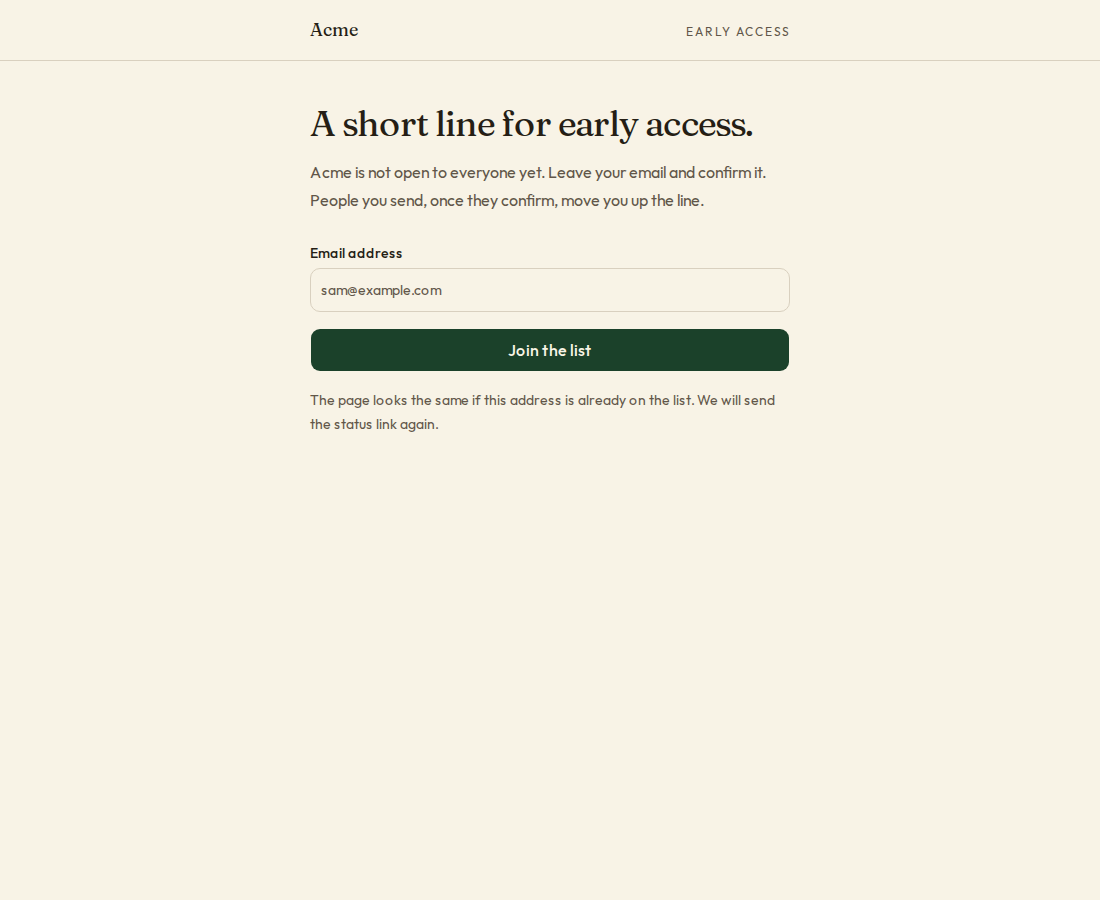
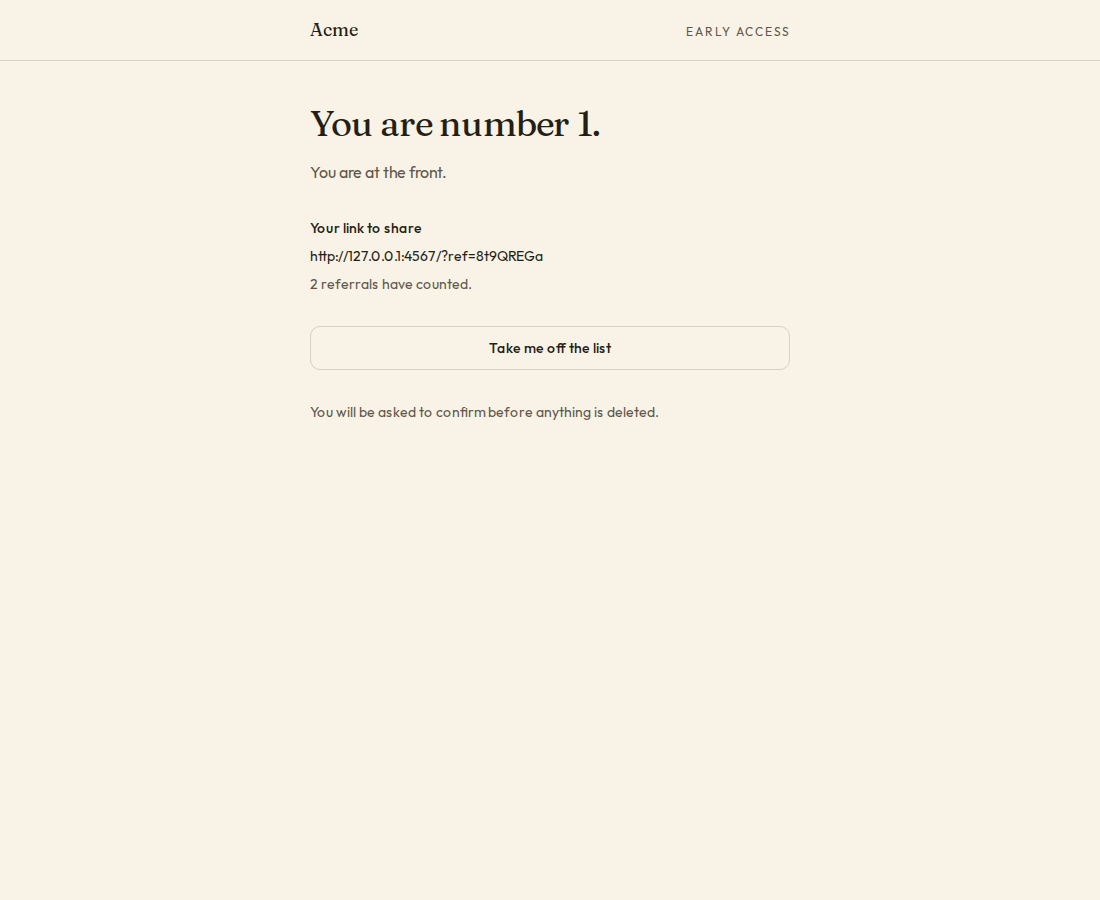
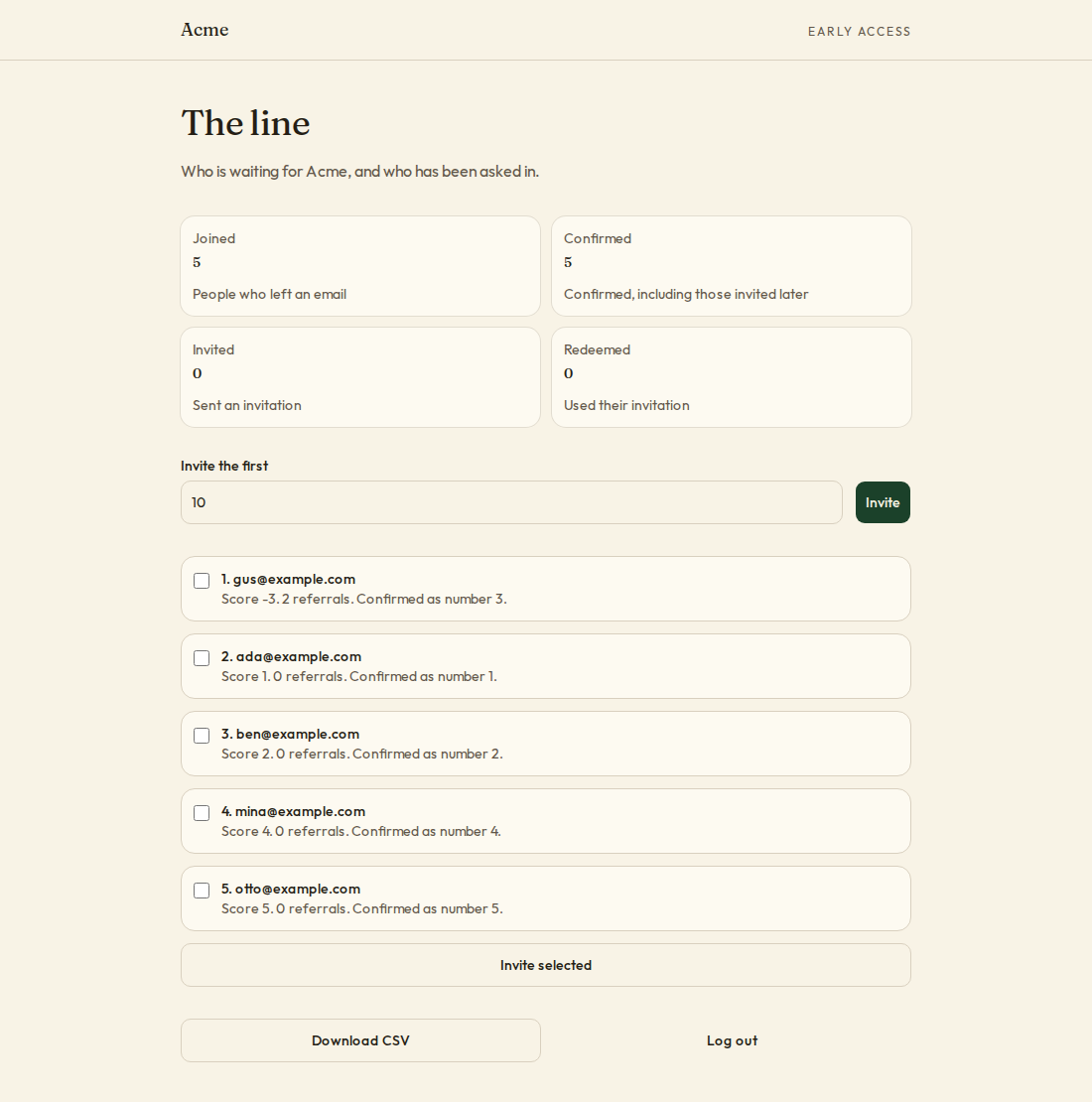
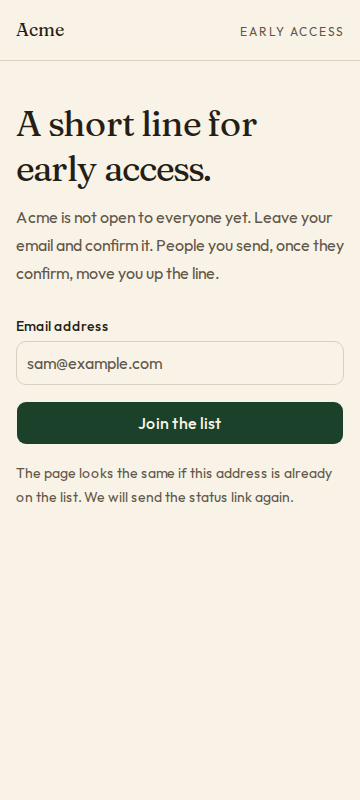
What can I customize?
Your choices go into the line you copy. Anything else is yours to edit, but it leaves the tested path.
What do I get?
-
spec.mdRequirements and acceptance criteria.Waitlist with referrals
What this builds
A waiting list for an app that is not open to everyone yet. A person leaves their email address and confirms it. They can move up the line by sending others, and the team lets people in a batch at a time. The rules for counting are exact, and written so the cheap ways of jumping the line do not work.
Read
spekkr.inputs.jsonfirst.referralsdecides whether R3 exists, and each referral is worthreferral_boostplaces.show_positionchanges R5. Useapp_nameon the pages and in every email.Out of scope
- The app's own sign-up. R7 is the one function it calls.
- Paying to move up.
- Prizes and leaderboards.
Requirements
Each requirement has an id. Tests name the id they cover.
R1. Join
- A person gives an email address. It is trimmed and lowercased.
- For telling whether someone already joined, a tag after a plus sign is ignored, and for Gmail addresses so are full stops:
sam+a@example.comissam@example.com, ands.a.m@gmail.comissam@gmail.com. Email is still sent to the address they gave, trimmed and in lowercase, not to the key. - The answer is the same whether the address is new or already on the list. A person already on it is sent their status link again.
- The form has a field people cannot see. A request that fills it in is answered as if it worked and nothing is stored.
- One IP address can join 5 times an hour.
Accept when:
Sam+x@Example.comandsam@example.comare one entry, the answer to both requests is the same, and the sixth join from an address in an hour is refused.R2. Confirm
- Joining sends a link that confirms the address. It works for 48 hours.
- Only confirmed entries have a place in line, count as referrals, or can be invited.
- The link shows a page with one button, and the button confirms. A mail scanner that opens the link confirms nothing.
Accept when: fetching the link with
GETalone confirms nothing, pressing the button does, and an entry not confirmed in 48 hours is deleted.R3. Referrals
Only if
referralsis on.- Each confirmed entry has a link to share, with a code of 8 letters and digits.
- A person who joins through the link and then confirms counts as one referral for its owner.
- These do not count: a person referring an address that is the same as theirs by the rule in R1; a referred entry that joined from the same IP address as its referrer; and more than 5 referred entries from one IP address in a day, whoever referred them.
- A referral that does not count is still a normal entry. Nobody is told which referrals counted.
Accept when: each of the three rules has a test, and a referral counts only after the referred person confirms.
R4. The line
- A person's score is their place by time of confirming, minus
referral_boostfor each referral that counts. - The line is ordered by score, lowest first. Equal scores go by who confirmed first.
- A person's place is their position in that order, starting at 1.
Accept when: the table in
design.mdis reproduced exactly.R5. Status page
- Every email holds a link to the person's own status page. The link carries a signed token, so nobody can read another person's page by guessing.
- The page shows, if
show_positionis on, the person's place and how many are ahead; and ifreferralsis on, their link to share and how many referrals have counted. - "Take me off the list" deletes the entry after one confirmation.
Accept when: a changed token is refused, and after "Take me off the list" the address is in no table.
R6. Invite
- An administrator invites the first N people in line, or picks people by hand.
- Each invited person gets an email with a code that works once, for 7 days, and leaves the line.
- An invitation that runs out puts the person back at the place their score gives them. They are told, once.
Accept when: inviting 3 invites the first three by R4, and an invitation unused after 7 days puts its person back in line.
R7. Let them in
- The app's sign-up calls
redeem(code, email). It answers yes once, for the address the code was sent to, compared by the rule in R1. - Redeeming marks the entry as joined, and it is kept as a record that the person came from the list.
Accept when: a code works once, fails for another address, and fails after 7 days.
R8. For the team
- A page with the counts: joined, confirmed, invited, redeemed. The line, with each person's score and referrals. A download of the list as CSV.
- Only administrators reach it.
Accept when: the counts match the table after each step of a test that joins, confirms, invites and redeems.
R9. Pages
- The form, "check your email", the confirm page, the status page, and the team's page.
Accept when: each page works with a keyboard alone and at a 360 pixel wide screen.
Definition of done
- Every acceptance check above has an automated test, and all tests pass. Tests capture email in memory and set the clock.
- A README explains how to put the form on a page, how to call
redeemfrom sign-up, and how to run the tests.
# Waitlist with referrals

## What this builds

A waiting list for an app that is not open to everyone yet. A person leaves their
email address and confirms it. They can move up the line by sending others, and
the team lets people in a batch at a time. The rules for counting are exact, and
written so the cheap ways of jumping the line do not work.

Read `spekkr.inputs.json` first. `referrals` decides whether R3 exists, and each
referral is worth `referral_boost` places. `show_position` changes R5. Use
`app_name` on the pages and in every email.

## Out of scope

- The app's own sign-up. R7 is the one function it calls.
- Paying to move up.
- Prizes and leaderboards.

## Requirements

Each requirement has an id. Tests name the id they cover.

### R1. Join

- A person gives an email address. It is trimmed and lowercased.
- For telling whether someone already joined, a tag after a plus sign is
  ignored, and for Gmail addresses so are full stops: `sam+a@example.com` is
  `sam@example.com`, and `s.a.m@gmail.com` is `sam@gmail.com`. Email is still
  sent to the address they gave, trimmed and in lowercase, not to the key.
- The answer is the same whether the address is new or already on the list. A
  person already on it is sent their status link again.
- The form has a field people cannot see. A request that fills it in is answered
  as if it worked and nothing is stored.
- One IP address can join 5 times an hour.

Accept when: `Sam+x@Example.com` and `sam@example.com` are one entry, the answer
to both requests is the same, and the sixth join from an address in an hour is
refused.

### R2. Confirm

- Joining sends a link that confirms the address. It works for 48 hours.
- Only confirmed entries have a place in line, count as referrals, or can be
  invited.
- The link shows a page with one button, and the button confirms. A mail scanner
  that opens the link confirms nothing.

Accept when: fetching the link with `GET` alone confirms nothing, pressing the
button does, and an entry not confirmed in 48 hours is deleted.

### R3. Referrals

Only if `referrals` is on.

- Each confirmed entry has a link to share, with a code of 8 letters and digits.
- A person who joins through the link and then confirms counts as one referral
  for its owner.
- These do not count: a person referring an address that is the same as theirs
  by the rule in R1; a referred entry that joined from the same IP address as its
  referrer; and more than 5 referred entries from one IP address in a day,
  whoever referred them.
- A referral that does not count is still a normal entry. Nobody is told which
  referrals counted.

Accept when: each of the three rules has a test, and a referral counts only after
the referred person confirms.

### R4. The line

- A person's score is their place by time of confirming, minus `referral_boost`
  for each referral that counts.
- The line is ordered by score, lowest first. Equal scores go by who confirmed
  first.
- A person's place is their position in that order, starting at 1.

Accept when: the table in `design.md` is reproduced exactly.

### R5. Status page

- Every email holds a link to the person's own status page. The link carries a
  signed token, so nobody can read another person's page by guessing.
- The page shows, if `show_position` is on, the person's place and how many are
  ahead; and if `referrals` is on, their link to share and how many referrals
  have counted.
- "Take me off the list" deletes the entry after one confirmation.

Accept when: a changed token is refused, and after "Take me off the list" the
address is in no table.

### R6. Invite

- An administrator invites the first N people in line, or picks people by hand.
- Each invited person gets an email with a code that works once, for 7 days, and
  leaves the line.
- An invitation that runs out puts the person back at the place their score
  gives them. They are told, once.

Accept when: inviting 3 invites the first three by R4, and an invitation unused
after 7 days puts its person back in line.

### R7. Let them in

- The app's sign-up calls `redeem(code, email)`. It answers yes once, for the
  address the code was sent to, compared by the rule in R1.
- Redeeming marks the entry as joined, and it is kept as a record that the
  person came from the list.

Accept when: a code works once, fails for another address, and fails after 7
days.

### R8. For the team

- A page with the counts: joined, confirmed, invited, redeemed. The line, with
  each person's score and referrals. A download of the list as CSV.
- Only administrators reach it.

Accept when: the counts match the table after each step of a test that joins,
confirms, invites and redeems.

### R9. Pages

- The form, "check your email", the confirm page, the status page, and the
  team's page.

Accept when: each page works with a keyboard alone and at a 360 pixel wide screen.

## Definition of done

- Every acceptance check above has an automated test, and all tests pass. Tests
  capture email in memory and set the clock.
- A README explains how to put the form on a page, how to call `redeem` from
  sign-up, and how to run the tests.
-
design.mdData model, rules and flows.Design
This file fixes the parts that are easy to get wrong. Choose the language and framework that fit the person's project; nothing here depends on them.
Data model
Use the database in the
databaseinput.Table Columns waitlist_entriesid,email(trimmed, lowercase),email_key(unique; by the rule in R1),code(unique),referred_by,referral_counts,ip,state,joined_at,confirmed_at,confirm_orderwaitlist_invitesid,entry_id,code_hash(unique),sent_at,expires_at,redeemed_atstateis one ofpending,confirmed,invitedandjoined.confirm_orderis 1 for the first entry to confirm, 2 for the second, and so on, given in the transaction that confirms.referral_countssays whether this entry counts as a referral for the entry inreferred_by.The line
score = confirm_order - boost * (number of entries that count as its referrals)boostis thereferral_boostinput. Order byscore, then byconfirm_order. Only entries in stateconfirmedare in the line; an invited person's place closes up behind them.Seven people, with a boost of 3:
Place Person Confirmed as number Referrals that count Score 1 gus7 4 -5 2 dev4 2 -2 3 ana1 0 1 4 ben2 0 2 5 cho3 0 3 6 fay6 1 3 7 eli5 0 5 choandfayboth score 3.choconfirmed first, sochois ahead.Work the line out with one query that sorts. Do not store places: every referral would change many rows.
Rules
- Decide whether a referral counts once, when the referred entry confirms, and store the answer. Later changes to the rules do not rewrite the past.
- The three rules of R3 need the IP address of each join. Delete it 30 days after the entry confirms.
- The status token is the entry's id, a full stop, and an HMAC-SHA-256 of the id keyed with
WAITLIST_SECRET, both in base64url. Compare in constant time. - Invitation codes are 10 random letters and digits, stored as SHA-256 hashes.
- Put sending behind one small interface so tests capture messages without a network. Four messages: confirm, you are on the list, you are invited, your invitation ran out. Use the
app_nameinput in each. - In CSV, put a single quote in front of any cell that starts with
=,+,-or@.
Configuration
Secret Purpose DATABASE_URLConnection string for the chosen database. EMAIL_API_KEYSends the emails. Optional in development. EMAIL_API_URLWhere send_emailposts each message. Optional in development.EMAIL_FROMThe address every email is sent from. Optional in development. WAITLIST_SECRETSigns status links. At least 32 random bytes. Who is signed in
The spec reaches the app's sign-in through one function,
current_user(request). It answers with the person's id, and says whether they are an administrator where this spec asks. In the person's app it reads their session.When there is no app yet, build this stand-in and nothing more: a page that lists two seeded people, one of them an administrator, with a button for each that sets a signed cookie naming them. The stand-in refuses to start in production.
Sending email
Send every email through one function,
send_email(to, subject, text).- With
EMAIL_API_URLandEMAIL_API_KEYset, it makes onePOSTtoEMAIL_API_URLwith the headerAuthorization: Bearer <EMAIL_API_KEY>and the JSON body{"from": EMAIL_FROM, "to": ..., "subject": ..., "text": ...}. Any 2xx answer means sent. The person points the address at their email service, or at a few lines that translate for it. - With neither set, outside production, the message goes to a local outbox that tests read. It is not printed: a message can hold a link that signs someone in.
In production the app refuses to start without both.
Named here
- "In a day" is the last 24 hours.
googlemail.comcounts as Gmail.
What this spec leaves to you
Where this spec names something, use that name, so that two builds of it agree. Where it does not, the choice is yours. List what you chose in the README.
# Design This file fixes the parts that are easy to get wrong. Choose the language and framework that fit the person's project; nothing here depends on them. ## Data model Use the database in the `database` input. | Table | Columns | | --- | --- | | `waitlist_entries` | `id`, `email` (trimmed, lowercase), `email_key` (unique; by the rule in R1), `code` (unique), `referred_by`, `referral_counts`, `ip`, `state`, `joined_at`, `confirmed_at`, `confirm_order` | | `waitlist_invites` | `id`, `entry_id`, `code_hash` (unique), `sent_at`, `expires_at`, `redeemed_at` | `state` is one of `pending`, `confirmed`, `invited` and `joined`. `confirm_order` is 1 for the first entry to confirm, 2 for the second, and so on, given in the transaction that confirms. `referral_counts` says whether this entry counts as a referral for the entry in `referred_by`. ## The line ``` score = confirm_order - boost * (number of entries that count as its referrals) ``` `boost` is the `referral_boost` input. Order by `score`, then by `confirm_order`. Only entries in state `confirmed` are in the line; an invited person's place closes up behind them. Seven people, with a boost of 3: | Place | Person | Confirmed as number | Referrals that count | Score | | --- | --- | --- | --- | --- | | 1 | `gus` | 7 | 4 | -5 | | 2 | `dev` | 4 | 2 | -2 | | 3 | `ana` | 1 | 0 | 1 | | 4 | `ben` | 2 | 0 | 2 | | 5 | `cho` | 3 | 0 | 3 | | 6 | `fay` | 6 | 1 | 3 | | 7 | `eli` | 5 | 0 | 5 | `cho` and `fay` both score 3. `cho` confirmed first, so `cho` is ahead. Work the line out with one query that sorts. Do not store places: every referral would change many rows. ## Rules - Decide whether a referral counts once, when the referred entry confirms, and store the answer. Later changes to the rules do not rewrite the past. - The three rules of R3 need the IP address of each join. Delete it 30 days after the entry confirms. - The status token is the entry's id, a full stop, and an HMAC-SHA-256 of the id keyed with `WAITLIST_SECRET`, both in base64url. Compare in constant time. - Invitation codes are 10 random letters and digits, stored as SHA-256 hashes. - Put sending behind one small interface so tests capture messages without a network. Four messages: confirm, you are on the list, you are invited, your invitation ran out. Use the `app_name` input in each. - In CSV, put a single quote in front of any cell that starts with `=`, `+`, `-` or `@`. ## Configuration | Secret | Purpose | | --- | --- | | `DATABASE_URL` | Connection string for the chosen database. | | `EMAIL_API_KEY` | Sends the emails. Optional in development. | | `EMAIL_API_URL` | Where `send_email` posts each message. Optional in development. | | `EMAIL_FROM` | The address every email is sent from. Optional in development. | | `WAITLIST_SECRET` | Signs status links. At least 32 random bytes. | ## Who is signed in The spec reaches the app's sign-in through one function, `current_user(request)`. It answers with the person's id, and says whether they are an administrator where this spec asks. In the person's app it reads their session. When there is no app yet, build this stand-in and nothing more: a page that lists two seeded people, one of them an administrator, with a button for each that sets a signed cookie naming them. The stand-in refuses to start in production. ## Sending email Send every email through one function, `send_email(to, subject, text)`. - With `EMAIL_API_URL` and `EMAIL_API_KEY` set, it makes one `POST` to `EMAIL_API_URL` with the header `Authorization: Bearer <EMAIL_API_KEY>` and the JSON body `{"from": EMAIL_FROM, "to": ..., "subject": ..., "text": ...}`. Any 2xx answer means sent. The person points the address at their email service, or at a few lines that translate for it. - With neither set, outside production, the message goes to a local outbox that tests read. It is not printed: a message can hold a link that signs someone in. In production the app refuses to start without both. ## Named here - "In a day" is the last 24 hours. `googlemail.com` counts as Gmail. ## What this spec leaves to you Where this spec names something, use that name, so that two builds of it agree. Where it does not, the choice is yours. List what you chose in the README. -
tasks.mdBuild tasks in order, each with a check.Tasks
Work in order. Finish a task's check before starting the next.
- Set up. Add the tables in
design.md, a clock that tests can set, and a way to capture email in tests. Check: migrations run from empty. - The same address (R1). A pure function from an address to its key. Check: tests cover a plus tag, Gmail full stops, case, and an address that must stay as it is.
- Join and confirm (R1, R2). Use the
app_nameinput in the emails. Check: the R1 and R2 acceptance tests pass. - Referrals (R3). Only if
referralsis on. Check: the R3 acceptance tests pass. - The line (R4). One query, using the
referral_boostinput. Check: a test builds the seven people indesign.mdand gets the table. - Status page (R5). Honour
show_position. Check: the R5 acceptance tests pass. - Invite and let in (R6, R7). Check: the R6 and R7 acceptance tests pass.
- For the team (R8) and pages (R9). Check: the R8 test passes, and every page can be used with a keyboard alone and at 360 pixels wide.
- Finish. Write the README and run the whole test suite. Check: every item under "Definition of done" in
spec.mdis true.
# Tasks

Work in order. Finish a task's check before starting the next.

1. **Set up.** Add the tables in `design.md`, a clock that tests can set, and a
   way to capture email in tests.
   Check: migrations run from empty.

2. **The same address (R1).** A pure function from an address to its key.
   Check: tests cover a plus tag, Gmail full stops, case, and an address that
   must stay as it is.

3. **Join and confirm (R1, R2).** Use the `app_name` input in the emails.
   Check: the R1 and R2 acceptance tests pass.

4. **Referrals (R3).** Only if `referrals` is on.
   Check: the R3 acceptance tests pass.

5. **The line (R4).** One query, using the `referral_boost` input.
   Check: a test builds the seven people in `design.md` and gets the table.

6. **Status page (R5).** Honour `show_position`.
   Check: the R5 acceptance tests pass.

7. **Invite and let in (R6, R7).**
   Check: the R6 and R7 acceptance tests pass.

8. **For the team (R8) and pages (R9).**
   Check: the R8 test passes, and every page can be used with a keyboard alone
   and at 360 pixels wide.

9. **Finish.** Write the README and run the whole test suite.
   Check: every item under "Definition of done" in `spec.md` is true.
- Set up. Add the tables in
Is it for me?
- Kind
- app part
- Platforms
- web, backend
What does it need?
- Accounts
- An email-sending service
- Agent permissions
- shell, network
- Secrets it reads
DATABASE_URLEMAIL_API_KEYWAITLIST_SECRET
What changed?
- 0.1.215 Nov 2026Names what it builds.
- 0.1.114 Nov 2026Says "person" where it said "buyer".
- 0.1.014 Nov 2026Moved from dwrtz/waitlist.
For agents: start.md says how to build this spec, spec.json holds everything on this page, and bundle.tar.gz holds its files.