Comments
Comments with replies on anything in your app, with mentions, edits, soft deletes and markup that cannot carry a script.
This is an app part spec on Spekkr, published by rook. It is listed with the other specs. Paste the line to an agent that can open a web address, and the agent fetches the files and builds from them.
- Spec
rook/comments- Version
- 0.1.2
- Published by
- rook
- Updated
- 15 Nov 2026
Build this spec
Build the spec at https://spekkr.com/rook/comments/start.md.
Paste this to your AI agent. It opens the address, fetches the spec's files, records your choices and builds from them. Nothing to install, no account.
Published by rook.
What does the result look like?
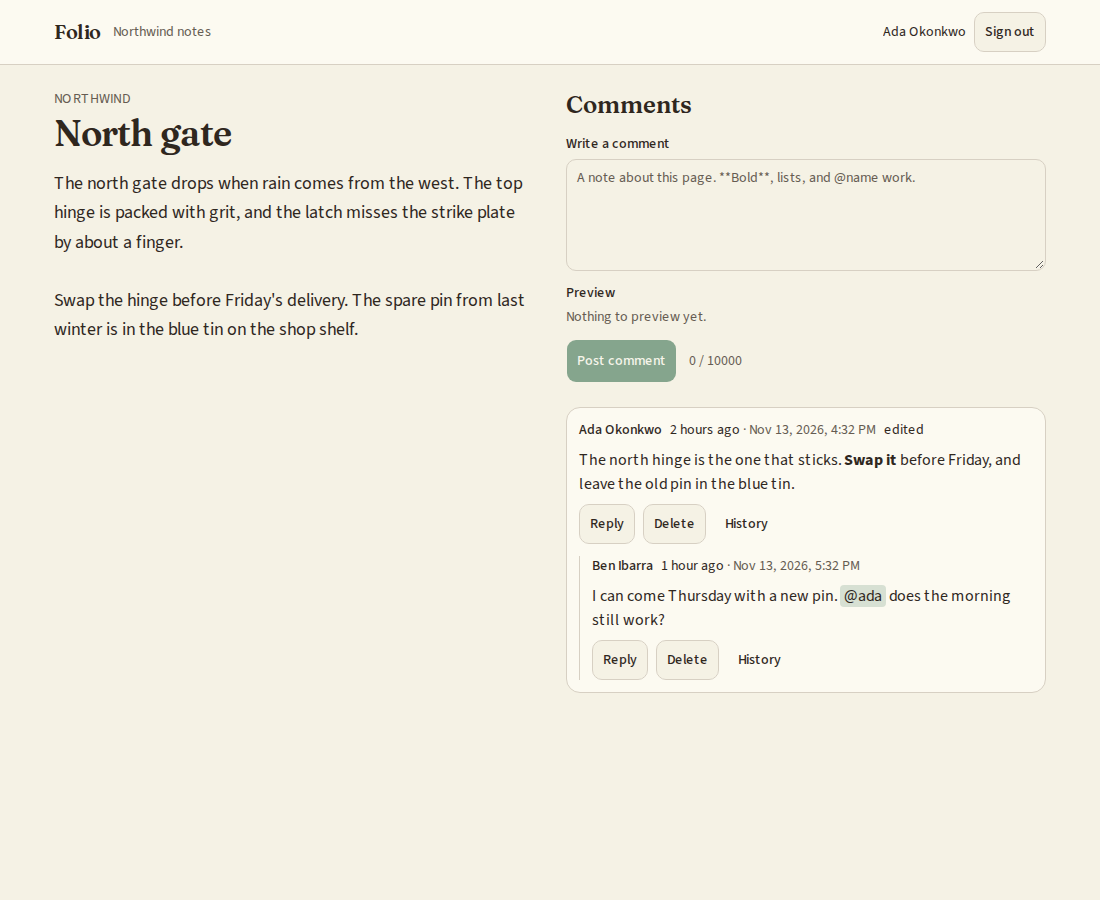
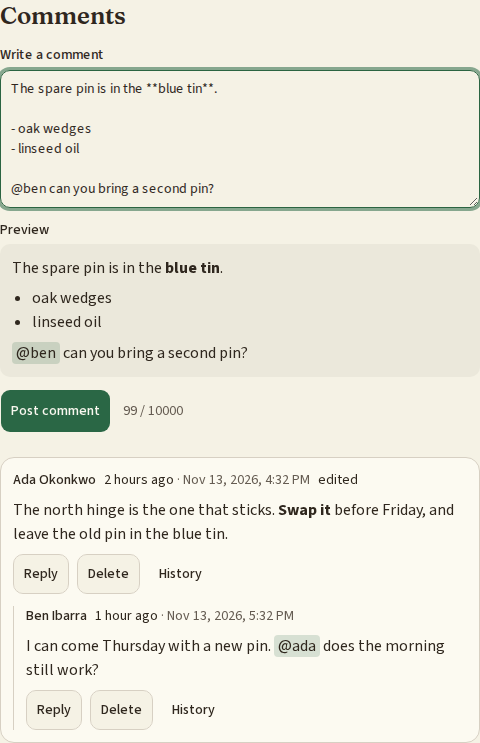
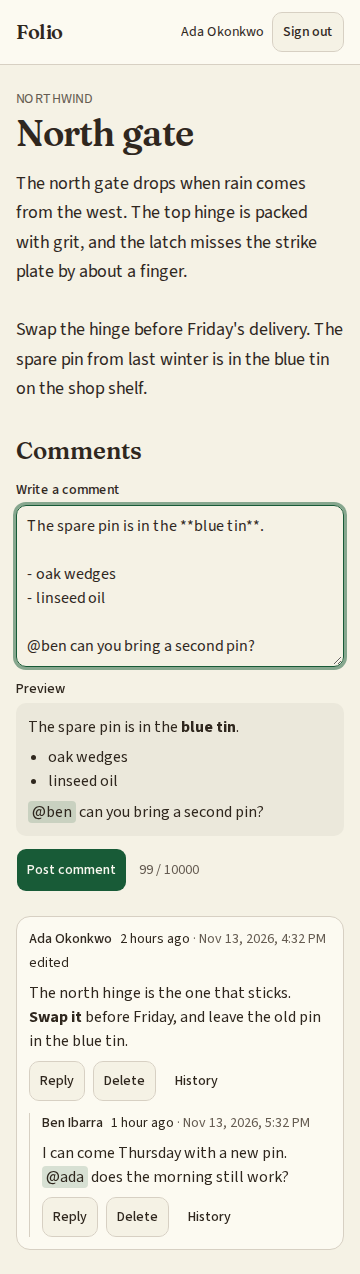
What can I customize?
Your choices go into the line you copy. Anything else is yours to edit, but it leaves the tested path.
What do I get?
-
spec.mdRequirements and acceptance criteria.Comments
What this builds
Comments that can be attached to anything in an app: a task, a document, an order. People write in a small, safe kind of Markdown, reply to each other, mention each other, and fix a typo for a short while after posting.
Read
spekkr.inputs.jsonfirst. A comment can be edited foredit_minutesminutes.mentionsdecides whether R4 exists andreactionswhether R8 does.The spec attaches comments to one example record. It needs the app to know who is signed in, and two answers from the app about any record: may this person read it, and may they comment on it.
Out of scope
- Comments from people who are not signed in.
- Attachments and images.
- Showing new comments without a reload.
Requirements
Each requirement has an id. Tests name the id they cover.
R1. Attach to anything
- A comment belongs to a subject: a kind of record and its id.
- Two functions decide access,
can_read(user, subject)andcan_comment(user, subject). As built, both say yes to members of the example record's workspace. The person's app replaces them. - A person who may not read a subject gets 404 for its comments, as if there were none.
Accept when: a person who may read but not comment sees the comments and gets 403 on posting, and one who may not read gets 404 for both.
R2. Write
- A comment is 1 to 10,000 characters after trimming.
- The browser sends an id of its own making with each new comment. A second request with the same id creates nothing and answers with the first comment, so a double click or a retry posts once.
- A person posts at most 10 comments a minute.
Accept when: the same request sent twice leaves one comment, and the eleventh comment in a minute is refused with a message that says when to try again.
R3. Safe markup
- Comments are written in the Markdown listed in
design.mdand stored as written. They are turned into HTML when shown. - Nothing a person writes is passed through as HTML. Tags they type are shown as text.
- A link is kept only if it starts with
http://orhttps://. Every link getsrel="nofollow noopener". - The result contains only the elements and attributes listed in
design.md.
Accept when: every row of the table of cases in
design.mdgives the HTML listed, and a test that feeds 50 known script-injection strings finds no element or attribute outside the list in any result.R4. Mentions
Only if
mentionsis on.@namementions the person with that username, by the rules indesign.md.- Each person mentioned is told once per comment, through one function,
on_mention(comment, user). As built it records the mention in a table. - Only a person who may read the subject can be mentioned. A name that belongs to nobody, or to someone who may not read it, is left as plain text, and the two cases look the same.
- Editing a comment tells only people the edit newly mentions.
Accept when: every row of the table of mention cases in
design.mdpasses, and mentioning a person who may not read the subject tells nobody.R5. Replies
- A comment can be a reply to another comment on the same subject.
- Replies go one level deep. A reply to a reply is stored as a reply to the same first comment.
- A thread shows its first comment and then its replies, oldest first. Threads are shown oldest first, 50 at a time, with a cursor.
Accept when: a reply to a reply sits beside it, not under it, and the cursor returns every thread once.
R6. Edit
- The author can edit a comment for
edit_minutesminutes after posting it. After that the text is fixed. - An edited comment says "edited". The text before each edit is kept, and administrators can read it.
Accept when: an edit one second before the limit is saved and one second after is refused.
R7. Delete
- The author can delete their own comment at any time. An administrator can delete any.
- A deleted comment with replies stays in place as "This comment was deleted", without its text or its author's name. One without replies disappears.
- Deleted text is removed from the database after 30 days.
Accept when: a deleted comment's text is in no answer from the API, and its replies are still shown.
R8. Reactions
Only if
reactionsis on.- A person can add each of a fixed set of six symbols to a comment once, and take it back.
- A comment shows each symbol that was added with a count, and whether this person added it.
Accept when: adding the same symbol twice counts once, and a symbol outside the set is refused.
R9. On the page
- A list of threads, a box to write in with a preview, and reply, edit and delete on each comment where the person may.
- A new comment appears at once and is taken back with a message if saving fails.
- Times are shown as "5 minutes ago" with the exact time available.
Accept when: the page works with a keyboard alone and at a 360 pixel wide screen.
Definition of done
- Every acceptance check above has an automated test, and all tests pass.
- A README explains how to attach comments to another record, how to replace the two access functions and
on_mention, and how to run the tests.
# Comments

## What this builds

Comments that can be attached to anything in an app: a task, a document, an
order. People write in a small, safe kind of Markdown, reply to each other,
mention each other, and fix a typo for a short while after posting.

Read `spekkr.inputs.json` first. A comment can be edited for `edit_minutes`
minutes. `mentions` decides whether R4 exists and `reactions` whether R8 does.

The spec attaches comments to one example record. It needs the app to know who is
signed in, and two answers from the app about any record: may this person read
it, and may they comment on it.

## Out of scope

- Comments from people who are not signed in.
- Attachments and images.
- Showing new comments without a reload.

## Requirements

Each requirement has an id. Tests name the id they cover.

### R1. Attach to anything

- A comment belongs to a subject: a kind of record and its id.
- Two functions decide access, `can_read(user, subject)` and
  `can_comment(user, subject)`. As built, both say yes to members of the example
  record's workspace. The person's app replaces them.
- A person who may not read a subject gets 404 for its comments, as if there
  were none.

Accept when: a person who may read but not comment sees the comments and gets 403
on posting, and one who may not read gets 404 for both.

### R2. Write

- A comment is 1 to 10,000 characters after trimming.
- The browser sends an id of its own making with each new comment. A second
  request with the same id creates nothing and answers with the first comment,
  so a double click or a retry posts once.
- A person posts at most 10 comments a minute.

Accept when: the same request sent twice leaves one comment, and the eleventh
comment in a minute is refused with a message that says when to try again.

### R3. Safe markup

- Comments are written in the Markdown listed in `design.md` and stored as
  written. They are turned into HTML when shown.
- Nothing a person writes is passed through as HTML. Tags they type are shown as
  text.
- A link is kept only if it starts with `http://` or `https://`. Every link gets
  `rel="nofollow noopener"`.
- The result contains only the elements and attributes listed in `design.md`.

Accept when: every row of the table of cases in `design.md` gives the HTML
listed, and a test that feeds 50 known script-injection strings finds no element
or attribute outside the list in any result.

### R4. Mentions

Only if `mentions` is on.

- `@name` mentions the person with that username, by the rules in `design.md`.
- Each person mentioned is told once per comment, through one function,
  `on_mention(comment, user)`. As built it records the mention in a table.
- Only a person who may read the subject can be mentioned. A name that belongs
  to nobody, or to someone who may not read it, is left as plain text, and the
  two cases look the same.
- Editing a comment tells only people the edit newly mentions.

Accept when: every row of the table of mention cases in `design.md` passes, and
mentioning a person who may not read the subject tells nobody.

### R5. Replies

- A comment can be a reply to another comment on the same subject.
- Replies go one level deep. A reply to a reply is stored as a reply to the same
  first comment.
- A thread shows its first comment and then its replies, oldest first. Threads
  are shown oldest first, 50 at a time, with a cursor.

Accept when: a reply to a reply sits beside it, not under it, and the cursor
returns every thread once.

### R6. Edit

- The author can edit a comment for `edit_minutes` minutes after posting it.
  After that the text is fixed.
- An edited comment says "edited". The text before each edit is kept, and
  administrators can read it.

Accept when: an edit one second before the limit is saved and one second after is
refused.

### R7. Delete

- The author can delete their own comment at any time. An administrator can
  delete any.
- A deleted comment with replies stays in place as "This comment was deleted",
  without its text or its author's name. One without replies disappears.
- Deleted text is removed from the database after 30 days.

Accept when: a deleted comment's text is in no answer from the API, and its
replies are still shown.

### R8. Reactions

Only if `reactions` is on.

- A person can add each of a fixed set of six symbols to a comment once, and
  take it back.
- A comment shows each symbol that was added with a count, and whether this
  person added it.

Accept when: adding the same symbol twice counts once, and a symbol outside the
set is refused.

### R9. On the page

- A list of threads, a box to write in with a preview, and reply, edit and delete
  on each comment where the person may.
- A new comment appears at once and is taken back with a message if saving fails.
- Times are shown as "5 minutes ago" with the exact time available.

Accept when: the page works with a keyboard alone and at a 360 pixel wide screen.

## Definition of done

- Every acceptance check above has an automated test, and all tests pass.
- A README explains how to attach comments to another record, how to replace the
  two access functions and `on_mention`, and how to run the tests.
-
design.mdData model, rules and flows.Design
This file fixes the parts that are easy to get wrong. Choose the language and framework that fit the person's project; nothing here depends on them.
Data model
Use the database in the
databaseinput.Table Columns commentsid,client_id(unique per author),subject_type,subject_id,parent_id,author_id,body,created_at,edited_at,deleted_at,deleted_bycomment_editsid,comment_id,body_before,atcomment_mentionscomment_id,user_id; primary key on both (only ifmentionsis on)comment_reactionscomment_id,user_id,symbol; primary key on all three (only ifreactionsis on)Index
commentsonsubject_type,subject_id,parent_id,created_at.The Markdown that is understood
Paragraphs, line breaks,
**bold**,*italic*,`code`, fenced code blocks, links written as[text](address), bare addresses that start withhttp://orhttps://, lists with-or1., and quotes with>. Nothing else: no headings, images, tables or HTML.Elements allowed in the result:
p,br,strong,em,code,pre,a,ul,ol,li,blockquote. Attributes allowed:hrefandrelona, andclass="mention"onafor a mention.Build the HTML from parsed pieces, escaping every piece of text. Do not produce HTML and clean it afterwards.
Written Shown as **hi**<p><strong>hi</strong></p><b>hi</b><p><b>hi</b></p><script>alert(1)</script><p><script>alert(1)</script></p>[x](https://example.com)<p><a href="https://example.com" rel="nofollow noopener">x</a></p>[x](javascript:alert(1))<p>[x](javascript:alert(1))</p>[x](JaVaScRiPt:alert(1))<p>[x](JaVaScRiPt:alert(1))</p>[x](data:text/html,hi)<p>[x](data:text/html,hi)</p>https://example.com/a?b=1&c=2<p><a href="https://example.com/a?b=1&c=2" rel="nofollow noopener">https://example.com/a?b=1&c=2</a></p><p></p># Title<p># Title</p>`<i>`<p><code><i></code></p>Mentions
A mention is
@followed by a username, where the@is at the start of the text or follows a space, a line break or an opening bracket, and the username is followed by the end of the text or by a character that cannot be in a username. Usernames here are letters, digits and hyphens; use the app's own rule if it differs. Matching ignores case. Text inside code is never a mention.Written Mentions @ana hianathanks @ana.ana(@ana)ana@Anaana@ana @anaana, oncemail me at x@ana.comnobody `@ana`nobody @nobody-by-this-namenobody; shown as plain text A mention is shown as a link to the person's page with
class="mention".Rules
- Take the time from one function, so tests can set it. Use the
edit_minutesinput for R6. - An answer from the API for a deleted comment holds its id, its place in the thread and
deleted: true, and nothing else. - The six symbols for R8 are a list in code.
Configuration
Secret Purpose DATABASE_URLConnection string for the chosen database. Who is signed in
The spec reaches the app's sign-in through one function,
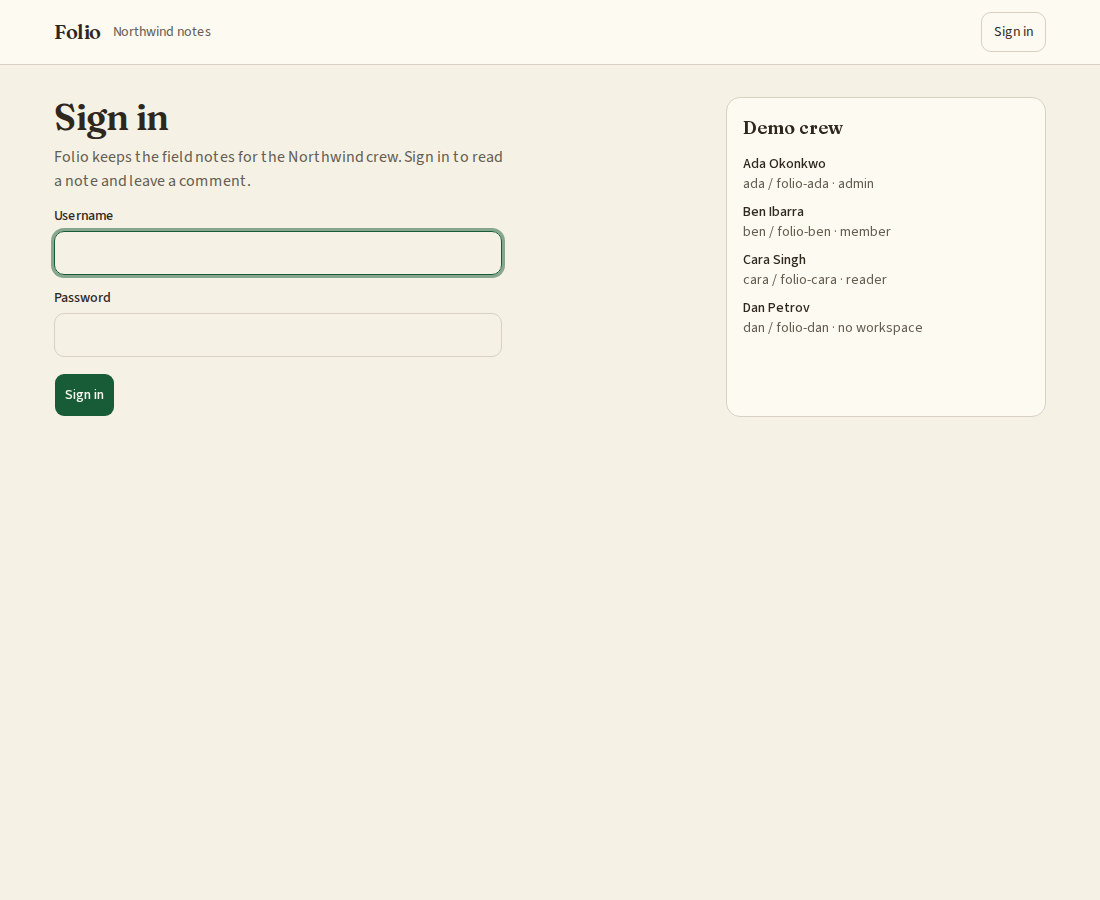
current_user(request). It answers with the person's id, and says whether they are an administrator where this spec asks. In the person's app it reads their session.When there is no app yet, build this stand-in and nothing more: a page that lists two seeded people, one of them an administrator, with a button for each that sets a signed cookie naming them. The stand-in refuses to start in production.
Named here
- A mention links to
profile_url(username), a function the app supplies. The stand-in answers/people/<username>. - A mention may follow
(,[or{. Lengths are counted in Unicode code points.
What this spec leaves to you
Where this spec names something, use that name, so that two builds of it agree. Where it does not, the choice is yours. List what you chose in the README.
# Design This file fixes the parts that are easy to get wrong. Choose the language and framework that fit the person's project; nothing here depends on them. ## Data model Use the database in the `database` input. | Table | Columns | | --- | --- | | `comments` | `id`, `client_id` (unique per author), `subject_type`, `subject_id`, `parent_id`, `author_id`, `body`, `created_at`, `edited_at`, `deleted_at`, `deleted_by` | | `comment_edits` | `id`, `comment_id`, `body_before`, `at` | | `comment_mentions` | `comment_id`, `user_id`; primary key on both (only if `mentions` is on) | | `comment_reactions` | `comment_id`, `user_id`, `symbol`; primary key on all three (only if `reactions` is on) | Index `comments` on `subject_type`, `subject_id`, `parent_id`, `created_at`. ## The Markdown that is understood Paragraphs, line breaks, `**bold**`, `*italic*`, `` `code` ``, fenced code blocks, links written as `[text](address)`, bare addresses that start with `http://` or `https://`, lists with `-` or `1.`, and quotes with `>`. Nothing else: no headings, images, tables or HTML. Elements allowed in the result: `p`, `br`, `strong`, `em`, `code`, `pre`, `a`, `ul`, `ol`, `li`, `blockquote`. Attributes allowed: `href` and `rel` on `a`, and `class="mention"` on `a` for a mention. Build the HTML from parsed pieces, escaping every piece of text. Do not produce HTML and clean it afterwards. | Written | Shown as | | --- | --- | | `**hi**` | `<p><strong>hi</strong></p>` | | `<b>hi</b>` | `<p><b>hi</b></p>` | | `<script>alert(1)</script>` | `<p><script>alert(1)</script></p>` | | `[x](https://example.com)` | `<p><a href="https://example.com" rel="nofollow noopener">x</a></p>` | | `[x](javascript:alert(1))` | `<p>[x](javascript:alert(1))</p>` | | `[x](JaVaScRiPt:alert(1))` | `<p>[x](JaVaScRiPt:alert(1))</p>` | | `[x](data:text/html,hi)` | `<p>[x](data:text/html,hi)</p>` | | `https://example.com/a?b=1&c=2` | `<p><a href="https://example.com/a?b=1&c=2" rel="nofollow noopener">https://example.com/a?b=1&c=2</a></p>` | | `` | `<p></p>` | | `# Title` | `<p># Title</p>` | | `` `<i>` `` | `<p><code><i></code></p>` | ## Mentions A mention is `@` followed by a username, where the `@` is at the start of the text or follows a space, a line break or an opening bracket, and the username is followed by the end of the text or by a character that cannot be in a username. Usernames here are letters, digits and hyphens; use the app's own rule if it differs. Matching ignores case. Text inside code is never a mention. | Written | Mentions | | --- | --- | | `@ana hi` | `ana` | | `thanks @ana.` | `ana` | | `(@ana)` | `ana` | | `@Ana` | `ana` | | `@ana @ana` | `ana`, once | | `mail me at x@ana.com` | nobody | | `` `@ana` `` | nobody | | `@nobody-by-this-name` | nobody; shown as plain text | A mention is shown as a link to the person's page with `class="mention"`. ## Rules - Take the time from one function, so tests can set it. Use the `edit_minutes` input for R6. - An answer from the API for a deleted comment holds its id, its place in the thread and `deleted: true`, and nothing else. - The six symbols for R8 are a list in code. ## Configuration | Secret | Purpose | | --- | --- | | `DATABASE_URL` | Connection string for the chosen database. | ## Who is signed in The spec reaches the app's sign-in through one function, `current_user(request)`. It answers with the person's id, and says whether they are an administrator where this spec asks. In the person's app it reads their session. When there is no app yet, build this stand-in and nothing more: a page that lists two seeded people, one of them an administrator, with a button for each that sets a signed cookie naming them. The stand-in refuses to start in production. ## Named here - A mention links to `profile_url(username)`, a function the app supplies. The stand-in answers `/people/<username>`. - A mention may follow `(`, `[` or `{`. Lengths are counted in Unicode code points. ## What this spec leaves to you Where this spec names something, use that name, so that two builds of it agree. Where it does not, the choice is yours. List what you chose in the README. - Take the time from one function, so tests can set it. Use the
-
tasks.mdBuild tasks in order, each with a check.Tasks
Work in order. Finish a task's check before starting the next.
- Set up. Add the tables in
design.md. If there is no app yet, build the smallest one: signed-in users, a workspace, and one kind of record to comment on. Check: migrations run from empty. - Safe markup (R3). A pure function from what was written to HTML. Check: a test covers every row of the table of cases in
design.md, and the test with 50 injection strings passes. - Attach and write (R1, R2). Check: the R1 and R2 acceptance tests pass.
- Mentions (R4). Only if
mentionsis on. A pure function from text to the names mentioned, then the rule about who may be told. Check: a test covers every row of the table of mention cases, and the R4 acceptance tests pass. - Replies (R5). Check: the R5 acceptance tests pass.
- Edit (R6) and delete (R7). Use the
edit_minutesinput and a clock that tests can set. Check: the R6 and R7 acceptance tests pass. - Reactions (R8). Only if
reactionsis on. Check: the R8 acceptance tests pass. - On the page (R9). Check: the page can be used with a keyboard alone and at 360 pixels wide.
- Finish. Write the README and run the whole test suite. Check: every item under "Definition of done" in
spec.mdis true.
# Tasks

Work in order. Finish a task's check before starting the next.

1. **Set up.** Add the tables in `design.md`. If there is no app yet, build the
   smallest one: signed-in users, a workspace, and one kind of record to comment
   on.
   Check: migrations run from empty.

2. **Safe markup (R3).** A pure function from what was written to HTML.
   Check: a test covers every row of the table of cases in `design.md`, and the
   test with 50 injection strings passes.

3. **Attach and write (R1, R2).**
   Check: the R1 and R2 acceptance tests pass.

4. **Mentions (R4).** Only if `mentions` is on. A pure function from text to the
   names mentioned, then the rule about who may be told.
   Check: a test covers every row of the table of mention cases, and the R4
   acceptance tests pass.

5. **Replies (R5).**
   Check: the R5 acceptance tests pass.

6. **Edit (R6) and delete (R7).** Use the `edit_minutes` input and a clock that
   tests can set.
   Check: the R6 and R7 acceptance tests pass.

7. **Reactions (R8).** Only if `reactions` is on.
   Check: the R8 acceptance tests pass.

8. **On the page (R9).**
   Check: the page can be used with a keyboard alone and at 360 pixels wide.

9. **Finish.** Write the README and run the whole test suite.
   Check: every item under "Definition of done" in `spec.md` is true.
- Set up. Add the tables in
Is it for me?
- Kind
- app part
- Platforms
- web, backend
What does it need?
- Agent permissions
- shell, network
- Secrets it reads
DATABASE_URL
What changed?
- 0.1.215 Nov 2026Names what it builds.
- 0.1.114 Nov 2026Says "person" where it said "buyer".
- 0.1.014 Nov 2026Moved from dwrtz/comments.
For agents: start.md says how to build this spec, spec.json holds everything on this page, and bundle.tar.gz holds its files.