Notifications
An in-app inbox with an unread count, email for what was missed, preferences per type and one-click unsubscribe.
This is an app part spec on Spekkr, published by rook. It is listed with the other specs. Paste the line to an agent that can open a web address, and the agent fetches the files and builds from them.
- Spec
rook/notifications- Version
- 0.1.2
- Published by
- rook
- Updated
- 15 Nov 2026
Build this spec
Build the spec at https://spekkr.com/rook/notifications/start.md.
Paste this to your AI agent. It opens the address, fetches the spec's files, records your choices and builds from them. Nothing to install, no account.
Published by rook.
What does the result look like?
What can I customize?
Your choices go into the line you copy. Anything else is yours to edit, but it leaves the tested path.
What do I get?
-
spec.mdRequirements and acceptance criteria.Notifications
What this builds
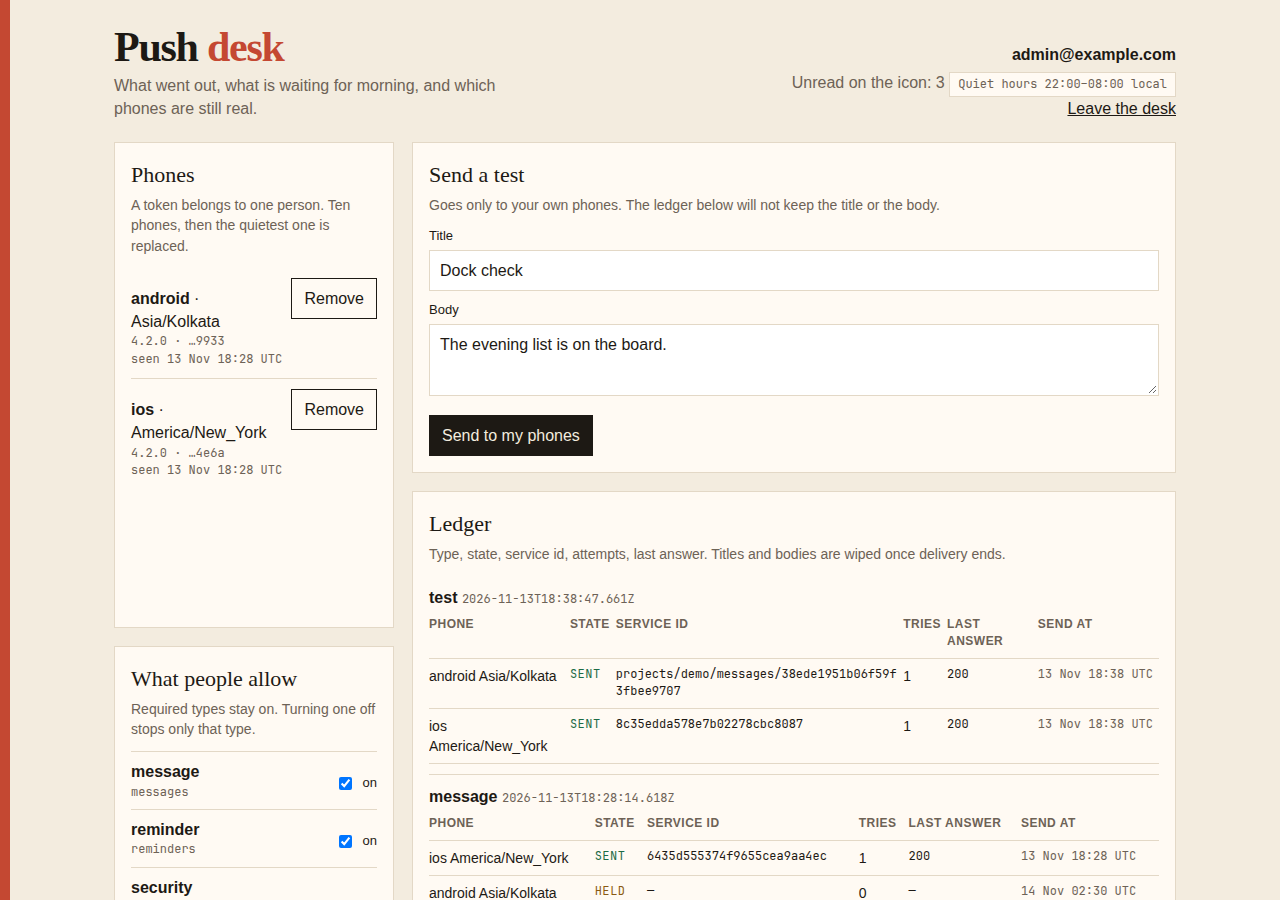
A way for an app to tell a person that something happened: an inbox in the app with a count of what is unread, and an email for what they did not see. People choose what they hear about and can stop any email with one click.
Read
spekkr.inputs.jsonfirst.email_channeldecides whether R5 and R7 exist anddaily_digestwhether R8 does. An unread notification is emailed afteremail_delay_minutesminutes.live_updatessays how the count stays current. Useapp_namein every email.This spec needs the app to know who is signed in. It does not build sign-in.
Out of scope
- Push notifications to phones and text messages.
- Notifications to people who have no account.
- Marketing email.
Requirements
Each requirement has an id. Tests name the id they cover.
R1. Send a notification
- App code calls
notify(user, type, data, options). - Types are a fixed list in code. Each has a title written from the data, a link into the app, and whether it is
required. Start withcomment_added,invited_to_workspaceand the requiredsecurity_notice. - With a
dedupe_key, a second notification of the same type, for the same person, with the same key inside 24 hours is not created. - A notification added inside a database transaction exists exactly when the transaction commits.
Accept when: a notification appears in the right person's inbox, a repeat with the same key adds nothing, and an unknown type is an error.
R2. The inbox
- A person sees their notifications newest first, 20 at a time, and loads more with a cursor, not a page number.
- Each shows its title, how long ago, and whether it is read. Following its link marks it read.
- "Mark all as read" marks everything that existed at the moment of the click. A notification that arrives during the click stays unread.
- A person can never read, mark or count another person's notifications.
Accept when: the cursor returns every notification exactly once while new ones arrive, and a request for another person's notification gets 404.
R3. The unread count
GET /api/notifications/unread_countanswers with a number. The bell shows it, and shows99+above 99.- The count comes from one indexed query. It is not a number kept on the side that can drift.
Accept when: the count is right after every combination of new, read and mark-all, and the query uses an index with 100,000 notifications in the table.
R4. Keeping the count current
- If
live_updatesispolling, the page asks for the count every 30 seconds while its tab is visible and not at all while hidden. - If
live_updatesisserver_sent_events, the page holds one connection that the server sends the new count down. A person with several tabs open gets it in each. A dropped connection is reopened after a wait that grows up to 30 seconds.
Accept when: a new notification changes the bell without a reload, inside 30 seconds for polling and inside 2 seconds for server-sent events.
R5. Email what was missed
Only if
email_channelis on.- A notification still unread
email_delay_minutesminutes after it was created is emailed. One read before then is never emailed. - If several are due for one person at once, they go in one email.
- A person gets at most one such email every
email_delay_minutesminutes. Anything that comes due in between waits for the next one. - A
requiredtype is emailed at once, on its own.
Accept when: reading a notification inside the delay prevents its email, five unread ones produce one email that lists five, and a required one is sent at once.
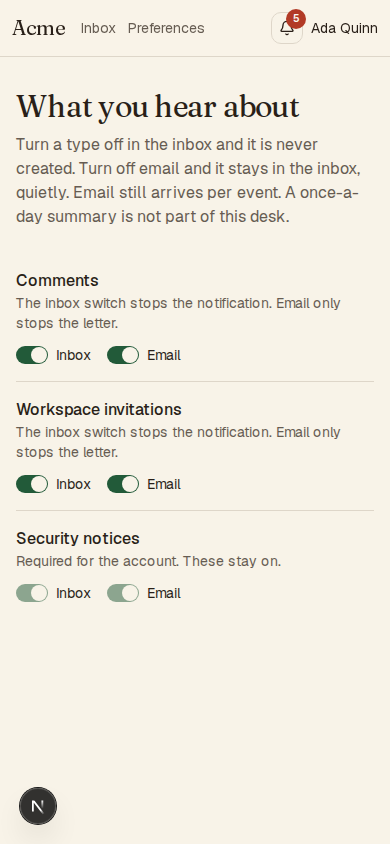
R6. Preferences
- A page lists every type with a switch for the inbox and, if
email_channelis on, a switch for email. - A
requiredtype is shown with its switches on and locked. - A notification is not created for a person who has turned its type off in the inbox, and not emailed to one who has turned its email off.
Accept when: each switch stops what it names and nothing else, and a required type cannot be turned off through the page or through its API.
R7. Unsubscribe
Only if
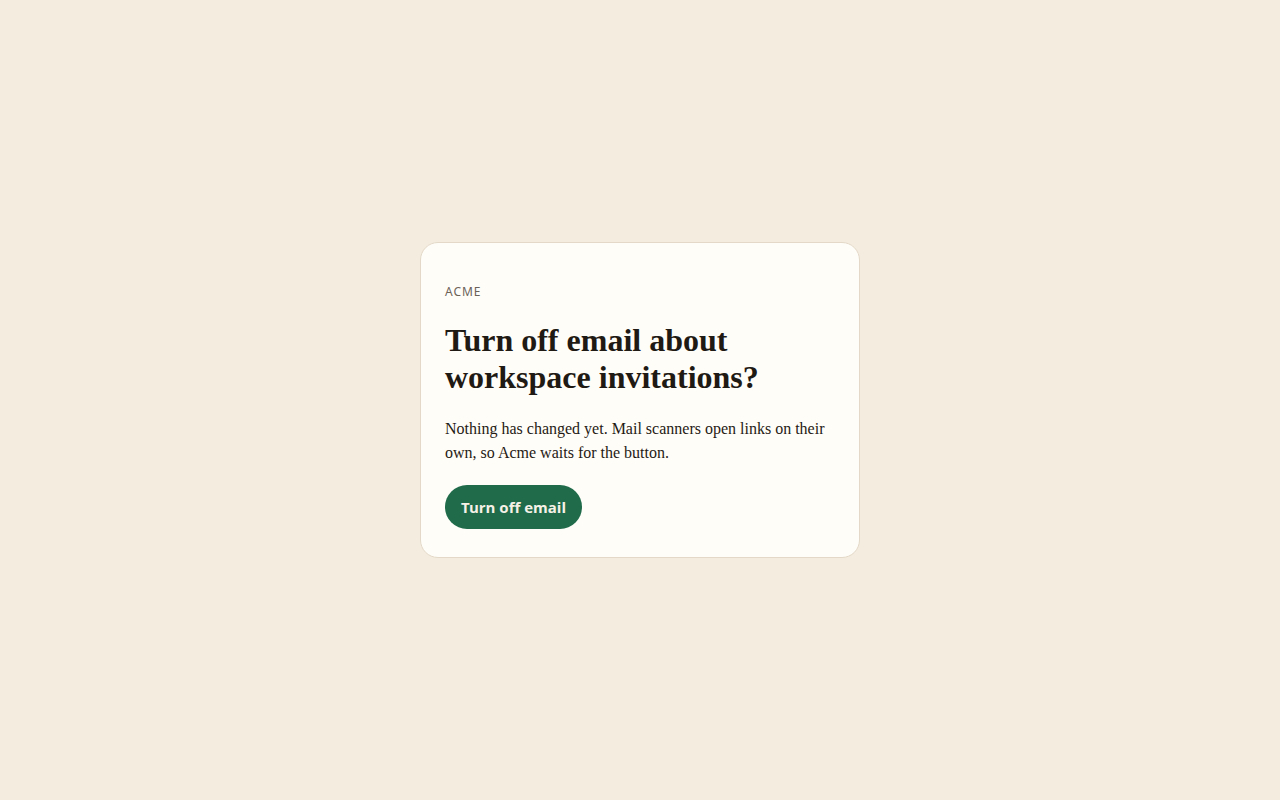
email_channelis on.- Every email ends with a link to turn off email for that type. It works without signing in. Opening it changes nothing: the page names the type and has one button. Pressing the button turns email for that type off and shows what was turned off, with a button to undo.
- Every email carries the headers
List-UnsubscribeandList-Unsubscribe-Post: List-Unsubscribe=One-Click. APOSTto the address in the first turns off email for that type without any page. - The link holds a signed token that names the person and the type. It does not expire. A token that was altered is refused.
- Emails of a
requiredtype have no unsubscribe link and say why.
Accept when: a
POSTto the unsubscribe address turns the switch off, aGETalone does not, and a changed token is refused.R8. Daily summary
Only if
daily_digestis on.- In R6 a person can choose "once a day" for email. They then get one email at 08:00 in their time zone with what was unread from the day before, and none if there was nothing.
requiredtypes are still emailed at once.
Accept when: a person in
Europe/Berlinand one inAmerica/Los_Angeleseach get their summary at 08:00 their time, on a day when the clocks change too.R9. Clean up
- Read notifications are deleted after 90 days and unread ones after 180.
Accept when: a clean-up run deletes exactly the notifications that are old enough.
R10. Pages
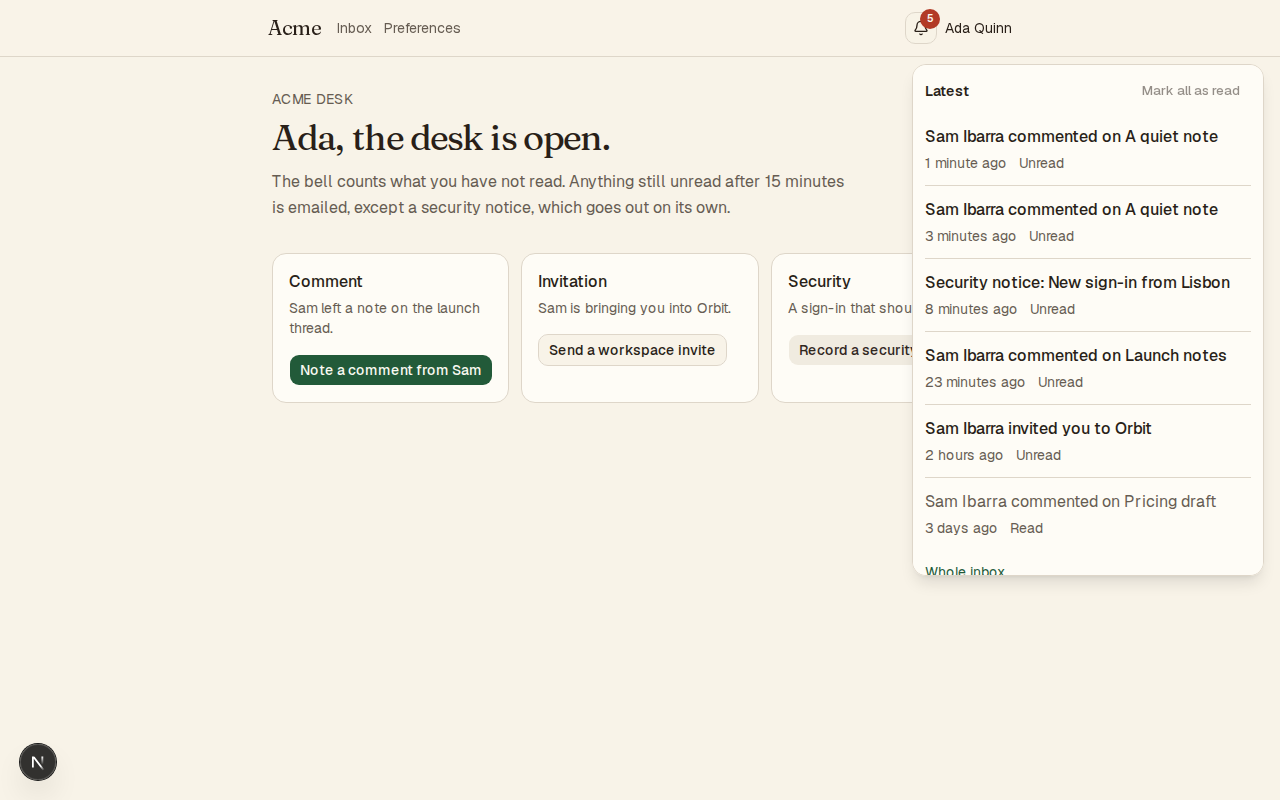
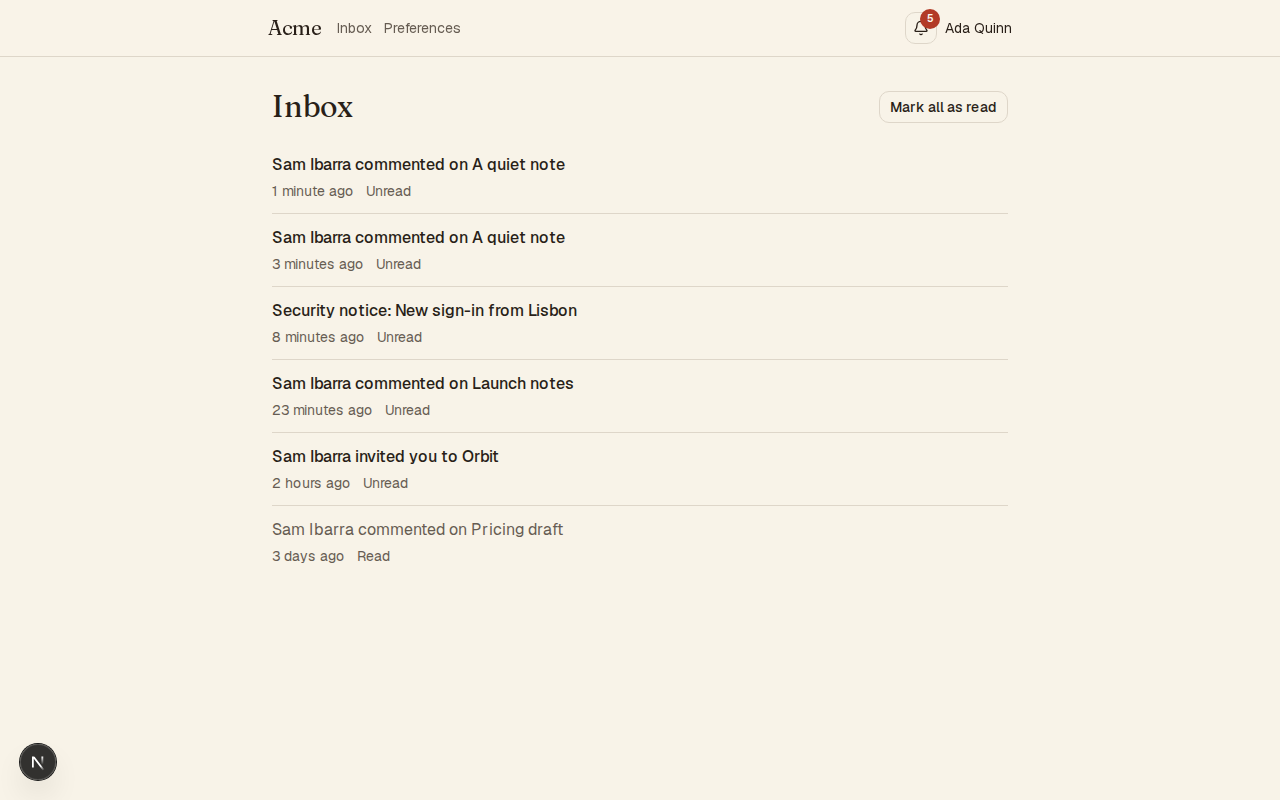
- A bell with the count, a panel that opens from it with the latest 20, a page with the whole inbox, and the preferences page.
- The bell says its count to screen readers, and the panel can be opened, read and closed with a keyboard.
Accept when: each page works with a keyboard alone and at a 360 pixel wide screen.
Definition of done
- Every acceptance check above has an automated test, and all tests pass. Tests capture email in memory and set the clock.
- A README explains how to add a type, how to send a notification, and how to run the tests.
# Notifications

## What this builds

A way for an app to tell a person that something happened: an inbox in the app
with a count of what is unread, and an email for what they did not see. People
choose what they hear about and can stop any email with one click.

Read `spekkr.inputs.json` first. `email_channel` decides whether R5 and R7 exist
and `daily_digest` whether R8 does. An unread notification is emailed after
`email_delay_minutes` minutes. `live_updates` says how the count stays current.
Use `app_name` in every email.

This spec needs the app to know who is signed in. It does not build sign-in.

## Out of scope

- Push notifications to phones and text messages.
- Notifications to people who have no account.
- Marketing email.

## Requirements

Each requirement has an id. Tests name the id they cover.

### R1. Send a notification

- App code calls `notify(user, type, data, options)`.
- Types are a fixed list in code. Each has a title written from the data, a link
  into the app, and whether it is `required`. Start with `comment_added`,
  `invited_to_workspace` and the required `security_notice`.
- With a `dedupe_key`, a second notification of the same type, for the same person,
  with the same key inside 24 hours is not created.
- A notification added inside a database transaction exists exactly when the
  transaction commits.

Accept when: a notification appears in the right person's inbox, a repeat with the
same key adds nothing, and an unknown type is an error.

### R2. The inbox

- A person sees their notifications newest first, 20 at a time, and loads more
  with a cursor, not a page number.
- Each shows its title, how long ago, and whether it is read. Following its link
  marks it read.
- "Mark all as read" marks everything that existed at the moment of the click. A
  notification that arrives during the click stays unread.
- A person can never read, mark or count another person's notifications.

Accept when: the cursor returns every notification exactly once while new ones
arrive, and a request for another person's notification gets 404.

### R3. The unread count

- `GET /api/notifications/unread_count` answers with a number. The bell shows it,
  and shows `99+` above 99.
- The count comes from one indexed query. It is not a number kept on the side that
  can drift.

Accept when: the count is right after every combination of new, read and
mark-all, and the query uses an index with 100,000 notifications in the table.

### R4. Keeping the count current

- If `live_updates` is `polling`, the page asks for the count every 30 seconds
  while its tab is visible and not at all while hidden.
- If `live_updates` is `server_sent_events`, the page holds one connection that the
  server sends the new count down. A person with several tabs open gets it in each.
  A dropped connection is reopened after a wait that grows up to 30 seconds.

Accept when: a new notification changes the bell without a reload, inside 30
seconds for polling and inside 2 seconds for server-sent events.

### R5. Email what was missed

Only if `email_channel` is on.

- A notification still unread `email_delay_minutes` minutes after it was created
  is emailed. One read before then is never emailed.
- If several are due for one person at once, they go in one email.
- A person gets at most one such email every `email_delay_minutes` minutes.
  Anything that comes due in between waits for the next one.
- A `required` type is emailed at once, on its own.

Accept when: reading a notification inside the delay prevents its email, five
unread ones produce one email that lists five, and a required one is sent at once.

### R6. Preferences

- A page lists every type with a switch for the inbox and, if `email_channel` is
  on, a switch for email.
- A `required` type is shown with its switches on and locked.
- A notification is not created for a person who has turned its type off in the
  inbox, and not emailed to one who has turned its email off.

Accept when: each switch stops what it names and nothing else, and a required type
cannot be turned off through the page or through its API.

### R7. Unsubscribe

Only if `email_channel` is on.

- Every email ends with a link to turn off email for that type. It works without
  signing in. Opening it changes nothing: the page names the type and has one
  button. Pressing the button turns email for that type off and shows what was
  turned off, with a button to undo.
- Every email carries the headers `List-Unsubscribe` and `List-Unsubscribe-Post:
  List-Unsubscribe=One-Click`. A `POST` to the address in the first turns off email
  for that type without any page.
- The link holds a signed token that names the person and the type. It does not
  expire. A token that was altered is refused.
- Emails of a `required` type have no unsubscribe link and say why.

Accept when: a `POST` to the unsubscribe address turns the switch off, a `GET`
alone does not, and a changed token is refused.

### R8. Daily summary

Only if `daily_digest` is on.

- In R6 a person can choose "once a day" for email. They then get one email at
  08:00 in their time zone with what was unread from the day before, and none if
  there was nothing.
- `required` types are still emailed at once.

Accept when: a person in `Europe/Berlin` and one in `America/Los_Angeles` each get
their summary at 08:00 their time, on a day when the clocks change too.

### R9. Clean up

- Read notifications are deleted after 90 days and unread ones after 180.

Accept when: a clean-up run deletes exactly the notifications that are old enough.

### R10. Pages

- A bell with the count, a panel that opens from it with the latest 20, a page
  with the whole inbox, and the preferences page.
- The bell says its count to screen readers, and the panel can be opened, read and
  closed with a keyboard.

Accept when: each page works with a keyboard alone and at a 360 pixel wide screen.

## Definition of done

- Every acceptance check above has an automated test, and all tests pass. Tests
  capture email in memory and set the clock.
- A README explains how to add a type, how to send a notification, and how to run
  the tests.
-
design.mdData model, rules and flows.Design
This file fixes the parts that are easy to get wrong. Choose the language and framework that fit the person's project; nothing here depends on them.
Data model
Use the database in the
databaseinput.Table Columns notificationsid(grows with time),user_id,type,data(JSON),dedupe_key,created_at,read_at,emailed_atnotification_preferencesuser_id,type,in_app,email; primary key on the first twonotification_settingsuser_id(primary key),email_mode(eachordaily),time_zone,last_email_at,last_digest_onIndexes:
user_id,iddescending for the inbox;user_idwhereread_atis null for the count; a unique one onuser_id,type,dedupe_keywhere the key is set.A missing preference row means the type's defaults. Rows exist only for what a person changed.
Rules
- The cursor is the
idof the last notification shown. The next page is everything with a smallerid. Page numbers skip or repeat rows when new ones arrive. - "Mark all as read" sends the
idof the newest notification the page knows about, and the server marks only those at or below it. - For the 24 hours in R1, a job clears
dedupe_keyon notifications 24 hours old or older, which frees the unique index. - Titles are made when a notification is shown, from
typeanddata, so a change of wording applies to old notifications too. Escape everything taken fromdata.
Email
A job runs every minute. For each person with email in mode
each, it takes the notifications that are unread, not yet emailed, older thanemail_delay_minutesand of a type whose email is on. If there are any andlast_email_atis older than the delay, it sends one email and setsemailed_aton each in the same transaction aslast_email_at.The daily summary is the same job with another test: the local time in the person's
time_zonehas passed 08:00 andlast_digest_onis before today's local date. Work out local time with the platform's time zone database, never with a fixed offset.Put sending behind one small interface so tests capture messages without a network. Use the
app_nameinput as the sender's name and in the subject.The unsubscribe token
payload = user id, a full stop, type
token   = base64url(payload) + "." + base64url(HMAC-SHA-256(UNSUBSCRIBE_SECRET, payload))
Compare the signature in constant time. The page reached by
GETchanges nothing until its button is pressed, because mail scanners follow links.Configuration
Secret Purpose DATABASE_URLConnection string for the chosen database. EMAIL_API_KEYSends the emails. Optional in development. EMAIL_API_URLWhere send_emailposts each message. Optional in development.EMAIL_FROMThe address every email is sent from. Optional in development. UNSUBSCRIBE_SECRETSigns unsubscribe links. At least 32 random bytes. Who is signed in
The spec reaches the app's sign-in through one function,
current_user(request). It answers with the person's id, and says whether they are an administrator where this spec asks. In the person's app it reads their session.When there is no app yet, build this stand-in and nothing more: a page that lists two seeded people, one of them an administrator, with a button for each that sets a signed cookie naming them. The stand-in refuses to start in production.
Sending email
Send every email through one function,
send_email(to, subject, text).- With
EMAIL_API_URLandEMAIL_API_KEYset, it makes onePOSTtoEMAIL_API_URLwith the headerAuthorization: Bearer <EMAIL_API_KEY>and the JSON body{"from": EMAIL_FROM, "to": ..., "subject": ..., "text": ...}. Any 2xx answer means sent. The person points the address at their email service, or at a few lines that translate for it. - With neither set, outside production, the message goes to a local outbox that tests read. It is not printed: a message can hold a link that signs someone in.
In production the app refuses to start without both.
Named here
- A missing preference row means inbox on and email on.
- A repeat is blocked until 24 hours have passed. At 24 hours exactly it is created.
unread_countis a JSON number.
What this spec leaves to you
Where this spec names something, use that name, so that two builds of it agree. Where it does not, the choice is yours. List what you chose in the README.
# Design This file fixes the parts that are easy to get wrong. Choose the language and framework that fit the person's project; nothing here depends on them. ## Data model Use the database in the `database` input. | Table | Columns | | --- | --- | | `notifications` | `id` (grows with time), `user_id`, `type`, `data` (JSON), `dedupe_key`, `created_at`, `read_at`, `emailed_at` | | `notification_preferences` | `user_id`, `type`, `in_app`, `email`; primary key on the first two | | `notification_settings` | `user_id` (primary key), `email_mode` (`each` or `daily`), `time_zone`, `last_email_at`, `last_digest_on` | Indexes: `user_id`, `id` descending for the inbox; `user_id` where `read_at` is null for the count; a unique one on `user_id`, `type`, `dedupe_key` where the key is set. A missing preference row means the type's defaults. Rows exist only for what a person changed. ## Rules - The cursor is the `id` of the last notification shown. The next page is everything with a smaller `id`. Page numbers skip or repeat rows when new ones arrive. - "Mark all as read" sends the `id` of the newest notification the page knows about, and the server marks only those at or below it. - For the 24 hours in R1, a job clears `dedupe_key` on notifications 24 hours old or older, which frees the unique index. - Titles are made when a notification is shown, from `type` and `data`, so a change of wording applies to old notifications too. Escape everything taken from `data`. ## Email A job runs every minute. For each person with email in mode `each`, it takes the notifications that are unread, not yet emailed, older than `email_delay_minutes` and of a type whose email is on. If there are any and `last_email_at` is older than the delay, it sends one email and sets `emailed_at` on each in the same transaction as `last_email_at`. The daily summary is the same job with another test: the local time in the person's `time_zone` has passed 08:00 and `last_digest_on` is before today's local date. Work out local time with the platform's time zone database, never with a fixed offset. Put sending behind one small interface so tests capture messages without a network. Use the `app_name` input as the sender's name and in the subject. ## The unsubscribe token ``` payload = user id, a full stop, type token = base64url(payload) + "." + base64url(HMAC-SHA-256(UNSUBSCRIBE_SECRET, payload)) ``` Compare the signature in constant time. The page reached by `GET` changes nothing until its button is pressed, because mail scanners follow links. ## Configuration | Secret | Purpose | | --- | --- | | `DATABASE_URL` | Connection string for the chosen database. | | `EMAIL_API_KEY` | Sends the emails. Optional in development. | | `EMAIL_API_URL` | Where `send_email` posts each message. Optional in development. | | `EMAIL_FROM` | The address every email is sent from. Optional in development. | | `UNSUBSCRIBE_SECRET` | Signs unsubscribe links. At least 32 random bytes. | ## Who is signed in The spec reaches the app's sign-in through one function, `current_user(request)`. It answers with the person's id, and says whether they are an administrator where this spec asks. In the person's app it reads their session. When there is no app yet, build this stand-in and nothing more: a page that lists two seeded people, one of them an administrator, with a button for each that sets a signed cookie naming them. The stand-in refuses to start in production. ## Sending email Send every email through one function, `send_email(to, subject, text)`. - With `EMAIL_API_URL` and `EMAIL_API_KEY` set, it makes one `POST` to `EMAIL_API_URL` with the header `Authorization: Bearer <EMAIL_API_KEY>` and the JSON body `{"from": EMAIL_FROM, "to": ..., "subject": ..., "text": ...}`. Any 2xx answer means sent. The person points the address at their email service, or at a few lines that translate for it. - With neither set, outside production, the message goes to a local outbox that tests read. It is not printed: a message can hold a link that signs someone in. In production the app refuses to start without both. ## Named here - A missing preference row means inbox on and email on. - A repeat is blocked until 24 hours have passed. At 24 hours exactly it is created. - `unread_count` is a JSON number. ## What this spec leaves to you Where this spec names something, use that name, so that two builds of it agree. Where it does not, the choice is yours. List what you chose in the README. - The cursor is the
-
tasks.mdBuild tasks in order, each with a check.Tasks
Work in order. Finish a task's check before starting the next.
- Set up. Add the tables and indexes in
design.md, and a clock that tests can set. If there is no app yet, build the smallest one: a signed-in user. Check: migrations run from empty. - Send (R1). The list of types and
notify. Check: the R1 acceptance tests pass. - Inbox and count (R2, R3). Check: the R2 and R3 acceptance tests pass.
- Preferences (R6). Check: the R6 acceptance tests pass.
- Email (R5). Only if
email_channelis on. Use theemail_delay_minutesandapp_nameinputs. Check: the R5 acceptance tests pass with email captured in memory. - Unsubscribe (R7). Only if
email_channelis on. Check: the R7 acceptance tests pass. - Daily summary (R8). Only if
daily_digestis on. Check: the R8 acceptance tests pass. - Keeping the count current (R4). As the
live_updatesinput says. Check: the R4 acceptance test passes. - Clean up (R9) and pages (R10). Check: the R9 test passes, and every page can be used with a keyboard alone and at 360 pixels wide.
- Finish. Write the README and run the whole test suite. Check: every item under "Definition of done" in
spec.mdis true.
# Tasks Work in order. Finish a task's check before starting the next. 1. **Set up.** Add the tables and indexes in `design.md`, and a clock that tests can set. If there is no app yet, build the smallest one: a signed-in user. Check: migrations run from empty. 2. **Send (R1).** The list of types and `notify`. Check: the R1 acceptance tests pass. 3. **Inbox and count (R2, R3).** Check: the R2 and R3 acceptance tests pass. 4. **Preferences (R6).** Check: the R6 acceptance tests pass. 5. **Email (R5).** Only if `email_channel` is on. Use the `email_delay_minutes` and `app_name` inputs. Check: the R5 acceptance tests pass with email captured in memory. 6. **Unsubscribe (R7).** Only if `email_channel` is on. Check: the R7 acceptance tests pass. 7. **Daily summary (R8).** Only if `daily_digest` is on. Check: the R8 acceptance tests pass. 8. **Keeping the count current (R4).** As the `live_updates` input says. Check: the R4 acceptance test passes. 9. **Clean up (R9) and pages (R10).** Check: the R9 test passes, and every page can be used with a keyboard alone and at 360 pixels wide. 10. **Finish.** Write the README and run the whole test suite. Check: every item under "Definition of done" in `spec.md` is true. - Set up. Add the tables and indexes in
Is it for me?
- Kind
- app part
- Platforms
- web, backend
What does it need?
- Accounts
- An email-sending service, if email is on
- Agent permissions
- shell, network
- Secrets it reads
DATABASE_URLEMAIL_API_KEYUNSUBSCRIBE_SECRET
What changed?
- 0.1.215 Nov 2026Names what it builds.
- 0.1.114 Nov 2026Says "person" where it said "buyer".
- 0.1.014 Nov 2026Moved from dwrtz/notifications.
For agents: start.md says how to build this spec, spec.json holds everything on this page, and bundle.tar.gz holds its files.