Push notifications
Push notifications for iOS and Android: device tokens kept clean, quiet hours in each person's time zone and delivery you can trace.
This is an app part spec on Spekkr, published by rook. It is listed with the other specs. Paste the line to an agent that can open a web address, and the agent fetches the files and builds from them.
- Spec
rook/push-notifications- Version
- 0.1.2
- Published by
- rook
- Updated
- 15 Nov 2026
Build this spec
Build the spec at https://spekkr.com/rook/push-notifications/start.md.
Paste this to your AI agent. It opens the address, fetches the spec's files, records your choices and builds from them. Nothing to install, no account.
Published by rook.
What does the result look like?

What can I customize?
Your choices go into the line you copy. Anything else is yours to edit, but it leaves the tested path.
What do I get?
-
spec.mdRequirements and acceptance criteria.Push notifications
What this builds
The server side of push notifications for a mobile app. It keeps track of which phone belongs to whom, sends through Apple's and Google's services, drops phones that are gone, holds what is not urgent until morning where the person is, and keeps a record of what was sent.
Read
spekkr.inputs.jsonfirst.targetssays which services are built.quiet_hoursdecides whether R6 exists, betweenquiet_startandquiet_end.badge_countsdecides whether R8 exists.The spec builds the server and a short list of what the app itself must do, in
design.md. It needs the server to know who is signed in on a phone.Out of scope
- The app's own screens for asking permission.
- Notifications in a web browser.
- Pictures and buttons inside a notification.
Requirements
Each requirement has an id. Tests name the id they cover.
R1. Phones
- The app sends
POST /api/deviceswith its push token, its platform, its version and the phone's time zone, when it starts and when the token changes. - A token belongs to one person at a time. When another person signs in on the phone, the token moves to them and the first person stops getting notifications there.
- Signing out deletes the token.
- A person has at most 10 phones. An eleventh replaces the one not seen longest.
Accept when: a token registered by a second person is no longer the first person's, and signing out leaves no row for the token.
R2. Send
- App code calls
push(user, type, title, body, data, options). - A push asked for inside a database transaction is queued exactly when the transaction commits.
- Types are a list in code. Each says whether it is urgent and what group it is shown under on the phone.
- A payload is at most 4,000 bytes. A body that would make it larger is cut, at a character and not inside one, and ends with an ellipsis.
datais never cut: adatatoo large is an error at the call. - With a
collapse_key, a newer push replaces an older one with the same key on the phone instead of adding to it.
Accept when: a body of 5,000 characters is sent cut and still valid UTF-8, and
dataof 5,000 bytes is refused at the call.R3. Through the services
- One adapter for each service in
targets, behind one interface, with a stand-in for tests. - The adapters follow the table in
design.md: how to sign in to the service, what to send, and what each answer means. - The sign-in to each service is reused until shortly before it runs out, not made anew for every push.
Accept when: each row of the table of answers in
design.mdhas a test against the stand-in, and 100 pushes make one sign-in to the service.R4. Phones that are gone
- When a service says a token is no longer valid, the token is deleted at once and not tried again.
- A token the app has not sent again for 270 days is deleted.
Accept when: after an "unregistered" answer the token is gone and the next push to that person skips it.
R5. Retry
- An answer that says "try later" is tried again after 30 seconds, 2 minutes, 10 minutes and 1 hour, or after the time the service names if it names one.
- A push can have an expiry. One not delivered by then is dropped, and the service is told the same expiry so it does not deliver late either.
- After the fifth failure a push to that phone is marked failed.
Accept when: a stand-in that answers "try later" twice and then accepts is called three times, and an expired push is not sent.
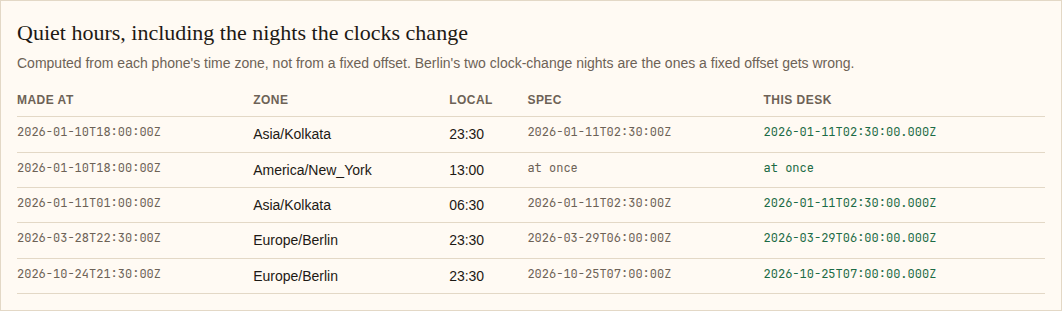
R6. Quiet hours
Only if
quiet_hoursis on.- A push of a type that is not urgent, made when it is between
quiet_startandquiet_endon the phone, is held and sent atquiet_endthere. - The phone's time zone decides, with its own rules for summer time. Two phones of one person can get the same push at different moments.
- Urgent types are sent at once.
- Several pushes held for one phone are all sent at
quiet_end, oldest first, at most 5. If more were held, the fifth is replaced by one that says how many more there are.
Accept when: every row of the table of cases in
design.mdgives the time listed, including the two nights when the clocks change.R7. What each person wants
- A person can turn each type off. A type that is off is not sent to any of their phones.
- Types marked as required cannot be turned off.
Accept when: turning a type off stops it and nothing else.
R8. Badge
Only if
badge_countsis on.- Each push to an iPhone carries the number of that person's unread notifications, counting the one being sent.
- When the person reads notifications in the app, the app tells the server, and the server sends a silent push that sets the badge to the new number on their other phones.
Accept when: three pushes carry 1, 2 and 3, and after reading two the next carries 2.
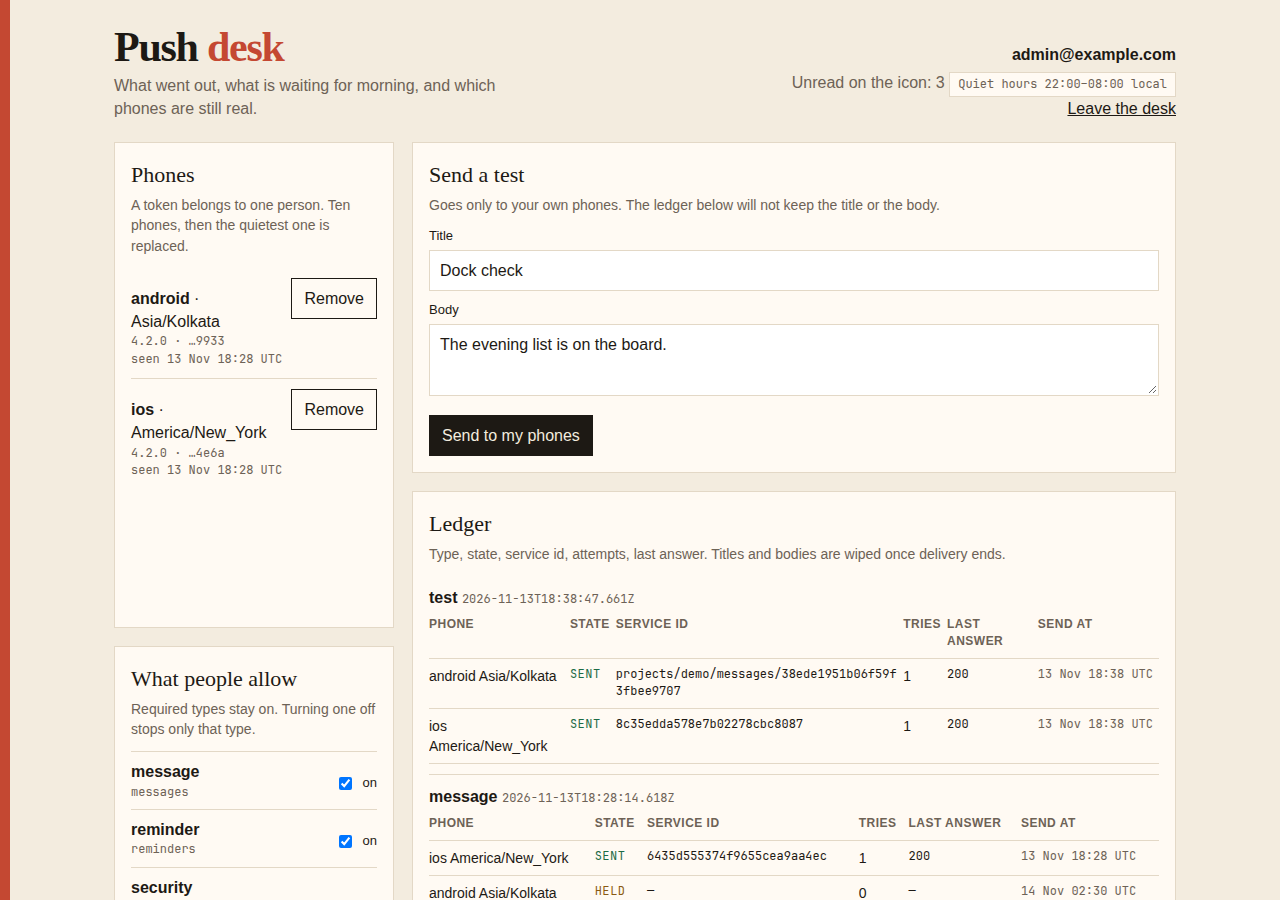
R9. A record
- For each push and each phone: the type, the state, the service's id for it, the attempts and the last answer. Not the title or the body.
- Records are kept 30 days.
- An administrator can send a test push to their own phones and see its record.
Accept when: the record of a sent push holds the service's id, and no record holds a title or a body.
Definition of done
- Every acceptance check above has an automated test, and all tests pass. Tests use the stand-in services, set the clock, and use no outside network.
- No log line holds a push token in full, a key or a service account.
- A README explains how to get the Apple key and the Firebase service account, what the app must do, how to add a type, and how to run the tests.
# Push notifications

## What this builds

The server side of push notifications for a mobile app. It keeps track of which
phone belongs to whom, sends through Apple's and Google's services, drops phones
that are gone, holds what is not urgent until morning where the person is, and
keeps a record of what was sent.

Read `spekkr.inputs.json` first. `targets` says which services are built.
`quiet_hours` decides whether R6 exists, between `quiet_start` and `quiet_end`.
`badge_counts` decides whether R8 exists.

The spec builds the server and a short list of what the app itself must do, in
`design.md`. It needs the server to know who is signed in on a phone.

## Out of scope

- The app's own screens for asking permission.
- Notifications in a web browser.
- Pictures and buttons inside a notification.

## Requirements

Each requirement has an id. Tests name the id they cover.

### R1. Phones

- The app sends `POST /api/devices` with its push token, its platform, its
  version and the phone's time zone, when it starts and when the token changes.
- A token belongs to one person at a time. When another person signs in on the
  phone, the token moves to them and the first person stops getting
  notifications there.
- Signing out deletes the token.
- A person has at most 10 phones. An eleventh replaces the one not seen longest.

Accept when: a token registered by a second person is no longer the first
person's, and signing out leaves no row for the token.

### R2. Send

- App code calls `push(user, type, title, body, data, options)`.
- A push asked for inside a database transaction is queued exactly when the
  transaction commits.
- Types are a list in code. Each says whether it is urgent and what group it is
  shown under on the phone.
- A payload is at most 4,000 bytes. A body that would make it larger is cut, at a
  character and not inside one, and ends with an ellipsis. `data` is never cut: a
  `data` too large is an error at the call.
- With a `collapse_key`, a newer push replaces an older one with the same key on
  the phone instead of adding to it.

Accept when: a body of 5,000 characters is sent cut and still valid UTF-8, and
`data` of 5,000 bytes is refused at the call.

### R3. Through the services

- One adapter for each service in `targets`, behind one interface, with a
  stand-in for tests.
- The adapters follow the table in `design.md`: how to sign in to the service,
  what to send, and what each answer means.
- The sign-in to each service is reused until shortly before it runs out, not
  made anew for every push.

Accept when: each row of the table of answers in `design.md` has a test against
the stand-in, and 100 pushes make one sign-in to the service.

### R4. Phones that are gone

- When a service says a token is no longer valid, the token is deleted at once
  and not tried again.
- A token the app has not sent again for 270 days is deleted.

Accept when: after an "unregistered" answer the token is gone and the next push
to that person skips it.

### R5. Retry

- An answer that says "try later" is tried again after 30 seconds, 2 minutes, 10
  minutes and 1 hour, or after the time the service names if it names one.
- A push can have an expiry. One not delivered by then is dropped, and the
  service is told the same expiry so it does not deliver late either.
- After the fifth failure a push to that phone is marked failed.

Accept when: a stand-in that answers "try later" twice and then accepts is called
three times, and an expired push is not sent.

### R6. Quiet hours

Only if `quiet_hours` is on.

- A push of a type that is not urgent, made when it is between `quiet_start` and
  `quiet_end` on the phone, is held and sent at `quiet_end` there.
- The phone's time zone decides, with its own rules for summer time. Two phones
  of one person can get the same push at different moments.
- Urgent types are sent at once.
- Several pushes held for one phone are all sent at `quiet_end`, oldest first, at
  most 5. If more were held, the fifth is replaced by one that says how many
  more there are.

Accept when: every row of the table of cases in `design.md` gives the time
listed, including the two nights when the clocks change.

### R7. What each person wants

- A person can turn each type off. A type that is off is not sent to any of
  their phones.
- Types marked as required cannot be turned off.

Accept when: turning a type off stops it and nothing else.

### R8. Badge

Only if `badge_counts` is on.

- Each push to an iPhone carries the number of that person's unread
  notifications, counting the one being sent.
- When the person reads notifications in the app, the app tells the server, and
  the server sends a silent push that sets the badge to the new number on their
  other phones.

Accept when: three pushes carry 1, 2 and 3, and after reading two the next
carries 2.

### R9. A record

- For each push and each phone: the type, the state, the service's id for it, the
  attempts and the last answer. Not the title or the body.
- Records are kept 30 days.
- An administrator can send a test push to their own phones and see its record.

Accept when: the record of a sent push holds the service's id, and no record
holds a title or a body.

## Definition of done

- Every acceptance check above has an automated test, and all tests pass. Tests
  use the stand-in services, set the clock, and use no outside network.
- No log line holds a push token in full, a key or a service account.
- A README explains how to get the Apple key and the Firebase service account,
  what the app must do, how to add a type, and how to run the tests.
-
design.mdData model, rules and flows.Design
This file fixes the parts that are easy to get wrong. Choose the language and framework that fit the person's project; nothing here depends on them.
Data model
Use the database in the
databaseinput.Table Columns devicesid,user_id,platform,token(unique),app_version,time_zone,created_at,last_seen_atpushesid,user_id,type,title,body,data(JSON),collapse_key,expires_at,created_atpush_deliveriesid,push_id,device_id,state,attempts,send_at,provider_id,last_answerpush_preferencesuser_id,type,enabled; primary key on the first twostateis one ofheld,waiting,sent,failedanddropped.titleandbodyare emptied when every delivery of the push has ended.The services
Confirm these in Apple's and Google's documentation before building. They were right when this was written.
Apple (APNs) Google (FCM) Address https://api.push.apple.com/3/device/TOKEN, over HTTP/2https://fcm.googleapis.com/v1/projects/PROJECT/messages:sendSign-in A JWT signed with ES256 by the key in APNS_KEY, with the key id in its header and the team id as issuer. Reuse it for 50 minutes.An OAuth access token for the service account in FCM_SERVICE_ACCOUNT. Reuse it until 5 minutes before it runs out.Which app Header apns-topicwithAPNS_BUNDLE_IDThe project in the address Kind Header apns-push-type:alert, orbackgroundfor a silent pushnotificationanddatain the message, ordataalone for a silent pushExpiry Header apns-expiration, seconds since 1970android.ttlReplace Header apns-collapse-idandroid.collapse_keyUrgent Header apns-priority10, otherwise 5android.priorityHIGH, otherwiseNORMALUse the sandbox address
https://api.sandbox.push.apple.comfor builds made in development. Take every address from configuration, so tests can point at the stand-in.What an answer means
Service Answer Do Apple 200 Sent. Keep the apns-idheader.Apple 410, or 400 with reason BadDeviceTokenDelete the token. Apple 400 with reason DeviceTokenNotForTopicDelete the token and log it: the token is for another app. Apple 403 The sign-in is wrong. Make a new one once, then stop and log. Apple 429, 500, 503 Try later. Google 200 Sent. Keep the message name. Google 404, or error UNREGISTEREDDelete the token. Google 400 with error INVALID_ARGUMENTMark failed and log. Do not retry. Google 401 Get a new access token once, then stop and log. Google 429, 500, 503 Try later, after Retry-Afterif it is there.Quiet hours
Work in the phone's
time_zonewith the platform's time zone database, never with a fixed offset. With quiet hours from 22:00 to 08:00:Push made at (UTC) Phone's time zone Local time Sent at (UTC) 2026-01-10T18:00:00ZAsia/Kolkata23:30 2026-01-11T02:30:00Z2026-01-10T18:00:00ZAmerica/New_York13:00 at once 2026-01-11T01:00:00ZAsia/Kolkata06:30 2026-01-11T02:30:00Z2026-03-28T22:30:00ZEurope/Berlin23:30 2026-03-29T06:00:00Z2026-10-24T21:30:00ZEurope/Berlin23:30 2026-10-25T07:00:00ZThe last two are the nights the clocks change in Berlin. A fixed offset gets both wrong by an hour.
The quiet period can cross midnight, as here, or not. A phone with a time zone the database does not know is treated as UTC.
What the app must do
- Ask for permission to notify at a moment that makes sense to the person, not on first launch.
- Send the token to
POST /api/deviceson every launch and whenever the system gives a new one. - Tell the server on sign-out, before the session is dropped.
- When a notification is tapped, open the address in its
data.link. - When the person reads notifications, call the server so badges on their other phones are set.
Configuration
Secret Purpose DATABASE_URLConnection string for the chosen database. APNS_KEY,APNS_KEY_ID,APNS_TEAM_ID,APNS_BUNDLE_IDApple's push key and what goes with it. Not needed without iOS. FCM_SERVICE_ACCOUNTThe Firebase service account, as JSON. Not needed without Android. Named here
- A payload's size is the size of the JSON sent to the push service, without the device token.
- Quiet hours that start and end at the same time mean no quiet hours.
What this spec leaves to you
Where this spec names something, use that name, so that two builds of it agree. Where it does not, the choice is yours. List what you chose in the README.
# Design

This file fixes the parts that are easy to get wrong. Choose the language and
framework that fit the person's project; nothing here depends on them.

## Data model

Use the database in the `database` input.

| Table | Columns |
| --- | --- |
| `devices` | `id`, `user_id`, `platform`, `token` (unique), `app_version`, `time_zone`, `created_at`, `last_seen_at` |
| `pushes` | `id`, `user_id`, `type`, `title`, `body`, `data` (JSON), `collapse_key`, `expires_at`, `created_at` |
| `push_deliveries` | `id`, `push_id`, `device_id`, `state`, `attempts`, `send_at`, `provider_id`, `last_answer` |
| `push_preferences` | `user_id`, `type`, `enabled`; primary key on the first two |

`state` is one of `held`, `waiting`, `sent`, `failed` and `dropped`. `title` and
`body` are emptied when every delivery of the push has ended.

## The services

Confirm these in Apple's and Google's documentation before building. They were
right when this was written.

| | Apple (APNs) | Google (FCM) |
| --- | --- | --- |
| Address | `https://api.push.apple.com/3/device/TOKEN`, over HTTP/2 | `https://fcm.googleapis.com/v1/projects/PROJECT/messages:send` |
| Sign-in | A JWT signed with ES256 by the key in `APNS_KEY`, with the key id in its header and the team id as issuer. Reuse it for 50 minutes. | An OAuth access token for the service account in `FCM_SERVICE_ACCOUNT`. Reuse it until 5 minutes before it runs out. |
| Which app | Header `apns-topic` with `APNS_BUNDLE_ID` | The project in the address |
| Kind | Header `apns-push-type`: `alert`, or `background` for a silent push | `notification` and `data` in the message, or `data` alone for a silent push |
| Expiry | Header `apns-expiration`, seconds since 1970 | `android.ttl` |
| Replace | Header `apns-collapse-id` | `android.collapse_key` |
| Urgent | Header `apns-priority` 10, otherwise 5 | `android.priority` `HIGH`, otherwise `NORMAL` |

Use the sandbox address `https://api.sandbox.push.apple.com` for builds made in
development. Take every address from configuration, so tests can point at the
stand-in.

## What an answer means

| Service | Answer | Do |
| --- | --- | --- |
| Apple | 200 | Sent. Keep the `apns-id` header. |
| Apple | 410, or 400 with reason `BadDeviceToken` | Delete the token. |
| Apple | 400 with reason `DeviceTokenNotForTopic` | Delete the token and log it: the token is for another app. |
| Apple | 403 | The sign-in is wrong. Make a new one once, then stop and log. |
| Apple | 429, 500, 503 | Try later. |
| Google | 200 | Sent. Keep the message name. |
| Google | 404, or error `UNREGISTERED` | Delete the token. |
| Google | 400 with error `INVALID_ARGUMENT` | Mark failed and log. Do not retry. |
| Google | 401 | Get a new access token once, then stop and log. |
| Google | 429, 500, 503 | Try later, after `Retry-After` if it is there. |

## Quiet hours

Work in the phone's `time_zone` with the platform's time zone database, never
with a fixed offset. With quiet hours from 22:00 to 08:00:

| Push made at (UTC) | Phone's time zone | Local time | Sent at (UTC) |
| --- | --- | --- | --- |
| `2026-01-10T18:00:00Z` | `Asia/Kolkata` | 23:30 | `2026-01-11T02:30:00Z` |
| `2026-01-10T18:00:00Z` | `America/New_York` | 13:00 | at once |
| `2026-01-11T01:00:00Z` | `Asia/Kolkata` | 06:30 | `2026-01-11T02:30:00Z` |
| `2026-03-28T22:30:00Z` | `Europe/Berlin` | 23:30 | `2026-03-29T06:00:00Z` |
| `2026-10-24T21:30:00Z` | `Europe/Berlin` | 23:30 | `2026-10-25T07:00:00Z` |

The last two are the nights the clocks change in Berlin. A fixed offset gets
both wrong by an hour.

The quiet period can cross midnight, as here, or not. A phone with a time zone
the database does not know is treated as UTC.

## What the app must do

1. Ask for permission to notify at a moment that makes sense to the person, not
   on first launch.
2. Send the token to `POST /api/devices` on every launch and whenever the system
   gives a new one.
3. Tell the server on sign-out, before the session is dropped.
4. When a notification is tapped, open the address in its `data.link`.
5. When the person reads notifications, call the server so badges on their other
   phones are set.

## Configuration

| Secret | Purpose |
| --- | --- |
| `DATABASE_URL` | Connection string for the chosen database. |
| `APNS_KEY`, `APNS_KEY_ID`, `APNS_TEAM_ID`, `APNS_BUNDLE_ID` | Apple's push key and what goes with it. Not needed without iOS. |
| `FCM_SERVICE_ACCOUNT` | The Firebase service account, as JSON. Not needed without Android. |

## Named here

- A payload's size is the size of the JSON sent to the push service, without the
  device token.
- Quiet hours that start and end at the same time mean no quiet hours.

## What this spec leaves to you

Where this spec names something, use that name, so that two builds of it agree.
Where it does not, the choice is yours. List what you chose in the README.
-
tasks.mdBuild tasks in order, each with a check.Tasks
Work in order. Finish a task's check before starting the next.
- Set up. Add the tables in
design.md, a clock that tests can set, the adapter interface and a stand-in service. If there is no server yet, build the smallest one: users who can sign in from a phone. Check: migrations run from empty. - Phones (R1). Check: the R1 acceptance tests pass.
- Send (R2). The list of types,
push, and the cut that keeps a payload under its size. Check: the R2 acceptance tests pass. - Quiet hours (R6). Only if
quiet_hoursis on. A pure function from a time, a time zone,quiet_startandquiet_endto when to send. Check: a test covers every row of the table of cases indesign.md. - The worker, retries and dead tokens (R4, R5). Against the stand-in. Check: the R4 and R5 acceptance tests pass.
- The real adapters (R3). For the
targetsinput. Check: each row of the table of answers indesign.mdhas a test, and the sign-in is reused. - Preferences (R7) and badges (R8). R8 only if
badge_countsis on. Check: the R7 and R8 acceptance tests pass. - A record (R9). Check: the R9 acceptance tests pass.
- Finish. Write the README and run the whole test suite. Check: every item under "Definition of done" in
spec.mdis true.
# Tasks

Work in order. Finish a task's check before starting the next.

1. **Set up.** Add the tables in `design.md`, a clock that tests can set, the
   adapter interface and a stand-in service. If there is no server yet, build
   the smallest one: users who can sign in from a phone.
   Check: migrations run from empty.

2. **Phones (R1).**
   Check: the R1 acceptance tests pass.

3. **Send (R2).** The list of types, `push`, and the cut that keeps a payload
   under its size.
   Check: the R2 acceptance tests pass.

4. **Quiet hours (R6).** Only if `quiet_hours` is on. A pure function from a
   time, a time zone, `quiet_start` and `quiet_end` to when to send.
   Check: a test covers every row of the table of cases in `design.md`.

5. **The worker, retries and dead tokens (R4, R5).** Against the stand-in.
   Check: the R4 and R5 acceptance tests pass.

6. **The real adapters (R3).** For the `targets` input.
   Check: each row of the table of answers in `design.md` has a test, and the
   sign-in is reused.

7. **Preferences (R7) and badges (R8).** R8 only if `badge_counts` is on.
   Check: the R7 and R8 acceptance tests pass.

8. **A record (R9).**
   Check: the R9 acceptance tests pass.

9. **Finish.** Write the README and run the whole test suite.
   Check: every item under "Definition of done" in `spec.md` is true.
- Set up. Add the tables in
Is it for me?
- Kind
- app part
- Platforms
- mobile, backend
What does it need?
- Accounts
- An Apple Developer account with a push key, for iOS, A Firebase project, for Android
- Agent permissions
- shell, network
- Secrets it reads
DATABASE_URLAPNS_KEYAPNS_KEY_IDAPNS_TEAM_IDAPNS_BUNDLE_IDFCM_SERVICE_ACCOUNT
What changed?
- 0.1.215 Nov 2026Names what it builds.
- 0.1.114 Nov 2026Says "person" where it said "buyer".
- 0.1.014 Nov 2026Moved from dwrtz/push-notifications.
For agents: start.md says how to build this spec, spec.json holds everything on this page, and bundle.tar.gz holds its files.