Feature flags
Flags with targeting rules, percentage rollouts that stay stable per user, a kill switch and a history of every change.
This is an app part spec on Spekkr, published by vex. It is listed with the other specs. Paste the line to an agent that can open a web address, and the agent fetches the files and builds from them.
- Spec
vex/feature-flags- Version
- 0.1.2
- Published by
- vex
- Updated
- 15 Nov 2026
Build this spec
Build the spec at https://spekkr.com/vex/feature-flags/start.md.
Paste this to your AI agent. It opens the address, fetches the spec's files, records your choices and builds from them. Nothing to install, no account.
Published by vex.
What does the result look like?
What can I customize?
Your choices go into the line you copy. Anything else is yours to edit, but it leaves the tested path.
What do I get?
-
spec.mdRequirements and acceptance criteria.Feature flags
What this builds
Switches that turn parts of an app on for some people and off for others without a deploy. A flag has rules, can be rolled out to a percentage, and can be killed at once. App code asks one function whether a flag is on.
Read
spekkr.inputs.jsonfirst. A rollout counts the thing named bysubject. Flags are cached forcache_secondsseconds.change_historydecides whether R6 exists andclient_endpointwhether R7 does.This spec needs the app to know who is signed in and who is an administrator. It does not build sign-in.
Out of scope
- Experiments, metrics and deciding which variant won.
- Flags with values other than on and off.
- Separate settings per environment. Each environment has its own database.
Requirements
Each requirement has an id. Tests name the id they cover.
R1. Flags
- A flag has a key of lowercase letters, digits and hyphens, a description, and a kill switch called
enabled. - A flag whose
enabledis off is off for everyone, whatever its rules say. - A key cannot be changed or reused after the flag is deleted.
Accept when: a flag with
enabledoff is off for a subject its rules would turn it on for, and a deleted key cannot be created again.R2. Rules
- A flag has an ordered list of rules. The first rule whose conditions all hold decides. If none holds, the flag is off.
- A condition compares one attribute of the subject:
equals,ina list, orends_with, which is meant for email domains. Comparison ignores case. - A rule's outcome is on, off, or a percentage from 0 to 100 with up to two decimal places.
- A rule with no conditions holds for everyone. It is how "20% of everyone" is written.
Accept when: rules are tried in order and the first match decides, and an attribute that the subject does not have makes a condition false, not an error.
R3. Percentages
- A percentage is decided by the bucket in
design.md, a number from 0 to 9999 worked out from the flag's key and the subject's id. - The flag is on when the bucket is less than the percentage times 100.
- The same subject always gets the same answer for the same flag and percentage. Raising a percentage never turns the flag off for a subject who had it on.
- Two flags at the same percentage do not pick the same subjects.
Accept when: the table of buckets in
design.mdis reproduced exactly, and the counts given under it are reproduced exactly.R4. Ask whether a flag is on
- App code calls
is_enabled(flag_key, subject, attributes). - A key that has no flag answers off, and is logged once per process.
- Asking does not query the database each time. Flags are loaded together and kept for
cache_secondsseconds. - If the database cannot be reached, the last loaded flags keep answering. If nothing was ever loaded, everything is off.
Accept when: a thousand calls make at most one database query, a change shows up after the cache time, and with the database stopped the last answers stand.
R5. Overrides
- A flag can be forced on or off for single subjects by id. An override beats every rule, but not the kill switch.
Accept when: an override to on wins over a rule that says off, and loses to
enabledoff.R6. History
Only if
change_historyis on.- Every change to a flag, its rules or its overrides records who made it, when, and the flag as it was before and after.
- The flag's page shows its history, newest first.
- History is never edited. It is deleted only with the flag, after 90 days.
Accept when: each kind of change leaves one entry with the right before and after.
R7. Flags for the browser
Only if
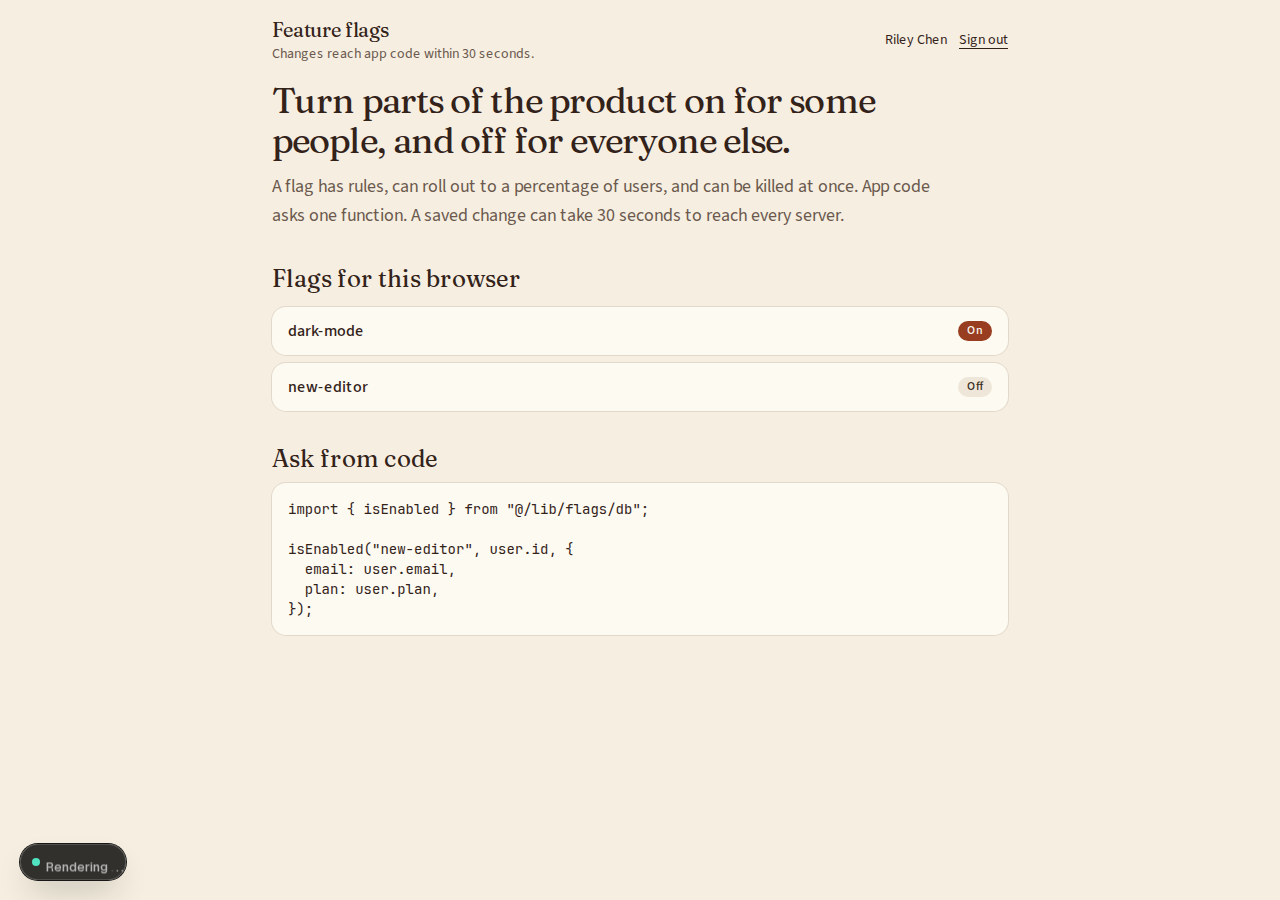
client_endpointis on.GET /api/flagsanswers a signed-in browser with the flags marked "visible to the browser", each as on or off for that subject.- The answer never contains rules, percentages, overrides or flags not so marked.
Accept when: the answer for two subjects differs where their rules differ, and a flag that is not marked visible never appears.
R8. Pages for administrators
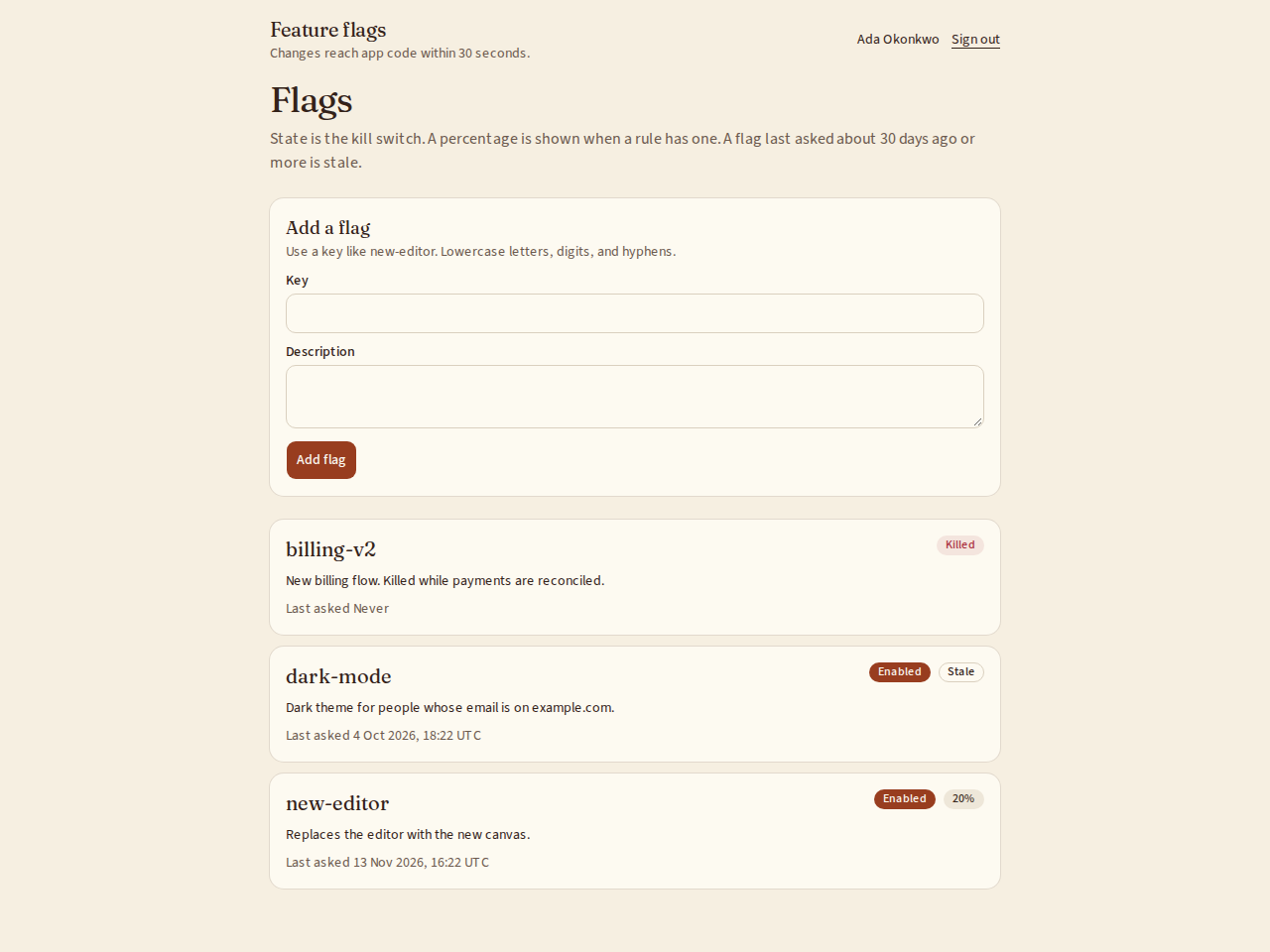
- A list of flags with their state, the percentage if there is one, and when each was last asked about. Flags not asked about for 30 days are marked stale.
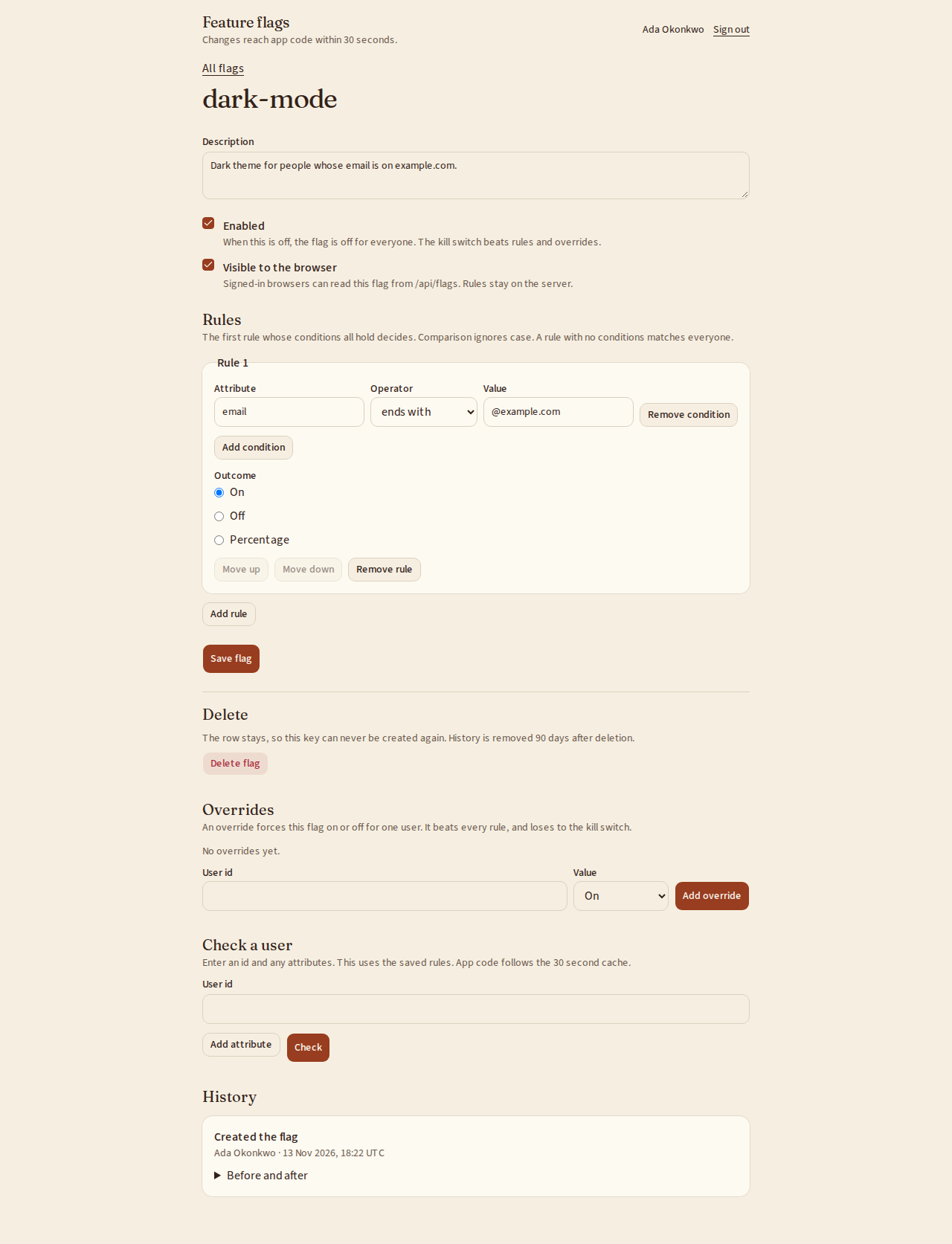
- A flag's page to edit the description, the kill switch, the rules, their order and the overrides.
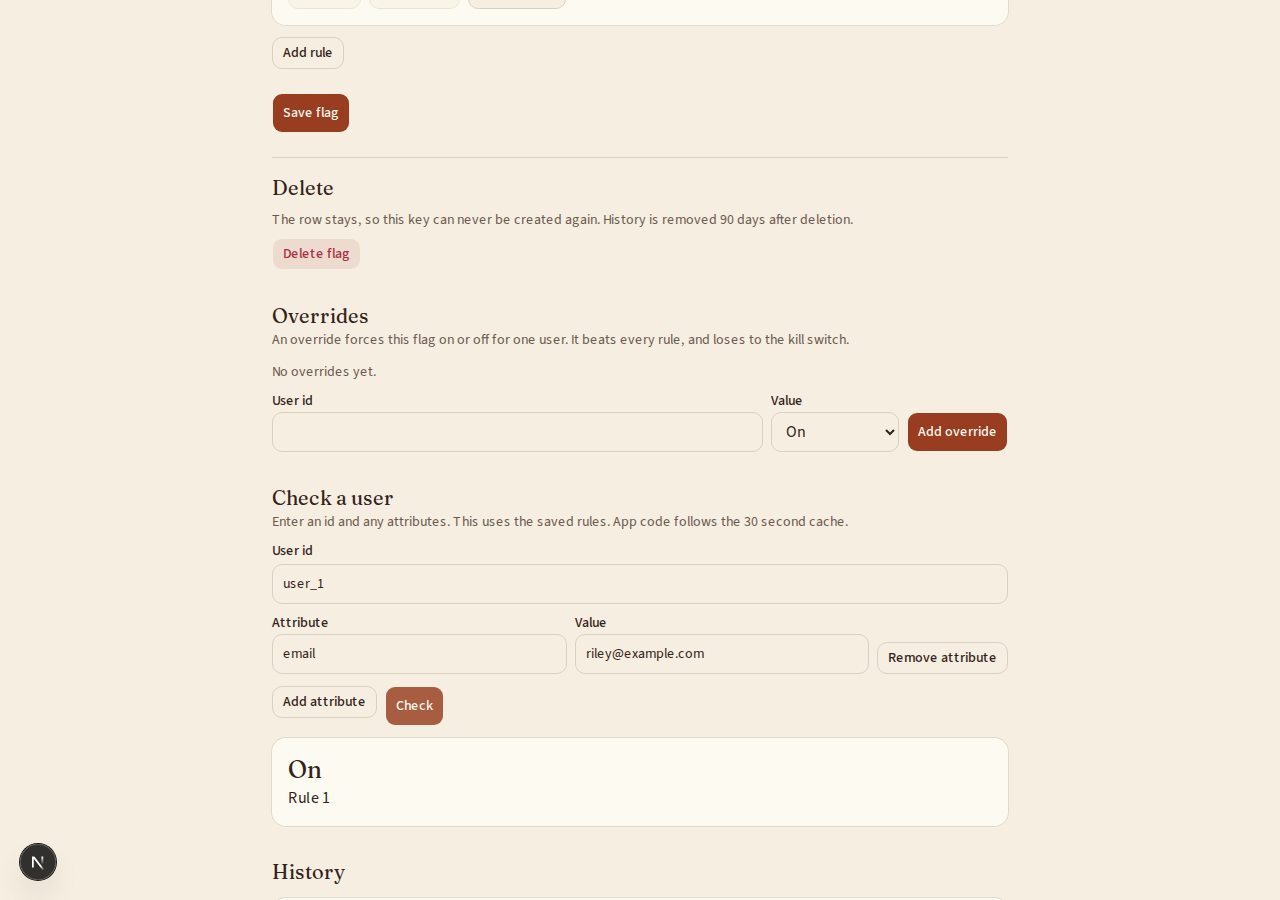
- "Check a subject": enter an id and attributes, and see the answer and which rule gave it.
- Only administrators reach these pages.
Accept when: each page works with a keyboard alone and at a 360 pixel wide screen, and a person who is not an administrator gets 403.
Definition of done
- Every acceptance check above has an automated test, and all tests pass.
- A README explains how to add a flag, how to ask about it from code, and how to run the tests.
# Feature flags

## What this builds

Switches that turn parts of an app on for some people and off for others without a
deploy. A flag has rules, can be rolled out to a percentage, and can be killed at
once. App code asks one function whether a flag is on.

Read `spekkr.inputs.json` first. A rollout counts the thing named by `subject`.
Flags are cached for `cache_seconds` seconds. `change_history` decides whether R6
exists and `client_endpoint` whether R7 does.

This spec needs the app to know who is signed in and who is an administrator. It
does not build sign-in.

## Out of scope

- Experiments, metrics and deciding which variant won.
- Flags with values other than on and off.
- Separate settings per environment. Each environment has its own database.

## Requirements

Each requirement has an id. Tests name the id they cover.

### R1. Flags

- A flag has a key of lowercase letters, digits and hyphens, a description, and a
  kill switch called `enabled`.
- A flag whose `enabled` is off is off for everyone, whatever its rules say.
- A key cannot be changed or reused after the flag is deleted.

Accept when: a flag with `enabled` off is off for a subject its rules would turn it
on for, and a deleted key cannot be created again.

### R2. Rules

- A flag has an ordered list of rules. The first rule whose conditions all hold
  decides. If none holds, the flag is off.
- A condition compares one attribute of the subject: `equals`, `in` a list, or
  `ends_with`, which is meant for email domains. Comparison ignores case.
- A rule's outcome is on, off, or a percentage from 0 to 100 with up to two
  decimal places.
- A rule with no conditions holds for everyone. It is how "20% of everyone" is
  written.

Accept when: rules are tried in order and the first match decides, and an attribute
that the subject does not have makes a condition false, not an error.

### R3. Percentages

- A percentage is decided by the bucket in `design.md`, a number from 0 to 9999
  worked out from the flag's key and the subject's id.
- The flag is on when the bucket is less than the percentage times 100.
- The same subject always gets the same answer for the same flag and percentage.
  Raising a percentage never turns the flag off for a subject who had it on.
- Two flags at the same percentage do not pick the same subjects.

Accept when: the table of buckets in `design.md` is reproduced exactly, and the
counts given under it are reproduced exactly.

### R4. Ask whether a flag is on

- App code calls `is_enabled(flag_key, subject, attributes)`.
- A key that has no flag answers off, and is logged once per process.
- Asking does not query the database each time. Flags are loaded together and kept
  for `cache_seconds` seconds.
- If the database cannot be reached, the last loaded flags keep answering. If
  nothing was ever loaded, everything is off.

Accept when: a thousand calls make at most one database query, a change shows up
after the cache time, and with the database stopped the last answers stand.

### R5. Overrides

- A flag can be forced on or off for single subjects by id. An override beats every
  rule, but not the kill switch.

Accept when: an override to on wins over a rule that says off, and loses to
`enabled` off.

### R6. History

Only if `change_history` is on.

- Every change to a flag, its rules or its overrides records who made it, when,
  and the flag as it was before and after.
- The flag's page shows its history, newest first.
- History is never edited. It is deleted only with the flag, after 90 days.

Accept when: each kind of change leaves one entry with the right before and after.

### R7. Flags for the browser

Only if `client_endpoint` is on.

- `GET /api/flags` answers a signed-in browser with the flags marked "visible to
  the browser", each as on or off for that subject.
- The answer never contains rules, percentages, overrides or flags not so marked.

Accept when: the answer for two subjects differs where their rules differ, and a
flag that is not marked visible never appears.

### R8. Pages for administrators

- A list of flags with their state, the percentage if there is one, and when each
  was last asked about. Flags not asked about for 30 days are marked stale.
- A flag's page to edit the description, the kill switch, the rules, their order
  and the overrides.
- "Check a subject": enter an id and attributes, and see the answer and which
  rule gave it.
- Only administrators reach these pages.

Accept when: each page works with a keyboard alone and at a 360 pixel wide screen,
and a person who is not an administrator gets 403.

## Definition of done

- Every acceptance check above has an automated test, and all tests pass.
- A README explains how to add a flag, how to ask about it from code, and how to
  run the tests.
-
design.mdData model, rules and flows.Design
This file fixes the parts that are easy to get wrong. Choose the language and framework that fit the person's project; nothing here depends on them.
Data model
Use the database in the
databaseinput.Table Columns flagskey(primary key),description,enabled,client_visible,rules(JSON),last_asked_at,created_at,deleted_atflag_overridesflag_key,subject_id,value; primary key on the first twoflag_changesid,flag_key,actor_id,before(JSON),after(JSON),at(only ifchange_historyis on)A deleted flag keeps its row with
deleted_atset, so its key cannot be reused.The subject is a user or a workspace, as the
subjectinput says. Its id is turned to text before it is used below.Rules as data
[
  { "when": [{ "attribute": "email", "op": "ends_with", "value": "@example.com" }],
    "then": "on" },
  { "when": [{ "attribute": "plan", "op": "in", "value": ["pro", "team"] }],
    "then": { "percentage": 20 } },
  { "when": [], "then": "off" }
]
The bucket
text   = flag key, a colon, subject id      for example  new-editor:user_1
digest = SHA-256 of text as UTF-8
number = the first 4 bytes of digest, read as an unsigned big-endian integer
bucket = number modulo 10000
The flag is on when
bucket < percentage * 100. Do the comparison in whole numbers: 12.5% is 1250.Flag key Subject id Bucket On at 20% On at 60% new-editoruser_15258 no yes new-editoruser_28497 no no new-editoruser_36249 no no new-editoruser_41707 yes yes dark-modeuser_12089 no yes Over the 10,000 subject ids
user_1touser_10000:Rollout Subjects with the flag on new-editorat 20%1,979 new-editorat 50%4,970 new-editorat 20% anddark-modeat 20%, both on409 Order of evaluation
- No flag with that key: off.
enabledis off: off.- An override for the subject: its value.
- The first rule whose conditions all hold: its outcome.
- Otherwise: off.
Return the answer with the reason, one of
unknown,killed,override,rulewith its position, ordefault. "Check a subject" shows the reason.Caching
- Keep every flag and override in memory, loaded in one query each, and reload when they are older than
cache_seconds. - Reload in the background. A request never waits for a reload after the first.
- Write
last_asked_atat most once an hour per flag, from a background task.
Configuration
Secret Purpose DATABASE_URLConnection string for the chosen database. Who is signed in
The spec reaches the app's sign-in through one function,
current_user(request). It answers with the person's id, and says whether they are an administrator where this spec asks. In the person's app it reads their session.When there is no app yet, build this stand-in and nothing more: a page that lists two seeded people, one of them an administrator, with a button for each that sets a signed cookie naming them. The stand-in refuses to start in production.
Named here
- A rule's position in a reason is counted from 1.
- In the form, the values of an
inrule are separated by commas.
What this spec leaves to you
Where this spec names something, use that name, so that two builds of it agree. Where it does not, the choice is yours. List what you chose in the README.
# Design This file fixes the parts that are easy to get wrong. Choose the language and framework that fit the person's project; nothing here depends on them. ## Data model Use the database in the `database` input. | Table | Columns | | --- | --- | | `flags` | `key` (primary key), `description`, `enabled`, `client_visible`, `rules` (JSON), `last_asked_at`, `created_at`, `deleted_at` | | `flag_overrides` | `flag_key`, `subject_id`, `value`; primary key on the first two | | `flag_changes` | `id`, `flag_key`, `actor_id`, `before` (JSON), `after` (JSON), `at` (only if `change_history` is on) | A deleted flag keeps its row with `deleted_at` set, so its key cannot be reused. The subject is a user or a workspace, as the `subject` input says. Its id is turned to text before it is used below. ## Rules as data ```json [ { "when": [{ "attribute": "email", "op": "ends_with", "value": "@example.com" }], "then": "on" }, { "when": [{ "attribute": "plan", "op": "in", "value": ["pro", "team"] }], "then": { "percentage": 20 } }, { "when": [], "then": "off" } ] ``` ## The bucket ``` text = flag key, a colon, subject id for example new-editor:user_1 digest = SHA-256 of text as UTF-8 number = the first 4 bytes of digest, read as an unsigned big-endian integer bucket = number modulo 10000 ``` The flag is on when `bucket < percentage * 100`. Do the comparison in whole numbers: 12.5% is 1250. | Flag key | Subject id | Bucket | On at 20% | On at 60% | | --- | --- | --- | --- | --- | | `new-editor` | `user_1` | 5258 | no | yes | | `new-editor` | `user_2` | 8497 | no | no | | `new-editor` | `user_3` | 6249 | no | no | | `new-editor` | `user_4` | 1707 | yes | yes | | `dark-mode` | `user_1` | 2089 | no | yes | Over the 10,000 subject ids `user_1` to `user_10000`: | Rollout | Subjects with the flag on | | --- | --- | | `new-editor` at 20% | 1,979 | | `new-editor` at 50% | 4,970 | | `new-editor` at 20% and `dark-mode` at 20%, both on | 409 | ## Order of evaluation 1. No flag with that key: off. 2. `enabled` is off: off. 3. An override for the subject: its value. 4. The first rule whose conditions all hold: its outcome. 5. Otherwise: off. Return the answer with the reason, one of `unknown`, `killed`, `override`, `rule` with its position, or `default`. "Check a subject" shows the reason. ## Caching - Keep every flag and override in memory, loaded in one query each, and reload when they are older than `cache_seconds`. - Reload in the background. A request never waits for a reload after the first. - Write `last_asked_at` at most once an hour per flag, from a background task. ## Configuration | Secret | Purpose | | --- | --- | | `DATABASE_URL` | Connection string for the chosen database. | ## Who is signed in The spec reaches the app's sign-in through one function, `current_user(request)`. It answers with the person's id, and says whether they are an administrator where this spec asks. In the person's app it reads their session. When there is no app yet, build this stand-in and nothing more: a page that lists two seeded people, one of them an administrator, with a button for each that sets a signed cookie naming them. The stand-in refuses to start in production. ## Named here - A rule's position in a reason is counted from 1. - In the form, the values of an `in` rule are separated by commas. ## What this spec leaves to you Where this spec names something, use that name, so that two builds of it agree. Where it does not, the choice is yours. List what you chose in the README. -
tasks.mdBuild tasks in order, each with a check.Tasks
Work in order. Finish a task's check before starting the next.
- Set up. Add the tables in
design.md. If there is no app yet, build the smallest one: a signed-in user who may be an administrator, and a workspace ifsubjectisworkspace. Check: migrations run from empty. - The bucket (R3). A pure function of flag key and subject id. Check: a test reproduces every row of both tables under "The bucket" in
design.md. - Evaluation (R1, R2, R5). A pure function from a flag, its overrides, a subject and attributes to an answer and a reason. Check: the R1, R2 and R5 acceptance tests pass without a database.
- Loading and caching (R4). Use the
cache_secondsinput and a clock that tests can set. Check: the R4 acceptance tests pass. - History (R6). Only if
change_historyis on. Check: the R6 acceptance tests pass. - Flags for the browser (R7). Only if
client_endpointis on. Check: the R7 acceptance tests pass. - Pages (R8). Check: every page can be used with a keyboard alone and at 360 pixels wide.
- Finish. Write the README and run the whole test suite. Check: every item under "Definition of done" in
spec.mdis true.
# Tasks

Work in order. Finish a task's check before starting the next.

1. **Set up.** Add the tables in `design.md`. If there is no app yet, build the
   smallest one: a signed-in user who may be an administrator, and a workspace if
   `subject` is `workspace`.
   Check: migrations run from empty.

2. **The bucket (R3).** A pure function of flag key and subject id.
   Check: a test reproduces every row of both tables under "The bucket" in
   `design.md`.

3. **Evaluation (R1, R2, R5).** A pure function from a flag, its overrides, a
   subject and attributes to an answer and a reason.
   Check: the R1, R2 and R5 acceptance tests pass without a database.

4. **Loading and caching (R4).** Use the `cache_seconds` input and a clock that
   tests can set.
   Check: the R4 acceptance tests pass.

5. **History (R6).** Only if `change_history` is on.
   Check: the R6 acceptance tests pass.

6. **Flags for the browser (R7).** Only if `client_endpoint` is on.
   Check: the R7 acceptance tests pass.

7. **Pages (R8).**
   Check: every page can be used with a keyboard alone and at 360 pixels wide.

8. **Finish.** Write the README and run the whole test suite.
   Check: every item under "Definition of done" in `spec.md` is true.
- Set up. Add the tables in
Is it for me?
- Kind
- app part
- Platforms
- backend, web
What does it need?
- Agent permissions
- shell, network
- Secrets it reads
DATABASE_URL
What changed?
- 0.1.215 Nov 2026Names what it builds.
- 0.1.114 Nov 2026Says "person" where it said "buyer".
- 0.1.014 Nov 2026Moved from dwrtz/feature-flags.
For agents: start.md says how to build this spec, spec.json holds everything on this page, and bundle.tar.gz holds its files.