CSV import
Let customers import a CSV file: column mapping, a dry run, an error report row by row, and no half-finished imports.
This is an app part spec on Spekkr, published by vex. It is listed with the other specs. Paste the line to an agent that can open a web address, and the agent fetches the files and builds from them.
- Spec
vex/csv-import- Version
- 0.1.2
- Published by
- vex
- Updated
- 15 Nov 2026
Build this spec
Build the spec at https://spekkr.com/vex/csv-import/start.md.
Paste this to your AI agent. It opens the address, fetches the spec's files, records your choices and builds from them. Nothing to install, no account.
Published by vex.
What does the result look like?
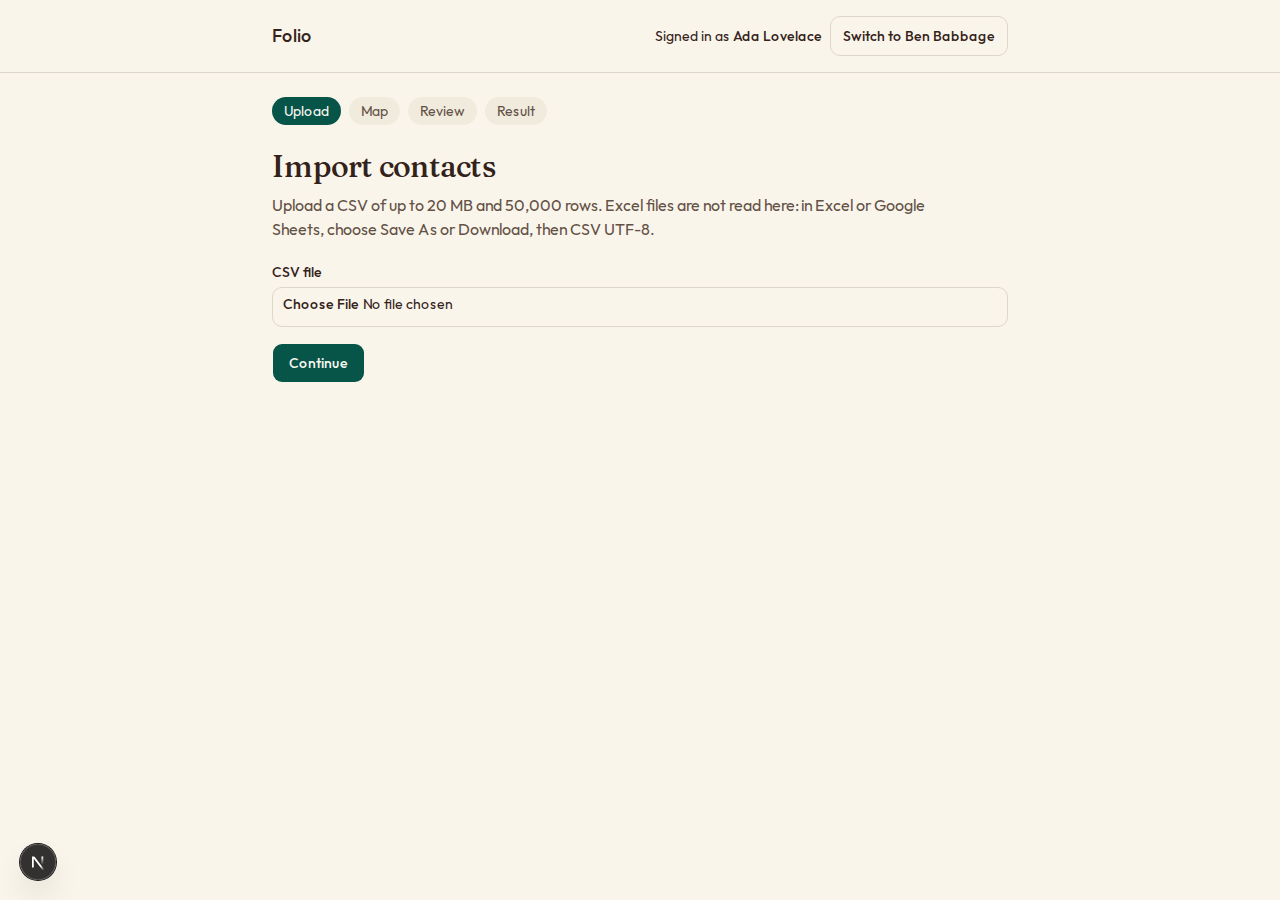
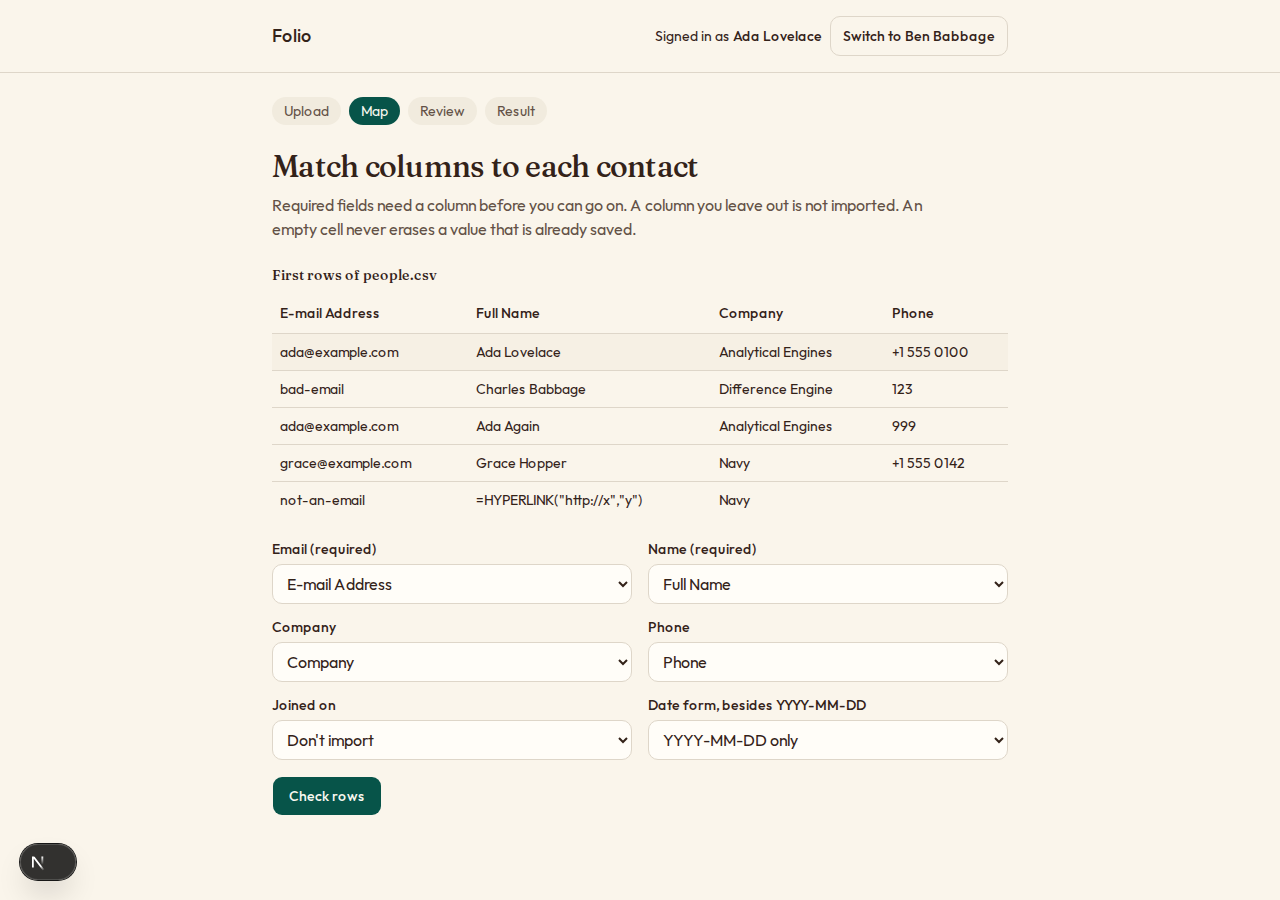
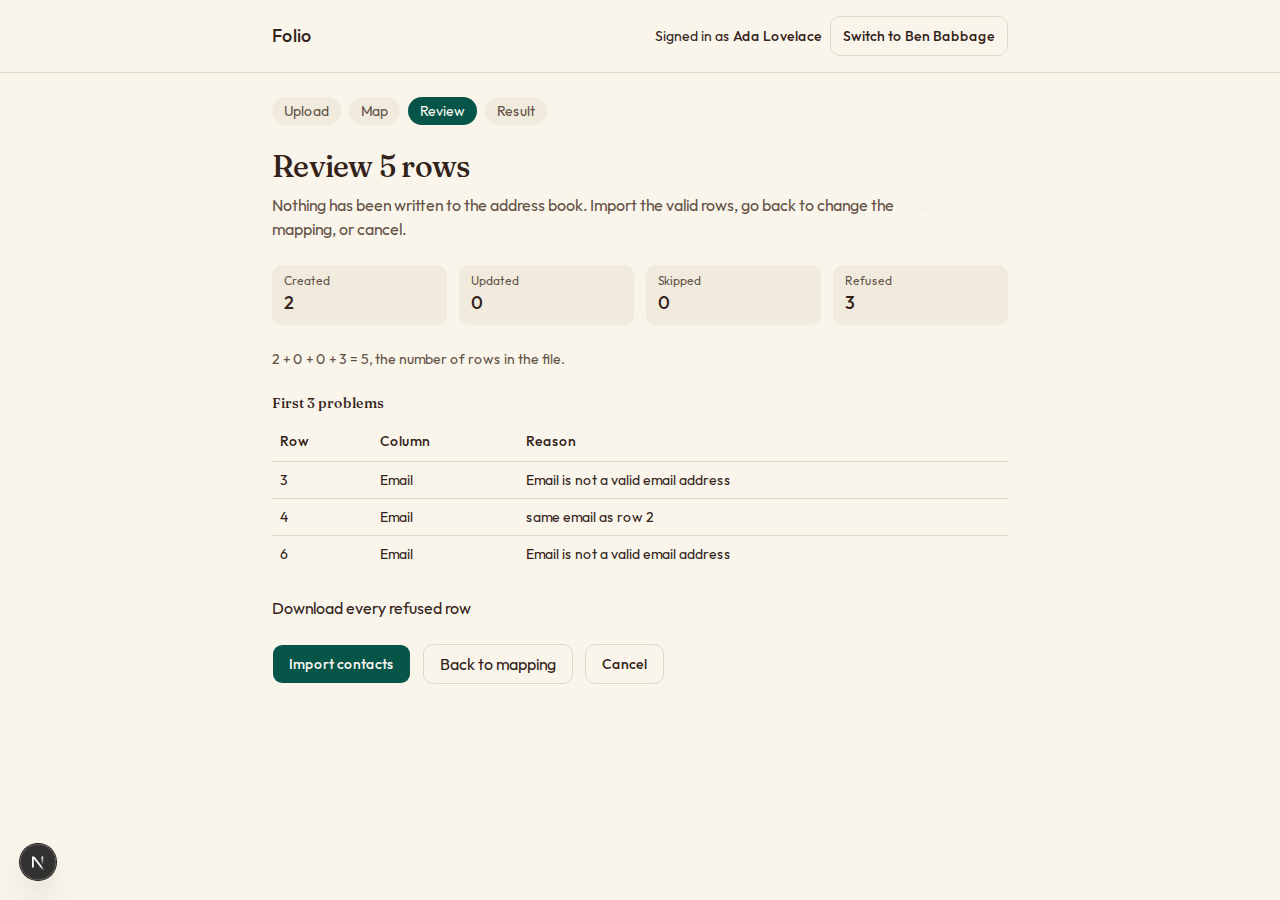
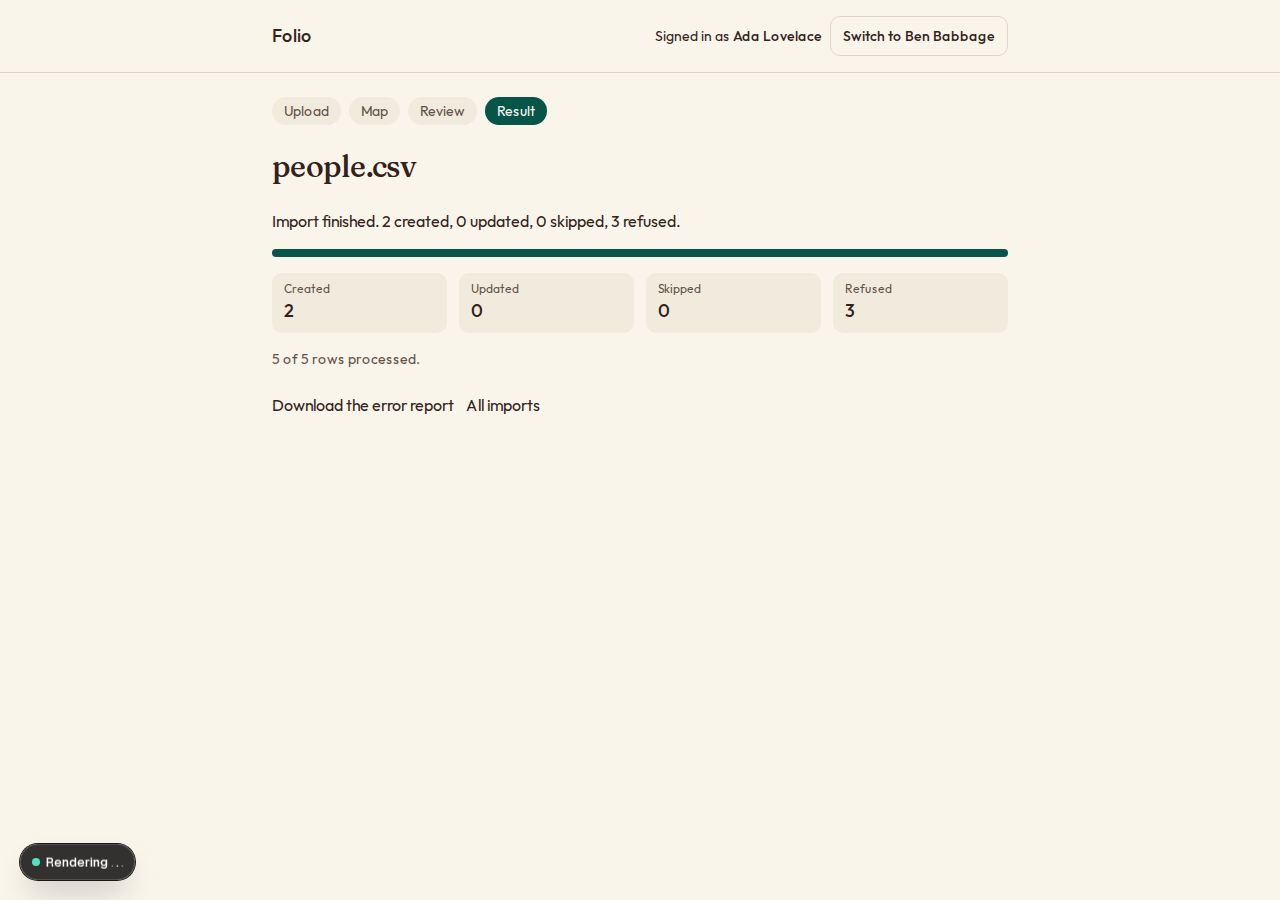
What can I customize?
Your choices go into the line you copy. Anything else is yours to edit, but it leaves the tested path.
What do I get?
-
spec.mdRequirements and acceptance criteria.CSV import
What this builds
A way for an app's customers to bring their own data in from a spreadsheet. The person uploads a CSV file, says which column is which, sees what would happen before anything is saved, and gets a report of every row that has a problem.
Read
spekkr.inputs.jsonfirst. The pages call the thing being imported arecord_noun. A file has at mostmax_rowsrows.update_existingchanges R5, andundodecides whether R7 exists.The spec imports into one example table,
contacts, described as data indesign.md. To import something else, change that description and nothing else.This spec needs the app to know who is signed in. It does not build sign-in.
Out of scope
- Excel files. The upload page says how to save a sheet as CSV.
- Imports that run on a schedule or from an address.
- Records that span several rows.
Requirements
Each requirement has an id. Tests name the id they cover.
R1. Read the file
- A file is at most 20 MB (20,000,000 bytes) and
max_rowsrows, not counting the header. A larger one is refused before it is read to the end. - The file is UTF-8, with or without a byte order mark, or UTF-16 with one. Any other encoding is refused with a message that says how to save as UTF-8.
- The separator is whichever of comma, semicolon and tab splits the first 10 lines into the same number of columns, more than one. If none does, the person is asked.
- Fields follow the usual rules: a field in double quotes can hold separators, line breaks and doubled quotes. The cases in
design.mdcome out exactly as given. - The first row is the header. Empty rows are skipped. A row with more or fewer fields than the header is an error for that row, not for the file.
Accept when: every case in the table in
design.mdparses as given, and a file ofmax_rowsplus one rows is refused.R2. Map the columns
- The person sees the header and the first 5 rows, and for each field of the record a list to choose a column from.
- Each field starts on the column whose header matches its name or one of its other names, ignoring case, spaces, hyphens and underscores.
- A required field must be mapped before the person can go on. A column can be left out.
- The choice is remembered for that person, and offered again for a file with the same header.
Accept when: a header of
E-mail Addressis matched toemailunasked, and going on without a required field is refused.R3. Dry run
- Every row is checked against the rules of the fields it maps to: required, the form of an email address, a number, a date, a longest length.
- Dates are read as
YYYY-MM-DD, or in the one other form the person picks from a list on the mapping page. A date that fits neither is an error. - The result says how many rows would be created, updated, skipped and refused, and shows the first 20 problems with row number, column and reason.
- The person can download every refused row as a CSV file: the original columns plus one,
Error. - Nothing is saved to the record table during a dry run.
Accept when: the counts add up to the number of rows, the downloaded report holds exactly the refused rows, and the record table is unchanged.
R4. Import
- After the dry run the person imports the valid rows, or cancels.
- The import runs in the background, 500 rows to a database transaction, and the page shows how far it has got.
- An import that is interrupted carries on from the last finished batch when it is started again. No row is saved twice.
- A person can cancel a running import. Batches already saved stay saved, and the result says so.
- One person runs one import at a time.
Accept when: an import killed after any batch and started again ends with the same records as one that ran straight through.
R5. Rows that match
- A record is recognised by its key field. For contacts that is
email, compared without regard to case. - Two rows in the file with the same key: the first counts, and each later one is refused with "same email as row N".
- A row whose key matches an existing record: if
update_existingis on, the record's mapped fields are updated and fields that are not mapped are left alone. An empty cell does not erase a value. If it is off, the row is skipped and counted.
Accept when: a file with a repeated key creates one record and reports the other row, and an update with an empty cell keeps the old value.
R6. Safe reports
- In any file the app writes, a cell that starts with
=,+,-,@, a tab or a carriage return gets a single quote in front, so a spreadsheet does not run it as a formula.
Accept when: a refused row whose name is
=HYPERLINK("http://x","y")appears in the report with a quote in front.R7. Undo
Only if
undois on.- For 24 hours an import can be undone. Records it created are deleted. Records it updated get their old values back.
- A record that someone changed after the import is left as it is and listed in the result of the undo.
Accept when: undoing leaves the table as it was before the import, apart from records changed since, which are listed.
R8. History
- A page lists a person's imports: file name, when, counts, state, and links to the error report and, if
undois on, to undo. - Uploaded files and reports are deleted after 30 days. The history line stays.
Accept when: one person never sees another person's imports or files.
R9. Pages
- Four steps: upload, map, review, result. The person can go back from review to mapping without uploading again.
- Progress is announced to screen readers, not only drawn.
Accept when: each page works with a keyboard alone and at a 360 pixel wide screen.
Definition of done
- Every acceptance check above has an automated test, and all tests pass.
- A README explains how to describe another record in place of contacts, and how to run the tests.
# CSV import ## What this builds A way for an app's customers to bring their own data in from a spreadsheet. The person uploads a CSV file, says which column is which, sees what would happen before anything is saved, and gets a report of every row that has a problem. Read `spekkr.inputs.json` first. The pages call the thing being imported a `record_noun`. A file has at most `max_rows` rows. `update_existing` changes R5, and `undo` decides whether R7 exists. The spec imports into one example table, `contacts`, described as data in `design.md`. To import something else, change that description and nothing else. This spec needs the app to know who is signed in. It does not build sign-in. ## Out of scope - Excel files. The upload page says how to save a sheet as CSV. - Imports that run on a schedule or from an address. - Records that span several rows. ## Requirements Each requirement has an id. Tests name the id they cover. ### R1. Read the file - A file is at most 20 MB (20,000,000 bytes) and `max_rows` rows, not counting the header. A larger one is refused before it is read to the end. - The file is UTF-8, with or without a byte order mark, or UTF-16 with one. Any other encoding is refused with a message that says how to save as UTF-8. - The separator is whichever of comma, semicolon and tab splits the first 10 lines into the same number of columns, more than one. If none does, the person is asked. - Fields follow the usual rules: a field in double quotes can hold separators, line breaks and doubled quotes. The cases in `design.md` come out exactly as given. - The first row is the header. Empty rows are skipped. A row with more or fewer fields than the header is an error for that row, not for the file. Accept when: every case in the table in `design.md` parses as given, and a file of `max_rows` plus one rows is refused. ### R2. Map the columns - The person sees the header and the first 5 rows, and for each field of the record a list to choose a column from. - Each field starts on the column whose header matches its name or one of its other names, ignoring case, spaces, hyphens and underscores. - A required field must be mapped before the person can go on. A column can be left out. - The choice is remembered for that person, and offered again for a file with the same header. Accept when: a header of `E-mail Address` is matched to `email` unasked, and going on without a required field is refused. ### R3. Dry run - Every row is checked against the rules of the fields it maps to: required, the form of an email address, a number, a date, a longest length. - Dates are read as `YYYY-MM-DD`, or in the one other form the person picks from a list on the mapping page. A date that fits neither is an error. - The result says how many rows would be created, updated, skipped and refused, and shows the first 20 problems with row number, column and reason. - The person can download every refused row as a CSV file: the original columns plus one, `Error`. - Nothing is saved to the record table during a dry run. Accept when: the counts add up to the number of rows, the downloaded report holds exactly the refused rows, and the record table is unchanged. ### R4. Import - After the dry run the person imports the valid rows, or cancels. - The import runs in the background, 500 rows to a database transaction, and the page shows how far it has got. - An import that is interrupted carries on from the last finished batch when it is started again. No row is saved twice. - A person can cancel a running import. Batches already saved stay saved, and the result says so. - One person runs one import at a time. Accept when: an import killed after any batch and started again ends with the same records as one that ran straight through. ### R5. Rows that match - A record is recognised by its key field. For contacts that is `email`, compared without regard to case. - Two rows in the file with the same key: the first counts, and each later one is refused with "same email as row N". - A row whose key matches an existing record: if `update_existing` is on, the record's mapped fields are updated and fields that are not mapped are left alone. An empty cell does not erase a value. If it is off, the row is skipped and counted. Accept when: a file with a repeated key creates one record and reports the other row, and an update with an empty cell keeps the old value. ### R6. Safe reports - In any file the app writes, a cell that starts with `=`, `+`, `-`, `@`, a tab or a carriage return gets a single quote in front, so a spreadsheet does not run it as a formula. Accept when: a refused row whose name is `=HYPERLINK("http://x","y")` appears in the report with a quote in front. ### R7. Undo Only if `undo` is on. - For 24 hours an import can be undone. Records it created are deleted. Records it updated get their old values back. - A record that someone changed after the import is left as it is and listed in the result of the undo. Accept when: undoing leaves the table as it was before the import, apart from records changed since, which are listed. ### R8. History - A page lists a person's imports: file name, when, counts, state, and links to the error report and, if `undo` is on, to undo. - Uploaded files and reports are deleted after 30 days. The history line stays. Accept when: one person never sees another person's imports or files. ### R9. Pages - Four steps: upload, map, review, result. The person can go back from review to mapping without uploading again. - Progress is announced to screen readers, not only drawn. Accept when: each page works with a keyboard alone and at a 360 pixel wide screen. ## Definition of done - Every acceptance check above has an automated test, and all tests pass. - A README explains how to describe another record in place of contacts, and how to run the tests. -
design.mdData model, rules and flows.Design
This file fixes the parts that are easy to get wrong. Choose the language and framework that fit the person's project; nothing here depends on them.
The record, as data
Everything the importer knows about the record comes from one description. Keep it in one place in code.
Field Label Type Rules Other names it answers to emailEmail email required, key, at most 254 characters e-mail,email address,mailnameName text required, at most 200 characters full name,contact namecompanyCompany text at most 200 characters organisation,organization,accountphonePhone text at most 40 characters telephone,mobile,teljoined_onJoined on date joined,signup date,createdData model
Use the database in the
databaseinput.Table Columns contactsid,owner_id,email(unique per owner, lowercase),name,company,phone,joined_on,created_at,updated_atimportsid,user_id,file_name,file_key,separator,mapping(JSON),date_format,state,rows_total,rows_done,created,updated,skipped,refused,report_key,created_at,finished_atimport_changesimport_id,record_id,action,before(JSON),after(JSON) (only ifundois on)import_mappingsuser_id,header_hash,mapping; primary key on the first twostateis one ofuploaded,checked,running,done,cancelledandfailed.Parsing cases
Each line of the first column is one line of the file.
⏎marks a line break inside the file.File Fields a,b,ca,b,c"a,b",ca,b,c"say ""hi""",xsay "hi",x"one⏎two",xone field holding one, a line break andtwo; thenxa,,ca, an empty field,ca;b;cin a file whose lines all have two semicolonsa,b,ca , ba,b: spaces around a value are trimmed" a "a: also when the value was quotedA byte order mark, then email,nameemail,name: the mark is not part of the first headera,bthen an empty last lineone row; the empty line is not a row Lines end with a line feed, or a carriage return and a line feed. Accept both in one file. Use a maintained CSV library if the language has one, and run these cases against it.
Rules
- Read the file as a stream. Never hold all of it in memory.
- The dry run and the import run the same code for each row, with one switch that says whether to save. That is what keeps the counts of the two equal.
- Row numbers in messages count the header as row 1, as a spreadsheet shows them.
- To carry on after an interruption:
rows_doneis updated in the same transaction as its batch. Starting again skips that many rows. - A row's fate is decided against the database inside its batch's transaction, so a record created by someone else during the import is updated or skipped, not duplicated. The unique index on
emailis the last guard. - For undo, write one
import_changesrow for each record created or updated, in the same transaction, with the values before and after. To undo an update, restore a field only if it still holds theaftervalue.
Configuration
Secret Purpose DATABASE_URLConnection string for the chosen database. Who is signed in
The spec reaches the app's sign-in through one function,
current_user(request). It answers with the person's id, and says whether they are an administrator where this spec asks. In the person's app it reads their session.When there is no app yet, build this stand-in and nothing more: a page that lists two seeded people, one of them an administrator, with a button for each that sets a signed cookie naming them. The stand-in refuses to start in production.
Named here
- When two separators split the first lines equally well, comma wins, then semicolon, then tab.
- The other date forms a person may pick:
MM/DD/YYYY,DD/MM/YYYY,DD.MM.YYYY. - Empty rows are not counted in any total.
What this spec leaves to you
Where this spec names something, use that name, so that two builds of it agree. Where it does not, the choice is yours. List what you chose in the README.
# Design

This file fixes the parts that are easy to get wrong. Choose the language and
framework that fit the person's project; nothing here depends on them.

## The record, as data

Everything the importer knows about the record comes from one description. Keep it
in one place in code.

| Field | Label | Type | Rules | Other names it answers to |
| --- | --- | --- | --- | --- |
| `email` | Email | email | required, key, at most 254 characters | `e-mail`, `email address`, `mail` |
| `name` | Name | text | required, at most 200 characters | `full name`, `contact name` |
| `company` | Company | text | at most 200 characters | `organisation`, `organization`, `account` |
| `phone` | Phone | text | at most 40 characters | `telephone`, `mobile`, `tel` |
| `joined_on` | Joined on | date | | `joined`, `signup date`, `created` |

## Data model

Use the database in the `database` input.

| Table | Columns |
| --- | --- |
| `contacts` | `id`, `owner_id`, `email` (unique per owner, lowercase), `name`, `company`, `phone`, `joined_on`, `created_at`, `updated_at` |
| `imports` | `id`, `user_id`, `file_name`, `file_key`, `separator`, `mapping` (JSON), `date_format`, `state`, `rows_total`, `rows_done`, `created`, `updated`, `skipped`, `refused`, `report_key`, `created_at`, `finished_at` |
| `import_changes` | `import_id`, `record_id`, `action`, `before` (JSON), `after` (JSON) (only if `undo` is on) |
| `import_mappings` | `user_id`, `header_hash`, `mapping`; primary key on the first two |

`state` is one of `uploaded`, `checked`, `running`, `done`, `cancelled` and
`failed`.

## Parsing cases

Each line of the first column is one line of the file. `⏎` marks a line break
inside the file.

| File | Fields |
| --- | --- |
| `a,b,c` | `a`, `b`, `c` |
| `"a,b",c` | `a,b`, `c` |
| `"say ""hi""",x` | `say "hi"`, `x` |
| `"one⏎two",x` | one field holding `one`, a line break and `two`; then `x` |
| `a,,c` | `a`, an empty field, `c` |
| `a;b;c` in a file whose lines all have two semicolons | `a`, `b`, `c` |
| ` a , b ` | `a`, `b`: spaces around a value are trimmed |
| `" a "` | `a`: also when the value was quoted |
| A byte order mark, then `email,name` | `email`, `name`: the mark is not part of the first header |
| `a,b` then an empty last line | one row; the empty line is not a row |

Lines end with a line feed, or a carriage return and a line feed. Accept both in
one file. Use a maintained CSV library if the language has one, and run these
cases against it.

## Rules

- Read the file as a stream. Never hold all of it in memory.
- The dry run and the import run the same code for each row, with one switch that
  says whether to save. That is what keeps the counts of the two equal.
- Row numbers in messages count the header as row 1, as a spreadsheet shows them.
- To carry on after an interruption: `rows_done` is updated in the same
  transaction as its batch. Starting again skips that many rows.
- A row's fate is decided against the database inside its batch's transaction, so
  a record created by someone else during the import is updated or skipped, not
  duplicated. The unique index on `email` is the last guard.
- For undo, write one `import_changes` row for each record created or updated, in
  the same transaction, with the values before and after. To undo an update,
  restore a field only if it still holds the `after` value.

## Configuration

| Secret | Purpose |
| --- | --- |
| `DATABASE_URL` | Connection string for the chosen database. |

## Who is signed in

The spec reaches the app's sign-in through one function, `current_user(request)`.
It answers with the person's id, and says whether they are an administrator where
this spec asks. In the person's app it reads their session.

When there is no app yet, build this stand-in and nothing more: a page that lists
two seeded people, one of them an administrator, with a button for each that sets
a signed cookie naming them. The stand-in refuses to start in production.

## Named here

- When two separators split the first lines equally well, comma wins, then
  semicolon, then tab.
- The other date forms a person may pick: `MM/DD/YYYY`, `DD/MM/YYYY`,
  `DD.MM.YYYY`.
- Empty rows are not counted in any total.

## What this spec leaves to you

Where this spec names something, use that name, so that two builds of it agree.
Where it does not, the choice is yours. List what you chose in the README.
-
tasks.mdBuild tasks in order, each with a check.Tasks
Work in order. Finish a task's check before starting the next.
- Set up. Add the tables in
design.md, somewhere to keep uploaded files, and the smallest app if there is none: a signed-in user. Check: migrations run from empty. - Read the file (R1). Encoding, separator and fields, as a stream. Use the
max_rowsinput. Check: a test runs every parsing case indesign.md, and the R1 limits hold. - The record as data. The description in
design.md, and the checks for each type of field. Check: tests cover each rule with a value that passes and one that fails. - Map the columns (R2). Check: the R2 acceptance tests pass.
- Dry run (R3) and safe reports (R6). Check: the R3 and R6 acceptance tests pass.
- Rows that match (R5). As the
update_existinginput says. Check: the R5 acceptance tests pass. - Import (R4). In the background, in batches, able to carry on. Check: the R4 test that kills the import after each batch in turn passes.
- Undo (R7). Only if
undois on. Check: the R7 acceptance tests pass. - History (R8) and pages (R9). Use the
record_nouninput on the pages. Check: the R8 test passes, and every page can be used with a keyboard alone and at 360 pixels wide. - Finish. Write the README and run the whole test suite. Check: every item under "Definition of done" in
spec.mdis true.
# Tasks Work in order. Finish a task's check before starting the next. 1. **Set up.** Add the tables in `design.md`, somewhere to keep uploaded files, and the smallest app if there is none: a signed-in user. Check: migrations run from empty. 2. **Read the file (R1).** Encoding, separator and fields, as a stream. Use the `max_rows` input. Check: a test runs every parsing case in `design.md`, and the R1 limits hold. 3. **The record as data.** The description in `design.md`, and the checks for each type of field. Check: tests cover each rule with a value that passes and one that fails. 4. **Map the columns (R2).** Check: the R2 acceptance tests pass. 5. **Dry run (R3) and safe reports (R6).** Check: the R3 and R6 acceptance tests pass. 6. **Rows that match (R5).** As the `update_existing` input says. Check: the R5 acceptance tests pass. 7. **Import (R4).** In the background, in batches, able to carry on. Check: the R4 test that kills the import after each batch in turn passes. 8. **Undo (R7).** Only if `undo` is on. Check: the R7 acceptance tests pass. 9. **History (R8) and pages (R9).** Use the `record_noun` input on the pages. Check: the R8 test passes, and every page can be used with a keyboard alone and at 360 pixels wide. 10. **Finish.** Write the README and run the whole test suite. Check: every item under "Definition of done" in `spec.md` is true. - Set up. Add the tables in
Is it for me?
- Kind
- app part
- Platforms
- web, backend
What does it need?
- Agent permissions
- shell, network
- Secrets it reads
DATABASE_URL
What changed?
- 0.1.215 Nov 2026Names what it builds.
- 0.1.114 Nov 2026Says "person" where it said "buyer".
- 0.1.014 Nov 2026Moved from dwrtz/csv-import.
For agents: start.md says how to build this spec, spec.json holds everything on this page, and bundle.tar.gz holds its files.