File uploads
Uploads that go straight from the browser to your storage, with size and type checks, private downloads and nothing left orphaned.
This is an app part spec on Spekkr, published by vex. It is listed with the other specs. Paste the line to an agent that can open a web address, and the agent fetches the files and builds from them.
- Spec
vex/file-uploads- Version
- 0.1.2
- Published by
- vex
- Updated
- 15 Nov 2026
Build this spec
Build the spec at https://spekkr.com/vex/file-uploads/start.md.
Paste this to your AI agent. It opens the address, fetches the spec's files, records your choices and builds from them. Nothing to install, no account.
Published by vex.
What does the result look like?
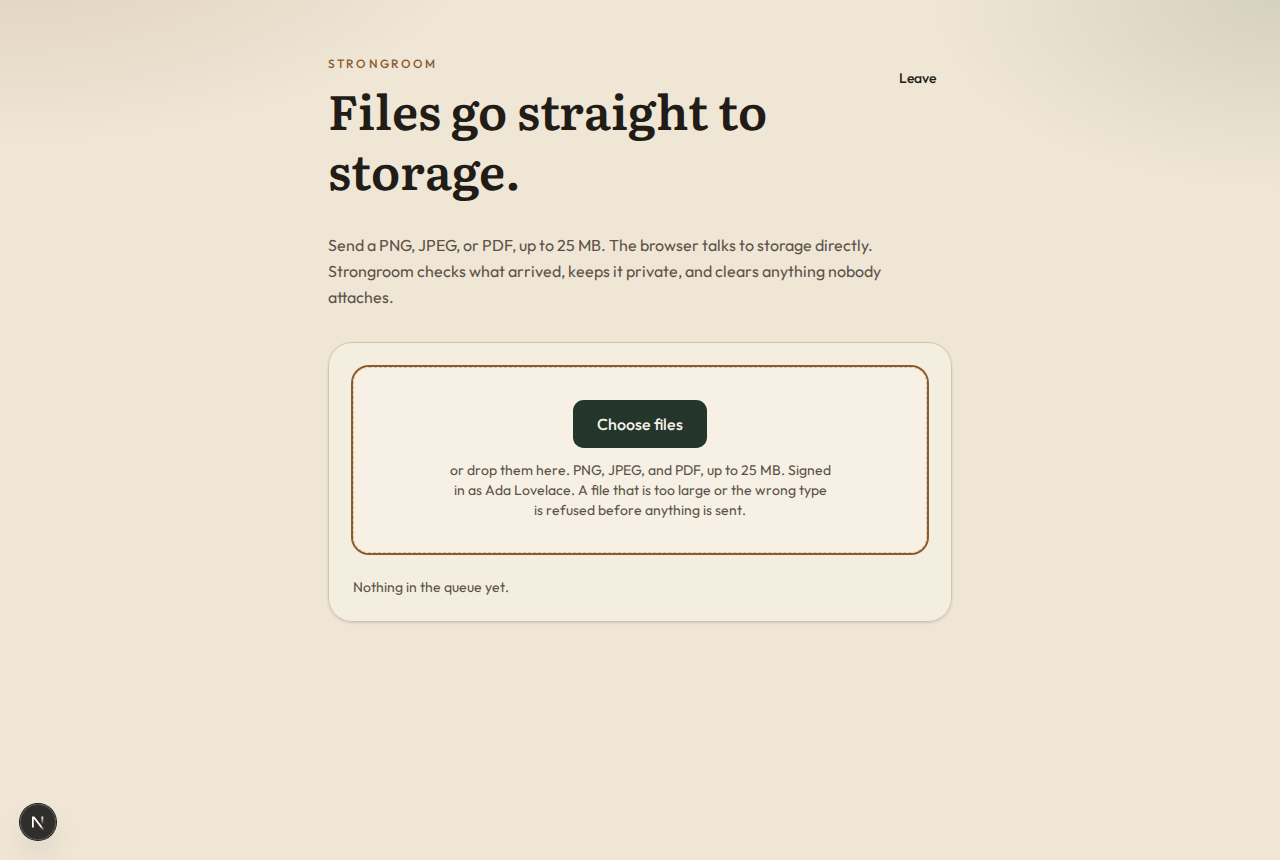
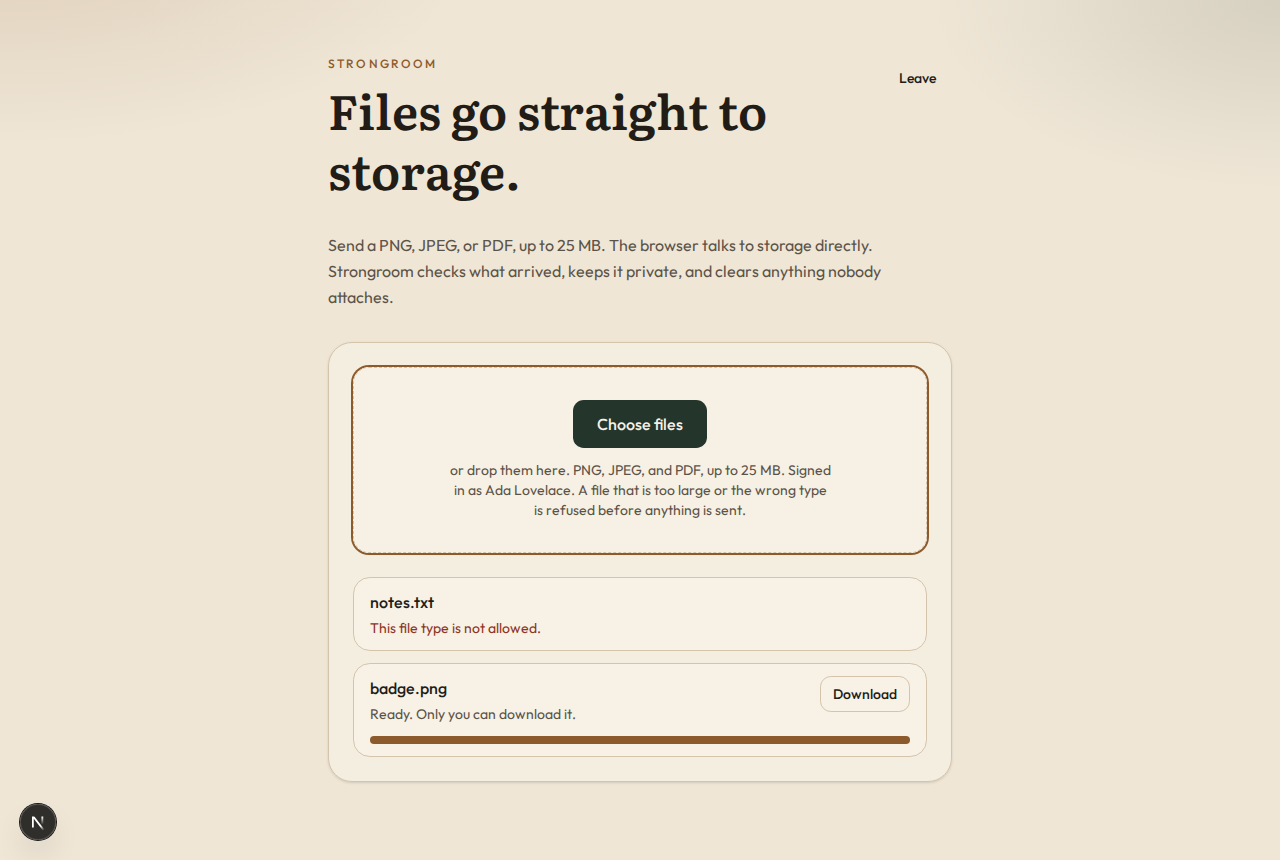
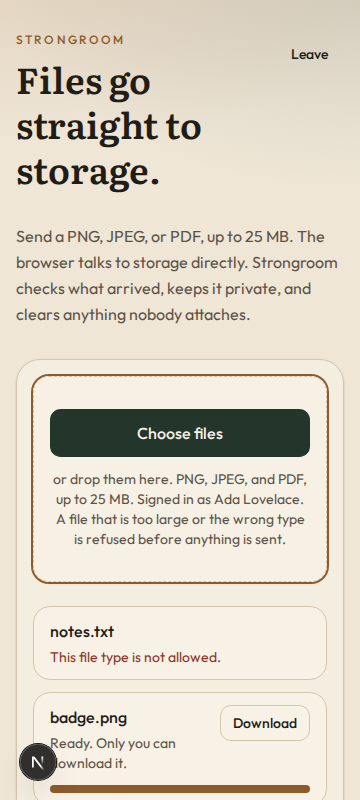
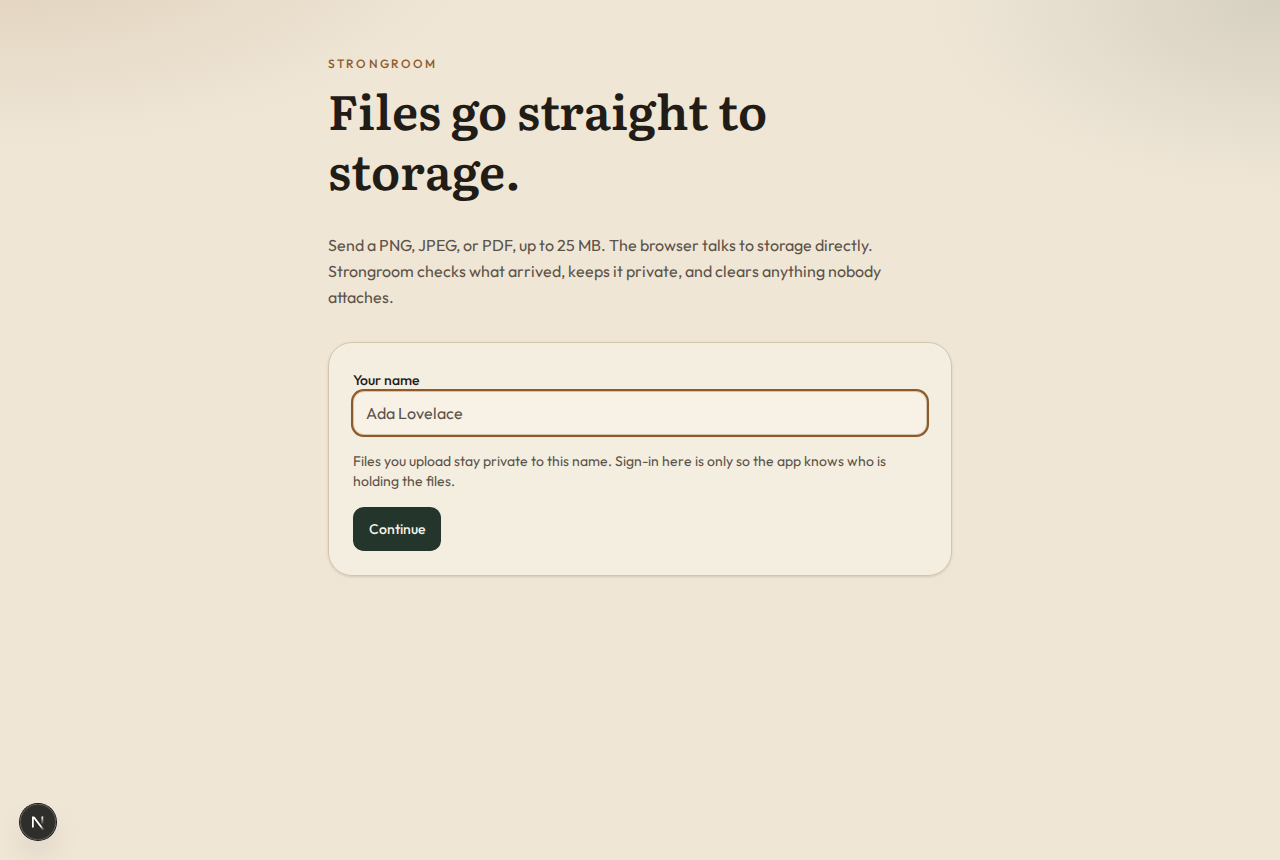
What can I customize?
Your choices go into the line you copy. Anything else is yours to edit, but it leaves the tested path.
What do I get?
-
spec.mdRequirements and acceptance criteria.File uploads
What this builds
File uploads for a web app. The browser sends a file straight to storage, so large files never pass through the app's servers. The app checks what arrived, keeps files private, hands them out only to people allowed to see them, and deletes what nobody uses.
Read
spekkr.inputs.jsonfirst. A file is at mostmax_file_mbmegabytes, of 1,000,000 bytes each, and one ofallowed_types.storagesays where files are kept.image_previewsdecides whether R8 exists andscan_hookwhether R7 does.This spec needs the app to know who is signed in. It does not build sign-in.
Out of scope
- Uploads that resume after a dropped connection.
- Editing, cropping or converting files.
- A scanner for malware. R7 is the place to plug one in.
Requirements
Each requirement has an id. Tests name the id they cover.
R1. Start an upload
- The browser sends the file's name, size and type to
POST /api/uploads. - The app refuses a size over
max_file_mbmegabytes, a size of zero and a type not inallowed_types, each with its own message. - Otherwise it records a pending file and answers with an address to send the file to. The address works for 15 minutes, for that size and that type only.
- The place the file is stored under is random. It never contains the file's name or anything else the uploader chose.
- A person can start at most 20 uploads a minute.
- The app refuses to start if
allowed_typescontainsimage/svg+xml,text/htmlor any type that is not in the table indesign.md.
Accept when: a file of the stated size and type can be sent to the address, a larger file or another type is refused by storage itself, and the address stops working after 15 minutes.
R2. Finish and check
- The browser calls
POST /api/uploads/ID/completewhen the file is sent. - The app looks at the stored file. Its size must equal the size that was stated, and its first bytes must match the stated type, by the table in
design.md. - A file that fails is deleted from storage and marked rejected, and the browser gets the reason.
- A file that passes becomes ready, or goes to R7 if
scan_hookis on.
Accept when: a text file named
photo.pngand stated asimage/pngis rejected and gone from storage, and a real PNG passes.R3. Download
- Stored files are never public. Nothing can be fetched from storage without a signed address from the app.
GET /files/IDasks one function,can_read(user, file), and answers 404 when it says no. As built, only the uploader can read a file. The person's app replaces the function.- When it says yes, the answer is a redirect to a signed address that works for 5 minutes.
- Files are sent as attachments, with the cleaned name from R4. Only PNG, JPEG, GIF, WebP and PDF may be shown in the browser instead, and only when asked for with
?inline=1. - Every file is served with
X-Content-Type-Options: nosniffand the type that was checked in R2.
Accept when: a person who may not read a file gets 404, the signed address stops working after 5 minutes, and no file can be fetched from storage without one.
R4. File names
- The name the uploader gave is kept for display and for downloads only.
- It is cleaned first: path separators and control characters are removed, leading dots are removed, and it is cut to 200 characters with its extension kept.
- A name that is empty after cleaning becomes
fileplus the extension for its type.
Accept when:
../../etc/passwd, a name with a newline in it and a name of 500 characters each come out as given in the table indesign.md.R5. Attach, and delete what is not used
- App code calls
attach(file, record)to tie a ready file to something in the app, anddetachto untie it. - A ready file that is still not attached after 24 hours is deleted. So is a pending upload that was never finished.
- Deleting a record deletes its files. A file is deleted from storage first and from the database after, so a failure leaves a row to retry from, never a stored file that nothing points to.
Accept when: an unattached file is gone after 24 hours, an attached one stays, and a deletion that fails halfway is completed by the next clean-up run.
R6. Files on local disk
Only if
storageislocal_disk.- The address from R1 is a route on the app itself. It carries a signed token with the file's id, size, type and expiry.
- The route writes the body to disk as it arrives and stops with status 413 as soon as more bytes than stated have come in.
- Files live in a folder outside anything the web server serves. A file's path is built from its random key and nothing else.
- Downloads are sent by the app, after the same check as R3.
Accept when: a body one byte longer than stated is refused and leaves no file, and no request can read or write outside the storage folder.
R7. Hold files until they are scanned
Only if
scan_hookis on.- A file that passes R2 is marked scanning and handed to one function,
scan(file), which answers clean or infected. As built it answers clean. - A scanning file cannot be downloaded or attached. An infected file is deleted from storage and marked rejected.
Accept when: with a test scanner that flags one file, that file is never downloadable and the others become ready.
R8. Previews of images
Only if
image_previewsis on.- For PNG, JPEG and WebP files the app makes a preview, at most 512 pixels on its long side, encoded afresh so nothing hidden in the original is carried over.
- An image of more than 50 million pixels is not decoded. It has no preview.
- A preview is private in the same way as its file.
Accept when: a 4000 by 3000 pixel image gets a 512 by 384 preview with no location data, and an image that states 100,000 by 100,000 pixels is not decoded.
R9. The upload control
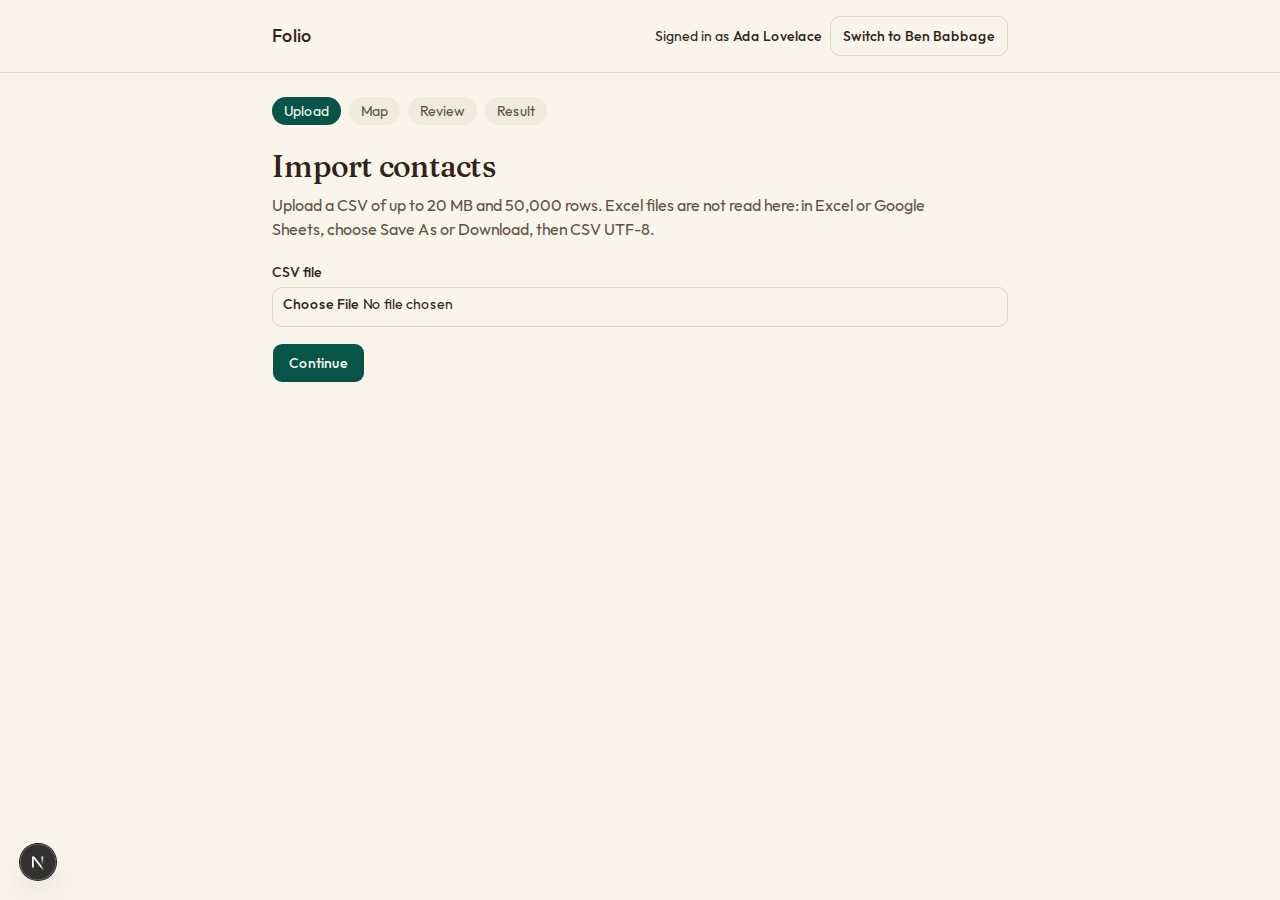
- A control that takes files by picking or by dropping, shows progress for each file, lets an upload be cancelled, and shows errors in words.
- It checks size and type before sending, to save the person time. The checks on the server are the ones that count.
Accept when: the control works with a keyboard alone and at a 360 pixel wide screen, and a file that is too large is refused before any of it is sent.
Definition of done
- Every acceptance check above has an automated test, and all tests pass. Tests run against a local stand-in for storage, with no outside network.
- A README explains how to set the secrets, how to replace
can_read, and how to run the tests.
# File uploads

## What this builds

File uploads for a web app. The browser sends a file straight to storage, so large
files never pass through the app's servers. The app checks what arrived, keeps
files private, hands them out only to people allowed to see them, and deletes what
nobody uses.

Read `spekkr.inputs.json` first. A file is at most `max_file_mb` megabytes, of 1,000,000 bytes each, and one
of `allowed_types`. `storage` says where files are kept. `image_previews` decides
whether R8 exists and `scan_hook` whether R7 does.

This spec needs the app to know who is signed in. It does not build sign-in.

## Out of scope

- Uploads that resume after a dropped connection.
- Editing, cropping or converting files.
- A scanner for malware. R7 is the place to plug one in.

## Requirements

Each requirement has an id. Tests name the id they cover.

### R1. Start an upload

- The browser sends the file's name, size and type to `POST /api/uploads`.
- The app refuses a size over `max_file_mb` megabytes, a size of zero and a type
  not in `allowed_types`, each with its own message.
- Otherwise it records a pending file and answers with an address to send the file
  to. The address works for 15 minutes, for that size and that type only.
- The place the file is stored under is random. It never contains the file's name
  or anything else the uploader chose.
- A person can start at most 20 uploads a minute.
- The app refuses to start if `allowed_types` contains `image/svg+xml`,
  `text/html` or any type that is not in the table in `design.md`.

Accept when: a file of the stated size and type can be sent to the address, a
larger file or another type is refused by storage itself, and the address stops
working after 15 minutes.

### R2. Finish and check

- The browser calls `POST /api/uploads/ID/complete` when the file is sent.
- The app looks at the stored file. Its size must equal the size that was stated,
  and its first bytes must match the stated type, by the table in `design.md`.
- A file that fails is deleted from storage and marked rejected, and the browser
  gets the reason.
- A file that passes becomes ready, or goes to R7 if `scan_hook` is on.

Accept when: a text file named `photo.png` and stated as `image/png` is rejected
and gone from storage, and a real PNG passes.

### R3. Download

- Stored files are never public. Nothing can be fetched from storage without a
  signed address from the app.
- `GET /files/ID` asks one function, `can_read(user, file)`, and answers 404 when
  it says no. As built, only the uploader can read a file. The person's app replaces
  the function.
- When it says yes, the answer is a redirect to a signed address that works for 5
  minutes.
- Files are sent as attachments, with the cleaned name from R4. Only PNG, JPEG, GIF,
  WebP and PDF may be shown in the browser instead, and only when asked for with
  `?inline=1`.
- Every file is served with `X-Content-Type-Options: nosniff` and the type that
  was checked in R2.

Accept when: a person who may not read a file gets 404, the signed address stops
working after 5 minutes, and no file can be fetched from storage without one.

### R4. File names

- The name the uploader gave is kept for display and for downloads only.
- It is cleaned first: path separators and control characters are removed, leading
  dots are removed, and it is cut to 200 characters with its extension kept.
- A name that is empty after cleaning becomes `file` plus the extension for its
  type.

Accept when: `../../etc/passwd`, a name with a newline in it and a name of 500
characters each come out as given in the table in `design.md`.

### R5. Attach, and delete what is not used

- App code calls `attach(file, record)` to tie a ready file to something in the
  app, and `detach` to untie it.
- A ready file that is still not attached after 24 hours is deleted. So is a
  pending upload that was never finished.
- Deleting a record deletes its files. A file is deleted from storage first and
  from the database after, so a failure leaves a row to retry from, never a stored
  file that nothing points to.

Accept when: an unattached file is gone after 24 hours, an attached one stays, and
a deletion that fails halfway is completed by the next clean-up run.

### R6. Files on local disk

Only if `storage` is `local_disk`.

- The address from R1 is a route on the app itself. It carries a signed token with
  the file's id, size, type and expiry.
- The route writes the body to disk as it arrives and stops with status 413 as
  soon as more bytes than stated have come in.
- Files live in a folder outside anything the web server serves. A file's path is
  built from its random key and nothing else.
- Downloads are sent by the app, after the same check as R3.

Accept when: a body one byte longer than stated is refused and leaves no file, and
no request can read or write outside the storage folder.

### R7. Hold files until they are scanned

Only if `scan_hook` is on.

- A file that passes R2 is marked scanning and handed to one function,
  `scan(file)`, which answers clean or infected. As built it answers clean.
- A scanning file cannot be downloaded or attached. An infected file is deleted
  from storage and marked rejected.

Accept when: with a test scanner that flags one file, that file is never
downloadable and the others become ready.

### R8. Previews of images

Only if `image_previews` is on.

- For PNG, JPEG and WebP files the app makes a preview, at most 512 pixels on its
  long side, encoded afresh so nothing hidden in the original is carried over.
- An image of more than 50 million pixels is not decoded. It has no preview.
- A preview is private in the same way as its file.

Accept when: a 4000 by 3000 pixel image gets a 512 by 384 preview with no location
data, and an image that states 100,000 by 100,000 pixels is not decoded.

### R9. The upload control

- A control that takes files by picking or by dropping, shows progress for each
  file, lets an upload be cancelled, and shows errors in words.
- It checks size and type before sending, to save the person time. The checks on
  the server are the ones that count.

Accept when: the control works with a keyboard alone and at a 360 pixel wide
screen, and a file that is too large is refused before any of it is sent.

## Definition of done

- Every acceptance check above has an automated test, and all tests pass. Tests run
  against a local stand-in for storage, with no outside network.
- A README explains how to set the secrets, how to replace `can_read`, and how to
  run the tests.
-
design.mdData model, rules and flows.Design
This file fixes the parts that are easy to get wrong. Choose the language and framework that fit the person's project; nothing here depends on them.
Data model
Use the database in the
databaseinput.Table Columns filesid,uploader_id,storage_key(unique),preview_key,name,media_type,size,state,reject_reason,created_at,ready_at,deleted_atfile_attachmentsfile_id,record_type,record_id; primary key on all threestateis one ofpending,scanning,ready,rejectedanddeleting.Types and their first bytes
A type in the
allowed_typesinput must be in this table. Bytes are in hexadecimal.Type Extension The file starts with image/png.png89 50 4E 47 0D 0A 1A 0Aimage/jpeg.jpgFF D8 FFimage/gif.gif47 49 46 38 37 61or47 49 46 38 39 61image/webp.webp52 49 46 46, then any 4 bytes, then57 45 42 50application/pdf.pdf25 50 44 46 2Dapplication/zip.zip50 4B 03 04text/plain.txtNo fixed start. The first 4,096 bytes must be valid UTF-8 with no zero byte. text/csv.csvThe same rule as text/plain.Office documents are zip files and cannot be told apart by their first bytes. To allow them, add their types here with the zip start, and serve them as attachments only.
The signed address
With
storageset tos3_compatible, the address in R1 is a presignedPUTwithContent-LengthandContent-Typeamong the signed headers, so storage refuses any other size or type. Read only the first 16 bytes back for R2, with a range request, and the size from the object's metadata.The bucket blocks all public access. Its CORS rule allows
PUTfrom the app's own origin only.Names
Name given Name kept ../../etc/passwdetcpasswdreportthen a newline then.pdfreport.pdf.htaccesshtaccess500 letters athen.png196 letters athen.pngAn empty name, type image/pngfile.pngIn the
Content-Dispositionheader, send the name both ways: an ASCII fallback with anything else replaced by_, andfilename*=UTF-8''with the real name percent-encoded.Deleting
- Set
statetodeleting. - Delete the stored file and its preview. A file that is already gone counts as deleted.
- Delete the row.
A clean-up run once an hour starts this for unattached and unfinished files older than 24 hours, and finishes it for rows left in
deleting.Configuration
Secret Purpose DATABASE_URLConnection string for the chosen database. STORAGE_ENDPOINTAddress of the storage service. Not needed for local_disk.STORAGE_BUCKETName of the bucket. Not needed for local_disk.STORAGE_ACCESS_KEY_IDStorage credentials. Not needed for local_disk.STORAGE_SECRET_ACCESS_KEYStorage credentials. Not needed for local_disk.Who is signed in
The spec reaches the app's sign-in through one function,
current_user(request). It answers with the person's id, and says whether they are an administrator where this spec asks. In the person's app it reads their session.When there is no app yet, build this stand-in and nothing more: a page that lists two seeded people, one of them an administrator, with a button for each that sets a signed cookie naming them. The stand-in refuses to start in production.
What this spec leaves to you
Where this spec names something, use that name, so that two builds of it agree. Where it does not, the choice is yours. List what you chose in the README.
# Design

This file fixes the parts that are easy to get wrong. Choose the language and
framework that fit the person's project; nothing here depends on them.

## Data model

Use the database in the `database` input.

| Table | Columns |
| --- | --- |
| `files` | `id`, `uploader_id`, `storage_key` (unique), `preview_key`, `name`, `media_type`, `size`, `state`, `reject_reason`, `created_at`, `ready_at`, `deleted_at` |
| `file_attachments` | `file_id`, `record_type`, `record_id`; primary key on all three |

`state` is one of `pending`, `scanning`, `ready`, `rejected` and `deleting`.

## Types and their first bytes

A type in the `allowed_types` input must be in this table. Bytes are in
hexadecimal.

| Type | Extension | The file starts with |
| --- | --- | --- |
| `image/png` | `.png` | `89 50 4E 47 0D 0A 1A 0A` |
| `image/jpeg` | `.jpg` | `FF D8 FF` |
| `image/gif` | `.gif` | `47 49 46 38 37 61` or `47 49 46 38 39 61` |
| `image/webp` | `.webp` | `52 49 46 46`, then any 4 bytes, then `57 45 42 50` |
| `application/pdf` | `.pdf` | `25 50 44 46 2D` |
| `application/zip` | `.zip` | `50 4B 03 04` |
| `text/plain` | `.txt` | No fixed start. The first 4,096 bytes must be valid UTF-8 with no zero byte. |
| `text/csv` | `.csv` | The same rule as `text/plain`. |

Office documents are zip files and cannot be told apart by their first bytes. To
allow them, add their types here with the zip start, and serve them as attachments
only.

## The signed address

With `storage` set to `s3_compatible`, the address in R1 is a presigned `PUT` with
`Content-Length` and `Content-Type` among the signed headers, so storage refuses
any other size or type. Read only the first 16 bytes back for R2, with a range
request, and the size from the object's metadata.

The bucket blocks all public access. Its CORS rule allows `PUT` from the app's own
origin only.

## Names

| Name given | Name kept |
| --- | --- |
| `../../etc/passwd` | `etcpasswd` |
| `report` then a newline then `.pdf` | `report.pdf` |
| `.htaccess` | `htaccess` |
| 500 letters `a` then `.png` | 196 letters `a` then `.png` |
| An empty name, type `image/png` | `file.png` |

In the `Content-Disposition` header, send the name both ways: an ASCII fallback
with anything else replaced by `_`, and `filename*=UTF-8''` with the real name
percent-encoded.

## Deleting

1. Set `state` to `deleting`.
2. Delete the stored file and its preview. A file that is already gone counts as
   deleted.
3. Delete the row.

A clean-up run once an hour starts this for unattached and unfinished files older
than 24 hours, and finishes it for rows left in `deleting`.

## Configuration

| Secret | Purpose |
| --- | --- |
| `DATABASE_URL` | Connection string for the chosen database. |
| `STORAGE_ENDPOINT` | Address of the storage service. Not needed for `local_disk`. |
| `STORAGE_BUCKET` | Name of the bucket. Not needed for `local_disk`. |
| `STORAGE_ACCESS_KEY_ID` | Storage credentials. Not needed for `local_disk`. |
| `STORAGE_SECRET_ACCESS_KEY` | Storage credentials. Not needed for `local_disk`. |

## Who is signed in

The spec reaches the app's sign-in through one function, `current_user(request)`.
It answers with the person's id, and says whether they are an administrator where
this spec asks. In the person's app it reads their session.

When there is no app yet, build this stand-in and nothing more: a page that lists
two seeded people, one of them an administrator, with a button for each that sets
a signed cookie naming them. The stand-in refuses to start in production.

## What this spec leaves to you

Where this spec names something, use that name, so that two builds of it agree.
Where it does not, the choice is yours. List what you chose in the README.
- Set
-
tasks.mdBuild tasks in order, each with a check.Tasks
Work in order. Finish a task's check before starting the next.
- Set up. Add the tables in
design.mdand a local stand-in for storage that tests can use. If there is no app yet, build the smallest one: a signed-in user. Check: migrations run from empty and a test stores and reads back one object. - Types and names (R4). Two pure functions: one from the first bytes to a type, one that cleans a name. Check: tests cover every row of both tables in
design.md. - Start an upload (R1). Use the
max_file_mbandallowed_typesinputs. Check: the R1 acceptance tests pass. - Finish and check (R2). Check: the R2 acceptance tests pass.
- Local disk (R6). Only if
storageislocal_disk. Check: the R6 acceptance tests pass. - Download (R3). Check: the R3 acceptance tests pass.
- Attach and clean up (R5). With a clock that tests can set. Check: the R5 acceptance tests pass.
- Scan hook (R7). Only if
scan_hookis on. Check: the R7 acceptance tests pass. - Previews (R8). Only if
image_previewsis on. Check: the R8 acceptance tests pass. - The upload control (R9). Check: the control can be used with a keyboard alone and at 360 pixels wide.
- Finish. Write the README and run the whole test suite. Check: every item under "Definition of done" in
spec.mdis true.
# Tasks Work in order. Finish a task's check before starting the next. 1. **Set up.** Add the tables in `design.md` and a local stand-in for storage that tests can use. If there is no app yet, build the smallest one: a signed-in user. Check: migrations run from empty and a test stores and reads back one object. 2. **Types and names (R4).** Two pure functions: one from the first bytes to a type, one that cleans a name. Check: tests cover every row of both tables in `design.md`. 3. **Start an upload (R1).** Use the `max_file_mb` and `allowed_types` inputs. Check: the R1 acceptance tests pass. 4. **Finish and check (R2).** Check: the R2 acceptance tests pass. 5. **Local disk (R6).** Only if `storage` is `local_disk`. Check: the R6 acceptance tests pass. 6. **Download (R3).** Check: the R3 acceptance tests pass. 7. **Attach and clean up (R5).** With a clock that tests can set. Check: the R5 acceptance tests pass. 8. **Scan hook (R7).** Only if `scan_hook` is on. Check: the R7 acceptance tests pass. 9. **Previews (R8).** Only if `image_previews` is on. Check: the R8 acceptance tests pass. 10. **The upload control (R9).** Check: the control can be used with a keyboard alone and at 360 pixels wide. 11. **Finish.** Write the README and run the whole test suite. Check: every item under "Definition of done" in `spec.md` is true. - Set up. Add the tables in
Is it for me?
- Kind
- app part
- Platforms
- web, backend
What does it need?
- Accounts
- A storage bucket that speaks the S3 API, unless files are kept on local disk
- Agent permissions
- shell, network
- Secrets it reads
DATABASE_URLSTORAGE_ENDPOINTSTORAGE_BUCKETSTORAGE_ACCESS_KEY_IDSTORAGE_SECRET_ACCESS_KEY
What changed?
- 0.1.215 Nov 2026Names what it builds.
- 0.1.114 Nov 2026Says "person" where it said "buyer".
- 0.1.014 Nov 2026Moved from dwrtz/file-uploads.
For agents: start.md says how to build this spec, spec.json holds everything on this page, and bundle.tar.gz holds its files.