Data export and account deletion
Let people download what you hold about them and delete their account, with a grace period and a test that nothing is left behind.
This is an app part spec on Spekkr, published by kato. It is listed with the other specs. Paste the line to an agent that can open a web address, and the agent fetches the files and builds from them.
- Spec
kato/account-deletion- Version
- 0.1.2
- Published by
- kato
- Updated
- 15 Nov 2026
Build this spec
Build the spec at https://spekkr.com/kato/account-deletion/start.md.
Paste this to your AI agent. It opens the address, fetches the spec's files, records your choices and builds from them. Nothing to install, no account.
Published by kato.
What does the result look like?
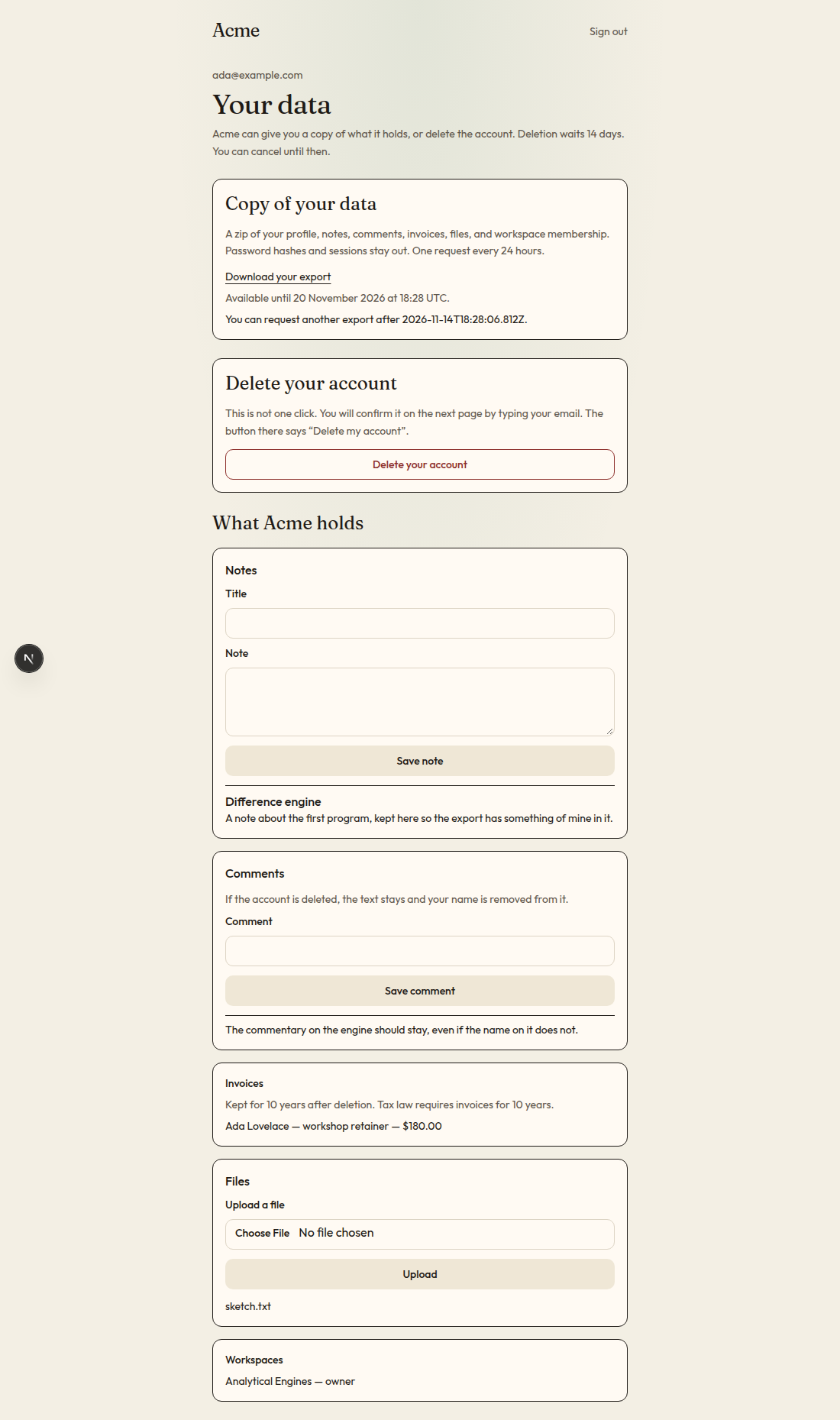
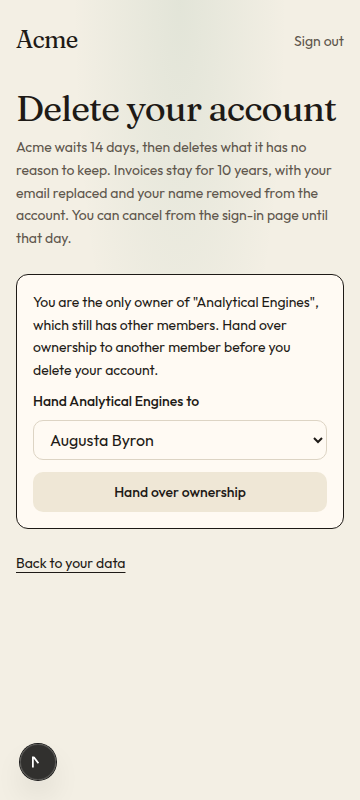
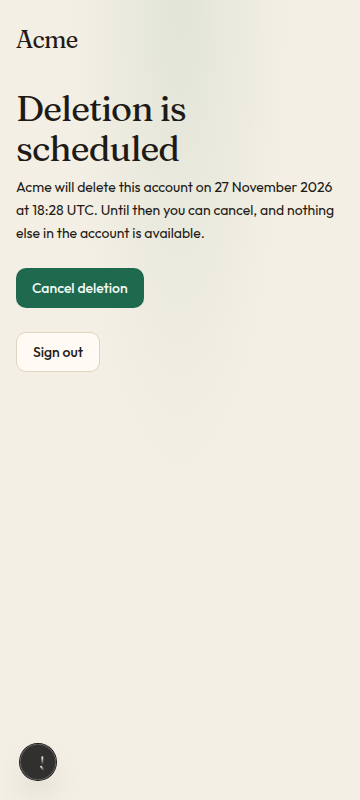
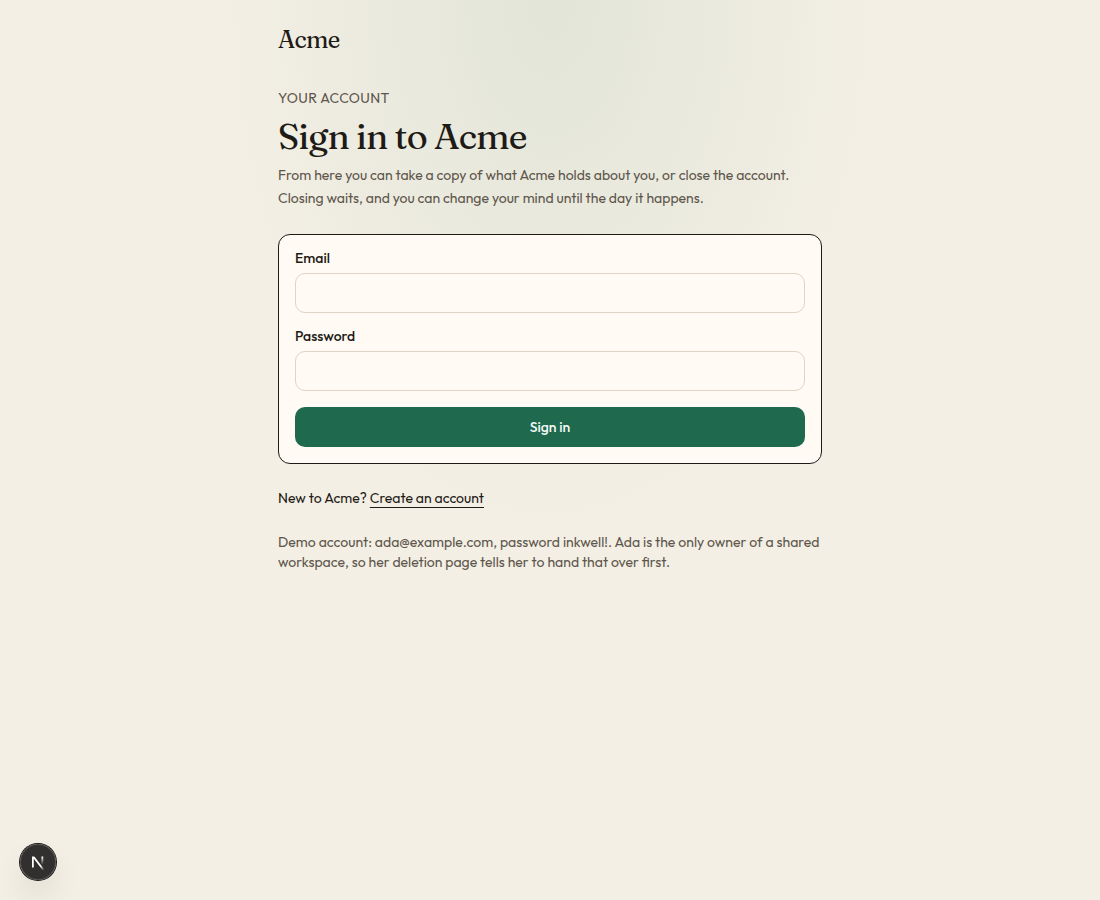
What can I customize?
Your choices go into the line you copy. Anything else is yours to edit, but it leaves the tested path.
What do I get?
-
spec.mdRequirements and acceptance criteria.Data export and account deletion
What this builds
Two things a person can do from their account page: download a copy of everything the app holds about them, and delete their account. Deletion waits a number of days, can be cancelled until then, and afterwards leaves nothing behind except what the app has written down a reason to keep.
Read
spekkr.inputs.jsonfirst. A deletion is carried outgrace_daysdays after it is asked for.export_formatsays what the export holds.admin_requestsdecides whether R9 exists. Useapp_nameon the pages and in every email.This spec needs an app with a
userstable and sign-in. It does not build them.Out of scope
- Legal advice. The spec builds the machinery. What must be kept, and for how long, is for the person to decide and write into the registry in R1.
- Removing data from backups.
- Deleting a whole workspace.
Requirements
Each requirement has an id. Tests name the id they cover.
R1. A registry of personal data
- One list in code names every table that holds data about a person. Each entry says how to find one person's rows, whether they go in the export, and what happens to them at deletion:
delete,anonymizewith the columns to blank, orkeepwith a written reason. - A test reads the database schema and fails if any table that refers to
usersis missing from the list. A new table cannot be forgotten. - Columns that must never be exported, such as password hashes and tokens, are marked in the same list.
Accept when: adding a table with a
user_idcolumn and no registry entry makes the test suite fail with a message that names the table.R2. Ask for an export
- A signed-in person asks for an export. They must have signed in during the last 10 minutes, or do so again.
- The export is built in the background. A person has one export in progress at a time and can ask for a new one once every 24 hours.
Accept when: a second request inside 24 hours is refused with the time when the next is allowed, and a request with an older sign-in asks to sign in again.
R3. What the export holds
- A zip file with one JSON file for each registered table that is marked for export, holding that person's rows, and a
README.txtthat says what each file is. - If
export_formatisjson_and_csv, each table is there as a CSV file too. - Files the person uploaded are included as they were.
- Nothing about any other person is included, and no column marked as never exported.
- The export is built as a stream. An account with a million rows does not need a million rows of memory.
Accept when: the export of one person contains every row of theirs from every exported table, and a search of it for another person's email address and for any password hash finds nothing.
R4. Download the export
- When the export is ready the person gets an email with a link to the account page, where the download is.
- The download works only for that person, signed in. It works for 7 days, and then the file is deleted.
Accept when: another signed-in person gets 404 for the download, and the file is gone from storage after 7 days.
R5. Ask for deletion
- A signed-in person asks to delete their account. They must have signed in during the last 10 minutes and must type their email address to confirm.
- If R8 finds a reason the account cannot be deleted yet, the page says what to do first and the request is not accepted.
- The account is then marked for deletion in
grace_daysdays. Every session is ended and the person gets an email that says when, with a link to cancel. - Until then the account cannot be used. Signing in leads to one page, which offers to cancel or to sign out.
Accept when: after the request every old session is refused, and signing in again reaches only the cancel page.
R6. Cancel
- Signing in during the wait and pressing cancel restores the account exactly as it was, apart from its sessions. The sessions ended in R5 stay ended, and the person carries on in the one they cancelled from. The person gets an email that says so.
Accept when: a cancelled account has every row it had before other than its sessions, can be used again, and a session from before the request is still refused.
R7. Carry out the deletion
- When the wait is over a job goes through the registry and deletes, anonymizes or keeps each table's rows as its entry says, in an order that respects references between tables.
- Files the person uploaded are deleted from storage.
- The user row is handled last. It is deleted, or if kept rows refer to it, its email address becomes
deleted-ID@deleted.invalidand every other personal column is blanked. - The job can be stopped at any point and run again. It ends in the same state.
- A record of the deletion is kept: the user's id, the time, and how many rows of each table were deleted, anonymized and kept. It holds no personal data.
- The address can then be used to sign up afresh, with no link to the old account.
Accept when: after deletion a search of every table for the person's email address and name finds nothing outside rows marked
keep, and a job killed halfway and run again reaches the same end.R8. Reasons to wait
- One function,
deletion_blockers(user), returns the reasons an account cannot be deleted yet, each with a sentence for the person. As built it returns one: the person is the only owner of something that has other members. - It is asked at the request in R5 and again just before R7. If it gives a reason the second time, the deletion is put off a day and the person is emailed.
Accept when: a sole owner is told to hand over ownership first, and can delete once they have.
R9. Requests handled by staff
Only if
admin_requestsis on.- An administrator can start an export or a deletion for a person who asked another way. They must enter a note of how the person asked.
- The person gets the same emails as if they had asked themselves, and an export still reaches only them.
- Each such action is recorded with the administrator, the time and the note.
Accept when: an administrator can start both, cannot download the export, and the record names them.
R10. Pages
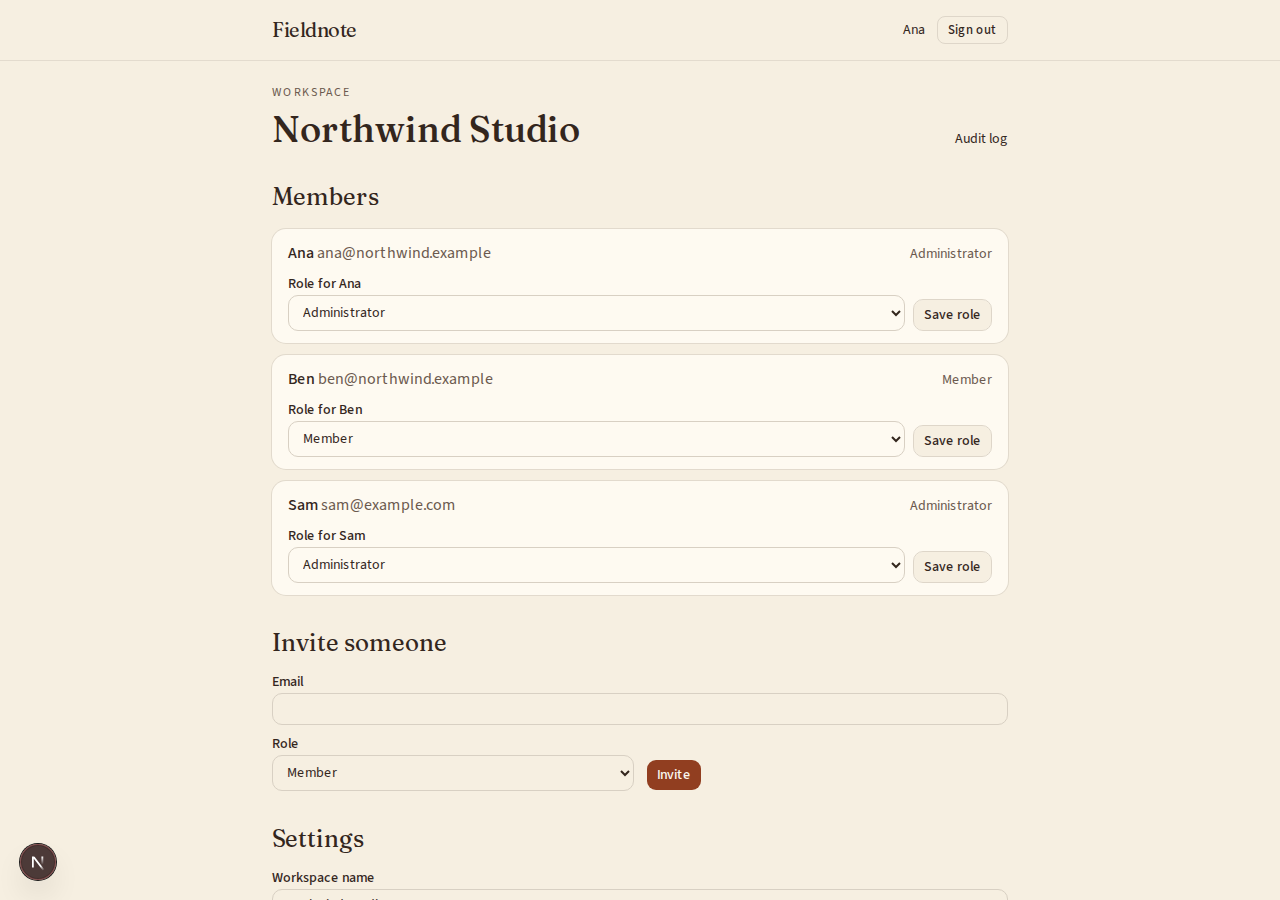
- A "Your data" part of the account page with both actions and their state, the confirmation page for deletion, and the page a person sees during the wait.
- Deletion is never one click. The button that confirms it says "Delete my account", not "OK".
Accept when: each page works with a keyboard alone and at a 360 pixel wide screen.
Definition of done
- Every acceptance check above has an automated test, and all tests pass. Tests capture email in memory and set the clock.
- A README explains how to register a table, what each deletion choice does, and how to run the tests.
# Data export and account deletion

## What this builds

Two things a person can do from their account page: download a copy of everything
the app holds about them, and delete their account. Deletion waits a number of
days, can be cancelled until then, and afterwards leaves nothing behind except
what the app has written down a reason to keep.

Read `spekkr.inputs.json` first. A deletion is carried out `grace_days` days after
it is asked for. `export_format` says what the export holds. `admin_requests`
decides whether R9 exists. Use `app_name` on the pages and in every email.

This spec needs an app with a `users` table and sign-in. It does not build them.

## Out of scope

- Legal advice. The spec builds the machinery. What must be kept, and for how
  long, is for the person to decide and write into the registry in R1.
- Removing data from backups.
- Deleting a whole workspace.

## Requirements

Each requirement has an id. Tests name the id they cover.

### R1. A registry of personal data

- One list in code names every table that holds data about a person. Each entry
  says how to find one person's rows, whether they go in the export, and what
  happens to them at deletion: `delete`, `anonymize` with the columns to blank, or
  `keep` with a written reason.
- A test reads the database schema and fails if any table that refers to `users`
  is missing from the list. A new table cannot be forgotten.
- Columns that must never be exported, such as password hashes and tokens, are
  marked in the same list.

Accept when: adding a table with a `user_id` column and no registry entry makes the
test suite fail with a message that names the table.

### R2. Ask for an export

- A signed-in person asks for an export. They must have signed in during the last
  10 minutes, or do so again.
- The export is built in the background. A person has one export in progress at a
  time and can ask for a new one once every 24 hours.

Accept when: a second request inside 24 hours is refused with the time when the
next is allowed, and a request with an older sign-in asks to sign in again.

### R3. What the export holds

- A zip file with one JSON file for each registered table that is marked for
  export, holding that person's rows, and a `README.txt` that says what each file
  is.
- If `export_format` is `json_and_csv`, each table is there as a CSV file too.
- Files the person uploaded are included as they were.
- Nothing about any other person is included, and no column marked as never
  exported.
- The export is built as a stream. An account with a million rows does not need a
  million rows of memory.

Accept when: the export of one person contains every row of theirs from every
exported table, and a search of it for another person's email address and for any
password hash finds nothing.

### R4. Download the export

- When the export is ready the person gets an email with a link to the account
  page, where the download is.
- The download works only for that person, signed in. It works for 7 days, and
  then the file is deleted.

Accept when: another signed-in person gets 404 for the download, and the file is
gone from storage after 7 days.

### R5. Ask for deletion

- A signed-in person asks to delete their account. They must have signed in during
  the last 10 minutes and must type their email address to confirm.
- If R8 finds a reason the account cannot be deleted yet, the page says what to do
  first and the request is not accepted.
- The account is then marked for deletion in `grace_days` days. Every session is
  ended and the person gets an email that says when, with a link to cancel.
- Until then the account cannot be used. Signing in leads to one page, which
  offers to cancel or to sign out.

Accept when: after the request every old session is refused, and signing in again
reaches only the cancel page.

### R6. Cancel

- Signing in during the wait and pressing cancel restores the account exactly as
  it was, apart from its sessions. The sessions ended in R5 stay ended, and the
  person carries on in the one they cancelled from. The person gets an email that
  says so.

Accept when: a cancelled account has every row it had before other than its
sessions, can be used again, and a session from before the request is still
refused.

### R7. Carry out the deletion

- When the wait is over a job goes through the registry and deletes, anonymizes or
  keeps each table's rows as its entry says, in an order that respects references
  between tables.
- Files the person uploaded are deleted from storage.
- The user row is handled last. It is deleted, or if kept rows refer to it, its
  email address becomes `deleted-ID@deleted.invalid` and every other personal
  column is blanked.
- The job can be stopped at any point and run again. It ends in the same state.
- A record of the deletion is kept: the user's id, the time, and how many rows of
  each table were deleted, anonymized and kept. It holds no personal data.
- The address can then be used to sign up afresh, with no link to the old account.

Accept when: after deletion a search of every table for the person's email address
and name finds nothing outside rows marked `keep`, and a job killed halfway and run
again reaches the same end.

### R8. Reasons to wait

- One function, `deletion_blockers(user)`, returns the reasons an account cannot be
  deleted yet, each with a sentence for the person. As built it returns one: the
  person is the only owner of something that has other members.
- It is asked at the request in R5 and again just before R7. If it gives a reason
  the second time, the deletion is put off a day and the person is emailed.

Accept when: a sole owner is told to hand over ownership first, and can delete
once they have.

### R9. Requests handled by staff

Only if `admin_requests` is on.

- An administrator can start an export or a deletion for a person who asked
  another way. They must enter a note of how the person asked.
- The person gets the same emails as if they had asked themselves, and an export
  still reaches only them.
- Each such action is recorded with the administrator, the time and the note.

Accept when: an administrator can start both, cannot download the export, and the
record names them.

### R10. Pages

- A "Your data" part of the account page with both actions and their state, the
  confirmation page for deletion, and the page a person sees during the wait.
- Deletion is never one click. The button that confirms it says "Delete my
  account", not "OK".

Accept when: each page works with a keyboard alone and at a 360 pixel wide screen.

## Definition of done

- Every acceptance check above has an automated test, and all tests pass. Tests
  capture email in memory and set the clock.
- A README explains how to register a table, what each deletion choice does, and
  how to run the tests.
-
design.mdData model, rules and flows.Design
This file fixes the parts that are easy to get wrong. Choose the language and framework that fit the person's project; nothing here depends on them.
The registry
One entry for each table, as data. For example:
Table Find a person's rows by Export At deletion Never export usersidyes last; see R7 password_hashsessionsuser_idno deletetoken_hashnotescreated_byyes deletecommentsauthor_idyes anonymize: setauthor_idto null, keep the textinvoicesuser_idyes keep: "Tax law requires invoices for 10 years."audit_entriesactor_idno anonymize: setactor_idto nullThe person's app has its own tables. Register what is there. Where the right choice is not clear from the code, choose
delete, and list the table in the README under "Check these choices".The schema test finds every foreign key that points at
users, and every column nameduser_id, and looks each table up in the registry.Data model
Use the database in the
databaseinput. Three tables are added.Table Columns data_exportsid,user_id,state,file_key,requested_by,created_at,ready_at,expires_atdeletion_requestsid,user_id,state,requested_by,note,requested_at,due_at,cancelled_at,completed_atdeletion_recordsid,user_id(not a reference),completed_at,counts(JSON)usersgains one column,deletion_due_at. The sign-in guard checks it: when it is set, only the cancel page and sign-out are reachable.Building the export
- Write the zip as a stream to storage, one table at a time, reading rows in pages by primary key.
- Use the
export_formatinput to decide whether CSV copies are added. In CSV, put a single quote in front of any cell that starts with=,+,-or@. - Store the file under a random key in private storage. Serve it through the app after checking the signed-in user, never by a public address.
Carrying out a deletion
- Ask
deletion_blockers. If it gives a reason, movedue_ata day on and stop. - For each registry entry, in order of dependency, children before parents: act on up to 1,000 rows at a time, each batch in its own transaction, and add to the counts.
- Delete uploaded files from storage. A file that is already gone counts as deleted.
- Handle the
usersrow. - Write the
deletion_recordsrow and mark the request completed.
Every step looks only at what is still there, so running the job again after a crash repeats nothing harmful. The counts are kept on the request while the job runs, so a second run adds to them.
Email
Five messages: export ready, deletion scheduled, deletion cancelled, deletion put off, and deletion completed, which is sent just before the address is removed. Put sending behind one small interface so tests capture messages without a network. Use the
app_nameinput in each.Configuration
Secret Purpose DATABASE_URLConnection string for the chosen database. EMAIL_API_KEYSends the emails. Optional in development. EMAIL_API_URLWhere send_emailposts each message. Optional in development.EMAIL_FROMThe address every email is sent from. Optional in development. Sending email
Send every email through one function,
send_email(to, subject, text).- With
EMAIL_API_URLandEMAIL_API_KEYset, it makes onePOSTtoEMAIL_API_URLwith the headerAuthorization: Bearer <EMAIL_API_KEY>and the JSON body{"from": EMAIL_FROM, "to": ..., "subject": ..., "text": ...}. Any 2xx answer means sent. The person points the address at their email service, or at a few lines that translate for it. - With neither set, outside production, the message goes to a local outbox that tests read. It is not printed: a message can hold a link that signs someone in.
In production the app refuses to start without both.
Named here
- Progress is kept in a
progresscolumn ondeletion_requests: the counts so far and the last key done in each table. A run that was stopped carries on after that key.
What this spec leaves to you
Where this spec names something, use that name, so that two builds of it agree. Where it does not, the choice is yours. List what you chose in the README.
# Design This file fixes the parts that are easy to get wrong. Choose the language and framework that fit the person's project; nothing here depends on them. ## The registry One entry for each table, as data. For example: | Table | Find a person's rows by | Export | At deletion | Never export | | --- | --- | --- | --- | --- | | `users` | `id` | yes | last; see R7 | `password_hash` | | `sessions` | `user_id` | no | `delete` | `token_hash` | | `notes` | `created_by` | yes | `delete` | | | `comments` | `author_id` | yes | `anonymize`: set `author_id` to null, keep the text | | | `invoices` | `user_id` | yes | `keep`: "Tax law requires invoices for 10 years." | | | `audit_entries` | `actor_id` | no | `anonymize`: set `actor_id` to null | | The person's app has its own tables. Register what is there. Where the right choice is not clear from the code, choose `delete`, and list the table in the README under "Check these choices". The schema test finds every foreign key that points at `users`, and every column named `user_id`, and looks each table up in the registry. ## Data model Use the database in the `database` input. Three tables are added. | Table | Columns | | --- | --- | | `data_exports` | `id`, `user_id`, `state`, `file_key`, `requested_by`, `created_at`, `ready_at`, `expires_at` | | `deletion_requests` | `id`, `user_id`, `state`, `requested_by`, `note`, `requested_at`, `due_at`, `cancelled_at`, `completed_at` | | `deletion_records` | `id`, `user_id` (not a reference), `completed_at`, `counts` (JSON) | `users` gains one column, `deletion_due_at`. The sign-in guard checks it: when it is set, only the cancel page and sign-out are reachable. ## Building the export - Write the zip as a stream to storage, one table at a time, reading rows in pages by primary key. - Use the `export_format` input to decide whether CSV copies are added. In CSV, put a single quote in front of any cell that starts with `=`, `+`, `-` or `@`. - Store the file under a random key in private storage. Serve it through the app after checking the signed-in user, never by a public address. ## Carrying out a deletion 1. Ask `deletion_blockers`. If it gives a reason, move `due_at` a day on and stop. 2. For each registry entry, in order of dependency, children before parents: act on up to 1,000 rows at a time, each batch in its own transaction, and add to the counts. 3. Delete uploaded files from storage. A file that is already gone counts as deleted. 4. Handle the `users` row. 5. Write the `deletion_records` row and mark the request completed. Every step looks only at what is still there, so running the job again after a crash repeats nothing harmful. The counts are kept on the request while the job runs, so a second run adds to them. ## Email Five messages: export ready, deletion scheduled, deletion cancelled, deletion put off, and deletion completed, which is sent just before the address is removed. Put sending behind one small interface so tests capture messages without a network. Use the `app_name` input in each. ## Configuration | Secret | Purpose | | --- | --- | | `DATABASE_URL` | Connection string for the chosen database. | | `EMAIL_API_KEY` | Sends the emails. Optional in development. | | `EMAIL_API_URL` | Where `send_email` posts each message. Optional in development. | | `EMAIL_FROM` | The address every email is sent from. Optional in development. | ## Sending email Send every email through one function, `send_email(to, subject, text)`. - With `EMAIL_API_URL` and `EMAIL_API_KEY` set, it makes one `POST` to `EMAIL_API_URL` with the header `Authorization: Bearer <EMAIL_API_KEY>` and the JSON body `{"from": EMAIL_FROM, "to": ..., "subject": ..., "text": ...}`. Any 2xx answer means sent. The person points the address at their email service, or at a few lines that translate for it. - With neither set, outside production, the message goes to a local outbox that tests read. It is not printed: a message can hold a link that signs someone in. In production the app refuses to start without both. ## Named here - Progress is kept in a `progress` column on `deletion_requests`: the counts so far and the last key done in each table. A run that was stopped carries on after that key. ## What this spec leaves to you Where this spec names something, use that name, so that two builds of it agree. Where it does not, the choice is yours. List what you chose in the README. -
tasks.mdBuild tasks in order, each with a check.Tasks
Work in order. Finish a task's check before starting the next.
- Read the app. List every table that refers to
users. If there is no app yet, build the smallest one with the example tables indesign.md. Check: the list is written into the README. - The registry (R1). The list as data, and the schema test. Check: the suite passes, and fails when an entry is removed.
- Schema. Add the three tables and the column in
design.md. Check: migrations run from empty. - Export (R2, R3, R4). As the
export_formatinput says. Check: the R2, R3 and R4 acceptance tests pass. - Ask and cancel (R5, R6, R8). Use the
grace_daysinput and a clock that tests can set. Check: the R5, R6 and R8 acceptance tests pass. - Carry out (R7). Check: the R7 acceptance tests pass, including the job killed halfway.
- Staff requests (R9). Only if
admin_requestsis on. Check: the R9 acceptance tests pass. - Pages (R10). Use the
app_nameinput. Check: every page can be used with a keyboard alone and at 360 pixels wide. - Finish. Write the README and run the whole test suite. Check: every item under "Definition of done" in
spec.mdis true.
# Tasks

Work in order. Finish a task's check before starting the next.

1. **Read the app.** List every table that refers to `users`. If there is no app
   yet, build the smallest one with the example tables in `design.md`.
   Check: the list is written into the README.

2. **The registry (R1).** The list as data, and the schema test.
   Check: the suite passes, and fails when an entry is removed.

3. **Schema.** Add the three tables and the column in `design.md`.
   Check: migrations run from empty.

4. **Export (R2, R3, R4).** As the `export_format` input says.
   Check: the R2, R3 and R4 acceptance tests pass.

5. **Ask and cancel (R5, R6, R8).** Use the `grace_days` input and a clock that
   tests can set.
   Check: the R5, R6 and R8 acceptance tests pass.

6. **Carry out (R7).**
   Check: the R7 acceptance tests pass, including the job killed halfway.

7. **Staff requests (R9).** Only if `admin_requests` is on.
   Check: the R9 acceptance tests pass.

8. **Pages (R10).** Use the `app_name` input.
   Check: every page can be used with a keyboard alone and at 360 pixels wide.

9. **Finish.** Write the README and run the whole test suite.
   Check: every item under "Definition of done" in `spec.md` is true.
- Read the app. List every table that refers to
Is it for me?
- Kind
- app part
- Platforms
- web, backend
What does it need?
- Accounts
- An email-sending service
- Agent permissions
- shell, network
- Secrets it reads
DATABASE_URLEMAIL_API_KEY
What changed?
- 0.1.215 Nov 2026Names what it builds.
- 0.1.114 Nov 2026Says "person" where it said "buyer".
- 0.1.014 Nov 2026Moved from dwrtz/account-deletion.
For agents: start.md says how to build this spec, spec.json holds everything on this page, and bundle.tar.gz holds its files.